
265行JavaScript代码的第一人称3D H5游戏Demo【个人总结1】
本文目的是分解前面的代码。其实,它得逻辑很清楚,只是对于我这种只是用过 Canvas 画线(用过 Fabric.js Canvas库)的人来说,这个还是很复杂的。我研究这个背景天空也是搞了一天,下面就是只加载天空的代码及分析。
在线效果点击:http://1.codemo2.sinaapp.com/3d_demo_265line/index.html 【可以用键盘“左右”键控制】【手机浏览器触控有些异常】
原理大概就是:
1. 创建主循环
2. 主循环内重复调用绘制方法
3. 绘制方法: 针对 Player 的位置和方向,绘制背景图
其中用到了 H5 的 requestAnimationFrame(callback),bind(this, argu,...) 比较难以理解的函数。
Player 是人物,含有平面x,y位置和方向三个特性;Controls 用来响应键盘和触屏操作;Map 是背景图还有后面的墙壁;Camera 是最重要的摄像机,用来绘制我们看到的炫酷图像;GameLoop 是整个程序的入口,一直循环调用 Camera 刷新绘制图形。
一、主循环
程序入口是
var loop = new GameLoop();
loop.start(function frame(seconds){}); //将 frame(secondes) 函数赋值给 GameLoop 对象的callbackGameLoop.prototype.start = function(callback) {
this.callback = callback;
requestAnimationFrame(this.frame);
}紧接着在 loop.start() 里立即调用 requestAnimationFrame(this.frame); 通知浏览器 loop.frame 函数要播放动画。
看看 loop.frame() 里面都干了啥:
GameLoop.prototype.frame = function(time){
var seconds = (time - this.lastTime) / 1000;
this.lastTime = time;
if (seconds < 0.2) this.callback(seconds); //【this.callback在loop.start之后才被赋值为function frame(seconds){}】
requestAnimationFrame(this.frame); //调用自己,产生无限循环;requestAnimationFrame 用法类似 setTimeout()}
注意:要区分清楚 this.callback(argu) 函数和 this.frame(argu) 。
其中,this.callback(seconds); 调用 传给 loop.start() 的这个 函数:
loop.start(function frame(seconds){
player.update(controls.states, map, seconds); //更新 player 的面向、地图/背景图
camera.render(player, map); //绘制 player 和地图/背景图
});下面就是如何更新和绘制 player 和地图/背景图了。
二、Player和地图更新及绘制
player.update(controls.states, map, seconds); //更新 player 的面向、地图/背景图
player 对象去读取全局变量 controls (里面记录着用户是否点击上下左右按键或触屏事件),如果用户按了【左】键,player 的 面向就发生改变。代码:
Player.prototype.update = function(controls, map, seconds){
if (controls.left) {this.rotate(-Math.PI * seconds)};
if (controls.right) this.rotate(Math.PI * seconds);
}其中controls 监听键盘和触控事件,遇到 keydown/keyup/touchstart等事件,调用事件响应函数,将触屏事件转化为键盘值,再转化为 Player 的【左右转动和前后移动】并更新 player 的状态。(代码多且简单,此处不列)
接下来是真正的绘制背景了。 camera.render(player, map); //绘制 player 和地图/背景图
我们来看看 camera.render() 函数的实现:
function Camera(canvas, resolution , focalLength){
this.ctx = canvas.getContext('2d');
this.width = canvas.width = window.innerWidth * 0.5;
this.height = canvas.height = window.innerHeight * 0.5;
this.resolution = resolution;
this.spacing = this.width / resolution;
this.focalLength = focalLength || 0.8;
this.range = MOBILE ? 8 : 14;
this.lightRange = 5;
this.scale = (this.width + this.height) / 1200;
}Camera.prototype.render = function(player, map){
this.drawSky(player.direction, map.skybox, map.light); //player的面向,地图背景图,地图环境光
}Camera.prototype.drawSky = function(direction, sky, ambient){
var width = sky.width * (this.height / sky.height) * 2; //保持背景图宽高比的同时,将图重复左右拼接
var left = (direction / CIRCLE) * -width;this.ctx.save();
this.ctx.drawImage(sky.image, left, 0, width, this.height); //调用 Canvas 2d 的 drawImage()
if (left < width - this.width) {
this.ctx.drawImage(sky.image, left + width, 0, width, this.height);
}
this.ctx.restore();
}这里看不懂了。。。为何 left 是个 负数?
三、背景图的拼接显示
想了三天终于想清楚了,关键点是 HTML5 Canvas 的 drawImage(img,x,y,width,height) 函数没有理解清楚。平时使用 drawImage() 时,参数均是正数,没有思考当5个参数时 x, y 为负数时的含义。x , y 的准确意义是【在画布上的 x ,y 处定位图像】。当 x, y 为负数时,即说明在画布的 -100,-100 处开始绘制原图,简单说就是,原图的左上角被隐藏了。见图1:
<img id="tulip" src="flower.jpg" width="400" height="266" />
<canvas id="myCanvas" width="800" height="300" />

var c=document.getElementById("myCanvas");

var ctx=c.getContext("2d");

var img=document.getElementById("tulip");

ctx.drawImage(img,-400,-133,,266);  //img,x,y,width,height
//先拉伸原图,再隐藏部分区域
//结果见图1
var c=document.getElementById("myCanvas");
var ctx=c.getContext("2d");
var img=document.getElementById("tulip");
ctx.drawImage(img,0,0,,266); //img,x,y,width,height//拉伸原图
//结果见图2var c=document.getElementById("myCanvas");
var ctx=c.getContext("2d");
var img=document.getElementById("tulip");
ctx.drawImage(img,-400,0,800,266);//绘制被拉伸2倍后图片的左半边,这时画布右半边是空白
ctx.drawImage(img,,0,800,266);//接着绘制画布右半边,内容还是被拉伸后的图片
//画布上显示的结果就是原图的首尾(左右)连接了起来
//同理,本文的背景星空图也就是这样首尾连接起来的
//结果见图3


图1 drawImage第23参数为负隐藏部分图片 图2 drawImage的width参数为原图片两倍_自动拉伸图片 图3 使用drawImage将原图左右连接起来
回头再看看
Camera.prototype.drawSky = function(direction, sky, ambient){
var width = sky.width * (this.height / sky.height) * 2; //保持背景图宽高比的同时,将图重复左右拼接
var left = (direction / CIRCLE) * -width;this.ctx.save();
this.ctx.drawImage(sky.image, left, 0, width, this.height); //调用 Canvas 2d 的 drawImage()
if (left < width - this.width) {
this.ctx.drawImage(sky.image, left + width, 0, width, this.height);
}
this.ctx.restore();
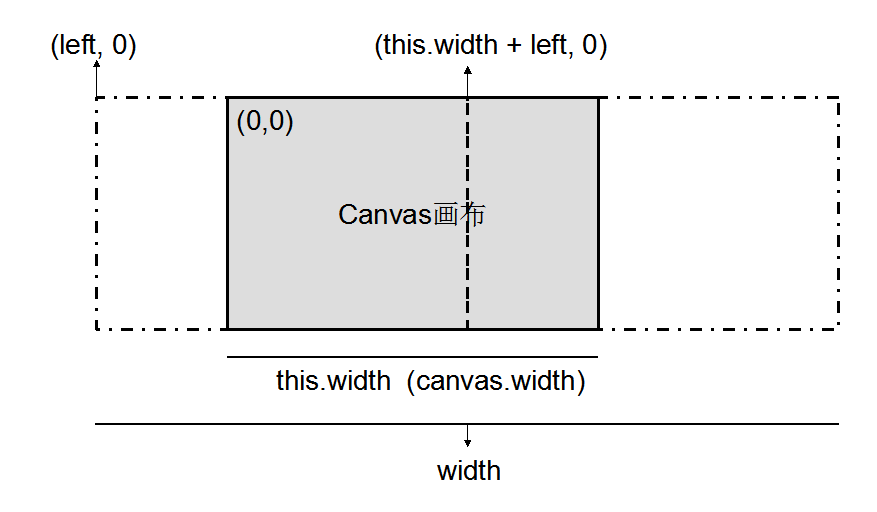
}其中 CIRCLE 是定义为 2*Math.PI 的常量,direction 前面也有说明 等于 (this.direction + angle + CIRCLE) % (CIRCLE); 即永远在 0 ~ 2Pi 之间,所以 (direction / CIRCLE) 也永远在 0~1 之间,于是
left = (direction / CIRCLE) * -width 也就在 (-width , 0)之间。
下面是我用PPT画的说明图,这就能解释为何 left 为负数,width 要用原图宽度乘以2了。

 <!--

 1. draw sky

 -->

 <!doctype html>

 <html>

   <head>

       <meta charset="utf-8">

     <meta name="viewport" content="width=device-width, initial-scale=1.0, maximum-scale=1.0, user-scalable=no">

     <title>Raycaster Demo - PlayfulJS</title>

   </head>

   <body style='background: #000; margin: 0; padding: 0; width: 100%; height: 100%;'>

     <canvas id='display' width='1' height='1' style='width: 100%; height: 100%;' />

     <script>

     var CIRCLE = Math.PI * 2;

     var MOBILE = /Android|webOS|iPhone|iPad|iPod|BlackBerry/i.test(navigator.userAgent)

     function Controls(){

         this.codes  = { 37: 'left', 39: 'right', 38: 'forward', 40: 'backward' };

         this.states = { 'left': false, 'right': false, 'forward': false, 'backward': false };

         document.addEventListener('keydown', this.onKey.bind(this, true), false);

         document.addEventListener('keyup', this.onKey.bind(this, false), false);

         document.addEventListener('touchstart', this.onTouch.bind(this), false);

         document.addEventListener('touchmove', this.onTouch.bind(this), false);

         document.addEventListener('toucheend', this.onTouchEnd.bind(this), false);

     }

     Controls.prototype.onTouch = function(e){

         var t = e.touches[0];

         this.onTouchEnd(e);

         if (t.pageY < window.innerHeight * 0.5) this.onKey(true, { keyCode: 38 });

         else if (t.pageX < window.innerWidth * 0.5) this.onKey(true, { keyCode: 37 });

         else if (t.pageY > window.innerWidth * 0.5) this.onKey(true, { keyCode: 39 });

     }

     Controls.prototype.onTouchEnd = function(e){

         this.states = { 'left': false, 'right': false, 'forward': false, 'backward': false };

         e.preventDefault();

         e.stopPropagation();

     }

     Controls.prototype.onKey = function(val,e){

         var state = this.codes[e.keyCode];

         if (typeof state === 'undefined') return;

         this.states[state] = val;

         e.preventDefault && e.preventDefault();

         e.stopPropagation && e.stopPropagation();

         // console.log(e.keyCode);

     }

     function Bitmap(url, width, height){

         this.image = new Image();

         this.image.src = url;

         this.width = width;

         this.height = height;

     }

     function Map(){

         this.skybox = new Bitmap('assets/deathvalley_panorama.jpg', 2000, 750);

     }

     function Player(x, y, direction){

         this.x = x;

         this.y = y;

         this.direction = direction;

     }

     //弧度制

     Player.prototype.rotate = function(angle){

         console.log(angle);

         this.direction = (this.direction + angle + CIRCLE) % (CIRCLE);

     }

     Player.prototype.update = function(controls, map, seconds){

         if (controls.left) {this.rotate(-Math.PI * seconds)};

         if (controls.right) this.rotate(Math.PI * seconds);

         // console.log("sdf");

     }

     //http://www.ituring.com.cn/article/50019

     //camera renderer scene

     //resolution : 分辨率

     function Camera(canvas, resolution , focalLength){

         this.ctx = canvas.getContext('2d');

         this.width = canvas.width = window.innerWidth * 0.5;

         this.height = canvas.height = window.innerHeight * 0.5;

         this.resolution = resolution;

         this.spacing = this.width / resolution;

         this.focalLength = focalLength || 0.8;

         this.range = MOBILE ? 8 : 14;

         this.lightRange = 5;

         this.scale = (this.width + this.height) / 1200;

     }

     Camera.prototype.render = function(player, map){

         this.drawSky(player.direction, map.skybox, map.light);

     }

     //ambient: environment light

     Camera.prototype.drawSky = function(direction, sky, ambient){

         var width = sky.width * (this.height / sky.height) * 2;

         var left = (direction / CIRCLE) * -width;

         this.ctx.save();

         this.ctx.drawImage(sky.image, left, 0, width, this.height);

         if (left < width - this.width) {

           this.ctx.drawImage(sky.image, left + width, 0, width, this.height);

         }

         this.ctx.restore();

     }

     function GameLoop(){

         // this.start =

         this.lastTime = 0;        //control FPS

         this.frame = this.frame.bind(this);

         this.callback = function(){};        //place holder

     }

     //requestAnimationFrame make borswer start animate,argu is callbadk

     GameLoop.prototype.start = function(callback) {

         this.callback = callback;

         requestAnimationFrame(this.frame);

         // body...

     }

     GameLoop.prototype.frame = function(time){

         var seconds = (time - this.lastTime) / 1000;

         this.lastTime = time;

         if (seconds < 0.2) this.callback(seconds);

         requestAnimationFrame(this.frame);

     }

     var display = document.getElementById('display');

     var player  = new Player(15.3, -1.2, Math.PI * 0.3);

     var camera = new Camera(display, MOBILE ? 160 : 320, 0.8);

     var map = new Map();

     var controls = new Controls();

     var loop = new GameLoop();

     loop.start(function frame(seconds){

         //update map

         // update player

         player.update(controls.states, map, seconds);

         // console.log("refresh..");

         camera.render(player, map);

     });

     </script>

   </body>

 </html>
参考:http://www.ituring.com.cn/article/48955# 有关3D Camera
265行JavaScript代码的第一人称3D H5游戏Demo【个人总结1】的更多相关文章
- 【转】265行JavaScript代码的第一人称3D H5游戏Demo
译文:http://blog.jobbole.com/70956/ 原文:http://www.playfuljs.com/a-first-person-engine-in-265-lines/ 这是 ...
- 教你看懂网上流传的60行JavaScript代码俄罗斯方块游戏
早就听说网上有人仅仅用60行JavaScript代码写出了一个俄罗斯方块游戏,最近看了看,今天在这篇文章里面我把我做的分析整理一下(主要是以注释的形式). 我用C写一个功能基本齐全的俄罗斯方块的话,大 ...
- 60行JavaScript代码俄罗斯方块
教你看懂网上流传的60行JavaScript代码俄罗斯方块游戏 早就听说网上有人仅仅用60行JavaScript代码写出了一个俄罗斯方块游戏,最近看了看,今天在这篇文章里面我把我做的分析整理一下( ...
- 只要200行JavaScript代码,就能把特斯拉汽车带到您身边
Jerry的前一篇文章 如何使用JavaScript开发AR(增强现实)移动应用 (一) 介绍了用React-Native + ViroReact开发增强现实应用的一些预备知识. 本文咱们开始进入增强 ...
- 只有20行Javascript代码!手把手教你写一个页面模板引擎
http://www.toobug.net/article/how_to_design_front_end_template_engine.html http://barretlee.com/webs ...
- 65行 JavaScript 代码实现 Flappy Bird 游戏
飞扬的小鸟(Flappy Bird)无疑是2014年全世界最受关注的一款游戏.这款游戏是一位来自越南河内的独立游戏开发者阮哈东开发,形式简易但难度极高的休闲游戏,很容易让人上瘾. 这里给大家分享一篇这 ...
- 9 行 javascript 代码获取 QQ 群成员
昨天看到一条微博:「22 行 JavaScript 代码实现 QQ 群成员提取器」. 本着好奇心点击进去,发现没有达到效果,一是 QQ 版本升级了,二是博客里面的代码也有些繁琐. 于是自己试着写了一个 ...
- 关于Unity中FPS第一人称射击类游戏制作(专题十)
当前Unity最新版本5.6.3f1,我使用的是5.5.1f1 场景搭建 1: 导入人物模型, 手持一把枪;2: 导入碎片模型;3: 创建一个平面;4: 创建一个障碍物;5: 导入人物模型;6: 配置 ...
- 一个256行代码的第一人称引擎(Direct2D移植版)
这篇文章是对"a first person engine in 265 lines"[1]的一个Direct2D版的移植.看到这篇文章我立刻就想到了QUAKE,当然QUAKE使用了 ...
随机推荐
- SQL_server 的基本操作
1.---------------数据库基本操作 主键 : 1.不重复 2.不为NULL外键 1.取消重复行(消除完全一样的行,保留一行)select distinct cloumname1,clou ...
- DOM操作--表格点击行变色
点击表格行变色,这种网页效果应该还是比较常见的.大家应该看见了,我这里的效果是用DOM操作实现的,那么很多人会问什么是DOM操作,贴出代码之前我就和大家解释一下什么是DOM操作: DOM是Docume ...
- javascript创建对象(一)
对象定义:无序属性的集合,属性包含基本值.对象.函数,相当于一组没有特定顺序的值. 创建自定义对象最简单的方式就是: var movie=new Object(); movie.name=&qu ...
- Azure cache 的配置与应用
最近公司的项目要是用cloud Service 所以研究了下 Azure cache 的配置与使用. 首先创建项目 第二步 配置 cache worker role (1) 点击 cache work ...
- macbook pro retina 编程字体推荐
使用VS2010.VS2012.Qt Creator编译工具首推等宽字体,等宽字体中consolas. 首先大家都知道等宽对于编码来说的直观性不言而喻,其次retina屏幕的特殊性,整天用特别小的字体 ...
- SVM(支持向量机)算法
第一步.初步了解SVM 1.0.什么是支持向量机SVM 要明白什么是SVM,便得从分类说起. 分类作为数据挖掘领域中一项非常重要的任务,它的目的是学会一个分类函数或分类模型(或者叫做分类器),而支持向 ...
- 修改hosts使用谷歌服务
原文链接如下: http://www.findspace.name/res/72#_1
- sql知识
SQL 基本知识 SQL Server 是Microsoft 公司推出的关系型数据库管理系统.具有使用方便可伸缩性好与相关软件集成程度高等优点,可跨越从运行Microsoft Windows 98 的 ...
- Hybrid App开发者一定不要错过的框架和工具
最近开始给网站的移动版本做技术选型,发现了很多好玩的东西,写出来给大家分享下. ionicFramework 我是hybrid app的忠实粉丝和大力倡导者,从 新浪移动云开始就不断的寻找能帮助Web ...
- Android中基于Socket的网络通信
1. Socket介绍 2. ServerSocket的建立与使用 3. 使用ServerSocket建立聊天服务器-1 4. 使用ServerSocket建立聊天服务器-2 5. 在Android中 ...