
使用C#WebClient类访问(上传/下载/删除/列出文件目录)由IIS搭建的http文件服务器
前言
为什么要写这边博文呢?其实,就是使用C#WebClient类访问由IIS搭建的http文件服务器的问题花了我足足两天的时间,因此,有必要写下自己所学到的,同时,也能让广大的博友学习学习一下。
本文足如有不足之处,请在下方留言提出,我会进行改正的,谢谢!
搭建IIS文件服务器
本博文使用的操作系统为Windows 10 企业版,其他Windows系统类似,请借鉴:
一、当然,开始肯定没有IIS,那该怎么办?需要一个软件环境进行搭建,具体方法如下:
1)打开“控制面板”,找到“程序与功能”,如下图所示:

2)点进去之后,找到“启用或关闭Windows功能”,如下图所示:
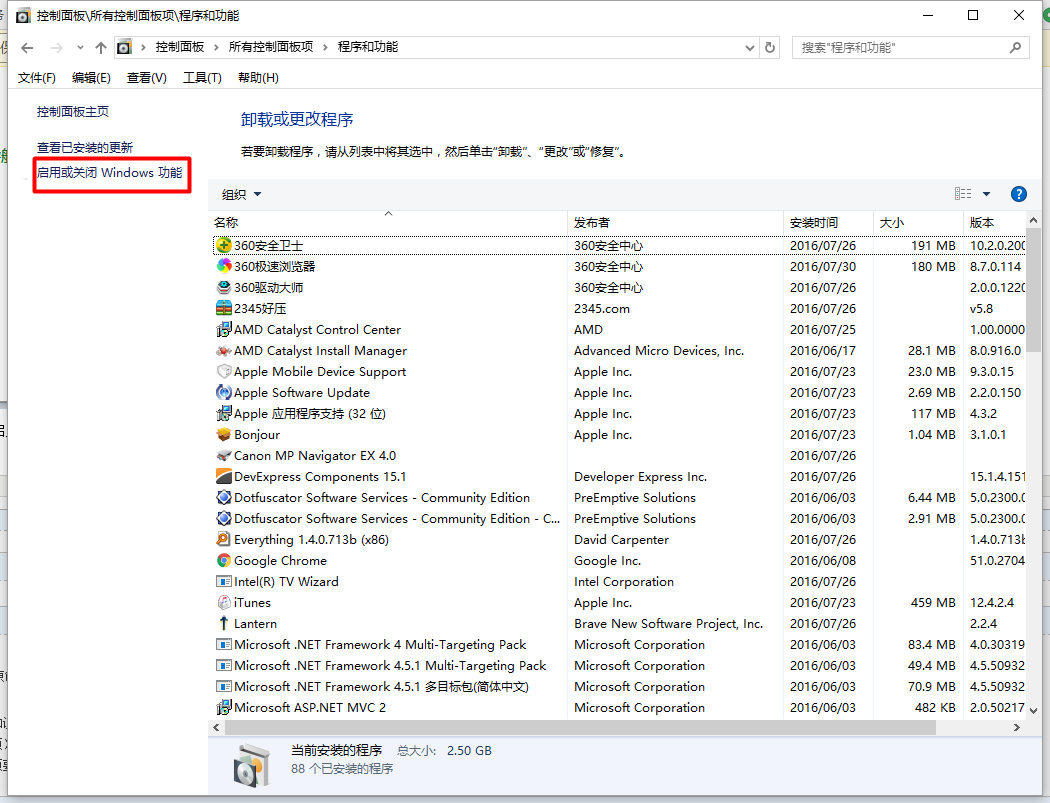
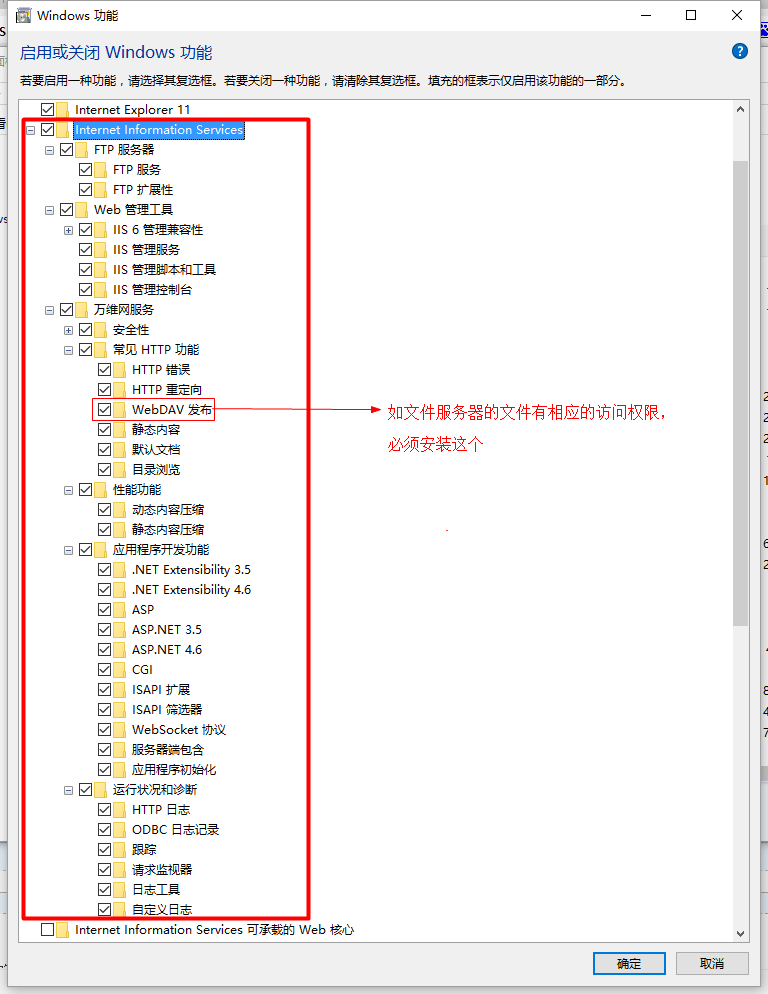
3)点进去之后,将“Internet Information Services”下所有节点都打勾(这样就搭建了一个功能完全的HTTP/FTP服务器),注意“WebDAV发布”必须要安装,这个跟文件服务器中文件访问权限有着很大的关系,如果想对服务器中某个具有读写权限的文件夹进行读写,就必须开启该选项,如下图所示:
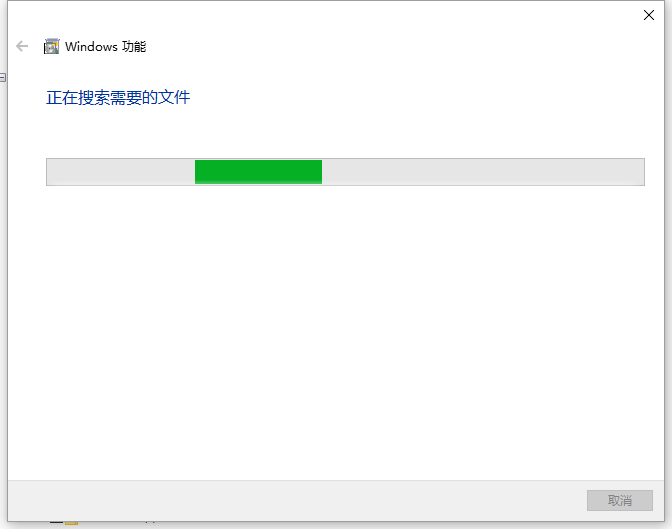
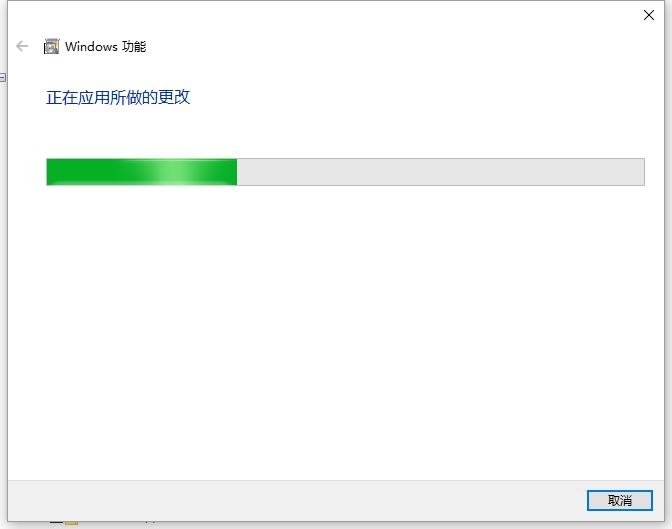
4)等待安装完毕,请耐心等待, 如下图所示:
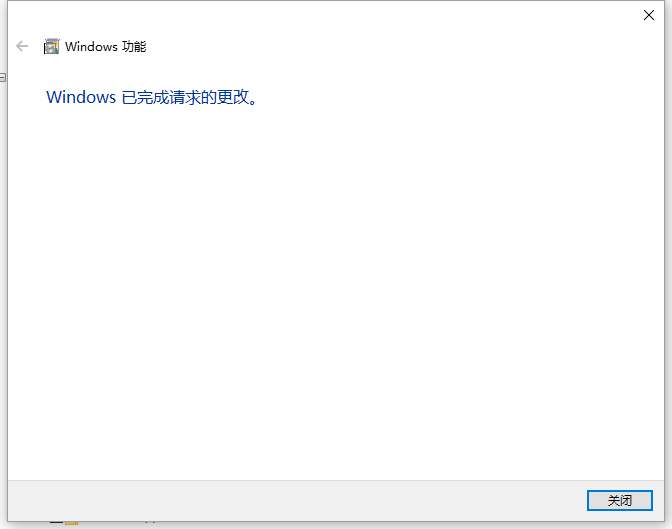
5)完成之后,点击“关闭”按钮即可,然后,打开“控制面板”,找到“管理工具”,如下图所示:
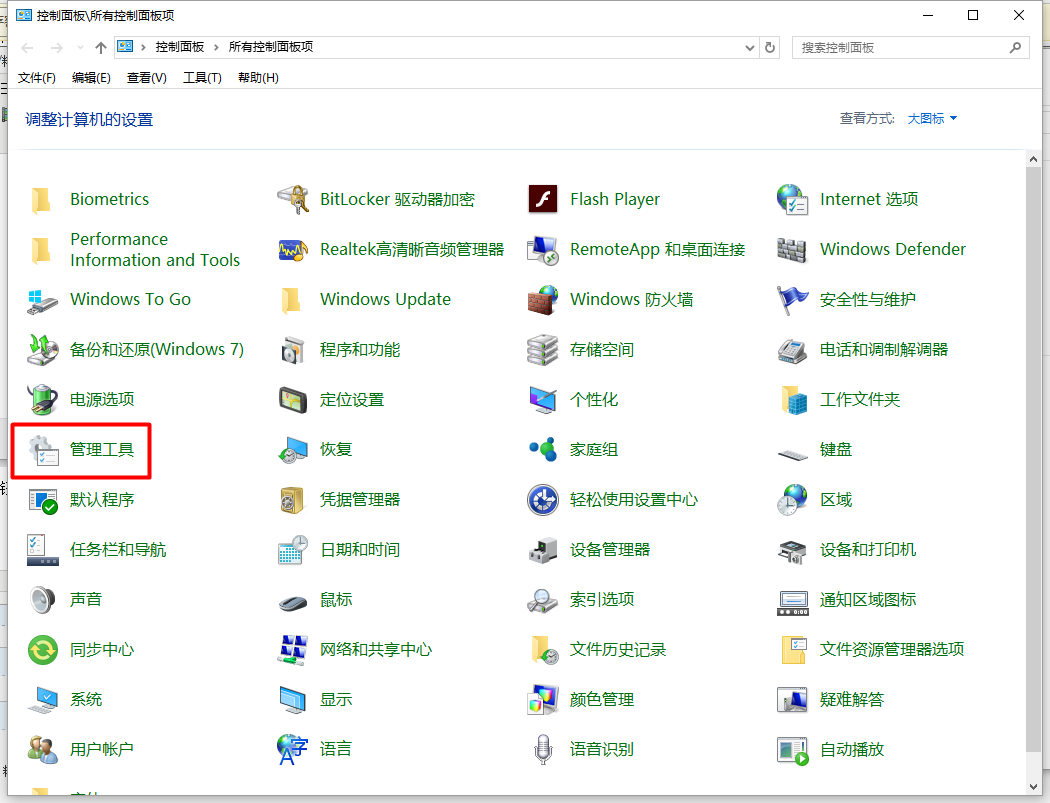
6)点击“管理工具”后,找到“Internet Information Services (IIS)管理器”,打开它,如下图所示:
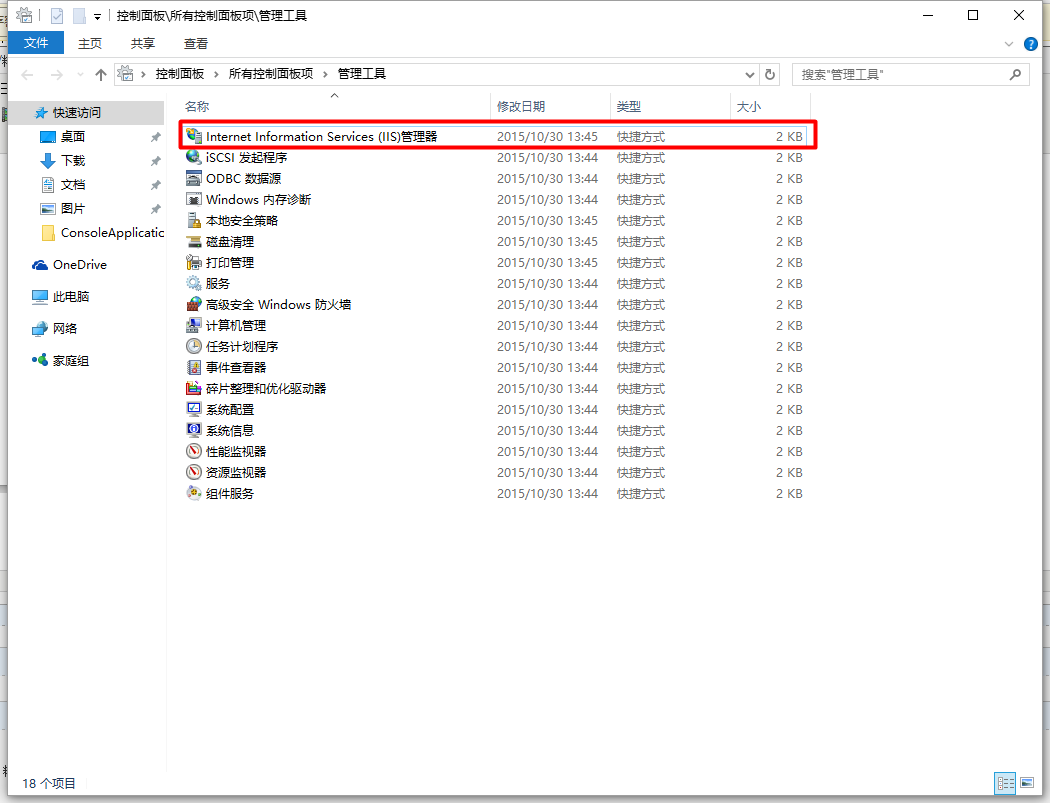
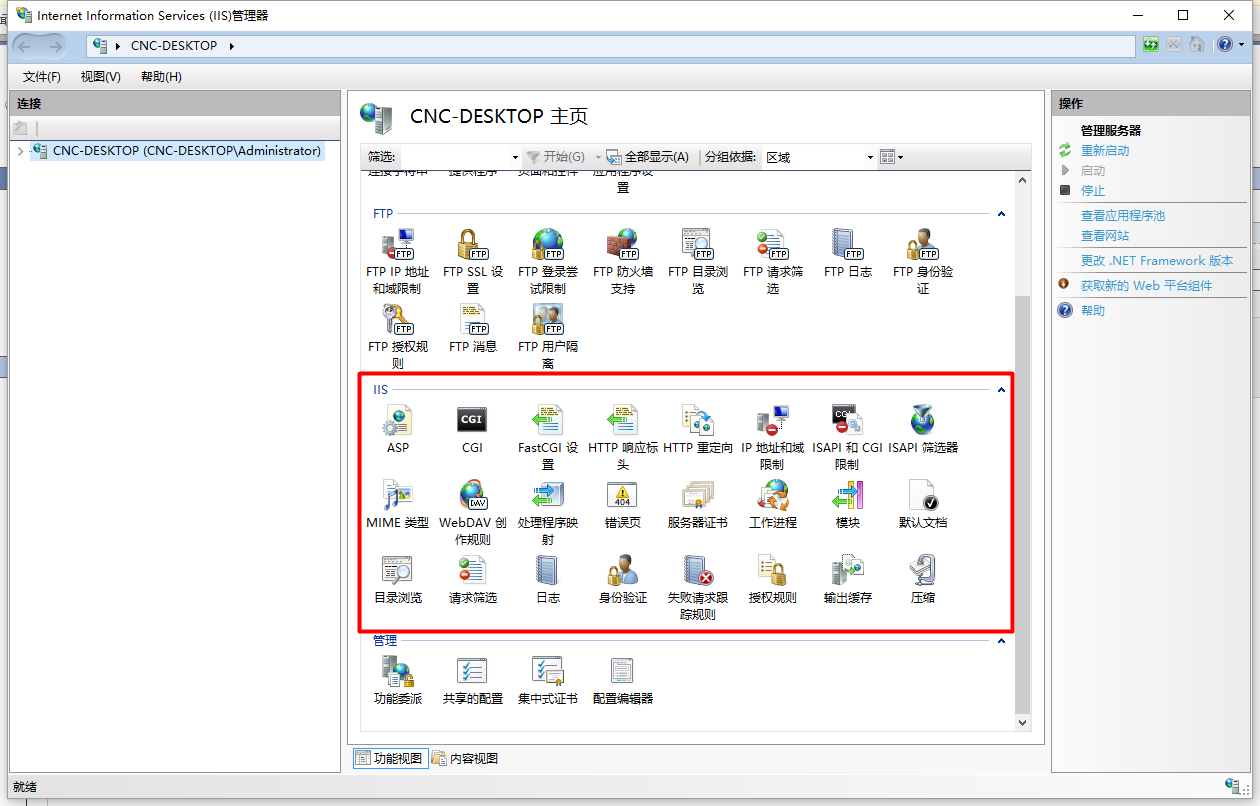
7)进去之后,就已经进入了IIS的管理界面,我们只用到的功能为红色框内的IIS功能,如下图所示:
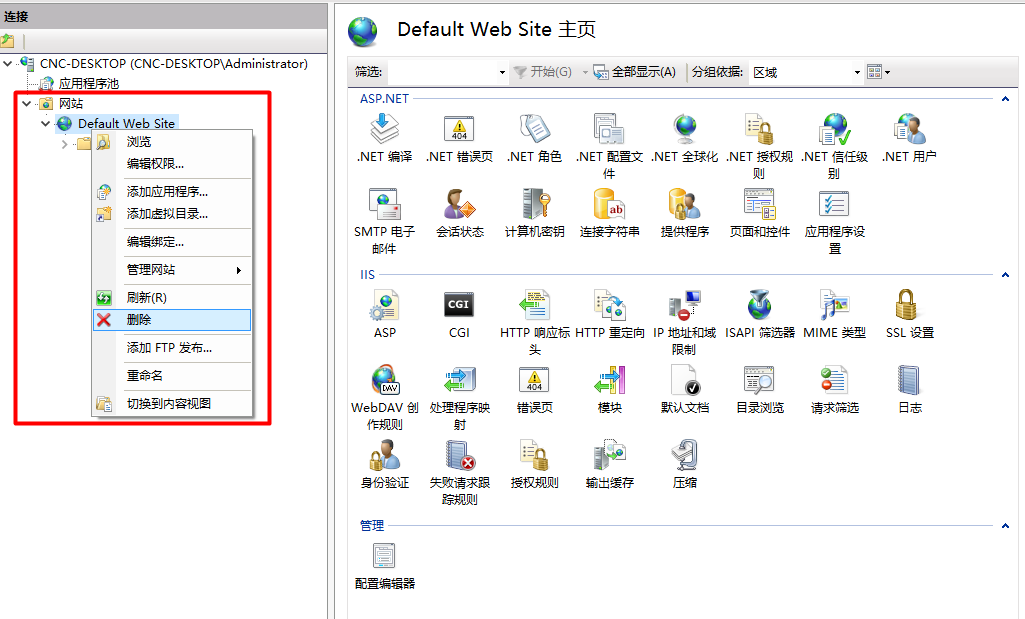
8)第一搭建IIS,会出现一个默认的Web网站,我们将鼠标移到“Default Web Site”上方,右键弹出菜单,在菜单中点击“删除”将该网站删除,如下图所示:
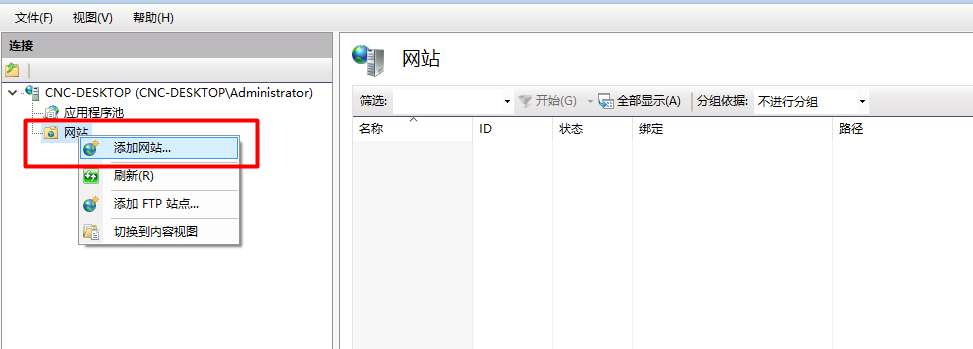
9)添加自己的一个网站,鼠标移到“网站”上方,右键点击鼠标,弹出菜单,在菜单中点击“添加网站”,如下图所示:
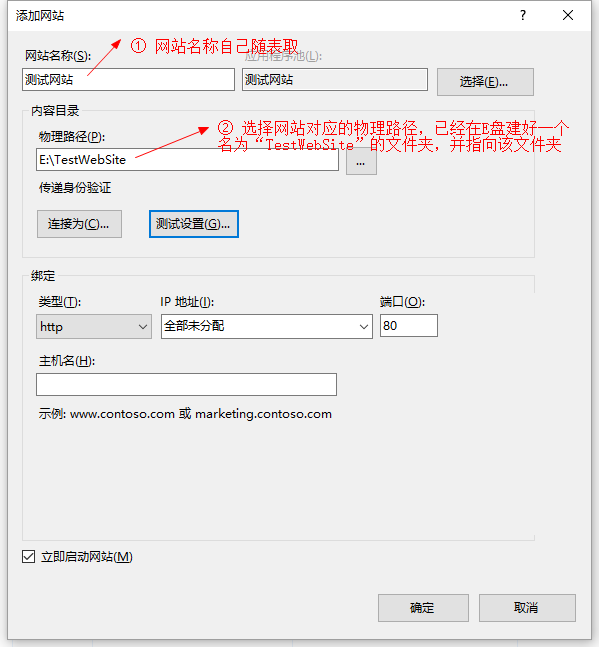
10)根据如下图所说的步骤,填写网站名称及选择物理路径,其他默认即可,然后点击“确定”按钮:
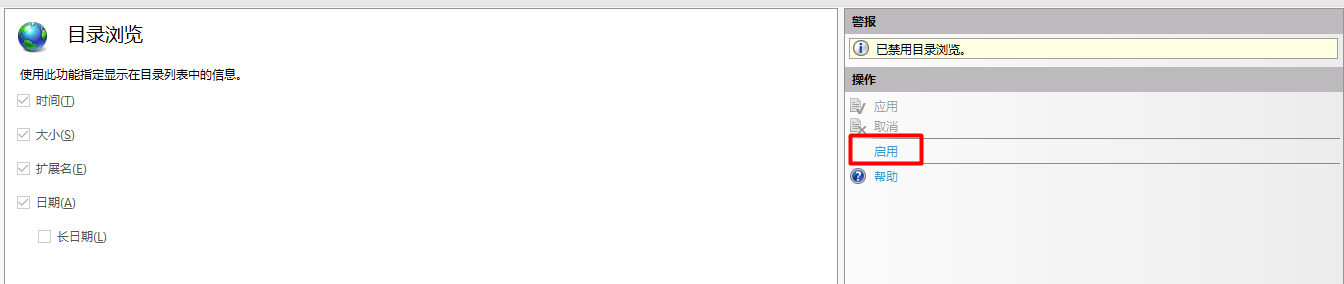
11)本网站仅作为文件服务器,因此,将服务器的文件浏览功能打开,以便浏览,具体操作为鼠标双击“目录浏览”后,将“操作”一栏里的“启用”打开,如下图所示:

12)鼠标双击“WebDAV创作规则”,如下图所示:
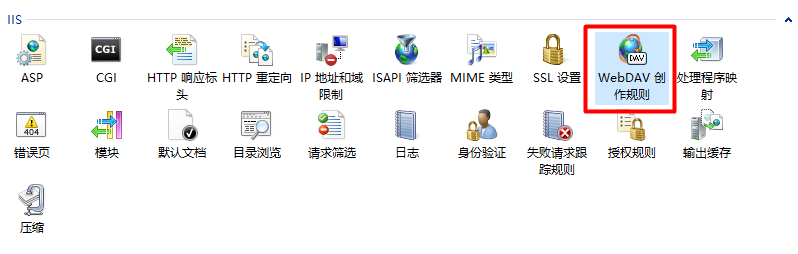
13)点击“WebDAV设置”,如下图所示:

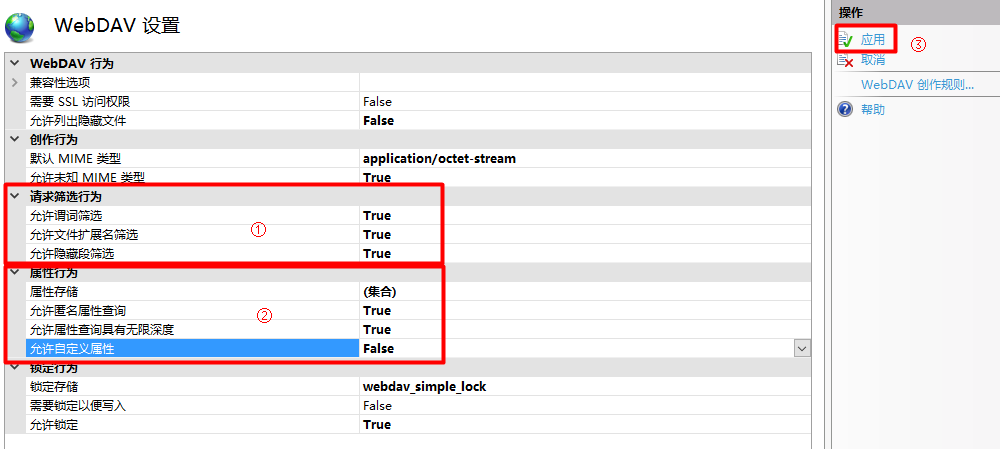
14)将①②所示红色框内的属性设置为图中所示的属性,并点击“应用”,如下图所示:
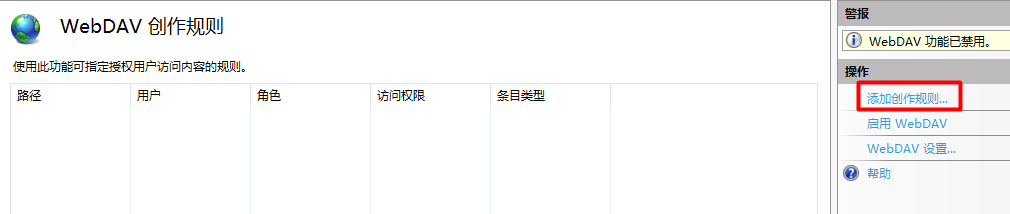
15)返回到“WebDAV创作规则”,点击“添加创作规则”,如下图所示:
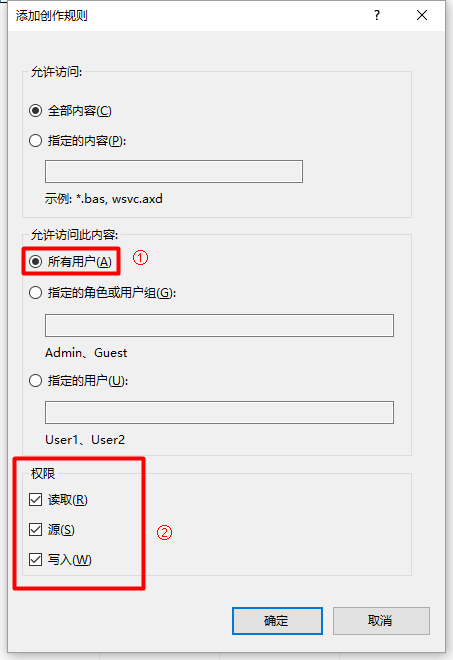
16)在弹出的“添加创作规则”,将“允许访问此内容”选中,权限“读取、源、写入”都打勾,点击“确定”按钮关闭,如下图所示:
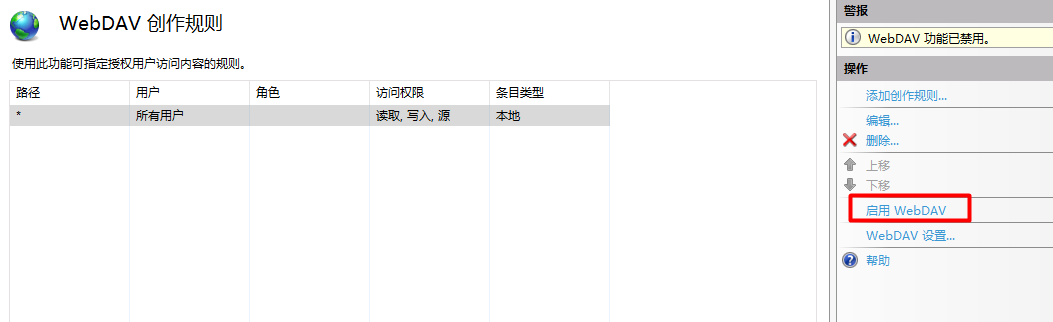
17)返回到“WebDAV创作规则”,点击“启用WebDAV”,如下图所示:
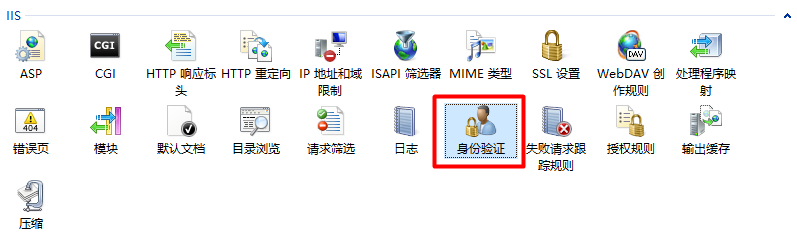
18)双击“身份验证”,将“匿名身份验证”(客户端读取文件)及“Windows身份验证”(客户端写入、删除)启用,如下所示:

19)为了能让文件服务器具有写入、删除功能,可以在现有Windows系统账户上新建一个隶属于“Power Users”的账户“test”(密码:123),如下图所示:

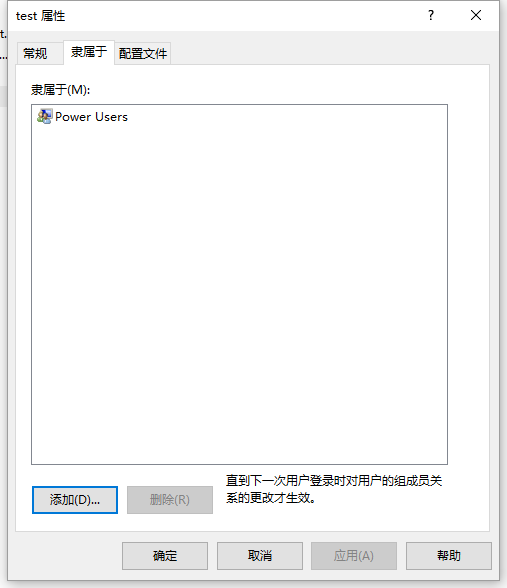
以上关于如何创建账户的内容,请自行百度
20)为了能让test账户顺利访问存放于E盘下的“TestWebSite”文件夹,需要为该文件夹设置Power Users组的访问权限,如下图所示:
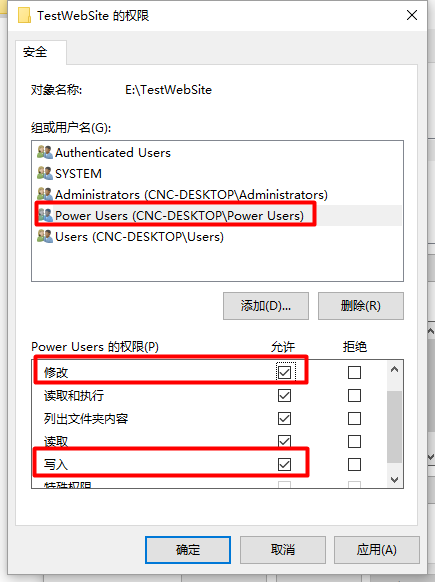
关于如何将特定组或用户设置权限的问题,请自行百度
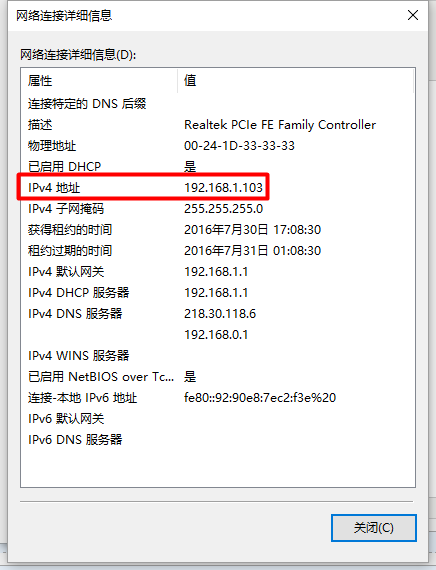
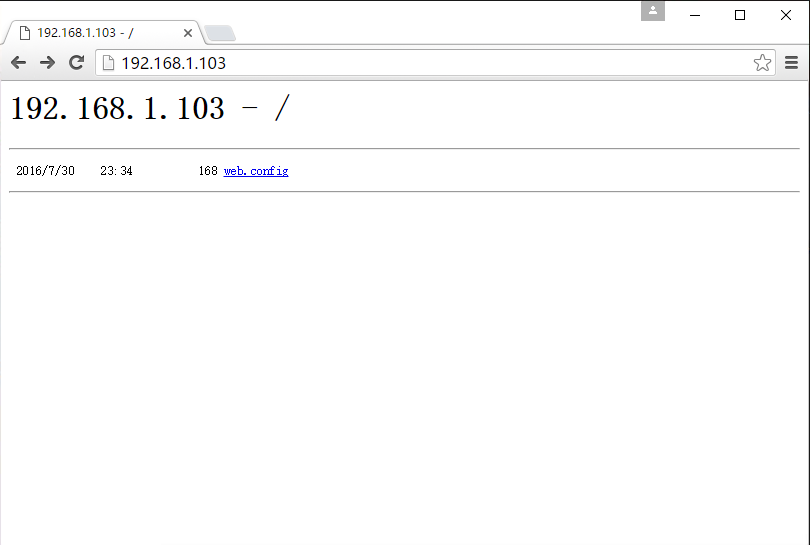
21)查看本机IIS的IP地址,并在浏览器输入该IP,将会显示以下内容,如下图所示:
22)自此,IIS文件服务器的搭建已经完毕。
使用C#WebClient访问IIS文件服务器
本博文使用的的IDE为VS2015,在使用WebClient类之前,必须先引用System.Net命名空间,文件下载、上传与删除的都是使用异步编程,也可以使用同步编程,
这里以异步编程为例:
1)文件下载:
         static void Main(string[] args)

         {

             //定义_webClient对象

             WebClient _webClient = new WebClient();

             //使用默认的凭据——读取的时候,只需默认凭据就可以

             _webClient.Credentials = CredentialCache.DefaultCredentials;

             //下载的链接地址(文件服务器)

             Uri _uri = new Uri(@"http://192.168.1.103/test.doc");

             //注册下载进度事件通知

             _webClient.DownloadProgressChanged += _webClient_DownloadProgressChanged;

             //注册下载完成事件通知

             _webClient.DownloadFileCompleted += _webClient_DownloadFileCompleted;

             //异步下载到D盘

             _webClient.DownloadFileAsync(_uri, @"D:\test.doc");

             Console.ReadKey();

         }

         //下载完成事件处理程序

         private static void _webClient_DownloadFileCompleted(object sender, System.ComponentModel.AsyncCompletedEventArgs e)

         {

             Console.WriteLine("Download Completed...");

         }

         //下载进度事件处理程序

         private static void _webClient_DownloadProgressChanged(object sender, DownloadProgressChangedEventArgs e)

         {

             Console.WriteLine($"{e.ProgressPercentage}:{e.BytesReceived}/{e.TotalBytesToReceive}");

         }
运行结果如下:

2)文件上传:
        static void Main(string[] args)

        {

            //定义_webClient对象

            WebClient _webClient = new WebClient();

            //使用Windows登录方式

            _webClient.Credentials = new NetworkCredential("test", "");

            //上传的链接地址(文件服务器)

            Uri _uri = new Uri(@"http://192.168.1.103/test.doc");

            //注册上传进度事件通知

            _webClient.UploadProgressChanged += _webClient_UploadProgressChanged;

            //注册上传完成事件通知

            _webClient.UploadFileCompleted += _webClient_UploadFileCompleted;

            //异步从D盘上传文件到服务器

            _webClient.UploadFileAsync(_uri,"PUT", @"D:\test.doc");

            Console.ReadKey();

        }

        //下载完成事件处理程序

        private static void _webClient_UploadFileCompleted(object sender, UploadFileCompletedEventArgs e)

        {

            Console.WriteLine("Upload Completed...");

        }

        //下载进度事件处理程序

        private static void _webClient_UploadProgressChanged(object sender, UploadProgressChangedEventArgs e)

        {

            Console.WriteLine($"{e.ProgressPercentage}:{e.BytesSent}/{e.TotalBytesToSend}");

        }
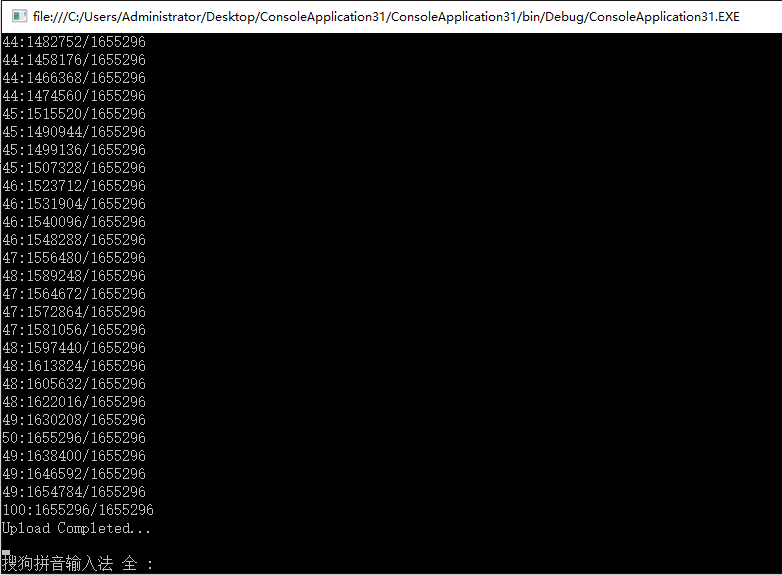
运行结果如下:
3)文件删除:
        static void Main(string[] args)

        {

            //定义_webClient对象

            WebClient _webClient = new WebClient();

            //使用Windows登录方式

            _webClient.Credentials = new NetworkCredential("test", "");

            //待删除的文件链接地址(文件服务器)

            Uri _uri = new Uri(@"http://192.168.1.103/test.doc");

            //注册删除完成时的事件(模拟删除)

            _webClient.UploadDataCompleted += _webClient_UploadDataCompleted;

            //异步从文件(模拟)删除文件

            _webClient.UploadDataAsync(_uri, "DELETE", new byte[]);

            Console.ReadKey();

        }

        //删除完成事件处理程序

        private static void _webClient_UploadDataCompleted(object sender, UploadDataCompletedEventArgs e)

        {

            Console.WriteLine("Deleted...");

        }
运行结果如下:

4)列出文件(或目录):
需引入命名空间:System.IO、System.Xml及System.Globalization
        static void Main(string[] args)

        {

            SortedList<string, ServerFileAttributes> _results =GetContents(@"http://192.168.1.103", true);

            //在控制台输出文件(或目录)信息:

            foreach(var _r in _results)

            {

                Console.WriteLine($"{_r.Key}:\r\nName:{_r.Value.Name}\r\nIsFolder:{_r.Value.IsFolder}");

                Console.WriteLine($"Value:{_r.Value.Url}\r\nLastModified:{_r.Value.LastModified}");

                Console.WriteLine();

            }

            Console.ReadKey();

        }

        //定义每个文件或目录的属性

        struct ServerFileAttributes

        {

            public string Name;

            public bool IsFolder;

            public string Url;

            public DateTime LastModified;

        }

        //将文件或目录列出来

        static SortedList<string, ServerFileAttributes> GetContents(string serverUrl, bool deep)

        {

            HttpWebRequest _httpWebRequest = (HttpWebRequest)HttpWebRequest.Create(serverUrl);

            _httpWebRequest.Headers.Add("Translate: f");

            _httpWebRequest.Credentials = CredentialCache.DefaultCredentials;

            string _requestString = @"<?xml version=""1.0"" encoding=""utf-8""?>" +

                  @"<a:propfind xmlns:a=""DAV:"">" +

                  "<a:prop>" +

                  "<a:displayname/>" +

                  "<a:iscollection/>" +

                  "<a:getlastmodified/>" +

                  "</a:prop>" +

                  "</a:propfind>";

            _httpWebRequest.Method = "PROPFIND";

            if (deep == true)

                _httpWebRequest.Headers.Add("Depth: infinity");

            else

                _httpWebRequest.Headers.Add("Depth: 1");

            _httpWebRequest.ContentLength = _requestString.Length;

            _httpWebRequest.ContentType = "text/xml";

            Stream _requestStream = _httpWebRequest.GetRequestStream();

            _requestStream.Write(Encoding.ASCII.GetBytes(_requestString), , Encoding.ASCII.GetBytes(_requestString).Length);

            _requestStream.Close();

            HttpWebResponse _httpWebResponse;

            StreamReader _streamReader;

            try

            {

                _httpWebResponse = (HttpWebResponse)_httpWebRequest.GetResponse();

                _streamReader = new StreamReader(_httpWebResponse.GetResponseStream());

            }

            catch (WebException ex)

            {

                throw ex;

            }

            StringBuilder _stringBuilder = new StringBuilder();

            char[] _chars = new char[];

            int _bytesRead = ;

            _bytesRead = _streamReader.Read(_chars, , );

            while (_bytesRead > )

            {

                _stringBuilder.Append(_chars, , _bytesRead);

                _bytesRead = _streamReader.Read(_chars, , );

            }

            _streamReader.Close();

            XmlDocument _xmlDocument = new XmlDocument();

            _xmlDocument.LoadXml(_stringBuilder.ToString());

            XmlNamespaceManager _xmlNamespaceManager = new XmlNamespaceManager(_xmlDocument.NameTable);

            _xmlNamespaceManager.AddNamespace("a", "DAV:");

            XmlNodeList _nameList = _xmlDocument.SelectNodes("//a:prop/a:displayname", _xmlNamespaceManager);

            XmlNodeList _isFolderList = _xmlDocument.SelectNodes("//a:prop/a:iscollection", _xmlNamespaceManager);

            XmlNodeList _lastModifyList = _xmlDocument.SelectNodes("//a:prop/a:getlastmodified", _xmlNamespaceManager);

            XmlNodeList _hrefList = _xmlDocument.SelectNodes("//a:href", _xmlNamespaceManager);

            SortedList<string, ServerFileAttributes> _sortedListResult = new SortedList<string, ServerFileAttributes>();

            ServerFileAttributes _serverFileAttributes;

            for (int i = ; i < _nameList.Count; i++)

            {

                if (_hrefList[i].InnerText.ToLower(new CultureInfo("en-US")).TrimEnd(new char[] { '/' }) != serverUrl.ToLower(new CultureInfo("en-US")).TrimEnd(new char[] { '/' }))

                {

                    _serverFileAttributes = new ServerFileAttributes();

                    _serverFileAttributes.Name = _nameList[i].InnerText;

                    _serverFileAttributes.IsFolder = Convert.ToBoolean(Convert.ToInt32(_isFolderList[i].InnerText));

                    _serverFileAttributes.Url = _hrefList[i].InnerText;

                    _serverFileAttributes.LastModified = Convert.ToDateTime(_lastModifyList[i].InnerText);

                    _sortedListResult.Add(_serverFileAttributes.Url, _serverFileAttributes);

                }

            }

            return _sortedListResult;

        }
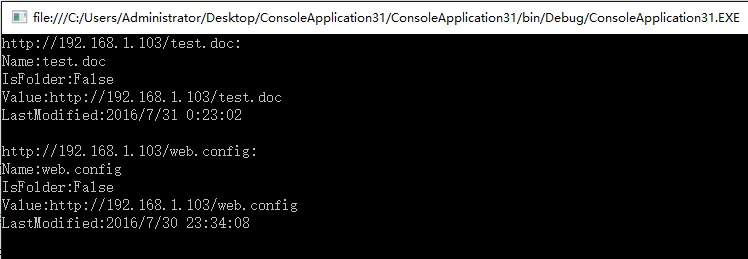
运行结果如下:
使用C#WebClient类访问(上传/下载/删除/列出文件目录)由IIS搭建的http文件服务器的更多相关文章
- 使用C#WebClient类访问(上传/下载/删除/列出文件目录)
在使用WebClient类之前,必须先引用System.Net命名空间,文件下载.上传与删除的都是使用异步编程,也可以使用同步编程, 这里以异步编程为例: 1)文件下载: static void Ma ...
- SpringMVC ajax技术无刷新文件上传下载删除示例
参考 Spring MVC中上传文件实例 SpringMVC结合ajaxfileupload.js实现ajax无刷新文件上传 Spring MVC 文件上传下载 (FileOperateUtil.ja ...
- java FTP 上传下载删除文件
在JAVA程序中,经常需要和FTP打交道,比如向FTP服务器上传文件.下载文件,本文简单介绍如何利用jakarta commons中的FTPClient(在commons-net包中)实现上传下载文件 ...
- [FTP] FTPClient--FTP操作帮助类,上传下载,文件,目录操作 (转载)
点击下载 FTPClient.zip 这个类是关于FTP客户端的操作1.构造函数 2.字段 服务器账户密码3.属性4.链接5.传输模式6.文件操作7.上传和下载8.目录操作9.内容函数看下面代码吧 / ...
- C# FTPClient--FTP操作帮助类,上传下载,文件,目录操作
FROM :http://www.sufeinet.com/forum.php?mod=viewthread&tid=1736&extra=page%3D1%26filter%3Dty ...
- C# WebClient 的文件上传下载
上传文件 string path = openFileDialog1.FileName; WebClient wc = new WebClient(); wc.Credentials = Creden ...
- [C#]工具类—FTP上传下载
public class FtpHelper { /// <summary> /// ftp方式上传 /// </summary> public static int Uplo ...
- FastDFSClient工具类 文件上传下载
package cn.itcast.fastdfs.cliennt; import org.csource.common.NameValuePair; import org.csource.fastd ...
- Win10 搭建FTP环境,并使用Java实现上传,下载,删除
测试的环境一般都是在自己电脑上面装的,现在一般都使用Win10开发 搭建FTP: 第一步:打开控制面板:点击程序 第二步: 第三步: 然后点击确认后等待完成 完成后在启动中找到IIS管理器 打开 在网 ...
随机推荐
- MATLAB conv2卷积的实现
MATLAB conv2卷积的实现 二维卷积的算法原理比较简单,参考任意一本数字信号处理的书籍,而matlab的conv2函数的滤波有个形状参数,用下面的一张图很能说明问题: 这里给出一种最原始的实现 ...
- hdu 1875
题目很简单,我却WA了几十次,找错误找了我一个小时: 蛋都碎了! 后来发现错误的地方竟然是memset: 用一个循环来替代它就A了:╮(╯▽╰)╭ 今晚回去好好的看看memset!!! 发个代码纪念下 ...
- 公告: 新博客已经迁移到 www.root.run
root.run www.root.run www.root.run/sitemap.html www.root.run/sitemap.xml
- 【HDOJ】3466 Proud Merchants
先排序预处理,后01背包. #include <stdio.h> #include <string.h> #include <stdlib.h> #define M ...
- dev中gridview控件 z
目录:一.客户端常用1.常用API2.聚焦行变更事件3.客户端选择多行4.客户端选择行5. 获取选择的行数目6.单击行时,选中行7.通过checkbox 选择行8.选择所有行9.启动编辑框,Conta ...
- Ubuntu下安装Apache2, php5 mysql
不错的博文:http://blog.csdn.net/guaikai/article/details/6905781 1:首先安装apache:打开终端(ctrl+Alt+t), 输入命令:sudo ...
- Ubuntu 使用apt-get时提示错误:无法获得锁 /var/lib/dpkg/lock
推荐博客:http://blog.sina.com.cn/s/blog_5c1450a8010188ju.html Ubuntu 使用apt-get时提示错误:无法获得锁 /var/lib/dpkg/ ...
- EF中使用存储过程
1.存储过程使用out参数返回结果 存储过程: create or replace procedure PROC_GETSEQ(tbname varchar,ReturnNum out number) ...
- javascript 通过IE ActiveX 获得本机内网ip
<HTML><HEAD><TITLE>WMI Scripting HTML</TITLE> <META http-equiv=Content-Ty ...
- 再次分享 pyspider 爬虫框架 - V2EX
再次分享 pyspider 爬虫框架 - V2EX block