
监听EditText的变化
http://liangruijun.blog.51cto.com/3061169/729505
之前博客上的有关EditText的文章,只是介绍EditText的一些最基本的用法,这次来深入学习一下EditText。
监听EditText的变化
使用EditText的addTextChangedListener(TextWatcher watcher)方法对EditText实现监听,TextWatcher是一个接口类,所以必须实现TextWatcher里的抽象方法:
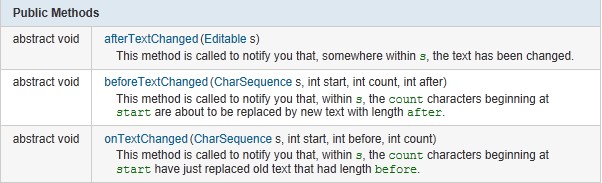
当EditText里面的内容有变化的时候,触发TextChangedListener事件,就会调用TextWatcher里面的抽象方法。
MainActivity.java
    package com.lingdududu.watcher;

    import android.app.Activity;

    import android.app.AlertDialog;

    import android.content.DialogInterface;

    import android.os.Bundle;

    import android.text.Editable;

    import android.text.TextWatcher;

    import android.util.Log;

    import android.widget.EditText;

    public class MainActivity extends Activity {

        private EditText text;

        String str;

        @Override

        public void onCreate(Bundle savedInstanceState) {

            super.onCreate(savedInstanceState);

            setContentView(R.layout.main);

            text = (EditText)findViewById(R.id.text);

            text.addTextChangedListener(textWatcher);

        }

        private TextWatcher textWatcher = new TextWatcher() {

            @Override

            public void afterTextChanged(Editable s) {

                // TODO Auto-generated method stub

                Log.d("TAG","afterTextChanged--------------->");

            }

            @Override

            public void beforeTextChanged(CharSequence s, int start, int count,

                    int after) {

                // TODO Auto-generated method stub

                Log.d("TAG","beforeTextChanged--------------->");

            }

             @Override

            public void onTextChanged(CharSequence s, int start, int before,

                    int count) {

                Log.d("TAG","onTextChanged--------------->");

                str = text.getText().toString();

                try {

                    //if ((heighText.getText().toString())!=null)

                    Integer.parseInt(str);

                } catch (Exception e) {

                    // TODO: handle exception

                    showDialog();

                }

            }

        };

        private void showDialog(){

            AlertDialog dialog;

            AlertDialog.Builder builder = new AlertDialog.Builder(MainActivity.this);

            builder.setTitle("消息").setIcon(android.R.drawable.stat_notify_error);

            builder.setMessage("你输出的整型数字有误,请改正");

            builder.setPositiveButton("确定", new DialogInterface.OnClickListener(){

                @Override

                public void onClick(DialogInterface dialog, int which) {

                    // TODO Auto-generated method stub

                }

            });

            dialog = builder.create();

            dialog.show();

        }

    }
main.xml
    <?xml version="1.0" encoding="utf-8"?>

    <LinearLayout xmlns:android="http://schemas.android.com/apk/res/android"

        android:orientation="vertical"

        android:layout_width="fill_parent"

        android:layout_height="fill_parent"

        >

    <TextView

        android:layout_width="fill_parent"

        android:layout_height="wrap_content"

        android:text="请输入整型数字"

        />

    <EditText

        android:id="@+id/text"

        android:layout_width="fill_parent"

        android:layout_height="wrap_content"

        />

    </LinearLayout>
效果图:
当我们在输入框输入不是整型数字的时候,会立刻弹出输入框,提示你改正
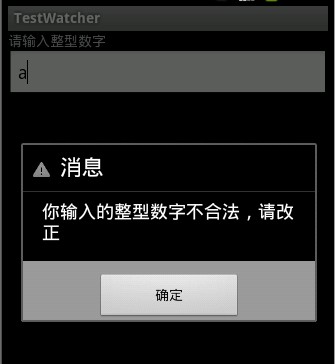
在LogCat查看调用这些方法的顺序:
beforeTextChanged-->onTextChanged-->onTextChanged

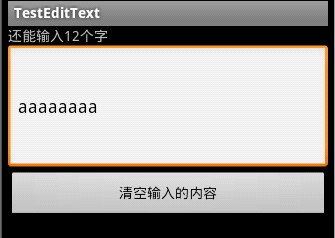
第二个例子实现了提示文本框还能输入多少个字符的功能
    package com.lingdududu.test;

    import android.app.Activity;

    import android.os.Bundle;

    import android.text.Editable;

    import android.text.TextWatcher;

    import android.view.View;

    import android.widget.Button;

    import android.widget.EditText;

    import android.widget.TextView;

    public class MainActivity extends Activity {

     private Button clearBtn;

     private EditText et;

     private TextView tv;

     final int MAX_LENGTH = 20;

     int Rest_Length = MAX_LENGTH;

        @Override

        public void onCreate(Bundle savedInstanceState) {

            super.onCreate(savedInstanceState);

            setContentView(R.layout.main);

            tv =(TextView)findViewById(R.id.tv);

            et = (EditText)findViewById(R.id.et);

            clearBtn = (Button)findViewById(R.id.btn);

            et.addTextChangedListener(new TextWatcher() {

                @Override

                public void beforeTextChanged(CharSequence s, int start, int count,

                        int after) {

                    tv.setText("还能输入"+Rest_Length+"个字");

                }

                @Override

                public void afterTextChanged(Editable s) {

                    tv.setText("还能输入"+Rest_Length+"个字");

                }

                @Override

                public void onTextChanged(CharSequence s, int start, int before, int count) {

                    if(Rest_Length>0){

                        Rest_Length = MAX_LENGTH - et.getText().length();

                    }

                }

            });

            clearBtn.setOnClickListener(new Button.OnClickListener() {

                @Override

                public void onClick(View v) {

                    et.setText("");

                    Rest_Length = MAX_LENGTH;

                }

            });

        }

     }
效果图:
本文出自 “IT的点点滴滴” 博客,请务必保留此出处http://liangruijun.blog.51cto.com/3061169/729505
监听EditText的变化的更多相关文章
- Android简易实战教程--第十九话《手把手教您监听EditText文本变化,实现抖动和震动的效果》
昨晚写博客太仓促,代码结构有问题,早上测试发现没法监听文本变化!今日更改一下.真心见谅啦,哈哈!主活动的代码已经改好了,看截图这次的确实现了文本监听变化情况. 监听文本输入情况,仅仅限于土司略显low ...
- 使用TextWatcher监听EditText变化
public class MainActivity extends AppCompatActivity { private TextView mTextView; private EditText m ...
- listview监听组件内容变化
package com.meizu.ui.gifts; import android.app.Activity; import android.content.Context; import andr ...
- HTML5 oninput实时监听输入框值变化的完美方案
在网页开发中经常会碰到需要动态监听输入框值变化的情况,如果使用 onkeydown.onkeypress.onkeyup 这个几个键盘事件来监测的话,监听不了右键的复制.剪贴和粘贴这些操作,处理组合快 ...
- 【转载】实时监听输入框值变化的完美方案:oninput & onpropertychange
oninput 是 HTML5 的标准事件,对于检测 textarea, input:text, input:password 和 input:search 这几个元素通过用户界面发生的内容变化非常有 ...
- 实时监听输入框值变化:oninput & onpropertychange
结合 HTML5 标准事件 oninput 和 IE 专属事件 onpropertychange 事件来监听输入框值变化. oninput 是 HTML5 的标准事件,对于检测 textarea, i ...
- js/jquery 实时监听输入框值变化的完美方案:oninput & onpropertychange
(1) 先说jquery, 使用 jQuery 库的话,只需要同时绑定 oninput 和 onpropertychange 两个事件就可以了,示例代码: $('#username').bin ...
- JS 获取和监听屏幕方向变化(portrait / landscape)
移动设备的屏幕有两个方向: landscape(横屏)和portrait(竖屏),在某些情况下需要获取设备的屏幕方向和监听屏幕方向的变化,因此可以使用Javascript提供的 MediaQueryL ...
- 实时监听输入框值变化的完美方案:oninput & onpropertychange
实时监听输入框值变化的完美方案:oninput & onpropertychange: 网址:http://www.cnblogs.com/lhb25/archive/2012/11/30/o ...
随机推荐
- efront二次开发记要
efront系统是一套开源的在线学习系统,是用PHP编写的,内含“考试”功能.该系统的开源的是社区版,虽然看上去功能强大,但使用起来却很不符合国情.为了让公司使用,先做了一次最简化的二次开发,由于是最 ...
- [转]笔记本Ubuntu系统关闭独显+省电降温设置
[转载者按]最近装了Ubuntu 13.04 64 bits版操作系统玩玩,但是发现两个显卡都开着,所以上网查找资料,以在不需要3D的时候关闭Nvidia显卡.通过Bumblebee软件包可以达到这一 ...
- java JdbcTemplate源码
package com.wl.filter; package org.javaresearch.jerch; import java.lang.reflect.Method; import java. ...
- EXT 组件一些属性与方法(Tree)
1.Ext.tree.TreePanel 主要配置项: root:树的根节点. rootVisible:是否显示根节点,默认为true. useArrows:是否在树中使用Vista样式箭头,默认为f ...
- Linux创建新用户以及useradd adduser的区别
从阿里云那弄了个机子玩玩,系统用的是Ubuntu12.04.刚等上去时候是用root登录的,首先想到的就是创建一个用户. 使用 useradd myname 发现/home目录下没有myname的家目 ...
- [JLOI2013]卡牌游戏
[题目描述 Description] N个人坐成一圈玩游戏.一开始我们把所有玩家按顺时针从1到N编号.首先第一回合是玩家1作为庄家.每个回合庄家都会随机(即按相等的概率)从卡牌堆里选择一张卡片,假设卡 ...
- gcc “-I”(大写i),“-L”(大写l),“-l”(小写l)的区别
我们用gcc编译程序时,可能会用到“-I”(大写i),“-L”(大写l),“-l”(小写l)等参数,下面做个记录: 例: gcc -o hello hello.c -I /home/hello/inc ...
- 稀疏矩阵coo_matrix的乘法
稀疏矩阵的乘法在做基于n-gram的分类的时候还是相当有用的,但是由于网上资料太少,所以折腾了几天才算折腾出来. 首先scipy包里常见的稀疏矩阵有三种形式, coo_matrix, csr_matr ...
- 前端自动生成/加载CSS
前言: 1.我很懒! 2.写样式时,很多时候需要单独设置长度.宽度.内间距.外间距等.于是,就会有很多CSS代码会出现很多类似以下的代码: .w20: { width: 20px; } .mt10: ...
- gcc 的visibility 使用
gcc 的visibility 使用(zz) -fvisibility=default|internal|hidden|protectedgcc的visibility是说,如果编译的时候用了这个属性, ...