
获取音、视频时长(NAudio,Shell32,FFmpeg)
参考网址:https://blog.csdn.net/u013810234/article/details/57471780
以下为本次测试用到的音、视频格式:
audio :”.wav;.mp3;.wma;.ra;.mid;.ogg;.ape;.au;.aac;”;
vedio :”.mp4;.mpg;.mpeg;.avi;.rm;.rmvb;.wmv;.3gp;.flv;.mkv;.swf;.asf;”;
Note:
1. 测试音、视频均为对应格式的有效文件(下载自地址:包含了各种可供测试音视频格式,且不断更新中。。);
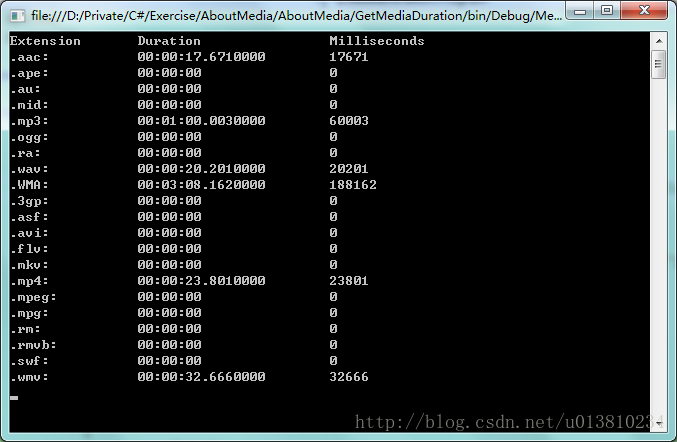
2. 若某音/视频时长为0,表示对应库、组件无法解码文件,即不支持该格式;
3. 类之间的关系:定义了Duration父类,三个测试方案均继承自Duration,并重写父类GetDuration方法。
获取时长父类
public abstract class Duration
{
/// <summary>
/// Abstract method of getting duration(ms) of audio or vedio
/// </summary>
/// <param name="filePath">audio/vedio's path</param>
/// <returns>Duration in original format, duration in milliseconds</returns>
public abstract Tuple<string, long> GetDuration(string filePath);
/// <summary>
/// Convert format of "00:10:16" and "00:00:19.82" into milliseconds
/// </summary>
/// <param name="formatTime"></param>
/// <returns>Time in milliseconds</returns>
public long GetTimeInMillisecond(string formatTime)
{
double totalMilliSecends = 0;
if (!string.IsNullOrEmpty(formatTime))
{
string[] timeParts = formatTime.Split(':');
totalMilliSecends = Convert.ToInt16(timeParts[0]) * 60 * 60 * 1000
+ Convert.ToInt16(timeParts[1]) * 60 * 1000
+ Math.Round(double.Parse(timeParts[2]) * 1000);
}
return (long)totalMilliSecends;
}
}
使用NAudio.dll
下载、引用NAudio.dll;
由于NAudio本身主要用于处理音频,用其获取视频时长并不合理(仅作统一测试),所以多数格式不支持,不足为奇;
public class ByNAudio : Duration
{
/// <summary>
/// Get duration(ms) of audio or vedio by NAudio.dll
/// </summary>
/// <param name="filePath">audio/vedio's path</param>
/// <returns>Duration in original format, duration in milliseconds</returns>
/// <remarks>return value from NAudio.dll is in format of: "00:00:19.820"</remarks>
public override Tuple<string, long> GetDuration(string filePath)
{
TimeSpan ts;
try
{
using (AudioFileReader audioFileReader = new AudioFileReader(filePath))
{
ts = audioFileReader.TotalTime;
}
}
catch (Exception)
{
/* As NAudio is mainly used for processing audio, so some formats may not surport,
* just use 00:00:00 instead for these cases.
*/
ts = new TimeSpan();
//throw ex;
}
return Tuple.Create(ts.ToString(), GetTimeInMillisecond(ts.ToString()));
}
}
NAudio结果:
使用Shell32.dll
引用Shell32.dll,在COM里;
Windows自带的组件,仅支持常见的音视频格式;
public class ByShell32 : Duration
{
/// <summary>
/// Get duration(ms) of audio or vedio by Shell32.dll
/// </summary>
/// <param name="filePath">audio/vedio's path</param>
/// <returns>Duration in original format, duration in milliseconds</returns>
/// <remarks>return value from Shell32.dll is in format of: "00:10:16"</remarks>
public override Tuple<string, long> GetDuration(string filePath)
{
try
{
string dir = Path.GetDirectoryName(filePath);
// From Add Reference --> COM
Shell32.Shell shell = new Shell32.Shell();
Shell32.Folder folder = shell.NameSpace(dir);
Shell32.FolderItem folderitem = folder.ParseName(Path.GetFileName(filePath));
string duration = null;
// Deal with different versions of OS
if (Environment.OSVersion.Version.Major >= 6)
{
duration = folder.GetDetailsOf(folderitem, 27);
}
else
{
duration = folder.GetDetailsOf(folderitem, 21);
}
duration = string.IsNullOrEmpty(duration) ? "00:00:00" : duration;
return Tuple.Create(duration, GetTimeInMillisecond(duration));
}
catch (Exception ex)
{
throw ex;
}
}
}
Shell32结果:
使用FFmpeg.exe
下载FFmpeg.exe;
异步调用“ffmpeg -i 文件路径”命令,获取返回文本,并解析出Duration部分;
FFmpeg是对音视频进行各种处理的一套完整解决方案,包含了非常先进的音频/视频编解码库,因此可处理多种格式(本次测试的音、视频格式均可以进行有效解码)。
public class ByFFmpeg : Duration
{
private StringBuilder result = new StringBuilder(); // Store output text of ffmpeg
/// <summary>
/// Get duration(ms) of audio or vedio by FFmpeg.exe
/// </summary>
/// <param name="filePath">audio/vedio's path</param>
/// <returns>Duration in original format, duration in milliseconds</returns>
/// <remarks>return value from FFmpeg.exe is in format of: "00:00:19.82"</remarks>
public override Tuple<string, long> GetDuration(string filePath)
{
GetMediaInfo(filePath);
string duration = MatchDuration(result.ToString());
return Tuple.Create(duration, GetTimeInMillisecond(duration));
}
// Call exe async
private void GetMediaInfo(string filePath)
{
result.Clear(); // Clear result to avoid previous value's interference
Process p = new Process();
p.StartInfo.FileName = "ffmpeg.exe";
p.StartInfo.RedirectStandardError = true;
p.StartInfo.UseShellExecute = false;
p.StartInfo.Arguments = string.Concat("-i ", filePath);
p.ErrorDataReceived += new DataReceivedEventHandler(OutputCallback);
p.Start();
p.BeginErrorReadLine();
p.WaitForExit();
p.Close();
p.Dispose();
}
// Callback funciton of output stream
private void OutputCallback(object sender, DataReceivedEventArgs e)
{
if (!string.IsNullOrEmpty(e.Data))
{
result.Append(e.Data);
}
}
// Match the 'Duration' section in "ffmpeg -i filepath" output text
private string MatchDuration(string text)
{
string pattern = @"Duration:\s(\d{2}:\d{2}:\d{2}.\d+)";
Match m = Regex.Match(text, pattern);
return m.Groups.Count == 2 ? m.Groups[1].ToString() : string.Empty;
}
}
ffmpeg -i filePath
……[mp3 @ 0233ca60] Estimating duration from bitrate, this may be inaccurate
Input #0, mp3, from ‘2012.mp3’:
Duration: 00:22:47.07, start: 0.000000, bitrate: 127 kb/s
Stream #0:0: Audio: mp3, 44100 Hz, stereo, s16p, 128 kb/s
At least one output file must be specified
Note:以上为ffmpeg -i 命令的输出值,需要匹配到Duration的时长部分。
FFmpeg结果:
Source Code(含测试音、视频文件): Github
获取音、视频时长(NAudio,Shell32,FFmpeg)的更多相关文章
- asp.net 获取音视频时长 的方法
http://www.evernote.com/l/AHPMEDnEd65A7ot_DbEP4C47QsPDYLhYdYg/ 日志: 1.第一种方法: 调用:shell32.dll ,win7 ...
- jave 计算音视频时长
File source = new File("视频.mp4"); Encoder encoder = new Encoder(); try { MultimediaInfo in ...
- vue / js使用video获取视频时长
项目中遇到上传视频功能,需要有预览和获取视频时长功能,因之前使用upload(有需要的话可以参考下我之前的文章),这里就不赘述,直接用来上传视频,不过在上传之前和上传成功后的钩子里,获取不到时长: 没 ...
- vue 获取视频时长
参考资料:js获取上传音视频文件的时长 直接通过element-ui自带的上传组件结合js即可,代码如下: HTML: <el-upload class="upload-demo&qu ...
- windows server 2008 R2服务器无法通过ShellClass获取mp3音乐时长
我们先看一段代码,获取mp3播放时长: #region GetMediaDetailInfo 获取媒体文件属性信息 /// <summary> /// 获取媒体文件属性信息 /// < ...
- iOS:Gif动画功能(显示gif动画、获取gif动画时长、获取gif动画执行次数)
一.简单介绍 gif动画是iOS开发中很常用的一个功能,有的是为了显示加载视频的过程,更多的是为了显示一个结果状态(动画更直观). 那么如何执行gif动画,方法有很多.(这里只写一下方法三,前两种之前 ...
- Android获取视频音频的时长的方法
android当中获取视频音频的时长,我列举了三种. 1:获取视频URI后获取cursor cursor.getLong(cursor.getColumnIndexOrThrow(MediaStore ...
- Long类型时间如何转换成视频时长?
数据库中存放的视频时长是一个Long类型的毫秒/秒时间,现在需要把这个时间转换成标准的视频时长格式,在我看来这应该是一个很常用的转化有一个很常用的转换方法工具才对,可是我百度找了许久,没有一个简单直观 ...
- javascript 获得以秒计的视频时长
<!DOCTYPE html> <html> <body> <h3>演示如何访问 VIDEO 元素</h3> <video id=&q ...
随机推荐
- 力扣(LeetCode) 997. 找到小镇的法官
在一个小镇里,按从 1 到 N 标记了 N 个人.传言称,这些人中有一个是小镇上的秘密法官. 如果小镇的法官真的存在,那么: 小镇的法官不相信任何人. 每个人(除了小镇法官外)都信任小镇的法官. 只有 ...
- leecode第一百零四题(二叉树的最大深度)
/** * Definition for a binary tree node. * struct TreeNode { * int val; * TreeNode *left; * TreeNode ...
- Codeforces 797E - Array Queries
E. Array Queries 题目链接:http://codeforces.com/problemset/problem/797/E time limit per test 2 seconds m ...
- m_Orchestrate learning system---mo系统权限思考
m_Orchestrate learning system---mo系统权限思考 一.总结 一句话总结:注意不同身份访问同一客户端时候的权限,比如面板显示,比如功能按钮 权限 面板 功能 1.小组之间 ...
- Servlet 小知识
1.In servlet 3.0 we have new feature annotations to replace XML.也就是说应该尽量使用annotations Servlet is an ...
- 雷林鹏分享:jQuery EasyUI 窗口 - 创建简单窗口
jQuery EasyUI 窗口 - 创建简单窗口 创建一个窗口(window)非常简单,我们创建一个 DIV 标记: Some Content. 现在运行测试页面,您会看见一个窗口(window)显 ...
- 【转】 多线程之linux线程调度策略
转自:http://blog.csdn.net/byperseverance/article/details/44522731 Linux线程的调度策略分为3个:SCHED_OTHER,SCHED_F ...
- 线性代数 | Linear Algebra
网上说<线性代数应该这样学>非常不错,再配合大学教材,把线性代数的基本知识点过一遍. 线性代数 - 知乎 最近在跟一个教程:李宏毅的线性代数 基本知识: Rn :We denote the ...
- C#定义一个方法的3种形式
[定义方法对象,可使用签名兼容的委托变量来引用它] 1.定义一个方法,采用常规标准写法(V1.0) [本质上是签名兼容的委托类型的实例 / 对象] 2.定义一个方法,采用匿名方法(delegate)( ...
- LeetCode--441--排列硬币
问题描述: 你总共有 n 枚硬币,你需要将它们摆成一个阶梯形状,第 k 行就必须正好有 k 枚硬币. 给定一个数字 n,找出可形成完整阶梯行的总行数. n 是一个非负整数,并且在32位有符号整型的范围 ...