
mint-ui Picker的使用
<template>

  <div v-bind:style="{minHeight:clientHeight + 'px'}" id="recive-min-body">

    <mt-header title="我的赞">

      <mt-button icon="back" slot="left" @click.native="goBack">返回</mt-button>

    </mt-header>

    <form>

      <h3 class="recive-min-input">请填写以下信息:</h3>

      <mt-field label="你要点赞给" placeholder="巩一杰"  @click.native="handleClick"></mt-field>

      <!-- <mt-field label="使用数量" placeholder="1张"></mt-field> -->

      <mt-popup

      v-model="popupVisible"

      position="bottom"

      modal=false>

      <mt-picker v-bind:style="{width:clientWidth + 'px',padding: 20 + 'px'}" :slots="slots" @change="onValuesChange"></mt-picker>

      </mt-popup>

      <mt-field label="点赞理由" placeholder="点赞理由要规范" type="textarea" rows="4"></mt-field>

      <div class="recive-buttonBox">

            <mt-button type="primary" class="recive-button"  @click.native="reciveTestSubmit">确定</mt-button>

      </div>

    </form>

  </div>

</template>

<style scoped>

  #recive-min-body {

    background-color: #f5f5f5;

  }

  .picker-item {

    padding: 30px;

  }

  .recive-min-input {

    margin-top: 10px;

  }

  form h3 {

    margin: 0;

    padding: 10px !important;

    font-weight: normal;

    font-size: 15px;

  }

  .recive-buttonBox {

        margin: 0 20px;

    }

  .recive-button {

        width: 100%;

        border-radius: 7px;

        margin-top: 20px;

    }

</style>

<script>

export default {

  data () {

    return {

      clientWidth: document.documentElement.clientWidth,

      clientHeight: document.documentElement.clientHeight,

      popupVisible:false,

      slots:

          [

          {

            flex: 1,

            values: ['大一', '大二', '大三'],

            className: 'slot1',

            textAlign: 'left'

          }, {

            divider: true,

            content: '-',

            className: 'slot2'

          }, {

            flex: 1,

            values: ['1', '2', '3'],

            className: 'slot3',

            textAlign: 'right'

          }

        ],

      ids: ""

    }

  },

  watch: {

    values:function(val,oldval){

         console.log(val,oldval);

    }

  },

  methods:{

    goBack: function() {

      this.$router.push({ path: '/home/mine' });

    },

    handleClick: function() {

      this.popupVisible = true;

    },

    onValuesChange(picker, values) {

      if (values[0]=='大一') {

        picker.setSlotValues(1, ['1','2','3']);

      }else if (values[0]=='大二') {

        picker.setSlotValues(1, ['a','b','c']);

      }else if (values[0]=='大三') {

        picker.setSlotValues(1, ['4','5','6']);

      };

    }

  },

  mounted(){

    // this.ids = filters.ytox(this.$route.params.ids)

  }

}

</script>
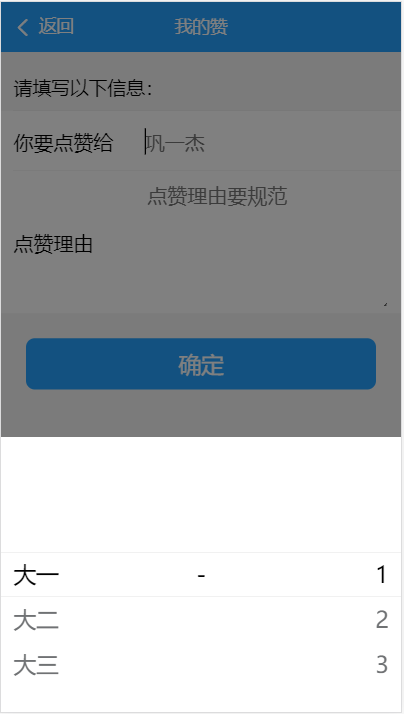
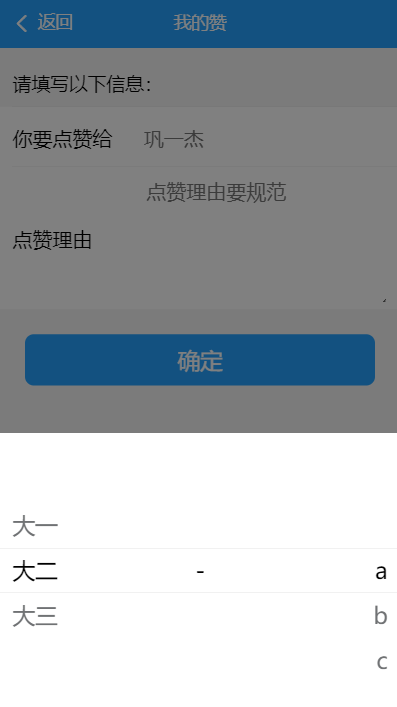
效果图:
mint-ui Picker的使用的更多相关文章
- vue mint ui 手册文档对于墙的恐惧
http://www.cnblogs.com/smallteeth/p/6901610.html npm 安装 推荐使用 npm 的方式安装,它能更好地和 webpack 打包工具配合使用. npm ...
- vue mint ui 手册文档
npm 安装 推荐使用 npm 的方式安装,它能更好地和 webpack 打包工具配合使用. npm i mint-ui -S CDN 目前可以通过 unpkg.com/mint-ui 获取到最新版本 ...
- vue mint UI
vue 与mint UI 结合开发手机app html5页面 api 文档 http://mint-ui.github.io/#!/zh-cn
- 基于VUE.JS的移动端框架Mint UI
Mint UI GitHub:github.com/ElemeFE/mint 项目主页:mint-ui.github.io/# Demo:elemefe.github.io/mint- 文档:mint ...
- Mint UI文档
Mint UI文档:http://elemefe.github.io/mint-ui/#/ 一.Mint UI的安装和基本用法. 1.NPM :npm i mint-ui -S 建议使用npm进行安装 ...
- 新建一个基于vue.js+Mint UI的项目
上篇文章里面讲到如何新建一个基于vue,js的项目(详细文章请戳用Vue创建一个新的项目). 该项目如果需要组件等都需要自己去写,今天就学习一下如何新建一个基于vue.js+Mint UI的项目,直接 ...
- iView webapp / Mint UI / MUI [前端UI]
前端UI iView webapp一套高质量的 微信小程序 UI 组件库 https://weapp.iviewui.com/?from=iview Mint UI 基于 Vue.js 的移动端组件库 ...
- Mint UI 使用指南
上来直接在webpack里将Mint UI引入项目,发现各种问题.饿了么组件库文档太坑了,好多地方写错,有些该说明的地方没说,比如例子里单文件.vue组件里用的类post-css处理器,我一直使用SA ...
- Mint UI Example的运行
Mint -UI是新推出的移动端UI框架 官网 不过官网上的文档例子不是很全面. 建议下载他们提供的example来学习. 1.examplle源码下载地址 2.打开项目,我这里使用webstorm, ...
- vuetify,vux,Mint UI 等框架的选择
vuetify: https://vuetifyjs.com/zh-Hans/getting-started/quick-start NutUI:https://github.com/jdf2e/nu ...
随机推荐
- [No000014D]chrome console 调试 引入 jquery等外部库
var importJs=document.createElement('script') //在页面新建一个script标签 importJs.setAttribute("type&quo ...
- notbook1.1
1)95年创建java语言 2)1.2版本使java具有了生产能力 3)1.8版本增加 新的API lamda 函数式编程1.9 使之模块化 4)java编程的基本套路 1. 编写源代码2. 编译源程 ...
- ssh agent-forward
出于安全性考虑,服务器迁移后,将统一使用 SSH agent forwarding 方式登录所有服务器, 原则上所有 ssh 操作都要通过跳板机,而且跳板机上禁止存储一切私钥. 在此说明一下后续ssh ...
- LeetCode 762 Prime Number of Set Bits in Binary Representation 解题报告
题目要求 Given two integers L and R, find the count of numbers in the range [L, R] (inclusive) having a ...
- python全栈开发day10
day10知识点总结 while循环补充: continue,终止当前循环,开始下一次循环 break,终止所有循环 pycharm 技巧1.setting 中搜索 mouse 设置鼠标滚轮 改变字体 ...
- 【雅思】【写作】【大作文】Advantage VS. Disadvantage
Advantage VS. Disadvantage Advantage vs. Disadvantage 社会现象或者做法 “People can work or study on the Inte ...
- aws小结
IAM:亚马逊访问权限控制(AWS Identity and Access Management ) https://www.cnblogs.com/andy9468/p/10635019.html ...
- Java基础知识(抽象类和接口)
一.抽象类 在了解抽象类之前,先来了解一下抽象方法.抽象方法是一种特殊的方法:它只有声明,而没有具体的实现.抽象方法的声明格式为: 1 abstract void fun(); 抽象方法必须用abst ...
- TlistView基本使用
//增加 procedure TForm1.Button1Click(Sender: TObject); var lsItem: TListItem; begin lsItem := ListView ...
- 001-dubbo基础-001-服务化最佳实践、异常处理逻辑
1.参看地址 http://dubbo.apache.org/zh-cn/ 2.服务化最佳实践 分包 建议将服务接口.服务模型.服务异常等均放在 API 包中,因为服务模型和异常也是 API 的一部分 ...