
mint-ui Picker的使用
<template>

  <div v-bind:style="{minHeight:clientHeight + 'px'}" id="recive-min-body">

    <mt-header title="我的赞">

      <mt-button icon="back" slot="left" @click.native="goBack">返回</mt-button>

    </mt-header>

    <form>

      <h3 class="recive-min-input">请填写以下信息:</h3>

      <mt-field label="你要点赞给" placeholder="巩一杰"  @click.native="handleClick"></mt-field>

      <!-- <mt-field label="使用数量" placeholder="1张"></mt-field> -->

      <mt-popup

      v-model="popupVisible"

      position="bottom"

      modal=false>

      <mt-picker v-bind:style="{width:clientWidth + 'px',padding: 20 + 'px'}" :slots="slots" @change="onValuesChange"></mt-picker>

      </mt-popup>

      <mt-field label="点赞理由" placeholder="点赞理由要规范" type="textarea" rows="4"></mt-field>

      <div class="recive-buttonBox">

            <mt-button type="primary" class="recive-button"  @click.native="reciveTestSubmit">确定</mt-button>

      </div>

    </form>

  </div>

</template>

<style scoped>

  #recive-min-body {

    background-color: #f5f5f5;

  }

  .picker-item {

    padding: 30px;

  }

  .recive-min-input {

    margin-top: 10px;

  }

  form h3 {

    margin: 0;

    padding: 10px !important;

    font-weight: normal;

    font-size: 15px;

  }

  .recive-buttonBox {

        margin: 0 20px;

    }

  .recive-button {

        width: 100%;

        border-radius: 7px;

        margin-top: 20px;

    }

</style>

<script>

export default {

  data () {

    return {

      clientWidth: document.documentElement.clientWidth,

      clientHeight: document.documentElement.clientHeight,

      popupVisible:false,

      slots:

          [

          {

            flex: 1,

            values: ['大一', '大二', '大三'],

            className: 'slot1',

            textAlign: 'left'

          }, {

            divider: true,

            content: '-',

            className: 'slot2'

          }, {

            flex: 1,

            values: ['1', '2', '3'],

            className: 'slot3',

            textAlign: 'right'

          }

        ],

      ids: ""

    }

  },

  watch: {

    values:function(val,oldval){

         console.log(val,oldval);

    }

  },

  methods:{

    goBack: function() {

      this.$router.push({ path: '/home/mine' });

    },

    handleClick: function() {

      this.popupVisible = true;

    },

    onValuesChange(picker, values) {

      if (values[0]=='大一') {

        picker.setSlotValues(1, ['1','2','3']);

      }else if (values[0]=='大二') {

        picker.setSlotValues(1, ['a','b','c']);

      }else if (values[0]=='大三') {

        picker.setSlotValues(1, ['4','5','6']);

      };

    }

  },

  mounted(){

    // this.ids = filters.ytox(this.$route.params.ids)

  }

}

</script>
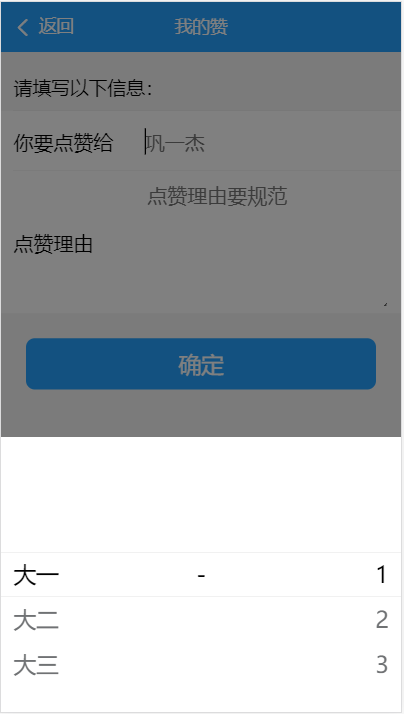
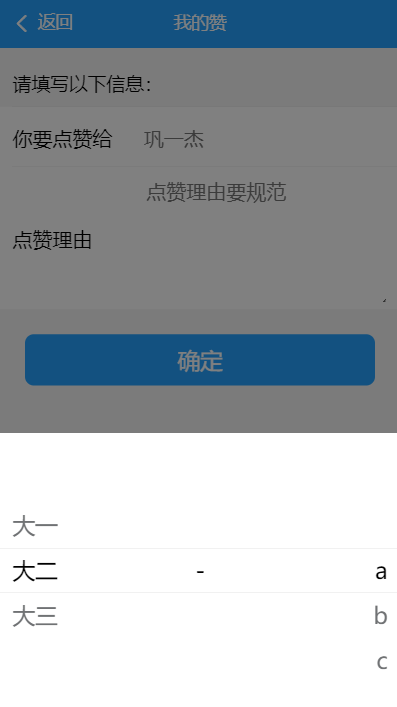
效果图:
mint-ui Picker的使用的更多相关文章
- vue mint ui 手册文档对于墙的恐惧
http://www.cnblogs.com/smallteeth/p/6901610.html npm 安装 推荐使用 npm 的方式安装,它能更好地和 webpack 打包工具配合使用. npm ...
- vue mint ui 手册文档
npm 安装 推荐使用 npm 的方式安装,它能更好地和 webpack 打包工具配合使用. npm i mint-ui -S CDN 目前可以通过 unpkg.com/mint-ui 获取到最新版本 ...
- vue mint UI
vue 与mint UI 结合开发手机app html5页面 api 文档 http://mint-ui.github.io/#!/zh-cn
- 基于VUE.JS的移动端框架Mint UI
Mint UI GitHub:github.com/ElemeFE/mint 项目主页:mint-ui.github.io/# Demo:elemefe.github.io/mint- 文档:mint ...
- Mint UI文档
Mint UI文档:http://elemefe.github.io/mint-ui/#/ 一.Mint UI的安装和基本用法. 1.NPM :npm i mint-ui -S 建议使用npm进行安装 ...
- 新建一个基于vue.js+Mint UI的项目
上篇文章里面讲到如何新建一个基于vue,js的项目(详细文章请戳用Vue创建一个新的项目). 该项目如果需要组件等都需要自己去写,今天就学习一下如何新建一个基于vue.js+Mint UI的项目,直接 ...
- iView webapp / Mint UI / MUI [前端UI]
前端UI iView webapp一套高质量的 微信小程序 UI 组件库 https://weapp.iviewui.com/?from=iview Mint UI 基于 Vue.js 的移动端组件库 ...
- Mint UI 使用指南
上来直接在webpack里将Mint UI引入项目,发现各种问题.饿了么组件库文档太坑了,好多地方写错,有些该说明的地方没说,比如例子里单文件.vue组件里用的类post-css处理器,我一直使用SA ...
- Mint UI Example的运行
Mint -UI是新推出的移动端UI框架 官网 不过官网上的文档例子不是很全面. 建议下载他们提供的example来学习. 1.examplle源码下载地址 2.打开项目,我这里使用webstorm, ...
- vuetify,vux,Mint UI 等框架的选择
vuetify: https://vuetifyjs.com/zh-Hans/getting-started/quick-start NutUI:https://github.com/jdf2e/nu ...
随机推荐
- EM学习-思想和代码
EM算法的简明实现 当然是教学用的简明实现了,这份实现是针对双硬币模型的. 双硬币模型 假设有两枚硬币A.B,以相同的概率随机选择一个硬币,进行如下的抛硬币实验:共做5次实验,每次实验独立的抛十次,结 ...
- 2015年蓝桥杯省赛A组c++第1题
/* 方程: a^2 + b^2 + c^2 = 1000 这个方程有整数解吗?有:a,b,c=6,8,30 就是一组解. 你能算出另一组合适的解吗? 请填写该解中最小的数字. 注意:你提交的应该是一 ...
- bootstrape学习
bootstrape学习 已分享到有道上:http://note.youdao.com/share/?id=076fb6314c99c742a79f6fb66b2a58b0&type=note ...
- Page5:状态转移矩阵及性质、连续线性系统离散化及其性质[Linear System Theory]
内容包含脉冲响应矩阵和传递函数矩阵之间的关系,状态转移矩阵及性质,以及线性连续系统离散化及其性质
- [daily][mariadb][mysql] mariadb快速设置
参考: https://wiki.archlinux.org/index.php/MySQL 1. 安装 使用pacman常规安装 2. btrfs 禁用CoW mariadb的数据文件如果存储在bt ...
- delphi加载ADOQUERY
CxgridDBTableView3.ClearItems;//这里是cxgrid的表层,先清除之前的列再创建 for I:=0 to adoquery1.FieldCount-1 do begi ...
- tensorflow入门笔记(四) tf.summary 模块
模块内的函数: tf.summary.audio(name, tensor, sample_rate, max_outputs=3, collections=None, family=None) 输出 ...
- python摸爬滚打之day03----基本数据类型(int,str,bool)
1.数据类型转换 字符串 ----> bool print( bool("hello") ) -----> True 数字----> bool print( b ...
- linux进程间通信同步-共享内存
参考:https://www.cnblogs.com/charlesblc/p/6142868.html 使用有名信号量,sem_open().sem_close().sem_post().sem_w ...
- python基础数据类型考试题
Python基础数据类型考试题 考试时间:两个半小时 满分100分(80分以上包含80分及格) 一,基础题. 1,简述变量命名规范(3分) 2,字节和位的关系 ...