
SpringMVC.入门篇《二》form表单
SpringMVC.入门篇《二》form表单
项目工程结构:
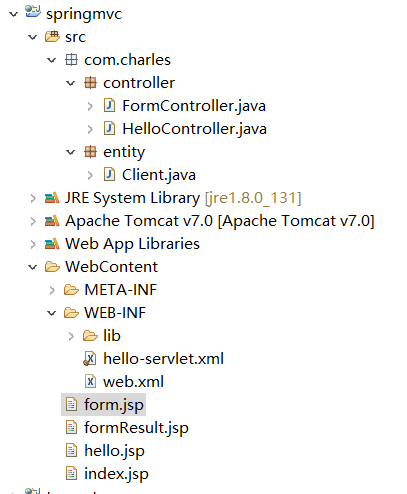
在《springmvc入门篇一.HelloWorld》基础上继续添加代码,新增:FormController.java,form.jsp,formResult.jsp 三个文件,并修改了index.jsp文件
FormController.java
 package com.charles.controller;

 import org.springframework.stereotype.Controller;

 import org.springframework.ui.Model;

 import org.springframework.web.bind.annotation.RequestMapping;

 import org.springframework.web.bind.annotation.RequestMethod;

 import org.springframework.web.servlet.ModelAndView;

 import com.charles.entity.Client;

 /**

  * <p>Type: FormController</p>

  * <p>Description: Form表单控制层</p>

  * @author baitang.<gy03554>

  * @date 2018年10月14日 下午4:37:08

  * @version v1.0.0

  */

 @Controller

 public class FormController {

     @RequestMapping(value = "formpage", method = RequestMethod.GET)

     public ModelAndView intoFormPage() {

         return  new ModelAndView("form", "command", new Client());

     }

     @RequestMapping(value = "register", method = RequestMethod.POST)

     public String register(Model model, Client client) {

         String cemail = client.getCemail();

         String cpwd = client.getCpwd();

         System.out.println("客户输入的邮箱是:" + cemail);

         System.out.println("客户输入的密码是:" + cpwd);

         model.addAttribute("cemail", cemail);

         model.addAttribute("cpwd", cpwd);

         return "formResult";

     }

 }
form.jsp 文件代码:
 <%@ page language="java" contentType="text/html; charset=UTF-8" pageEncoding="UTF-8"%>

 <%@ taglib uri="http://www.springframework.org/tags/form" prefix="form" %>

 <!DOCTYPE html PUBLIC "-//W3C//DTD HTML 4.01 Transitional//EN" "http://www.w3.org/TR/html4/loose.dtd">

 <html>

     <head>

         <meta http-equiv="Content-Type" content="text/html; charset=UTF-8">

         <title>SpringMVC.入门篇《二》form表单</title>

     </head>

     <body>

         <center>

             <h2>客户注册</h2>

             <form:form method="post" action="register">

                 <table border="1px" cellpadding="0" cellspacing="0">

                     <tr>

                         <td><form:label path="cemail">邮箱:</form:label> </td>

                         <td><form:input path="cemail"/> </td>

                     </tr>

                     <tr>

                         <td><form:label path="cpwd">密码:</form:label> </td>

                         <td><form:input path="cpwd"/> </td>

                     </tr>

                     <tr>

                         <td colspan="2">

                             <input type="submit" value="提交" />

                         </td>

 <!--                         <td></td> -->

                     </tr>

                 </table>

             </form:form>

         </center>

     </body>

 </html>
formResult.jsp 代码
 <%@ page language="java" contentType="text/html; charset=UTF-8" pageEncoding="UTF-8"%>

 <!DOCTYPE html PUBLIC "-//W3C//DTD HTML 4.01 Transitional//EN" "http://www.w3.org/TR/html4/loose.dtd">

 <html>

     <head>

         <meta http-equiv="Content-Type" content="text/html; charset=UTF-8">

         <title>Insert title here</title>

     </head>

     <body>

         <center>

             <h2>注册成功</h2>

             <h3>邮箱:${cemail }</h3>

             <h3>密码:${cpwd }</h3>

         </center>

     </body>

 </html>
index.jsp 代码
 <%@ page language="java" contentType="text/html; charset=UTF-8" pageEncoding="UTF-8"%>

 <!DOCTYPE html PUBLIC "-//W3C//DTD HTML 4.01 Transitional//EN" "http://www.w3.org/TR/html4/loose.dtd">

 <html>

     <head>

         <meta http-equiv="Content-Type" content="text/html; charset=UTF-8">

         <title>Insert title here</title>

     </head>

     <body>

         <a href="hello">进入Hello页面.</a> <br/>

         <a href="formpage">进入Form表单页面.</a>

     </body>

 </html>
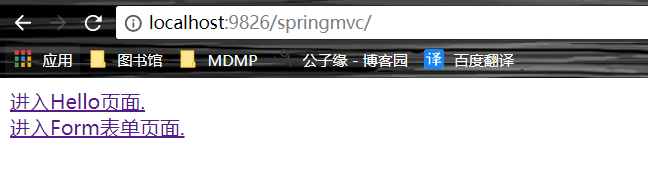
运行项目,通过浏览器访问:http://localhost:9826/springmvc ,点击:进入Form表单页面, 填写form表单信息,然后注册。


如有问题,欢迎纠正!!!
如有转载,请标明源处:https://www.cnblogs.com/Charles-Yuan/p/9786855.html
SpringMVC.入门篇《二》form表单的更多相关文章
- [精]Oracle APEX 5.0 入门教程(一) Form表单
Oracle APEX Tutorial for Beginners (APEX 5.0) 1- Introduction 2- Create Workspace 3- Work with Works ...
- springmvc使用map接收form表单的参数
其实只需要在map前面加上@RequestParam参数即可,jsp的name等都不变 public String queryByCondition(@RequestParam Map<Stri ...
- django form表单验证
一. django form表单验证引入 有时时候我们需要使用get,post,put等方式在前台HTML页面提交一些数据到后台处理例 ; <!DOCTYPE html> <html ...
- Unit 2.前端之html--table(表格),form(表单)标签
一.table标签 作用:定义html表格.一个table标签元素至少包含 thead(表头),tbody(表主题),还可以有tfoot(表底部) html表格游table元素及一个或者多个tr,th ...
- 前端HTML基础之form表单
目录 一:form表单 1.form表单功能 2.表单元素 二:form表单搭建(注册页面) 1.编写input会出现黄色阴影问题 三:完整版,前端代码(注册页面) 四:type属性介绍 1.inpu ...
- 天河微信小程序入门《四》:融会贯通,form表单提交数据库
天河在阔别了十几天之后终于又回来了.其实这篇文章里的demo是接着(天河微信小程序入门<三>)后面就做了的,但是因为最近在做别的项目,所以就偷懒没有发出来.放到今天来看,从前台提交数据到数 ...
- form表单那点事儿(下) 进阶篇
form表单那点事儿(下) 进阶篇 上一篇主要温习了一下form表单的属性和表单元素,这一片主要讲解用JavaScript如何操作form. 目录: 表单操作 取值 赋值 重置 校验 提交 技巧 不提 ...
- form表单那点事儿(上) 基础篇
form表单那点事儿(上) 基础篇 做为html中最为常见,应用最广泛的标签之一,form常伴随前端左右.了解更深,用的更顺. 目录: 表单属性 表单元素 常识 模拟外观 表单属性 这个表单展示了fo ...
- SpringMVC中使用bean来接收form表单提交的参数时的注意点
这是前辈们对于SpringMVC接收表单数据记录下来的总结经验: SpringMVC接收页面表单参数 springmvc请求参数获取的几种方法 下面是我自己在使用时发现的,前辈们没有记录的细节和注意点 ...
随机推荐
- deepin中Tomcat添加执行权限
terwer@terwer-PC:~$ cd /opt/*tomcat*/bin terwer@terwer-PC:/opt/apache-tomcat-9.0.13/bin$ sudo chmod ...
- OC中如何优化代理是否响应某个方法
看以下示例代码: if([_delegate respondsToSelector: @selector(someClassDidSomething:)){ [_delegate someClassD ...
- day2_webservice接口怎么测-SoapUI
可以用SoapUI工具测试 步骤: 1.新建soap project Ok后左侧出现接口内容 2.输入参数执行 3.根据需求文档的参数返回值做对比
- 关于.htaccess的设置
RewriteEngine On #设置是否开始rewrite RewriteBase / #设置开始匹配的目录,比如web程序放在/var/www/html/test下,则这个值要设置为" ...
- ReactDom.render调用后没有渲染
可能发生问题的代码: <!DOCTYPE html> <html lang="en"> <head> <meta charset=&quo ...
- Go-学习之路
Go学习之路 环境搭建 基础知识 类型与变量 常量与运算符 控制语句 Array数组 slice切片 function函数 ...持续更新中
- 【Python全栈-后端开发】MySQL数据库-练习题
MySQL数据库-练习题 一.表关系 请创建如下表,并创建相关约束 二.操作表 1.自行创建测试数据 2.查询“生物”课程比“物理”课程成绩高的所有学生的学号: 3.查询平均成绩大于60分的同学的学号 ...
- 【Python爬虫】Requests库的基本使用
Requests库的基本使用 阅读目录 基本的GET请求 带参数的GET请求 解析Json 获取二进制数据 添加headers 基本的POST请求 response属性 文件上传 获取cookie 会 ...
- cuda9.0编译caffe报错nvcc fatal : Unsupported gpu architecture 'compute_70'
Tesla V100 cuda9.0 caffe编译的时候报上述错误,修改方法: CUDA_ARCH := #-gencode arch=compute_20,code=sm_20 \ #-genco ...
- 生成器-代码举例:()和yield
怎么自定义一个生成器:两个方法: 1.小括号包裹表达式 2.函数中用yield返回 方法一:①小括号包裹表达式 G=(x*2 for x in range(5)) print(G)输出:<gen ...