
linux笔记_day06
1.用户:表示符,凭证
2.用户组:表示符
进程也是有属主和属组的
安全上下文(secure context):
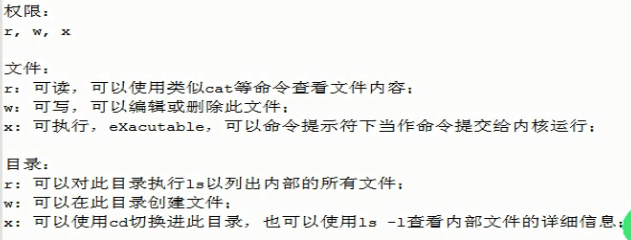
用户:UID,/etc/pawwd
组:GID ,/etc/group
影子口令:
用户:/etc/shadow
组:/etc/gshadow
用户类别:
管理员:uid=0
普通用户:1-65535
系统用户1-499(后台进程的属主)
一般用户500-60000
用户组类别:
基本组:用户的默认组
私有组: 在创建用户时,如果没有给用户指定其所属的组,系统会默认给用户创建一个和用户同名的组。
附加组:
进程被发起之前是个可执行文件,文件执行之前的权限,进程的权限是进程发起者的身份(进程可以使用那些资源文件,由发起者决定,不是文件的所属者)
[root@good eric usr]# whatis passwd

passwd               (1)  - update user's authentication tokens

passwd               (5)  - password file

passwd [sslpasswd]   (1ssl)  - compute password hashes

[root@good eric usr]# man 5 passwd

The field descriptions are:

              account   the name of the user on the system.  It should not contain capital letters.

              password  the encrypted user password, an asterisk (*), or the letter 'x'.  (See pwconv(8) for an  expla-

                        nation of 'x'.)

              UID       the numerical user ID.

              GID       the numerical primary group ID for this user.

              GECOS     This field is optional and only used for informational purposes.  Usually, it contains the full

                        username.  GECOS means General Electric Comprehensive Operating System, which has been  renamed

                        to  GCOS  when GE’s large systems division was sold to Honeywell.  Dennis Ritchie has reported:

                        "Sometimes we sent printer output or batch jobs to the GCOS machine.  The  gcos  field  in  the

                        password file was a place to stash the information for the $IDENTcard.  Not elegant."

              directory the user’s $HOME directory.

              shell     the  program to run at login (if empty, use /bin/sh).  If set to a non-existing executable, the

                        user will be unable to login through login(1).用户默认shell
添加用户
[root@good eric usr]# which useradd

/usr/sbin/useradd

[root@good eric usr]# ls -l `which useradd`

-rwxr-x---. 1 root root 111320 Feb  9  2016 /usr/sbin/useradd

[root@good eric usr]# useradd tom

[root@good eric usr]# tail -1 /etc/passwd

tom:x:501:501::/home/tom:/bin/bash

[root@good eric usr]# tail -1 /etc/shadow

tom:!!:17299:0:99999:7:::

[root@good eric usr]# passwd tom

New password:

BAD PASSWORD: it is based on a dictionary word

BAD PASSWORD: is too simple

Retype new password:

passwd: all authentication tokens updated successfully.

[root@good eric usr]# tail -1 /etc/shadow

tom:$1$0G6ELf7b$W46ShX5zObXOfepp6Eb8p/:17299:0:99999:7:::

[root@good eric usr]#

[root@good eric default]# cd /etc/default/

[root@good eric default]# ls

nss  useradd

[root@good eric default]# file useradd

useradd: ASCII text

[root@good eric default]#
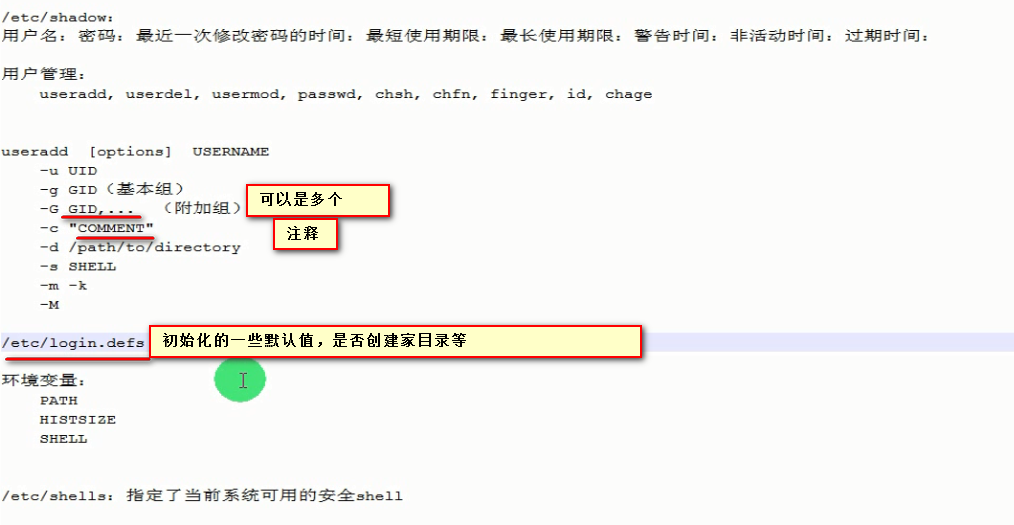
useradd -c The ‘-c‘ option allows you to add custom comments, such as user’s full name, phone number, etc to /etc/passwd file
linux笔记_day06的更多相关文章
- 【Linux笔记】Linux目录结构
[Linux笔记]Linux目录结构 本文内容整理自网络,以作参考. /:根目录,位于linux文件系统目录结构的顶层,一般根目录下只存放目录,不要存放文件,/etc./bin./dev./lib ...
- Linux 笔记 #03# 在 Debian远程服务器上运行 Java socket程序
我试图做什么:把我的破代码放到服务器上运行,并成功与客户端进行 socket通信. 预备环境:刚安装好 MySQL 和 JVM 的 Linux远程服务器(Debian 8)一台. 主要有如下几个步骤: ...
- 《学渣Linux笔记》——关于.bashrc与profile(涉及交互式与非交互式、登录与非登录shell)
<学渣Linux笔记>--关于.bashrc与profile(涉及交互式与非交互式.登录与非登录shell) 1.基本概念(个人理解) 交互式shell:等待用户输入,并执行相应操作的sh ...
- 《学渣Linux笔记》——更改ls命令的输出颜色和命令提示符颜色(二)
<学渣Linux笔记>--更改ls命令的输出颜色和命令提示符颜色(二) II.更改命令提示符颜色 命令提示符的显示格式是由变量PS1决定的,首先我们查找GNU官方手册,发现如下内容(不是我 ...
- Linux笔记(二)
Linux笔记(二) 一.软件包管理 1.rpm命令使用:Linux安装软件包的三种方法 rpm工具类似于Windows的exe文件,可以直接进行安装,而且安装路径和文件名一般都是固定好的. 在Cen ...
- linux笔记(一)——基本命令和快捷键
linux笔记(一) 1.常用BASH快捷键 编辑命令 快捷键 作用 Ctrl + a 移到命令行首 Ctrl + e 移到命令行尾 Ctrl + xx 在命令行首和光标之间移动 Ctrl + u 从 ...
- Ubuntu/Linux 笔记应用 为知笔记(支持markdown)
发现网易云笔记没有Linux,但是为知笔记有Linux版本,且支持markdown格式 sudo add-apt-repository ppa:wiznote-team sudo apt-get up ...
- Linux 笔记 #04# Installing Tomcat 8 on Debian
失败一 ※ 失败二 ※ 失败三 ※ 完 1- 确认机型: root@iZwz:~# lsb_release -a LSB Version: core-2.0-amd64:core-2.0-noarc ...
- Linux笔记-Linux的命令初解1
我是一个Linux的初学者,经验肯定没有大牛们那么全面,但是我很想把自己在学习过程中的所有所学和一些自己的感悟写下来. 首先我主要看的书为<鸟哥的私房菜>,这是一本非常棒的书,但是你会发现 ...
随机推荐
- Minimum Cost POJ - 2516 (模板题 spfa最小费用最大流)
题意: 人回家,一步一块钱,有x个人,y个房子,求能回家的最大人数且使之费用最小 解析: 就是....套模板,,,, 建图(⊙﹏⊙)...要仔细观察呐 对于人拆不拆都可以 都能过,,,,这里贴上拆开 ...
- Surrounded Regions - LeetCode
目录 题目链接 注意点 解法 小结 题目链接 https://leetcode.com/problems/surrounded-regions/ 注意点 边缘不算包围'O' 解法 解法一:dfs.找处 ...
- Java8的Stream流(一) --- 基础用法
Java8中的Stream Stream使用一种类似用SQL语句从数据库查询数据的直观方式来提供一种对Java集合运算和表达的高阶抽象. Stream的特性及优点: 无存储. Stream不是一种数据 ...
- Luogu 1351 NOIP 2014 联合权值(贪心,计数原理)
Luogu 1351 NOIP 2014 联合权值(贪心,计数原理) Description 无向连通图 G 有 n 个点,n-1 条边.点从 1 到 n 依次编号,编号为 i 的点的权值为 Wi, ...
- Persits.Jpeg CMYK-to-RGB
这几天发现有几个用户上传的图片显示一个“红叉叉”,用迅雷下载一看,原来图片的“模式”是CMYK,这样的模式是不能在IE中正常显示的. 我想起能不能用程序自动转换呢? 在网上看到利用Persits.Jp ...
- MySQL之汇总数据(AVG,COUNT,MAX,MIN,SUM)
table test Field Type Null Key Default Extra id int(11) NO PRI NULL auto_increment name char(50) NO ...
- bug7 java.net.BindException: 端口被占用。
java.net.BindException: 端口被占用. java.net.BindException: 端口被占用.
- udp之关于linux udp收发包缓冲区大小
1.修订单个socket的缓冲区大小:通过setsockopt使用SO_RCVBUF来设置接收缓冲区,该参数在设置的时候不会与rmem_max进行对比校验,但是如果设置的大小超过rmem_max的话, ...
- webstorm的一些小技巧
1.怎样禁止自动保存文件: 设置--->外观和行为--->常规--->Synchronization--->要么四个全不选,要么把最后两个不选 Settings--->A ...
- libevent-2.0.so.5 (安装MEMCACHED问题)
今天安装memcache启动服务时出现 error while loading shared libraries: libevent-2.0.so.5: cannot open shared obje ...