
TFLearn 与 Tensorflow 一起使用
好用的不是一点点、、=-=、、

import tensorflow as tf
import tflearn
import tflearn.datasets.mnist as mnist

# Using MNIST Dataset
import tflearn.datasets.mnist as mnist
mnist_data = mnist.read_data_sets(one_hot=True)

# User defined placeholders
with tf.Graph().as_default():
    # Placeholders for data and labels
    X = tf.placeholder(shape=(None, 784), dtype=tf.float32)
    Y = tf.placeholder(shape=(None, 10), dtype=tf.float32)

    net = tf.reshape(X, [-1, 28, 28, 1])

    # Using TFLearn wrappers for network building
    net = tflearn.conv_2d(net, 32, 3, activation='relu')
    net = tflearn.max_pool_2d(net, 2)
    net = tflearn.local_response_normalization(net)
    net = tflearn.dropout(net, 0.8)
    net = tflearn.conv_2d(net, 64, 3, activation='relu')
    net = tflearn.max_pool_2d(net, 2)
    net = tflearn.local_response_normalization(net)
    net = tflearn.dropout(net, 0.8)
    net = tflearn.fully_connected(net, 128, activation='tanh')
    net = tflearn.dropout(net, 0.8)
    net = tflearn.fully_connected(net, 256, activation='tanh')
    net = tflearn.dropout(net, 0.8)
    net = tflearn.fully_connected(net, 10, activation='linear')

    # Defining other ops using Tensorflow
    loss = tf.reduce_mean(tf.nn.softmax_cross_entropy_with_logits(logits=net, labels=Y))
    optimizer = tf.train.AdamOptimizer(learning_rate=0.01).minimize(loss)

    # Initializing the variables
    init = tf.initialize_all_variables()

    # Launch the graph
    with tf.Session() as sess:
        sess.run(init)

        batch_size = 128
        for epoch in range(2): # 2 epochs
            avg_cost = 0.
            total_batch = int(mnist_data.train.num_examples/batch_size)
            for i in range(total_batch):
                batch_xs, batch_ys = mnist_data.train.next_batch(batch_size)
                sess.run(optimizer, feed_dict={X: batch_xs, Y: batch_ys})
                cost = sess.run(loss, feed_dict={X: batch_xs, Y: batch_ys})
                avg_cost += cost/total_batch
                if i % 20 == 0:
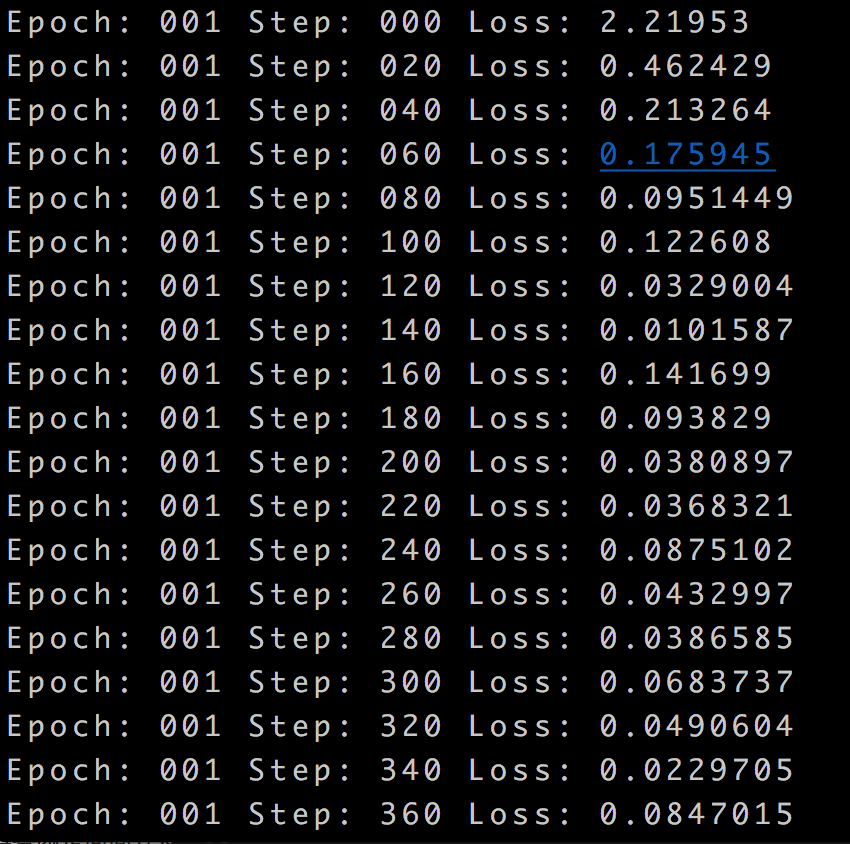
                    print "Epoch:", '%03d' % (epoch+1), "Step:", '%03d' % i, "Loss:", str(cost)
结果:
TFLearn 与 Tensorflow 一起使用的更多相关文章
- NN tutorials:
确实“人话”解释清楚了 ^_^ 池化不只有减少参数的作用,还可以: 不变性,更关注是否存在某些特征而不是特征具体的位置.可以看作加了一个很强的先验,让学到的特征要能容忍一些的变化.防止过拟合,提高模型 ...
- Tensorflow tflearn 编写RCNN
两周多的努力总算写出了RCNN的代码,这段代码非常有意思,并且还顺带复习了几个Tensorflow应用方面的知识点,故特此总结下,带大家分享下经验.理论方面,RCNN的理论教程颇多,这里我不在做详尽说 ...
- tflearn tensorflow LSTM predict sin function
from __future__ import division, print_function, absolute_import import tflearn import numpy as np i ...
- TensorFlow 之 高层封装slim,tflearn,keras
tensorflow资源整合 使用原生态TensorFlow API来实现各种不同的神经网络结构.虽然原生态的TensorFlow API可以很灵活的支持不同的神经网络结构,但是其代码相对比较冗长,写 ...
- tflearn 中文汉字识别,训练后模型存为pb给TensorFlow使用——模型层次太深,或者太复杂训练时候都不会收敛
tflearn 中文汉字识别,训练后模型存为pb给TensorFlow使用. 数据目录在data,data下放了汉字识别图片: data$ ls0 1 10 11 12 13 14 15 ...
- anaconda tensorflow tflearn 自动安装脚本 anaconda使用-b可以非交互式安装
install_dir=/usr/local/anaconda3 DIR="$( cd "$( dirname "${BASH_SOURCE[0]}" )&qu ...
- 将tflearn的模型保存为pb,给TensorFlow使用
参考:https://github.com/tflearn/tflearn/issues/964 解决方法: """ Tensorflow graph freezer C ...
- TensorFlow实战笔记(17)---TFlearn
目录: 分布式Estimator 自定义模型 建立自己的机器学习Estimator 调节RunConfig运行时的参数 Experiment和LearnRunner 深度学习Estimator 深度神 ...
- 吴裕雄--天生自然TensorFlow高层封装:使用TFLearn处理MNIST数据集实现LeNet-5模型
# 1. 通过TFLearn的API定义卷机神经网络. import tflearn import tflearn.datasets.mnist as mnist from tflearn.layer ...
随机推荐
- iOS block 机制
本文要将block的以下机制,并配合具体代码详细描述: block 与 外部变量 block 的存储域:栈块.堆块.全局块 定义 块与函数类似,只不过是直接定义在另一个函数里,和定义它的那个函数共享同 ...
- VCG(VisualCodeGrepper)安装使用教程
一.说明 代码审计工具看来还是比较难做,一是开源的代码审计工具少,二是原本的一些开源审计工具很多都不更新甚至不能使用了. VCG支持审计C++.Java.C#.PHP和VB,但其“审计”基本相当于函数 ...
- Eclipse集成weblogic教程
1.在线安装插件 1.1安装Oracle Weblogic Servers Tools oeop是添加的软件仓库的名字,随便写主要是方便记. 仓库链接:http://www.oracle.com/te ...
- S3cmd命令行管理对象存储
我的使用步骤 cd /usr/ 目录 git clone https://github.com/jdcloud-cmw/s3cmd.git 下载文件 ln -s /usr/s3cmd/s3c ...
- oracle和sql server中,取前10条数据语法的区别
在sql server中,取数据中前10条语句,我们可以用top 10 这样语句,但是oracle就没有这个函数,接下来介绍它们之间的区别 1.sql server 取前10语句和随机10条的语法 - ...
- C/C++ 运算符优先级(转载)
最讨厌这个了.在这里记录下. 优先级 操作符 描述 例子 结合性 1 ()[]->.::++-- 调节优先级的括号操作符数组下标访问操作符通过指向对象的指针访问成员的操作符通过对象本身访问成员的 ...
- 20 KMP匹配的Next值和Nextval值
i 0 1 2 3 4 5 6 7 8 s a b a b a a b a b n ...
- 前端之Bootstrap框架
一.Bootstrap介绍 Bootstrap是Twitter开源的基于HTML.CSS.JavaScript的前端框架. 它是为实现快速开发Web应用程序而设计的一套前端工具包. 它支持响应式布局, ...
- mysql存储过程中使用游标
用户变量一般以@开头,作用于全局范围 局部变量需用 declare 定义格式为 declare 变量名 数据类型 [default value]; mysql 数据类型有 int ,float,dat ...
- (C/C++学习笔记) 二十. 文件和流
二十. 文件和流 ● 文件的概念 文件(file) 一. C/C++语言将文件作为字节序列(sequence of characters)来对待,但从编码角度,或说从对字节信息的解释来看,文件分为:文 ...