
也谈.Net中间语言——破解Delphi2CS行数和时间限制
其实我一直在研究将Delphi版的传奇2源代码使用C#实现,不过由于我并没有学习过Delphi。就只能说先试着用一些工具转换代码。
后来我在网上找到了一款软件:Delphi2CS。这款软件比较强大,虽然不支持条件编译,但竟然能对窗体控件达到非常高的转换效率!且直接生成vs.net的项目,令我十分高兴,这意味着我们只需要修复很少的部分。
不过真正尝试转换的时候发现有一个限制:源文件不得超过500行。
如下,图片为准换完成后的报告,代码为转换完成后的cs文件:

 using System;

 using System.IO;

 using DCPconst;

 using Base64;

 using Sha1;

 namespace DCPcrypt

 {

  // Delphi2CS trial converts the .PAS file that is less than 500 lines.

  // DCPcrypt.pas is 1029 lines.

  // Please purchse the final version to avoid the limitation.

 }
这令我十分困扰。
后来在网上发现博客园的liufei同学解决了这个问题,他说明了方法并提供了可用程序。
使用他的程序确实可以达到效果,但是另一个问题却出现了:

大概意思是说过期了。我是从官网上下载了文件进行安装,然后将liufei同学的破解文件放到程序目录下执行的(如果是直接使用liu同学的程序是可行的)。不过出现了上图的情况。
虽然不知道原因,不过貌似现在只能自己来破解了。
先打开IL,载入程序
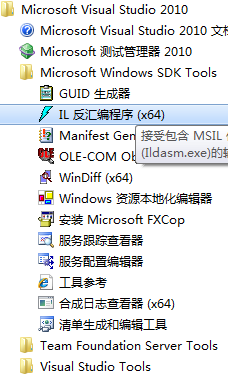

然后依次点击“文件”=>“转储”,使用默认设置就行了

然后打开il文件开始找,不过没什么挑战性,一下就找到了

上述代码可用.NET Reflector还原
 public void F()

 {

     if (!this.TB)

     {

         try

         {

             DC.Q = this;

             StringBuilder builder = new StringBuilder();

             bool flag = false;

             StringBuilder builder2 = new StringBuilder();

             bool flag2 = false;

             StringBuilder builder3 = new StringBuilder();

             StringBuilder b = null;

             if (this.R != null)

             {

                 AB ab = null;

                 foreach (string str in this.R)

                 {

                     ab = this.NB.BB(str);

                     if (ab != null)

                     {

                         this.U(this.LD(ab.O()), null);

                     }

                 }

             }

             if (this.OB != null)

             {

                 foreach (string str2 in this.OB)

                 {

                     if (!str2.Equals(this.O()))

                     {

                         builder.Append("using ").Append(str2).Append(";").Append("\r\n");

                     }

                 }

             }

             string str3 = SB.U();

             if ((str3 != null) && (str3 != ""))

             {

                 builder.Append(str3);

             }

             if (this.EB != null)

             {

                 builder.Append(this.EB.Replace("U_K_N_O_W_N ", " "));

             }

             if (QB.B != )

             {

                 this.ED("Delphi2CS has expired.");

                 builder3.Append("// Delphi2CS has expired, please purchase the final version. \r\n");

                 flag = true;

             }

             else if (this.GB.A > 0x1f4)

             {

                 this.ED("Delphi2CS trial converts the .pas file that is less than 500 lines.");

                 builder3.Append(" // Delphi2CS trial converts the .PAS file that is less than 500 lines. \r\n");

                 string fileName = Path.GetFileName(this.O);

                 builder3.Append(string.Concat(new object[] { " // ", fileName, " is ", this.GB.A, " lines. \r\n" }));

                 builder3.Append(" // Please purchse the final version to avoid the limitation.\r\n");

                 flag = true;

             }

             if (!flag)

             {

                 if ((this.MB != null) && (this.MB.Count > ))

                 {

                     foreach (YB yb in this.MB.ToArray())

                     {

                         if (yb.L() == null)

                         {

                             continue;

                         }

                         if (SB.J())

                         {

                             if (b == null)

                             {

                                 b = new StringBuilder();

                             }

                             b.Append("namespace " + this.O() + "\r\n{").Append("\r\n");

                             b.Append("  partial class ").Append(yb.B.A).Append("\r\n");

                             b.Append("    {\r\n");

                             b.Append(yb.L().U());

                             b.Append("    }\r\n");

                             b.Append("}\r\n");

                         }

                         builder3.Append(yb.HB());

                         this.MB.Remove(yb);

                     }

                 }

                 if ((this.MB != null) && (this.MB.Count > ))

                 {

                     foreach (YB yb2 in this.MB)

                     {

                         builder3.Append(yb2.HB());

                     }

                 }

                 if (this.U.K.W != null)

                 {

                     flag2 = true;

                     StringBuilder builder5 = new StringBuilder();

                     builder5.Append(this.U.K.W.FB());

                     if (builder5.Length > )

                     {

                         builder2.Append("namespace ").Append(this.O()).Append(".Units\r\n");

                         builder2.Append("{\r\n");

                         builder2.Append(builder5.ToString());

                         builder2.Append("}\r\n");

                         builder2.Append("\r\n");

                         string str5 = this.HB();

                         if (str5 != null)

                         {

                             str5 = str5.Replace("U_K_N_O_W_N ", "");

                             builder2.Append(str5);

                         }

                     }

                 }

             }

             string fileNameWithoutExtension = Path.GetFileNameWithoutExtension(this.O);

             string a = fileNameWithoutExtension + ".Designer.cs";

             if (this.RB)

             {

                 string str8 = this.NB.LB(this.O);

                 fileNameWithoutExtension = fileNameWithoutExtension + str8;

             }

             else

             {

                 fileNameWithoutExtension = fileNameWithoutExtension + ".cs";

             }

             string str9 = this.O.ToLower().Replace(this.NB.K, this.NB.J);

             if (!str9.StartsWith(this.NB.J))

             {

                 str9 = this.NB.J(str9, this.NB.J);

             }

             if (!str9.StartsWith(this.NB.J))

             {

                 str9 = this.NB.K(str9, this.NB.J);

             }

             str9 = Path.Combine(Path.GetDirectoryName(str9), fileNameWithoutExtension);

             FileInfo info = new FileInfo(str9);

             if (info.Exists)

             {

                 info.Delete();

             }

             else

             {

                 info.Directory.Create();

             }

             this.PC();

             FileStream stream = info.Open(FileMode.OpenOrCreate, FileAccess.ReadWrite, FileShare.Read);

             StreamWriter writer = new StreamWriter(stream, Encoding.Default);

             writer.Write(builder.ToString());

             if (builder3.Length > )

             {

                 writer.WriteLine("namespace " + this.O() + "\r\n{");

                 writer.Write(builder3.ToString());

                 writer.WriteLine("}\r\n");

             }

             if (flag2)

             {

                 writer.Write(builder2.ToString());

             }

             writer.Close();

             stream.Close();

             writer = null;

             stream = null;

             if ((b != null) && (b.Length > ))

             {

                 this.VC(a, b);

             }

             builder2 = null;

             builder3 = null;

             builder = null;

             this.P = str9.Replace(this.NB.J, "");

             if (this.P.StartsWith(Path.DirectorySeparatorChar.ToString()))

             {

                 this.P = this.P.Substring();

             }

             this.NB.T.Add(this.P);

             if (this.KB != null)

             {

                 string key = this.KB.Replace(this.NB.J, "");

                 this.JC("Creating " + Path.GetFileName(this.KB));

                 try

                 {

                     this.LB.Close();

                     this.NB.U.Add(key, this.P);

                 }

                 catch

                 {

                 }

             }

         }

         catch (Exception exception)

         {

             this.NB.W(exception.ToString());

             this.ED(exception.Message);

         }

     }

 }
上面的语句其实是一个条件判断,判断读取到的行数是否小于500,在第51行处。我们可以改到500000。
行数限制似乎破解了,那么时间限制呢?文章第一副图片所示大概是说我们使用的是Delphi2CS评估版,而现在它过期了。
破解过期时间很简单,我们在il文件中找到过期判断语句
 .method private hidebysig instance void

           H(object A,

             class [mscorlib]System.EventArgs B) cil managed

   {

     // 代码大小        (0x1b3)

     .maxstack

     .locals init (string V_0,

              string V_1,

              class [mscorlib]System.Threading.ThreadStart V_2,

              class [mscorlib]System.Threading.Thread V_3)

     IL_0000:  ldsfld     int32 QB::B

     IL_0005:  ldc.i4.s

     IL_0007:  beq.s      IL_001d

     IL_0009:  ldstr      "Delphi2CS Evaluation Version has expired, please p"

     + "urchase the final version."

     IL_000e:  ldstr      "Error"

     IL_0013:  ldc.i4.

     IL_0014:  ldc.i4.s
搜索“Delphi2CS Evaluation”即可找到,上面代码第11行即判断了QB.B和100是否相等,我们通过.NET Reflector来查看可得下面的代码:
 private void H(object A, EventArgs B)

 {

     if (QB.B != )

     {

         MessageBox.Show("Delphi2CS Evaluation Version has expired, please purchase the final version.", "Error", MessageBoxButtons.OK, MessageBoxIcon.Hand);

     }

     else

     {

         this.UB = this.O.Text;

         if ((this.UB.Trim().Length == ) || (this.UB == null))

         {

             MessageBox.Show("You must input an existed Delphi Project filename", "Error", MessageBoxButtons.OK, MessageBoxIcon.Hand);

         }

         else if (!File.Exists(this.UB))

         {

             MessageBox.Show("You must input an existed Delphi Project filename:\n '" + this.UB + "'", "Error", MessageBoxButtons.OK, MessageBoxIcon.Hand);

         }

         else

         {

             this.VB = this.J.Text;

             if (this.VB.Trim().Length == )

             {

                 MessageBox.Show("Please specify an output path for the generated C# files", "Error", MessageBoxButtons.OK, MessageBoxIcon.Hand);

             }

             else

             {

                 if (!Directory.Exists(this.VB))

                 {

                     Directory.CreateDirectory(this.VB);

                 }

                 this.VB = Path.GetFullPath(this.VB);

                 if (!this.VB.EndsWith(new string(Path.DirectorySeparatorChar, )))

                 {

                     this.VB = this.VB + Path.DirectorySeparatorChar;

                 }

                 string str = Path.GetDirectoryName(this.UB).ToLower();

                 string str2 = Path.GetDirectoryName(this.VB).ToLower();

                 if (str.StartsWith(str2))

                 {

                     MessageBox.Show("Please make sure the Output path is different from the project path.", "Warning", MessageBoxButtons.OK, MessageBoxIcon.Hand);

                 }

                 else

                 {

                     this.WB = new LD(this);

                     ThreadStart start = new ThreadStart(this.I);

                     Thread thread = new Thread(start);

                     thread.Start();

                     this.WB.ShowDialog(this);

                     try

                     {

                         if (thread != null)

                         {

                             thread.Abort();

                         }

                         else

                         {

                             thread = null;

                         }

                     }

                     catch

                     {

                     }

                     this.WB = null;

                     base.Activate();

                 }

             }

         }

     }

 }
其实能够猜到:这个方法是点击浏览按钮选择了文件后的事件处理方法。第一步就判断了QB.B是否等于100,如果不等的话就会终端执行。我们只需把if的条件设为永远不等即可,如下面这样
 .method private hidebysig instance void

           H(object A,

             class [mscorlib]System.EventArgs B) cil managed

   {

     // 代码大小        (0x1b3)

     .maxstack

     .locals init (string V_0,

              string V_1,

              class [mscorlib]System.Threading.ThreadStart V_2,

              class [mscorlib]System.Threading.Thread V_3)

     IL_0000:  ldc.i4.s

     IL_0005:  ldc.i4.s

     IL_0007:  beq.s      IL_001d

     IL_0009:  ldstr      "Delphi2CS Evaluation Version has expired, please p"

     + "urchase the final version."

     IL_000e:  ldstr      "Error"

     IL_0013:  ldc.i4.

     IL_0014:  ldc.i4.s
在IL_0000里我把二元判断表达式左边的值从QB.B直接换成了100,这样的话就不存在过期了,因为if(100 != 100)永远为false!
其实现在要做的就很简单了,把上面的0x1f4(即500)改大和把这个使用了QB.B判断并终止程序执行的地方修正(其实重要的地方有两个,上述的KD.H方法中和BB.F中,后者的if判断正在500行判断前)。我更改过后后进入vs.net的命令行生成可执行文件。


按照liu同学的说法,delphi2cs程序需要.net framework3.5,所以vs2005的cmd无法编译,不过我没有尝试。按照上图的方法就能生成exe文件了,使用生成的文件替换掉安装目录下文件即可。
我把破解了的文件上传上来,大家可以看看。
欢迎您移步我们的交流群,无聊的时候大家一起打发时间:
或者通过QQ与我联系:
(最后编辑时间2013-08-17 01:05:38)
也谈.Net中间语言——破解Delphi2CS行数和时间限制的更多相关文章
- Android日志打印类LogUtils,能够定位到类名,方法名以及出现错误的行数并保存日志文件
Android日志打印类LogUtils,能够定位到类名,方法名以及出现错误的行数并保存日志文件 在开发中,我们常常用打印log的方式来调试我们的应用.在Java中我们常常使用方法System.out ...
- replace into 影响行数
replace into 影响行数,谈起影响行数,先理解replace into 原理:其是先到表里通过一定规则(单主键或复合主键或唯一索引)找到记录,并且删除,然后在insert into 记录,即 ...
- 统计iOS项目的总代码行数的方法
打开终端, 用cd命令 定位到工程所在的目录,然后调用以下命名即可把每个源代码文件行数及总数统计出来: find . "(" -name "*.m" -or - ...
- jquery获取table的行数、列数
$("#grd").find("tr").length; //行数 $("#grd").find("tr").find( ...
- SQL 从指定表筛选指定行信息 获取表行数
1.获取指定表的行数 --获取表中数据行数 --select max([列名]) from 表名 2.筛选指定表的指定行数据(数据表分页获取) http://www.cnblogs.com/morni ...
- 使用java读取文件夹中文件的行数
使用java统计某文件夹下所有文件的行数 经理突然交代一个任务:要求统计某个文件夹下所有文件的行数.在网上查了一个多小时没有解决.后来心里不爽就决定自己写一个java类用来统计文件的行数,于是花了两个 ...
- 图文介绍如何在Eclipse统计代码行数(转)
使用Eclipse可以方便的统计工程或文件的代码行数,方法如下: 1.点击要统计的项目或许文件夹,在菜单栏点击Search,然后点击File... 2.选中正则表达式(Regular expressi ...
- 如何获取ResultSet的行数和列数
当我们执行数据库查询返回一个ResultSet的时候,很多情况下我们需要知道这个ResultSet的大小,即它的行数和列数.我们知道它的列数可以通过resultSet.getMetaData().ge ...
- 软件工程-构建之法 WordCount小程序 统计文件中字符串个数,单词个数,词频,行数
一.前言 在之前写过一个词频统计的C语言课设,别人说你一个大三的怎么写C语言课程,我只想说我是先学习VB,VB是我编程语言的开始,然后接触到C语言及C++:再后来我是学习C++,然后反过来学习C语言, ...
随机推荐
- centos安装memcached和PHP php-pecl-memcached.x86_64
安装memcached sudo yum install memcached.x86_64 安装php-pecl-memcached php memcache有两个实现类 php-pecl-memca ...
- [Python设计模式] 第7章 找人帮忙追美眉——代理模式
github地址:https://github.com/cheesezh/python_design_patterns 题目1 Boy追求Girl,给Girl送鲜花,送巧克力,送洋娃娃. class ...
- ROS actionlib学习(三)
下面这个例子将展示用actionlib来计算随机变量的均值和标准差.首先在action文件中定义goal.result和feedback的数据类型,其中goal为样本容量,result为均值和标准差, ...
- eclipse alt+/智能提示错误问题
转自: https://blog.csdn.net/u013066244/article/details/69054447
- 【转】《iOS7 by Tutorials》系列:iOS7的设计精髓(下)
四.聚焦于内容 在iOS7里,强调的不是眼花缭乱的装饰效果,而是最重要的内容本身. 下面我们来探讨这个主题: 1.删除不必要的内容 伟大的设计更多是减法和加法的组合. 虽然很酷的想法是很重要,但还有更 ...
- java的impl
java impl 是一个资源包,用来存放java文件的. 在Java开发中,通常将后台分成几层,常见的是三层mvc:model.view.controller,模型视图控制层三层,而impl通常处于 ...
- 阿里云的免费型DV SSL证书
阿里云提供的免费型DV SSL. 证书的说明: [公告]免费新根证书,切入DigiCert PKI体系,兼容性如下操作系统版本IOS 5.0+.Android 2.3.3+.JRE 1.6.5+.WI ...
- InnoDB 存储引擎的主要知识点介绍
本文转载自:Draveness,略有修改 原文链接:『浅入浅出』MySQL 和 InnoDB · 面向信仰编程 作为一名开发人员,在日常的工作中会难以避免地接触到数据库,无论是基于文件的 sqlite ...
- maven打包含有多个main程序的jar包及运行方式
pom.xml <build> <plugins> <plugin> <groupId> ...
- android的activity被杀死后如何重启
最近公司的大屏展示机器人上的程序运行时间长了,比如五天,十天会出现偶尔的崩溃,查日志可能是内存溢出或者是ndk层的错误,这种错误一时也不太好查找,但是产品那边有个要求就是程序退出了一定要能重启,能抓日 ...