
NOSQL -- mongoDB的了解与安装(Wins10)
NOSQL -- mongoDB的了解与安装
首先看看什么是nosql:
我的理解:非关系型数据库,大多是以map形式存储,map<key,value>,适合存储,查询。redis也是nosql。
mongobd:
MongoDB 是由C++语言编写的,是一个基于分布式文件存储的开源数据库系统。
在高负载的情况下,添加更多的节点,可以保证服务器性能。
MongoDB 旨在为WEB应用提供可扩展的高性能数据存储解决方案。
MongoDB 将数据存储为一个文档,数据结构由键值(key=>value)对组成。MongoDB 文档类似于 JSON 对象。字段值可以包含其他文档,数组及文档数组。
我一般比较喜欢新鲜的东西,所以了解下mongodb。记录下
下载:
1.下载驱动:
https://www.mongodb.com/download-center#community

安装:
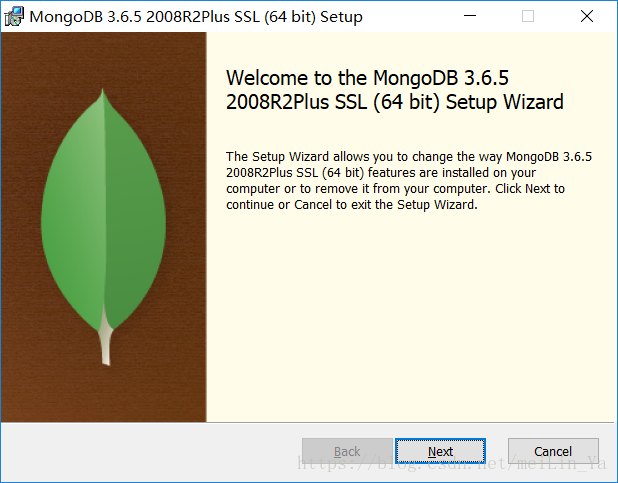
选则customer。-->点击next,-->finish
2.在当前目录下创建文件夹:
data
创建:mongo.config文件
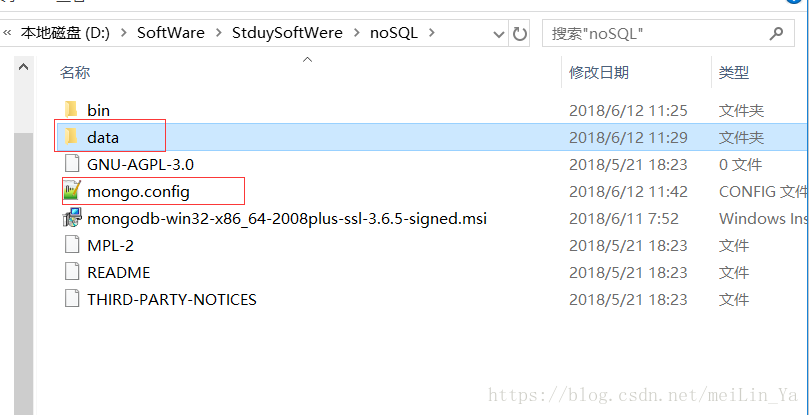
3.在data目录下
创建db和log
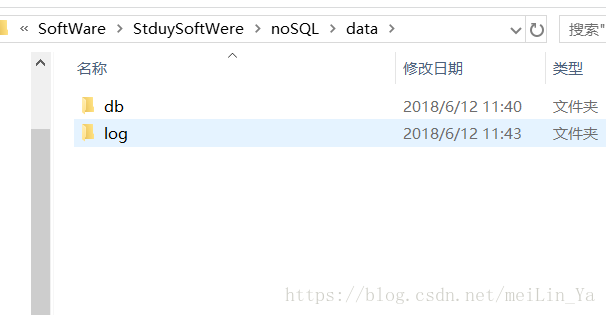
4.在log中创建一个 mongo.log的空文本。
在mongo.config中编辑:
dbpath=D:\SoftWare\StduySoftWere\noSQL\data\db

logpath=D:\SoftWare\StduySoftWere\noSQL\data\log\mongo.log
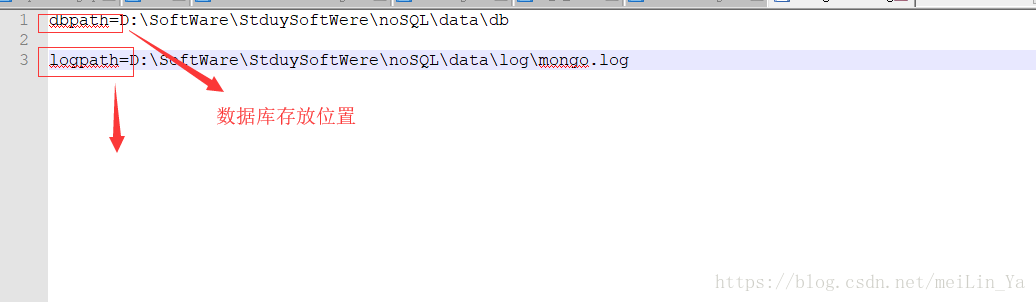
5.使用dos命令:进入mongodb的bin下:
mongod --dbpath D:\SoftWare\StduySoftWere\noSQL\data\db
出现一下效果:
D:\SoftWare\StduySoftWere\noSQL\bin>mongod --dbpath D:\SoftWare\StduySoftWere\noSQL\data\db

2018-06-11T20:33:11.319-0700 I CONTROL  [initandlisten] MongoDB starting : pid=988 port=27017 dbpath=D:\SoftWare\StduySoftWere\noSQL\data\db 64-bit host=MicroWin10-1953

2018-06-11T20:33:11.319-0700 I CONTROL  [initandlisten] targetMinOS: Windows 7/Windows Server 2008 R2

2018-06-11T20:33:11.321-0700 I CONTROL  [initandlisten] db version v3.6.5

2018-06-11T20:33:11.324-0700 I CONTROL  [initandlisten] git version: a20ecd3e3a174162052ff99913bc2ca9a839d618

2018-06-11T20:33:11.324-0700 I CONTROL  [initandlisten] OpenSSL version: OpenSSL 1.0.2o-fips  27 Mar 2018

2018-06-11T20:33:11.325-0700 I CONTROL  [initandlisten] allocator: tcmalloc

2018-06-11T20:33:11.325-0700 I CONTROL  [initandlisten] modules: none

2018-06-11T20:33:11.326-0700 I CONTROL  [initandlisten] build environment:

2018-06-11T20:33:11.326-0700 I CONTROL  [initandlisten]     distmod: 2008plus-ssl

2018-06-11T20:33:11.326-0700 I CONTROL  [initandlisten]     distarch: x86_64

2018-06-11T20:33:11.327-0700 I CONTROL  [initandlisten]     target_arch: x86_64

2018-06-11T20:33:11.327-0700 I CONTROL  [initandlisten] options: { storage: { dbPath: "D:\SoftWare\StduySoftWere\noSQL\data\db" } }

2018-06-11T20:33:11.328-0700 I STORAGE  [initandlisten] wiredtiger_open config: create,cache_size=7611M,session_max=20000,eviction=(threads_min=4,threads_max=4),config_base=false,statistics=(fast),cache_cursors=false,log=(enabled=true,archive=true,path=journal,compressor=snappy),file_manager=(close_idle_time=100000),statistics_log=(wait=0),verbose=(recovery_progress),

2018-06-11T20:33:11.344-0700 I STORAGE  [initandlisten] WiredTiger message [1528774391:343821][988:140730764704848], txn-recover: Set global recovery timestamp: 0

2018-06-11T20:33:11.360-0700 I CONTROL  [initandlisten]

2018-06-11T20:33:11.360-0700 I CONTROL  [initandlisten] ** WARNING: Access control is not enabled for the database.

2018-06-11T20:33:11.361-0700 I CONTROL  [initandlisten] **          Read and write access to data and configuration is unrestricted.

2018-06-11T20:33:11.361-0700 I CONTROL  [initandlisten]

2018-06-11T20:33:11.361-0700 I CONTROL  [initandlisten] ** WARNING: This server is bound to localhost.

2018-06-11T20:33:11.361-0700 I CONTROL  [initandlisten] **          Remote systems will be unable to connect to this server.

2018-06-11T20:33:11.362-0700 I CONTROL  [initandlisten] **          Start the server with --bind_ip <address> to specify which IP

2018-06-11T20:33:11.362-0700 I CONTROL  [initandlisten] **          addresses it should serve responses from, or with --bind_ip_all to

2018-06-11T20:33:11.364-0700 I CONTROL  [initandlisten] **          bind to all interfaces. If this behavior is desired, start the

2018-06-11T20:33:11.364-0700 I CONTROL  [initandlisten] **          server with --bind_ip 127.0.0.1 to disable this warning.

2018-06-11T20:33:11.366-0700 I CONTROL  [initandlisten]

2018-06-11T20:33:11.367-0700 I CONTROL  [initandlisten]

2018-06-11T20:33:11.367-0700 I CONTROL  [initandlisten] ** WARNING: The file system cache of this machine is configured to be greater than 40% of the total memory. This can lead to increased memory pressure and poor performance.

2018-06-11T20:33:11.367-0700 I CONTROL  [initandlisten] See http://dochub.mongodb.org/core/wt-windows-system-file-cache

2018-06-11T20:33:11.368-0700 I CONTROL  [initandlisten]

2018-06-12T11:33:11.369+0800 I STORAGE  [initandlisten] createCollection: admin.system.version with provided UUID: 01a8af6d-02d7-4e9f-aa8c-b63f58b8a5bc

2018-06-12T11:33:11.375+0800 I COMMAND  [initandlisten] setting featureCompatibilityVersion to 3.6

2018-06-12T11:33:11.379+0800 I STORAGE  [initandlisten] createCollection: local.startup_log with generated UUID: b480a552-640b-471b-a869-8808a46734a2

2018-06-12T11:33:11.552+0800 I FTDC     [initandlisten] Initializing full-time diagnostic data capture with directory 'D:/SoftWare/StduySoftWere/noSQL/data/db/diagnostic.data'

2018-06-12T11:33:11.556+0800 I NETWORK  [initandlisten] waiting for connections on port 27017

2018-06-12T11:34:35.536+0800 I NETWORK  [listener] connection accepted from 127.0.0.1:64944 #1 (1 connection now open)

2018-06-12T11:34:35.547+0800 I NETWORK  [conn1] Error receiving request from client: SSLHandshakeFailed: SSLHandshakeFailed. Ending connection from 127.0.0.1:64944 (connection id: 1)

2018-06-12T11:34:35.547+0800 I NETWORK  [listener] connection accepted from 127.0.0.1:64945 #2 (2 connections now open)

2018-06-12T11:34:35.547+0800 I NETWORK  [conn1] end connection 127.0.0.1:64944 (1 connection now open)

2018-06-12T11:34:35.548+0800 I NETWORK  [conn2] Error receiving request from client: SSLHandshakeFailed: SSLHandshakeFailed. Ending connection from 127.0.0.1:64945 (connection id: 2)

2018-06-12T11:34:35.549+0800 I NETWORK  [conn2] end connection 127.0.0.1:64945 (0 connections now open)

2018-06-12T11:34:35.788+0800 I NETWORK  [listener] connection accepted from 127.0.0.1:64947 #3 (1 connection now open)

2018-06-12T11:34:35.850+0800 I NETWORK  [listener] connection accepted from 127.0.0.1:64949 #4 (2 connections now open)

2018-06-12T11:34:35.854+0800 I NETWORK  [conn4] Error receiving request from client: SSLHandshakeFailed: SSLHandshakeFailed. Ending connection from 127.0.0.1:64949 (connection id: 4)

2018-06-12T11:34:35.855+0800 I NETWORK  [conn4] end connection 127.0.0.1:64949 (1 connection now open)

2018-06-12T11:34:36.000+0800 I NETWORK  [conn3] Error receiving request from client: SSLHandshakeFailed: SSLHandshakeFailed. Ending connection from 127.0.0.1:64947 (connection id: 3)

2018-06-12T11:34:36.001+0800 I NETWORK  [conn3] end connection 127.0.0.1:64947 (0 connections now open)

2018-06-12T11:34:36.102+0800 I NETWORK  [listener] connection accepted from 127.0.0.1:64953 #5 (1 connection now open)

2018-06-12T11:34:36.103+0800 I NETWORK  [conn5] Error receiving request from client: SSLHandshakeFailed: SSLHandshakeFailed. Ending connection from 127.0.0.1:64953 (connection id: 5)

2018-06-12T11:34:36.103+0800 I NETWORK  [conn5] end connection 127.0.0.1:64953 (0 connections now open)

2018-06-12T11:34:36.302+0800 I NETWORK  [listener] connection accepted from 127.0.0.1:64954 #6 (1 connection now open)

2018-06-12T11:34:36.303+0800 I NETWORK  [conn6] Error receiving request from client: SSLHandshakeFailed: SSLHandshakeFailed. Ending connection from 127.0.0.1:64954 (connection id: 6)

2018-06-12T11:34:36.303+0800 I NETWORK  [conn6] end connection 127.0.0.1:64954 (0 connections now open)

2018-06-12T11:34:36.304+0800 I NETWORK  [listener] connection accepted from 127.0.0.1:64955 #7 (1 connection now open)

2018-06-12T11:34:41.417+0800 I NETWORK  [listener] connection accepted from 127.0.0.1:64964 #8 (2 connections now open)

2018-06-12T11:34:41.419+0800 I NETWORK  [conn8] Error receiving request from client: SSLHandshakeFailed: SSLHandshakeFailed. Ending connection from 127.0.0.1:64964 (connection id: 8)

2018-06-12T11:34:41.419+0800 I NETWORK  [conn8] end connection 127.0.0.1:64964 (1 connection now open)

2018-06-12T11:34:41.419+0800 I NETWORK  [listener] connection accepted from 127.0.0.1:64965 #9 (2 connections now open)

2018-06-12T11:34:41.424+0800 I NETWORK  [conn7] Error receiving request from client: SSLHandshakeFailed: SSLHandshakeFailed. Ending connection from 127.0.0.1:64955 (connection id: 7)

2018-06-12T11:34:41.428+0800 I NETWORK  [conn7] end connection 127.0.0.1:64955 (1 connection now open)

2018-06-12T11:34:41.432+0800 I NETWORK  [conn9] Error receiving request from client: SSLHandshakeFailed: SSLHandshakeFailed. Ending connection from 127.0.0.1:64965 (connection id: 9)

2018-06-12T11:34:41.438+0800 I NETWORK  [conn9] end connection 127.0.0.1:64965 (0 connections now open)

2018-06-12T11:34:41.668+0800 I NETWORK  [listener] connection accepted from 127.0.0.1:64967 #10 (1 connection now open)

2018-06-12T11:34:44.143+0800 I NETWORK  [conn10] Error receiving request from client: SSLHandshakeFailed: SSLHandshakeFailed. Ending connection from 127.0.0.1:64967 (connection id: 10)

2018-06-12T11:34:44.144+0800 I NETWORK  [conn10] end connection 127.0.0.1:64967 (0 connections now open)

2018-06-12T11:34:44.445+0800 I NETWORK  [listener] connection accepted from 127.0.0.1:64971 #11 (1 connection now open)

2018-06-12T11:34:44.452+0800 I NETWORK  [conn11] Error receiving request from client: SSLHandshakeFailed: SSLHandshakeFailed. Ending connection from 127.0.0.1:64971 (connection id: 11)

2018-06-12T11:34:44.452+0800 I NETWORK  [conn11] end connection 127.0.0.1:64971 (0 connections now open)

2018-06-12T11:34:44.452+0800 I NETWORK  [listener] connection accepted from 127.0.0.1:64972 #12 (1 connection now open)

2018-06-12T11:34:44.455+0800 I NETWORK  [conn12] Error receiving request from client: SSLHandshakeFailed: SSLHandshakeFailed. Ending connection from 127.0.0.1:64972 (connection id: 12)

2018-06-12T11:34:44.455+0800 I NETWORK  [conn12] end connection 127.0.0.1:64972 (0 connections now open)

2018-06-12T11:34:44.699+0800 I NETWORK  [listener] connection accepted from 127.0.0.1:64974 #13 (1 connection now open)

2018-06-12T11:35:00.607+0800 I NETWORK  [conn13] end connection 127.0.0.1:64974 (0 connections now open)

2018-06-12T11:35:00.909+0800 I NETWORK  [listener] connection accepted from 127.0.0.1:64988 #14 (1 connection now open)

2018-06-12T11:35:00.914+0800 I NETWORK  [listener] co
你可以去访问mongodb的网页
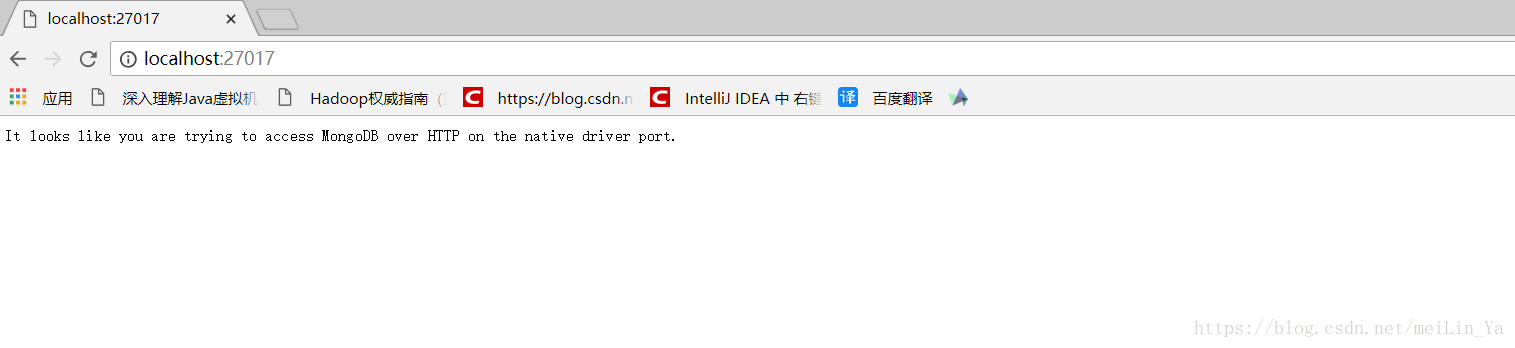
然后添加windows服务
进入管理员命令操作一下:
mongod --config D:\SoftWare\StduySoftWere\noSQL\mongo.config --install --serviceName "Mongodb"
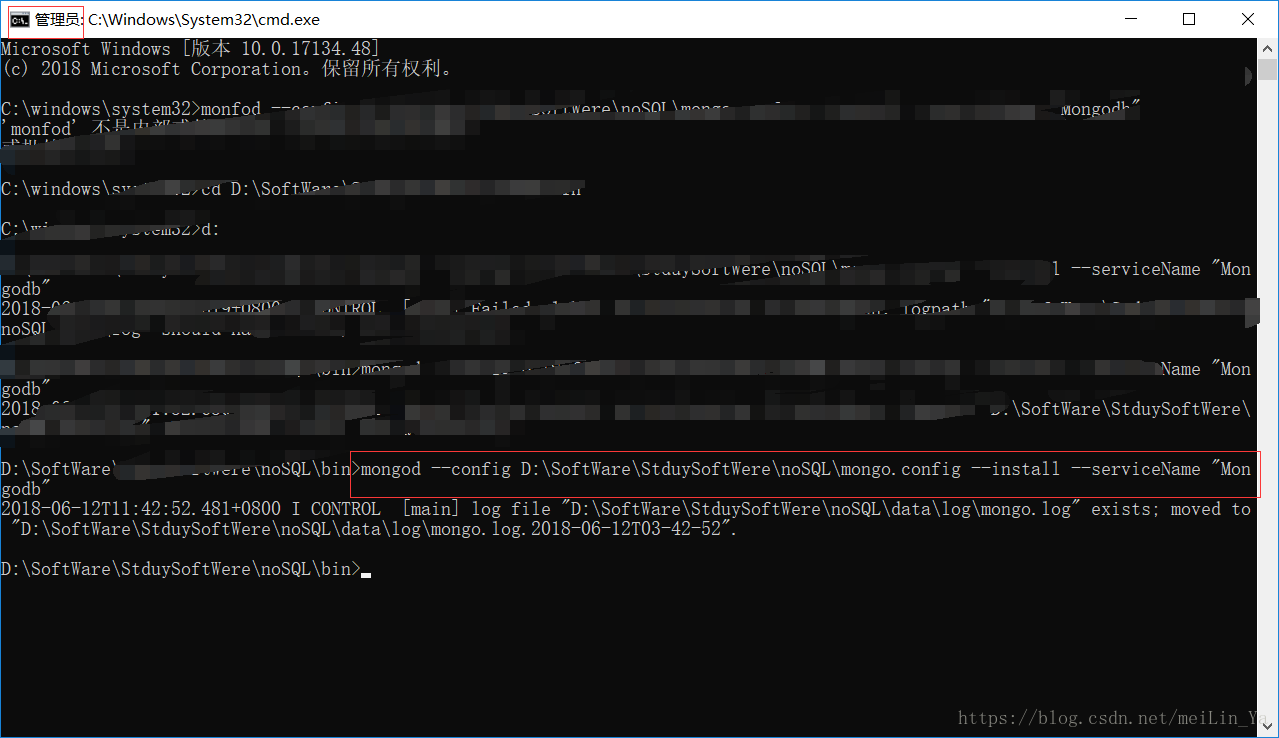
然后进入服务:
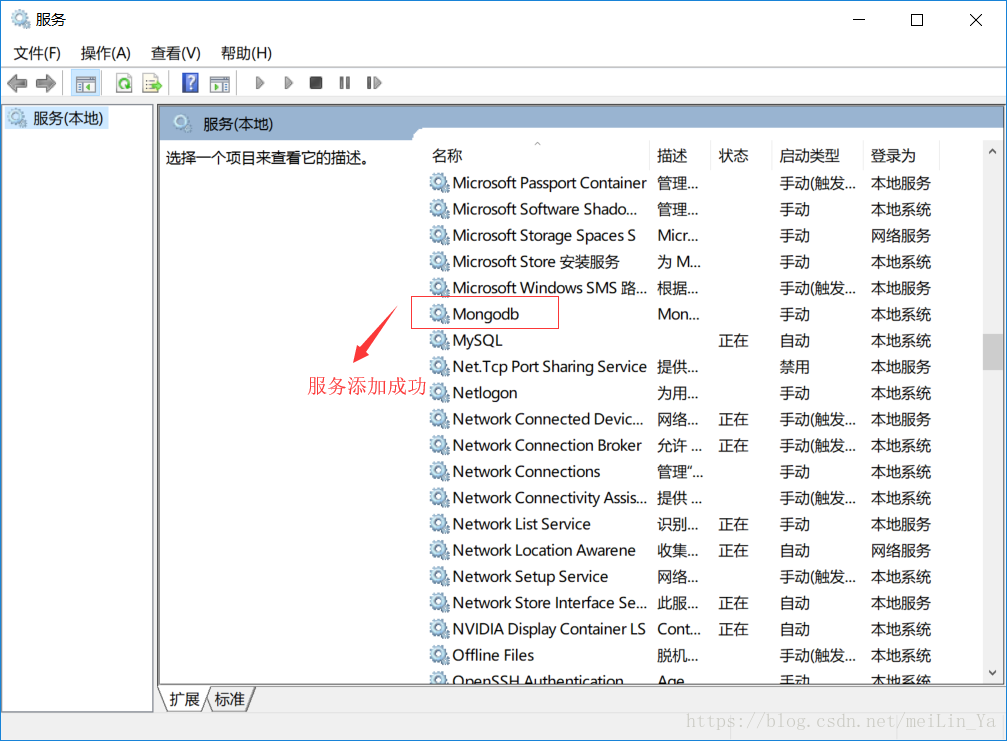
然后就完成了mongodb服务的安装。。。
然后安装mongodb的可视化工具:Root 3

我使用的是它。免费的。
现在我们创建一个连接
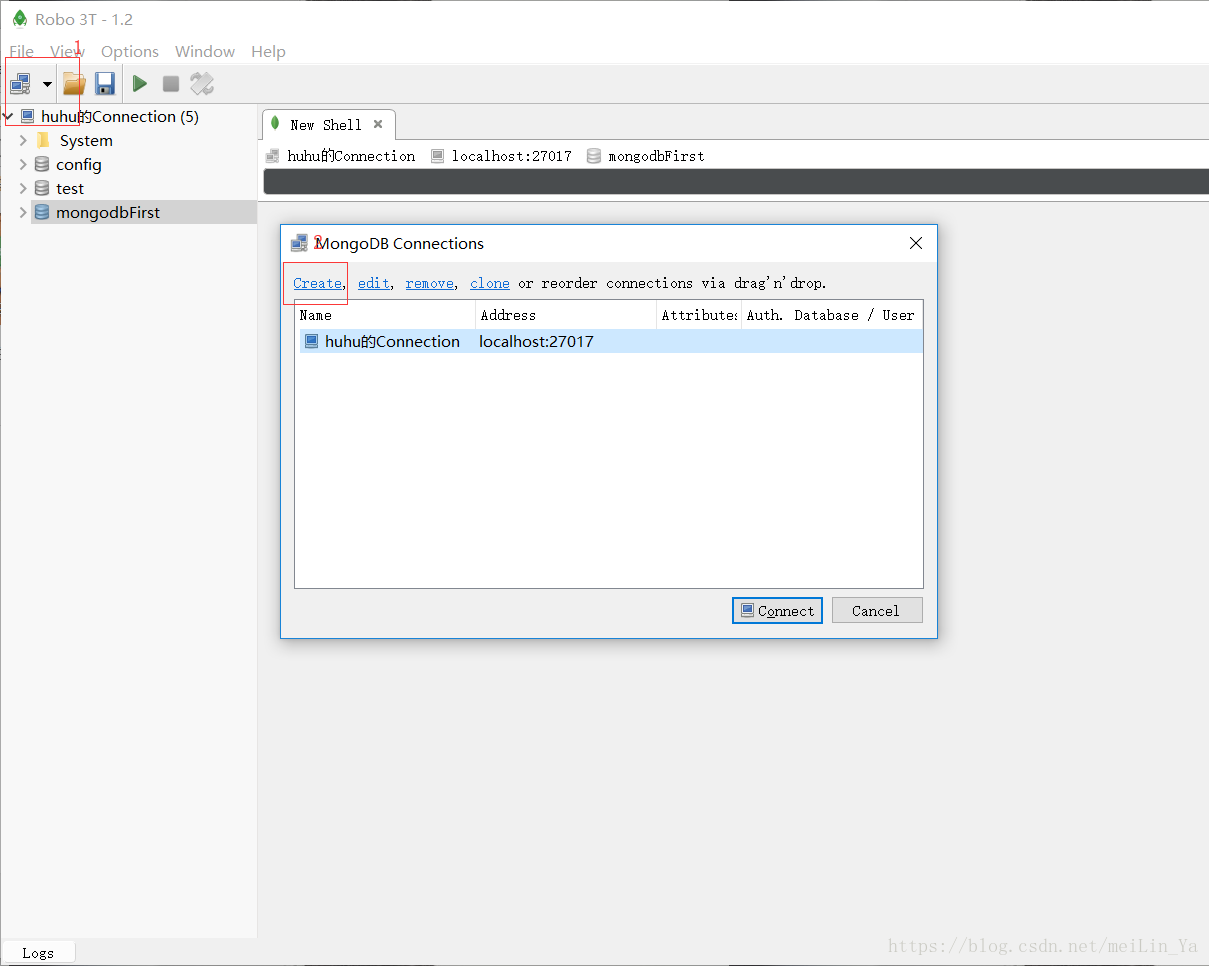
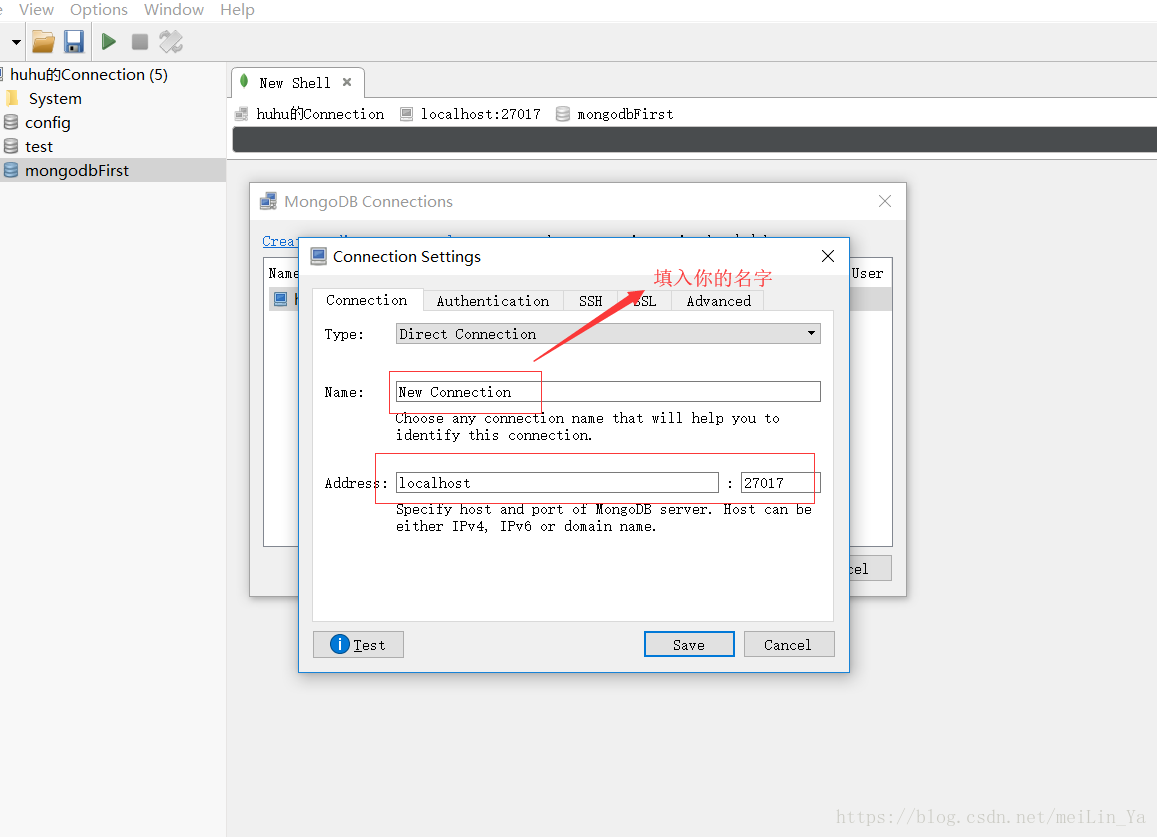
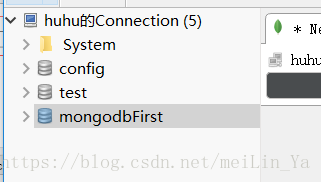
然后出现这个:
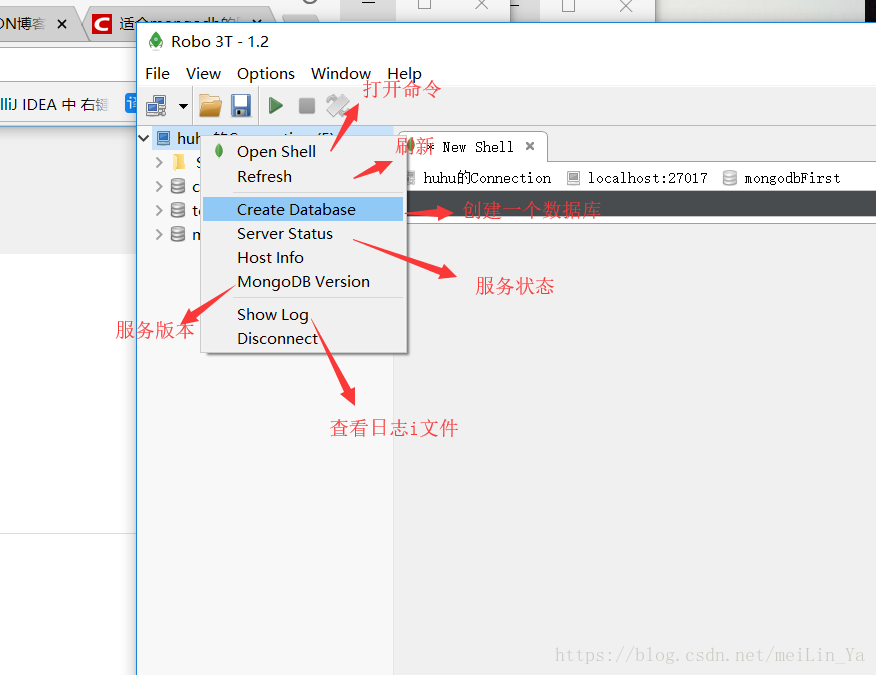
然后右键有各种选择和操作
NOSQL -- mongoDB的了解与安装(Wins10)的更多相关文章
- NoSql非关系型数据库之MongoDB应用(二):安装MongoDB可视化工具
业精于勤,荒于嬉:行成于思,毁于随. 我们上次说到NoSql非关系型数据库之MongoDB应用(一):安装MongoDB服务 这次我们介绍安装 NoSQL Manager for MongoDB 可 ...
- mongodb 3.0下载安装、配置及mongodb最新特性、基本命令教程详细介绍
mongoDB简介(本文由www.169it.com搜集整理) MongoDB是一个高性能,开源,无模式的文档型数据库,是目前在IT行业非常流行的一种非关系型数据库(NoSql).它在许多场景下可用于 ...
- 二十三、MongoDb 数据库介绍、安装、启动和连接(非关系型数据库)
1.数据库和文件的主要区别 1. 数据库有数据库表.行和列的概念,让我们存储操作数据更方便2. 数据库提供了非常方便的接口,可以让 nodejs.php java .net 很方便的实现增加修改删除功 ...
- MongoDB第一天(MongoDB的简介和安装)
MongoDB 简介 什么是 MongoDB MongoDB 是一个基于分布式文件存储的数据库.由 C++语言编写.在为 WEB 应用提供可扩展的高性能数据存储解决方案. MongoDB 是一个介于关 ...
- MongoDB的下载与安装
MongoDB的下载与安装 一.简介 MongoDB 是一个基于分布式文件存储的数据库.由 C++ 语言编写.旨在为 WEB 应用提供可扩展的高性能数据存储解决方案.MongoDB 是一个介于关系 ...
- MongoDB的快速手动安装
上一篇文章<MongoDB.WebIDE:升级版的Mongodb管理工具>漏了点东西:就是关于MongoDB主从库的安装配置和启动.网上关于MongoDB的安装有大量的文章供大家学习.我这 ...
- MongoDB Linux下的安装和启动(转)
1. 下载MongoDB,此处下载的版本是:mongodb-linux-i686-1.8.1.tgz.tar. http://fastdl.mongodb.org/linux/mongodb-linu ...
- PHP学习之-Mongodb在Windows下安装及配置
Mongodb在Windows下安装及配置 1.下载 下载地址:http://www.mongodb.org/ 建议下载zip版本. 2.安装 下载windows版本安装就和普通的软件一样,直接下一步 ...
- (转)NoSQL——Redis在win7下安装配置的学习一
NoSQL——Redis在win7下安装配置的学习一 有些也是从网上看来的 1.下载安装 Redis它没有windows的官方版本,但是又非官方的版本,到官网上去下载相应的版本,我的电脑是win7 ...
随机推荐
- HTML-CSS-JS-JQ常用知识点总结
html:展示文件 标签:<html><head><title></title><meta><link><style> ...
- curl: (6) Could not resolve host: www.baidu.com;
今天,在执行curl时,突然发现这个报错,问题是之前完全没有出现过这样的情况. [root@localhost ~]# curl www.baidu.comcurl: (6) Could not re ...
- Calendar的使用注意
一.Calendar和GregorianCalendar的关系 GregorianCalendar的一点: // 初始化 Gregorian 日历 // 使用当前时间和日期 // 默认为本地时间和时区 ...
- 《剑指offer》第五十五题(二叉树的深度)
// 面试题55(一):二叉树的深度 // 题目:输入一棵二叉树的根结点,求该树的深度.从根结点到叶结点依次经过的 // 结点(含根.叶结点)形成树的一条路径,最长路径的长度为树的深度. //如果左右 ...
- Scrapy基本命令
全局命令,不用在项目中运行fetch:爬取网页,不依赖爬虫项目直接爬网页信息,并显示爬取过程scrapy命令格式:scrapy 命令名 --参数,可能通过--控制,例如:scrapy fetch -h ...
- MySQL学习(七)
学习子查询 1 查出本网站最新的good_id最大的一条商品(要求取出商品名) mysql> select goos_id,goods_name from goods -> order b ...
- Python全栈开发-Day2-Python基础2
本节内容 列表.元组操作 字符串操作 字典操作 集合操作 文件操作 字符编码与转码 1. 列表.元组操作 列表是我们最以后最常用的数据类型之一,通过列表可以对数据实现最方便的存储.修改等操作 定义列表 ...
- 2017-2018-2 20165303 实验三《Java面向对象程序设计》实验报告
实验三 敏捷开发与XP实践-1 实验要求 实验三 敏捷开发与XP实践 http://www.cnblogs.com/rocedu/p/4795776.html, Eclipse的内容替换成IDEA 参 ...
- idea ----> 使用idea工具整合mybaiti时出现的问题总结
使用idea测试mabtis实例时出现 java.lang.IllegalArgumentException: Mapped Statements collection does not conta ...
- 三个解释——MVC的网址
[三个MVC网址]1.https://www.cnblogs.com/sunniest/p/4555801.html2.https://www.cnblogs.com/wmyskxz/p/884846 ...