
在vue中结合render函数渲染指定的组件到容器中
1、demo
项目结构:
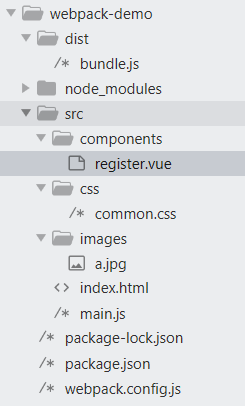
index.html
<!DOCTYPE html>

<html>

<head>

    <title>标题</title>

    <meta charset="utf-8">

</head>

<body>

    <h3 class="blue">h3标签内的文本</h3>

    <ul>

        <li>这是一个li标签</li>

        <li>这是一个li标签</li>

        <li>这是一个li标签</li>

        <li>这是一个li标签</li>

        <li>这是一个li标签</li>

    </ul>

    <div class="img"></div>

    <div id="app">

        <h3> {{ msg }} </h3>

        <login></login>

    </div>

    <script type="text/javascript" src="../dist/bundle.js"></script>

</body>

</html>
main.js
// 这是项目的入口js文件

// 导入jquery, 这是ES6中导入模块的语法

import $ from 'jquery';

import './css/common.css';

// 注意:在webpack中,使用下面这句导入vue,功能不完整,只提供runtime-only的方式,并没没有提供向网页中那样的使用方式

//import Vue from 'vue';

// 导入完整的vue

import Vue from '../node_modules/vue/dist/vue.js';

// 导入register组件

import register from './components/register.vue';

// 默认webpack无法处理.vue文件,要安装第三方loader

// npm i vue-loader vue-template-compiler -D

$(function() {

    $('li:odd').css('backgroundColor','yellow');

    $('li:even').css('backgroundColor','#eee');

});

// 组件的模板对象

var login = {

    template: '<h1>登录组件</h1>'

};

var vm = new Vue({

    el: '#app',

    data: {

        msg: 'hello vue'

    },

    components: {

        login

    },
   // render:将register组件渲染到el指定的div#app中(div#app中其他内容被覆盖)
   // 简写render: c => c(register)

    render: function (createElements) {

        return createElements(register);

    }

});
register.vue
<template>

    <h1>注册组件</h1>

</template>

<script>

</script>

<style>

</style>
package.json
{

  "name": "webpack-study1",

  "version": "1.0.0",

  "description": "",

  "main": "index.js",

  "scripts": {

    "test": "echo \"Error: no test specified\" && exit 1"

  },

  "keywords": [],

  "author": "",

  "license": "ISC",

  "dependencies": {

    "jquery": "^3.3.1",

    "vue": "^2.6.10"

  },

  "devDependencies": {

    "css-loader": "^0.28.0",

    "file-loader": "^1.1.11",

    "style-loader": "^0.21.0",

    "url-loader": "^1.0.1",

    "vue-loader": "^15.2.4",

    "vue-template-compiler": "^2.5.16",

    "webpack": "^3.6.0"

  }

}
webpack.config.js
var path = require('path');

const { VueLoaderPlugin } = require('vue-loader');

// 通过node的模块操作,向外暴露一个配置对象

module.exports = {

    entry: path.join(__dirname, './src/main.js'), // 入口,表示要使用webpack打包哪个文件

    output: {   // 出口

        path: path.join(__dirname, './dist'),

        filename: 'bundle.js'

    },

    module: {  //用于配置所有第三方模块加载器

        rules: [  //所有第三方模块的匹配规则

            // 首先安装loader: npm i style-loader css-loader -D, 然后配置

            { test:/\.css$/, use: ['style-loader','css-loader'] },

            // 首先安装loader: npm i url-loader file-loader -D, 然后配置

            {

                test:/\.(jpg|png|gif|bmp|jpeg)$/,

                use: ['url-loader']

                // limit单位byte,如果图片大于等于limit给定值,则不会被转为base64格式字符串

                // name=[name].[ext]:打包的图片原名相同

                // use: ['url-loader?limit=1000&name=[name].[ext]']

            },

            // 首先安装loader: npm i vue-loader vue-template-compiler -D, 然后配置

            { test: /\.vue$/, use: 'vue-loader' }

        ]

    },

    plugins: [

                new VueLoaderPlugin()

             ],

};
2、遇到的问题
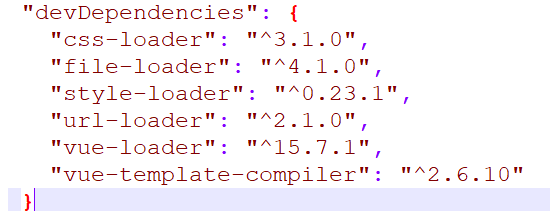
2.1、webpack版本是3.6.0,与css-loader不兼容

2.2、下载安装vue-loader以后,报错缺少相关插件 include VueLoaderPlugin in your webpack config
const { VueLoaderPlugin } = require('vue-loader');
……
plugins: [
new VueLoaderPlugin(),
],
在vue中结合render函数渲染指定的组件到容器中的更多相关文章
- render 函数渲染表格的当前数据列使用
columns7: [ { title: '编号', align: 'center', width: 90, key: 'No', render: (h, params) => { return ...
- iview table表中使用render函数props传值出现问题
使用iview中的table表格时避免不了使用render函数渲染自定义内容,或者渲染组件.但是在正常使用时出现了props传值无法识别, 按照官网介绍使用props如下: render: (h, p ...
- 使用render函数渲染组件
使用render函数渲染组件:https://www.jianshu.com/p/27ec4467a66b
- iview table中的render函数使用
1.表格列数据内容过多可以用以下两个属性解决: ellipsis:"true', tooltip:true 使每个列的内容如果过多的话变为省略号 2.table中的render函数(实现根据 ...
- vue中的render函数介绍
简介:对于不了解slot的用法(参考:大白话vue-slot的用法)又刚接触render函数的同学来说,官网的解释无疑一脸懵逼,这里就整理下个人对render函数的理解 问题: 1.render函数是 ...
- Vue中的render函数随笔
使用vue-cli创建项目后,再main.js里面有这样一段代码: new Vue({ render:h => h(App) }).$mount('#app') render函数是渲染一个视图, ...
- Vue.js之render函数基础
刚才翻了一下博客,才发现,距离自己写的第一篇Vue的博客vue.js之绑定class和style(2016-10-30)已经过去一年零两天.这一年里,自己从船厂的普通技术员,成为了一个微型不靠谱创业公 ...
- 19 使用Vue实例的render方法渲染组件
<!doctype html> <html lang="en"> <head> <meta charset="UTF-8&quo ...
- Vue2.x中的Render函数
Render函数是Vue2.x版本新增的一个函数:使用虚拟dom来渲染节点提升性能,因为它是基于JavaScript计算.通过使用createElement(h)来创建dom节点.createElem ...
随机推荐
- vue项目与node项目分离
为了前后端分离,我们在前端和api层中间,架构了一层node层,用来做服务端渲染,来加快用户的首屏可用和对搜索引擎的友好.项目一开始放置在同一个git仓库里面,分别放在client目录和server目 ...
- 【嵌入式开发】用 VLC 显示 树莓派摄像头 H264 裸流
首先树莓派连上网络,并和电脑在同一网段. 树莓派的IP是: 192.168.3.13 电脑的IP是: 192.168.3.6 1.在树莓派上采集 H264裸流,并用UDP发送到电脑. pi@Neil- ...
- 微信小程序开发(一)----- 基础知识
1.什么是微信小程序 概念:小程序是一种不需要下载安装即可使用的应用,它实现了应用“触手可及”的梦想,用户扫一扫或者搜一下即可打开应用,体现了“用完即走”的理念,用户不需要关心是否安装太多应用的问题, ...
- 为 JS 的字符串,添加一个 format 的功能。
<script> String.prototype.format = function (kwargs) { var ret = this.replace(/\{(\w+)\}/g, fu ...
- Android API文档
官方API文档: Android官网: https://developer.android.google.cn/index.html (不需要梯子) Android官网: https://develo ...
- 使用iwebshop開發實現QQ第三方登錄
$appid = "101353491"; $appkey = "df4e46ba7da52f787c6e3336d30526e4"; $redirect_ur ...
- php之CGI、FastCGI、php-fpm运行原理
学好一门语言,必须懂得他得运行原理,php之CGI.FastCGI.php-fpm运行原理 早期的webserver只处理html等静态文件,但是随着技术的发展,出现了像php等动态语言.webser ...
- 关于chrome请求被挂起页面加载缓慢问题的追查
请参考FEX团队探究结果 http://fex.baidu.com/blog/2015/01/chrome-stalled-problem-resolving-process/ 结论如下: 请求成功构 ...
- KL散度的理解(GAN网络的优化)
原文地址Count Bayesie 这篇文章是博客Count Bayesie上的文章Kullback-Leibler Divergence Explained 的学习笔记,原文对 KL散度 的概念诠释 ...
- mysql小数和类型转换函数
保留两位小数 SELECT ROUND( 123456789.3563898,2),TRUNCATE(123456789.3563898,2),FORMAT(123456789.3563898,2); ...