
FacertGrid()的使用
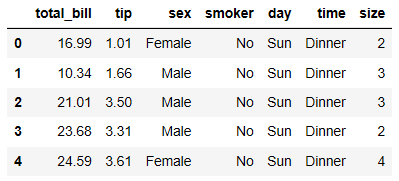
查看数据的前五行
tips = sns.load_dataset("tips")
tips.head()
引入数据,布置横向画布
g = sns.FacetGrid(tips, col='time')
g = sns.FacetGrid(tips, col='time')
g.map(plt.hist, "tip") #以tip为横轴画柱状图

g = sns.FacetGrid(tips, col="sex", hue="smoker")
g.map(plt.scatter, "total_bill", "tip", alpha=.7) #绘制散点图,设置横纵轴,设置透明度
g.add_legend() #加上如下图标注的图例

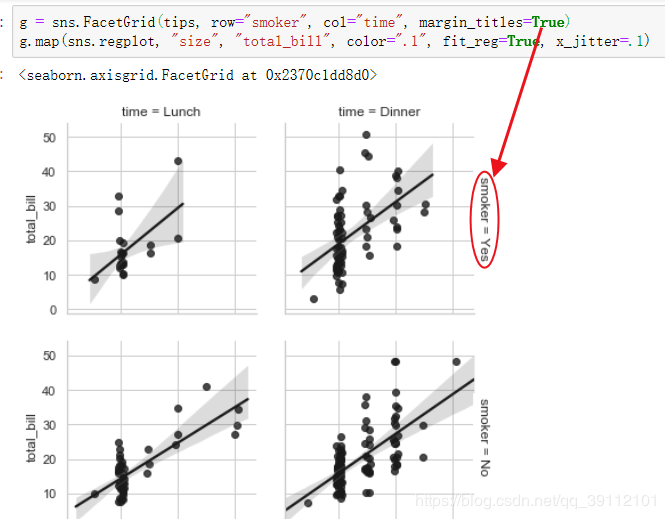
g = sns.FacetGrid(tips, row="smoker", col="time", margin_titles=True) #设置行列布局方式
g.map(sns.regplot, "size", "total_bill", color=".1", fit_reg=True, x_jitter=.1) #fit_reg画出回归线,x_jitter为摆动程度
画出柱形图
g = sns.FacetGrid(tips, col="day", size=4, aspect=.5)
g.map(sns.barplot, "sex", "total_bill")

from pandas import Categorical
ordered_days = tips.day.value_counts().index
print(ordered_days)
查看day的排列顺序
CategoricalIndex(['Sat', 'Sun', 'Thur', 'Fri'], categories=['Thur', 'Fri', 'Sat', 'Sun'], ordered=False, dtype='category')
重新设置行的排列顺序
ordered_days = Categorical(["Thur", "Sun", "Fri", "Sat"])
g = sns.FacetGrid(tips, row="day", row_order=ordered_days, size=1.7, aspect=4)
g.map(sns.boxplot, "total_bill")

(盒图能够自动识别哪个变量是离散型,哪个是连续型,然后对连续型构造盒图。)
例如以下代码
 import seaborn as sns

 import numpy as np

 import pandas as pd

 import matplotlib as mpl

 from pandas import Categorical

 import matplotlib.pyplot as plt

 tips = sns.load_dataset("tips")   #seaborn内置数据集,DaraFram类型

 print(tips.head())

 ordered_days = Categorical(["Thur", "Sun", "Fri", "Sat"])

 print(type(ordered_days))

 print(ordered_days)

 g = sns.FacetGrid(tips, row="day", row_order=ordered_days, size=1.7, aspect=4)

 g.map(sns.boxplot, "total_bill", "sex")

 plt.show()
运行结果如下,函数识别出sex是离散型变量,所以对sex进行分类,然后在每一个类别上对连续型变量total_bill构造盒图。

还可以用FacertGrid的palette参数给hue的列的不同类设置不同颜色,代码如下
 import seaborn as sns

 import numpy as np

 import pandas as pd

 import matplotlib as mpl

 from pandas import Categorical

 import matplotlib.pyplot as plt

 tips = sns.load_dataset("tips")   #seaborn内置数据集,DaraFram类型

 print(tips.head())

 pal = dict(Lunch="seagreen", Dinner="gray")

 g = sns.FacetGrid(data=tips, hue="time", palette=pal, size=5)

 g.map(plt.scatter, "total_bill", "tip", s=50, alpha=0.7, linewidths=0.5, edgecolors="white")

 g.add_legend()

 plt.show()
运行结果如下

如果再设置marker参数,可指定用什么图标画散点,可以是三角形或圆形等
 import seaborn as sns

 import numpy as np

 import pandas as pd

 import matplotlib as mpl

 from pandas import Categorical

 import matplotlib.pyplot as plt

 tips = sns.load_dataset("tips")   #seaborn内置数据集,DaraFram类型

 print(tips.head())

 pal = dict(Lunch="seagreen", Dinner="gray")

 g = sns.FacetGrid(data=tips, hue="time", palette=pal, size=5, hue_kws={"marker":['^', 'v']})

 g.map(plt.scatter, "total_bill", "tip", s=50, alpha=0.7, linewidths=0.5, edgecolors="white")

 g.add_legend()

 plt.show()

还有一些小调整:set_axis_labels()函数可以自定义x和y轴名字,set(xticks, yticks)可以自定义x和y轴的刻度。fig.subplots_adjust()函数可以调整子图之间
的间隔和距离边框的大小。edgecolors可以设置散点周围的边缘颜色。
 import seaborn as sns

 import numpy as np

 import pandas as pd

 import matplotlib as mpl

 from pandas import Categorical

 import matplotlib.pyplot as plt

 tips = sns.load_dataset("tips")   #seaborn内置数据集,DaraFram类型

 print(tips.head())

 with sns.axes_style("white"):

     g = sns.FacetGrid(tips, row="sex", col="smoker", margin_titles=True, size=2.5)

 g.map(plt.scatter, "total_bill", "tip", color="#334488", edgecolors="white", lw=0.5)

 g.set_axis_labels("Total_bill", "Tip")

 g.set(xticks=[10, 30, 50], yticks=[2, 6, 10])

 g.fig.subplots_adjust(wspace=0.25, hspace=0.25)

 plt.show()

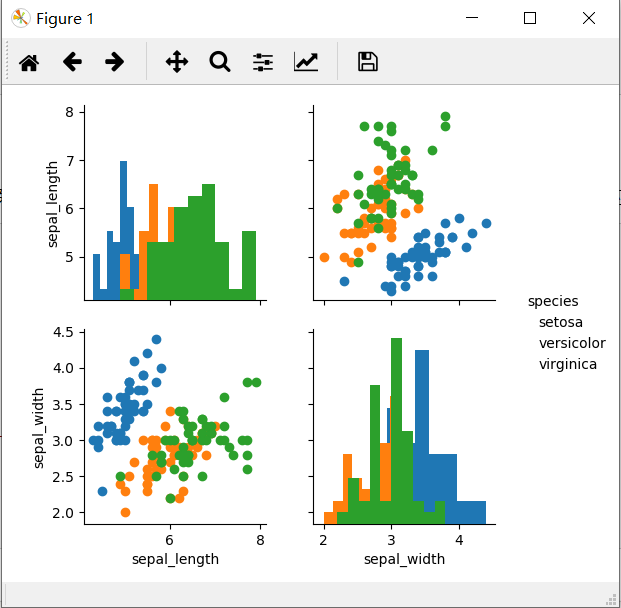
可以用PairGrid对数据中的列进行两两配对绘制散点图,当然也可以指定要配对的列。
 import seaborn as sns

 import numpy as np

 import pandas as pd

 import matplotlib as mpl

 from pandas import Categorical

 import matplotlib.pyplot as plt

 iris = sns.load_dataset("iris")

 g = sns.PairGrid(data=iris, vars=["sepal_length", "sepal_width"], hue="species")

 g.add_legend()

 g.map_offdiag(plt.scatter)

 g.map_diag(plt.hist)

 plt.show()
函数PairGrid()中的vars参数指定要两两进行绘图的列,这些列是数据集的子列。map_offdiag和map_diag分别设置非对角的和对角的图使用的统计图类型。
 import seaborn as sns

 import numpy as np

 import pandas as pd

 import matplotlib as mpl

 from pandas import Categorical

 import matplotlib.pyplot as plt

 iris = sns.load_dataset("iris")

 g = sns.PairGrid(data=iris, vars=["sepal_length", "sepal_width"], hue="species")

 g.add_legend()

 g.map_offdiag(plt.scatter)

 g.map_diag(plt.hist)

 plt.show()
FacertGrid()的使用的更多相关文章
随机推荐
- vue父组件调用子组件方法、父组件向子组件传值、子组件向父组件传值
一.父组件调用子组件方法 父组件代码 parent.vue <template> <div> <button @click="parentFun" ...
- SetConsoleTextAttribute和SetConsoleScreenBufferInfoEx的使用
主要是作用于控制台文本下划线和改变文本颜色 #include "pch.h" #include <iostream> #include <Windows.h> ...
- 使用 python 开发 Web Service
使用 python 开发 Web Service Python 是一种强大的面向对象脚本语言,用 python 开发应用程序往往十分快捷,非常适用于开发时间要求苛刻的原型产品.使用 python 开发 ...
- SQL中INEXISTS和IN 的区别和联系
SET NOCOUNT ON , SET NOCOUNT OFF当 SET NOCOUNT 为 ON 时,不返回计数(表示受 Transact-SQL 语句影响的行数).当 SET NOCOUNT 为 ...
- centos6.5下修改系统的roo用户/非root用户的密码
1.修改系统root用户的密码 [........~]# passwd然后输入新密码,若提示密码太简单,无需理会,直接敲回车: 然后再次输入新密码,即可修改成功. 2.修改系统非root用户的密码:e ...
- chrome scrollTop 获取失败问题及解决方案
https://blog.csdn.net/h357650113/article/details/78384621
- SQL复杂筛选
SELECT A.MATERIALID,A.MATERIALNAME,ISNULL(A.COMPIDSEQ,'') COMPIDSEQ,ISNULL(A.SUPPLYID,'') SUPPLYID,S ...
- 利用aspose-words直接将Word转化为图片
之前遇到一个需求,需要在word文档中加入一些文字,并转化为图片.之前也试过几种方案,但是发现效果还不是很理想,且中间需要经过一次转化为pdf的过程,最近找到了最理想的方式,即利用aspose-wor ...
- 解决JavaServer Faces 2.2 requires Dynamic Web Module 2.5 or newer问题
** 错误1: **在eclipse中新创建一个web项目的时候项目下的JSP文件中会爆出错误:The superclass “javax.servlet.http.HttpServlet” was ...
- 结合webpack使用vue-router
demo结构 webpack.config.js var path = require('path'); // const { VueLoaderPlugin } = require('vue-loa ...