
react native之使用 Fetch进行网络数据请求
这是一个单独的页面,可以从其他地方跳转过来。
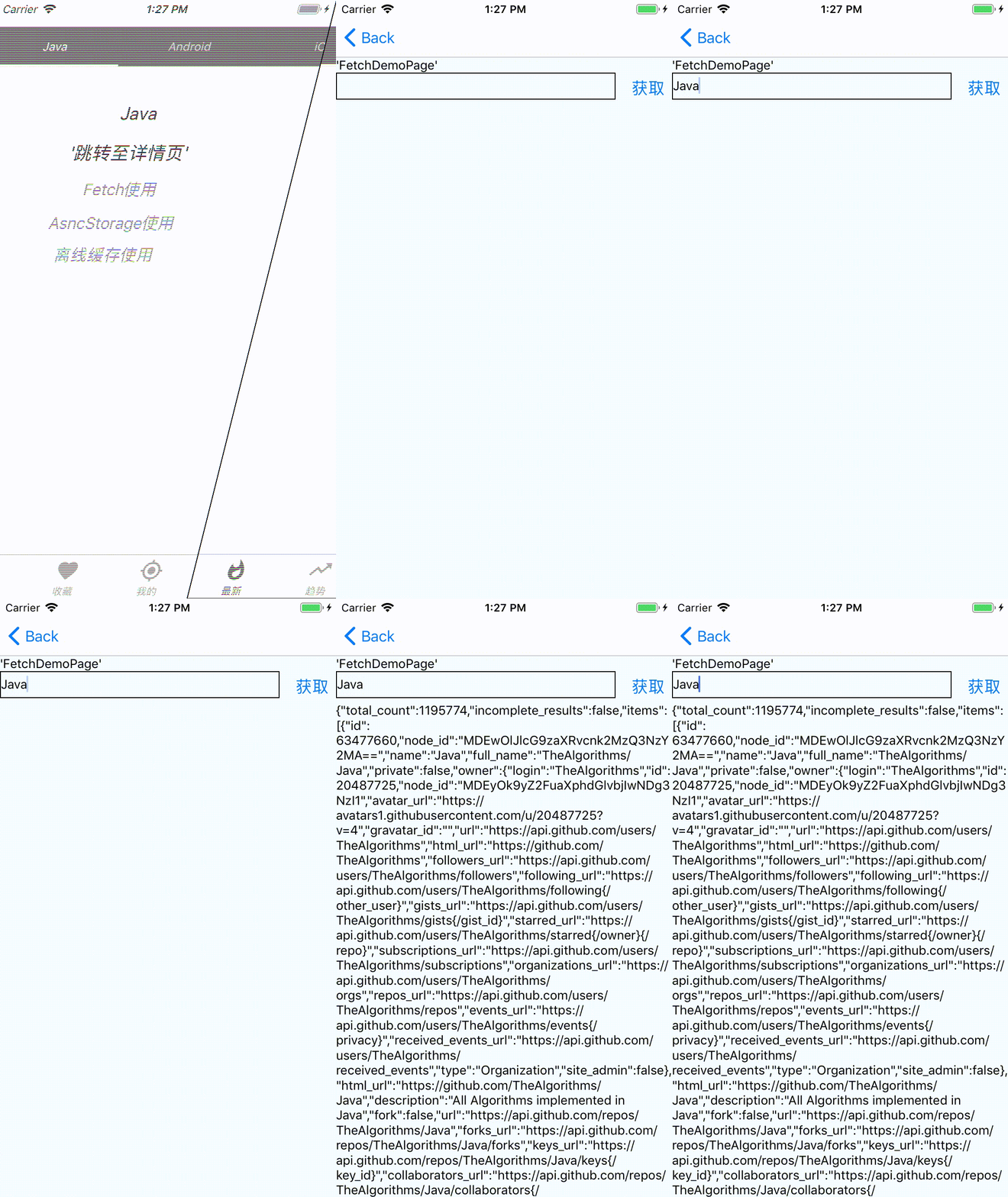
输入语言关键字,从github检索相关数据
import React, {Component} from 'react';

import {

  StyleSheet,

  View,

  Text,

  Button,

  TextInput,

} from 'react-native';

export default class FetchDemoPage extends Component {

  constructor(props){

    super(props);

    this.state={

      showText:''

    }

  }

  loadData(){

    let url = `https://api.github.com/search/repositories?q=${this.searchKey}`;

    fetch(url)

          .then(response => response.text())

          .then(responseText => {

            this.setState({

                showText:responseText

            })

          })

  }

  loadData2(){

    let url = `https://api.github.com/search/repositories?q=${this.searchKey}`;

    fetch(url)

          .then(response => {

            if(response.ok){

              return response.text();

            }

            throw new Error('Network not ok');

          })

          .then(responseText => {

            this.setState({

                showText:responseText

            })

          })

          .catch(e=>{

            this.setState({

                showText:e.toString()

            })

          })

  }

  render(){

    const {navigation} = this.props;

    return (

      <View style={styles.container}>

        <Text>'FetchDemoPage'</Text>

        <View style={styles.input_container}>

          <TextInput

            style={styles.input}

            onChangeText={text => {

              this.searchKey = text;

            }}

            />

          <Button

            title='获取'

            onPress={()=>{

              this.loadData2();

            }}

          />

        </View>

        <Text>

         {this.state.showText}

        </Text>

      </View>

      );

  }

}

const styles = StyleSheet.create({

  container:{

    flex: 1,

    backgroundColor:'#F5FCFF',

  },

  text:{

    fontSize: 20,

    textAlign: 'center',

    margin: 10,

  },

  input:{

    height: 30,

    flex: 1,

    borderColor: 'black',

    borderWidth: 1,

    marginRight: 10,

  },

  input_container:{

    flexDirection: 'row',

    justifyContent: 'center',

  }

});
react native之使用 Fetch进行网络数据请求的更多相关文章
- 在React Native中,使用fetch网络请求 实现get 和 post
//在React Native中,使用fetch实现网络请求 /* fetch 是一个封装程度更高的网络API, 使用了Promise * Promise 是异步编程的一种解决方案 * Promise ...
- 使用react native制作的一款网络音乐播放器
使用react native制作的一款网络音乐播放器 基于第三方库 react-native-video设计"react-native-video": "^1.0.0&q ...
- iOS - NetRequest 网络数据请求
1.网络请求 1.1 网络通讯三要素 1.IP 地址(主机名): 网络中设备的唯一标示.不易记忆,可以用主机名(域名). 1) IP V4: 0~255.0~255.0~255.0~255 ,共有 2 ...
- 网络数据请求request
关于网络数据请求的类很多,httpwebrequest,webrequest,webclient以及httpclient,具体差别在此不在赘述,在应用方面介绍webclient与httpclient则 ...
- android翻译应用、地图轨迹、视频广告、React Native知乎日报、网络请求框架等源码
Android精选源码 android实现高德地图轨迹效果源码 使用React Native(Android和iOS)实现的 知乎日报效果源码 一款整合百度翻译api跟有道翻译api的翻译君 RxEa ...
- swift网络数据请求方法
搭建一个apache服务器,用php编写一个返回给客户端请求数据的脚本 <?php // header("Content-type:text/html;charset=utf-8&qu ...
- React native 中使用Fetch请求数据
一.代码 import React, { Component } from 'react'; import { AppRegistry, StyleSheet, Text, View } from ' ...
- React Native原生模块向JS传递数据的几种方式(Android)
一般情况可以分为三种方式: 1. 通过回调函数Callbacks的方式 2. 通过Promises的异步的方式 3. 通过发送事件的事件监听的方式. 参考文档:传送门
- React Native网络编程之Fetch
目录 1.前言 2.什么是Fetch 3.最简单的应用 4.支持的请求参数 - 4.1. 参数详讲 - 4.2. 示例 5.请求错误与异常处理 1. 前言 网络请求是开发APP中不可或缺的一部 ...
随机推荐
- 科普:PV,UV,VV,IP
1.PV PV即Page View,即页面浏览量或点击量,用户每一次对网站中的每个网页访问均被记录一次.用户对同一页面的多次访问,访问量累计. 2.UV UV即Unique Visitor,是指通过互 ...
- 用matplotlib对数据可视化
下图是要用到的数据集,反映了从1984到2016年的失业率的变化 1.导入可视化模块import matlibplot.pyplot as plt, 函数plt.plot(x, y)确定折线图的点,x ...
- debian下安装mysql 5.1.34
#cd /usr/local/src # tar xvzf mysql-5.1.34.tar.gz # cd mysql-5.5.1.34 配置和编译 #chmod +x configure # ./ ...
- jenkins自动化测试Email Extension邮件模板 及可用参数TEST_COUNTS ,FAILED_TESTS详细说明
先列出模板内容: <!DOCTYPE html><html> <head> <meta charset="UTF-8"> <t ...
- 普通项目——>maven项目——>SSM(一)
首先应该明白,SSM是什么? SSM指的是Spring+SpringMVC+MyBatis Spring Spring就像是整个项目中装配bean的大工厂,在配置文件中可以指定使用特定的参数去调用实体 ...
- GCC 编译参数
-s 这个参数会把符号表从最终的可执行文件中删除.没有符号表,你就不能用gdb调试了,但是程序会更小 -O0 不做任何优化,这是默认的编译选项 -c 只编译不链接,产生.o文件,就是obj文件,不产生 ...
- CentOS8 下 Redis5.0.7 哨兵Sentinel 模式配置指南
下载Redis Redis下载链接 解压缩 tar -xzvf redis-5.0.7.tar.gz 编译安装 make和gcc依赖 可通过yum -y install gcc automake au ...
- 题解 CF292A 【SMSC】
蒟蒻本想发一篇黑题题解,没想到黑题竟然掉紫了QwQ. 趁着题解还只有几篇,赶紧来发一篇嘿嘿嘿. 这道题其实很简单,题解其实都不需要 AC代码: #include<bits/stdc++.h> ...
- [LeetCode] 92. 反转链表 II
题目链接 : https://leetcode-cn.com/problems/reverse-linked-list-ii/ 题目描述: 反转从位置 m 到 n 的链表.请使用一趟扫描完成反转. 说 ...
- MFC- 网络编程
一.MFC网络编程 a)CAsyncSocket用于异步非阻塞类,用UDP通信: b)CAsyncSocket的子类(派生类):Csocket同步阻塞类,用于TCP通信: c)通信前,必须调用AfxS ...