
140、spring webflux 高并发的spring组件
最近公司可谓是风云变幻,年前说要拆开卖,后来说要整体卖,表示像我这种渣渣,始终逃脱不掉被卖的命运
下面进入正题
spring webflux 是spring 支持的高并发web框架,将每个http请求都以java nio的非阻塞方式来进行处理
这样当cpu在处理一个请求的空隙时,还有时间来处理其他请求。提高CPU资源的运行效率
下面来看如何进行实现
1、首先eclipse中新建一个maven的项目。然后完整版的pom文件如下所示。(本人翻遍了网上的教程,都没有提供完整版的pom文件,哪里有?哪里有?感觉这里是独一份,除了github以外)
<?xml version="1.0" encoding="UTF-8"?>

<project xmlns="http://maven.apache.org/POM/4.0.0" xmlns:xsi="http://www.w3.org/2001/XMLSchema-instance"

    xsi:schemaLocation="http://maven.apache.org/POM/4.0.0 http://maven.apache.org/xsd/maven-4.0.0.xsd">

    <modelVersion>4.0.0</modelVersion>

  <groupId>Pactera</groupId>

  <artifactId>webflux-test</artifactId>

  <version>0.0.1-SNAPSHOT</version>

  <packaging>jar</packaging>

  <name>webflux-test</name>

  <properties>

    <project.build.sourceEncoding>UTF-8</project.build.sourceEncoding>

    <project.reporting.outputEncoding>UTF-8</project.reporting.outputEncoding>

    <java.version>1.8</java.version>

  </properties>

   <parent>

        <groupId>org.springframework.boot</groupId>

        <artifactId>spring-boot-starter-parent</artifactId>

        <version>2.0.6.BUILD-SNAPSHOT</version>

        <relativePath/>

   </parent>

  <dependencies>

    <dependency>

      <groupId>junit</groupId>

      <artifactId>junit</artifactId>

      <version>3.8.1</version>

      <scope>test</scope>

    </dependency>

    <dependency>

            <groupId>org.springframework.boot</groupId>

            <artifactId>spring-boot-starter</artifactId>

        </dependency>

    <dependency>

        <groupId>org.springframework.boot</groupId>

        <artifactId>spring-boot-starter-webflux</artifactId>

    </dependency>

    <dependency>

        <groupId>org.springframework.boot</groupId>

        <artifactId>spring-boot-starter-test</artifactId>

        <scope>test</scope>

    </dependency>

    <dependency>

        <groupId>io.projectreactor</groupId>

        <artifactId>reactor-test</artifactId>

        <scope>test</scope>

    </dependency>

  </dependencies>

       <build>

              <defaultGoal>compile</defaultGoal>

        <plugins>

            <plugin>

                <artifactId>maven-jar-plugin</artifactId>

                <executions>

                    <execution>

                        <!-- <goals>

                            <goal>jar</goal>

                        </goals>   -->

                        <phase>package</phase>

                    </execution>

                </executions>

            </plugin>

            <!-- <plugin>

                <groupId>org.springframework.boot</groupId>

                <artifactId>spring-boot-maven-plugin</artifactId>

            </plugin> -->

        </plugins>

    </build>

    <repositories>

        <repository>

            <id>spring-snapshots</id>

            <name>Spring Snapshots</name>

            <url>https://repo.spring.io/snapshot</url>

            <snapshots>

                <enabled>true</enabled>

            </snapshots>

        </repository>

        <repository>

            <id>spring-milestones</id>

            <name>Spring Milestones</name>

            <url>https://repo.spring.io/milestone</url>

            <snapshots>

                <enabled>false</enabled>

            </snapshots>

        </repository>

    </repositories>

    <pluginRepositories>

        <pluginRepository>

            <id>spring-snapshots</id>

            <name>Spring Snapshots</name>

            <url>https://repo.spring.io/snapshot</url>

            <snapshots>

                <enabled>true</enabled>

            </snapshots>

        </pluginRepository>

        <pluginRepository>

            <id>spring-milestones</id>

            <name>Spring Milestones</name>

            <url>https://repo.spring.io/milestone</url>

            <snapshots>

                <enabled>false</enabled>

            </snapshots>

        </pluginRepository>

    </pluginRepositories>

</project>
2、下面是一个handler处理类,这个类是用来处理http请求的核心类
package org.spring.springboot.handler;

import org.springframework.http.MediaType;

import org.springframework.stereotype.Component;

import org.springframework.web.reactive.function.BodyInserters;

import org.springframework.web.reactive.function.server.ServerRequest;

import org.springframework.web.reactive.function.server.ServerResponse;

import reactor.core.publisher.Mono;

@Component

public class CityHandler {

    public Mono<ServerResponse> helloCity(ServerRequest request) {

        return ServerResponse.ok().contentType(MediaType.TEXT_PLAIN)

                .body(BodyInserters.fromObject("Hello, City!"));

    }

}
3、下面一个类是当监测到CPU有空闲时间的时候,将HTTP请求分发给handler类的router类
package org.spring.springboot.router;

import org.spring.springboot.handler.CityHandler;

import org.springframework.context.annotation.Bean;

import org.springframework.context.annotation.Configuration;

import org.springframework.http.MediaType;

import org.springframework.web.reactive.function.server.RequestPredicates;

import org.springframework.web.reactive.function.server.RouterFunction;

import org.springframework.web.reactive.function.server.RouterFunctions;

import org.springframework.web.reactive.function.server.ServerResponse;

@Configuration

public class CityRouter {

    @Bean

    public RouterFunction<ServerResponse> routeCity(CityHandler cityHandler) {

        return RouterFunctions.route(

                RequestPredicates.GET("/hello").and(RequestPredicates.accept(MediaType.TEXT_PLAIN)),

                cityHandler::helloCity);

    }

}
4、然后在最外层的主入口,Application.java
package org;

import org.springframework.boot.SpringApplication;

import org.springframework.boot.autoconfigure.EnableAutoConfiguration;

import org.springframework.boot.autoconfigure.SpringBootApplication;

import org.springframework.context.annotation.ComponentScan;

import org.springframework.context.annotation.Configuration;

@Configuration

@EnableAutoConfiguration

@SpringBootApplication

@ComponentScan("org.spring")

public class Application {

    public static void main(String[] args) {

        SpringApplication.run(Application.class, args);

    }

}
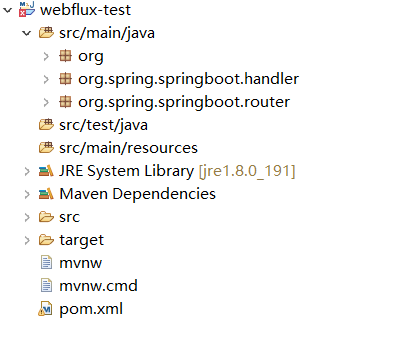
5、整个包的结构如下所示
6、然后程序跑起来啦
  .   ____          _            __ _ _

 /\\ / ___'_ __ _ _(_)_ __  __ _ \ \ \ \

( ( )\___ | '_ | '_| | '_ \/ _` | \ \ \ \

 \\/  ___)| |_)| | | | | || (_| |  ) ) ) )

  '  |____| .__|_| |_|_| |_\__, | / / / /

 =========|_|==============|___/=/_/_/_/

 :: Spring Boot ::  (v2.0.6.BUILD-SNAPSHOT)

2019-03-05 07:37:15.713  INFO 8284 --- [           main] org.Application                          : Starting Application on DESKTOP-QGKILFJ with PID 8284 (D:\eclipse-workspace\webflux-test\target\classes started by weizhen in D:\eclipse-workspace\webflux-test)

2019-03-05 07:37:15.725  INFO 8284 --- [           main] org.Application                          : No active profile set, falling back to default profiles: default

2019-03-05 07:37:15.818  INFO 8284 --- [           main] onfigReactiveWebServerApplicationContext : Refreshing org.springframework.boot.web.reactive.context.AnnotationConfigReactiveWebServerApplicationContext@62e136d3: startup date [Tue Mar 05 07:37:15 CST 2019]; root of context hierarchy

2019-03-05 07:37:17.662  WARN 8284 --- [           main] reactor.ipc.netty.tcp.TcpResources       : [http] resources will use the default LoopResources: DefaultLoopResources {prefix=reactor-http, daemon=true, selectCount=4, workerCount=4}

2019-03-05 07:37:17.662  WARN 8284 --- [           main] reactor.ipc.netty.tcp.TcpResources       : [http] resources will use the default PoolResources: DefaultPoolResources {name=http, provider=reactor.ipc.netty.resources.PoolResources$$Lambda$188/243575009@2e554a3b}

2019-03-05 07:37:18.293  INFO 8284 --- [           main] o.s.w.r.f.s.s.RouterFunctionMapping      : Mapped ((GET && /hello) && Accept: [text/plain]) -> org.spring.springboot.router.CityRouter$$Lambda$197/416201381@64bc21ac

2019-03-05 07:37:18.310  INFO 8284 --- [           main] o.s.w.r.handler.SimpleUrlHandlerMapping  : Mapped URL path [/webjars/**] onto handler of type [class org.springframework.web.reactive.resource.ResourceWebHandler]

2019-03-05 07:37:18.310  INFO 8284 --- [           main] o.s.w.r.handler.SimpleUrlHandlerMapping  : Mapped URL path [/**] onto handler of type [class org.springframework.web.reactive.resource.ResourceWebHandler]

2019-03-05 07:37:18.437  INFO 8284 --- [           main] o.s.w.r.r.m.a.ControllerMethodResolver   : Looking for @ControllerAdvice: org.springframework.boot.web.reactive.context.AnnotationConfigReactiveWebServerApplicationContext@62e136d3: startup date [Tue Mar 05 07:37:15 CST 2019]; root of context hierarchy

2019-03-05 07:37:18.750  INFO 8284 --- [           main] o.s.j.e.a.AnnotationMBeanExporter        : Registering beans for JMX exposure on startup

2019-03-05 07:37:20.073  INFO 8284 --- [ctor-http-nio-1] r.ipc.netty.tcp.BlockingNettyContext     : Started HttpServer on /0:0:0:0:0:0:0:0:8080

2019-03-05 07:37:20.074  INFO 8284 --- [           main] o.s.b.web.embedded.netty.NettyWebServer  : Netty started on port(s): 8080

2019-03-05 07:37:20.080  INFO 8284 --- [           main] org.Application                          : Started Application in 4.836 seconds (JVM running for 5.499)
7、进行访问

这样下来一个简单的高并发框架就完成啦
可能有小伙伴看博主之前写的博客都是关于机器学习的,还有salesforce的
其实吧,博主一直是做java的,两年半以来做过GE的NPI CRM项目,惠普的Solr搜素项目,还有GE的语言助手项目,还有赛诺菲的供应链语音助手项目
为什么不写java类的博客,主要是博客觉得java这个应该都算是基础知识,应该是程序猿最基本的知识。
感觉写出来也不显得吸引人眼球。所以没写。不过今天这个高并发确实很厉害。所以写了一下
Thanks
WeiZhen
140、spring webflux 高并发的spring组件的更多相关文章
- 爸爸又给Spring MVC生了个弟弟叫Spring WebFlux
情景引入 很早之前,Java就火起来了,是因为它善于开发和处理网络方面的应用. Java有一个爱好,就是喜欢制定规范标准,但自己又不善于去实现. 反倒是一些服务提供商使用它的规范标准来制造应用服务器而 ...
- 基于Angular和Spring WebFlux做个小Demo
前言 随着Spring Boot2.0正式发布,Spring WebFlux正式来到了Spring Boot大家族里面.由于Spring WebFlux可以通过更少的线程去实现更高的并发和使用更少的硬 ...
- Spring WebFlux 01 (原理及使用场景)
一.什么是 Spring WebFlux 好多人以为Spring WebFlux就是Spring MVC的升级版,其实不然,那到底什么是Spring WebFlux呢,首先就要搞清楚Spring We ...
- 【MVC】Spring WebFlux
一.什么是 Spring WebFlux 下图截自 Spring Boot 官方网站: 结合上图,在了解 Spring WebFlux 之前,我们先来对比说说什么是 Spring MVC,这更有益我们 ...
- Spring WebFlux 基础教程:参数校验
请求参数校验,在实际的应用中很常见,网上的文章大部分提供的使用注解的方式做参数校验.本文主要介绍 Spring Webflux Function Endpoint 使用 Spring Validati ...
- 尼恩 Java高并发三部曲 [官方]
高并发 发烧友社群:疯狂创客圈(总入口) 奉上以下珍贵的学习资源: 疯狂创客圈 经典图书 : 极致经典 + 社群大片好评 < Java 高并发 三部曲 > 面试必备 + 大厂必备 + 涨薪 ...
- 15套java架构师、集群、高可用、高可扩展、高性能、高并发、性能优化、Spring boot、Redis、ActiveMQ、Nginx、Mycat、Netty、Jvm大型分布式项目实战视频教程
* { font-family: "Microsoft YaHei" !important } h1 { color: #FF0 } 15套java架构师.集群.高可用.高可扩展. ...
- java架构师负载均衡、高并发、nginx优化、tomcat集群、异步性能优化、Dubbo分布式、Redis持久化、ActiveMQ中间件、Netty互联网、spring大型分布式项目实战视频教程百度网盘
15套Java架构师详情 * { font-family: "Microsoft YaHei" !important } h1 { background-color: #006; ...
- 询问Spring Bott和高并发框架两个问题
这里我问两个问题,请大神告诉我. 第一个问题,如果我想用Spring Boot开发企业级的微服务,我该看哪些资料?比如数据库该如何配置?消息中间件该怎么设置?等等.或者可以推荐给我几本这方面的书. 第 ...
随机推荐
- SpringBoot jar程序配置成服务运行
windows 版本 http://www.cppblog.com/aurain/archive/2014/01/23/205534.aspx linux 版本 https://blog.csdn.n ...
- [2019杭电多校第二场][hdu6599]I Love Palindrome String(回文自动机&&hash)
题目链接:http://acm.hdu.edu.cn/showproblem.php?pid=6599 题目大意为求字符串S有多少个子串S[l,r]满足回文串的定义,并且S[l,(l+r)/2]也满足 ...
- NameVirtualHost的使用
如果某个ip:port 上只设置了一个虚拟主机,那么NameVirtualHost ip:port 可以不写,因为从这个ip:port的访问不需要做任何选择:如上例中192.168.1.197只对应于 ...
- ssh远程钥匙对连接
1.服务器必须启动ssh服务 2.在客户机执行命令:ssh-keygen -t rsa 两次回车即可 3.在客户机家目录下的.ssh\下生成钥匙对 4.将公钥传输到要连接的服务器主机要连接的用户家目录 ...
- SCUT - 271 - CC 非诚勿扰 - FFT
https://scut.online/p/271 第一次遇到没这么裸的,其实感觉到是卷积但是不知道怎么化.看来以后要多注意下标. #include <bits/stdc++.h> usi ...
- 年月日联动select下拉菜单
<!DOCTYPE html> <html lang="en"> <head> <meta charset="UTF-8&quo ...
- basename函数不能获取url路径中文文件名的问题
basename basename() 函数返回路径中的文件名部分. 语法 basename(path,suffix) 参数 描述 path 必需.规定要检查的路径. suffix 可选.规定文件扩展 ...
- CentOS7搭建Kafka单机环境及基础操作
前提 安装Kafka前需要先安装zookeeper集群,集体安装方法请参照我的另一篇文档. Kafka安装 下载 wget https://archive.apache.org/dist/kafka/ ...
- vsftp 主动模式安装
server:192.168.109.137 client:192.168.109.138 ------------------------------------------------------ ...
- Kubernetes部署DNS
前言 阅读地址 http://thoreauz.com/2017/04/16/docker/Kubernetes%E9%83%A8%E7%BD%B2DNS%E5%92%8CDashboard/ Kub ...