
nginx+tomcat负载均衡实验
导言:
本次实验,tomcat就直接使用录原生的主页,只是简单修改主页识别主机,nginx也是直接在欢迎页上面修改的,直接实现负载均衡。
主机1:192.168.100.156 nginx+tomcat
主机2:192.168.100.157 tomcat
安装启动tomcat
主机1
下载安装包
#打开下载目录

cd /home/download

#下载tar包

wget http://mirrors.hust.edu.cn/apache/tomcat/tomcat-8/v8.5.24/bin/apache-tomcat-8.5.24.tar.gz
Tomcat7官网下载地址:https://tomcat.apache.org/download-70.cgi
Tomcat8官网下载地址:https://tomcat.apache.org/download-80.cgi
配置目录
# 创建tomcat目录

sudo mkdir /usr/tomcat

#解压到指定目录

sudo tar -zvxf apache-tomcat-8.5..tar.gz -C /usr/tomcat

#改名目录名为tomcat8

mv /usr/tomcat/apache-tomcat-8.5. /usr/tomcat/tomcat8
修改默认主页
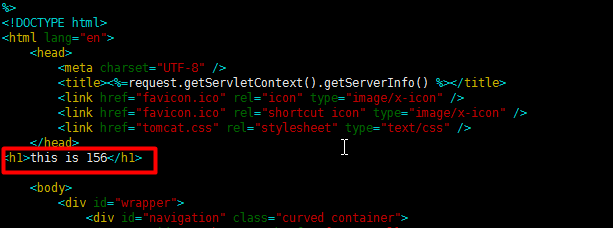
在<head>与<body>之间插入一行
<h1>this is 156</h1>
vim /usr/tomcat/tomcat8/webapps/ROOT/index.jsp

%>

<!DOCTYPE html>

<html lang="en">

    <head>

        <meta charset="UTF-8" />

        <title><%=request.getServletContext().getServerInfo() %></title>

        <link href="favicon.ico" rel="icon" type="image/x-icon" />

        <link href="favicon.ico" rel="shortcut icon" type="image/x-icon" />

        <link href="tomcat.css" rel="stylesheet" type="text/css" />

    </head>

<h1>this is </h1>

    <body>
启动tomcat
#启动

cd /usr/tomcat/tomcat8/bin && sh startup.sh
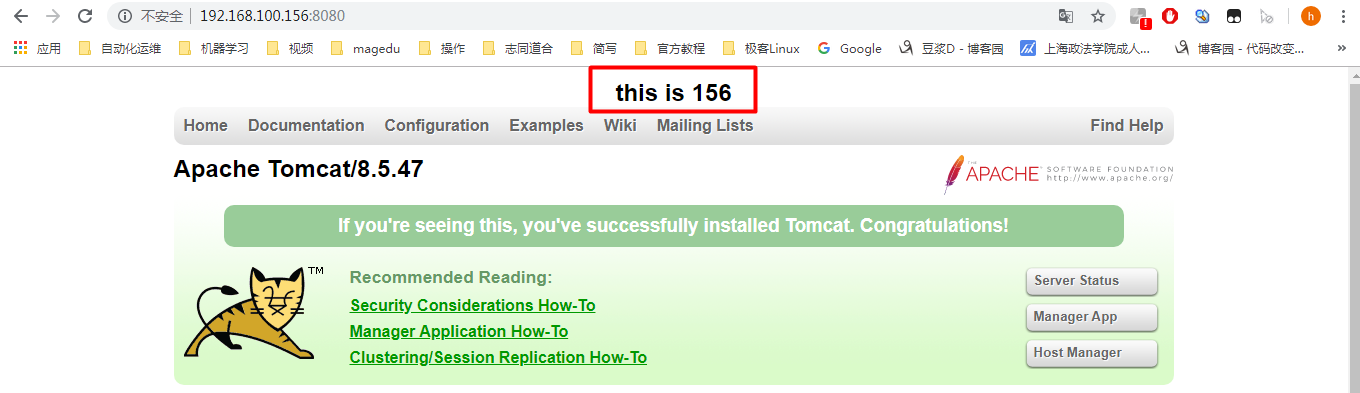
访问测试(测试环境注意关闭防火墙)
192.168.100.156:8080
主机2配置与主机一样

配置nginx
配置nginx的yum源
rpm -Uvh http://nginx.org/packages/centos/7/noarch/RPMS/nginx-release-centos-7-0.el7.ngx.noarch.rpm
安装nginx
yum install nginx -y
启动
systemctl start nginx
配置负载均衡
 vim /etc/nginx/conf.d/default.conf

 配置好的文件如下 即增加了5-8行内容,21行内容

 upstream tomcat {

                 server 192.168.100.156:;

                 server 192.168.100.157:;

                  }

 server {

     listen       ;

     server_name  localhost;

     #charset koi8-r;

     #access_log  /var/log/nginx/host.access.log  main;

     location / {

         root   /usr/share/nginx/html;

         index  index.html index.htm;

         proxy_pass http://tomcat;

     }

     #error_page                /.html;

     # redirect server error pages to the static page /50x.html

     #

     error_page        /50x.html;

     location = /50x.html {

         root   /usr/share/nginx/html;

     }

     # proxy the PHP scripts to Apache listening on 127.0.0.1:

     #

     #location ~ \.php$ {

     #    proxy_pass   http://127.0.0.1;

     #}

     # pass the PHP scripts to FastCGI server listening on 127.0.0.1:

     #

     #location ~ \.php$ {

     #    root           html;

     #    fastcgi_pass   127.0.0.1:;

     #    fastcgi_index  index.php;

     #    fastcgi_param  SCRIPT_FILENAME  /scripts$fastcgi_script_name;

     #    include        fastcgi_params;

     #}

     # deny access to .htaccess files, if Apache's document root

     # concurs with nginx's one

     #

     #location ~ /\.ht {

     #    deny  all;

     #}

 }
重启nginx
systemctl restart nginx
浏览器输入192.168.100.156查看效果
刷新一次为156,再刷新一次157
百度脑图:

nginx+tomcat负载均衡实验的更多相关文章
- nginx+tomcat负载均衡
最近练习nginx+tomcat负载均衡.根据一些资料整理了大体思路,最终实现了1个nginx+2个tomcat负载均衡. 安装JDK 1>进入安装目录,给所有用户添加可执行的权限 #chmod ...
- linux+nginx+tomcat负载均衡,实现session同步
linux+nginx+tomcat负载均衡,实现session同步 花了一个上午的时间研究nginx+tomcat的负载均衡测试,集群环境搭建比较顺利,但是session同步的问题折腾了几个小时才搞 ...
- Nginx + Tomcat 负载均衡配置详解
Nginx常用操作指南一.Nginx 与 Tomcat 安装.配置及优化1. 检查和安装依赖项 yum -y install gcc pcre pcre-devel zlib zlib-devel o ...
- Nginx+Tomcat负载均衡、动静分离群集
Nginx+Tomcat负载均衡.动静分离群集 目录 Nginx+Tomcat负载均衡.动静分离群集 一.Tomcat 1. Tomcat简介 2. Tomcat重要目录 二.Nginx负载均衡原理 ...
- Linux下Nginx+Tomcat负载均衡和动静分离配置要点
本文使用的Linux发行版:CentOS6.7 下载地址:https://wiki.centos.org/Download 一.安装Nginx 下载源:wget http://nginx.org/pa ...
- Nginx+tomcat负载均衡时静态页面报404
百度到的问题解决BLOG http://os.51cto.com/art/201204/326843.htm nginx+2台tomcat负载均衡,应用程序已部署,单独访问tomcat时,可以访问到所 ...
- nginx+tomcat负载均衡策略
測试环境均为本地,測试软件为: nginx-1.6.0,apache-tomcat-7.0.42-1.apache-tomcat-7.0.42-2.apache-tomcat-7.0.42-3 利用n ...
- nginx+tomcat负载均衡和session复制
本文介绍下传统的tomcat负载均衡和session复制. session复制是基于JVM内存的,当然在当今的互联网大数据时代,有更好的替代方案,如将session数据保存在Redis中. 1.安装n ...
- Nginx+tomcat负载均衡配置
Nginx+tomcat是目前主流的java web架构,如何让nginx+tomcat同时工作呢,也可以说如何使用nginx来反向代理tomcat后端均衡呢?直接安装配置如下: 1.JAVA JDK ...
随机推荐
- upc组队赛14 As rich as Crassus【扩展中国剩余定理】
As rich as Crassus 题目链接 题目描述 Crassus, the richest man in the world, invested some of his money with ...
- 在WSL Ubuntu 下编译UPX详细步骤
准备环境: 1. sudo apt-get update 2. sudo apt-get clang 3. apt-get install libstdc++-dev Reading package ...
- Thymeleaf 遇到的问题
1. 后台传递long类型的值作为 js 执行方法的参数,精准度失效解决办法 解决办法:用thymeleaf的拼接字符串方法来解决 例:<button class="btn btn-p ...
- 转 lsof命令详解
lsof命令详解 lsof (list open files)是一个列出当前系统打开文件的工具.在linux系统环境下,任何事物都可以以文件形式存在,通过文件不仅可以访问常规的数据,还可以访问网络 ...
- 什么是中间件?中间件和java应用关系是什么
中间件,比如websphere 是一种独立的系统软件,你的java应用要通过它来管理,比如数据库连接,消息通信等,中间件位于操作系统之上.简单滴说,你不可能直接把你的java应用部署在操作系统上,得由 ...
- 【目录】sql server 进阶篇系列
随笔分类 - sql server 进阶篇系列 sql server 下载安装标记 摘要: SQL Server 2017 的各版本和支持的功能 https://docs.microsoft.com/ ...
- SVN版本管理 目录结构
一. SVN标准目录 Subversion有一个很标准的目录结构,是这样的.比如项目是 proj,svn地址为 svn://proj/,那么标准的 svn 布局是: 这是一个标准的布局,trunk为主 ...
- plsql exception
EXCEPTION aligns with BEGIN ... END blocks. There is no BEGIN inside your loop, so there should be n ...
- 容斥原理+补集转化+MinMax容斥
容斥原理的思想大家都应该挺熟悉的,然后补集转化其实就是容斥原理的一种应用. 一篇讲容斥的博文https://www.cnblogs.com/gzy-cjoier/p/9686787.html 当我们遇 ...
- mybatis 自定义查询语句
通过mybatis插件生成的mapper文件只有基本的增.删.改.查.汇总.但是实际使用场景中,总是有各种需要连表.汇总.分组查询的需求,那我们一般都通过自定义查询语句去实现. 有时候会有表结构更改的 ...