
centOS7安装docker遇到 [Errno 14] curl#35 - "TCP connection reset by peer问题解决
-------------------------------------------------------------------------------------------------------------开始安装------------------------------------------------------------------------------------------------------
安装需要的软件包, yum-util 提供yum-config-manager功能,另外两个是devicemapper驱动依赖的
yum install -y yum-utils device-mapper-persistent-data lvm2
一、更换为阿里源
首先这个问题是因为国内访问不到docker官方镜像的缘故,所以我们要使用 国内的源来访问,之前我也试过163的源,但是一直解决不了,但是后来换了阿里源就成功解决了这个问题,不扯淡了直接出语句:
yum-config-manager --add-repo http://mirrors.aliyun.com/docker-ce/linux/centos/docker-ce.repo 成功如下:
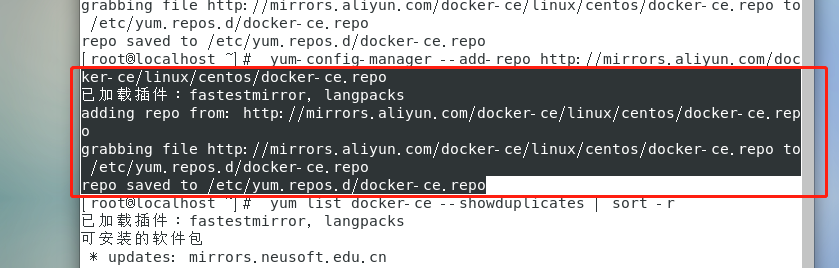
二、查看docker仓库中的所有版本 输入指令可以看到docker的版本信息,如下:(如果内核版本低,docker版本高会安装出错)
yum list docker-ce --showduplicates | sort -r
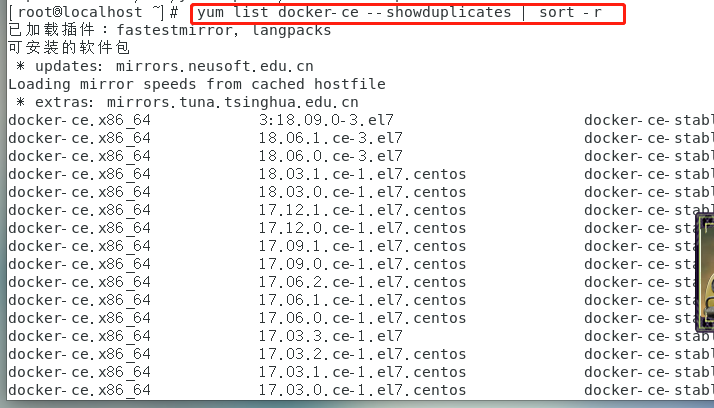
我们可以安装指定版本,使用 sudo yum install <docker的版本> ,这里我使用 sudo yum install docker-ce 默认安装最高的版本。例如
sudo yum install docker-ce.x86_64 3:18.09.0-3.el7
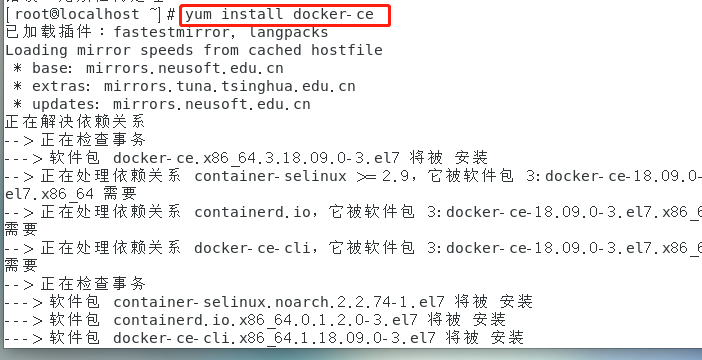
三、静静等待
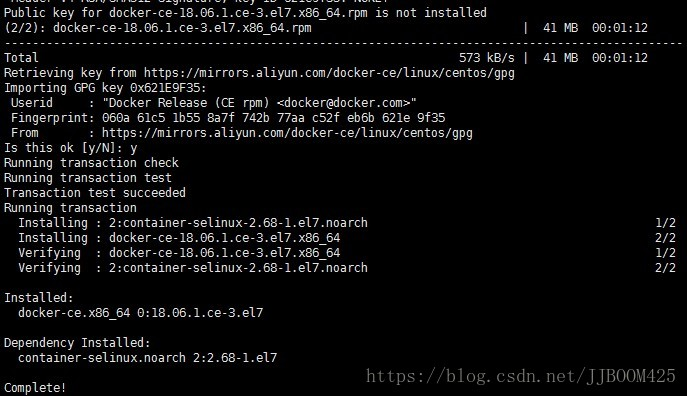
四、启动并加入开机启动
sudo systemctl start docker 与 sudo systemctl enable docker
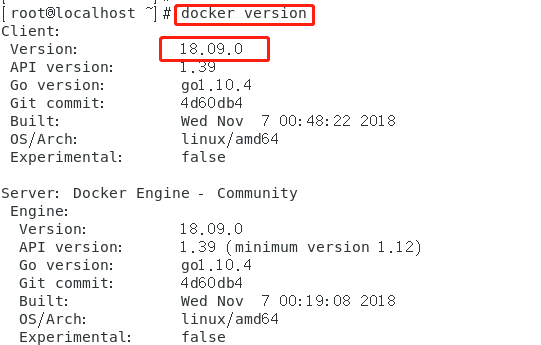
五、检测是否安装docker成功,查看版本信息。出现如下图,恭喜docker安装成功!可以看到Client与Server的信息。
docker version
问题
1、因为之前已经安装过旧版本的docker,在安装的时候报错如下:
Transaction check error:

  file /usr/bin/docker from install of docker-ce-17.12.0.ce-1.el7.centos.x86_64 conflicts with file from package docker-common-2:1.12.6-68.gitec8512b.el7.centos.x86_64

  file /usr/bin/docker-containerd from install of docker-ce-17.12.0.ce-1.el7.centos.x86_64 conflicts with file from package docker-common-2:1.12.6-68.gitec8512b.el7.centos.x86_64

  file /usr/bin/docker-containerd-shim from install of docker-ce-17.12.0.ce-1.el7.centos.x86_64 conflicts with file from package docker-common-2:1.12.6-68.gitec8512b.el7.centos.x86_64

  file /usr/bin/dockerd from install of docker-ce-17.12.0.ce-1.el7.centos.x86_64 conflicts with file from package docker-common-2:1.12.6-68.gitec8512b.el7.centos.x86_64
2、卸载旧版本的包
$ sudo yum erase docker-common-2:1.12.6-68.gitec8512b.el7.centos.x86_64

3、再次安装docker
$ sudo yum install docker-ce
---------------------
原文:https://blog.csdn.net/jjboom425/article/details/83342800
https://www.cnblogs.com/yufeng218/p/8370670.html
centOS7安装docker遇到 [Errno 14] curl#35 - "TCP connection reset by peer问题解决的更多相关文章
- YUM安装软件提示[Errno 14] curl#6 - "Could not resolve host: mirrors.cloud.aliyuncs.com; 未知的错误"
报错如下: 翻译过来就是 所以问题很简单: 第一种情况:本地DNS服务错误 第二种情况:远程主机挂了 第三种情况:远程主机地址配置错误 第一种解决方法:换DNS 首先验证一下是不是本地DNS错误 从上 ...
- Centos7安装Docker 基于Dockerfile 搭建httpd运行环境
Centos7安装Docker 基于Dockerfile 搭建httpd运行环境 docker docker搭建 docker build 本文档完成目标内容如下 使用Docker搭建http服务器一 ...
- CentOS yum 命令出现 [Errno 14] curl#6 - "Couldn't resolve host ..." 的解决方法
安装svn的时候,发现报错说一个地址无法訪问. # yum list | grep subversion http://opensource.wandisco.com/centos/7/svn-1.8 ...
- 获取Centos7安装Docker各种姿势(指定版本)(转载)
Centos7安装docker社区(CE)版 官网指导:https://docs.docker.com/engine/installation/linux/docker-ce/centos/#inst ...
- centos7 安装docker(手动和脚本安装)换源 卸载
centos7 安装docker(手动和脚本安装)换源 卸载 Docker 要求 CentOS 系统的内核版本高于 3.10 ,查看本页面的前提条件来验证你的CentOS 版本是否支持 Docker ...
- centos7安装docker、docker-compose、es7.3.0、kibana7.3.0
一.安装docker 1.更新yum包 sudo yum update 2.卸载旧版本(如果安装过旧版本的话) sudo yum remove docker docker-common docker- ...
- redhat 7.6 部署禅道 yum [Errno 14] curl#37 - "Couldn't open file /mnt/repodata/repomd.
记个流水账 redhat 7.6 上部署 禅道. 禅道官网下载 http://dl.cnezsoft.com/zentao/9.8.3/ZenTaoPMS.9.8.3.zbox_64.tar.gz ...
- centos7安装 docker
centos7安装 docker 切换到 root用户,执行: [root@localhost frinder]# yum install docker已加载插件:fastestmirror, lan ...
- 【运维技术】VM虚拟机上使用centos7安装docker启动gogs服务教程【含B站视频教程】
VM虚拟机上使用centos7安装docker启动gogs服务视频教程 BiliBili视频教程链接飞机票,点我 使用VMware Workstation安装Centos7 MinMal系统 第一步: ...
随机推荐
- spark算子篇-aggregate 系列
aggregate aggregate 是比较常用的 行动 操作,不是很好懂,这里做个解释. aggregate(zeroValue, seqOp, combOp) zeroValue 是一个初始值, ...
- Codeforces 1194E. Count The Rectangles
传送门 看到 $n<=5000$,直接暴力枚举左右两条竖线 然后考虑怎么计算高度在某个范围内,左端点小于等于某个值,右端点大于等于某个值的横线数量 直接用权值树状数组维护当前高度在某个区间内的横 ...
- MySQL性能优化(一):优化方式
原文:MySQL性能优化(一):优化方式 版权声明:本文为博主原创文章,遵循CC 4.0 BY-SA版权协议,转载请附上原文出处链接和本声明. 本文链接:https://blog.csdn.net/v ...
- Django实现websocket完成实时通讯
一 什么是Websocket WebSocket是一种在单个TCP连接上进行全双工通信的协议 WebSocket使得客户端和服务器之间的数据交换变得更加简单,允许服务端主动向客户端推送数据.在WebS ...
- vue路由(基于VScode开发)
index.js如果在router目录下,代表这个js文件只是路由使用 main.js中为全局,需要引入使用到的组件,一般vue中不用写东西vue中el挂载哪个就哪个组件为根目录,传值数据绑定的时候在 ...
- 第十篇.6、python并发编程之IO模型
一 IO模型介绍 为了更好地了解IO模型,我们需要事先回顾下:同步.异步.阻塞.非阻塞 同步(synchronous) IO和异步(asynchronous) IO,阻塞(blocking) IO和非 ...
- CentOS7.6静默(无图形化界面)安装Oracle 11g
一.准备工作 1.准备CentOS 7 系统环境 由于是使用静默模式(silent)安装的,无需使用图形化界面,我选择了最小安装的服务器版的CentOS 7.安装完成后,只有命令行界面. 2.下载 O ...
- linux svn 安装
1.环境centos6.4 2.安装svnyum -y install subversion 3.配置 建立版本库目录mkdir /var/www/svndata svnserve -d -r /va ...
- Qt5.12.0交叉编译
Qt5.12.0 交叉编译 源码配置 修改 qtbase/mkspecs/linux-arm-gnueabi-g++/qmake.conf 文件 MAKEFILE_GENERATOR = UNIX C ...
- Cocos Creator 热更新文件MD5计算和需要注意的问题
Creator的热更新使用jsb.热更新基本按照 http://docs.cocos.com/creator/manual/zh/advanced-topics/hot-update.html?h=% ...