
【串线篇】spring boot自定义starter
starter:
一、这个场景需要使用到的依赖是什么?
二、如何编写自动配置
启动器只用来做依赖导入;(启动器模块是一个空 JAR 文件,仅提供辅助性依赖管理,这些依赖可能用于自动装配或者其他类库)
专门来写一个自动配置模块;
启动器依赖自动配置;别人只需要引入启动器(starter)
我们一般的的经验
@Configuration //指定这个类是一个配置类 @ConditionalOnXXX //在指定条件成立的情况下自动配置类生效 @AutoConfigureAfter //指定自动配置类的顺序
@Bean //给容器中添加组件
@ConfigurationPropertie(prefix=””)结合相关xxxProperties类来绑 定相关的配置
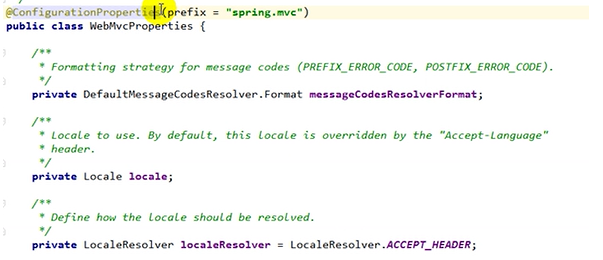
@EnableConfigurationProperties //让xxxProperties生效加入到容器中
自动配置类要能加载
将需要启动就加载的自动配置类,配置在META‐INF/spring.factories下(即要把绿色要配置在里面)
org.springframework.boot.autoconfigure.EnableAutoConfiguration=\ org.springframework.boot.autoconfigure.admin.SpringApplicationAdminJmxAutoConfiguration,\
org.springframework.boot.autoconfigure.aop.AopAutoConfiguration,\
三、模式
1.启动器只是用来做依赖导入;启动器模块是一个空 JAR 文件,仅提供辅助性依赖管理,这些依赖可能用于自动 装配或者其他类库;比如
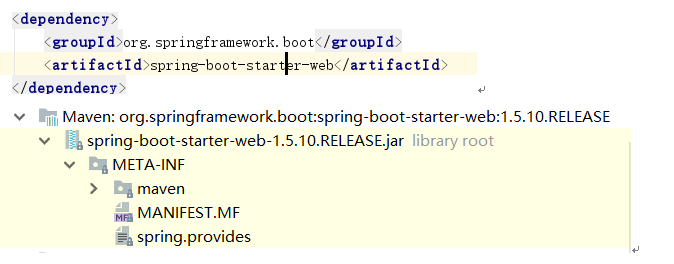
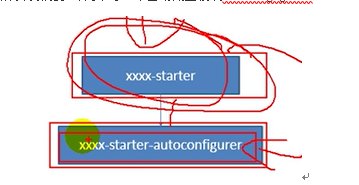
2. 启动器依赖自动配置;别人只需要引入启动器(starter)
所以我们要 专门来写一个自动配置模块autocongigurer;
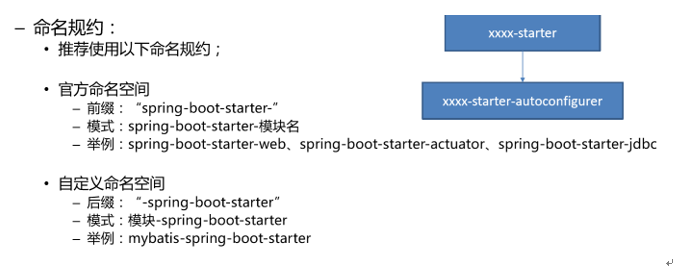
3.推荐命名规则
四、步骤:
1)、启动器模块
<?xml  version="1.0"  encoding="UTF‐8"?>

<project  xmlns="http://maven.apache.org/POM/4.0.0" xmlns:xsi="http://www.w3.org/2001/XMLSchema‐instance" xsi:schemaLocation="http://maven.apache.org/POM/4.0.0

http://maven.apache.org/xsd/maven‐4.0.0.xsd">

<modelVersion>4.0.0</modelVersion>

<groupId>com.atguigu.starter</groupId>

<artifactId>atguigu‐spring‐boot‐starter</artifactId>

<version>1.0‐SNAPSHOT</version>

<!‐‐启动器‐‐>

<dependencies>

<!‐‐引入自动配置模块‐‐>

<dependency>

<groupId>com.atguigu.starter</groupId>

<artifactId>atguigu‐spring‐boot‐starter‐autoconfigurer</artifactId>

<version>0.0.1‐SNAPSHOT</version>

</dependency>

</dependencies>

</project>
2)、自动配置模块
 <?xml  version="1.0"  encoding="UTF‐8"?>

    <project  xmlns="http://maven.apache.org/POM/4.0.0" xmlns:xsi="http://www.w3.org/2001/XMLSchema‐instance"

    xsi:schemaLocation="http://maven.apache.org/POM/4.0.0  http://maven.apache.org/xsd/maven‐ 4.0.0.xsd">

    <modelVersion>4.0.0</modelVersion> 5

    <groupId>com.atguigu.starter</groupId>

    <artifactId>atguigu‐spring‐boot‐starter‐autoconfigurer</artifactId>

    <version>0.0.1‐SNAPSHOT</version>

    <packaging>jar</packaging>

    <name>atguigu‐spring‐boot‐starter‐autoconfigurer</name>

    <description>Demo  project  for  Spring  Boot</description>

    <parent>

    <groupId>org.springframework.boot</groupId>

    <artifactId>spring‐boot‐starter‐parent</artifactId>

    <version>1.5.10.RELEASE</version>

    <relativePath/>  <!‐‐  lookup  parent  from  repository  ‐‐>

    </parent>

    <properties>

    <project.build.sourceEncoding>UTF‐8</project.build.sourceEncoding>

    <project.reporting.outputEncoding>UTF‐8</project.reporting.outputEncoding>

    <java.version>1.8</java.version>

    </properties>

    <dependencies>

    <!‐‐引入spring‐boot‐starter;所有starter的基本配置‐‐>

    <dependency>

    <groupId>org.springframework.boot</groupId>

    <artifactId>spring‐boot‐starter</artifactId>

    </dependency>

    </dependencies>

    </project>
package  com.atguigu.starter;

import org.springframework.boot.context.properties.ConfigurationProperties;

@ConfigurationProperties(prefix  =  "atguigu.hello")

public  class  HelloProperties

private String prefix;

private String suffix;

public String getPrefix() { return prefix;

}

public void setPrefix(String prefix) { this.prefix = prefix;

}

public String getSuffix() { return suffix;

}

public void setSuffix(String suffix) { this.suffix = suffix;

}

}
package  com.atguigu.starter; public  class  HelloService  {

HelloProperties  helloProperties;

public  HelloProperties  getHelloProperties()  { return helloProperties;

}

public  void  setHelloProperties(HelloProperties  helloProperties)  {

this.helloProperties = helloProperties;

}

public  String  sayHellAtguigu(String  name){

return helloProperties.getPrefix()+"‐" +name + helloProperties.getSuffix();

}

}
package  com.atguigu.starter;

import  org.springframework.beans.factory.annotation.Autowired;

import  org.springframework.boot.autoconfigure.condition.ConditionalOnWebApplication; import  org.springframework.boot.context.properties.EnableConfigurationProperties; import  org.springframework.context.annotation.Bean;

import  org.springframework.context.annotation.Configuration;

@Configuration

@ConditionalOnWebApplication  //web应用才生效

@EnableConfigurationProperties(HelloProperties.class)

public  class  HelloServiceAutoConfiguration  {

@Autowired

HelloProperties  helloProperties; @Bean

public  HelloService  helloService(){ HelloService  service  =  new  HelloService();

service.setHelloProperties(helloProperties); return service;

}

}
【串线篇】spring boot自定义starter的更多相关文章
- Spring Boot自定义starter必知必会条件
前言 在目前的Spring Boot框架中,不管是Spring Boot官方还是非官方,都提供了非常多的starter系列组件,助力开发者在企业应用中的开发,提升研发人员的工作效率,Spring Bo ...
- spring boot自定义starter
1.spring boot 项目中自定义jar包 2.项目目录 3.src/main/java 下面写自己的方法,重点是 resources 下面的文件,在resources下面新建文件夹名字为 ME ...
- Spring Boot 自定义 starter
一.简介 SpringBoot 最强大的功能就是把我们常用的场景抽取成了一个个starter(场景启动器),我们通过引入springboot 为我提供的这些场景启动器,我们再进行少量的配置就能使用相应 ...
- Spring boot 自定义starter
以下配置来自尚硅谷.. 常用如何配置 @Configuration //指定这个类是一个配置类 @ConditionalOnXXX //在指定条件成立的情况下自动配置类生效 @AutoConfigur ...
- Spring Boot 自定义Starter 可能引发的问题(Error)
如果你的项目出现: Consider defining a bean of type 'com.wy.helloworld_spring_boot_starter.PersonService' in ...
- Spring Boot 自定义kafka 消费者配置 ContainerFactory最佳实践
Spring Boot 自定义kafka 消费者配置 ContainerFactory最佳实践 本篇博文主要提供一个在 SpringBoot 中自定义 kafka配置的实践,想象这样一个场景:你的系统 ...
- spring boot自定义线程池以及异步处理
spring boot自定义线程池以及异步处理@Async:什么是线程池?线程池是一种多线程处理形式,处理过程中将任务添加到队列,然后在创建线程后自动启动这些任务.线程池线程都是后台线程.每个线程都使 ...
- Spring Boot自定义配置与加载
Spring Boot自定义配置与加载 application.properties主要用来配置数据库连接.日志相关配置等.除了这些配置内容之外,还可以自定义一些配置项,如: my.config.ms ...
- Spring Boot 2.X(四):Spring Boot 自定义 Web MVC 配置
0.准备 Spring Boot 不仅提供了相当简单使用的自动配置功能,而且开放了非常自由灵活的配置类.Spring MVC 为我们提供了 WebMvcConfigurationSupport 类和一 ...
随机推荐
- JS 替换所有的空格
在JS中替换掉输入框内的空格,是在处理表单需求的时候极为常用的一项操作,以防止用户的操作习惯引起数据异常,保证传参的安全性. NO.1 name.replace(" "," ...
- 十一、RF操作滚动条
两种方式: 方式一:window.scrollBy(0, document.body.scrollHeight) 方式二:window.scrollTo(0, document.body.scroll ...
- Spring 缓存注解解析过程
Spring 缓存注解解析过程 通过 SpringCacheAnnotationParser 的 parseCacheAnnotations 方法解析指定方法或类上的缓存注解, @Cacheable ...
- JavaScript对象的常用属性及使用
什么是浏览器对象模型? 浏览器对象模型(BOM Browser Object Model)是JavaScript的组成之一,它提供了独立于内容和浏览器窗口进行交互的对象,使用浏览器对象模型可以实现与H ...
- bug大致分类及如何定位
前端 一.概念:网站的静态页面设计,网站前端工作使用的是html.css.javascript等技术设计网站页面的样式和排版布局,这就是网站前端. 二.Bug类别 1.HTML:出现文本的问题基本都是 ...
- 学习使用CGI和HTML
目标和需求: (1)通过网页查询并设置开发板的网络参数,要求至少可查询IP地址.子网掩码.网关.MAC地址,可设置自动获取IP或固定IP,设置包括查询的内容 (2)使用CGI编程+HTML实现简单数据 ...
- sklearn+nltk ——情感分析(积极、消极)
转载:https://www.iteye.com/blog/dengkane-2406703 步骤: 1 有标签的数据.数据:好评文本:pos_text.txt 差评文本:neg_text.txt ...
- python+selenium控制浏览器窗口(刷新、前进、后退、退出浏览器)
调用说明: driver.属性值 变量说明: 1.driver.current_url:用于获得当前页面的URL 2.driver.title:用于获取当前页面的标题 3.driver.page_so ...
- k线图的分形
蜡烛图上的分形指标,作为一种特殊的K线组合形态,通过对价格的一系列的高低点的描述,辅助识别出市场潜在的突破和反转点,预判后期走势. 顶分形:相邻的五根K线,若中间那根K线最高价为这五根K线的最高价,则 ...
- 004 gcc 编译 C/C++ 默认使用哪个标准
0. 前言 我挺久没碰 C,不想就这么忘了,最近重温了一些相关知识 1. C 语言的几种"方言" 简单地说,有这么几种常见的 年份 名称 1983 ANSI C 1987 C87 ...