
WinRTXamlToolkit在Win8.1实现统计图
【注1】WinRTXamlToolkit是免费控件,不过很久不更新了,而且网上的资源很少。后来我发现syncfusion控件有免费的community版本,并且有详细文档,所以就转过去使用syncfusion了。继续在WinRT/UWP奋战的亲们可以去围观一下:https://www.syncfusion.com/products/communitylicense
【注2】.Net平台各种免费和收费的包含Chart的控件:WinRTXamlToolkit/ModernUI/Visifire/Telerik/Syncfusion
【注3】WinRTXamlToolkit示例:http://eren.ws/2013/10/15/using-graphs-and-charts-in-windows-store-apps-boredom-challenge-day-11/
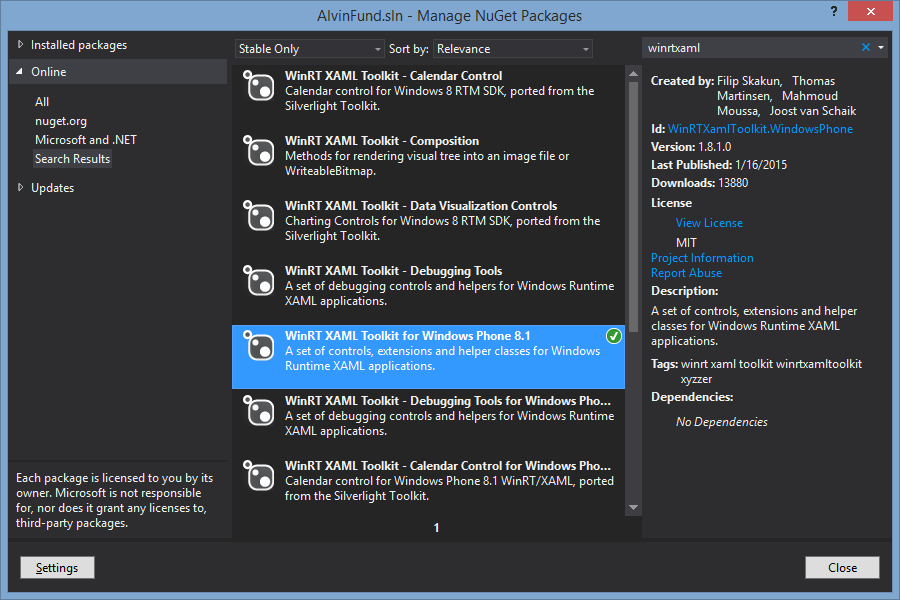
xmlns:Charting="using:WinRTXamlToolkit.Controls.DataVisualization.Charting"
<Grid Background="{StaticResource ApplicationPageBackgroundThemeBrush}">

        <Charting:Chart x:Name="PieChart" HorizontalAlignment="Left" VerticalAlignment="Top" Margin="100,100,0,0" Width="400" Height="400">

            <Charting:PieSeries Margin="0" IndependentValuePath="Name" DependentValuePath="Amount" IsSelectionEnabled="True"/>

        </Charting:Chart>

        <Button x:Name="ButtonRefresh" Content="Refresh" HorizontalAlignment="Left" Margin="100,57,0,0" VerticalAlignment="Top" Click="ButtonRefresh_Click"/>

        <Charting:Chart x:Name="ColumnChart" HorizontalAlignment="Left" VerticalAlignment="Top" Margin="505,100,0,0" Width="399" Height="400">

            <Charting:ColumnSeries Title="Smartphone Companies" Margin="0" IndependentValuePath="Name" DependentValuePath="Amount" IsSelectionEnabled="True"/>

        </Charting:Chart>

        <Charting:Chart x:Name="LineChart" HorizontalAlignment="Left" VerticalAlignment="Top" Margin="909,100,-143,0" Width="600" Height="400">

            <Charting:LineSeries Title="Smartphone Companies" Margin="0" IndependentValuePath="Name" DependentValuePath="Amount" IsSelectionEnabled="True"/>

        </Charting:Chart>

        <Charting:Chart x:Name="BarChart" HorizontalAlignment="Left" VerticalAlignment="Top" Margin="100,505,0,-137" Width="600" Height="400">

            <Charting:BarSeries Title="Smartphone Companies" Margin="0" IndependentValuePath="Name" DependentValuePath="Amount" IsSelectionEnabled="True"/>

        </Charting:Chart>

        <Charting:Chart x:Name="BubbleChart" HorizontalAlignment="Left" VerticalAlignment="Top" Margin="705,505,0,-137" Width="600" Height="400">

            <Charting:BubbleSeries Title="Smartphone Companies" Margin="0" IndependentValuePath="Name" DependentValuePath="Amount" IsSelectionEnabled="True"/>

        </Charting:Chart>

    </Grid>
        public class FinancialStuff

        {

            public string Name { get; set; }

            public int Amount { get; set; }

        }

        private void LoadChartContents()

        {

            Random rand = new Random();

            List<FinancialStuff> financialStuffList = new List<FinancialStuff>();

            financialStuffList.Add(new FinancialStuff() { Name = "MSFT", Amount = rand.Next(, ) });

            financialStuffList.Add(new FinancialStuff() { Name = "AAPL", Amount = rand.Next(, ) });

            financialStuffList.Add(new FinancialStuff() { Name = "GOOG", Amount = rand.Next(, ) });

            financialStuffList.Add(new FinancialStuff() { Name = "BBRY", Amount = rand.Next(, ) });

            (PieChart.Series[] as PieSeries).ItemsSource = financialStuffList;

            (ColumnChart.Series[] as ColumnSeries).ItemsSource = financialStuffList;

            (LineChart.Series[] as LineSeries).ItemsSource = financialStuffList;

            (BarChart.Series[] as BarSeries).ItemsSource = financialStuffList;

            (BubbleChart.Series[] as BubbleSeries).ItemsSource = financialStuffList;

        }
也可以先将Series弄出来:
        public static LineSeries InitChart(List<FinancialStuff> financialStuffList)

        {

            LineSeries lSeries = new LineSeries();

            lSeries.IndependentValuePath = "Name";

            lSeries.DependentValuePath = "Amount";

            lSeries.ItemsSource = financialStuffList;

            return lSeries;

        }
 LineSeries ls = Functions.WinrtChartHelper.InitChart(financialStuffList);

                    this.LineChart.Series.Add(ls);
然而,这样子只能实现LineSeries ,PieSeries/ColumnSeries/BarSeries/BubbleSeries等都会有一个UnhandledException出现……
WinRTXamlToolkit在Win8.1实现统计图的更多相关文章
- Windows.Andy.Code4App.dll Win8.1/WP8.1通用类库@ver1.0.0
直接入题! Win8.1和WP8.1眼下已经渐渐融为一体,WP8.1不断向Win8.1靠拢,虽然一些方法上WP8.1和Win8.1不同(ps:WP8.1和Win8.1的不同之处),但大部分还是相同的. ...
- 0.Win8.1,Win10,Windows Server 2012 安装 Net Framework 3.5
后期会在博客首发更新:http://dnt.dkill.net 网站部署之~Windows Server | 本地部署:http://www.cnblogs.com/dunitian/p/482280 ...
- win8.1硬盘安装ubuntu14.04双系统
在网上找了很多方法都失败了,原因是大多数方法都是用mbr方式安装的,如grub4dos,easybcd.以至于连自己都怀疑win8能不能用硬盘安装,差点就去买个u盘来安装了,就在打算放弃的时候在ubu ...
- alienware Win8 系统安装
原作者网名 alienware-小来: 我的外星人 老是装系统出错.我觉得写的不错.把原作者的东西拿过来.. 对于win7系统的用户来说想要体验下win8.1系统,或者是原来win8.1系统加装固态后 ...
- win8改win7笔记
内存<=4G,选32位(×86) 内存>=4G,选64位(×64) (非必须) BIOS设置 USB Boot Support Disabled改为Enabled(如 ...
- 【转】微软教学:三种方法屏蔽Win7/Win8.1升级Win10推送
原文地址:http://www.ithome.com/html/win10/199961.htm 微软在2015年6月就开启了Win10升级推送工作,主要是靠<获取Windows10>工具 ...
- 教你一招:解决win10/win8.1系统在安装、卸载软件时出现2502、2503错误代码的问题
经常遇到win10/win8.1系统在安装.卸载软件时出现2502.2503错误代码的问题. 解决办法: 1.打开任务管理器后,切换到“详细信息”选项卡,找到explore.exe这个进程,然后结束进 ...
- 【转】windows环境下安装win8.1+Mac OS X 10.10双系统教程
先要感谢远景论坛里的各位大神们的帖子 没有他们的分享我也不能顺利的装上Mac OS X 10.10! 写这篇随笔主要是为了防止自己遗忘,同时给大家分享下我的经验. 本教程适用于BIOS+MBR分区的 ...
- 【转】[教程]在 win7 / win8 下安装苹果系统 (懒人版)
前言 这篇安装教程的素材在国庆就准备好了,但那时学习任务比较重,没有时间发帖,一直拖到现在.趁这个周末有空,赶紧写完它,希望能帮助一些景友. 论坛已经有不少安装教程,如果对这篇安装教程有疑问可以去 ...
随机推荐
- 使用printf函数实现串口信息打印——设置IAR和Keil的Options
在Keil和IAR中都可以使用printf函数,但两者设置的方法不一样.以下分别是IAR和Keil的设置. 下面是Keil的设置. 选中Options--->Target--->Code ...
- Get Length 使用dynamic关键字
http://www.codewars.com/kata/566f571ed78037c7b6000036/train/csharp You don't have any idea what is t ...
- Java 错误:找不到或无法加载主类(源文件中含有包名 package)
1. 问题定位 编译(javac)和执行(java)java 程序时,出现这种类型的错误:找不到或无法加载主类: 首先排除是否是环境变量配置不当造成的问题,只要保证,命令行界面能够识别 javac/j ...
- codeforces round #424 div2
A 暴力查询,分三段查就可以了 #include<bits/stdc++.h> using namespace std; ; int n, pos; int a[N]; int main( ...
- Enter the path to the kernel header files for the 3.18.0-kali1-686-pae kerne vmware tool
安装VMWare Tools出现提示:Enter the path to the kernel header files for the 3.18.0-kali1-686-pae kerne? 201 ...
- PCB MS SQL 小写转大写
由于SQL Server允许为小写进入 ,导致数据库中存在小写,在数据集成到MES或ERP时报错,Oracle要求大写导致, 需转换为大写,可通过以下语句,查询所有小写数据,再更新.
- Rancher 2:添加 NFS client provisioner 动态提供 Kubernetes 后端存储卷
一.前提说明 1.说明: NFS client provisioner 利用 NFS Server 给 Kubernetes 作为持久存储的后端,并且动态提供PV. 默认 rancher 2 的存储类 ...
- Servlet初始化与异步支持
Shared libraries(共享库) / runtimes pluggability(运行时插件能力) 1.Servlet容器启动会扫描,当前应用里面每一个jar包的 ServletContai ...
- String和八种基本数据类型互相转换
//String转换为对应的八种基本数据类型 String str="100"; //Value out of range. Value:"200" Radix ...
- HTML+CSS(11)
n CSS背景属性 Background-color:背景色. Background-image:背景图片地址.如:background-image:url(images/bg.gif;) Back ...