
Android的PopWindow动画实现
转载博客:http://www.open-open.com/lib/view/open1423626956186.html
1.实现步骤
<RelativeLayout xmlns:android="http://schemas.android.com/apk/res/android"

    xmlns:tools="http://schemas.android.com/tools"

    android:id="@+id/main"

    android:layout_width="match_parent"

    android:layout_height="match_parent" >

    <Button

        android:id="@+id/open"

        android:layout_width="wrap_content"

        android:layout_height="wrap_content"

        android:layout_centerHorizontal="true"

        android:text="打开泡泡窗口" />

</RelativeLayout>
2.popupwindow.xml
<?xml version="1.0" encoding="utf-8"?>

<LinearLayout xmlns:android="http://schemas.android.com/apk/res/android"

    android:layout_width="match_parent"

    android:layout_height="match_parent"

    android:orientation="vertical" >

    <GridView

        android:id="@+id/gv"

        android:layout_width="fill_parent"

        android:layout_height="wrap_content"

        android:background="#00bfff"

        android:numColumns="" >

    </GridView>

</LinearLayout>
3.MainActivity
public class MainActivity extends Activity implements OnClickListener {

    private Button open;

    private View parent;

    private View popView;

    private PopupWindow popupWindow;

    private GridView gv;

    private String[] names = { "生", "如", "夏", "花", "海", "阔", "天", "空" };

    private int[] images = { R.drawable.ic_launcher, R.drawable.ic_launcher,

            R.drawable.ic_launcher, R.drawable.ic_launcher,

            R.drawable.ic_launcher, R.drawable.ic_launcher,

            R.drawable.ic_launcher, R.drawable.ic_launcher };

    @Override

    protected void onCreate(Bundle savedInstanceState) {

        super.onCreate(savedInstanceState);

        setContentView(R.layout.activity_main);

        parent = findViewById(R.id.main);

        open = (Button) findViewById(R.id.open);

        open.setOnClickListener(this);

        initPopupWindow();

    }

    /**

     * 初始化popupWindow

     */

    private void initPopupWindow() {

        popView = getLayoutInflater().inflate(R.layout.popupwindow, null);

        popupWindow = new PopupWindow(popView,

                ViewGroup.LayoutParams.MATCH_PARENT,

                ViewGroup.LayoutParams.WRAP_CONTENT);

        popupWindow.setFocusable(true);

        popupWindow.setBackgroundDrawable(new BitmapDrawable());

        popupWindow.setOutsideTouchable(true);

        gv = (GridView) popView.findViewById(R.id.gv);

        gv.setAdapter(MyAdapter());

    }

    /**

     * 为GridView填充数据

     *

     * @return

     */

    private ListAdapter MyAdapter() {

        List<Map<String, Object>> list = new ArrayList<Map<String, Object>>();

        for (int i = ; i < names.length; i++) {

            Map<String, Object> map = new HashMap<String, Object>();

            map.put("names", names[i]);

            map.put("images", images[i]);

            list.add(map);

        }

        SimpleAdapter simpleAdapter = new SimpleAdapter(this, list,

                R.layout.pop_item, new String[] { "names", "images" },

                new int[] { R.id.tv, R.id.img });

        return simpleAdapter;

    }

    @Override

    public void onClick(View v) {

        //为popWindow添加动画效果

        popupWindow.setAnimationStyle(R.style.popWindow_animation);

        // 点击弹出泡泡窗口

        popupWindow.showAtLocation(parent, Gravity.BOTTOM, , );

    }

}
4.为了实现动画进出效果,定义两个布局文件
popupwindow_enter.xml
<?xml version="1.0" encoding="utf-8"?>

<set xmlns:android="http://schemas.android.com/apk/res/android" >

    <translate

        android:duration=""

        android:fromYDelta="100%p"

        android:toYDelta="" />

    <alpha

        android:duration=""

        android:fromAlpha="0.5"

        android:toAlpha="1.0" />

</set>
popupwindow_exit.xml
<?xml version="1.0" encoding="utf-8"?>

<set xmlns:android="http://schemas.android.com/apk/res/android" >

    <alpha

        android:duration=""

        android:fromAlpha="1.0"

        android:toAlpha="0.5" />

    <translate

        android:fromYDelta=""

        android:toYDelta="100%p"

        android:duration="" />

</set>
5.style.xml
<style name="popWindow_animation">

        <item name="android:windowEnterAnimation">@anim/popupwindow_enter</item>

        <item name="android:windowExitAnimation">@anim/popupwindow_exit</item>

</style>
PopuWindow和软键盘共存时的设置
一、键盘不消失,popuwindow在下层布局大小不变
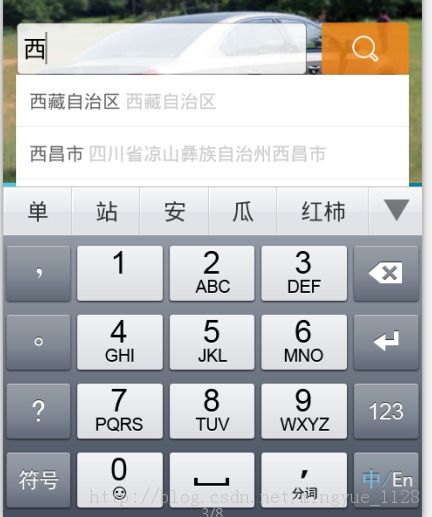
popupWindow=new PopupWindow(popuview,LayoutParams.WRAP_CONTENT, LayoutParams.WRAP_CONTENT);

// 需要设置一下此参数,点击外边可消失

popupWindow.setBackgroundDrawable(new BitmapDrawable());

//设置点击窗口外边窗口消失

popupWindow.setOutsideTouchable(true);

//设置弹出窗体需要软键盘,

popupWindow.setInputMethodMode(PopupWindow.INPUT_METHOD_NEEDED);

//再设置模式,和Activity的一样,覆盖。

popupWindow.setSoftInputMode(WindowManager.LayoutParams.SOFT_INPUT_ADJUST_PAN);
二、键盘不消失,popuWindow在下层,布局上移

popupWindow=new PopupWindow(popuview,LayoutParams.WRAP_CONTENT, LayoutParams.WRAP_CONTENT);

// 需要设置一下此参数,点击外边可消失

popupWindow.setBackgroundDrawable(new BitmapDrawable());

//设置点击窗口外边窗口消失

popupWindow.setOutsideTouchable(true);

//设置弹出窗体需要软键盘,

popupWindow.setInputMethodMode(PopupWindow.INPUT_METHOD_NEEDED);

//再设置模式,和Activity的一样,覆盖,调整大小。

popupWindow.setSoftInputMode(WindowManager.LayoutParams.SOFT_INPUT_ADJUST_RESIZE);
三、键盘消失

popupWindow=new PopupWindow(popuview,LayoutParams.WRAP_CONTENT, LayoutParams.WRAP_CONTENT);

// 需要设置一下此参数,点击外边可消失

popupWindow.setBackgroundDrawable(new BitmapDrawable());

//设置点击窗口外边窗口消失

popupWindow.setOutsideTouchable(true);

popupWindow.setFocusable(true);
Android的PopWindow动画实现的更多相关文章
- Android立体旋转动画实现与封装(支持以X、Y、Z三个轴为轴心旋转)
本文主要介绍Android立体旋转动画,或者3D旋转,下图是我自己实现的一个界面 立体旋转分为以下三种: 1. 以X轴为轴心旋转 2. 以Y轴为轴心旋转 3. 以Z轴为轴心旋转--这种等价于andro ...
- Android中矢量动画
Android中矢量动画 Android中用<path> 标签来创建SVG,就好比控制着一支画笔,从一点到一点,动一条线. <path> 标签 支持一下属性 M = (Mx, ...
- Android Animation(动画)
前言 Android 平台提供实现动画的解决方案(三种) 一.3.0以前,android支持两种动画: (1)Frame Animation:顺序播放事先做好的图像,与gif图片原理类似,是一种逐帧动 ...
- android 补间动画和Animation
介绍: 补间动画是一种设定动画开始状态.结束状态,其中间的变化由系统计算补充.这也是他叫做补间动画的原因. 补间动画由Animation类来实现具体效果,包括平移(TranslateAnimation ...
- Android中过场动画
overridePendingTransition(R.anim.slide_in_right,R.anim.slide_out_left); 第一参数为进入的动画 第二参数为退出的动画 进入的动画 ...
- Android 自定义波浪动画 --"让进度浪起来~"
原文链接:http://www.jianshu.com/p/0e25a10cb9f5 一款效果不错的动画,实现也挺简单的,推荐阅读学习~ -- 由 傻小孩b 分享 waveview <Andro ...
- Android 三种动画详解
[工匠若水 http://blog.csdn.net/yanbober 转载请注明出处.点我开始Android技术交流] 1 背景 不能只分析源码呀,分析的同时也要整理归纳基础知识,刚好有人微博私信让 ...
- Android自定义窗口动画
第一步,设置出现和消失的xml 1.在res/anim下创建enter_anim.xml,设置窗口出现的动画 <?xml version="1.0" encoding=&qu ...
- 实例源码--Android自定义Gallery动画效果
相关文档与源码: 下载源码 技术要点: 1.自定义控件的使用 2.Gallery控件的使用实例 3.详细的源码注释 ...... 详细介绍: 1.自定义控件的使用 本套源码通过自定义控件的方式,继 ...
随机推荐
- View 与 Controller 之间的delegate(代理)传值
这个代理传值是经常使用的一种传值方式,下面介绍一种View 和 Controller 之间的代理传值方法. 先建立一个View视图 如 LoginView 是继承于一个UIView 在LoginVie ...
- jsp使用EL表达式回传boolean值出错的问题
在最近做的一个项目中使用session回传的属性中有一个为boolean,报出错. 属性名字为"isAdmit",布尔类型.后来我上网查了一下,是因为我使用了Myeclipse的自 ...
- struts2中的jar包
核心包: (后面数字是版本号,不同struts2版本,数字可能不一样.) struts2-core-2.1.8.1 struts2的核心jar包,不可缺少的 xwork-core-2.1.6 xwor ...
- Webform Application传值 ViewState
Application:所有的会话共享一个Application空间,任何一个人改变Application的内容,其他人都会发现被改变了.Application中的内容不会被自动释放 存放位置:服务端 ...
- bootstrap按钮样式
<a class='btn' href='javascript:;'>常规按钮</a> <a class='btn btn-small' href='javascript ...
- Ubuntu14.04或16.04下安装JDK1.8+Scala+Hadoop2.7.3+Spark2.0.2
为了将Hadoop和Spark的安装简单化,今日写下此帖. 首先,要看手头有多少机器,要安装伪分布式的Hadoop+Spark还是完全分布式的,这里分别记录. 1. 伪分布式安装 伪分布式的Hadoo ...
- 工作总结_sql
今天客户叫导入数据,因为存在特殊字符,快把我给玩死了,,所以请教...总结 sql 数据导入excel 存在特殊字符引起的数据缺失 利用字符方式 : select a.OpenID+', ...
- Ubuntu 安装Theano
参考:http://deeplearning.net/software/theano/install_ubuntu.html 编译安装python3.4:http://blog.aboutc.net/ ...
- 多线程相关------临界区CriticalSection
多线程一直是短板,整理相关知识方便查询 临界区(Critical Section) 临界区是一段供线程独占式访问的代码.在任意时刻,若有一个线程正在访问该代码段,如果其他所有试图访问的线程都将被挂起, ...
- 使用DataList实现数据分页的技术
今天做网站的时候,用到了分页技术,我把使用方法记录下来,以便日后查阅以及帮助新手朋友们. DataList控件可以按照列表的形式显示数据表中的多行记录,但是被显示的多行记录没有分页功能,使用起来不太方 ...