
tensorflowxun训练自己的数据集之从tfrecords读取数据
当训练数据量较小时,采用直接读取文件的方式,当训练数据量非常大时,直接读取文件的方式太耗内存,这时应采用高效的读取方法,读取tfrecords文件,这其实是一种二进制文件。tensorflow为其内置了各种存储和读取的函数,方便调用。
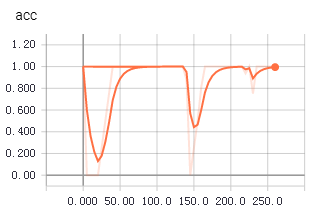
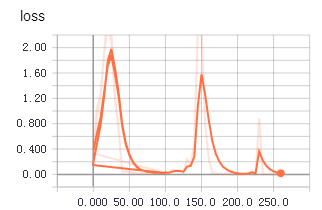
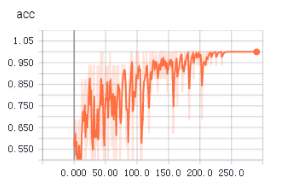
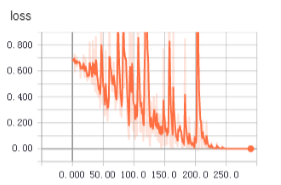
不知道为啥,从tfrecords中读取数据用于训练时,收敛得更快,更平稳。上面两个图是使用tfrecords的准确率和loss值变化,下面是直接读取文件的准确率和loss值变化。
1 生成记录样本的记录文件
 root_dir = os.getcwd()

 def getTrianList():

     with open("train.txt","w") as f:

         for file in os.listdir(root_dir+'\\dataSet'):

             for picFile in os.listdir(root_dir+"\\dataSet\\"+file):

                 f.write("dataSet/"+file+"/"+picFile+" "+file+"\n")

                 print(picFile)

 if __name__=="__main__":

     getTrianList()
将样本文件路径和标签统一记录到一个txt中,后面生成tfrecords文件就是通过读取这些信息。
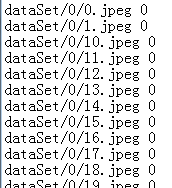
注意文件路径和标签之间采用空格,不要使用制表符。
2 读取txt存于数组中
 def load_file(example_list_file):

     lines = np.genfromtxt(example_list_file,delimiter=" ",dtype=[('col1', 'S120'), ('col2', 'i8')])

     examples = []

     labels = []

     for example,label in lines:

         examples.append(example)

         labels.append(label)

     #convert to numpy array

     return np.asarray(examples),np.asarray(labels),len(lines)
这段代码主要用来读取第1步生成的txt,将文件路径和标签存于数组中
3 读取图片
 def extract_image(filename,height,width):

     print(filename)

     image = cv2.imread(filename)

     image = cv2.resize(image,(height,width))

     b,g,r = cv2.split(image)

     rgb_image = cv2.merge([r,g,b])

     return rgb_image
使用cv2读取图片文件
4 转化为tfrecords文件
 def trans2tfRecord(trainFile,name,output_dir,height,width):

     if not os.path.exists(output_dir) or os.path.isfile(output_dir):

         os.makedirs(output_dir)

     _examples,_labels,examples_num = load_file(train_file)

     filename = name + '.tfrecords'

     writer = tf.python_io.TFRecordWriter(filename)

     for i,[example,label] in enumerate(zip(_examples,_labels)):

         print("NO{}".format(i))

         #need to convert the example(bytes) to utf-8

         example = example.decode("UTF-8")

         image = extract_image(example,height,width)

         image_raw = image.tostring()

         example = tf.train.Example(features=tf.train.Features(feature={

                 'image_raw':_bytes_feature(image_raw),

                 'height':_int64_feature(image.shape[0]),

                  'width': _int64_feature(32),

                 'depth': _int64_feature(32),

                  'label': _int64_feature(label)

                 }))

         writer.write(example.SerializeToString())

     writer.close()
 def _int64_feature(value):

     return tf.train.Feature(int64_list=tf.train.Int64List(value=[value]))

 def _bytes_feature(value):

     return tf.train.Feature(bytes_list=tf.train.BytesList(value=[value]))
5 从tfrecords中读取训练数据
 def read_tfRecord(file_tfRecord):

     queue = tf.train.string_input_producer([file_tfRecord])

     reader = tf.TFRecordReader()

     _,serialized_example = reader.read(queue)

     features = tf.parse_single_example(

             serialized_example,

             features={

           'image_raw': tf.FixedLenFeature([], tf.string),

           'height': tf.FixedLenFeature([], tf.int64),

           'width':tf.FixedLenFeature([], tf.int64),

           'depth': tf.FixedLenFeature([], tf.int64),

           'label': tf.FixedLenFeature([], tf.int64)

                     }

             )

     image = tf.decode_raw(features['image_raw'],tf.uint8)

     #height = tf.cast(features['height'], tf.int64)

     #width = tf.cast(features['width'], tf.int64)

     image = tf.reshape(image,[32,32,3])

     image = tf.cast(image, tf.float32)

     image = tf.image.per_image_standardization(image)

     label = tf.cast(features['label'], tf.int64)

     print(image,label)

     return image,label
从tfrecords文件中读取image和label,训练的时候,直接使用tf.train.batch函数生成用于训练的batch即可。
image_batches,label_batches = tf.train.batch([image, label], batch_size=16, capacity=20)
其余的部分跟之前的训练步骤一样。
tensorflowxun训练自己的数据集之从tfrecords读取数据的更多相关文章
- TensorFlow学习笔记——LeNet-5(训练自己的数据集)
在之前的TensorFlow学习笔记——图像识别与卷积神经网络(链接:请点击我)中了解了一下经典的卷积神经网络模型LeNet模型.那其实之前学习了别人的代码实现了LeNet网络对MNIST数据集的训练 ...
- Fast RCNN 训练自己的数据集(3训练和检测)
转载请注明出处,楼燚(yì)航的blog,http://www.cnblogs.com/louyihang-loves-baiyan/ https://github.com/YihangLou/fas ...
- 【faster-rcnn】训练自己的数据集时的坑
既然faster-rcnn原版发表时候是matlab版代码,那就用matlab版代码吧!不过遇到的坑挺多的,不知道python版会不会好一点. ======= update ========= 总体上 ...
- 【Tensorflow系列】使用Inception_resnet_v2训练自己的数据集并用Tensorboard监控
[写在前面] 用Tensorflow(TF)已实现好的卷积神经网络(CNN)模型来训练自己的数据集,验证目前较成熟模型在不同数据集上的准确度,如Inception_V3, VGG16,Inceptio ...
- 目标检测算法SSD之训练自己的数据集
目标检测算法SSD之训练自己的数据集 prerequesties 预备知识/前提条件 下载和配置了最新SSD代码 git clone https://github.com/weiliu89/caffe ...
- 可变卷积Deforable ConvNet 迁移训练自己的数据集 MXNet框架 GPU版
[引言] 最近在用可变卷积的rfcn 模型迁移训练自己的数据集, MSRA官方使用的MXNet框架 环境搭建及配置:http://www.cnblogs.com/andre-ma/p/8867031. ...
- caffe训练自己的数据集
默认caffe已经编译好了,并且编译好了pycaffe 1 数据准备 首先准备训练和测试数据集,这里准备两类数据,分别放在文件夹0和文件夹1中(之所以使用0和1命名数据类别,是因为方便标注数据类别,直 ...
- 使用yolo3模型训练自己的数据集
使用yolo3模型训练自己的数据集 本项目地址:https://github.com/Cw-zero/Retrain-yolo3 一.运行环境 1. Ubuntu16.04. 2. TensorFlo ...
- 【tf.keras】在 cifar 上训练 AlexNet,数据集过大导致 OOM
cifar-10 每张图片的大小为 32×32,而 AlexNet 要求图片的输入是 224×224(也有说 227×227 的,这是 224×224 的图片进行大小为 2 的 zero paddin ...
随机推荐
- Matplotlib植入PyQt5 + QT5的UI呈现
实现matplotlib图形通过PyQt5+Qt5在GUI中呈现步骤: 第一步,通过matplotlib.backends.backend_qt5agg类来连接PyQt5: import matplo ...
- 【ArcGIS for Android】经纬度坐标、地图投影坐标、屏幕坐标互相转换
SpatialReference mSR4326 = SpatialReference.create(4326); SpatialReference mSR3857 = SpatialReferenc ...
- ArcGIS ArcMap 问题(ArcMap闪退、cx_oracle安装不上)
一.问题描述 1.ArcMap闪退 2.安装32位cx_oracle提示python目录不存在 二.解决方案 1.修改pythoncore的文件目录,指向C:\Python27\ArcGIS10.3\ ...
- 如何通过Keil将程序正确的下载进flash中
前面介绍了一些创建工程和调试的基本步骤,在这里准备介绍一下如何正确的将Keil程序在仿真调试中下载到flash.这里再次涉及到了debug的窗口. 工具/原料 Keil uVision 4/5 ...
- C语言数组元素的查询
在实际开发中,经常需要查询数组中的元素.例如,学校为每位同学分配了一个唯一的编号,现在有一个数组,保存了实验班所有同学的编号信息,如果有家长想知道他的孩子是否进入了实验班,只要提供孩子的编号就可以,如 ...
- Transact-SQL小知识
一.Isnull 函数 Isnull 函数主要作用是将为空的值替换为指定值,如果不为空返回检查类型的返回值,isnull的语法: Isnull (check_expression , replacem ...
- .net Session延长过期时间
一.全局网站(即服务器)级 IIS-网站-属性-Asp.net-编辑配置-状态管理-会话超时(分钟)-设置为120,即为2小时,即120分钟后如果当前用户没有操作,那么Session就会自动过期. 二 ...
- chkcofnig-minimal-script
author :headsen chen date: 2018-06-04 12:02:27 #!/bin/bash for i in `chkconfig --list |awk '{print ...
- ios笔试题(选择题)
1-10 C语言 & 计算机基础 1.请看下面一段代码 static int a = 1; int main(){ int b = 2; char *c = NULL; c = (char * ...
- Angular2+学习第2篇 cli 环境搭建过程
Angular-cli是angular团队针对Angular2提供的脚手架,用于环境搭建,运行等:具体参考Angular-cli GitHub Angular的启动过程,需要先回答三个问题: 启动时加 ...