
圆角标题title
Html代码:
<!DOCTYPE html>

<html lang="en">

<head>

    <meta charset="UTF-8">

    <meta name="viewport" content="width=device-width,initial-scale=1.0, minimum-scale=1.0, maximum-scale=1.0, user-scalable=no" />

    <meta content="yes" name="apple-mobile-web-app-capable" />

    <meta content="black" name="apple-mobile-web-app-status-bar-style" />

    <meta content="telephone=no" name="format-detection" />

    <title>Document</title>

    <style type="text/css">

    * {margin: 0;padding: 0;}

    body {max-width: 640px;margin: 50px auto;}

    .public_title { margin: 5px 2px;overflow: hidden; text-align: center; font-size: 16px;}

    .public_title .p_t_bottom,

    .public_title .p_t_top {height: 5px;margin: 0 5px;background: #ff5b80;}

    .public_title .p_t_top {border-radius: 5px 5px 0 0;}

    .public_title .p_t_body {height: 22px;line-height: 22px;background: #ff5b80;position: relative;font-size: 18px;border-radius: 5px;color: #fff;}

    .public_title .p_t_bottom {border-radius: 0 0 5px 5px;}

    .border_wrapper { margin: 30px 2px;overflow: hidden; text-align: center; font-size: 16px;}

    .border_wrapper .b_w_bottom,

    .border_wrapper .b_w_top {height: 5px;margin: 0 5px;border:1px solid #ff5b80;}

    .border_wrapper .b_w_top {border-radius: 5px 5px 0 0; border-bottom: 0;}

    .border_wrapper .b_w_body {height: 22px;line-height: 22px; border:1px solid #ff5b80;position: relative;font-size: 18px;border-radius: 5px;color: #333; border-top:0;border-bottom: 0}

    .border_wrapper .b_w_bottom {border-radius: 0 0 5px 5px;border-top:0;}

    </style>

</head>

<body>

    <div class="public_title">

        <div class="p_t_top"></div>

        <div class="p_t_body"><span>测试小姐的命格</span></div>

        <div class="p_t_bottom"></div>

    </div>

    <div class="border_wrapper">

        <div class="b_w_top"></div>

        <div class="b_w_body"><span>测试先生的命格</span></div>

        <div class="b_w_bottom"></div>

    </div>

</body>

</html>
效果图:
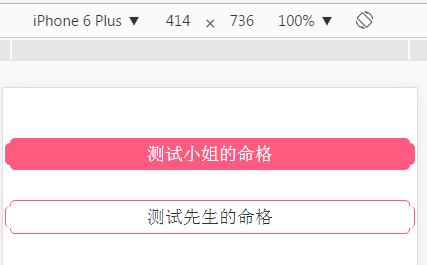
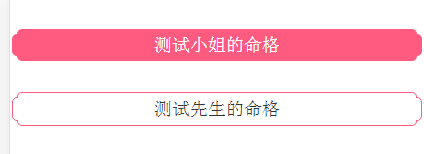
上面效果圆角“测试先生的命格”这个title圆角会模糊,b_w_body的上边框和下边框不用为0;只要把上下圆角的div,相对定位和加背景颜色就可以了,b_w_body也要加背景颜色;如下图所示:

圆角不模糊HTML代码:
<!DOCTYPE html>

<html lang="en">

<head>

    <meta charset="UTF-8">

    <meta name="viewport" content="width=device-width,initial-scale=1.0, minimum-scale=1.0, maximum-scale=1.0, user-scalable=no" />

    <meta content="yes" name="apple-mobile-web-app-capable" />

    <meta content="black" name="apple-mobile-web-app-status-bar-style" />

    <meta content="telephone=no" name="format-detection" />

    <title>Document</title>

    <style type="text/css">

    * {margin: 0;padding: 0;}

    body {max-width: 640px;margin: 50px auto;}

    .public_title { margin: 5px 2px;overflow: hidden; text-align: center; font-size: 16px;}

    .public_title .p_t_bottom,

    .public_title .p_t_top {height: 5px;margin: 0 5px;background: #ff5b80;}

    .public_title .p_t_top {border-radius: 5px 5px 0 0;}

    .public_title .p_t_body {height: 22px;line-height: 22px;background: #ff5b80;position: relative;font-size: 18px;border-radius: 5px;color: #fff;}

    .public_title .p_t_bottom {border-radius: 0 0 5px 5px;}

    .border_wrapper { margin: 30px 2px;overflow: hidden; text-align: center; font-size: 16px;}

    .border_wrapper .b_w_bottom,

    .border_wrapper .b_w_top {height: 5px;margin: 0 5px;border:1px solid #ff5b80; position: relative;z-index: 2;background: #fff;}

    .border_wrapper .b_w_top {border-radius: 5px 5px 0 0; border-bottom: 0; top:1px;}

    .border_wrapper .b_w_body {height: 22px;line-height: 22px; border:1px solid #ff5b80;font-size: 18px;border-radius: 5px;color: #333;background: #fff; }

    .border_wrapper .b_w_bottom {border-radius: 0 0 5px 5px;border-top:0; bottom:1px;}

    </style>

</head>

<body>

    <div class="public_title">

        <div class="p_t_top"></div>

        <div class="p_t_body"><span>测试小姐的命格</span></div>

        <div class="p_t_bottom"></div>

    </div>

    <div class="border_wrapper">

        <div class="b_w_top"></div>

        <div class="b_w_body"><span>测试先生的命格</span></div>

        <div class="b_w_bottom"></div>

    </div>

</body>

</html>
最终效果图:
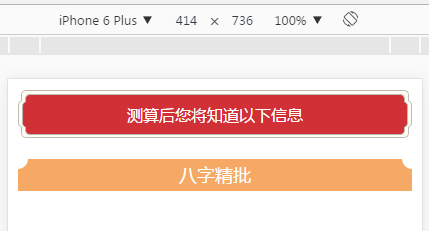
第二种圆角title:
HTML代码:
<!DOCTYPE html>

<html lang="en">

<head>

    <meta charset="UTF-8">

    <meta name="viewport" content="width=device-width,initial-scale=1.0, minimum-scale=1.0, maximum-scale=1.0, user-scalable=no" />

    <meta content="yes" name="apple-mobile-web-app-capable" />

    <meta content="black" name="apple-mobile-web-app-status-bar-style" />

    <meta content="telephone=no" name="format-detection" />

    <title> </title>

    <style type="text/css">

    * {

        margin: 0;

        padding: 0;

    }

    body{max-width: 640px; margin: 0 auto;}

    .public_border_title{ margin: 10px; text-align: center; color: #fff; }

    .b_t_down, .b_t_up {height: 10px;border: 1px solid #bbbab4; margin: 0 3px;position: relative;z-index: 2;background: #fffdf1;}

    .b_t_down span, .b_t_up span { display: block; height: 7px;border: 1px solid #bbbab4; margin:0 3px;background: #d23037;}

    .b_t_up {border-bottom: none;border-radius: 5px 5px 0 0;top: 1px;}

    .b_t_up span{border-bottom: none;border-radius: 5px 5px 0 0; margin-top: 3px;}

    .b_t_down {border-top: none;border-radius:  0 0 5px 5px;bottom: 1px;}

    .b_t_down span{border-top: none;border-radius:  0 0 5px 5px;}

    .b_t_body {border: 1px solid #bbbab4;background: #fffdf1;border-radius: 5px;height: 26px; line-height: 26px;}

    .b_t_body span{ display: block; border: 1px solid #bbbab4;background: #d23037;border-radius: 5px; margin:0 3px; height: 25px; line-height: 25px;}

    .title{ height: 32px; line-height: 32px; text-align: center; background-color: #f6a965; position: relative; color: #fff; font-size: 18px; margin: 20px 10px; }

    .title span{ display: inline-block; position: absolute; top:0;width: 10px;height: 10px;background-color: #fff;-webkit-border-radius: 0 0 20px 0;}

    .title .left{left: 0;   }

    .title .right{right: 0;  -moz-transform:scaleX(-1);

                -webkit-transform:scaleX(-1);

                -o-transform:scaleX(-1);

                transform:scaleX(-1);

                filter:FlipH;}

    </style>

</head>

<body>

    <div class="public_border_title">

        <div class="b_t_up"><span></span></div>

        <div class="b_t_body"><span>测算后您将知道以下信息</span></div>

        <div class="b_t_down"><span></span></div>

    </div>

    <div class="title">

        <span class="left"></span>

        八字精批

        <span class="right"></span>

    </div>

</body>

</html>
效果图:
圆角标题title的更多相关文章
- 山寨今日头条的标题title效果
山寨今日头条的标题title效果 效果: 源码: // // ViewController.m // 今日头条 // // Created by YouXianMing on 14/11/26. // ...
- 使用jquery修改标题$("title").html("标题")应注意的问题
使用jquery修改标题$("title").html("标题")应注意的问题: 如果修改后的标题和原标题一致,jquery会跳过该操作,这种情况再从其他页面回 ...
- SEO页面标题Title的优化
我在一个月前改过页面标题(Title),随后表现是:百度网页快照4天不更新,Google正常.而我仅仅是改了两个词组而已.在建博初期,修改Title的最频繁的时期,下面卢松松就我经历的修改Title过 ...
- Xamarin Mono for VS开发窗体标题(Title)乱码解决方案
利用mono for VS开发一个手机程序,结果只有窗体的标题 title部分是乱码,其他所有地方中文都显示正常,很郁闷.百度很久无果.最后发现只要在 VS菜单中 的 文件->高级保存选型中奖编 ...
- (转)asp.net动态设置标题title 关键字keywords 描述descrtptions
方法一 if (!IsPostBack){//Page title网页标题Page.Title = “我的网站标题”;//须将网页head标签设成服务器控件模式,即<head runat=&qu ...
- [Android] 获取WebView的页面标题(Title)-----WebChromeClient.onReceivedTitle()方法的重写
应用开发中需要获取WebView当前页面的标题,可能通过对WebChromeClient.onReceivedTitle()方法的重写来实现 效果图如下: 代码如下: public class Mai ...
- matplotlib命令与格式:标题(title),标注(annotate),文字说明(text)
1.title设置图像标题 (1)title常用参数 fontsize设置字体大小,默认12,可选参数 ['xx-small', 'x-small', 'small', 'medium', 'la ...
- EChart 标题 title 样式,x轴、y轴坐标显示,调整图表位置等
示例里工作一般情况是够用了,更复杂的可以查询教程: title 官方解说:http://echarts.baidu.com/option.html#title 坐标相关: X轴:http://echa ...
- 怎样查看或修改网页的标题title
网页的标题一般指的是 <title>标签之间的文本节点值, 它会显示在浏览器的标签页上, 我们可以通过 document.title 来查看或修改它: document.title; // ...
随机推荐
- Git Hook 同步服务器代码
参考并转载自: http://www.embbnux.com/2014/09/05/git_server_let_code_auto_deploy/ http://www.chenyudong.com ...
- CCS5连接调试C64X系列DSP核
CCS从3.3改版为5.X之后,CCS 变化很大.DaVinci芯片中DSP的调试步骤也不同了.这里介绍下在CCS里如何调试DaVinci的DSP核心 1. 创建CCS V5版本的project 本人 ...
- Dev的双击Gridview的DoubleClick
注意: 是GridView的Double而不是GridControlprivate void gridView1_DoubleClick(object sender, EventArgs e){ ...
- 封装baseservice
package com.huawei.base; import java.io.Serializable;import java.util.List; public abstract class Ba ...
- NormalMapping
[NormalMapping] 法线贴图内的数据是法线,高度贴图内的数据是高度,不是一个东西.在ShaderLab中,UnpackNormal()分析的是法线贴图(注意不是高度贴图). 可以看到,在G ...
- NPC问题及其解决方法(回溯法、动态规划、贪心法、深度优先遍历)
NP问题(Non-deterministic Polynomial ):多项式复杂程度的非确定性问题,这些问题无法根据公式直接地计算出来.比如,找大质数的问题(有没有一个公式,你一套公式,就可以一步步 ...
- 仿微信-ActionSheet
有时候我们在开发中,系统提供的actionsheet 不能满足我们的需求,所以,今天就做一个类似微信中的,支持多个按钮,我见有的人用的是个tableview,也可以,但是有点麻烦. 效果图: Acti ...
- 约瑟夫问题的变种 LA3882
题目大意: N个数排成一圈,第一次删除m,以后每k个数删除一次,求最后一被删除的数. 如果这题用链表或者数组模拟整个过程的话,时间复杂度都将高达O(nk),而n<=10000,k<=100 ...
- 4款最受欢迎的Mac原型工具
原型工具中Wireframe, Mockup和prototype之间的有什么不同? 无论你是一名刚入行的UX/UI设计师,还是入行多年的老手,在制作原型的过程中一定接触或听说过其中很重要的三个原型术语 ...
- MySQL 存储过程和存储函数 的定义条件和处理程序
#三.定义条件和处理程序 #mysql 存储函数和过程可以将错误 变成我们想要的处理结果分2步骤 #1.定义错误条件 语法:DECLARE 条件名字 CONDITION for 错误编码 #2. 定义 ...