
client , offset , scroll 系列 及百度导航栏案例
1. client 系列
示例 :
<!DOCTYPE html>

<html>

    <head>

        <meta charset="UTF-8">

        <title></title>

        <style type="text/css">

            .box{

                width: 200px;

                height: 200px;

                position: absolute;

                border: 10px solid red;

                /*margin: 10px 0px 0px 0px;*/

                padding: 80px;

            }

        </style>

    </head>

    <body>

        <div class="box">

            哈哈哈哈哈哈哈哈哈哈哈哈哈哈哈哈哈哈哈哈哈哈哈哈哈哈哈哈哈哈哈哈哈哈哈哈哈哈哈哈哈哈哈哈哈哈哈哈哈哈哈哈哈哈哈哈哈哈哈哈哈哈哈哈哈哈哈哈哈哈哈哈哈哈哈哈哈哈哈哈哈哈哈哈哈哈哈哈哈哈哈哈哈哈哈哈哈哈哈哈哈哈哈哈哈哈哈哈哈哈哈哈哈哈哈哈哈哈哈哈哈哈哈哈哈哈哈哈哈哈哈哈哈哈哈哈哈哈哈哈哈哈哈哈哈哈哈哈哈哈哈哈哈哈哈哈哈哈哈哈哈哈哈哈哈哈哈哈哈哈哈哈哈哈哈哈哈哈哈哈哈哈哈哈哈哈哈哈哈

        </div>

    </body>

    <script type="text/javascript">

        /*

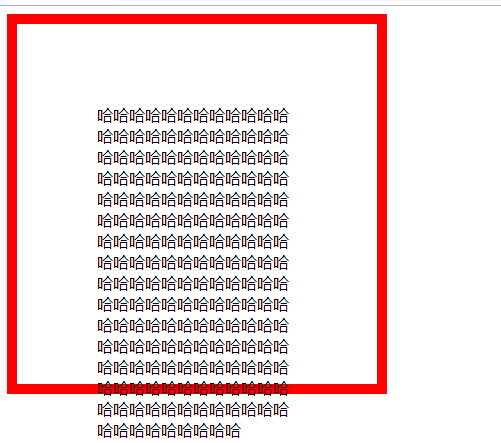
         *   clientTop 内容区域到边框顶部的距离 ,说白了,就是边框的高度

         *      clientLeft 内容区域到边框左部的距离,说白了就是边框的乱度

         *      clientWidth 内容区域+左右padding   可视宽度

         *      clientHeight 内容区域+ 上下padding   可视高度

         * */

        var oBox = document.getElementsByClassName('box')[0];

        console.log(oBox.clientTop);

        console.log(oBox.clientLeft);

        console.log(oBox.clientWidth);

        console.log(oBox.clientHeight);

    </script>

</html>
效果 :
2 . 屏幕的可视区域
示例 :
<!DOCTYPE html>

<html>

    <head>

        <meta charset="UTF-8">

        <title></title>

    </head>

    <body>

    </body>

    <script type="text/javascript">

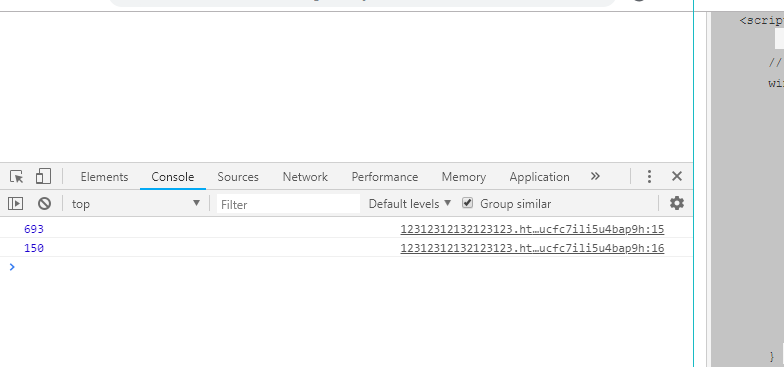
        // 屏幕的可视区域

        window.onload = function(){

            // document.documentElement 获取的是html标签

            console.log(document.documentElement.clientWidth);

            console.log(document.documentElement.clientHeight);

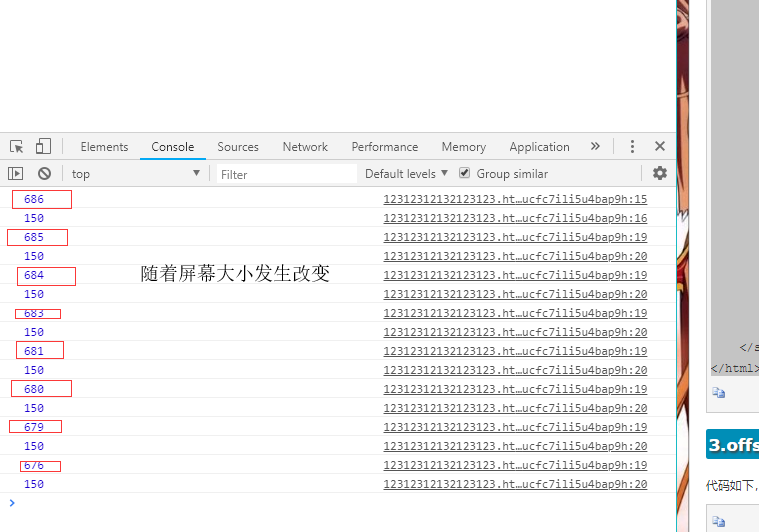
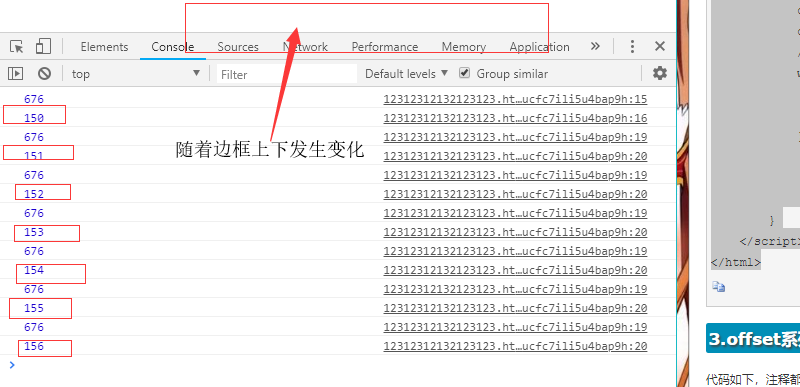
            // 窗口大小发生变化时,会调用此方法

            window.onresize = function(){

                console.log(document.documentElement.clientWidth);

                console.log(document.documentElement.clientHeight);

            }

        }

    </script>

</html>
效果 :
3 . offset 系列
示例 :
<!DOCTYPE html>

<html>

    <head>

        <meta charset="UTF-8">

        <title></title>

        <style type="text/css">

            *{

                padding: 0;

                margin: 0;

            }

        </style>

    </head>

    <body style="height: 2000px">

        <div>

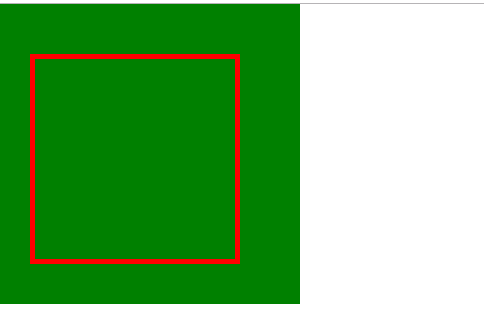
            <div class="wrap" style=" width: 300px;height: 300px;background-color: green">

                <div id="box" style="width: 200px;height: 200px;border: 5px solid red;position: absolute;top:50px;left: 30px;">

                </div>

            </div>

        </div>

    </body>

    <script type="text/javascript">

        window.onload = function(){

            var box = document.getElementById('box')

            /*

             offsetWidth占位宽  内容+padding+border

             offsetHeight占位高

             * offsetTop: 如果盒子没有设置定位 到body的顶部的距离,如果盒子设置定位,那么是以父辈为基准的top值

             * offsetLeft: 如果盒子没有设置定位 到body的左部的距离,如果盒子设置定位,那么是以父辈为基准的left值

             * */

            console.log(box.offsetTop)

            console.log(box.offsetLeft)

            console.log(box.offsetWidth)

            console.log(box.offsetHeight)

        }

    </script>

</html>
效果 :
4 . scroll 系列
示例 :
<!DOCTYPE html>

<html>

    <head>

        <meta charset="UTF-8">

        <title></title>

        <style type="text/css">

            *{padding: 0;margin: 0;}

        </style>

    </head>

    <body style="width: 2000px;height: 2000px;">

        <div style="height: 200px;background-color: red;"></div>

        <div style="height: 200px;background-color: green;"></div>

        <div style="height: 200px;background-color: yellow;"></div>

        <div style="height: 200px;background-color: blue;"></div>

        <div style="height: 200px;background-color: gray;"></div>

        <div id = 'scroll' style="width: 200px;height: 200px;border: 1px solid red;overflow: auto;padding: 10px;margin: 5px 0px 0px 0px;">

            <p>海贼王海贼王海贼王海贼王海贼王海贼王海贼王海贼王海贼王海贼王海贼王海贼王海贼王海贼王海贼王海贼王海贼王海贼王海贼王海贼王海贼王海贼王海贼王海贼王海贼王海贼王海贼王海贼王海贼王海贼王海贼王海贼王海贼王海贼王

                海贼王海贼王海贼王海贼王海贼王海贼王海贼王海贼王海贼王海贼王海贼王海贼王海贼王海贼王海贼王海贼王海贼王海贼王海贼王海贼王海贼王海贼王海贼王海贼王海贼王海贼王海贼王

                海贼王海贼王海贼王海贼王海贼王海贼王海贼王海贼王海贼王海贼王海贼王海贼王海贼王海贼王海贼王海贼王海贼王海贼王海贼王海贼王海贼王海贼王海贼王海贼王海贼王海贼王海贼王海贼王海贼王海贼王海贼王

            </p>

        </div>

    </body>

    <script type="text/javascript">

        window.onload = function(){

            //实施监听滚动事件

            window.onscroll = function(){

//                console.log(1111)

//                console.log('上'+document.documentElement.scrollTop)

//                console.log('左'+document.documentElement.scrollLeft)

//                console.log('宽'+document.documentElement.scrollWidth)

//                console.log('高'+document.documentElement.scrollHeight)

            }

            var s = document.getElementById('scroll');

            s.onscroll = function(){

//            scrollHeight : 内容的高度+padding  不包含边框

                console.log('上'+s.scrollTop)

                console.log('左'+s.scrollLeft)

                console.log('宽'+s.scrollWidth)

                console.log('高'+s.scrollHeight)

            }

        }

    </script>

</html>
5 . 案例 : 模拟百度导航栏滚动监听
示例 :
<!DOCTYPE html>

<html lang="en">

<head>

    <meta charset="UTF-8">

    <title></title>

    <style type="text/css">

        *{

            padding: 0;

            margin: 0;

        }

        ul{

            list-style: none;

        }

        a{

            text-decoration: none;

        }

        input{

            border: 0;

            outline: none;

        }

        body{

            /*padding-top: 80px;*/

        }

        .header{

            width: 100%;

            height: 70px;

            background-color: black;

            /*display: none;*/

        }

        .w{

            width: 1210px;

            overflow: hidden;

            margin: 0 auto;

        }

        .header ul li{

            float: left;

            width: 242px;

            height: 70px;

            line-height: 70px;

            text-align: center;

            background-color: blue;

        }

        .header ul li a{

            display: block;

            width: 242px;

            height: 70px;

            color: #fff;

        }

        /*固定导航栏*/

        .header-fix{

            width: 100%;

            height: 80px;

            background-color: white;

            box-shadow: 0 0 5px #888;

            display: none;

            position: fixed;

            top: 0;

            left: 0;

            z-index: 99999;

            /*margin-bottom: 10px;*/

        }

        .header-fix .logo{

            float: left;

            width: 117px;

            height: 57px;

            padding-top: 23px;

        }

        .header-fix .fm{

            float: left;

            width: 700px;

            height: 80px;

            margin-left: 100px;

        }

        .fm input[type='text']{

            float: left;

            width: 578px;

            height: 50px;

            border-top: 1px solid #999;

            border-left: 1px solid #999;

            border-bottom: 1px solid #999;

            margin-top: 15px;

            padding-left: 20px;

            font-size: 20px;

        }

        .fm input[type='submit']{

            float: left;

            width: 100px;

            height: 52px;

            background-color: #38f;

            position: relative;

            top: 15px;

            color: #fff;

            line-height: 52px;

            font-size: 18px;

        }

        .box1{

            width: 100%;

            height: 200px;

            background-color: red;

        }

        .box2{

            width: 100%;

            height: 300px;

            background-color: green;

        }

    </style>

</head>

<body style="height: 2000px">

    <div class="header">

        <div class="w">

            <ul>

                <li><a href="#">网站导航</a></li>

                <li><a href="#">网站导航</a></li>

                <li><a href="#">网站导航</a></li>

                <li><a href="#">网站导航</a></li>

                <li><a href="#">网站导航</a></li>

            </ul>

        </div>

    </div>

    <div class="header-fix">

        <div class="w">

            <div class="logo">

                <img src="./logo_top.png" alt="">

            </div>

            <form class="fm">

                <input type="text" name="">

                <input type="submit" name="" value="百度一下">

            </form>

        </div>

    </div>

    <div class="box1"></div>

    <div class="box2"></div>

    <script type="text/javascript">

        window.onload = function(){

            var box2Height = document.getElementsByClassName('box2')[0];

            var fixBox = document.getElementsByClassName('header-fix')[0];

            var headerBox = document.getElementsByClassName('header')[0];

            window.onscroll = function(){

                console.log(box2Height.offsetTop);

                if (document.documentElement.scrollTop >=box2Height.offsetTop) {

                    fixBox.style.display = 'block';

                    document.body.style.paddingTop = '80'+ 'px';

                    headerBox.style.display = 'none';

                }else{

                    fixBox.style.display = 'none';

                    document.body.style.paddingTop = '0'+ 'px';

                    headerBox.style.display = 'block';

                }

            }

        }

    </script>

</body>

</html>
client , offset , scroll 系列 及百度导航栏案例的更多相关文章
- client,offset,scroll系列
client(客户端),offset(偏移),scroll(滚动)1.client系列 clientTop 内容区域到边框顶部的距离 ,说白了,就是边框的高度 clientLeft 内容区域到边框左部 ...
- 前端 ---- js 模拟百度导航栏滚动案例
模拟百度导航栏滚动监听 代码如下: <!DOCTYPE html> <html lang="en"> <head> <meta chars ...
- DOM盒模型和位置 client offset scroll 和滚动的关系
DOM盒模型和位置 client offset scroll 和滚动的关系 概览 在dom里面有几个描述盒子位置信息的值, pading border margin width height clie ...
- 文本属性和字体属性,超链接导航栏案例 background
文本属性 介绍几个常用的. 文本对齐 text-align 属性规定元素中的文本的水平对齐方式. 属性值:none | center | left | right | justify 文本颜色 col ...
- jQuery---固定导航栏案例
固定导航栏案例 <!DOCTYPE html> <html> <head lang="en"> <meta charset="U ...
- python 全栈开发,Day49(超链接导航栏案例,background,定位,z-index,iconfont使用)
昨日内容回顾 浮动:是css中布局最多的一个属性 有浮动,一定要清除浮动 浮动不是一个元素单独浮动,要浮动一起浮动 清除浮动四种方式: 1.给父盒子添加高度,一般导航栏 2.给浮动元素后面加一个空的块 ...
- inline元素导航栏案例
练习一个超链接元素在文档流当中,a标签显示出来的inline这种元素的特性.我们可以用display来将它转换成inline-block类型,这样我们就可以设置它的高度,宽度和它的背景颜色等等特性了. ...
- JS中client/offset/scroll等的宽高解析
原文地址:→传送门 window相关宽高属性 1. window.outerHeight (窗口的外层的高度) / window.outerWidth (窗口的外层的宽度) window.outerH ...
- client offset scroll 之间的区别
一.client 属性 值 clientWidth 元素被设置的宽度 + padding左右内间距 clientHeight 元素被设置的高度 + padding上下内间距 clientLeft 左 ...
随机推荐
- 泽熙学到的 z
叶展,原泽熙投资总经理助理,现任齐鲁证券资产管理公司总裁助理,齐鲁星空.星汉等集合理财投资经理. 导读:三年前,我加入了泽熙投资,正式成为一名职业投资者.做职业投资者一直是我的理想.在股市中用眼光和头 ...
- Android性能优化第(一)篇---基本概念
最近打算总结几篇app性能优化方面的东西,毕竟android弄了这么久,万一到哪些转了行,岁月久了就忘记了,纯粹当个人笔记.今个是第一篇---性能优化的基本概念,毛主席说了,让理论先行,理论指导实践. ...
- MyEclipse Html自动提示功能的设置方法
操作方法: windows------preferences----------搜索 html----------找到 html Source这项--------- 右边视图,找到 content a ...
- ERROR 2002 (HY000): Can't connect to local MySQL server through socket '/tmp/mysql.sock'
原因:找不到mysql.sock文件 解决方法: 1 找到mysql.sock文件位置 echo "show variables" | mysql | grep "soc ...
- centos 编译 安装php
安装phpcd /usr/local/srctar -zvxf php-5.3.10.tar.gzcd php-5.3.10mkdir -p /usr/local/php5 #建立php安装目录. ...
- Hadoop本地调试
windows上先调试该程序,然后再转到linux下. 程序运行的过程中, 报 Failed to locate the winutils binary in the hadoop binary pa ...
- Java数据结构-线性表之静态链表
静态链表的定义: 节点由一个一维数组和一个指针域组成,数组用来存放数据元素,而指针域里面的指针(又称游标)用来指向下一个节点的数组下标. 这种链表称之为静态链表. 链表中的数组第一个和最后一个位置须要 ...
- Solidworks如何绘制螺纹
1 随便画一个圆柱 2 在原来的地方画一个一摸一样的圆(草图2) 3 在特征选项卡中点击曲线-螺旋线/涡状线 4 设置螺距和圈数,画螺旋线 5 建立一个基准面,第一参考是点,第二参考是 ...
- day06_方法_20150806
day06_方法_20150806 -------------------------回想:--------------------------------- 1.更佳适用情况 当---w ...
- 性能指标 - OEE
work center 是指 执行制造作业的资源, 可以是 一个人, 一组人, 一台自动机器, 一组自动机器, 一个半自动机器, 一组半自动机器, 或者是 一个区域组成的生产资源 基本参数 Time ...