
.NET CORE2.0后台管理系统(一)配置API
一:引用关系图
要写一个项目首先离不开的就是一个清晰的流程图,当然我这里很简单。
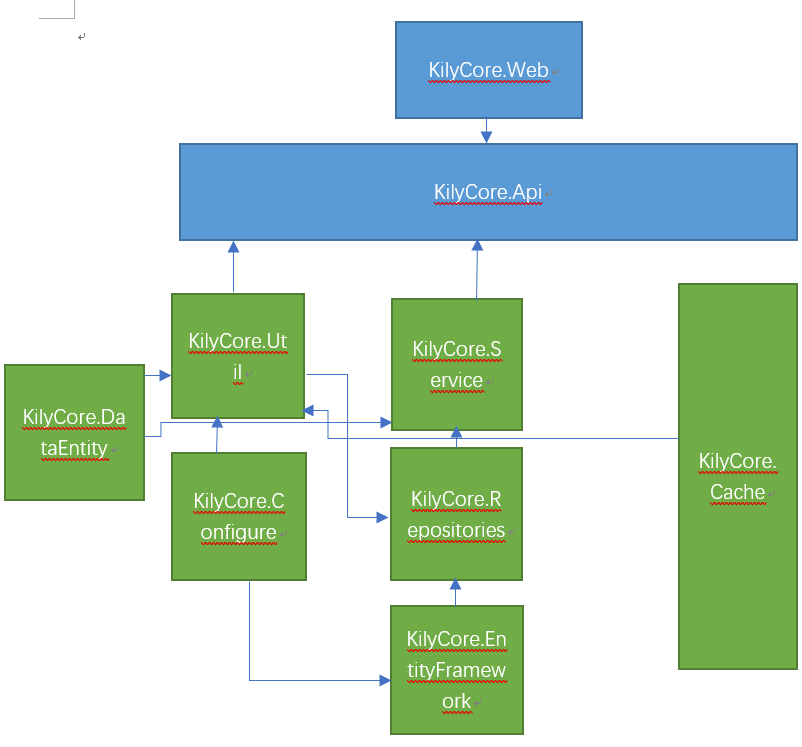
上诉完成后打开api下的Startup.cs文件,因为我是配置好了所在我直接上传代码然后介绍一下:
using System;

using System.Collections.Generic;

using System.Linq;

using System.Threading.Tasks;

using Microsoft.AspNetCore.Builder;

using Microsoft.AspNetCore.Hosting;

using Microsoft.Extensions.Configuration;

using Microsoft.Extensions.DependencyInjection;

using Microsoft.Extensions.DependencyModel;

using System.Runtime.Loader;

using System.Reflection;

using KilyCore.Util.FilterGroup;

using KilyCore.Configure;

using Microsoft.Extensions.Logging;

using NLog.Extensions.Logging;

using NLog.Web;

using KilyCore.Util.ApplicationService.DependencyIdentity;

namespace KilyCore.Api

{

    public class Startup

    {

        public IEngine Engine { get; private set; }

        public Startup(IHostingEnvironment env)

        {

            var builder = new ConfigurationBuilder()

                .SetBasePath(env.ContentRootPath)

                .AddJsonFile("appsettings.json", optional: false, reloadOnChange: true)

                .AddJsonFile($"appsettings.{env.EnvironmentName}.json", optional: true)

                .AddEnvironmentVariables();

            Configuration = builder.Build();

            GetAssembly();

            GetConfiger();

            Engine = EngineExtension.Context;

        }

        public IConfiguration Configuration { get; }

        // This method gets called by the runtime. Use this method to add services to the container.

        public IServiceProvider ConfigureServices(IServiceCollection services)

        {

            services.AddMvc(option =>

            {

                option.Filters.Add(typeof(AuthorizationFilter));

                option.Filters.Add(typeof(ResourceFilter));

                option.Filters.Add(typeof(ActionFilter));

                option.Filters.Add(typeof(ExceptionFilter));

                option.Filters.Add(typeof(ResultFilter));

                option.RespectBrowserAcceptHeader = true;

            });

            //添加跨域

            services.AddCors(option=>{

                option.AddPolicy("KilyCore", builder => builder.AllowAnyHeader().AllowAnyMethod().AllowAnyOrigin().AllowCredentials());

            });

            //添加Session

            services.AddSession();

            return Engine.ServiceProvider(services);

        }

        // This method gets called by the runtime. Use this method to configure the HTTP request pipeline.

        public void Configure(IApplicationBuilder app, IHostingEnvironment env, ILoggerFactory logger)

        {

            //Nlog

            logger.AddNLog();

            env.ConfigureNLog("Nlog.config");

            //设置全局跨域

            app.UseCors("KilyCore");

            //启用Session

            app.UseSession();

            if (env.IsDevelopment())

            {

                app.UseDeveloperExceptionPage();

            }

            app.UseMvc();

        }

        /// <summary>

        /// 加载所有程序集

        /// </summary>

        public void GetAssembly()

        {

            IList<Assembly> ass = new List<Assembly>();

            var lib = DependencyContext.Default;

            var libs = lib.CompileLibraries.Where(t => !t.Serviceable).Where(t => t.Type != "package").ToList();

            foreach (var item in libs)

            {

                Assembly assembly = AssemblyLoadContext.Default.LoadFromAssemblyName(new AssemblyName(item.Name));

                ass.Add(assembly);

            }

            Configer.Assembly = ass;

        }

        /// <summary>

        /// 获取连接字符串

        /// </summary>

        public void GetConfiger()

        {

            Configer.ConnentionString = Configuration.GetConnectionString("ConnectionString");

            Configer.RedisConnectionString = Configuration["RedisConnectionString:host"];

            Configer.ApiKey = Configuration["Key:ApiKey"];

        }

    }

}
因为我采用了5个过滤器所以在上诉代码上addmvc中添加了5个过滤器。
上面的代码我都有注解,都很简单,欢迎学习交流。
.NET CORE2.0后台管理系统(一)配置API的更多相关文章
- EntityFramework Core2.0 多对多关系配置
在EF6.0 中,多对多关系配置时,系统会自动生成第三张表,来将两张有互相约束关系的表联系起来,但是在EF Core2.0中,我们需要手动建立第三张表,比如说有两个模型Passage.cs和Cat ...
- 使用react全家桶制作博客后台管理系统 网站PWA升级 移动端常见问题处理 循序渐进学.Net Core Web Api开发系列【4】:前端访问WebApi [Abp 源码分析]四、模块配置 [Abp 源码分析]三、依赖注入
使用react全家桶制作博客后台管理系统 前面的话 笔者在做一个完整的博客上线项目,包括前台.后台.后端接口和服务器配置.本文将详细介绍使用react全家桶制作的博客后台管理系统 概述 该项目是基 ...
- 前后端分离后台管理系统 Gfast v3.0 全新发布
GFast V3.0 平台简介 基于全新Go Frame 2.0+Vue3+Element Plus开发的全栈前后端分离的管理系统 前端采用vue-next-admin .Vue.Element UI ...
- 从壹开始前后端分离【 .NET Core2.0 +Vue2.0 】框架之七 || API项目整体搭建 6.2 轻量级ORM
更新 1.在使用的时候,特别是更新数据的时候,如果不知道哪里有问题,可以查看数据库 和 实体类 的字段,是否大小写一致,比如 name 和 Name 2.在使用Sqlsugar 的 CodeFirst ...
- net core体系-web应用程序-4asp.net core2.0 项目实战(任务管理系统)-2项目搭建
系统要求 首先建议采用 Windows 10 专业版/企业版/教育版,且必须是64位操作系统,原因是docker装起来比较方便,Win7装起来比较麻烦,且不确定是否有其他问题(自己没有实践过) 其次W ...
- net core体系-web应用程序-4asp.net core2.0 项目实战(1)-12基于cookie登录授权认证并实现前台会员、后台管理员同时登录
1.登录的实现 登录功能实现起来有哪些常用的方式,大家首先想到的肯定是cookie或session或cookie+session,当然还有其他模式,今天主要探讨一下在Asp.net core 2.0下 ...
- 基于vue2.0 +vuex+ element-ui后台管理系统:包括本地开发调试详细步骤
效果演示地址, github地址: demo演示: 1.About 此项目是 vue2.0 + element-ui + node+mongodb 构建的后台管理系统,所有的数据都是从 ...
- Net Core2.0 基于QuartzNet任务管理系统
Net Core2.0 基于QuartzNet任务管理系统 Quartz.NET官网地址:https://www.quartz-scheduler.net/ Quartz.NET文档地址:https: ...
- GO 前后端分离开源后台管理系统 Gfast v2.0.4 版发布
更新内容:1.适配插件商城,开发环境从后台直接安装插件功能:2.代码生成细节修复及功能完善(支持生成上传文件.图片及富文本编辑器功能):3.增加swagger接口文档生成:4.更新goframe版本至 ...
随机推荐
- .net 哈希
using System; using System.Collections.Generic; using System.Linq; using System.Security.Cryptograph ...
- systemtap-oracle
https://savvinov.com/2015/12/21/non-intrusive-tracing/ https://mahmoudhatem.wordpress.com/2016/01/11 ...
- 第四章——SQLServer2008-2012资源及性能监控(1)专家
http://blog.csdn.net/dba_huangzj/article/details/8614817
- Myeclipse 出现了Could not generate DH keypair 错误
在myeclipse下安装svn插件,出现了Could not generate DH keypair,这么一个错误. 这个问题困扰了我半天时间,各种百度也找不到答案,或许是百度能力问题吧.百度出来的 ...
- 【Maven jar】打包单个或多个文件,有依赖jar包的将架包一起打包成一个jar包供别的项目引用
之前有一片文章,是打包单个java文件的.这次想要将http://www.cnblogs.com/sxdcgaq8080/p/8398780.html 打包成jar包,发现这个java文件中引用了多 ...
- gitignore 规则
在使用git的过程中,总有一些我们不想被跟踪的文件,例如vim的交换文件,编译产生的文件等等.这时,我们可以在项目的根目录下创建一个名为 .gitignore 的文件,列出不想被跟踪的文件模式即可.下 ...
- WPA2密钥重装攻击原理分析
这两天最火爆的莫过 “WPA2被破解” 这一条大新闻了.我对其原理非常感兴趣,苦于没有找到的文献,所以就整理这么一篇,方便自己和大家理解.主要是根据目前发布的文章以及一些相关资料. 壹.WPA2的机制 ...
- Basic Vim Configuration
原文: https://computers.tutsplus.com/tutorials/basic-vim-configuration--cms-21498 原来,vim的配置文件,.vimrc也是 ...
- flex 节点删除
<mx:Script> <![CDATA[ protected function btn1_clickHandler(evt:MouseEvent ...
- start-dfs.sh 和 start-all.sh的区别
start-dfs.sh 只启动namenode 和datanode, start-all.sh还包括yarn的resourcemanager 和nodemanager 之前就所以因为只启动了star ...