
PYDay6- 内置函数、验证码、文件操作、发送邮件函数
1、内置函数
1.1Python的内置函数
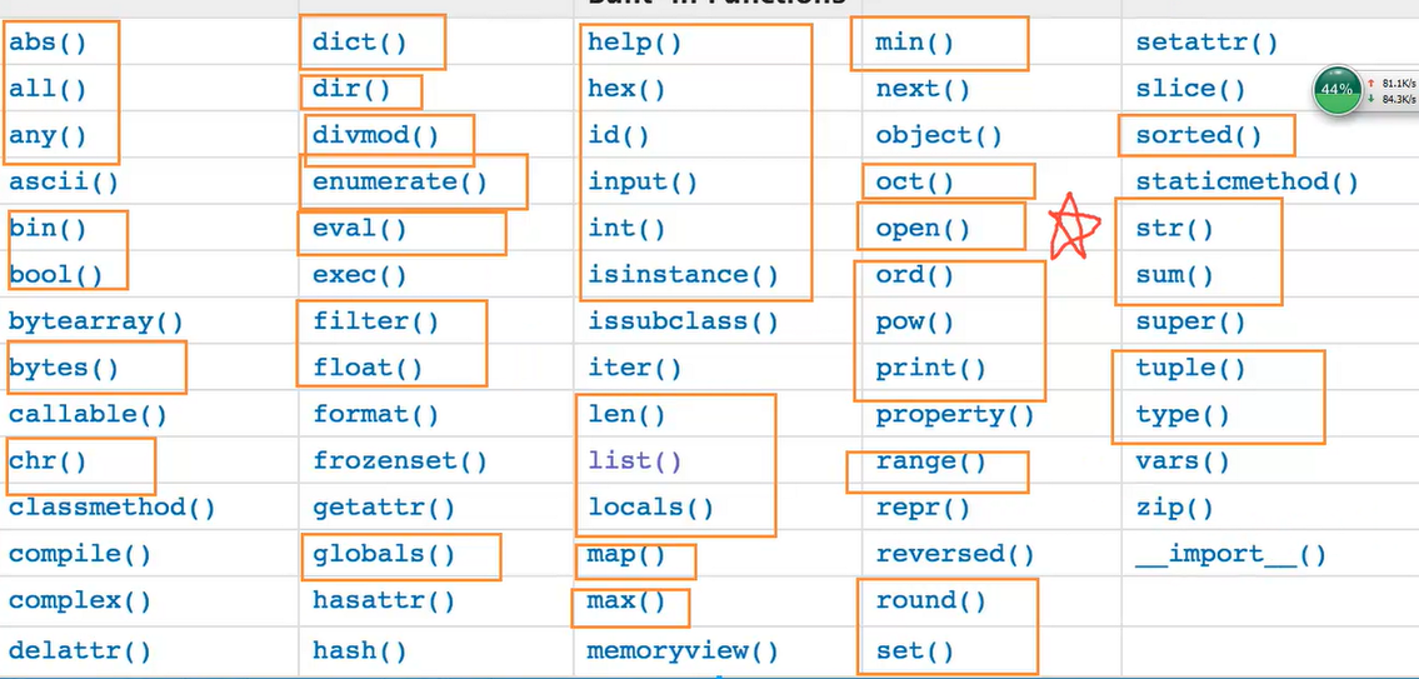
1.2一阶段需要掌握的函数
2、随机验证码函数:
import random

#assii:大写字母:65~90,小写 97~122 数字48-57

tmp = ""

for i in range(6):

    num =random.randrange(1,4)

    if num == 1:

        rad2 = random.randrange(0,10)

        tmp = tmp+str(rad2)

    elif num == 2:

        rad3 = random.randrange(97, 123)

        tmp = tmp + chr(rad3)

    else:

        rad1 = random.randrange(65,91)

        c = chr(rad1)

        tmp = tmp + c

print(tmp)
3、文件操作
使用open函数操作,该函数用于文件处理。
操作文件时,一般需要经历如下步骤:
打开文件
操作文件
关闭文件
3.1打开文件
open(文件名,模式,编码)
eg:
f = open("ha.log","a+",encoding="utf-8")
注:默认打开模式r
3.2打开模式:
基本模式:
• r:只读模式(不可写)
• w:只写模式(不可读,不存在则创建,存在则清空内容(只要打开就清空))
• x:只写模式(不可读,不存在则创建,存在则报错)
• a:追加模式(不可读,不存在就创建,存在只追加内容)
二进制模式:rb\wb\xb\ab
特点:二进制打开,对文件的操作都需以二进制的方式进行操作
对文件进行读写
- r+, 读写【可读,可写】
- w+,写读【可读,可写】
- x+ ,写读【可读,可写】
- a+, 写读【可读,可写】
3.3 文件操作的方法
class TextIOWrapper(_TextIOBase):

    """

    Character and line based layer over a BufferedIOBase object, buffer.

    encoding gives the name of the encoding that the stream will be

    decoded or encoded with. It defaults to locale.getpreferredencoding(False).

    errors determines the strictness of encoding and decoding (see

    help(codecs.Codec) or the documentation for codecs.register) and

    defaults to "strict".

    newline controls how line endings are handled. It can be None, '',

    '\n', '\r', and '\r\n'.  It works as follows:

    * On input, if newline is None, universal newlines mode is

      enabled. Lines in the input can end in '\n', '\r', or '\r\n', and

      these are translated into '\n' before being returned to the

      caller. If it is '', universal newline mode is enabled, but line

      endings are returned to the caller untranslated. If it has any of

      the other legal values, input lines are only terminated by the given

      string, and the line ending is returned to the caller untranslated.

    * On output, if newline is None, any '\n' characters written are

      translated to the system default line separator, os.linesep. If

      newline is '' or '\n', no translation takes place. If newline is any

      of the other legal values, any '\n' characters written are translated

      to the given string.

    If line_buffering is True, a call to flush is implied when a call to

    write contains a newline character.

    """

    def close(self, *args, **kwargs): # real signature unknown

        关闭文件

        pass

    def fileno(self, *args, **kwargs): # real signature unknown

        文件描述符

        pass

    def flush(self, *args, **kwargs): # real signature unknown

        刷新文件内部缓冲区

        pass

    def isatty(self, *args, **kwargs): # real signature unknown

        判断文件是否是同意tty设备

        pass

    def read(self, *args, **kwargs): # real signature unknown

        读取指定字节数据

        pass

    def readable(self, *args, **kwargs): # real signature unknown

        是否可读

        pass

    def readline(self, *args, **kwargs): # real signature unknown

        仅读取一行数据

        pass

    def seek(self, *args, **kwargs): # real signature unknown

        指定文件中指针位置

        pass

    def seekable(self, *args, **kwargs): # real signature unknown

        指针是否可操作

        pass

    def tell(self, *args, **kwargs): # real signature unknown

        获取指针位置

        pass

    def truncate(self, *args, **kwargs): # real signature unknown

        截断数据,仅保留指定之前数据

        pass

    def writable(self, *args, **kwargs): # real signature unknown

        是否可写

        pass

    def write(self, *args, **kwargs): # real signature unknown

        写内容

        pass

    def __getstate__(self, *args, **kwargs): # real signature unknown

        pass

    def __init__(self, *args, **kwargs): # real signature unknown

        pass

    @staticmethod # known case of __new__

    def __new__(*args, **kwargs): # real signature unknown

        """ Create and return a new object.  See help(type) for accurate signature. """

        pass

    def __next__(self, *args, **kwargs): # real signature unknown

        """ Implement next(self). """

        pass

    def __repr__(self, *args, **kwargs): # real signature unknown

        """ Return repr(self). """

        pass

    buffer = property(lambda self: object(), lambda self, v: None, lambda self: None)  # default

    closed = property(lambda self: object(), lambda self, v: None, lambda self: None)  # default

    encoding = property(lambda self: object(), lambda self, v: None, lambda self: None)  # default

    errors = property(lambda self: object(), lambda self, v: None, lambda self: None)  # default

    line_buffering = property(lambda self: object(), lambda self, v: None, lambda self: None)  # default

    name = property(lambda self: object(), lambda self, v: None, lambda self: None)  # default

    newlines = property(lambda self: object(), lambda self, v: None, lambda self: None)  # default

    _CHUNK_SIZE = property(lambda self: object(), lambda self, v: None, lambda self: None)  # default

    _finalizing = property(lambda self: object(), lambda self, v: None, lambda self: None)  # default

3.x
3.4 管理上下文
使用open方法打开后要关闭文本。
with方法后,python会自动回收资源
py2.7以后的版本with方法支持同时对两个文件进行操作
eg:with open('log1') as obj1, open('log2') as obj2:
3.5 文件日常操作
open(文件名,模式,编码)
close()
flush():将内存中的文件数据写入磁盘
read():读取指针的内容
readline():只都一行内容
seek()定位指针位置
tell()获取当前指针位置
truncate() 截断数据,仅保留指定之前的数据,依赖于指针
write() 写入数据
3.6 文件操作示例代码
#!/usr/bin/env python

# -*- coding:utf-8 -*-

####基本操作方法

#默认是只读模式,默认编码方式:utf-8

# f = open('ha.log')

# data = f.read()

# f.close()

# print(data)

#只读,r

# f = open("ha.log","r")

# f.write("asdfs")

# f.close()

#只写,w  ---存在就清空,打开就清空

# f = open("ha1.log","w")

# f.write("Hello world!")

# f.close()

#只写 ,x

# f = open("ha2.log","x")

# f.write("Hello world1!")

# f.close()

#追加  a,不可读

# f = open("ha2.log","a")

# f.write("\nHello world! a mode")

# f.close()

### 字节的方式打开

## 默认读取到的都是字节,不用设置编码方式

## 1、 只读,rb

# f = open("ha.log","rb")

# data =f.read()

# f.close()

# print(type(data))

# print(data)

# print(str(data,encoding="utf-8"))

#2 只写,wb

# f = open("ha.log","wb")

# f.write(bytes("中国",encoding="utf-8"))

# f.close()

### r+ ,w+,x+,a+

#r+

# f = open("ha.log",'r+',encoding="utf-8")

# print(f.tell())

# data = f.read()

# print(type(data),data)

# f.write("德国人")

# print(f.tell())

# data = f.read()

# f.close()

#w+  先清空,之后写入的可读,写后指针到最后

# f = open("ha.log","w+",encoding="utf-8")

# f.write("何莉莉")

# f.seek(0)  # 指针调到最后

# data = f.read()

# f.close()

# print(data)

#  x+  功能类似w+,区别:若文件存在即报错

#a +    打开的同时指针到最后

f = open("ha.log","a+",encoding="utf-8")

print(f.tell())

f.write("SB")

print(f.tell())

data = f.read()

print(data)

f.seek(0)

data = f.read()

print(data)

print(type(data))

print(type(f))

f.close()
文件操作示例
4、lambda表达式
f1 = lambda x,y: 9+x
5、发送邮件实例代码
#!/usr/bin/env python

# -*- coding:utf-8 -*-

def email():

    import smtplib

    from email.mime.text import MIMEText

    from email.utils import formataddr

    ret = True

    try:

        msg = MIMEText('邮件内容 test mail 2017-5-27 09:16:14 2017年1月27日11:16:37 \n 2017年1月28日06:47:51', 'plain', 'utf-8')

        msg['From'] = formataddr(["b2b", 'john@xxx.com'])

        msg['To'] = formataddr(["hi hi hi  ", 'john2@xxx.com'])

        msg['Subject'] = "主题2017年5月23日"

        server = smtplib.SMTP("mail.xxx.com", 25)

        server.login("john1", "txxx0517")

        server.sendmail('john1@tasly.com', ['john2@tasly.com', ], msg.as_string())

        server.quit()

    except:

        ret = False

    return  ret

i1 =  email()

print(i1)
发送邮件示例
PYDay6- 内置函数、验证码、文件操作、发送邮件函数的更多相关文章
- python基础(5)---整型、字符串、列表、元组、字典内置方法和文件操作介绍
对于python而言,一切事物都是对象,对象是基于类创建的,对象继承了类的属性,方法等特性 1.int 首先,我们来查看下int包含了哪些函数 # python3.x dir(int) # ['__a ...
- python笔记2小数据池,深浅copy,文件操作及函数初级
小数据池就是在内存中已经开辟了一些特定的数据,经一些变量名直接指向这个内存,多个变量间公用一个内存的数据. int: -5 ~ 256 范围之内 str: 满足一定得规则的字符串. 小数据池: 1,节 ...
- 【Unity Shaders】使用CgInclude让你的Shader模块化——Unity内置的CgInclude文件
本系列主要參考<Unity Shaders and Effects Cookbook>一书(感谢原书作者),同一时候会加上一点个人理解或拓展. 这里是本书全部的插图. 这里是本书所需的代码 ...
- php中文件操作常用函数有哪些
php中文件操作常用函数有哪些 一.总结 一句话总结:读写文件函数 判断文件或者目录是否存在函数 创建目录函数 file_exists() mkdir() file_get_content() fil ...
- python 文件操作: 文件操作的函数, 模式及常用操作.
1.文件操作的函数: open("文件名(路径)", mode = '模式', encoding = "字符集") 2.模式: r , w , a , r+ , ...
- python 文件操作的函数
1. 文件操作的函数 open(文件名(路径), mode="?", encoding="字符集") 2. 模式: r, w, a, r+, w+, a+, r ...
- PHP文件操作功能函数大全
PHP文件操作功能函数大全 <?php /* 转换字节大小 */ function transByte($size){ $arr=array("B","KB&quo ...
- php 内置的 html 格式化/美化tidy函数 -- 让你的HTML更美观
php 内置的 html 格式化/美化tidy函数 https://github.com/htacg/tidy-html5 # HTML 格式化 function beautify_html($htm ...
- SpringBoot 常用配置 静态资源访问配置/内置tomcat虚拟文件映射路径
Springboot 再模板引擎中引入Js等文件,出现服务器拒绝访问的错误,需要配置过滤器 静态资源访问配置 @Configuration @EnableWebMvc public class Sta ...
- Python全栈开发之4、内置函数、文件操作和递归
转载请注明出处http://www.cnblogs.com/Wxtrkbc/p/5476760.html 一.内置函数 Python的内置函数有许多,下面的这张图全部列举出来了,然后我会把一些常用的拿 ...
随机推荐
- 74HC14D(6反向施密特触发器)
74HC14D:6反向施密特触发器:延迟特性,反向特性,整形特点. 施密特触发器是具有特殊功能的非门,当加在它的输入端A的电压逐渐上升到某个值时(正阈值电压),输出端Y会突然从高电平跳到低电平,而当输 ...
- 如何查找Oracle某列值相同的字段
相关的sql语句如下 select xm_guidfrom T_NZYDKgroup by xm_guidhaving count (*)>1
- 09通过winfrom实现简单的播放音、视频
using System; using System.Collections.Generic; using System.ComponentModel; using System.Data; usin ...
- MVC系列学习(十六)-区域的学习
1.查找控制器的过程 1.1调用其他项目中的控制器 a.先到网站根目录下的bin文件夹下,遍历所有的程序集 b.找到以Controller结尾的类 c.再找出其中继承了Controller的类 d.接 ...
- kafka安装和使用
kafka安装和启动 kafka的背景知识已经讲了很多了,让我们现在开始实践吧,假设你现在没有Kafka和ZooKeeper环境. Step 1: 下载代码 下载0.10.0.0版本并且解压它. &g ...
- 洛谷 P1902 刺杀大使
刺杀大使 一道并不难的二分题,竟让我交了上20次,诶,果然还是我太弱了. 看完题目就基本想到要怎么做了: 只需要对最小伤害代价进行二分即可,check()函数里用搜索判断是否可以到达最后一行,这里的c ...
- PeopleSoft FSCM Production Support 案例分析
PeopleSoft FSCM Production Support 案例分析 2010年的时候曾建言博客园开辟Oracle ERP模块供大家交流,博客园如约开辟Oracle ERP 模块,而我后来却 ...
- github入门一
一.首先安装gitbash(自行百度)我使用的版本是Git-2.12.2.2-64-bit.exe 二.配置gitbash本地客户端 1.初始设置 1.1.设置姓名和邮箱地址 git config - ...
- Ubuntu下软件的搜索与安装
本文为笔者原创,首发于简书(点击这里查看). 小白玩转linux的第一个拦路虎就是软件的安装了.本文结合自己在Ubuntu14.04下软件安装经验做一个总结. 1.如何搜索软件? apt-cache ...
- shell流程语句使用介绍
1)使用if.case.read例子1:#!/bin/bash#读取终端输入的字符read -p "Please input a Number:" nn1=`echo $n|sed ...