
supervisor 安装使用
简介
Supervisor是用Python开发的一套通用的进程管理程序,能将一个普通的命令行进程变为后台daemon,并监控进程状态,异常退出时能自动重启。它是通过fork/exec的方式把这些被管理的进程当作supervisor的子进程来启动,这样只要在supervisor的配置文件中,把要管理的进程的可执行文件的路径写进去即可。也实现当子进程挂掉的时候,父进程可以准确获取子进程挂掉的信息的,可以选择是否自己启动和报警。supervisor还提供了一个功能,可以为supervisord或者每个子进程,设置一个非root的user,这个user就可以管理它对应的进程。
本人安装环境说明: Python 2.6.6 ,supervisor-3.3.2.tar.gz , Centos6.7
安装包准备
wget https://pypi.python.org/packages/7b/17/88adf8cb25f80e2bc0d18e094fcd7ab300632ea00b601cbbbb84c2419eae/supervisor-3.3.2.tar.gz
安装
mkdir /etc/supervisor/conf.d -p

tar -zxvf supervisor-3.3.2.tar.gz

cd supervisor-3.3.2

echo_supervisord_conf /etc/supervisor/supervisord.conf
在执行echo_supervisord_conf > /etc/supervisord.conf时
1.若提示没有setup 则安装python-setuptools, 可通过yum安装 :
yum install python-setuptools
2.若报pkg_resources.DistributionNotFound: meld3>=0.6.5错误的话
找到supervisor-3.1.3-py2.6.egg-info/requires.txt,把文件里面meld3 >= 0.6.5注释掉,然后再执行echo_supervisord_conf > /etc/supervisord.conf就好了
创建应用配置文件
到/etc/supervisor/conf.d 目录下创建ProjectName.conf(以项目名称命名的)
添加以下内容:
[program:ProjectName]

command= /Python_project/env3.5/bin/python3.5 /usr/local/Python_project/OAMP/bin/start.py (运行项目的命令)

directory= /usr/local/Python_project/OAMP ; (命令执行的目录)

autorestart=true ;(程序意外退出是否自动重启)

autostart=true ;(是否自启动)

stderr_logfile= /usr/longrise/LEAP/Python_project/OAMP/logs/OAMP.err.log ;(错误日志文件)

stdout_logfile= /usr/longrise/LEAP/Python_project/OAMP/logs/OAMP.out.log ;(启动日志文件)

user=root ; (执行的用户身份)

stopsignal=INT

startsecs=5 ;自动重启间隔
修改 /etc/supervisor/supervisord.conf
; Sample supervisor config file.

;

; For more information on the config file, please see:

; http://supervisord.org/configuration.html

;

; Notes:

;  - Shell expansion ("~" or "$HOME") is not supported.  Environment

;    variables can be expanded using this syntax: "%(ENV_HOME)s".

;  - Quotes around values are not supported, except in the case of

;    the environment= options as shown below.

;  - Comments must have a leading space: "a=b ;comment" not "a=b;comment".

;  - Command will be truncated if it looks like a config file comment, e.g.

;    "command=bash -c 'foo ; bar'" will truncate to "command=bash -c 'foo ".

[unix_http_server]

file=/tmp/supervisor.sock   ; the path to the socket file

;chmod=0700                 ; socket file mode (default 0700)

;chown=nobody:nogroup       ; socket file uid:gid owner

;username=user              ; default is no username (open server)

;password=123               ; default is no password (open server)

[inet_http_server]         ; inet (TCP) server disabled by default

port=*:9001        ; ip_address:port specifier, *:port for all iface

username=NAME         ; default is no username (open server) --------修改用户名

password=PASSWORD          ; default is no password (open server)--------修改密码

[supervisord]

logfile=/tmp/supervisord.log ; main log file; default $CWD/supervisord.log

logfile_maxbytes=50MB        ; max main logfile bytes b4 rotation; default 50MB

logfile_backups=10           ; # of main logfile backups; 0 means none, default 10

loglevel=info                ; log level; default info; others: debug,warn,trace

pidfile=/tmp/supervisord.pid ; supervisord pidfile; default supervisord.pid

nodaemon=false               ; start in foreground if true; default false

minfds=1024                  ; min. avail startup file descriptors; default 1024

minprocs=200                 ; min. avail process descriptors;default 200

;umask=022                   ; process file creation umask; default 022

;user=chrism                 ; default is current user, required if root

;identifier=supervisor       ; supervisord identifier, default is 'supervisor'

;directory=/tmp              ; default is not to cd during start

;nocleanup=true              ; don't clean up tempfiles at start; default false

;childlogdir=/tmp            ; 'AUTO' child log dir, default $TEMP

;environment=KEY="value"     ; key value pairs to add to environment

;strip_ansi=false            ; strip ansi escape codes in logs; def. false

; The rpcinterface:supervisor section must remain in the config file for

; RPC (supervisorctl/web interface) to work.  Additional interfaces may be

; added by defining them in separate [rpcinterface:x] sections.

[rpcinterface:supervisor]

supervisor.rpcinterface_factory = supervisor.rpcinterface:make_main_rpcinterface

; The supervisorctl section configures how supervisorctl will connect to

; supervisord.  configure it match the settings in either the unix_http_server

; or inet_http_server section.

[supervisorctl]

serverurl=unix:///tmp/supervisor.sock ; use a unix:// URL  for a unix socket

;serverurl=http://127.0.0.1:9001 ; use an http:// url to specify an inet socket

;username=chris              ; should be same as in [*_http_server] if set

;password=123                ; should be same as in [*_http_server] if set

;prompt=mysupervisor         ; cmd line prompt (default "supervisor")

;history_file=~/.sc_history  ; use readline history if available

; The sample program section below shows all possible program subsection values.

; Create one or more 'real' program: sections to be able to control them under

; supervisor.

;[program:theprogramname]

;command=/bin/cat              ; the program (relative uses PATH, can take args)

;process_name=%(program_name)s ; process_name expr (default %(program_name)s)

;numprocs=1                    ; number of processes copies to start (def 1)

;directory=/tmp                ; directory to cwd to before exec (def no cwd)

;umask=022                     ; umask for process (default None)

;priority=999                  ; the relative start priority (default 999)

;autostart=true                ; start at supervisord start (default: true)

;startsecs=1                   ; # of secs prog must stay up to be running (def. 1)

;startretries=3                ; max # of serial start failures when starting (default 3)

;autorestart=unexpected        ; when to restart if exited after running (def: unexpected)

;exitcodes=0,2                 ; 'expected' exit codes used with autorestart (default 0,2)

;stopsignal=QUIT               ; signal used to kill process (default TERM)

;stopwaitsecs=10               ; max num secs to wait b4 SIGKILL (default 10)

;stopasgroup=false             ; send stop signal to the UNIX process group (default false)

;killasgroup=false             ; SIGKILL the UNIX process group (def false)

;user=chrism                   ; setuid to this UNIX account to run the program

;redirect_stderr=true          ; redirect proc stderr to stdout (default false)

;stdout_logfile=/a/path        ; stdout log path, NONE for none; default AUTO

;stdout_logfile_maxbytes=1MB   ; max # logfile bytes b4 rotation (default 50MB)

;stdout_logfile_backups=10     ; # of stdout logfile backups (0 means none, default 10)

;stdout_capture_maxbytes=1MB   ; number of bytes in 'capturemode' (default 0)

;stdout_events_enabled=false   ; emit events on stdout writes (default false)

;stderr_logfile=/a/path        ; stderr log path, NONE for none; default AUTO

;stderr_logfile_maxbytes=1MB   ; max # logfile bytes b4 rotation (default 50MB)

;stderr_logfile_backups=10     ; # of stderr logfile backups (0 means none, default 10)

;stderr_capture_maxbytes=1MB   ; number of bytes in 'capturemode' (default 0)

;stderr_events_enabled=false   ; emit events on stderr writes (default false)

;environment=A="1",B="2"       ; process environment additions (def no adds)

;serverurl=AUTO                ; override serverurl computation (childutils)

; The sample eventlistener section below shows all possible eventlistener

; subsection values.  Create one or more 'real' eventlistener: sections to be

; able to handle event notifications sent by supervisord.

;[eventlistener:theeventlistenername]

;command=/bin/eventlistener    ; the program (relative uses PATH, can take args)

;process_name=%(program_name)s ; process_name expr (default %(program_name)s)

;numprocs=1                    ; number of processes copies to start (def 1)

;events=EVENT                  ; event notif. types to subscribe to (req'd)

;buffer_size=10                ; event buffer queue size (default 10)

;directory=/tmp                ; directory to cwd to before exec (def no cwd)

;umask=022                     ; umask for process (default None)

;priority=-1                   ; the relative start priority (default -1)

;autostart=true                ; start at supervisord start (default: true)

;startsecs=1                   ; # of secs prog must stay up to be running (def. 1)

;startretries=3                ; max # of serial start failures when starting (default 3)

;autorestart=unexpected        ; autorestart if exited after running (def: unexpected)

;exitcodes=0,2                 ; 'expected' exit codes used with autorestart (default 0,2)

;stopsignal=QUIT               ; signal used to kill process (default TERM)

;stopwaitsecs=10               ; max num secs to wait b4 SIGKILL (default 10)

;stopasgroup=false             ; send stop signal to the UNIX process group (default false)

;killasgroup=false             ; SIGKILL the UNIX process group (def false)

;user=chrism                   ; setuid to this UNIX account to run the program

;redirect_stderr=false         ; redirect_stderr=true is not allowed for eventlisteners

;stdout_logfile=/a/path        ; stdout log path, NONE for none; default AUTO

;stdout_logfile_maxbytes=1MB   ; max # logfile bytes b4 rotation (default 50MB)

;stdout_logfile_backups=10     ; # of stdout logfile backups (0 means none, default 10)

;stdout_events_enabled=false   ; emit events on stdout writes (default false)

;stderr_logfile=/a/path        ; stderr log path, NONE for none; default AUTO

;stderr_logfile_maxbytes=1MB   ; max # logfile bytes b4 rotation (default 50MB)

;stderr_logfile_backups=10     ; # of stderr logfile backups (0 means none, default 10)

;stderr_events_enabled=false   ; emit events on stderr writes (default false)

;environment=A="1",B="2"       ; process environment additions

;serverurl=AUTO                ; override serverurl computation (childutils)

; The sample group section below shows all possible group values.  Create one

; or more 'real' group: sections to create "heterogeneous" process groups.

;[group:thegroupname]

;programs=progname1,progname2  ; each refers to 'x' in [program:x] definitions

;priority=999                  ; the relative start priority (default 999)

; The [include] section can just contain the "files" setting.  This

; setting can list multiple files (separated by whitespace or

; newlines).  It can also contain wildcards.  The filenames are

; interpreted as relative to this file.  Included files *cannot*

; include files themselves.

[include]

files = conf.d/*.conf
启动supervisor
执行 supervisord -c /etc/supervisor/supervisord.conf
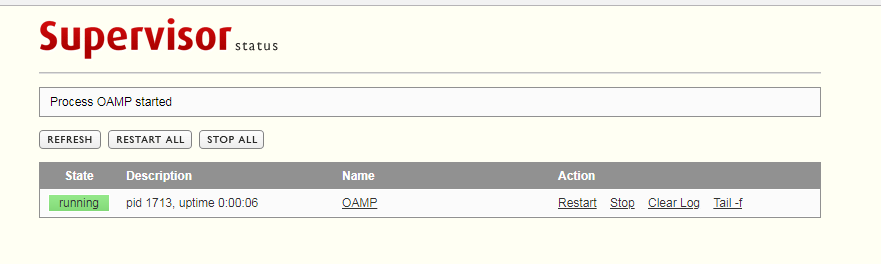
通过访问http://serverIP:9001 到web控制界面
相关命令:
supervisorctl shutdown
supervisorctl stop |start program_name
supervisorctl status
supervisor 安装使用的更多相关文章
- supervisor安装和配置
直接命令 easy_install supervisor 如果报错先安装 yum install python-setuptools,再上面一条命令: 安装成功后显示finished,我们再次进行py ...
- Supervisor 安装及配置管理uwsgi进程
Supervisor介绍 Supervisor 允许其用户在UNIX类操作系统上控制多个进程. 块如下: 方便 需要为每个进程实例编写rc.d脚本通常是不方便的. rc.d脚本是进程初始化/自动启动/ ...
- mac下supervisor安装及简单配置
supervisor是一个用 Python 写的进程管理工具,可以很方便的用来启动.重启.关闭进程(守护进程).可以用他来管理自己的“服务程序”. 安装 首先安装Python,Mac系统好像自带. 执 ...
- supervisor安装、使用详解
supervisor是用python写的一个进程管理工具,用来启动,重启,关闭进程. 1 supervisor的安装 pip install supervisor 2 supervisor的配置文件( ...
- supervisor安装部署和使用实例
Supervisord是用Python实现的一款非常实用的进程管理工具,类似于monit,monit和supervisord的一个比较大的差异是supervisord管理的进程必须由superviso ...
- Supervisor安装与配置(Linux/Unix进程管理工具)
原文链接:http://blog.csdn.net/xyang81/article/details/51555473 Supervisor(http://supervisord.org/)是用Pyth ...
- Linux系统下 Supervisor 安装搭建(yum安装)
安装Supervisor # 安装supervisor yum install supervisor # 打开supervisor的配置文件 vi /etc/supervisord.conf 将sup ...
- Linux系统下 Supervisor 安装搭建
在 web 应用部署到线上后,需要保证应用一直处于运行状态,在遇到程序异常.报错等情况,导致 web 应用终止时,需要保证程序可以立刻重启,继续提供服务. 所以,就需要一个工具,时刻监控 web 应用 ...
- supervisor安装及其配置
一.supervisor概述 supervisor是一个c/s系统,被用来在类Unix系统中监控进程状态.supervisor使用python开发. 服务端进程为supervisord,主要负责启动自 ...
- Supervisor安装与配置
Supervisor(http://supervisord.org/)是用Python开发的一个client/server服务,是Linux/Unix系统下的一个进程管理工具,不支持Windows系统 ...
随机推荐
- java jstat
jstat 虚拟机统计信息监视工具: jstat (JVM Statistics Monitoring Tool) 适用于监视虚拟机各种运行状态信息的命令行工具. 命令格式: jstat [ opti ...
- P4869 罪犯分组
思路: 明显的dp,虽然我想到了二进制模拟,想到了转移,但还是先看了题解,原来真是这样,,,,不是第三题吗? 用f[i]表示,对于前i个罪犯最少需要分几组. 对于每个状态用二进制表示,第i位上1,0表 ...
- UIScrollView使用stoboard自动布局
使用stoboard布局 scrollView 是有点麻烦的,首先我们往往约束好一个 scrollView 然后在添加子控件,此时都会报错,原因是, scrollView必须确定滚动范围 然后在使用V ...
- 一、单例模式(Singleton)
单例模式最初的定义出现于<设计模式>(艾迪生维斯理, 1994):“保证一个类仅有一个实例,并提供一个访问它的全局访问点.” 特点:一是某个类只能有一个实例: 二是它必须自行创建这个实例: ...
- webpack相关插件
webpack-merge:开发环境和生产环节的webpaak配置文件的配置合并 file-loader:编译写入文件,默认情况下生成文件的文件名是文件名与MD5哈希值的组合 vue-laoder:编 ...
- Git入门学习总结
用了两天时间看完廖雪峰老师的git教程(http://www.liaoxuefeng.com/wiki/0013739516305929606dd18361248578c67b8067c8c017b0 ...
- JavaScript中三种字符串连接方式及其性能比较
参考地址: https://www.cnblogs.com/programs/p/5554742.html 工作中经常会碰到要把2个或多个字符串连接成一个字符串的问题,在JS中处理这类问题一般有三种方 ...
- 实现memcopy函数
实现memcopy函数: void * memcpy(void *dest, const void *src, unsigned int count); { if ((src == NULL) || ...
- json格式引起的 parse 报错
json格式: {"ID":"4","PICDATAS":"[{"picDevNo": 1},{"p ...
- windows网络和共享中心“查看基本网络信息并设置连接”为“未知”的解决方案
存在问题“查看基本网络信息并设置连接”为“未知”.如图所示: 解决步骤 运行services.msc 启动Network List Service 若无法启动,打开其属性,选择“登录”选项卡,将启动类 ...