
Vu3+Element-Plus根据路由配置生成菜单导航栏
先看效果,整体界面结构如下
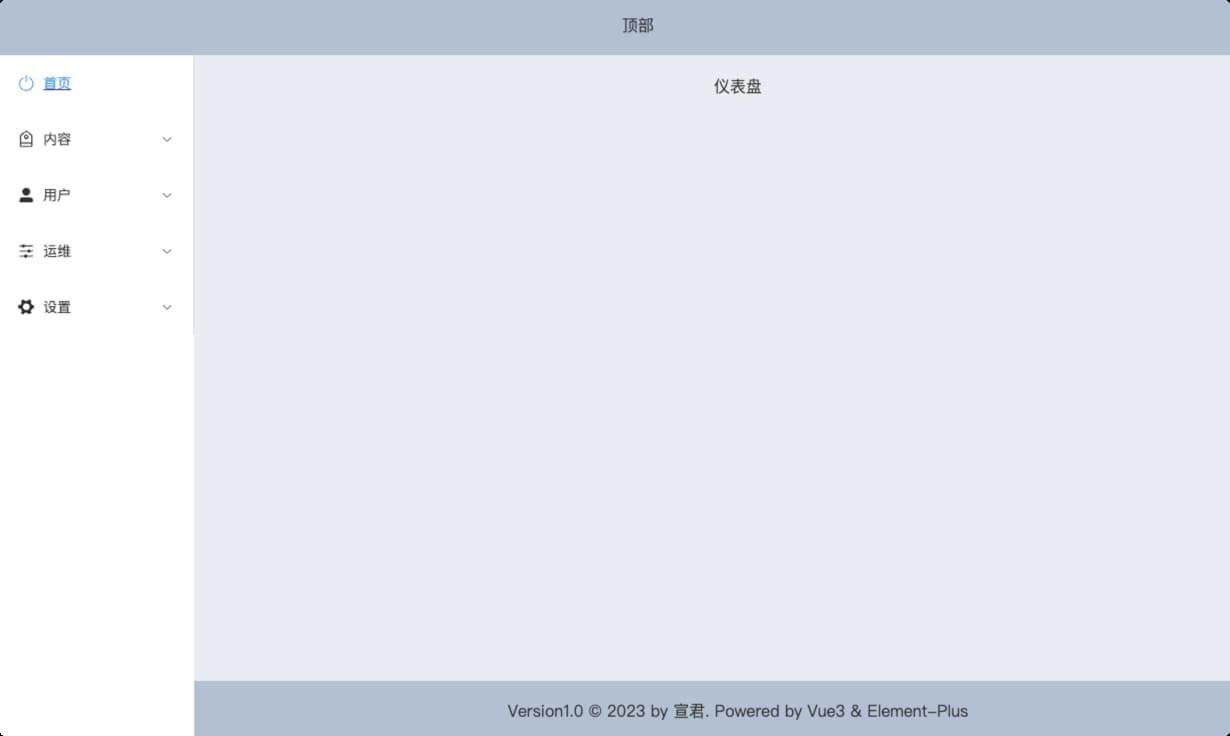
点击左侧菜单栏,右侧切换显示不同页面内容。
1 路由配置
路由配置如下:
const routes = [

  {

    path: "",

    component: () => import("@/layout/baseView.vue"),

    redirect: "/index",

    children: [

      {

        path: "/index",

        name: "首页",

        icon: "SwitchButton",

        hidden: false,

        component: () => import("@/page/dashboard/dashboard.vue"),

      },

      {

        path: "/content",

        name: "内容",

        icon: "Discount",

        hidden: false,

        component: () => import("@/layout/rightView.vue"),

        children: [

          {

            path: "manage-comment",

            icon: "MessageBox",

            name: "管理评论",

            hidden: false,

            component: () => import("@/page/content/manageComment.vue"),

          },

          {

            path: "manage-image",

            icon: "Odometer",

            name: "管理图片",

            hidden: false,

            component: () => import("@/page/content/manageImage.vue"),

          },

        ],

      },

      {

        path: "/user",

        icon: "UserFilled",

        name: "用户",

        hidden: false,

        component: () => import("@/layout/rightView.vue"),

        children: [

          {

            path: "list",

            icon: "User",

            name: "用户列表",

            hidden: false,

            component: () => import("@/page/user/list.vue"),

          },

          {

            path: "reset-pwd",

            icon: "Unlock",

            name: "重置密码",

            hidden: false,

            component: () => import("@/page/user/resetPwd.vue"),

          },

         // ....

        ],

      },

      {

        path: "/operation",

        icon: "Operation",

        name: "运维",

        hidden: false,

        component: () => import("@/layout/rightView.vue"),

        children: [

          {

            path: "mange-category",

            icon: "Edit",

            hidden: false,

            name: "管理分类",

            component: () => import("@/page/operation/manageCategory.vue"),

          },

          {

            path: "mange-carousel",

            icon: "Crop",

            name: "管理轮播图",

            hidden: false,

            component: () => import("@/page/operation/manageCarousel.vue"),

          },

        ],

      },

    ],

  },

  {

    path: "/login",

    hidden: true,

    component: () => import("@/page/login/login.vue"),

  },

];
说明:
@/layout/baseView.vue是整体页面结构
@/layout/rightView.vue是公共页面用于显示数据内容。
@/page/login/login.vue是登陆页面
2 页面结构
右侧数据内容视图是动态的,其它整个页面结构是固定的,因此提取baseView.vue作为页面基本结构。
登录界面是另一个页面整体,因此login.vue和基本结构页面baseView.vue都在App.vue页面中通过路由进行切换,因此App.vue中添加router-view进行动态路由渲染。
<template>

  <div id="app">

    <router-view></router-view>

  </div>

</template>
左侧菜单导航,菜单是根据路由进行动态渲染的,所以将路由生成菜单抽取为独立组组件leftMenuBar.vue。在mounted()中获取路由配置
export default {

  data() {

    return {

      menuList: [],

    };

  },

  mounted() {

    let routes = router.options.routes;

    this.menuList = routes[0].children;

    console.log(this.menuList);

  },

};
️Vue3通过router.options.routes 获取配置的路由
在右侧数据视图页面rightView.vue添加router-view标签
<template>

  <div class="right-view">

    <div class="header"></div>

    <div class="content">

      <router-view></router-view>

    </div>

  </div>

</template>
3 结合Element-plus 生成菜单导航
遍历路由通过element-plus的Menu组件生成菜单导航,完整的代码如下:
<template>

  <div>

    <el-menu

      default-active="0"

      :unique-opened="true"

      class="el-menu-vertical-demo"

    >

      <template v-for="(item, index) in menuList" :key="index">

        <router-link :to="item.path" v-if="!item.children" :key="index">

          <el-menu-item :index="index + ''">

            <el-icon><component :is="item.icon"></component></el-icon>

            <span>{{ item.name }}</span>

          </el-menu-item>

        </router-link>

        <el-sub-menu :index="index + ''" v-else>

          <template #title>

            <el-icon><component :is="item.icon"></component></el-icon>

            <span>{{ item.name }}</span>

          </template>

          <router-link

            :to="item.path + '/' + sub.path"

            v-for="(sub, subIndex) in item.children"

            :key="subIndex"

          >

            <el-menu-item :index="index + '-' + subIndex">

              <el-icon><component :is="sub.icon"></component></el-icon>

              <span>{{ sub.name }}</span>

            </el-menu-item>

          </router-link>

        </el-sub-menu>

      </template>

    </el-menu>

  </div>

</template>
4 设置菜单图标
由于element-plus使用svg 图标,复制的代码是<el-icon><Search /></el-icon>这样的,因此在遍历路由时,就不能通过<i :calss = "xxxx"></i>设置了,要通过<el-icon><component :is="xxxx"></component></el-icon>来设置,:is绑定的是icon的名称
<el-icon><component :is="item.icon"></component></el-icon>
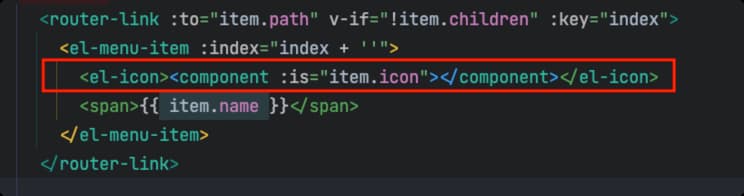
️这个地方element不同,element使用的是font-class的图标,可用 直接绑定
Vu3+Element-Plus根据路由配置生成菜单导航栏的更多相关文章
- jquery自定义插件-参数化配置多级菜单导航栏插件
1 自定义菜单导航栏插件的必要性 看图说话,下面是利用自定义的菜单导航栏插件simpleMenu创建的网站导航示例: 插件默认提供的是如上图的导航栏样式,即一二级菜单为横向分布:三四级菜单为纵向分布. ...
- 小程序配置单个页面导航栏的属性(微信小程序交流群:604788754)
配置单个页面导航栏的属性: 就在所要配置页面相对应的json文件中写入以下想要设置的属性: { "navigationBarBackgroundColor": "#fff ...
- 【原创】js实现一个可随意拖拽排序的菜单导航栏
1.想做这个效果的原因主要是用在UC上看新闻发现他们的导航菜单很有趣.无聊的时候在哪划着玩了很久.所以就干脆自己写一个.原效果如下 2.整体效果如下,在已推荐和未添加里面每个小方块可以触摸移动位置互换 ...
- 仿淘宝左侧菜单导航栏纯Html + css 写的
这俩天闲来没事淘宝逛了一圈看到淘宝的左侧导航菜单做的是真心的棒啊,一时兴起,查了点资料抓了几个图片仿淘宝写了个css,时间紧写的不太好,大神勿喷,给小白做个参考 废话不多说先来个效果图 接下来直接上代 ...
- jQuery 效果 - slideDown() 方法[菜单导航栏常用]
实例 以滑动方式显示隐藏的 <p> 元素: $(".btn2").click(function(){ $("p").slideDown(); }); ...
- vue根据路由变换,切换导航栏样式
<ul> <li> <router-link :to="{name: 'home'}" class="active_item" e ...
- ios开发之自己定义默认生成的导航栏 标题 颜色 返回button
一 改动导航栏颜色 导航栏在哪个页面代码放在那里面 self.navigationController.navigationBar.tintColor = [UIColor colorWithR ...
- Markdown使用TOC自动生成导航栏
经常使用markdown 的玩家一定很想要一个自动生成的导航栏吧,自己写的基本思路就是 轮询监听滚动条的位置,通过抛锚和跳锚实现,这里介绍一下今天的主角,markdown-toc插件: https:/ ...
- Vue结合路由配置递归实现菜单栏
作者:小土豆biubiubiu 博客园:https://www.cnblogs.com/HouJiao/ 掘金:https://juejin.im/user/58c61b4361ff4b005d9e8 ...
- 从壹开始 [vueAdmin后台] 之三 || 动态路由配置 & 项目快速开发
回顾 今天VS 2019正式发布,实验一波,你安装了么?Blog.Core 预计今天会升级到 Core 3.0 版本. 哈喽大家周三好!本来今天呢要写 Id4 了,但是写到了一半,突然有人问到了关于 ...
随机推荐
- 2022-08-23:以下go语言代码输出什么?A:map[baz:2 foo:0];B:map[bar:1 baz:2];C:map[baz:2];D:不确定。 package main impo
2022-08-23:以下go语言代码输出什么?A:map[baz:2 foo:0]:B:map[bar:1 baz:2]:C:map[baz:2]:D:不确定. package main impor ...
- 2022-08-18:每一个序列都是[a,b]的形式,a < b 序列连接的方式为,前一个序列的b,要等于后一个序列的a 比如 : [3, 7]、[7, 13]、[13, 26]这三个序列就可以依次连
2022-08-18:每一个序列都是[a,b]的形式,a < b 序列连接的方式为,前一个序列的b,要等于后一个序列的a 比如 : [3, 7].[7, 13].[13, 26]这三个序列就可以 ...
- 2022-07-08:以下go语言代码输出什么?A:3;B:+Inf;C:true;D:编译错误。 package main import “fmt“ func main() { var
2022-07-08:以下go语言代码输出什么?A:3:B:+Inf:C:true:D:编译错误. package main import "fmt" func main() { ...
- 2022-01-20: 矩形区域不超过 K 的最大数值和。 给你一个 m x n 的矩阵 matrix 和一个整数 k ,找出并返回矩阵内部矩形区域的不超过 k 的最大数值和。 题目数据保证总会存在一
2022-01-20: 矩形区域不超过 K 的最大数值和. 给你一个 m x n 的矩阵 matrix 和一个整数 k ,找出并返回矩阵内部矩形区域的不超过 k 的最大数值和. 题目数据保证总会存在一 ...
- save() prohibited to prevent data loss due to unsaved related object 'item_n
问题描述: save() prohibited to prevent data loss due to unsaved related object 'item_no 原因分析: 原来的目的是保存数据 ...
- 利用简单的IO操作实现M3U8文件之间的合并
先上代码: 1 @SneakyThrows //合并操作,最终文件不包含结束标识,方便多次合并 2 private static void mergeM3U8File(String source, S ...
- 【CF】Round #618 div2 C(文末有技巧)
目录 round #618 div2 C(文末有技巧) 题目: 样例输入输出 思路 小技巧(拿小本本记下来) round #618 div2 C(文末有技巧) 这是题目链接->链接 题目: 原题 ...
- JAVA 23种设计模式(小白进阶必经之路)
如今几乎所有程序都遵循万物皆对象的开发理念,然在写程序中我们用的最多的应该是封装(encapsulation).继承(inheritance).多态(Polymorphism)开发模式:而更高一个境界 ...
- K8s Pod状态与容器探针
1.pod的调度流程及常见状态 1.1.pod的调度流程 Pod创建过程如上图所示,首先用户向apiserver发送创建pod的请求,apiserver收到用于创建pod请求后,对应会对该用户身份信息 ...
- STM32F429 Discovery开发板应用:实现SPI-SD Card文件写入(搭载FatFS文件系统)
MCU:STM32F429ZIT6 开发环境:STM32CubeMX+MDK5 外购了一个SPI接口的SD Card模块,想要实现SD卡存储数据的功能. 首先需要打开STM32CubeMX工具.输入开 ...