
仿微信语音聊天webrtc
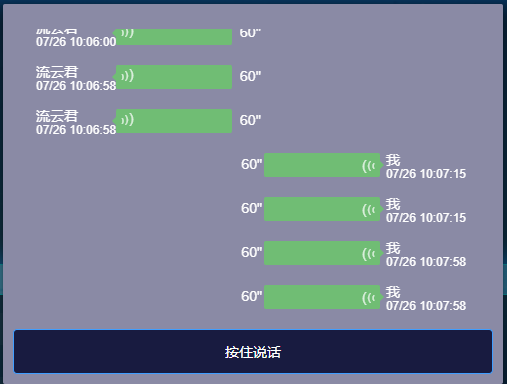
主要技术
MediaRecorder 录音
webrtc 获取麦克风
URL.createObjectURL 转换为url(实际生产中,通过后端转换blob为mp3网址)
实现elementui+vue
1.html
<div class="chat-record">

      <audio ref="chataudio"></audio>

      <transition-group tag="ul" class="msg-list" name="fade">

        <li v-for="(item, index) in chunList" :key="index" class="msg" @click="onPlay(index)" @touchend.prevent="onPlay(index)" :style="`flex-direction:${item.sendUserName===userName?'row-reverse':'row'}`">

          <div class="avatar">

            <dt>{{item.sendUserName}}</dt>

            <dd>{{item.sendTime}}</dd>

          </div>

          <div v-cloak class="audio"  :style="{width: 20 * item.audioStream + 'px'}" :class="{wink: item.wink,rotate:item.sendUserName!==userName}">

            <span>(</span>

            <span>(</span>

            <span>(</span>

          </div>

          <div class="duration">{{item.audioStream}}"</div>

        </li>

      </transition-group>

    </div>

    <span slot="footer" class="dialog-footer">

      <el-button type="primary" class="submit-btn" @mousedown.native="onMousedown" @touchstart.native="onMousedown" @mouseup.native="onMouseup" @touchend.native="onMouseup">{{btnText}}</el-button>

    </span>
touchstart.native为了移动端触感灵敏
2.判断浏览器是否有相关api
function getUserMedia(constrains, success, error) {

    let promise

    if (navigator.mediaDevices.getUserMedia) {

      //最新标准API

      promise = navigator.mediaDevices

        .getUserMedia(constrains)

        .then(success)

        .catch(error)

    } else if (navigator.webkitGetUserMedia) {

      //webkit内核浏览器

      promise = navigator

        .webkitGetUserMedia(constrains)

        .then(success)

        .catch(error)

    } else if (navigator.mozGetUserMedia) {

      //Firefox浏览器

      promise = navigator.mozGetUserMedia(constrains).then(success).catch(error)

    } else if (navigator.getUserMedia) {

      //旧版API

      promise = navigator.getUserMedia(constrains).then(success).catch(error)

    }

    return promise

  }

  function canGetUserMediaUse() {

    return !!(

      navigator.mediaDevices.getUserMedia ||

      navigator.webkitGetUserMedia ||

      navigator.mozGetUserMedia ||

      navigator.msGetUserMedia

    )

  }
3. new window.MediaRecorder(stream)
 if (canGetUserMediaUse()) {

          getUserMedia(

            {

              video: false,

              audio: true,

            },

            (stream) => {

              this.recorder = new window.MediaRecorder(stream)

              this.bindEvents()

            },

            (error) => {

              console.log(error)

              alert('出错,请确保已允许浏览器获取录音权限' + error)

            }

          )

        } else {

          alert('您的浏览器不兼容')

        }

      },
4.录音开始,暂停,保存,转换
 onMousedown() {

        this.btnText = '松开结束'

        this.onStart()

      },

      onMouseup() {

        this.btnText = '按住说话'

        this.onStop()

      },

      onStart() {

        this.recorder.start()

      },

      onStop() {

        this.recorder.stop()

      },

	 //重点

	 bindEvents() {

        this.recorder.ondataavailable = this.getRecordingData

        this.recorder.onstop = this.saveRecordingData

      },

      getRecordingData(e) {

        this.chunks.push(e.data)

      },

      saveRecordingData() {

        let blob = new Blob(this.chunks, { type: 'audio/ogg; codecs=opus' })

        let audioStream = URL.createObjectURL(blob)

        //估算时长

        let duration = parseInt(blob.size / 6600)

        if (duration <= 0) {

          alert('说话时间太短')

          return

        }

        if (duration > 60) {

          duration = 60

        }

        this.chunkList.push({audioStream: audioStream, duration: duration})

        this.chunks = []

      },
5.播放
onPlay(index) {

        let item = this.chunList[index]

        this.audio = this.$refs.chataudio

        this.audio.src = item.audioStream

        this.audio.play()

        this.bindAudioEvent(index)

      },
完整代码
这是props获取websoket数据,自己使用请把wsdata换成chunkList
点击查看代码
<template>

  <el-dialog append-to-body class="box-dialog" custom-class="dark-dialog" :visible.sync="dialogVisible" width="500px"  center>

    <div class="chat-record">

      <audio ref="chataudio"></audio>

      <transition-group tag="ul" class="msg-list" name="fade">

        <li v-for="(item, index) in wsdata" :key="index" class="msg" @click="onPlay(index)" @touchend.prevent="onPlay(index)" :style="`flex-direction:${item.sendUserName===userName?'row-reverse':'row'}`">

          <div class="avatar">

            <dt>{{item.sendUserName}}</dt>

            <dd>{{item.sendTime}}</dd>

          </div>

          <div v-cloak class="audio"  :style="{width: 20 * item.sendContentLength + 'px'}" :class="{wink: item.wink,rotate:item.sendUserName!==userName}">

            <span>(</span>

            <span>(</span>

            <span>(</span>

          </div>

          <div class="duration">{{item.sendContentLength}}"</div>

        </li>

      </transition-group>

    </div>

    <span slot="footer" class="dialog-footer">

      <el-button type="primary" class="submit-btn" @mousedown.native="onMousedown" @touchstart.native="onMousedown" @mouseup.native="onMouseup" @touchend.native="onMouseup">{{btnText}}</el-button>

    </span>

  </el-dialog>

</template>

<script>

  function getUserMedia(constrains, success, error) {

    let promise

    if (navigator.mediaDevices.getUserMedia) {

      //最新标准API

      promise = navigator.mediaDevices

        .getUserMedia(constrains)

        .then(success)

        .catch(error)

    } else if (navigator.webkitGetUserMedia) {

      //webkit内核浏览器

      promise = navigator

        .webkitGetUserMedia(constrains)

        .then(success)

        .catch(error)

    } else if (navigator.mozGetUserMedia) {

      //Firefox浏览器

      promise = navigator.mozGetUserMedia(constrains).then(success).catch(error)

    } else if (navigator.getUserMedia) {

      //旧版API

      promise = navigator.getUserMedia(constrains).then(success).catch(error)

    }

    return promise

  }

  function canGetUserMediaUse() {

    return !!(

      navigator.mediaDevices.getUserMedia ||

      navigator.webkitGetUserMedia ||

      navigator.mozGetUserMedia ||

      navigator.msGetUserMedia

    )

  }

  export default {

    data() {

      return {

        dialogVisible: false,

        chunks: [],

        audio: '',

        chunkList: [],

        btnText: '按住说话',

      }

    },

    props: {

      wsdata: {

        type: Array,

        default: () => {},

      },

      userName: {

        type: String,

        default: '',

      },

    },

    mounted() {

      this.requestAudioAccess()

    },

    methods: {

      open(data) {

        this.dialogVisible = true

      },

      close() {

        this.dialogVisible = false

        this.resetForm()

      },

      requestAudioAccess() {

        if (canGetUserMediaUse()) {

          getUserMedia(

            {

              video: false,

              audio: true,

            },

            (stream) => {

              this.recorder = new window.MediaRecorder(stream)

              this.bindEvents()

            },

            (error) => {

              console.log(error)

              alert('出错,请确保已允许浏览器获取录音权限' + error)

            }

          )

        } else {

          alert('您的浏览器不兼容')

        }

      },

      onMousedown() {

        this.btnText = '松开结束'

        this.onStart()

      },

      onMouseup() {

        this.btnText = '按住说话'

        this.onStop()

      },

      onStart() {

        this.recorder.start()

      },

      onStop() {

        this.recorder.stop()

      },

      onPlay(index) {

        this.wsdata.forEach((item) => {

          this.$set(item, 'wink', false)

        })

        let item = this.wsdata[index]

        this.audio = this.$refs.chataudio

        this.audio.src = item.sendContent

        this.audio.play()

        this.bindAudioEvent(index)

      },

      bindAudioEvent(index) {

        let item = this.wsdata[index]

        this.audio.onplaying = () => {

          this.$set(item, 'wink', true)

        }

        this.audio.onended = () => {

          this.$set(item, 'wink', false)

        }

      },

      bindEvents() {

        this.recorder.ondataavailable = this.getRecordingData

        this.recorder.onstop = this.saveRecordingData

      },

      getRecordingData(e) {

        this.chunks.push(e.data)

      },

      saveRecordingData() {

        let blob = new Blob(this.chunks, { type: 'audio/ogg; codecs=opus' })

        let audioStream = URL.createObjectURL(blob)

        //估算时长

        let duration = parseInt(blob.size / 6600)

        if (duration <= 0) {

          alert('说话时间太短')

          return

        }

        if (duration > 60) {

          duration = 60

        }

        this.$emit('getvoice', {blob: blob, duration: duration})

        this.chunks = []

      },

    },

  }

</script>

<style lang="scss" scoped>

.box-dialog::v-deep .el-dialog__footer {

  padding:0 0;

  padding-bottom: 10px;

}

.box-dialog::v-deep .el-dialog__body {

  padding-bottom:0;

  //background-color: rgba(#181b40, 0.9);

}

.box-dialog::v-deep .el-dialog__header {

  display: none;

}

.submit-btn {

  width: 96%;

  height: 45px;

  position: relative;

  background-color: #181b40;

  &:active {

  background-color: #03225c;

}

&:active:before {

  position: absolute;

  left: 50%;

  transform: translate(-50%, 0);

  top: -2px;

  content: '';

  width: 0%;

  height: 2px;

  background-color: #7bed9f;

  animation: loading 1s ease-in-out infinite backwards;

}

}

.chat-record {

  width: 100%;

  height: 300px;

  overflow-y: scroll;

  color: #fff;

}

.msg-list {

  margin: 0;

  padding: 0;

  height: 100%;

  overflow-y: auto;

  -webkit-overflow-scrolling: touch;

}

.msg-list::-webkit-scrollbar {

  display: none;

}

.msg-list .msg {

  list-style: none;

  padding: 0 8px;

  margin: 10px 0;

  overflow: hidden;

  cursor: pointer;

}

.msg-list .msg  {

  display: flex;

  flex-direction: row-reverse;

}

.rotate{

  transform: rotate(180deg);

}

.msg-list .msg .avatar {

  height: 34px;

  line-height: 14px;

  font-size: 12px;

  background-size: 100%;

  dt {

    font-size: 14px;

  }

}

.msg-list .msg .audio {

  position: relative;

  margin-right: 6px;

  max-width: 116px;

  min-width: 30px;

  height: 24px;

  line-height: 24px;

  padding: 0 4px 0 10px;

  border-radius: 2px;

  color: #000;

  text-align: right;

  background-color: rgba(107, 197, 107, 0.85);

}

.msg-list .msg.eg {

  cursor: default;

}

.msg-list .msg.eg .audio {

  text-align: left;

}

.msg-list .msg .audio:before {

  position: absolute;

  right: -8px;

  top: 8px;

  content: '';

  display: inline-block;

  width: 0;

  height: 0;

  border-style: solid;

  border-width: 4px;

  border-color: transparent transparent transparent rgba(107, 197, 107, 0.85);

}

.msg-list .msg .audio span {

  color: rgba(255, 255, 255, 0.8);

  display: inline-block;

  transform-origin: center;

}

.msg-list .msg .audio span:nth-child(1) {

  font-weight: 400;

}

.msg-list .msg .audio span:nth-child(2) {

  transform: scale(0.8);

  font-weight: 500;

}

.msg-list .msg .audio span:nth-child(3) {

  transform: scale(0.5);

  font-weight: 700;

}

.msg-list .msg .audio.wink span {

  animation: wink 1s ease infinite;

}

.msg-list .msg .duration {

  margin: 3px 2px;

}

.fade-enter-active,

.fade-leave-active {

  transition: opacity 0.5s;

}

.fade-enter,

.fade-leave-to {

  opacity: 0;

}

@keyframes wink {

  from {

    color: rgba(255, 255, 255, 0.8);

  }

  to {

    color: rgba(255, 255, 255, 0.1);

  }

}

@keyframes loading {

  from {

    width: 0%;

  }

  to {

    width: 100%;

  }

}

</style>
仿微信语音聊天webrtc的更多相关文章
- Android 高仿微信语音聊天页面高斯模糊效果
目前的应用市场上,使用毛玻璃效果的APP随处可见,比如用过微信语音聊天的人可以发现,语音聊天页面就使用了高斯模糊效果. 先看下效果图: 仔细观察上图,我们可以发现,背景图以用户头像为模板,对其进行了高 ...
- html5聊天案例|趣聊h5|仿微信界面聊天|红包|语音聊天|地图
之前有开发过一个h5微直播项目,当时里面也用到过聊天模块部分,今天就在之前聊天部分的基础上重新抽离模块,开发了这个h5趣聊项目,功能效果比较类似微信聊天界面.采用html5+css3+Zepto+sw ...
- uniapp+nvue实现仿微信App聊天应用 —— 成功实现好友聊天+语音视频通话功能
基于uniapp + nvue实现的uniapp仿微信App聊天应用 txim 实例项目,实现了以下功能. 1: 聊天会话管理 2: 好友列表 3: 文字.语音.视频.表情.位置等聊天消息收发 4: ...
- 【手把手教程】uniapp + vue 从0搭建仿微信App聊天应用:腾讯云TXIM即时通讯的最佳实践
基于uniapp + vue 实现仿微信App聊天应用实践,实现以下功能 1: 用户登陆 2: 聊天会话管理 3: 文本/图片/视频/定位消息收发 4: 贴图表情消息收发 5: 一对一语音视频在线通话 ...
- html5的audio实现高仿微信语音播放效果
效果图 前台大体呈现效果图如下: 点击就可以播放mp3格式的录音.点击另外一个录音,当前录音停止! 思路 关于播放动画,这个很简单,我们可以用css3的逐帧动画来实现.关于逐帧动画,我之前的文章也写过 ...
- h5移动端聊天室|仿微信界面聊天室|h5多人聊天室
今年的FIFA世界杯甚是精彩,最近兴致高涨就利用HTML5开发了一个手机端仿微信界面聊天室,该h5聊天室采用750px全新伸缩flex布局,以及使用rem响应式配合fontsize.js,页面弹窗则是 ...
- Tauri-Vue3桌面端聊天室|tauri+vite3仿微信|tauri聊天程序EXE
基于tauri+vue3.js+vite3跨桌面端仿微信聊天实例TauriVue3Chat. tauri-chat 运用最新tauri+vue3+vite3+element-plus+v3layer等 ...
- Android 高仿微信实时聊天 基于百度云推送
转载请标明出处:http://blog.csdn.net/lmj623565791/article/details/38799363 ,本文出自:[张鸿洋的博客] 一直在仿微信界面,今天终于有幸利用百 ...
- Android 高仿微信即时聊天 百度云为基础的推
转载请注明出处:http://blog.csdn.net/lmj623565791/article/details/38799363 ,本文出自:[张鸿洋的博客] 一直在仿微信界面,今天最终有幸利用百 ...
- uniapp+nvue开发之仿微信语音+视频通话功能 :实现一对一语音视频在线通话
本篇文章是利用uni-app和nvue实现微信效果功能的第三篇了,今天我们基于uniapp + nvue实现的uniapp仿微信音视频通话插件实例项目,实现了以下功能: 1: 语音通话 2: 视频 ...
随机推荐
- Gossip in Hyperledger Fabric
1. Gossip协议基础 1.1 什么是分布式系统 分布式系统(Distributed System)是由多台计算机或计算节点组成的计算机系统,这些计算节点通过网络连接在一起,并协同工作以完成共同的 ...
- XX-net安装
1.下载https://github.com/XX-net/XX-Net 2. 3. 4.运行google浏览器 5.找到安装XX-net的位置,点击即可访问google ps:校园网用户可以直接使用 ...
- xxl-job默认accessToken命令执行漏洞复现
起因: 昨天看见微步发布XXL-JOB默认accessToken身份绕过漏洞,之前hw期间遇到过几次,都没弱口令和未授权,对其有点印象,遂复现一下. 漏洞影响:2.3.1和2.4 环境准备: 1.下载 ...
- ORACLE 视图合并SQL优化案例
朋友给了一条SQL说跑8个小时才出结果,结果集很小75条数据,给他安排一下. SQL如下: SELECT DISTINCT T.XLA_TYPE, T.XLA_CODE, T.VENDOR_CODE, ...
- python3使用pymsql操作mysql数据库
操作系统 :Windows 10_x64 python版本 :3.9.2 pymysql版本: 1.0.2 MySQL版本: 5.7.38 之前写过一篇关于python操作mysql数据库的文章: ...
- 二分查找binary_search
一.解释 二.常用操作 1.头文件 #include <algorithm> 2.使用方法 a.binary_search:查找某个元素是否出现. a.函数模板:binary_search ...
- Windows 搭建 Flutter 开发环境
安装 去官网地址下载 Flutter SDK. 下载地址:https://flutter.dev/docs/development/tools/sdk/releases 将安装包解压到你想安装 Flu ...
- LabVIEW基于机器视觉的实验室设备管理系统(5)
目录 行动计划 设备借用 判断设备ID是否正确.设备是否在库 判断是否为已注册用户.电话是否正确 借出设备 设备归还 信息查询 判断ID是否正确.选择设备状态 效果演示 今天这一期,我们就来完成实验 ...
- Git如何回到拉取之前的代码
1.执行git reflog命令查看你的历史变更记录: 2.git reset --hard 2aee3f(拉代码之前的提交记录) Git基础命令总结请参考:https://blog.csdn.net ...
- 生产实践:Redis与Mysql的数据强一致性方案
公众号「架构成长指南」,专注于生产实践.云原生.分布式系统.大数据技术分享. 数据库和Redis如何保持强一致性,这篇文章告诉你 目的 Redis和Msql来保持数据同步,并且强一致,以此来提高对应接 ...