
【预训练语言模型】 使用Transformers库进行BERT预训练
基于 HuggingFace的Transformer库,在Colab或Kaggle进行预训练。
鉴于算力限制,选用了较小的英文数据集wikitext-2
目的:跑通Mask语言模型的预训练流程
一、准备
1.1 安装依赖
!pip3 install --upgrade pip

!pip install -U datasets

!pip install accelerate -U
注意:在Kaggle上训练时,最好将datasets更新到最新版(再重启kernel),避免版本低报错
colab和kaggle已经预安装transformers库
1.2 数据准备
加载数据
from datasets import concatenate_datasets, load_dataset

wikitext2 = load_dataset("liuyanchen1015/VALUE_wikitext2_been_done", split="train")

# concatenate_datasets可以合并数据集,这里为了减少训练数据量,只用1个数据集

dataset = concatenate_datasets([wikitext2])

# 将数据集合切分为 90% 用于训练,10% 用于测试

d = dataset.train_test_split(test_size=0.1)
type(d["train"])
可以看到d的类型是
datasets.arrow_dataset.Dataset

def __init__(arrow_table: Table, info: Optional[DatasetInfo]=None, split: Optional[NamedSplit]=None, indices_table: Optional[Table]=None, fingerprint: Optional[str]=None)

A Dataset backed by an Arrow table.
训练集和测试集数量
print(len(d["train"]), len(d["test"]))
5391 600
查看数据
d["train"][0]
sentence、idx和score构成的字典,sentence为文本
{'sentence': "Rowley dismissed this idea given the shattered state of Africaine and instead towed the frigate back to Île Bourbon , shadowed by Astrée and Iphigénie on the return journey . The French frigates did achieve some consolation in pursuing Rowley from a distance , running into and capturing the Honourable East India Company 's armed brig Aurora , sent from India to reinforce Rowley . On 15 September , Boadicea , Africaine and the brigs done arrived at Saint Paul , Africaine sheltering under the fortifications of the harbour while the others put to sea , again seeking to drive away the French blockade but unable to bring them to action . Bouvet returned to Port Napoleon on 18 September , and thus was not present when Rowley attacked and captured the French flagship Vénus and Commodore Hamelin at the Action of 18 September 1810 .",

 'idx': 1867,

 'score': 1}
接下来将训练和测试数据,分别保存在本地文件中(后续用于训练tokenizer)
def dataset_to_text(dataset, output_filename="data.txt", num=1000):

    """Utility function to save dataset text to disk,

    useful for using the texts to train the tokenizer

    (as the tokenizer accepts files)"""

    cnt = 0

    with open(output_filename, "w") as f:

        for t in dataset["sentence"]:

            print(t, file=f) # 重定向到文件

            # print(len(t), t)

            cnt += 1

            if cnt == num:

                break

    print("Write {} sample in {}".format(num, output_filename))

# save the training set to train.txt

dataset_to_text(d["train"], "train.txt", len(d["train"]))

# save the testing set to test.txt

dataset_to_text(d["test"], "test.txt", len(d["test"]))
二、训练分词器(Tokenizer)
BERT采用了WordPiece分词,即
根据训练语料先训练一个语言模型,迭代每次在合并词元对时,会对所有词元进行评分,然后选择使训练数据似然增加最多的token对。直到,到达预定的词表大小。
相比BPE的选取频词最高的token对,WordPiece使用了语言模型来计算似然值:
score = 词元对出现的概率 / (第1个词元出现的概率 * 第1个词元出现的概率)。
因此,需要首先这里使用transformers库中的BertWordPieceTokenizer 类来完成分词器(Tokenizer)训练
import os, json

from transformers import BertTokenizerFast

from tokenizers import BertWordPieceTokenizer

special_tokens = [

"[PAD]", "[UNK]", "[CLS]", "[SEP]", "[MASK]", "<S>", "<T>"

]

# 加载之前存储的训练语料(可同时选择训练集和测试集)

# files = ["train.txt", "test.txt"]

# 在training set上训练tokenizer

files = ["train.txt"]

# 设定词表大小,BERT模型vocab size为30522,可自行更改

vocab_size = 30_522

# 最大序列长度, 较小的长度可以增加batch数量、提升训练速度

# 最大序列长度同时也决定了,BERT预训练的PositionEmbedding的大小,决定了其最大推理长度

max_length = 512

# 是否截断处理, 这边开启截断处理

# truncate_longer_samples = False

truncate_longer_samples = True

# 初始化WordPiece tokenizer

tokenizer = BertWordPieceTokenizer()

# 训练tokenizer

tokenizer.train(files=files,

                vocab_size=vocab_size,

                special_tokens=special_tokens)

# 截断至最大序列长度-512 tokens

tokenizer.enable_truncation(max_length=max_length)

model_path = "pretrained-bert"

# make the directory if not already there

if not os.path.isdir(model_path):

    os.mkdir(model_path)

# 存储tokenizer(其实就是词表文件vocab.txt)

tokenizer.save_model(model_path)

# 存储tokenizer的配置信息到config文件,

# including special tokens, whether to lower case and the maximum sequence length

with open(os.path.join(model_path, "config.json"), "w") as f:

    tokenizer_cfg = {

    "do_lower_case": True,

    "unk_token": "[UNK]",

    "sep_token": "[SEP]",

    "pad_token": "[PAD]",

    "cls_token": "[CLS]",

    "mask_token": "[MASK]",

    "model_max_length": max_length,

    "max_len": max_length,

    }

    json.dump(tokenizer_cfg, f)

# when the tokenizer is trained and configured, load it as BertTokenizerFast

tokenizer = BertTokenizerFast.from_pretrained(model_path)
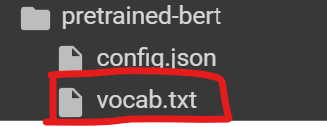
vocab.txt内容,包括特殊7个token以及训练得到的tokens
[PAD]

[UNK]

[CLS]

[SEP]

[MASK]

<S>

<T>

!

"

#

$

%

&

'

(
config.json文件
{"do_lower_case": true, "unk_token": "[UNK]", "sep_token": "[SEP]", "pad_token": "[PAD]", "cls_token": "[CLS]", "mask_token": "[MASK]", "model_max_length": 512, "max_len": 512}
config.json和vocab.txt文件都是我们平时微调BERT或GPT经常见到的文件,其来源就是这个。
三 预处理语料集合
在开始BERT预训前,还需要将预训练语料根据训练好的 Tokenizer进行处理,将文本转换为分词后的结果。
如果文档长度超过512个Token),那么就直接进行截断。
数据处理代码如下所示:
def encode_with_truncation(examples):

    """Mapping function to tokenize the sentences passed with truncation"""

    return tokenizer(examples["sentence"], truncation=True, padding="max_length",

    max_length=max_length, return_special_tokens_mask=True)

def encode_without_truncation(examples):

    """Mapping function to tokenize the sentences passed without truncation"""

    return tokenizer(examples["sentence"], return_special_tokens_mask=True)

# 上述encode函数的使用,取决于truncate_longer_samples变量

encode = encode_with_truncation if truncate_longer_samples else encode_without_truncation

# tokenizing训练集

train_dataset = d["train"].map(encode, batched=True)

# tokenizing测试集

test_dataset = d["test"].map(encode, batched=True)

if truncate_longer_samples:

    # remove other columns and set input_ids and attention_mask as PyTorch tensors

    train_dataset.set_format(type="torch", columns=["input_ids", "attention_mask"])

    test_dataset.set_format(type="torch", columns=["input_ids", "attention_mask"])

else:

    # remove other columns, and remain them as Python lists

    test_dataset.set_format(columns=["input_ids", "attention_mask", "special_tokens_mask"])

    train_dataset.set_format(columns=["input_ids", "attention_mask", "special_tokens_mask"])
truncate_longer_samples变量控制对数据集进行词元处理的 encode() 函数。
- 如果设置为True,则会截断超过最大序列长度(max_length)的句子。否则不截断。
- 如果truncate_longer_samples设为False,需要将没有截断的样本连接起来,并组合成固定长度的向量。
这边开启截断处理( 不截断处理,代码有为解决的bug )。便于拼成chunk,batch处理。
Map: 100%

 5391/5391 [00:15<00:00, 352.72 examples/s]

Map: 100%

 600/600 [00:01<00:00, 442.19 examples/s]
观察分词结果
x = d["train"][10]['sentence'].split(".")[0]

x
In his foreword to John Marriott 's book , Thunderbirds Are Go ! , Anderson put forward several explanations for the series ' enduring popularity : it " contains elements that appeal to most children – danger , jeopardy and destruction
按max_length=33进行截断处理
tokenizer(x, truncation=True, padding="max_length", max_length=33, return_special_tokens_mask=True)
多余token被截断了,没有padding。
- 句子首部加上了(token id为2的[CLS])
- 句子尾部加上了(token id为3的[SEP])
{'input_ids': [2, 502, 577, 23750, 649, 511, 1136, 29823, 13, 59, 1253, 18, 4497, 659, 762, 7, 18, 3704, 2041, 3048, 1064, 26668, 534, 492, 1005, 13, 12799, 4281, 32, 555, 8, 4265, 3],

'token_type_ids': [0, 0, 0, 0, 0, 0, 0, 0, 0, 0, 0, 0, 0, 0, 0, 0, 0, 0, 0, 0, 0, 0, 0, 0, 0, 0, 0, 0, 0, 0, 0, 0, 0],

'attention_mask': [1, 1, 1, 1, 1, 1, 1, 1, 1, 1, 1, 1, 1, 1, 1, 1, 1, 1, 1, 1, 1, 1, 1, 1, 1, 1, 1, 1, 1, 1, 1, 1, 1],

'special_tokens_mask': [1, 0, 0, 0, 0, 0, 0, 0, 0, 0, 0, 0, 0, 0, 0, 0, 0, 0, 0, 0, 0, 0, 0, 0, 0, 0, 0, 0, 0, 0, 0, 0, 1]}
按max_length=70进行截断处理
tokenizer(x, truncation=True, padding="max_length", max_length=70, return_special_tokens_mask=True)
不足max_length的token进行了padding(token id为0, 即[PAD]), 对应attention_mask为0(注意力系数会变成无穷小,即mask掉)
{'input_ids': [2, 11045, 13, 61, 1248, 3346, 558, 8, 495, 4848, 1450, 8, 18, 981, 1146, 578, 17528, 558, 18652, 513, 13102, 18, 749, 1660, 819, 1985, 548, 566, 11279, 579, 826, 3881, 8079, 505, 495, 28263, 360, 18, 16273, 505, 570, 4145, 1644, 18, 505, 652, 757, 662, 2903, 1334, 791, 543, 3008, 810, 495, 817, 8079, 4436, 505, 579, 1558, 3, 0, 0, 0, 0, 0, 0, 0, 0],

'token_type_ids': [0, 0, 0, 0, 0, 0, 0, 0, 0, 0, 0, 0, 0, 0, 0, 0, 0, 0, 0, 0, 0, 0, 0, 0, 0, 0, 0, 0, 0, 0, 0, 0, 0, 0, 0, 0, 0, 0, 0, 0, 0, 0, 0, 0, 0, 0, 0, 0, 0, 0, 0, 0, 0, 0, 0, 0, 0, 0, 0, 0, 0, 0, 0, 0, 0, 0, 0, 0, 0, 0],

'attention_mask': [1, 1, 1, 1, 1, 1, 1, 1, 1, 1, 1, 1, 1, 1, 1, 1, 1, 1, 1, 1, 1, 1, 1, 1, 1, 1, 1, 1, 1, 1, 1, 1, 1, 1, 1, 1, 1, 1, 1, 1, 1, 1, 1, 1, 1, 1, 1, 1, 1, 1, 1, 1, 1, 1, 1, 1, 1, 1, 1, 1, 1, 1, 0, 0, 0, 0, 0, 0, 0, 0],

'special_tokens_mask': [1, 0, 0, 0, 0, 0, 0, 0, 0, 0, 0, 0, 0, 0, 0, 0, 0, 0, 0, 0, 0, 0, 0, 0, 0, 0, 0, 0, 0, 0, 0, 0, 0, 0, 0, 0, 0, 0, 0, 0, 0, 0, 0, 0, 0, 0, 0, 0, 0, 0, 0, 0, 0, 0, 0, 0, 0, 0, 0, 0, 0, 1, 1, 1, 1, 1, 1, 1, 1, 1]}
如果,设置为不截断
tokenizer(x, truncation=False, return_special_tokens_mask=True)
比较正常的结果
{'input_ids': [2, 502, 577, 23750, 649, 511, 1136, 29823, 13, 59, 1253, 18, 4497, 659, 762, 7, 18, 3704, 2041, 3048, 1064, 26668, 534, 492, 1005, 13, 12799, 4281, 32, 555, 8, 4265, 2603, 545, 3740, 511, 843, 1970, 178, 8021, 18, 19251, 362, 510, 6681, 3], 'token_type_ids': [0, 0, 0, 0, 0, 0, 0, 0, 0, 0, 0, 0, 0, 0, 0, 0, 0, 0, 0, 0, 0, 0, 0, 0, 0, 0, 0, 0, 0, 0, 0, 0, 0, 0, 0, 0, 0, 0, 0, 0, 0, 0, 0, 0, 0, 0], 'attention_mask': [1, 1, 1, 1, 1, 1, 1, 1, 1, 1, 1, 1, 1, 1, 1, 1, 1, 1, 1, 1, 1, 1, 1, 1, 1, 1, 1, 1, 1, 1, 1, 1, 1, 1, 1, 1, 1, 1, 1, 1, 1, 1, 1, 1, 1, 1], 'special_tokens_mask': [1, 0, 0, 0, 0, 0, 0, 0, 0, 0, 0, 0, 0, 0, 0, 0, 0, 0, 0, 0, 0, 0, 0, 0, 0, 0, 0, 0, 0, 0, 0, 0, 0, 0, 0, 0, 0, 0, 0, 0, 0, 0, 0, 0, 0, 1]}
反tokenize
y = tokenizer.decode(y["input_ids"])

y
直观看到,加入了[CLS]和[SEP],而且这个例子是无损解码的。
[CLS] in his foreword to john marriott's book, thunderbirds are go!, anderson put forward several explanations for the series'enduring popularity : it " contains elements that appeal to most children – danger, jeopardy and destruction [SEP]
四、模型训练
在构建了处理好的预训练语料后,可以开始模型训练。
直接使用transformers的trainer类型,其代码如下所示:
from transformers import BertConfig, BertForMaskedLM

from transformers import DataCollatorForLanguageModeling, TrainingArguments, Trainer

# 使用config初始化model

model_config = BertConfig(vocab_size=vocab_size,

                          max_position_embeddings=max_length)

model = BertForMaskedLM(config=model_config)

# 初始化BERT的data collator, 随机Mask 20% (default is 15%)的token

# 掩码语言模型建模(Masked Language Modeling ,MLM)。预测[Mask]token对应的原始token

data_collator = DataCollatorForLanguageModeling(

tokenizer=tokenizer, mlm=True, mlm_probability=0.2

)

# 训练参数

training_args = TrainingArguments(

  output_dir=model_path,          # output directory to where save model checkpoint

  evaluation_strategy="steps",    # evaluate each `logging_steps` steps

  overwrite_output_dir=True,

  num_train_epochs=10,            # number of training epochs, feel free to tweak

  per_device_train_batch_size=10, # the training batch size, put it as high as your GPU memory fits

  gradient_accumulation_steps=8,  # accumulating the gradients before updating the weights

  per_device_eval_batch_size=64,  # evaluation batch size

  logging_steps=1000,             # evaluate, log and save model checkpoints every 1000 step

  save_steps=1000,

  # load_best_model_at_end=True, # whether to load the best model (in terms of loss)

  # at the end of training

  # save_total_limit=3, # whether you don't have much space so you

  # let only 3 model weights saved in the disk

  )

trainer = Trainer(

  model=model,

  args=training_args,

  data_collator=data_collator,

  train_dataset=train_dataset,

  eval_dataset=test_dataset,

  )

# 训练模型

trainer.train()
训练日志
wandb: Logging into wandb.ai. (Learn how to deploy a W&B server locally: https://wandb.me/wandb-server)

wandb: You can find your API key in your browser here: https://wandb.ai/authorize

wandb: Paste an API key from your profile and hit enter, or press ctrl+c to quit:

  ········································

wandb: Appending key for api.wandb.ai to your netrc file: /root/.netrc

Tracking run with wandb version 0.16.3

Run data is saved locally in /kaggle/working/wandb/run-20240303_135646-j2ki48iz

Syncing run crimson-microwave-1 to Weights & Biases (docs)

View project at https://wandb.ai/1506097817gm/huggingface

View run at https://wandb.ai/1506097817gm/huggingface/runs/j2ki48iz

 [ 19/670 1:27:00 < 55:32:12, 0.00 it/s, Epoch 0.27/10]
这里我尝试在kaggle CPU上训练了下的,耗时太长
GPU训练时, 切换更大的数据集
开始训练后,可以如下输出结果:

 [ 19/670 1:27:00 < 55:32:12, 0.00 it/s, Epoch 0.27/10]

Step Training Loss Validation Loss

1000 6.904000 6.558231

2000 6.498800 6.401168

3000 6.362600 6.277831

4000 6.251000 6.172856

5000 6.155800 6.071129

6000 6.052800 5.942584

7000 5.834900 5.546123

8000 5.537200 5.248503

9000 5.272700 4.934949

10000 4.915900 4.549236
五、模型使用
5.1 直接推理
# 加载模型参数 checkpoint

model = BertForMaskedLM.from_pretrained(os.path.join(model_path, "checkpoint-10000"))

# 加载tokenizer

tokenizer = BertTokenizerFast.from_pretrained(model_path)

fill_mask = pipeline("fill-mask", model=model, tokenizer=tokenizer)

# 模型推理

examples = [

"Today's most trending hashtags on [MASK] is Donald Trump",

"The [MASK] was cloudy yesterday, but today it's rainy.",

]

for example in examples:

  for prediction in fill_mask(example):

    print(f"{prediction['sequence']}, confidence: {prediction['score']}")

    print("="*50)

进行,mask的token预测(完形填空),可以得到如下输出:

```python

today's most trending hashtags on twitter is donald trump, confidence: 0.1027069091796875

today's most trending hashtags on monday is donald trump, confidence: 0.09271949529647827

today's most trending hashtags on tuesday is donald trump, confidence: 0.08099588006734848

today's most trending hashtags on facebook is donald trump, confidence: 0.04266013577580452

today's most trending hashtags on wednesday is donald trump, confidence: 0.04120611026883125

==================================================

the weather was cloudy yesterday, but today it's rainy., confidence: 0.04445931687951088

the day was cloudy yesterday, but today it's rainy., confidence: 0.037249673157930374

the morning was cloudy yesterday, but today it's rainy., confidence: 0.023775646463036537

the weekend was cloudy yesterday, but today it's rainy., confidence: 0.022554103285074234

the storm was cloudy yesterday, but today it's rainy., confidence: 0.019406016916036606

==================================================
参考资料
- 参考《大规模语言模型:从理论到实践》第2.2节预训练代码,将其调通
实现代码:
- github: https://github.com/DayDreamChaser/llm-todo/blob/main/BERT预训练脚本.ipynb
- kaggle: https://www.kaggle.com/code/leonyiyi/bert-pretraining-on-wikitext2/edit
ToDo
这次的BERT预训练只做了MLM,类似Roberta。
- 后续可以根据预训练的模型进行各种任务微调
- 可以将BERT的Trainer内部实现解析
- 详解WordPiece和BPE
- 下一个: GPT2预训练和SFT
【预训练语言模型】 使用Transformers库进行BERT预训练的更多相关文章
- 预训练语言模型整理(ELMo/GPT/BERT...)
目录 简介 预训练任务简介 自回归语言模型 自编码语言模型 预训练模型的简介与对比 ELMo 细节 ELMo的下游使用 GPT/GPT2 GPT 细节 微调 GPT2 优缺点 BERT BERT的预训 ...
- 知识增广的预训练语言模型K-BERT:将知识图谱作为训练语料
原创作者 | 杨健 论文标题: K-BERT: Enabling Language Representation with Knowledge Graph 收录会议: AAAI 论文链接: https ...
- NLP中的预训练语言模型(四)—— 小型化bert(DistillBert, ALBERT, TINYBERT)
bert之类的预训练模型在NLP各项任务上取得的效果是显著的,但是因为bert的模型参数多,推断速度慢等原因,导致bert在工业界上的应用很难普及,针对预训练模型做模型压缩是促进其在工业界应用的关键, ...
- 预训练语言模型的前世今生 - 从Word Embedding到BERT
预训练语言模型的前世今生 - 从Word Embedding到BERT 本篇文章共 24619 个词,一个字一个字手码的不容易,转载请标明出处:预训练语言模型的前世今生 - 从Word Embeddi ...
- 学习AI之NLP后对预训练语言模型——心得体会总结
一.学习NLP背景介绍: 从2019年4月份开始跟着华为云ModelArts实战营同学们一起进行了6期关于图像深度学习的学习,初步了解了关于图像标注.图像分类.物体检测,图像都目标物体检测等 ...
- 语言模型预训练方法(ELMo、GPT和BERT)——自然语言处理(NLP)
1. 引言 在介绍论文之前,我将先简单介绍一些相关背景知识.首先是语言模型(Language Model),语言模型简单来说就是一串词序列的概率分布.具体来说,语言模型的作用是为一个长度为m的文本确定 ...
- 自然语言处理中的语言模型预训练方法(ELMo、GPT和BERT)
自然语言处理中的语言模型预训练方法(ELMo.GPT和BERT) 最近,在自然语言处理(NLP)领域中,使用语言模型预训练方法在多项NLP任务上都获得了不错的提升,广泛受到了各界的关注.就此,我将最近 ...
- 预训练中Word2vec,ELMO,GPT与BERT对比
预训练 先在某个任务(训练集A或者B)进行预先训练,即先在这个任务(训练集A或者B)学习网络参数,然后存起来以备后用.当我们在面临第三个任务时,网络可以采取相同的结构,在较浅的几层,网络参数可以直接加 ...
- NLP中的预训练语言模型(五)—— ELECTRA
这是一篇还在双盲审的论文,不过看了之后感觉作者真的是很有创新能力,ELECTRA可以看作是开辟了一条新的预训练的道路,模型不但提高了计算效率,加快模型的收敛速度,而且在参数很小也表现的非常好. 论文: ...
- NLP中的预训练语言模型(三)—— XL-Net和Transformer-XL
本篇带来XL-Net和它的基础结构Transformer-XL.在讲解XL-Net之前需要先了解Transformer-XL,Transformer-XL不属于预训练模型范畴,而是Transforme ...
随机推荐
- 试用Proxmox VE 8.0搭建云桌面系统
6月22日发布了其服务器虚拟化管理平台 Proxmox 虚拟环境的稳定版 0.12.这个主要版本基于最新的Debian 7("书虫"),并为Proxmox VE 4.8或旧版本的用 ...
- (C语言)||2023.12.24||关于strcpy(&a[1],a)
strcpy 要求传入的两个指针 restrict(即区间不重叠). 因此直接 strcpy(&a[1],a) 是未定义行为.
- HDFS文件目录与LiveNodes 数量关系
- 惠普CP1025 因转印离合器导致打印不全大片空白的问题
问题症状 自检只打印出一部分, 后面大部分都是空白. 如果是碳盒缺粉, 应该是均匀地浅或者空白, 如果是成像鼓的问题, 应该是从上到下成条状的不均匀, 这样显示一节后空白的情况是没见过, 上网查有类似 ...
- 【C#】基于JsonConvert解析Json数据
1 解析字典 1)解析为 JObject private void ParseJson() { // 解析为JObject string jsonStr = "{'name': 'zha ...
- Vue+SpringBoot+ElementUI实战学生管理系统-8.班级管理模块
1.章节介绍 前一篇介绍了专业管理模块,这一篇编写班级管理模块,需要的朋友可以拿去自己定制.:) 2.获取源码 源码是捐赠方式获取,详细请QQ联系我 :)! 3.实现效果 班级列表 修改班级 4.模块 ...
- python课本学习-第五章
一.列表的概念 1.列表的创建 列表是由一组任意类型的值组合而成的序列,组成列表的值称为元素,每个元素之间用逗号隔开. 列表中的元素是可变的 #列表类似于c++中的数组,数组下标从0开始 list1 ...
- webrtc 渲染音频时遇到的问题
有用户反馈连麦时,直播间会有电流声,后面排查发现是 webrtc 内部播放器渲染音频时,用户的播放设备不支持 48000hz 采样率(我们传输的音频采样率都是 48000hz),导致音频数据受损而出现 ...
- 信捷电气 - C++工程师面试题(社招:3-5年工作经验)
1. char i = 1; printf("%d",i); // char字节用printf以整数型打印出来 2. int (*a[10])int a[10]是函数指针数组 ...
- 深入理解Go语言(01): interface源码分析
分析接口的赋值,反射,断言的实现原理 版本:golang v1.12 interface底层使用2个struct表示的:eface和iface 一:接口类型分为2个 1. 空接口 //比如 var i ...