
C# 读取DBF文件到Datatable
此种方式不依赖与任何驱动,第三方插件。
核心代码TDbfTable如下:
using System;
using System.Collections.Generic;
using System.Text;
using System.IO;
using System.Data; namespace TestSCClearCard
{
#region TDbfTable更新历史
//-----------------------------------------------------------------------------------------------
// 1) 2013-06-10: (1) 自 ReadDbf.cs 移植过来
// (2) 读记录时, 首先读删除标志字节, 然后读记录. 原代码这个地方忽略了删除标志字节.
// (3) 原代码 MoveNext() 后没有再判是否文件尾, 在读修改结构后的表时报错误.
// 2) 2013-06-11: (1) int.money.decimal.double 直接用 BitConverter 转换函数
// (2) Date类型转换时, 如果字符串为空, 则为1899-12-30日.
// (3) Time类型转换时, 如果天数和毫秒数全为0, 则为1899-12-30日.
// (4) Time类型转换时, 毫秒数存在误差, 有1000以下的整数数, 需要+1秒.
// (5) 读记录值时, 在定位首指针后, 顺序读每个记录数组.
// 3) 2013-06-17 (1) 打开文件后需要关闭文件流, 增加一个 CloseFileStream() 方法
// 4) 2013-06-18 (1) 把 CloseFileStream() 放到 try{}finally{} 结构中
//-----------------------------------------------------------------------------------------------------
#endregion public class TDbfHeader
{
public const int HeaderSize = 32;
public sbyte Version;
public byte LastModifyYear;
public byte LastModifyMonth;
public byte LastModifyDay;
public int RecordCount;
public ushort HeaderLength;
public ushort RecordLength;
public byte[] Reserved = new byte[16];
public sbyte TableFlag;
public sbyte CodePageFlag;
public byte[] Reserved2 = new byte[2];
} public class TDbfField
{
public const int FieldSize = 32;
public byte[] NameBytes = new byte[11]; // 字段名称
public byte TypeChar;
public byte Length;
public byte Precision;
public byte[] Reserved = new byte[2];
public sbyte DbaseivID;
public byte[] Reserved2 = new byte[10];
public sbyte ProductionIndex; public bool IsString {
get {
if (TypeChar == 'C')
{
return true;
} return false;
}
} public bool IsMoney {
get {
if (TypeChar == 'Y')
{
return true;
} return false;
}
} public bool IsNumber {
get {
if (TypeChar == 'N')
{
return true;
} return false;
}
} public bool IsFloat {
get {
if (TypeChar == 'F')
{
return true;
} return false;
}
} public bool IsDate {
get {
if (TypeChar == 'D')
{
return true;
} return false;
}
} public bool IsTime {
get {
if (TypeChar == 'T')
{
return true;
} return false;
}
} public bool IsDouble {
get {
if (TypeChar == 'B')
{
return true;
} return false;
}
} public bool IsInt {
get {
if (TypeChar == 'I')
{
return true;
} return false;
}
} public bool IsLogic {
get {
if (TypeChar == 'L')
{
return true;
} return false;
}
} public bool IsMemo {
get {
if (TypeChar == 'M')
{
return true;
} return false;
}
} public bool IsGeneral {
get {
if (TypeChar == 'G')
{
return true;
} return false;
}
} public Type FieldType {
get {
if (this.IsString == true)
{
return typeof(string);
}
else if (this.IsMoney == true || this.IsNumber == true || this.IsFloat == true)
{
return typeof(decimal);
}
else if (this.IsDate == true || this.IsTime == true)
{
return typeof(System.DateTime);
}
else if (this.IsDouble == true)
{
return typeof(double);
}
else if (this.IsInt == true)
{
return typeof(System.Int32);
}
else if (this.IsLogic == true)
{
return typeof(bool);
}
else if (this.IsMemo == true)
{
return typeof(string);
}
else if (this.IsMemo == true)
{
return typeof(string);
}
else
{
return typeof(string);
}
}
} public string GetFieldName()
{
return GetFieldName(System.Text.Encoding.Default);
} public string GetFieldName(System.Text.Encoding encoding)
{
string fieldName = encoding.GetString(NameBytes);
int i = fieldName.IndexOf('\0');
if (i > 0)
{
return fieldName.Substring(0, i).Trim();
} return fieldName.Trim();
}
} public class TDbfTable : IDisposable
{
private const byte DeletedFlag = 0x2A;
private DateTime NullDateTime = new DateTime(1899, 12, 30); // odbc中空日期对应的转换日期 private string _dbfFileName = null; private System.Text.Encoding _encoding = System.Text.Encoding.Default;
private System.IO.FileStream _fileStream = null;
private System.IO.BinaryReader _binaryReader = null; private bool _isFileOpened;
private byte[] _recordBuffer;
private int _fieldCount = 0; private TDbfHeader _dbfHeader = null;
private TDbfField[] _dbfFields;
private System.Data.DataTable _dbfTable = null; public TDbfTable(string fileName)
{
this._dbfFileName = fileName.Trim();
try
{
this.OpenDbfFile();
}
finally
{
this.CloseFileStream();
}
} public TDbfTable(string fileName, string encodingName)
{
this._dbfFileName = fileName.Trim();
this._encoding = GetEncoding(encodingName);
try
{
this.OpenDbfFile();
}
finally
{
this.CloseFileStream();
}
} void System.IDisposable.Dispose()
{
this.Dispose(true); // TODO: 添加 DBFFile.System.IDisposable.Dispose 实现
} protected virtual void Dispose(bool disposing)
{
if (disposing == true)
{
this.Close();
}
} private System.Text.Encoding GetEncoding(string encodingName)
{
if (string.IsNullOrEmpty(encodingName) == true)
{
return System.Text.Encoding.Default;
} if (encodingName.ToUpper() == "GB2313")
{
return System.Text.Encoding.GetEncoding("GB2312");
} if (encodingName.ToUpper() == "UNICODE")
{
return System.Text.Encoding.Unicode;
} if (encodingName.ToUpper() == "UTF8")
{
return System.Text.Encoding.UTF8;
} if (encodingName.ToUpper() == "UTF7")
{
return System.Text.Encoding.UTF7;
} if (encodingName.ToUpper() == "UTF32")
{
return System.Text.Encoding.UTF32;
} if (encodingName.ToUpper() == "ASCII")
{
return System.Text.Encoding.ASCII;
} return System.Text.Encoding.Default;
} public void Close()
{
this.CloseFileStream(); _recordBuffer = null;
_dbfHeader = null;
_dbfFields = null; _isFileOpened = false;
_fieldCount = 0;
} private void CloseFileStream()
{
if (_fileStream != null)
{
_fileStream.Close();
_fileStream = null;
} if (_binaryReader != null)
{
_binaryReader.Close();
_binaryReader = null;
}
} private void OpenDbfFile()
{
this.Close(); if (string.IsNullOrEmpty(_dbfFileName) == true)
{
throw new Exception("filename is empty or null.");
} if (System.IO.File.Exists(_dbfFileName) == false)
{
throw new Exception(this._dbfFileName + " does not exist.");
} try
{
this.GetFileStream();
this.ReadHeader();
this.ReadFields();
this.GetRecordBufferBytes();
this.CreateDbfTable();
this.GetDbfRecords();
}
catch (Exception e)
{
this.Close();
throw e;
}
} public void GetFileStream()
{
try
{
this._fileStream = File.Open(this._dbfFileName, FileMode.Open, FileAccess.Read, FileShare.Read);
this._binaryReader = new BinaryReader(this._fileStream, _encoding);
this._isFileOpened = true;
}
catch
{
throw new Exception("fail to read " + this._dbfFileName + ".");
}
} private void ReadHeader()
{
this._dbfHeader = new TDbfHeader(); try
{
this._dbfHeader.Version = this._binaryReader.ReadSByte(); //第1字节
this._dbfHeader.LastModifyYear = this._binaryReader.ReadByte(); //第2字节
this._dbfHeader.LastModifyMonth = this._binaryReader.ReadByte(); //第3字节
this._dbfHeader.LastModifyDay = this._binaryReader.ReadByte(); //第4字节
this._dbfHeader.RecordCount = this._binaryReader.ReadInt32(); //第5-8字节
this._dbfHeader.HeaderLength = this._binaryReader.ReadUInt16(); //第9-10字节
this._dbfHeader.RecordLength = this._binaryReader.ReadUInt16(); //第11-12字节
this._dbfHeader.Reserved = this._binaryReader.ReadBytes(16); //第13-14字节
this._dbfHeader.TableFlag = this._binaryReader.ReadSByte(); //第15字节
this._dbfHeader.CodePageFlag = this._binaryReader.ReadSByte(); //第16字节
this._dbfHeader.Reserved2 = this._binaryReader.ReadBytes(2); //第17-18字节 this._fieldCount = GetFieldCount();
}
catch
{
throw new Exception("fail to read file header.");
}
} private int GetFieldCount()
{
// 由于有些dbf文件的文件头最后有附加区段,但是有些文件没有,在此使用笨方法计算字段数目
// 就是测试每一个存储字段结构区域的第一个字节的值,如果不为0x0D,表示存在一个字段
// 否则从此处开始不再存在字段信息 int fCount = (this._dbfHeader.HeaderLength - TDbfHeader.HeaderSize - 1) / TDbfField.FieldSize; for (int k = 0; k < fCount; k++)
{
_fileStream.Seek(TDbfHeader.HeaderSize + k * TDbfField.FieldSize, SeekOrigin.Begin); // 定位到每个字段结构区,获取第一个字节的值
byte flag = this._binaryReader.ReadByte(); if (flag == 0x0D) // 如果获取到的标志不为0x0D,则表示该字段存在;否则从此处开始后面再没有字段信息
{
return k;
}
} return fCount;
} private void ReadFields()
{
_dbfFields = new TDbfField[_fieldCount]; try
{
_fileStream.Seek(TDbfHeader.HeaderSize, SeekOrigin.Begin);
for (int k = 0; k < _fieldCount; k++)
{
this._dbfFields[k] = new TDbfField();
this._dbfFields[k].NameBytes = this._binaryReader.ReadBytes(11);
this._dbfFields[k].TypeChar = this._binaryReader.ReadByte(); this._binaryReader.ReadBytes(4); // 保留, 源代码是读 UInt32()给 Offset this._dbfFields[k].Length = this._binaryReader.ReadByte();
this._dbfFields[k].Precision = this._binaryReader.ReadByte();
this._dbfFields[k].Reserved = this._binaryReader.ReadBytes(2);
this._dbfFields[k].DbaseivID = this._binaryReader.ReadSByte();
this._dbfFields[k].Reserved2 = this._binaryReader.ReadBytes(10);
this._dbfFields[k].ProductionIndex = this._binaryReader.ReadSByte();
}
}
catch
{
throw new Exception("fail to read field information.");
}
} private void GetRecordBufferBytes()
{
this._recordBuffer = new byte[this._dbfHeader.RecordLength]; if (this._recordBuffer == null)
{
throw new Exception("fail to allocate memory .");
}
} private void CreateDbfTable()
{
if (_dbfTable != null)
{
_dbfTable.Clear();
_dbfTable = null;
} _dbfTable = new System.Data.DataTable();
_dbfTable.TableName = this.TableName; for (int k = 0; k < this._fieldCount; k++)
{
System.Data.DataColumn col = new System.Data.DataColumn();
string colText = this._dbfFields[k].GetFieldName(_encoding); if (string.IsNullOrEmpty(colText) == true)
{
throw new Exception("the " + (k + 1) + "th column name is null.");
} col.ColumnName = colText;
col.Caption = colText;
col.DataType = this._dbfFields[k].FieldType;
_dbfTable.Columns.Add(col);
}
} public void GetDbfRecords()
{
try
{
this._fileStream.Seek(this._dbfHeader.HeaderLength, SeekOrigin.Begin); for (int k = 0; k < this.RecordCount; k++)
{
if (ReadRecordBuffer(k) != DeletedFlag)
{
System.Data.DataRow row = _dbfTable.NewRow();
for (int i = 0; i < this._fieldCount; i++)
{
row[i] = this.GetFieldValue(i);
}
_dbfTable.Rows.Add(row);
}
}
}
catch (ArgumentOutOfRangeException e)
{
throw e;
}
catch
{
throw new Exception("fail to get dbf table.");
}
} private byte ReadRecordBuffer(int recordIndex)
{
byte deleteFlag = this._binaryReader.ReadByte(); // 删除标志
this._recordBuffer = this._binaryReader.ReadBytes(this._dbfHeader.RecordLength - 1); // 标志位已经读取
return deleteFlag;
} private string GetFieldValue(int fieldIndex)
{
string fieldValue = null; int offset = 0;
for (int i = 0; i < fieldIndex; i++)
{
offset += _dbfFields[i].Length;
} byte[] tmp = CopySubBytes(this._recordBuffer, offset, this._dbfFields[fieldIndex].Length); if (this._dbfFields[fieldIndex].IsInt == true)
{
int val = System.BitConverter.ToInt32(tmp, 0);
fieldValue = val.ToString();
}
else if (this._dbfFields[fieldIndex].IsDouble == true)
{
double val = System.BitConverter.ToDouble(tmp, 0);
fieldValue = val.ToString();
}
else if (this._dbfFields[fieldIndex].IsMoney == true)
{
long val = System.BitConverter.ToInt64(tmp, 0); // 将字段值放大10000倍,变成long型存储,然后缩小10000倍。
fieldValue = ((decimal)val / 10000).ToString();
}
else if (this._dbfFields[fieldIndex].IsDate == true)
{
DateTime date = ToDate(tmp);
fieldValue = date.ToString(); }
else if (this._dbfFields[fieldIndex].IsTime == true)
{
DateTime time = ToTime(tmp);
fieldValue = time.ToString(); }
else
{
fieldValue = this._encoding.GetString(tmp);
} fieldValue = fieldValue.Trim(); // 如果本子段类型是数值相关型,进一步处理字段值
if (this._dbfFields[fieldIndex].IsNumber == true || this._dbfFields[fieldIndex].IsFloat == true) // N - 数值型, F - 浮点型
{
if (fieldValue.Length == 0)
{
fieldValue = "0";
}
else if (fieldValue == ".")
{
fieldValue = "0";
}
else
{
decimal val = 0; if (decimal.TryParse(fieldValue, out val) == false) // 将字段值先转化为Decimal类型然后再转化为字符串型,消除类似“.000”的内容, 如果不能转化则为0
{
val = 0;
} fieldValue = val.ToString();
}
}
else if (this._dbfFields[fieldIndex].IsLogic == true) // L - 逻辑型
{
if (fieldValue != "T" && fieldValue != "Y")
{
fieldValue = "false";
}
else
{
fieldValue = "true";
}
}
else if (this._dbfFields[fieldIndex].IsDate == true || this._dbfFields[fieldIndex].IsTime == true) // D - 日期型 T - 日期时间型
{
// 暂时不做任何处理
} return fieldValue;
} private static byte[] CopySubBytes(byte[] buf, int startIndex, long length)
{
if (startIndex >= buf.Length)
{
throw new ArgumentOutOfRangeException("startIndex");
} if (length == 0)
{
throw new ArgumentOutOfRangeException("length", "length must be great than 0.");
} if (length > buf.Length - startIndex)
{
length = buf.Length - startIndex; // 子数组的长度超过从startIndex起到buf末尾的长度时,修正为剩余长度
} byte[] target = new byte[length];
Array.Copy(buf, startIndex, target, 0, length);
return target;
} private DateTime ToDate(byte[] buf)
{
if (buf.Length != 8)
{
throw new ArgumentException("date array length must be 8.", "buf");
} string dateStr = System.Text.Encoding.ASCII.GetString(buf).Trim();
if (dateStr.Length < 8)
{
return NullDateTime;
} int year = int.Parse(dateStr.Substring(0, 4));
int month = int.Parse(dateStr.Substring(4, 2));
int day = int.Parse(dateStr.Substring(6, 2)); return new DateTime(year, month, day);
} private DateTime ToTime(byte[] buf)
{
if (buf.Length != 8)
{
throw new ArgumentException("time array length must be 8.", "buf");
} try
{
byte[] tmp = CopySubBytes(buf, 0, 4);
tmp.Initialize();
int days = System.BitConverter.ToInt32(tmp, 0); // ( ToInt32(tmp); // 获取天数 tmp = CopySubBytes(buf, 4, 4); // 获取毫秒数
int milliSeconds = System.BitConverter.ToInt32(tmp, 0); // ToInt32(tmp); if (days == 0 && milliSeconds == 0)
{
return NullDateTime;
} int seconds = milliSeconds / 1000;
int milli = milliSeconds % 1000; // vfp实际上没有毫秒级, 是秒转换来的, 测试时发现2秒钟转换为1999毫秒的情况
if (milli > 0)
{
seconds += 1;
} DateTime date = DateTime.MinValue; // 在最小日期时间的基础上添加刚获取的天数和秒数,得到日期字段数值
date = date.AddDays(days - 1721426);
date = date.AddSeconds(seconds); return date;
}
catch
{
return new DateTime();
}
} public string TableName {
get { return System.IO.Path.GetFileNameWithoutExtension(this._dbfFileName); }
} public System.Text.Encoding Encoding {
get { return this._encoding; }
} public int RecordLength {
get {
if (this.IsFileOpened == false)
{
return 0;
} return this._dbfHeader.RecordLength;
}
} public int FieldCount {
get {
if (this.IsFileOpened == false)
{
return 0;
} return this._dbfFields.Length;
}
} public int RecordCount {
get {
if (this.IsFileOpened == false || this._dbfHeader == null)
{
return 0;
} return this._dbfHeader.RecordCount;
}
} public bool IsFileOpened {
get {
return this._isFileOpened;
}
} public System.Data.DataTable Table {
get {
if (_isFileOpened == false)
{
return null;
}
return _dbfTable;
}
} public TDbfField[] DbfFields {
get {
if (_isFileOpened == false)
{
return null;
} return _dbfFields;
}
} public static implicit operator DataTable(TDbfTable v)
{
throw new NotImplementedException();
}
}
}
使用说明:
- TestSCClearCard.TDbfTable dbf = new TestSCClearCard.TDbfTable(dbf文件名),其中dbf文件是含路径的全文件名
- dbf.Table即是获取的DataTable对象;
- dbf.DbfFields为DBF字段数组。
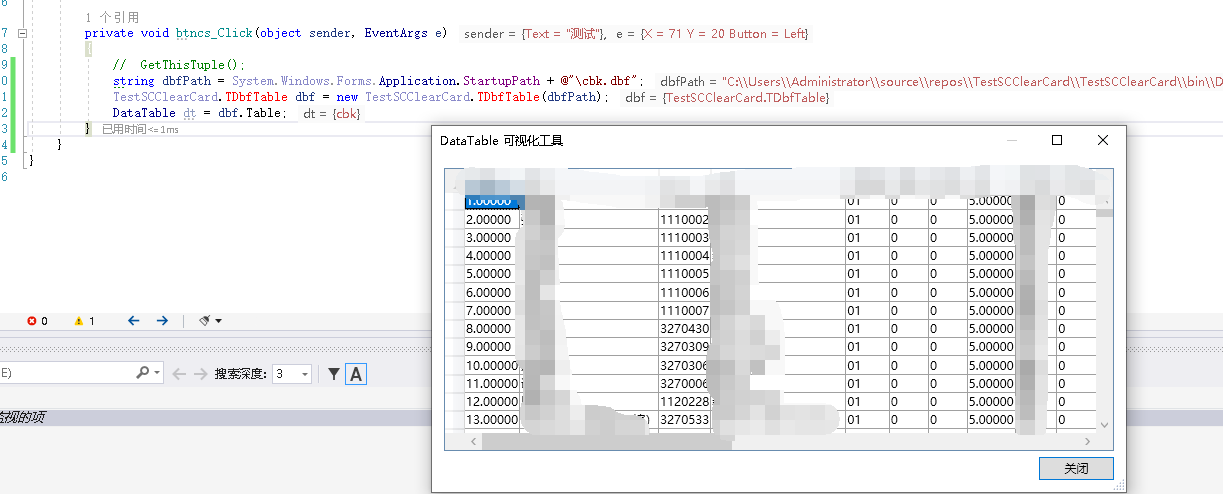
调用:
  string dbfPath = System.Windows.Forms.Application.StartupPath + @"\cbk.dbf";

  TestSCClearCard.TDbfTable dbf = new TestSCClearCard.TDbfTable(dbfPath);

  DataTable dt = dbf.Table;
结果:
原文资料出自:一个C#读取DBF文件的类TDbfTable
C# 读取DBF文件到Datatable的更多相关文章
- 读取DBF文件的部分代码
private void BtnOpenInitial_Click(object sender, EventArgs e) { OpenFileDialog file = new OpenFileDi ...
- C# 解决读取dbf文件,提示Microsoft Jet 数据库引擎找不到对象的问题
前言 最新项目需要经常和dbf文件打交道,在实际场景中很多软件需要和一些老的系统进行数据交互,而这些系统都在使用foxpro数据库,读取dbf文件一般都是分为两种情况:第一:安装foxpro的驱动进行 ...
- python3 读取dbf文件报错 UnicodeDecodeError: 'gbk' codec can't decode
在读取dbf文件时由于编码问题报错:UnicodeDecodeError: 'gbk' codec can't decode byte 0xb5 in position 49: incomplete ...
- C#读取txt文件返回DATATABLE
//1.打开资源管理器 OpenFileDialog open = new OpenFileDialog(); if (open.ShowDialog() == DialogResult.OK) { ...
- 读取excel 文件到datatable
上一篇文章介绍了将datatable 内容导出到excel 文件,这里介绍如何将一个excel 文件读取出来,并保持到datatable 中,实际这样的应用场景也是经常遇到的. 这里继续使用了Micr ...
- 读取DBF文件数据
#region 返回DBF表 public static System.Data.DataTable getDTFromDBF(string fullPath) { string pDir = Sys ...
- 【C#】采用OleDB读取Excel文件转DataTable
using System; using System.Data; using System.Data.OleDb; using System.IO; using System.Linq; using ...
- 使用Python读取Dbf文件
DBF:一种特殊的文件格式!表示数据库文件,Foxbase,Dbase,Visual FoxPro等数据库处理系统所产生的数据库文件! DBF 数据库是常用的桌面型数据库,它曾经被各企业.事业单位广泛 ...
- 读取Excel文件到DataTable中
private static string[] GetExcelSheetNames(OleDbConnection conn) { DataTable dtbSh ...
- shp系列(六)——利用C++进行Dbf文件的写(创建)
上一篇介绍了shp文件的创建,接下来介绍dbf的创建. 推荐结合读取dbf的博客一起看! 推荐结合读取dbf的博客一起看! 推荐结合读取dbf的博客一起看! 1.Dbf头文件的创建 Dbf头文件的结构 ...
随机推荐
- HTTP 协议学习:1-HTTP概述
背景 原文:HTTP概述 HTTP是一种能够获取如 HTML 这样的网络资源的 protocol(通讯协议).它是在 Web 上进行数据交换的基础,是一种 client-server 协议,也就是说, ...
- C#语言编写的仅有8KB大小的简易贪吃蛇开源游戏
前言 今天大姚给大家分享一款由C#语言编写的仅有8KB大小的简易贪吃蛇开源游戏:SeeSharpSnake. 项目特点 该仓库中的项目文件和脚本可以用多种不同的配置构建相同的游戏,每个配置生成的输出大 ...
- IPv6地址的文本表示规范
背景 随着IPv6越来越普及,经常要跟IPv6地址打交道,迫切需要一个统一的IPv6地址文本表示规范. RFC4291简单的说明了如何将IPv6地址表示成文本形式,但有很多有歧义和不周全的地方. RF ...
- Java中字符串去除空格
1. str.trim(); 去掉首尾空格 2. str.replace(" ", ""); 去掉所有空格,包括首尾.中间 String str = " ...
- 大语言模型的应用探索—AI Agent初探!
前言 大语言模型的应用之一是与大语言模型进行聊天也就是一个ChatBot,这个应用已经很广泛了. 接下来的一个应用就是AI Agent. AI Agent是人工智能代理(Artificial Inte ...
- KubeCube 用户管理与身份认证
前言 KubeCube (https://kubecube.io) 是由网易数帆近期开源的一个轻量化的企业级容器平台,为企业提供 kubernetes 资源可视化管理以及统一的多集群多租户管理功能.K ...
- linux mysql 允许进行远程连接 比如 navicat
出于安全方面考虑默认只允许本机(localhost, 127.0.0.1)来连接访问.所以开启远程访问权限.登录mysqlmysql -uroot -pxxxxxx 1:GRANT ALL PRIVI ...
- 如何更好的使用 Windows
如何更好的使用 Windows Microsoft 辅助功能和工具 键盘快捷方式,常用 ctrl+C 复制 ctrl+V 粘贴 ctrl+X 剪切 ctrl+Z 撤销 ctrl+Y 回退 alt+ta ...
- 02-springboot配置
目录 1,前言 2,YAML介绍 3,获取yml配置文件内容 4,springboot的配置文件 5,springboot使用@Value实现映射 6,@PropertySource.@ImportR ...
- Python 实现Excel和TXT文本格式之间的相互转换
Excel是一种具有强大的数据处理和图表制作功能的电子表格文件,而TXT则是一种简单通用.易于编辑的纯文本文件.将Excel转换为TXT可以帮助我们将复杂的数据表格以文本的形式保存,方便其他程序读取和 ...