
uprobe
本章的我们来学习uprobe ,顾名思义,相对于内核函数/地址的监控,主要用于用户态函数/地址的监控。听起来是不是有点神奇,内核怎么监控用户态函数的调用呢?本章的内容包括:
- 如何使用uprobe
- 内核是如何通过uprobe监控用户态的调用,其原理是如何的
1 如何使用uprobe
站在用户视角,我们先看个简单的例子,假设有这么个一个用户程序:
// test.c

#include <stdio.h>

void foo() {

    printf("hello, uprobe!\n");

}

int main() {

    foo();

    return 0;

}
编译好之后,查看某个符号的地址,然后告诉内核我要监控这个地址的调用:
#gcc test.c -o test

#readelf -s test | grep foo

    56: 000000000000115a    19 FUNC    GLOBAL DEFAULT   14 foo

#echo 1 > /sys/kernel/debug/tracing/events/uprobes/p_test_0x115a/enable

#echo 1 > /sys/kernel/debug/tracing/events/uprobes/p_test_0x115a/enable

#echo 1 > /sys/kernel/debug/tracing/tracing_on
然后运行用户程序并检查内核的监控返回:
$ ./test && ./test

hello, uprobe!

hello, uprobe!
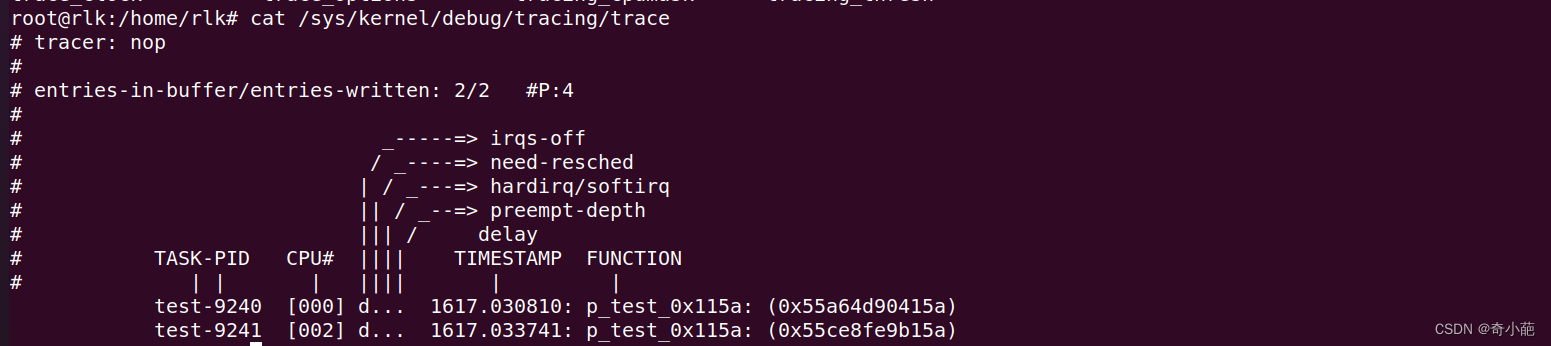
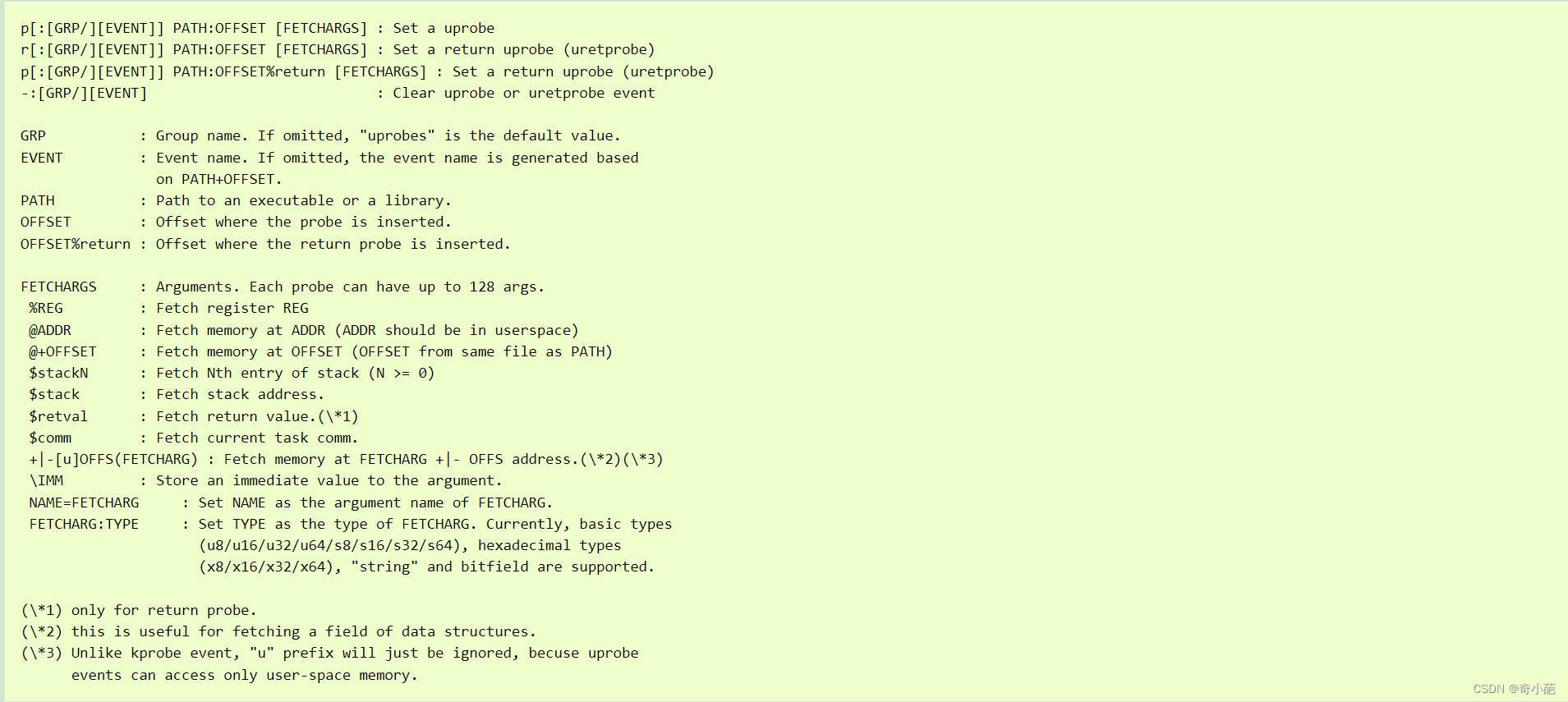
对于内核如何使用uprobe,请参考内核文档uprobetracer.html,其使用基本跟kprobe类似
2 实现原理
上面的接口是基于 tracefs,即读写文件的方式去与内核交互实现 uprobe 监控。
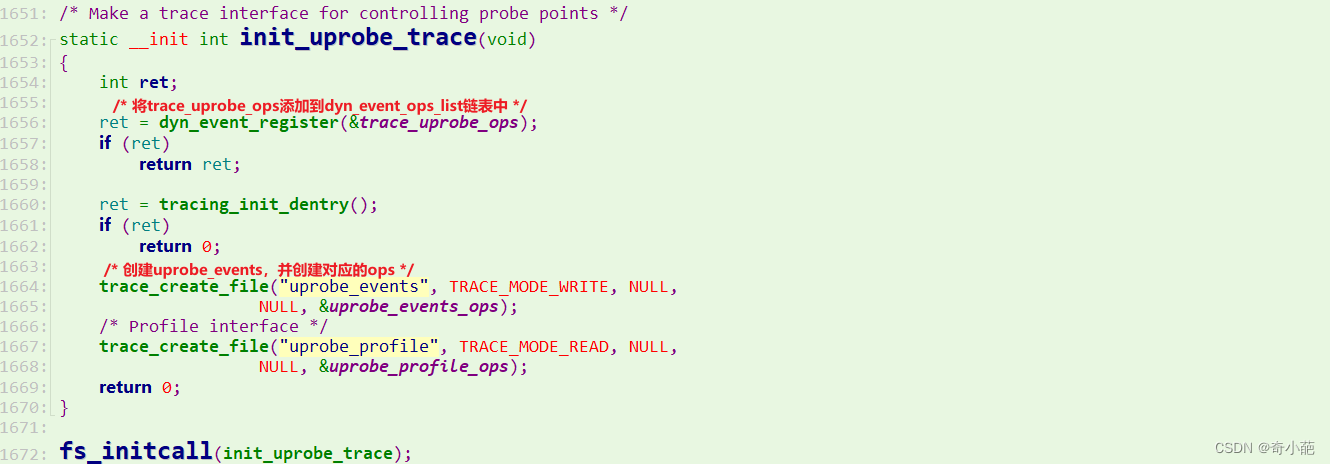
其中写入 uprobe_events 时会经过一系列内核调用,最终会调用到create_or_delete_trace_uprobe

对于__trace_uprobe_create跟使用kprobe类似,也是大家使用的三板斧
- alloc_trace_uprobe:分配 uprobe 结构体
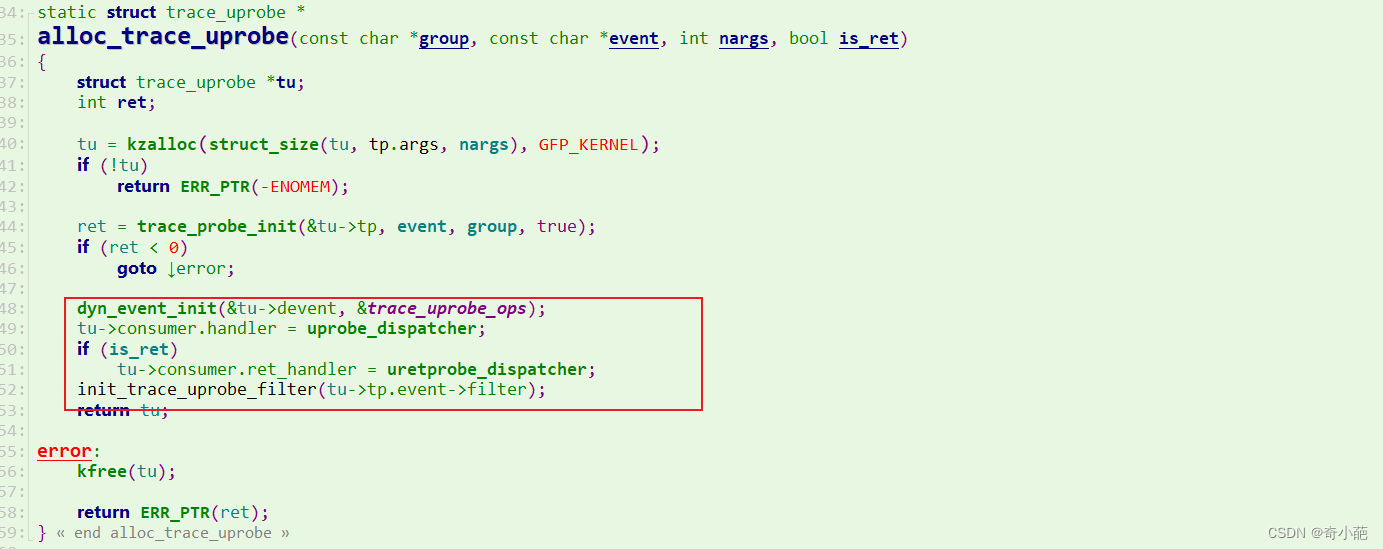
**register_trace_uprobe:**注册 uprobe:
regiseter_uprobe_event: 将 probe 添加到全局列表中,并创建对应的 uprobe debugfs 目录,即上文示例中的 p_test_0x115a
对于uprobe其实整个流程跟kprobe基本类似,我们重点关注于uprobe_register的函数做了些什么

当已经注册了 uprobe 的 ELF 程序被执行时,可执行文件会被 mmap 映射到进程的地址空间,同时内核会将该进程虚拟地址空间中对应的 uprobe 地址替换成断点指令。
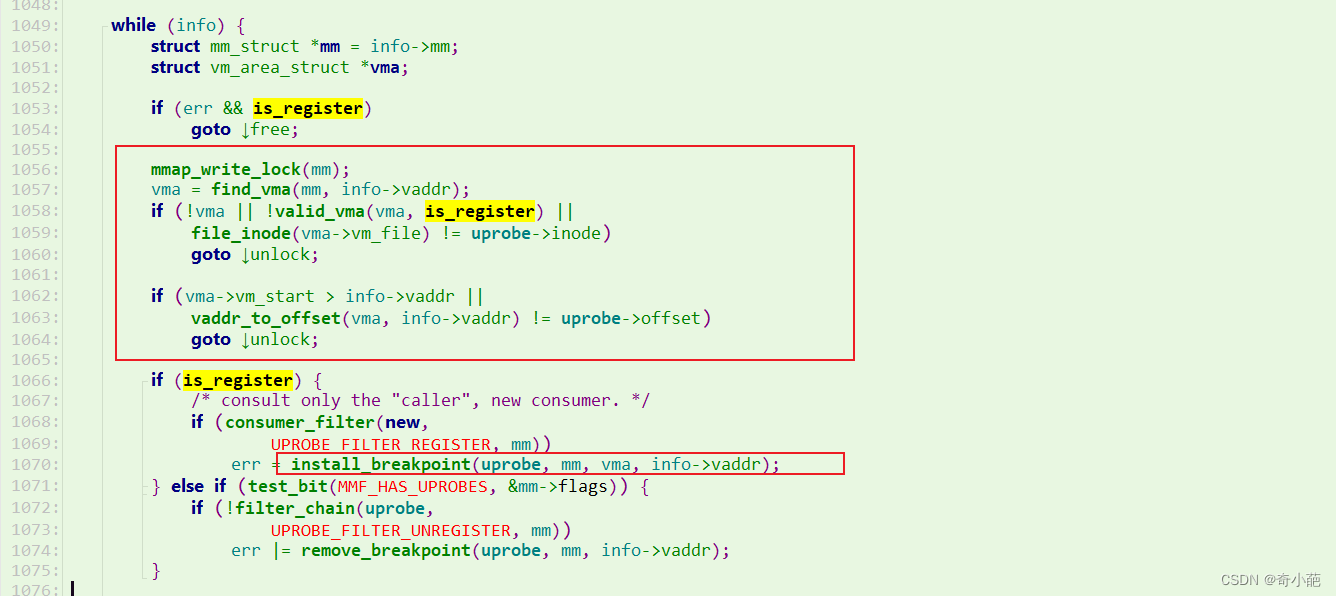
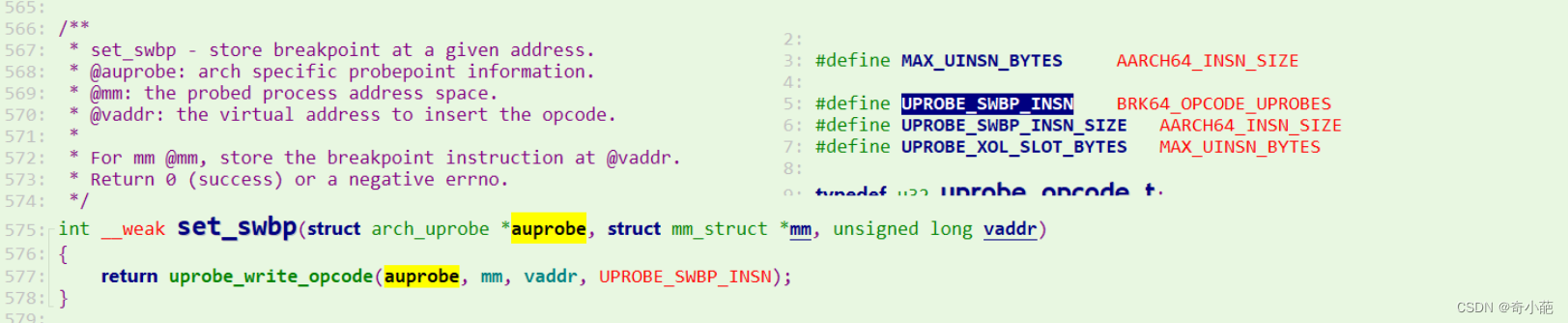
与 kprobe 类似,我们可以在触发 uprobe 时候根据对应寄存器去提取当前执行的上下文信息,比如函数的调用参数等。同时 uprobe 也有类似的同族: uretprobe。

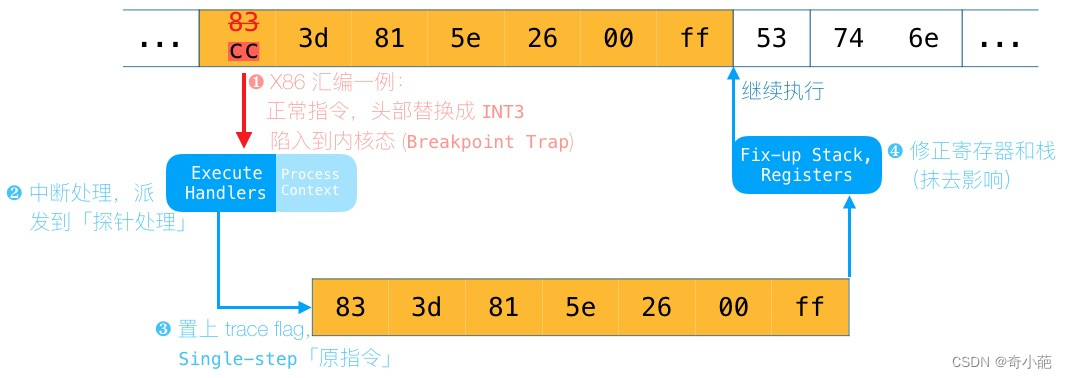
指定位置上的指令,头部修改为软件中断指令(同时原指令存档他处):
- 当执行到该位置时,触发软件中断,陷入内核
- 在内核,执行以 注入的 Handler
- 单步执行原指令
- 修正寄存器和栈,回到原有指令流
3 uprobe内核模块验证
我们以ubuntu为试验环境,使用uprobe一般都是编写内核驱动,在模块中定义uprobe_consumer ,然后调用uprobe的API(uprobe_register)来进行注册uprobe
#include <linux/module.h>

#include <linux/ptrace.h>

#include <linux/uprobes.h>

#include <linux/namei.h>

#include <linux/moduleparam.h>

MODULE_AUTHOR("john doe");

MODULE_LICENSE("GPL v2");

static char *filename;

module_param(filename, charp, S_IRUGO);

static long offset;

module_param(offset, long, S_IRUGO);

static int handler_pre(struct uprobe_consumer *self, struct pt_regs *regs){

        pr_info("handler: arg0 = %d arg1 =%d \n", (int)regs->di, (int)regs->si);

        return 0;

}

static int handler_ret(struct uprobe_consumer *self,

                                unsigned long func,

                                struct pt_regs *regs){

        pr_info("ret_handler ret = %d \n", (int)regs->ax);

        return 0;

}

static struct uprobe_consumer uc = {

        .handler = handler_pre,

        .ret_handler = handler_ret,

};

static struct inode *inode;

static int __init uprobe_init(void) {

        struct path path;

        int ret;

        ret = kern_path(filename, LOOKUP_FOLLOW, &path);

        if (ret < 0) {

                pr_err("kern_path failed, returned %d\n", ret);

                return ret;

        }

        inode = igrab(path.dentry->d_inode);

        path_put(&path);

        ret = uprobe_register(inode, offset, &uc);

        if (ret < 0) {

                pr_err("register_uprobe failed, returned %d\n", ret);

                return ret;

        }

        return 0;

}

static void __exit uprobe_exit(void) {

        uprobe_unregister(inode, offset, &uc);

}

module_init(uprobe_init);

module_exit(uprobe_exit);
此外,没有像 Kprobes 那样提供 uretprobe_register,如果 ret_handler 设置为值,则设置uretprobe,生成Makefile
obj-m := hello-uprobe-world.o

KDIR    := /lib/modules/$(shell uname -r)/build

VERBOSE = 0

all:

        $(MAKE) -C $(KDIR) M=$(PWD) KBUILD_VERBOSE=$(VERBOSE) CONFIG_DEBUG_INFO=y modules

clean:

        rm -f *.o *.ko *.mod.c Module.symvers modules.order
编译生成ko文件:

准备要跟踪的程序:
#include <stdio.h>

int add(int a, int b) {

        return a + b;

}

int main(void) {

        add(1, 2);

}
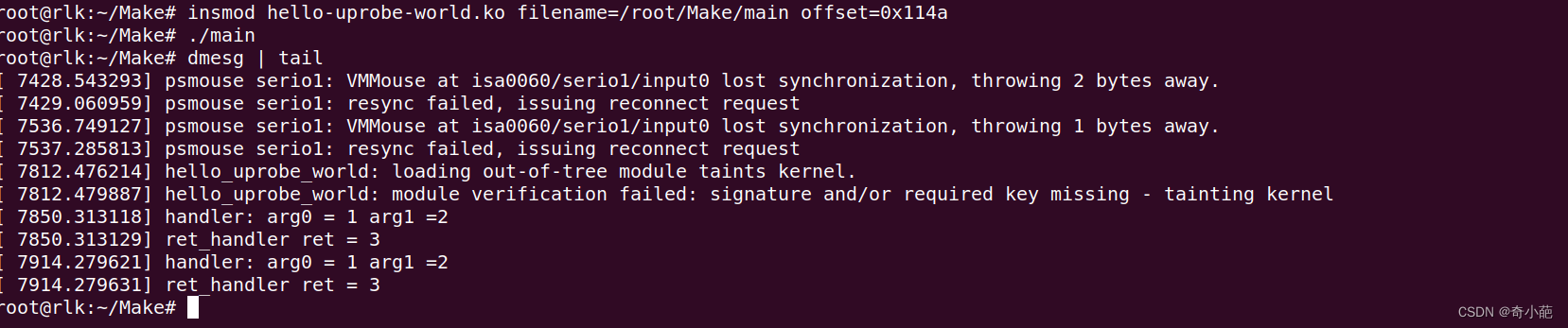
安装ko文件,并执行该文件,我们跟踪add函数,其offset可以通过获取

4 uprobe_event验证
uprobe_events 是一种无需创建内核模块即可使用 Uprobe 的机制。 您可以在与 Ftrace 相同的界面中动态创建探测
root@rlk:/sys/kernel/tracing# echo 'p:sample_uprobe /root/Make/main:0x114a %di %si' >  /sys/kernel/debug/tracing/uprobe_events

root@rlk:/sys/kernel/tracing# echo 'r:sample_uretprobe /root/Make/main:0x114a %ax' >>  /sys/kernel/debug/tracing/uprobe_events

root@rlk:/sys/kernel/tracing# echo 1 > /sys/kernel/tracing/events/uprobes/sample_uprobe/enable

root@rlk:/sys/kernel/tracing# echo 1 > /sys/kernel/tracing/events/uprobes/sample_uretprobe/enable
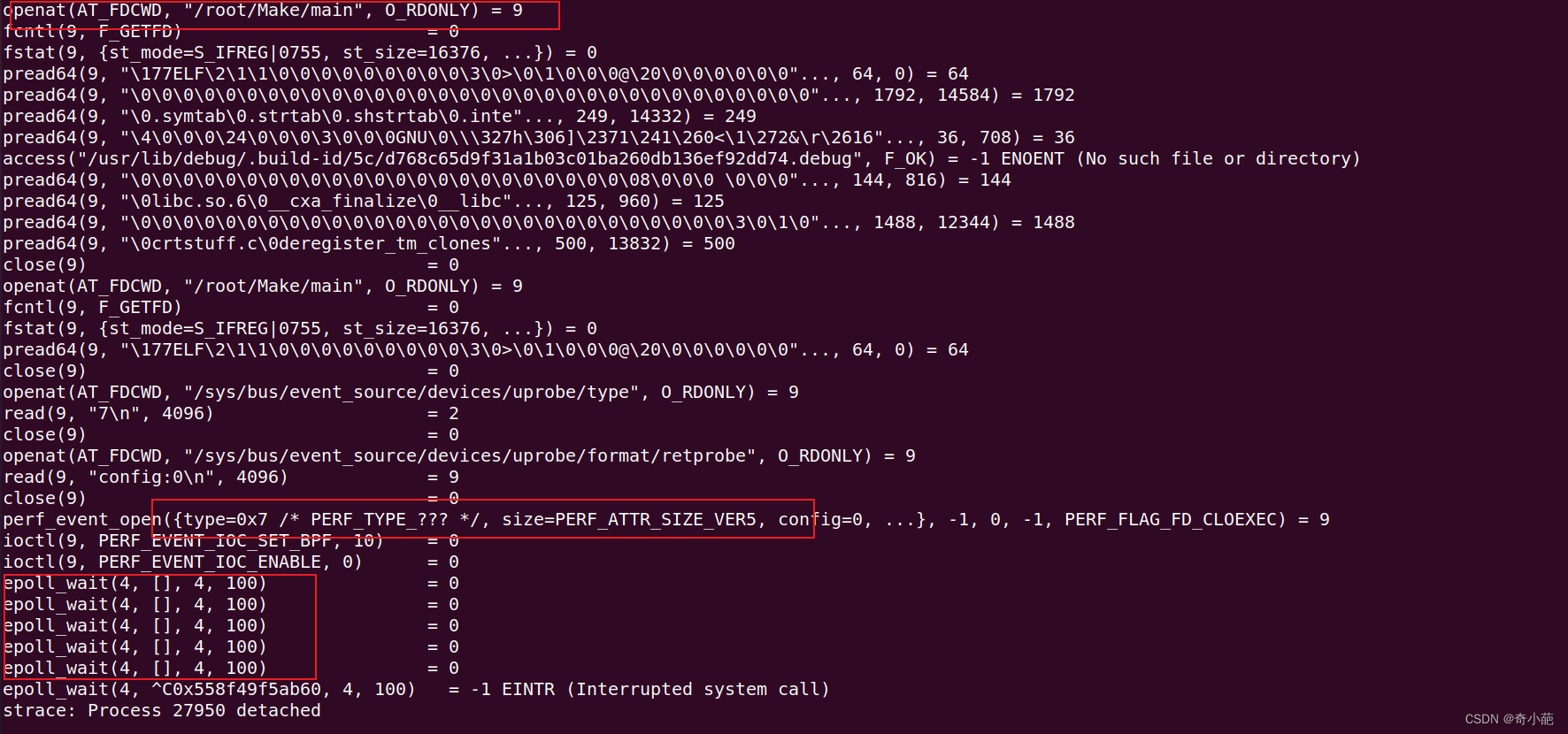
5 perf_event_open
perf_event_open系统调用将 BPF 程序附加到 uprobe 事件。 直接编写 BPF 程序可能比较痛苦,因此需要通过 bpftrace 来使用它。
bpftrace -e ‘uretprobe:/root/work/uprobe/main:add {printf(“%d\n”, retval); exit(); }’


检查perf_event_open的使用方式
uprobe的更多相关文章
- Python脚本传參和Python中调用mysqldump
Python脚本传參和Python中调用mysqldump<pre name="code" class="python">#coding=utf-8 ...
- Debug Hacks中文版——深入调试的技术和工具
关键词:gdb.strace.kprobe.uprobe.objdump.meminfo.valgrind.backtrace等. <Debugs Hacks中文版——深入调试的技术和工具> ...
- gdb 调试入门,大牛写的高质量指南
引用自:http://blog.jobbole.com/107759/ gdb 调试 ncurses 全过程: 发现网上的“gdb 示例”只有命令而没有对应的输出,我有点不满意.gdb 是 GNU 调 ...
- BPF+XDP比较全的资料都在这里
Dive into BPF: a list of reading material Sep 1, 2016 • Quentin Monnet◀Table of contents What is BPF ...
- systemtap 2.8 news
* What's new in version 2.8, 2015-06-17 - SystemTap has improved support for probing golang programs ...
- linux工具大全
Linux Performance hi-res: observability + static + perf-tools/bcc (svg)slides: observabilityslides: ...
- 再看perf是如何通过dwarf处理栈帧的
从结构体stack_dump入手, util/unwind-libunwind-local.c 中有函数access_mem #0 access_mem (as=0x1f65bd0, addr=140 ...
- gdb 调试 ncurses 全过程:
转载地址: http://blog.jobbole.com/107759/ gdb 调试 ncurses 全过程: 发现网上的“gdb 示例”只有命令而没有对应的输出,我有点不满意.gdb 是 GNU ...
- Linux内核调试的方式以及工具集锦【转】
转自:https://blog.csdn.net/gatieme/article/details/68948080 版权声明:本文为博主原创文章,遵循 CC 4.0 BY-SA 版权协议,转载请附上原 ...
- Linux性能优化实战学习笔记:第五十讲
一.上节回顾 上一节,我以 ksoftirqd CPU 使用率高的问题为例,带你一起学习了内核线程 CPU 使用率高时的分析方法.先简单回顾一下. 当碰到内核线程的资源使用异常时,很多常用的进程级性能 ...
随机推荐
- M1安装Anaconda遇到的问题
1. 安装时报错:"Anaconda3 is already installed in /opt/anaconda3. Use 'conda update anaconda3' to upd ...
- QT入门学习记录01
目录 前言 一.Qt安装 二.创建一个Qt工程 三.基类的区别和常用函数 1.QWidget 1.1 设置窗口标题 1.2 设置窗口大小和显示位置 1.3 显示窗口 1.4 隐藏窗口 1.5 改变窗口 ...
- VirtualBox扩容CentOS-7虚拟机磁盘
1.背景描述 如上图所示,根路径"/"所在的文件系统已没有可用的磁盘空间,需要扩容磁盘. df -h 2.VirtualBox操作 2.1.查看当前虚拟磁盘的大小 如上图所示,点击 ...
- Efficientvit: Enhanced linear attention for high-resolution low-computation visual recognition
GitHub地址: https://github.com/mit-han-lab/efficientvit#usage 相关: https://www.jetson-ai-lab.com/vit/tu ...
- 始智AI —— https://wisemodel.cn/ —— 试用
清华大学的合资企业推出的服务: 始智AI -- https://wisemodel.cn/ 链接: 始智AI -- https://wisemodel.cn/ 和modelscope比相对简约,毕竟功 ...
- 【转载】 arch linux下nvidia 驱动死机问题
原文地址: https://my.oschina.net/u/947271/blog/288063 ================================================== ...
- YouTube上的很多时视频就是有问题的,还经常不允许评论,妥妥的双标网站
过多的事情不说了,这些个外国反华势力的网站真是无时无刻的不在视频中加私货,你想评论吧他还能判断你的个人价值观来预估你的评价倾向然后禁止你评价,十分的气人.要是立场不够坚定的人真的是很容易被带偏,像这种 ...
- 聊一聊SQL优化
晚上睡不着,脑子里总想着一些问题,试着写一写对于SQL查询优化的见解. 首先,数据库有自己的查询优化器,执行一条查询SQL优化器会选择最优的方式(不走索引.走索引.走哪个索引), 所以索引不是越多越好 ...
- C#二叉搜索树算法
二叉搜索树算法实现原理 二叉搜索树(Binary Search Tree,简称BST)是一种节点有序排列的二叉树数据结构.它具有以下性质: 每个节点最多有两个子节点. 对于每个节点,其左子树的所有节点 ...
- 【原创】vagrant up 异常报错,出现 There was an error while executing `VBoxManage` 的解决方法
最近在使用 vagrant homestead 时,不小心在虚拟机上使用了 exit 命令退出虚拟机,导致再使用 vagrant up 时出现以下错误: Bringing machine 'larav ...