
实验20:IPv6
实验17-1: IPv6 静态路由
Ø 实验目的
通过本实验可以掌握
(1)启用IPv6 流量转发
(2)配置IPv6 地址
(3)IPv6 静态路由配置和调试
(4)IPv6 默认路由配置和调试
Ø 拓扑结构
实验步骤
u 步骤1:配置路由器R1
R1(config)#ipv6 unicast-routing //启用IPv6 流量转发
R1(config)#interface Loopback0
R1(config-if)#ipv6 address 2006:AAAA::1/64 //配置IPv6 地址
R1(config)#interface Loopback1
R1(config-if)#ipv6 address 2006:BBBB::1/64
R1(config)#interface Serial1/0
R1(config-if)#ipv6 address 2007:CCCC::1/64
R1(config-if)#no shutdown
R1(config)#ipv6 route 2008:DDDD::/64 Serial1/0 //配置IPv6 静态路由
u 步骤2:配置路由器R2
R2(config)#ipv6 unicast-routing
R2(config)#interface Loopback0
R2(config-if)#ipv6 address 2008:DDDD::2/64
R2(config)#interface Serial1/0
R2(config-if)#ipv6 address 2007:CCCC::2/64
R2(config-if)#clockrate 128000
R2(config-if)#no shutdown
R2(config)#ipv6 route ::/0 Serial1/0 //配置IPv6 默认路由
Ø 实验调试
n show ipv6 interface
该命令用来查看IPv6 的接口信息。
R1#show ipv6 interface s1/0
Serial1/0 is up, line protocol is up
IPv6 is enabled, link-local address is FE80::CE00:13FF:FEE8:0
FE80::C800:BFF:FE80:0
//本接口启用IPv6,本地链路地址自动配置
Global unicast address(es):
2007:CCCC::1, subnet is 2007:CCCC::/64
//全球聚合地址
Joined group address(es):
FF02::1
//表示本地链路上的所有节点和路由器
FF02::2
//表示本地链路上的所有路由器
FF02::1:FF00:1
//用于替换ARP 机制的被请求节点的多播地址
FF02::1:FFE8:0
//与单播地址2007:CCCC::1 相关的被请求节点多播地址
MTU is 1500 bytes
ICMP error messages limited to one every 100 milliseconds
ICMP redirects are enabled
//启用ICMP 重定向
ND DAD is enabled, number of DAD attempts: 1
//邻居发现和重复地址检测启动
ND reachable time is 30000 milliseconds
//ND 可达时间
Hosts use stateless autoconfig for addresses
//使用无状态自动配置地址
n show ipv6 route
该命令用来查看IPv6 路由表。
R1#show ipv6 route
IPv6 Routing Table - 9 entries
Codes: C - Connected, L - Local, S - Static, R - RIP, B - BGP
U - Per-user Static route
I1 - ISIS L1, I2 - ISIS L2, IA - ISIS interarea, IS - ISIS summary
O - OSPF intra, OI - OSPF inter, OE1 - OSPF ext 1, OE2 - OSPF ext 2
ON1 - OSPF NSSA ext 1, ON2 - OSPF NSSA ext 2
C 2006:AAAA::/64 [0/0]
via ::, Loopback0
L 2006:AAAA::1/128 [0/0]
via ::, Loopback0
C 2006:BBBB::/64 [0/0]
via ::, Loopback1
L 2006:BBBB::1/128 [0/0]
via ::, Loopback1
C 2007:CCCC::/64 [0/0]
via ::, Serial1/0
L 2007:CCCC::1/128 [0/0]
via ::, Serial1/0
S 2008:DDDD::/64 [1/0]
via ::, Serial1/0
L FE80::/10 [0/0]
via ::, Null0
R2#show ipv6 route
IPv6 Routing Table - 7 entries
Codes: C - Connected, L - Local, S - Static, R - RIP, B - BGP
U - Per-user Static route
I1 - ISIS L1, I2 - ISIS L2, IA - ISIS interarea, IS - ISIS summary
O - OSPF intra, OI - OSPF inter, OE1 - OSPF ext 1, OE2 - OSPF ext 2
ON1 - OSPF NSSA ext 1, ON2 - OSPF NSSA ext 2
S ::/0 [1/0]
via ::, Serial1/0
C 2007:CCCC::/64 [0/0]
via ::, Serial1/0
L 2007:CCCC::2/128 [0/0]
via ::, Serial1/0
C 2008:DDDD::/64 [0/0]
via ::, Loopback0
L 2008:DDDD::2/128 [0/0]
via ::, Loopback0
L FE80::/10 [0/0]
via ::, Null0
L FF00::/8 [0/0]
via ::, Null0
以上输出表明路由器R1 上有一条IPv6 的静态路由,R2 上有一条IPv6 的默认路由,IPv6中的默认路由是没有“*”的。
(3)ping
R2#ping ipv6 2006:AAAA::1
Type escape sequence to abort.
Sending 5, 100-byte ICMP Echos to 2006:AAAA::1, timeout is 2 seconds:
!!!!!
Success rate is 100 percent (5/5), round-trip min/avg/max = 48/62/76 ms
实验17-2: IPv6 RIPng
Ø 实验目的
通过本实验可以掌握
(1)启用IPv6 流量转发
(2)向RIPng 网络注入默认路由
(3) RIPng 配置和调试
Ø 拓扑结构
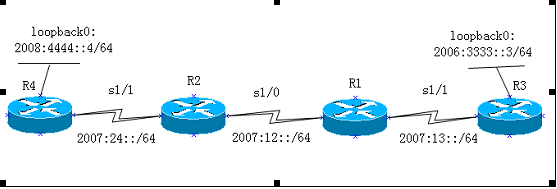
实验步骤
n 步骤1:配置路由器R1
R1(config)#ipv6 unicast-routing
R1(config)#ipv6 router rip cisco
R1(config-rtr)#split-horizon
R1(config-rtr)#poison-reverse
R1(config)#interface Serial1/0
R1(config-if)#ipv6 address 2007:12::1/64
R1(config-if)#ipv6 rip cisco enable
R1(config-if)#clockrate 128000
R1(config-if)#no shutdown
R1(config)#interface Serial1/1
R1(config-if)#ipv6 address 2007:13::1/64
R1(config-if)#ipv6 rip cisco enable
R1(config-if)#no shutdown
n 步骤2:配置路由器R2
R2(config)#ipv6 unicast-routing
R2(config)#ipv6 router rip cisco
R2(config-rtr)#split-horizon
R2(config-rtr)#poison-reverse
R2(config)#interface Serial1/0
R2(config-if)#ipv6 address 2007:12::2/64
R2(config-if)#ipv6 rip cisco enable
R2(config-if)#no shutdown
R2(config)#interface Serial1/1
R2(config-if)#ipv6 address 2007:24::2/64
R2(config-if)#ipv6 rip cisco enable
R2(config-if)#clock rate 128000
R2(config-if)#no shutdown
n 步骤3:配置路由器R3
R3(config)#ipv6 unicast-routing
R3(config)#ipv6 router rip cisco
R3(config-rtr)#split-horizon
R3(config-rtr)#poison-reverse
R3(config)#interface Loopback0
R3(config-if)#ipv6 address 2008:3333::3/64
R3(config-if)#ipv6 rip cisco enable
R3(config)#interface Serial1/1
R3(config-if)#ipv6 address 2007:13::3/64
R3(config-if)#ipv6 rip cisco enable
R3(config-if)#no shutdown
n 步骤4:配置路由器R4
R4(config)#ipv6 unicast-routing
R4(config)#ipv6 router rip cisco //启动IPv6 RIPng 进程
R4(config-rtr)#split-horizon //启用水平分割
R4(config-rtr)#poison-reverse //启用毒化反转
R4(config)#interface Loopback0
R4(config-if)#ipv6 address 2008:4444::4/64
R4(config-if)#ipv6 rip cisco enable //在接口上启用RIPng
R4(config)#interface Serial1/1
R4(config-if)#ipv6 address 2007:24::4/64
R4(config-if)#ipv6 rip cisco enable
R4(config-if)#ipv6 rip cisco default-information originate
//向IPv6 RIPng 区域注入一条默认路由(::/0)
R4(config-if)#no shutdown
R4(config)#ipv6 route ::/0 Loopback0 //配置默认路由
【提示】
“ipv6 rip cisco default-information only ”命令也可以向IPv6 RIPng 区域注入
一条默认路由,但是该命令只从该接口发送默认的IPv6 路由,而该接口其它的IPv6 的RIPng路由都被抑制。
Ø 实验调试
(1)show ipv6 route
R2#show ipv6 route
IPv6 Routing Table - 10 entries
Codes: C - Connected, L - Local, S - Static, R - RIP, B - BGP
U - Per-user Static route
I1 - ISIS L1, I2 - ISIS L2, IA - ISIS interarea, IS - ISIS summary
O - OSPF intra, OI - OSPF inter, OE1 - OSPF ext 1, OE2 - OSPF ext 2
ON1 - OSPF NSSA ext 1, ON2 - OSPF NSSA ext 2
R ::/0 [120/2]
via FE80::CE03:11FF:FE9C:0, Serial1/1
R 2006:3333::/64 [120/3]
via FE80::CE00:11FF:FE9C:0, Serial1/0
C 2007:12::/64 [0/0]
via ::, Serial1/0
L 2007:12::2/128 [0/0]
via ::, Serial1/0
R 2007:13::/64 [120/2]
via FE80::CE00:11FF:FE9C:0, Serial1/0
C 2007:24::/64 [0/0]
via ::, Serial1/1
L 2007:24::2/128 [0/0]
via ::, Serial1/1
R 2008:4444::/64 [120/2]
via FE80::CE03:11FF:FE9C:0, Serial1/1
L FE80::/10 [0/0]
via ::, Null0
L FF00::/8 [0/0]
via ::, Null0
以上输出表明R4 确实向IPv6 RIPng 网络注入一条IPv6 的默认路由,同时收到3 条
IPv6 RIPng 路由条目,而且所有IPv6 RIPng 路由条目的下一跳地址均为邻居路由器接口的“link-local”地址。可以通过“show ipv6 rip next-hops”命令查看RIPng 的下一跳地址。
R2#show ipv6 rip next-hops
RIP process "cisco", Next Hops
FE80::CE00:11FF:FE9C:0/Serial1/0 [3 paths]
FE80::CE03:11FF:FE9C:0/Serial1/1 [3 paths]
(2)show ip protocols
R2#show ipv6 protocols
IPv6 Routing Protocol is "connected"
IPv6 Routing Protocol is "static"
IPv6 Routing Protocol is "rip cisco"
Interfaces:
Serial1/1
Serial1/0
Redistribution:
None
以上输出表明启动的IPv6 RIPng 进程为cisco,同时在Serial1/1 和Serial1/0
接口上起用RIPng。
n show ipv6 rip database
该命令用来查看RIPng 的数据库。
R2#show ipv6 rip database
RIP process "cisco", local RIB
2006:3333::/64, metric 3, installed
Serial1/0/FE80::CE00:11FF:FE9C:0, expires in 171 secs
2007:12::/64, metric 2
Serial1/0/FE80::CE00:11FF:FE9C:0, expires in 171 secs
2007:13::/64, metric 2, installed
Serial1/0/FE80::CE00:11FF:FE9C:0, expires in 171 secs
2007:24::/64, metric 2
Serial1/1/FE80::CE03:11FF:FE9C:0, expires in 167 secs
2008:4444::/64, metric 2, installed
Serial1/1/FE80::CE03:11FF:FE9C:0, expires in 167 secs
::/0, metric 2, installed
Serial1/1/FE80::CE03:11FF:FE9C:0, expires in 167 secs
以上输出显示了R2 的RIPng 的数据库。
n debug ipv6 rip
该命令用来动态查看RIPng 的更新。
R2#debug ipv6 rip
RIP Routing Protocol debugging is on
*Mar 1 01:00:47.251: RIPng: response received from FE80::CE03:11FF:FE9C:0 on Serial1/1 for cisco
*Mar 1 01:00:47.255: src=FE80::CE03:11FF:FE9C:0 (Serial1/1)
*Mar 1 01:00:47.259: dst=FF02::9
*Mar 1 01:00:47.259: sport=521, dport=521, length=132
*Mar 1 01:00:47.263: command=2, version=1, mbz=0, #rte=6
*Mar 1 01:00:47.263: tag=0, metric=1, prefix=2008:4444::/64
*Mar 1 01:00:47.267: tag=0, metric=1, prefix=2007:24::/64
*Mar 1 01:00:47.267: tag=0, metric=16, prefix=2007:12::/64
*Mar 1 01:00:47.271: tag=0, metric=16, prefix=2007:13::/64
*Mar 1 01:00:47.271: tag=0, metric=16, prefix=2006:3333::/64
*Mar 1 01:00:47.275: tag=0, metric=1, prefix=::/0
*Mar 1 01:00:50.455: RIPng: response received from FE80::CE00:11FF:FE9C:0 on Serial1/0 for cisco
*Mar 1 01:00:50.459: src=FE80::CE00:11FF:FE9C:0 (Serial1/0)
*Mar 1 01:00:50.463: dst=FF02::9
*Mar 1 01:00:50.463: sport=521, dport=521, length=132
*Mar 1 01:00:50.467: command=2, version=1, mbz=0, #rte=6
*Mar 1 01:00:50.467: tag=0, metric=1, prefix=2007:12::/64
*Mar 1 01:00:50.471: tag=0, metric=1, prefix=2007:13::/64
*Mar 1 01:00:50.471: tag=0, metric=2, prefix=2006:3333::/64
*Mar 1 01:00:50.475: tag=0, metric=16, prefix=2007:24::/64
*Mar 1 01:00:50.475: tag=0, metric=16, prefix=2008:4444::/64
*Mar 1 01:00:50.479: tag=0, metric=16, prefix=::/0
*Mar 1 01:00:53.435: RIPng: Sending multicast update on Serial1/1 for cisco
*Mar 1 01:00:53.439: src=FE80::CE01:11FF:FE9C:0
*Mar 1 01:00:53.439: dst=FF02::9 (Serial1/1)
*Mar 1 01:00:53.443: sport=521, dport=521, length=132
*Mar 1 01:00:53.447: command=2, version=1, mbz=0, #rte=6
*Mar 1 01:00:53.447: tag=0, metric=1, prefix=2007:12::/64
*Mar 1 01:00:53.451: tag=0, metric=1, prefix=2007:24::/64
*Mar 1 01:00:53.451: tag=0, metric=2, prefix=2007:13::/64
*Mar 1 01:00:53.455: tag=0, metric=3, prefix=2006:3333::/64
*Mar 1 01:00:53.455: tag=0, metric=16, prefix=2008:4444::/64
*Mar 1 01:00:53.459: tag=0, metric=16, prefix=::/0
*Mar 1 01:00:53.463: RIPng: Sending multicast update on Serial1/0 for cisco
*Mar 1 01:00:53.463: src=FE80::CE01:11FF:FE9C:0
*Mar 1 01:00:53.467: dst=FF02::9 (Serial1/0)
*Mar 1 01:00:53.467: sport=521, dport=521, length=132
*Mar 1 01:00:53.471: command=2, version=1, mbz=0, #rte=6
*Mar 1 01:00:53.471: tag=0, metric=1, prefix=2007:12::/64
*Mar 1 01:00:53.475: tag=0, metric=1, prefix=2007:24::/64
*Mar 1 01:00:53.475: tag=0, metric=16, prefix=2007:13::/64
*Mar 1 01:00:53.479: tag=0, metric=16, prefix=2006:3333::/64
*Mar 1 01:00:53.483: tag=0, metric=2, prefix=2008:4444::/64
*Mar 1 01:00:53.483: tag=0, metric=2, prefix=::/0
以上输出显示路由器R2 发送和接收RIPng 的信息
实验20:IPv6的更多相关文章
- CCIE路由实验(9) -- IPv6
1.IPv6地址的各种情况2.配置通过DHCP-PD方式分配前缀信息3.IPv6路由基本配置4.IPv6路由--RIPng5.IPv6路由--EIGRPv66.IPv6路由--OSPFv37.IPv6 ...
- 【Python】【demo实验20】【练习实例】【寻找“完数”】
原题: 一个数如果恰好等于它的因子之和,这个数就称为"完数".例如6=1+2+3.编程找出1000以内的所有完数. 我的代码: #!/usr/bin/python # encodi ...
- CCNA CCNP CCIE所有实验名称完整版
实验1:通过Console端口访问Cisco路由器 实验2:通过Telnet访问Cisco路由器 实验3:配置终端服务器 实验4:通过浏览器访问路由器 实验5:模式切换.上下文帮助及查看有关信 ...
- IPv6原理、应用与实践
欢迎大家前往腾讯云+社区,获取更多腾讯海量技术实践干货哦~ 作者:腾讯微信技术架构部团队 2017年11月26日,中共中央办公厅和国务院办公厅印发了<推荐互联网协议第六版(IPv6)规模部署行动 ...
- IPv6技术详解:基本概念、应用现状、技术实践(下篇)
本文来自微信技术架构部的原创技术分享. 1.前言 在上篇<IPv6技术详解:基本概念.应用现状.技术实践(上篇)>,我们讲解了IPV6的基本概念. 本篇将继续从以下方面展开对IPV6的讲解 ...
- 20155223 实验5 MSF基础应用
20155223 实验5 MSF基础应用 基础问题回答 用自己的话解释什么是exploit,payload,encode? exploit:漏洞攻击.一个exploit程序肯定会触发系统的一个或多个漏 ...
- 成都国嵌-嵌入式linux必修实验手册…
emouse收集整理,转载请注明: emouse的技术专栏 博客园:http://www.cnblogs.com/emouse/ CSDN:http://blog.csdn.net/haozi_198 ...
- 【Beta】Scrum09
Info 考试周,暂停工作 时间:2016.12.26 21:35 时长:20min 地点:大运村1号公寓5楼楼道 类型:日常Scrum会议 NXT:2016.12.31 21:30 Task Rep ...
- 七天学会ASP.NET MVC (四)——用户授权认证问题
小编应各位的要求,快马加鞭,马不停蹄的终于:七天学会 Asp.Net MVC 第四篇出炉,在第四天的学习中,我们主要了学习如何在MVC中如何实现认证授权等问题,本节主要讲了验证错误时的错误值,客户端验 ...
随机推荐
- 使用K均值算法进行图片压缩
K均值算法 上一期介绍了机器学习中的监督式学习,并用了离散回归与神经网络模型算法来解决手写数字的识别问题.今天我们介绍一种机器学习中的非监督式学习算法--K均值算法. 所谓非监督式学习,是一种 ...
- 20.用PyInstaller打包py程序的步骤及问题解决
最近写了一个移动和复制文件的代码,代码完成之后,想将其打包成一个可以在任何电脑上使用的软件, 于是在网上查找相关资料,可以用PyInstaller打包成.exe程序,以下是具体步骤: 1.安装PyIn ...
- Spring中的ApplicationListener扩展使用
ApplicationListener是Spring事件机制的一部分,与抽象类ApplicationEvent类配合来完成ApplicationContext的事件机制. 如果容器中存在Applica ...
- C#反射与特性(六):设计一个仿ASP.NETCore依赖注入Web
目录 1,编写依赖注入框架 1.1 路由索引 1.2 依赖实例化 1.3 实例化类型.依赖注入.调用方法 2,编写控制器和参数类型 2.1 编写类型 2.2 实现控制器 3,实现低配山寨 ASP.NE ...
- C语言之枚举数据类型
枚举数据类型概述:1.枚举类型是C语言的一种构造类型.它用于声明一组命名的常数,2.当一个变量有几种可能的取值时,可以将它定义为枚举类型.3.枚举类型是由用户自定义的由多个命名枚举常量构成的类型,其声 ...
- three.js入门第一个案例
准备工作 1.运用three.js进行3d开发,其实和页面编程一样,首先需要在html文件中引入three.js.Three.js使用面向对象的方式来构建程序,它包含3个基本对象: 场景(scene) ...
- js去除字符串的前后空白
使用gravatar生成邮箱的头像时需要对邮箱地址哈希化,其中需要去除邮箱地址的首尾空白,查找了一些资料,总结一下 使用 js 提供的函数 trim() trim() 方法会删除一个字符串两端的空白字 ...
- Spring Boot2 系列教程 (三) | 使用 LomBok 提高开发效率
微信公众号:一个优秀的废人 如有问题或建议,请后台留言,我会尽力解决你的问题. 前言 上周去了开年会,去的地方是温泉度假村.老实说,我是无感的,90% 是因为没中奖(老板太抠,两百人只抽三个奖),10 ...
- .NET Core开发的iNeuOS工业互联平台,iNeuKernel物联网核心组件在Docker容器中部署。
目 录 1. 概述... 2 2. 演示信息... 2 3. 安装Docker容器... 2 4. 安装dotnet镜像... 3 5. ...
- 手写vue中v-bind:style效果的自定义指令
自定义指令 什么是自定义指令 以 v- 为前缀,然后加上自己定义好的名字组成的一个指令就是自定义指令.为什么要有自定义指令呢?在有些时候,你仍然需要对普通的DOM元素进行底层的操作,这个时候就可以用到 ...