
实验20:IPv6
实验17-1: IPv6 静态路由
Ø 实验目的
通过本实验可以掌握
(1)启用IPv6 流量转发
(2)配置IPv6 地址
(3)IPv6 静态路由配置和调试
(4)IPv6 默认路由配置和调试
Ø 拓扑结构
实验步骤
u 步骤1:配置路由器R1
R1(config)#ipv6 unicast-routing //启用IPv6 流量转发
R1(config)#interface Loopback0
R1(config-if)#ipv6 address 2006:AAAA::1/64 //配置IPv6 地址
R1(config)#interface Loopback1
R1(config-if)#ipv6 address 2006:BBBB::1/64
R1(config)#interface Serial1/0
R1(config-if)#ipv6 address 2007:CCCC::1/64
R1(config-if)#no shutdown
R1(config)#ipv6 route 2008:DDDD::/64 Serial1/0 //配置IPv6 静态路由
u 步骤2:配置路由器R2
R2(config)#ipv6 unicast-routing
R2(config)#interface Loopback0
R2(config-if)#ipv6 address 2008:DDDD::2/64
R2(config)#interface Serial1/0
R2(config-if)#ipv6 address 2007:CCCC::2/64
R2(config-if)#clockrate 128000
R2(config-if)#no shutdown
R2(config)#ipv6 route ::/0 Serial1/0 //配置IPv6 默认路由
Ø 实验调试
n show ipv6 interface
该命令用来查看IPv6 的接口信息。
R1#show ipv6 interface s1/0
Serial1/0 is up, line protocol is up
IPv6 is enabled, link-local address is FE80::CE00:13FF:FEE8:0
FE80::C800:BFF:FE80:0
//本接口启用IPv6,本地链路地址自动配置
Global unicast address(es):
2007:CCCC::1, subnet is 2007:CCCC::/64
//全球聚合地址
Joined group address(es):
FF02::1
//表示本地链路上的所有节点和路由器
FF02::2
//表示本地链路上的所有路由器
FF02::1:FF00:1
//用于替换ARP 机制的被请求节点的多播地址
FF02::1:FFE8:0
//与单播地址2007:CCCC::1 相关的被请求节点多播地址
MTU is 1500 bytes
ICMP error messages limited to one every 100 milliseconds
ICMP redirects are enabled
//启用ICMP 重定向
ND DAD is enabled, number of DAD attempts: 1
//邻居发现和重复地址检测启动
ND reachable time is 30000 milliseconds
//ND 可达时间
Hosts use stateless autoconfig for addresses
//使用无状态自动配置地址
n show ipv6 route
该命令用来查看IPv6 路由表。
R1#show ipv6 route
IPv6 Routing Table - 9 entries
Codes: C - Connected, L - Local, S - Static, R - RIP, B - BGP
U - Per-user Static route
I1 - ISIS L1, I2 - ISIS L2, IA - ISIS interarea, IS - ISIS summary
O - OSPF intra, OI - OSPF inter, OE1 - OSPF ext 1, OE2 - OSPF ext 2
ON1 - OSPF NSSA ext 1, ON2 - OSPF NSSA ext 2
C 2006:AAAA::/64 [0/0]
via ::, Loopback0
L 2006:AAAA::1/128 [0/0]
via ::, Loopback0
C 2006:BBBB::/64 [0/0]
via ::, Loopback1
L 2006:BBBB::1/128 [0/0]
via ::, Loopback1
C 2007:CCCC::/64 [0/0]
via ::, Serial1/0
L 2007:CCCC::1/128 [0/0]
via ::, Serial1/0
S 2008:DDDD::/64 [1/0]
via ::, Serial1/0
L FE80::/10 [0/0]
via ::, Null0
R2#show ipv6 route
IPv6 Routing Table - 7 entries
Codes: C - Connected, L - Local, S - Static, R - RIP, B - BGP
U - Per-user Static route
I1 - ISIS L1, I2 - ISIS L2, IA - ISIS interarea, IS - ISIS summary
O - OSPF intra, OI - OSPF inter, OE1 - OSPF ext 1, OE2 - OSPF ext 2
ON1 - OSPF NSSA ext 1, ON2 - OSPF NSSA ext 2
S ::/0 [1/0]
via ::, Serial1/0
C 2007:CCCC::/64 [0/0]
via ::, Serial1/0
L 2007:CCCC::2/128 [0/0]
via ::, Serial1/0
C 2008:DDDD::/64 [0/0]
via ::, Loopback0
L 2008:DDDD::2/128 [0/0]
via ::, Loopback0
L FE80::/10 [0/0]
via ::, Null0
L FF00::/8 [0/0]
via ::, Null0
以上输出表明路由器R1 上有一条IPv6 的静态路由,R2 上有一条IPv6 的默认路由,IPv6中的默认路由是没有“*”的。
(3)ping
R2#ping ipv6 2006:AAAA::1
Type escape sequence to abort.
Sending 5, 100-byte ICMP Echos to 2006:AAAA::1, timeout is 2 seconds:
!!!!!
Success rate is 100 percent (5/5), round-trip min/avg/max = 48/62/76 ms
实验17-2: IPv6 RIPng
Ø 实验目的
通过本实验可以掌握
(1)启用IPv6 流量转发
(2)向RIPng 网络注入默认路由
(3) RIPng 配置和调试
Ø 拓扑结构
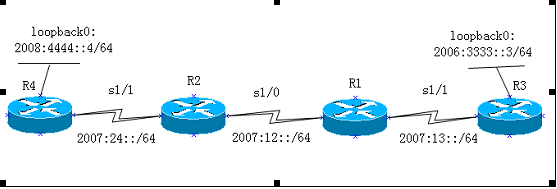
实验步骤
n 步骤1:配置路由器R1
R1(config)#ipv6 unicast-routing
R1(config)#ipv6 router rip cisco
R1(config-rtr)#split-horizon
R1(config-rtr)#poison-reverse
R1(config)#interface Serial1/0
R1(config-if)#ipv6 address 2007:12::1/64
R1(config-if)#ipv6 rip cisco enable
R1(config-if)#clockrate 128000
R1(config-if)#no shutdown
R1(config)#interface Serial1/1
R1(config-if)#ipv6 address 2007:13::1/64
R1(config-if)#ipv6 rip cisco enable
R1(config-if)#no shutdown
n 步骤2:配置路由器R2
R2(config)#ipv6 unicast-routing
R2(config)#ipv6 router rip cisco
R2(config-rtr)#split-horizon
R2(config-rtr)#poison-reverse
R2(config)#interface Serial1/0
R2(config-if)#ipv6 address 2007:12::2/64
R2(config-if)#ipv6 rip cisco enable
R2(config-if)#no shutdown
R2(config)#interface Serial1/1
R2(config-if)#ipv6 address 2007:24::2/64
R2(config-if)#ipv6 rip cisco enable
R2(config-if)#clock rate 128000
R2(config-if)#no shutdown
n 步骤3:配置路由器R3
R3(config)#ipv6 unicast-routing
R3(config)#ipv6 router rip cisco
R3(config-rtr)#split-horizon
R3(config-rtr)#poison-reverse
R3(config)#interface Loopback0
R3(config-if)#ipv6 address 2008:3333::3/64
R3(config-if)#ipv6 rip cisco enable
R3(config)#interface Serial1/1
R3(config-if)#ipv6 address 2007:13::3/64
R3(config-if)#ipv6 rip cisco enable
R3(config-if)#no shutdown
n 步骤4:配置路由器R4
R4(config)#ipv6 unicast-routing
R4(config)#ipv6 router rip cisco //启动IPv6 RIPng 进程
R4(config-rtr)#split-horizon //启用水平分割
R4(config-rtr)#poison-reverse //启用毒化反转
R4(config)#interface Loopback0
R4(config-if)#ipv6 address 2008:4444::4/64
R4(config-if)#ipv6 rip cisco enable //在接口上启用RIPng
R4(config)#interface Serial1/1
R4(config-if)#ipv6 address 2007:24::4/64
R4(config-if)#ipv6 rip cisco enable
R4(config-if)#ipv6 rip cisco default-information originate
//向IPv6 RIPng 区域注入一条默认路由(::/0)
R4(config-if)#no shutdown
R4(config)#ipv6 route ::/0 Loopback0 //配置默认路由
【提示】
“ipv6 rip cisco default-information only ”命令也可以向IPv6 RIPng 区域注入
一条默认路由,但是该命令只从该接口发送默认的IPv6 路由,而该接口其它的IPv6 的RIPng路由都被抑制。
Ø 实验调试
(1)show ipv6 route
R2#show ipv6 route
IPv6 Routing Table - 10 entries
Codes: C - Connected, L - Local, S - Static, R - RIP, B - BGP
U - Per-user Static route
I1 - ISIS L1, I2 - ISIS L2, IA - ISIS interarea, IS - ISIS summary
O - OSPF intra, OI - OSPF inter, OE1 - OSPF ext 1, OE2 - OSPF ext 2
ON1 - OSPF NSSA ext 1, ON2 - OSPF NSSA ext 2
R ::/0 [120/2]
via FE80::CE03:11FF:FE9C:0, Serial1/1
R 2006:3333::/64 [120/3]
via FE80::CE00:11FF:FE9C:0, Serial1/0
C 2007:12::/64 [0/0]
via ::, Serial1/0
L 2007:12::2/128 [0/0]
via ::, Serial1/0
R 2007:13::/64 [120/2]
via FE80::CE00:11FF:FE9C:0, Serial1/0
C 2007:24::/64 [0/0]
via ::, Serial1/1
L 2007:24::2/128 [0/0]
via ::, Serial1/1
R 2008:4444::/64 [120/2]
via FE80::CE03:11FF:FE9C:0, Serial1/1
L FE80::/10 [0/0]
via ::, Null0
L FF00::/8 [0/0]
via ::, Null0
以上输出表明R4 确实向IPv6 RIPng 网络注入一条IPv6 的默认路由,同时收到3 条
IPv6 RIPng 路由条目,而且所有IPv6 RIPng 路由条目的下一跳地址均为邻居路由器接口的“link-local”地址。可以通过“show ipv6 rip next-hops”命令查看RIPng 的下一跳地址。
R2#show ipv6 rip next-hops
RIP process "cisco", Next Hops
FE80::CE00:11FF:FE9C:0/Serial1/0 [3 paths]
FE80::CE03:11FF:FE9C:0/Serial1/1 [3 paths]
(2)show ip protocols
R2#show ipv6 protocols
IPv6 Routing Protocol is "connected"
IPv6 Routing Protocol is "static"
IPv6 Routing Protocol is "rip cisco"
Interfaces:
Serial1/1
Serial1/0
Redistribution:
None
以上输出表明启动的IPv6 RIPng 进程为cisco,同时在Serial1/1 和Serial1/0
接口上起用RIPng。
n show ipv6 rip database
该命令用来查看RIPng 的数据库。
R2#show ipv6 rip database
RIP process "cisco", local RIB
2006:3333::/64, metric 3, installed
Serial1/0/FE80::CE00:11FF:FE9C:0, expires in 171 secs
2007:12::/64, metric 2
Serial1/0/FE80::CE00:11FF:FE9C:0, expires in 171 secs
2007:13::/64, metric 2, installed
Serial1/0/FE80::CE00:11FF:FE9C:0, expires in 171 secs
2007:24::/64, metric 2
Serial1/1/FE80::CE03:11FF:FE9C:0, expires in 167 secs
2008:4444::/64, metric 2, installed
Serial1/1/FE80::CE03:11FF:FE9C:0, expires in 167 secs
::/0, metric 2, installed
Serial1/1/FE80::CE03:11FF:FE9C:0, expires in 167 secs
以上输出显示了R2 的RIPng 的数据库。
n debug ipv6 rip
该命令用来动态查看RIPng 的更新。
R2#debug ipv6 rip
RIP Routing Protocol debugging is on
*Mar 1 01:00:47.251: RIPng: response received from FE80::CE03:11FF:FE9C:0 on Serial1/1 for cisco
*Mar 1 01:00:47.255: src=FE80::CE03:11FF:FE9C:0 (Serial1/1)
*Mar 1 01:00:47.259: dst=FF02::9
*Mar 1 01:00:47.259: sport=521, dport=521, length=132
*Mar 1 01:00:47.263: command=2, version=1, mbz=0, #rte=6
*Mar 1 01:00:47.263: tag=0, metric=1, prefix=2008:4444::/64
*Mar 1 01:00:47.267: tag=0, metric=1, prefix=2007:24::/64
*Mar 1 01:00:47.267: tag=0, metric=16, prefix=2007:12::/64
*Mar 1 01:00:47.271: tag=0, metric=16, prefix=2007:13::/64
*Mar 1 01:00:47.271: tag=0, metric=16, prefix=2006:3333::/64
*Mar 1 01:00:47.275: tag=0, metric=1, prefix=::/0
*Mar 1 01:00:50.455: RIPng: response received from FE80::CE00:11FF:FE9C:0 on Serial1/0 for cisco
*Mar 1 01:00:50.459: src=FE80::CE00:11FF:FE9C:0 (Serial1/0)
*Mar 1 01:00:50.463: dst=FF02::9
*Mar 1 01:00:50.463: sport=521, dport=521, length=132
*Mar 1 01:00:50.467: command=2, version=1, mbz=0, #rte=6
*Mar 1 01:00:50.467: tag=0, metric=1, prefix=2007:12::/64
*Mar 1 01:00:50.471: tag=0, metric=1, prefix=2007:13::/64
*Mar 1 01:00:50.471: tag=0, metric=2, prefix=2006:3333::/64
*Mar 1 01:00:50.475: tag=0, metric=16, prefix=2007:24::/64
*Mar 1 01:00:50.475: tag=0, metric=16, prefix=2008:4444::/64
*Mar 1 01:00:50.479: tag=0, metric=16, prefix=::/0
*Mar 1 01:00:53.435: RIPng: Sending multicast update on Serial1/1 for cisco
*Mar 1 01:00:53.439: src=FE80::CE01:11FF:FE9C:0
*Mar 1 01:00:53.439: dst=FF02::9 (Serial1/1)
*Mar 1 01:00:53.443: sport=521, dport=521, length=132
*Mar 1 01:00:53.447: command=2, version=1, mbz=0, #rte=6
*Mar 1 01:00:53.447: tag=0, metric=1, prefix=2007:12::/64
*Mar 1 01:00:53.451: tag=0, metric=1, prefix=2007:24::/64
*Mar 1 01:00:53.451: tag=0, metric=2, prefix=2007:13::/64
*Mar 1 01:00:53.455: tag=0, metric=3, prefix=2006:3333::/64
*Mar 1 01:00:53.455: tag=0, metric=16, prefix=2008:4444::/64
*Mar 1 01:00:53.459: tag=0, metric=16, prefix=::/0
*Mar 1 01:00:53.463: RIPng: Sending multicast update on Serial1/0 for cisco
*Mar 1 01:00:53.463: src=FE80::CE01:11FF:FE9C:0
*Mar 1 01:00:53.467: dst=FF02::9 (Serial1/0)
*Mar 1 01:00:53.467: sport=521, dport=521, length=132
*Mar 1 01:00:53.471: command=2, version=1, mbz=0, #rte=6
*Mar 1 01:00:53.471: tag=0, metric=1, prefix=2007:12::/64
*Mar 1 01:00:53.475: tag=0, metric=1, prefix=2007:24::/64
*Mar 1 01:00:53.475: tag=0, metric=16, prefix=2007:13::/64
*Mar 1 01:00:53.479: tag=0, metric=16, prefix=2006:3333::/64
*Mar 1 01:00:53.483: tag=0, metric=2, prefix=2008:4444::/64
*Mar 1 01:00:53.483: tag=0, metric=2, prefix=::/0
以上输出显示路由器R2 发送和接收RIPng 的信息
实验20:IPv6的更多相关文章
- CCIE路由实验(9) -- IPv6
1.IPv6地址的各种情况2.配置通过DHCP-PD方式分配前缀信息3.IPv6路由基本配置4.IPv6路由--RIPng5.IPv6路由--EIGRPv66.IPv6路由--OSPFv37.IPv6 ...
- 【Python】【demo实验20】【练习实例】【寻找“完数”】
原题: 一个数如果恰好等于它的因子之和,这个数就称为"完数".例如6=1+2+3.编程找出1000以内的所有完数. 我的代码: #!/usr/bin/python # encodi ...
- CCNA CCNP CCIE所有实验名称完整版
实验1:通过Console端口访问Cisco路由器 实验2:通过Telnet访问Cisco路由器 实验3:配置终端服务器 实验4:通过浏览器访问路由器 实验5:模式切换.上下文帮助及查看有关信 ...
- IPv6原理、应用与实践
欢迎大家前往腾讯云+社区,获取更多腾讯海量技术实践干货哦~ 作者:腾讯微信技术架构部团队 2017年11月26日,中共中央办公厅和国务院办公厅印发了<推荐互联网协议第六版(IPv6)规模部署行动 ...
- IPv6技术详解:基本概念、应用现状、技术实践(下篇)
本文来自微信技术架构部的原创技术分享. 1.前言 在上篇<IPv6技术详解:基本概念.应用现状.技术实践(上篇)>,我们讲解了IPV6的基本概念. 本篇将继续从以下方面展开对IPV6的讲解 ...
- 20155223 实验5 MSF基础应用
20155223 实验5 MSF基础应用 基础问题回答 用自己的话解释什么是exploit,payload,encode? exploit:漏洞攻击.一个exploit程序肯定会触发系统的一个或多个漏 ...
- 成都国嵌-嵌入式linux必修实验手册…
emouse收集整理,转载请注明: emouse的技术专栏 博客园:http://www.cnblogs.com/emouse/ CSDN:http://blog.csdn.net/haozi_198 ...
- 【Beta】Scrum09
Info 考试周,暂停工作 时间:2016.12.26 21:35 时长:20min 地点:大运村1号公寓5楼楼道 类型:日常Scrum会议 NXT:2016.12.31 21:30 Task Rep ...
- 七天学会ASP.NET MVC (四)——用户授权认证问题
小编应各位的要求,快马加鞭,马不停蹄的终于:七天学会 Asp.Net MVC 第四篇出炉,在第四天的学习中,我们主要了学习如何在MVC中如何实现认证授权等问题,本节主要讲了验证错误时的错误值,客户端验 ...
随机推荐
- 洛谷$P1155$ 双栈排序 贪心+二分图匹配
正解:贪心+二分图匹配 解题报告: 传送门$QwQ$ 跪了,,,我本来以为我$NOIp$做得差不多了,,,然后康了一眼发现没做多少啊其实$QAQ$ 然后来康题趴$QwQ$ 首先考虑如果只有一个栈的情况 ...
- 洛谷$P4331\ [BOI2004]\ Sequence$ 数字序列 左偏树
正解:左偏树 解题报告: 传送门$QwQ$ 开始看到的时候$jio$得长得很像之前做的一个$dp$,,, 但是$dp$那题是说不严格这里是严格? 不难想到我们可以让$a_{i},b_{i}$同时减去$ ...
- linux mysql 5.7.20 部署脚本+备份脚本
一.官网下载源码包 源码包:mysql-5.7.20-linux-glibc2.12-x86_64.tar.gz 检查环境,卸载老版本mysql 二.自动部署脚本 进入文件目录,执行脚本 #!/bin ...
- 【C++】CCFCSP201803-2碰撞的小球
// // main.cpp // CCFCSP20180318_2_碰撞的小球 // // Created by T.P on 2018/3/24. // Copyright © 2018年 T.P ...
- (二)unittst用例操作
一.跳过用例 @unittest.skip(reason) 跳过被此装饰器装饰的测试. reason 为测试被跳过的原因. 应用场景: 1,有些用例不需要再次执行,或者作废的用例 2,本次测试构建,不 ...
- React实现座位排布组件
React实现座位排布组件 最近在开发一个影院系统的后台管理系统,该后台可以设置一个影厅的布局. 后台使用的是react框架,一位大神学长在几天之内就把这个控件研究出来了,并进行了较为严密的封装,佩服 ...
- 动态规划,以LeetCode-CombinationSumIV问题为例
简介: 动态规划问题面试中经常遇到的问题之一,按照动态规划的一般定义,其一般解法在于将大问题分解为很多小问题去解决,但是我在遇到很多实际的问题时,想法都是强行的去将问题分解,而忽略了分解的必要性和途径 ...
- Salesforce LWC学习(十一) port 1717报错的处理
使用vs code开发lwc的步骤,通常为先创建项目(create project)然后授权一个org(authorize an org),授权以后我们通常便会download代码到本地或者Uploa ...
- 006.kubernets之Deployment简单部署
一 Deployment相对于RC的优势 RS与Deployment主要用于替代RC.RS的全称为Replica Set.相对于RC,RS与Deployment的优势如下: RC只支持基于等式的sel ...
- MySQL快速回顾:更新和删除操作
前提要述:参考书籍<MySQL必知必会> 6.1 更新数据 为了更新(修改)表中的数据,可使用UPDATE语句.可采用两种方式使用UPDATE: 更新表中特定的行: 更新表中所有的行. U ...