
基于SpringBoot的Swagger2快速入门
1. Springboot 集成 Swagger2
1.1 导入Swagger2 依赖
<!-- https://mvnrepository.com/artifact/io.springfox/springfox-swagger2 -->
<dependency>
    <groupId>io.springfox</groupId>
    <artifactId>springfox-swagger2</artifactId>
    <version>2.9.2</version>
</dependency>

<!-- https://mvnrepository.com/artifact/io.springfox/springfox-swagger-ui -->
<dependency>
    <groupId>io.springfox</groupId>
    <artifactId>springfox-swagger-ui</artifactId>
    <version>2.9.2</version>
</dependency>
1.2 编写 Swagger 配置:如下简单添加注解即可访问SwaggerUi
@Configuration
@EnableSwagger2
public class SwaggerConfig {

}
1.3 访问http://localhost:8080/swagger-ui.html
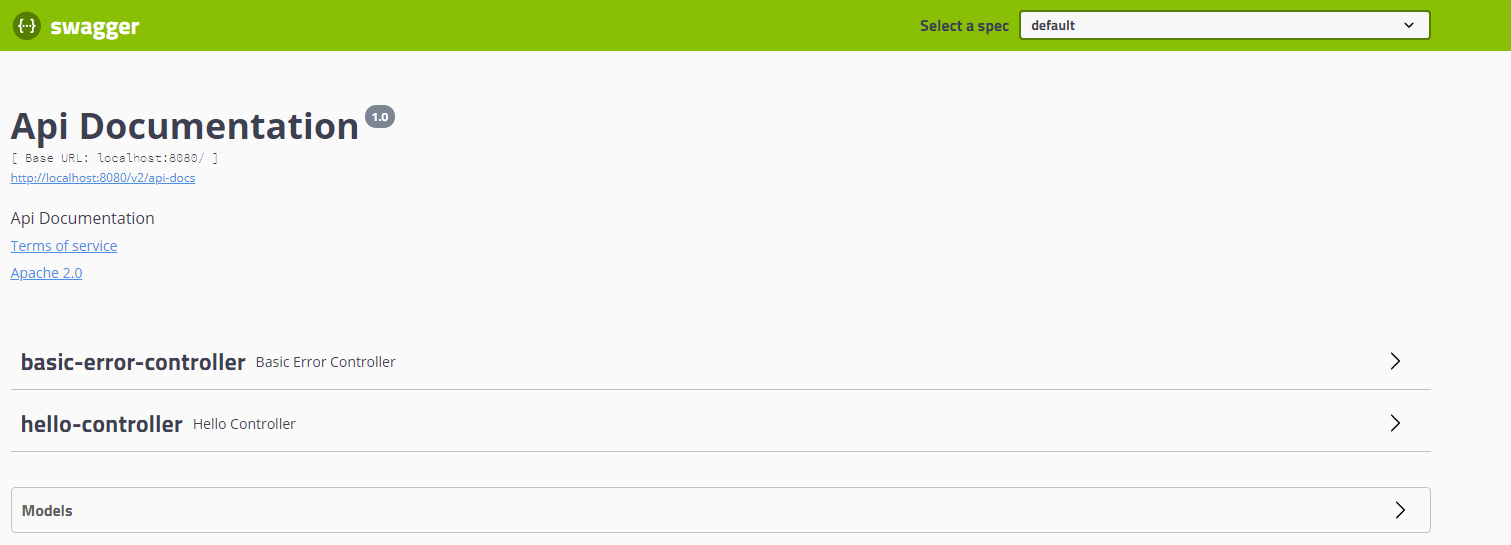
2. 配置Swagger2
@Configuration
@EnableSwagger2
public class SwaggerConfig {

    /**
     * 配置Swagger的Docket实例
     * @return
     */
    @Bean
    public Docket docket(){
        return new Docket(DocumentationType.SWAGGER_2)
                .apiInfo(apiInfo())
                .enable(false)    //关闭swagger
                .groupName("xxx")    //分组,多个分组需要多个Docket实例
                .select()    //接口过滤,扫描包名下的接口
                .apis(RequestHandlerSelectors.basePackage("cn.lcx.demo.controller"))
                .build();
    }

    /**
     * 配置Swagger信息
     * @return
     */
    private ApiInfo apiInfo(){

        Contact contact = new Contact("xxx","http://localhost:8080","xxxx@qq.com");
        return new ApiInfo(
                "xxx团队xxx项目api开发文档",
                "xxx团队xxx项目api开发文档",
                "1.0",
                "urn:tos",
                contact,
                "Apache 2.0",
                "http://www.apache.org/licenses/LICENSE-2.0",
                new ArrayList());
    }

}
访问http://localhost:8080/swagger-ui.html

3. 编写Api文档注释
3.1 实体类
@ApiModel("用户实体类")    //注解在类上的api文档
public class User {
    @ApiModelProperty("用户名")    //注解在属性上的api文档
    private String username;
    @ApiModelProperty("密码")
    private String password;

    public void setUsername(String username) {
        this.username = username;
    }

    public void setPassword(String password) {
        this.password = password;
    }

    public String getUsername() {
        return username;
    }

    public String getPassword() {
        return password;
    }
}
查看ui下面的model

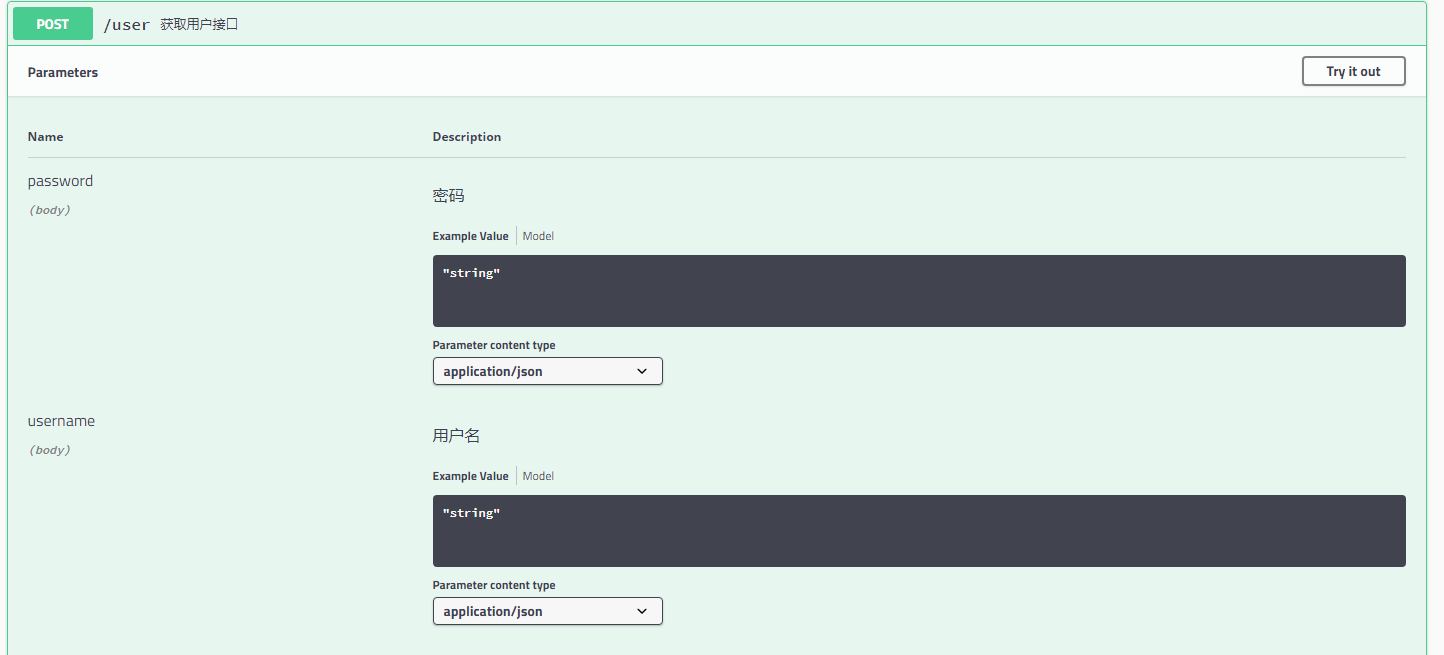
3.2 接口类
@RestController
public class HelloController {

    @ApiOperation("获取用户接口")        //注解在方法名上的api文档
    @PostMapping("/user")
    //注解在变量上的api文档
    public User getUser(@ApiParam("用户名") String username, @ApiParam("密码") String password){
        return new User();
    }
}
查看ui的接口信息
4. Swagger2 还提供接口在线测试,功能类似postman

基于SpringBoot的Swagger2快速入门的更多相关文章
- 在线Online表单来了!JeecgBoot 2.1 版本发布——基于SpringBoot+AntDesign的快速开发平台
项目介绍 Jeecg-Boot 是一款基于SpringBoot+代码生成器的快速开发平台! 采用前后端分离架构:SpringBoot,Ant-Design-Vue,Mybatis,Shiro,JWT. ...
- SpringBoot系列: RestTemplate 快速入门
====================================相关的文章====================================SpringBoot系列: 与Spring R ...
- 基于SpringBoot+AntDesign的快速开发平台,JeecgBoot 2.0.2 版本发布
Jeecg-Boot 是一款基于SpringBoot+代码生成器的快速开发平台! 采用前后端分离架构:SpringBoot,Ant-Design-Vue,Mybatis,Shiro,JWT. 强大的代 ...
- Springboot 完整搭建快速入门,必看!
前言 手把手教你Springboot微服务项目搭建快速入门,通过本文学习Springboot的搭建快速入门,掌握微服务大致的配置服务,后续将会继续将核心组件引入到项目中,欢迎关注,点赞,转发. Spr ...
- 基于PHP的cURL快速入门
cURL 是一个利用URL语法规定来传输文件和数据的工具,支持很多协议,如HTTP.FTP.TELNET等.最爽的是,PHP也支持 cURL 库.本文将介绍 cURL 的一些高级特性,以及在PHP中如 ...
- (转)基于PHP的cURL快速入门
1. 原文:基于PHP的cURL快速入门 英文原文:http://net.tutsplus.com/tutorial ... for-mastering-curl/ 原文作者:Burak Guzel ...
- 基于springboot构建dubbo的入门demo
之前记录了构建dubbo入门demo所需的环境以及基于普通maven项目构建dubbo的入门案例,今天记录在这些的基础上基于springboot来构建dubbo的入门demo:众所周知,springb ...
- 基于PHP的cURL快速入门教程 (小偷采集程序)
cURL 是一个利用URL语法规定来传输文件和数据的工具,支持很多协议,如HTTP.FTP.TELNET等.很多小偷程序都是使用这个函数. 最爽的是,PHP也支持 cURL 库.本文将介绍 c ...
- SpringBoot整合ActiveMQ快速入门
Spring Boot 具有如下特性: 为基于 Spring 的开发提供更快的入门体验 开箱即用,没有代码生成,也无需 XML 配置.同时也可以修改默认值来满足特定的需求. 提供了一些大型项目中常见的 ...
随机推荐
- golang 读取 ini配置信息
package main //BY: 29295842@qq.com//这个有一定问题 如果配置信息里有中文就不行//[Server] ;MYSQL配置//Server=localhost ...
- MySQL server has gone away 解决办法
Mysql 5.1 遇到的信息包过大问题 用客户端导入数据的时候,遇到 错误代码: 1153 - Got a packet bigger than 'max_allowed_packet' byt ...
- 截取url中的某个字符串后面的值
获取到当前网址 var url = window.location.href; http://localhost:8080/exam_questions?type=3 //获取url中的参数 func ...
- caller.arguments.callee.eval
------------------------------------ 1.函数的调用方式,与this的指向问题,原型对象中的this 2.对象创建的几种方式! 3.str.replace 页面初始 ...
- MySQL将查询结果写入到文件的2种方法
1.SELECT INTO OUTFIL: 这种方法不能覆盖或者追加到已经存在的文件,只能写入到新文件,并且建立文件的路径需要mysql进程用户有权限建立新文件. mysql 61571 60876 ...
- Spring Boot配置随机数
Spring Boot支持在系统加载的时候配置随机数. 添加config/random.properties文件,添加以下内容: #随机32位MD5字符串 user.random.secret=${r ...
- js button禁用/启用
搬运自:https://blog.csdn.net/SonaEx/article/details/80879061 禁用: $("#id").attr("disabled ...
- fedora 28 winscp链接不上
systemctl restart sshd.service //启动sshd服务 systemctl stop firewalld //关闭防火墙 /etc/selinux/config //关闭s ...
- openwrt redis
2071 make V=s 2072 cd build_dir/target-x86_64_uClibc-0.9.33.2/root-x86/ cd package/network/services/ ...
- 29. StringBuilder
1.字符串变量.StringBuffer.StringBulid的区别: 字符串是一个常量,不能被修改 字符串一旦被修改,那么会再创建一个对象,浪费空间 而 ...