
消息队列(五) ---RocketMQ-消息存储3
问题:
- consumeQueue 如何工作
- 刷盘机制如何工作
概述
该节我们将学习 consumeQueue 如何工作,先来看一下消息发送的大概过程。
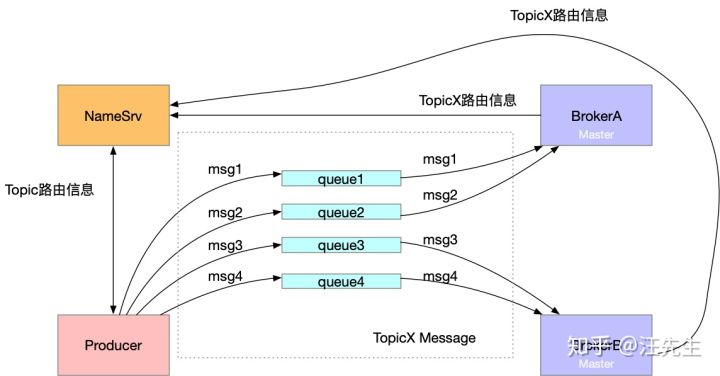
而为什么需要 consumeQueue 的存在呢?我们只有一个 commitLog 文件,那么假如需要查找某个主题下的消息,那么我们不得不遍历整个commmitLog 来完成查询,consumeQueue 的存在方便的消息的查询获取。首先来看一下 consumeQueue 文件的结构,其中 TopicTest 和 TopicTest1 是 topic ,里面的编号0~3表示该主题下的4个队列。
├─TopicTest

│  ├─0

│  ├─1

│  ├─2

│  └─3

└─TopicTest1

    ├─0

    ├─1

    ├─2

    └─3
ConsumeQueue 相关
DefaultMessageStore在初始化时开启了一个线程,该线程的作用是**(当生产者新生产一条消息)更新消息到 consumeQueue 中去** ,然后consumeQueue在回刷回去磁盘持久化。
可以看到这里分为两部分。
我们看一下这个线程是在哪里启动的
    public void start() throws Exception {

        if (this.messageStore != null) {

            this.messageStore.start();

        }

        ...

    }
DefaultMessageStore#start 方法
        //No.3 开启 reputMessageService

        if (this.getMessageStoreConfig().isDuplicationEnable()) {

            this.reputMessageService.setReputFromOffset(this.commitLog.getConfirmOffset());

        } else {

            this.reputMessageService.setReputFromOffset(this.commitLog.getMaxOffset());

        }

        this.reputMessageService.start();
reputMessageService#run 方法
        @Override

        public void run() {

            DefaultMessageStore.log.info(this.getServiceName() + " service started");

            while (!this.isStopped()) {

                try {

                    Thread.sleep(1);

                    //一直执行 doReput 方法

                    this.doReput();

                } catch (Exception e) {

                    DefaultMessageStore.log.warn(this.getServiceName() + " service has exception. ", e);

                }

            }

            DefaultMessageStore.log.info(this.getServiceName() + " service end");

        }
下面总结来自参考文章,侵删
doReput做了以下几件事
1:获取CommitLog中存储的新消息。
SelectMappedBufferResult result = DefaultMessageStore.this.commitLog.getData(reputFromOffset);
reputFromOffset记录了本次需要拉取的消息在CommitLog中的偏移。这里将reputFromOffset传递给CommitLog,获取CommitLog在reputFromOffset处存储的消息。
2:如果第一步获取的消息不为空,则表明有新消息被存储到CommitLog中,此时便会通知ConsumeQueue更新消息偏移。
DispatchRequest dispatchRequest =

                                DefaultMessageStore.this.commitLog.checkMessageAndReturnSize(result.getByteBuffer(), false, false);

......
DefaultMessageStore.this.doDispatch(dispatchRequest);
3:更新reputFromOffset,设置为下次需要拉取的消息在CommitLog中的偏移。
this.reputFromOffset = result.getStartOffset();

......

int size = dispatchRequest.getMsgSize();

......

this.reputFromOffset += size;
上面的重点在第二步中,这里调用 DefaultMessageStore.this.doDispatch(dispatchRequest) 来通知ConsumeQueue。
DefaultMessageStore中存储了一个dispatcherList,其中存放了几个CommitLogDispatcher对象,它们都是用来监听CommitLog中新消息存储的。
this.dispatcherList = new LinkedList<>();

//用于分发给 ConsumeQueue

this.dispatcherList.addLast(new CommitLogDispatcherBuildConsumeQueue());

//用于分发给 Index

this.dispatcherList.addLast(new CommitLogDispatcherBuildIndex());
其中第二步比较重要,这里我们这里也可以知道 commitLog 的分发器有两个,一个用于 ConsumeQueue ,另外一个用于 Index
    class CommitLogDispatcherBuildConsumeQueue implements CommitLogDispatcher {

        @Override

        public void dispatch(DispatchRequest request) {

            final int tranType = MessageSysFlag.getTransactionValue(request.getSysFlag());

            switch (tranType) {

                case MessageSysFlag.TRANSACTION_NOT_TYPE:

                case MessageSysFlag.TRANSACTION_COMMIT_TYPE:

                    DefaultMessageStore.this.putMessagePositionInfo(request);

                    break;

                case MessageSysFlag.TRANSACTION_PREPARED_TYPE:

                case MessageSysFlag.TRANSACTION_ROLLBACK_TYPE:

                    break;

            }

        }

    }

    public void putMessagePositionInfo(DispatchRequest dispatchRequest) {

        //找到对应的 ConsumeQueue

        ConsumeQueue cq = this.findConsumeQueue(dispatchRequest.getTopic(), dispatchRequest.getQueueId());

        //调用ConsumeQueue的存储逻辑

        cq.putMessagePositionInfoWrapper(dispatchRequest);

    }
    // 存储体的封装

    public void putMessagePositionInfoWrapper(DispatchRequest request) {

        final int maxRetries = 30;

        boolean canWrite = this.defaultMessageStore.getRunningFlags().isCQWriteable();

        for (int i = 0; i < maxRetries && canWrite; i++) {

            long tagsCode = request.getTagsCode();

            if (isExtWriteEnable()) {

                ConsumeQueueExt.CqExtUnit cqExtUnit = new ConsumeQueueExt.CqExtUnit();

                cqExtUnit.setFilterBitMap(request.getBitMap());

                cqExtUnit.setMsgStoreTime(request.getStoreTimestamp());

                cqExtUnit.setTagsCode(request.getTagsCode());

                long extAddr = this.consumeQueueExt.put(cqExtUnit);

                if (isExtAddr(extAddr)) {

                    tagsCode = extAddr;

                } else {

                    log.warn("Save consume queue extend fail, So just save tagsCode! {}, topic:{}, queueId:{}, offset:{}", cqExtUnit,

                        topic, queueId, request.getCommitLogOffset());

                }

            }

            //存储操作

            boolean result = this.putMessagePositionInfo(request.getCommitLogOffset(),

                request.getMsgSize(), tagsCode, request.getConsumeQueueOffset());

            if (result) {

                this.defaultMessageStore.getStoreCheckpoint().setLogicsMsgTimestamp(request.getStoreTimestamp());

                return;

            } else {

                // XXX: warn and notify me

                log.warn("[BUG]put commit log position info to " + topic + ":" + queueId + " " + request.getCommitLogOffset()

                    + " failed, retry " + i + " times");

                try {

                    Thread.sleep(1000);

                } catch (InterruptedException e) {

                    log.warn("", e);

                }

            }

        }

        // XXX: warn and notify me

        log.error("[BUG]consume queue can not write, {} {}", this.topic, this.queueId);

        this.defaultMessageStore.getRunningFlags().makeLogicsQueueError();

    }

    //存储操作

    private boolean putMessagePositionInfo(final long offset, final int size, final long tagsCode,

        final long cqOffset) {

        if (offset <= this.maxPhysicOffset) {

            return true;

        }

        this.byteBufferIndex.flip();

        this.byteBufferIndex.limit(CQ_STORE_UNIT_SIZE);

        //offset -> size -> tagsCode

        this.byteBufferIndex.putLong(offset);

        this.byteBufferIndex.putInt(size);

        this.byteBufferIndex.putLong(tagsCode);

        final long expectLogicOffset = cqOffset * CQ_STORE_UNIT_SIZE;

        //找到对应的 MappedFile

        MappedFile mappedFile = this.mappedFileQueue.getLastMappedFile(expectLogicOffset);

        if (mappedFile != null) {

            if (mappedFile.isFirstCreateInQueue() && cqOffset != 0 && mappedFile.getWrotePosition() == 0) {

                this.minLogicOffset = expectLogicOffset;

                this.mappedFileQueue.setFlushedWhere(expectLogicOffset);

                this.mappedFileQueue.setCommittedWhere(expectLogicOffset);

                this.fillPreBlank(mappedFile, expectLogicOffset);

                log.info("fill pre blank space " + mappedFile.getFileName() + " " + expectLogicOffset + " "

                    + mappedFile.getWrotePosition());

            }

            if (cqOffset != 0) {

                long currentLogicOffset = mappedFile.getWrotePosition() + mappedFile.getFileFromOffset();

                if (expectLogicOffset < currentLogicOffset) {

                    log.warn("Build  consume queue repeatedly, expectLogicOffset: {} currentLogicOffset: {} Topic: {} QID: {} Diff: {}",

                        expectLogicOffset, currentLogicOffset, this.topic, this.queueId, expectLogicOffset - currentLogicOffset);

                    return true;

                }

                if (expectLogicOffset != currentLogicOffset) {

                    LOG_ERROR.warn(

                        "[BUG]logic queue order maybe wrong, expectLogicOffset: {} currentLogicOffset: {} Topic: {} QID: {} Diff: {}",

                        expectLogicOffset,

                        currentLogicOffset,

                        this.topic,

                        this.queueId,

                        expectLogicOffset - currentLogicOffset

                    );

                }

            }

            this.maxPhysicOffset = offset;

            //调用 MappedFile 直接加入

            return mappedFile.appendMessage(this.byteBufferIndex.array());

        }

        return false;

    }
从上面我们可以知道 consumeQueue 的存储底层使用的是 mapfile 。
异步刷盘
刷盘的方式分为异步和同步,rocketmq 默认是异步刷盘,根据我们前面的分析,消息最后是落地的,那么刷盘的最终调用应该会是 mappfile 的flush 方法 。
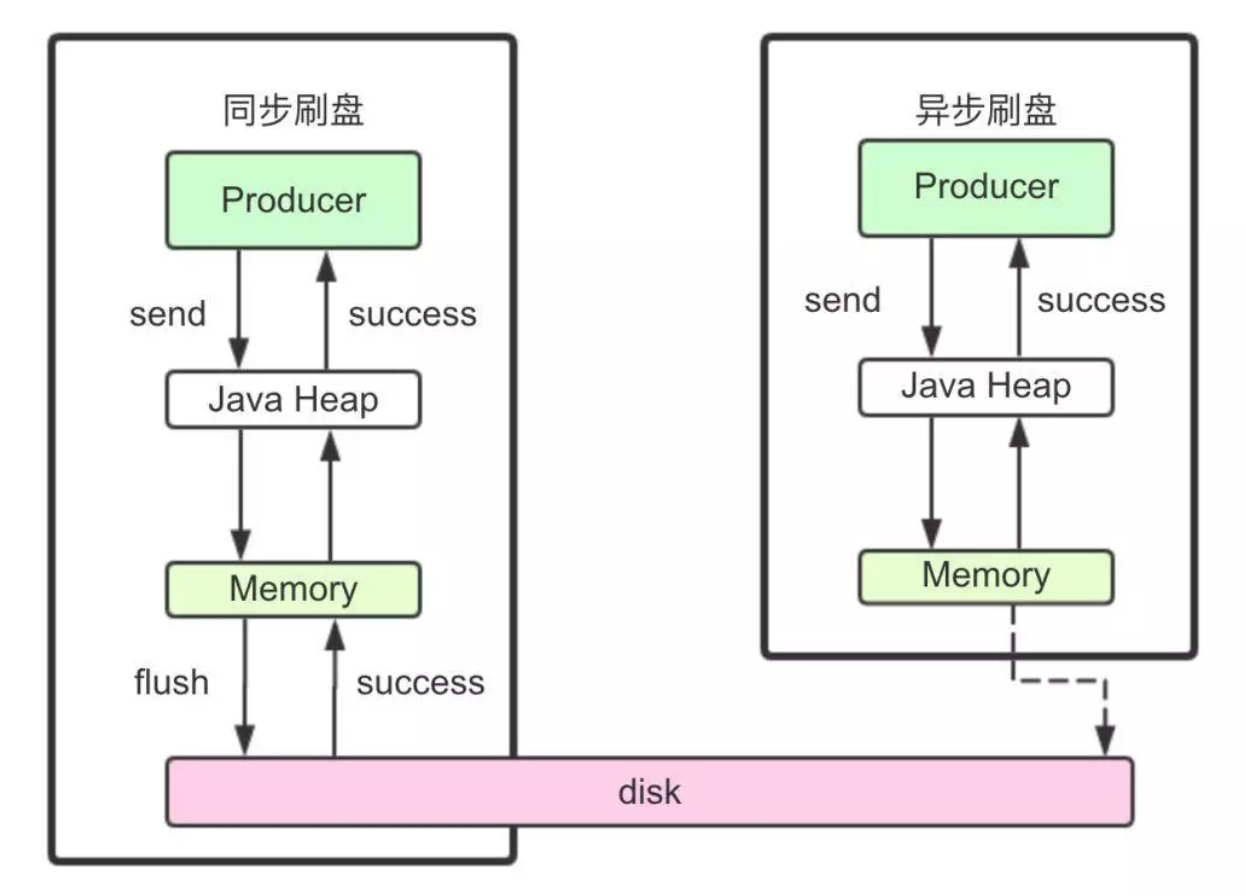
异步刷盘
异步刷盘相关的服务是FlushRealTimeService ,位于 CommitLog 这个类里面。
FlushRealTimeService 的 run 方法 。
        public void run() {

            CommitLog.log.info(this.getServiceName() + " service started");

            while (!this.isStopped()) {

                boolean flushCommitLogTimed = CommitLog.this.defaultMessageStore.getMessageStoreConfig().isFlushCommitLogTimed();

                int interval = CommitLog.this.defaultMessageStore.getMessageStoreConfig().getFlushIntervalCommitLog();

                int flushPhysicQueueLeastPages = CommitLog.this.defaultMessageStore.getMessageStoreConfig().getFlushCommitLogLeastPages();

                int flushPhysicQueueThoroughInterval =

                        CommitLog.this.defaultMessageStore.getMessageStoreConfig().getFlushCommitLogThoroughInterval();

                boolean printFlushProgress = false;

                // Print flush progress

                long currentTimeMillis = System.currentTimeMillis();

                if (currentTimeMillis >= (this.lastFlushTimestamp + flushPhysicQueueThoroughInterval)) {

                    this.lastFlushTimestamp = currentTimeMillis;

                    flushPhysicQueueLeastPages = 0;

                    printFlushProgress = (printTimes++ % 10) == 0;

                }

                // 前面的都是获刷盘时间

                try {

                    if (flushCommitLogTimed) {

                        Thread.sleep(interval);

                    } else {

                        this.waitForRunning(interval);

                    }

                    if (printFlushProgress) {

                        this.printFlushProgress();

                    }

                    long begin = System.currentTimeMillis();

                    // 核心逻辑

                    CommitLog.this.mappedFileQueue.flush(flushPhysicQueueLeastPages);

                    long storeTimestamp = CommitLog.this.mappedFileQueue.getStoreTimestamp();

                    if (storeTimestamp > 0) {

                        CommitLog.this.defaultMessageStore.getStoreCheckpoint().setPhysicMsgTimestamp(storeTimestamp);

                    }

                    long past = System.currentTimeMillis() - begin;

                    if (past > 500) {

                        log.info("Flush data to disk costs {} ms", past);

                    }

                } catch (Throwable e) {

                    CommitLog.log.warn(this.getServiceName() + " service has exception. ", e);

                    this.printFlushProgress();

                }

            }

            // Normal shutdown, to ensure that all the flush before exit

            boolean result = false;

            for (int i = 0; i < RETRY_TIMES_OVER && !result; i++) {

                result = CommitLog.this.mappedFileQueue.flush(0);

                CommitLog.log.info(this.getServiceName() + " service shutdown, retry " + (i + 1) + " times " + (result ? "OK" : "Not OK"));

            }

            this.printFlushProgress();

            CommitLog.log.info(this.getServiceName() + " service end");

        }
同步刷盘
同步刷盘使用的是 GroupCommitService
总结
参考文章
- https://zhuanlan.zhihu.com/p/59516998
- https://zhuanlan.zhihu.com/p/58728454
- https://juejin.im/post/5d3f00aaf265da03e1685097 (深入分析)
消息队列(五) ---RocketMQ-消息存储3的更多相关文章
- 消息队列之-RocketMQ入门
简介 RocketMQ是阿里开源的消息中间件,目前已经捐献个Apache基金会,它是由Java语言开发的,具备高吞吐量.高可用性.适合大规模分布式系统应用等特点,经历过双11的洗礼,实力不容小觑. 官 ...
- [分布式学习]消息队列之rocketmq笔记
文档地址 RocketMQ架构 哔哩哔哩上的视频 mq有很多,近期买了<分布式消息中间件实践>这本书,学习关于mq的相关知识.mq大致有有4个功能: 异步处理.比如业务端需要给用户发送邮件 ...
- 消息队列之--RocketMQ
序言 资料 https://github.com/alibaba/RocketMQ http://rocketmq.apache.org/
- 消息队列中间件 RocketMQ 源码分析 —— Message 存储
- 阿里消息队列中间件 RocketMQ源码解析:Message发送&接收
- 阿里消息队列中间件 RocketMQ 源码分析 —— Message 拉取与消费(上)
- IPC之消息队列详解与使用
一. 概念 消息队列就是一个消息的链表.对消息队列有写权限的进程可以向其中按照一定的规则添加新消息:对消息队列有读权限的进程可以从消息队列中读出消息.消息队列是随内核持续的.下面介绍三个概念: ...
- C#消息队列(RabbitMQ)零基础从入门到实战演练
一.课程介绍 如果您从工作中之听过但未有接触过消息对队列(MQ),如果你接触过一点关于MQ的知识,如果没有这么的多如果的话......,那么阿笨将通过本次<C#消息队列零基础从入门到实战演练&g ...
- 【windows 操作系统】进程间通信(IPC)简述|无名管道和命名管道 消息队列、信号量、共享存储、Socket、Streams等
一.进程间通信简述 每个进程各自有不同的用户地址空间,任何一个进程的全局变量在另一个进程中都看不到,所以进程之间要交换数据必须通过内核,在内核中开辟一块缓冲区,进程1把数据从用户空间拷到内核缓冲区,进 ...
- IM开发基础知识补课(五):通俗易懂,正确理解并用好MQ消息队列
1.引言 消息是互联网信息的一种表现形式,是人利用计算机进行信息传递的有效载体,比如即时通讯网坛友最熟悉的即时通讯消息就是其具体的表现形式之一. 消息从发送者到接收者的典型传递方式有两种: 1)一种我 ...
随机推荐
- 【Python】random库
种子相同,随机数相同
- (转)HDFS简介
转自:http://os.51cto.com/art/201212/369564.html
- Android 开发 微信分享,登陆,获取信息
1 获取appid和appsecret. https://open.weixin.qq.com/cgi-bin/index?t=home/index&lang=zh_CN ...
- js -- 操作sqlite数据库
最近看到一个使用js来操作sqlite数据库的,测试了一下,具体使用的是 js操作类: https://github.com/kripken/sql.js/(sqlite js 驱动) 异步请求:ht ...
- UNION JOIN 连接表
使用UNION JOIN进行多表连接,与9.3节介绍的各种表的连接类型不同,它并不对表中的数据进行任何匹配处理,而只是把来自一个源表中的行与另一个源表中的行联合起来,生成的结果表中包括第一个表中的所有 ...
- Reading Comprehensive
我是红色 When I re-entered the full-time workforce a few years ago after a decade of solitary[隐士,独居] sel ...
- Codeforces Round #620 (Div. 2)E(LCA求树上两点最短距离)
LCA求树上两点最短距离,如果a,b之间距离小于等于k并且奇偶性与k相同显然YES:或者可以从a先走到x再走到y再走到b,并且a,x之间距离加b,y之间距离+1小于等于k并且奇偶性与k相同也输出YES ...
- 使用VS2017开发安卓app(2)新建项目
安装完成后,在c#下找到Android,选择Android应用(Xamarin),修改项目名称和路径,新建第一个安卓项目! 点击确定后会出现 这里我们选择空白应用和Android 7.1. 创建新项目 ...
- 每日扫盲:eclipse快捷键 包括查找类、方法、变量汇总
[Ct rl+T] 搜索当前接口的实现类 1. [ALT +/] 此快捷键为用户编辑的好帮手,能为用户提供内容的辅助,不要为记不全方法和属性名称犯愁,当记不全类.方法和属性的名字时,多体验一下[ ...
- C#中数据类型char*,const char*和string的三者转换
C#中数据类型char*,const char*和string的三者转换: . const char* 和string 转换 () const char*转换为 string,直接赋值即可. EX: ...