
【Android】LitePal的基础
一、环境配置
LitePal 在GitHub地址为:https://github.com/LitePalFramework/LitePal
我们使用起来也很方便,直接在gradle中配置即可。
如果你是用的是Java版本,则在 build.gradle(Module:app)中添加:
dependencies {

    implementation 'org.litepal.android:java:3.0.0'

}
Kotlin版本:
dependencies {

    implementation 'org.litepal.android:kotlin:3.0.0'

}
然后点击Sync Now即可自动下载配置。
LitePal在使用的时候,需要配置一个litepal.xml文件放在安卓的assets目录中。
如果没有这个文件夹,点击你的项目app,右键new->Folder->Assets Folder
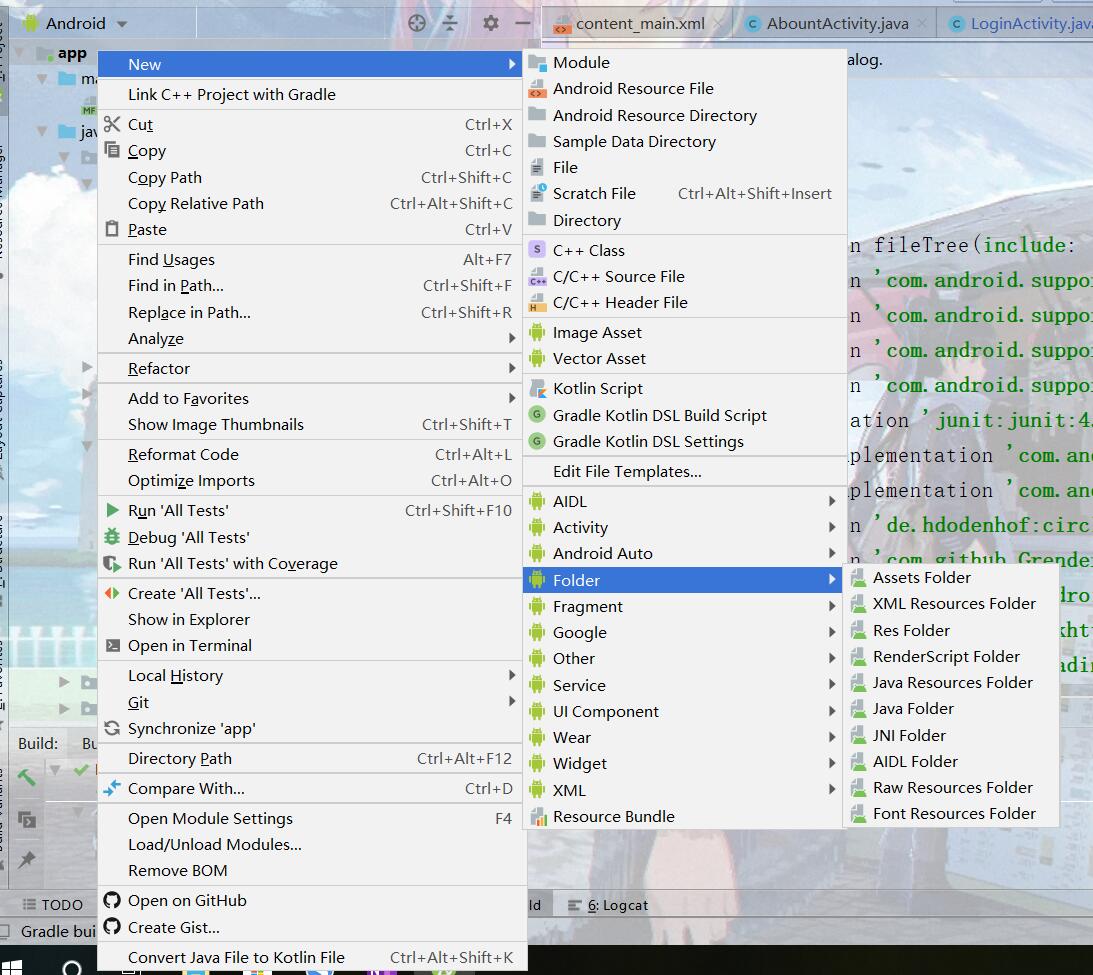
有了这个文件夹后,选中右键新建一个File,注意不要选择xml
命名为litepal.xml即可。
文件内容官方给的例子如下:
<?xml version="1.0" encoding="utf-8"?>

<litepal>

    <!--

        Define the database name of your application.

        By default each database name should be end with .db.

        If you didn't name your database end with .db,

        LitePal would plus the suffix automatically for you.

        For example:

        <dbname value="demo" />

    -->

    <dbname value="demo" />

    <!--

        Define the version of your database. Each time you want

        to upgrade your database, the version tag would helps.

        Modify the models you defined in the mapping tag, and just

        make the version value plus one, the upgrade of database

        will be processed automatically without concern.

            For example:

        <version value="1" />

    -->

    <version value="1" />

    <!--

        Define your models in the list with mapping tag, LitePal will

        create tables for each mapping class. The supported fields

        defined in models will be mapped into columns.

        For example:

        <list>

            <mapping class="com.test.model.Reader" />

            <mapping class="com.test.model.Magazine" />

        </list>

    -->

    <list>

    </list>

    <!--

        Define where the .db file should be. "internal" means the .db file

        will be stored in the database folder of internal storage which no

        one can access. "external" means the .db file will be stored in the

        path to the directory on the primary external storage device where

        the application can place persistent files it owns which everyone

        can access. "internal" will act as default.

        For example:

        <storage value="external" />

    -->

</litepal>
这样基础配置就完成了。
二、建表(Bean类)
在LitePal中,一个数据库的每一张表对应着一个类,这个类只需要继承自LitePalSupport
类中就会有save() 和 delete()两个方法,分别代表着保存(更新)和删除
我们需要创建一个Bean类,使用Alt+Insert快捷键可以快速调出生成菜单,生成get和set
例如:
import org.litepal.crud.LitePalSupport;

import java.text.SimpleDateFormat;

import java.util.Date;

/**

 * 作者:created by 巴塞罗那的余晖 on 2019/10/23 15:16

 * 邮箱:zhubaoluo@outlook.com

 * 不会写BUG的程序猿不是好程序猿,嘤嘤嘤

 */

public class DiaryBean extends LitePalSupport {

    String weather;

    String author;

    String content;

    String dateString;

    public DiaryBean(){

        Date date=new Date();

        SimpleDateFormat simpleDateFormat=new SimpleDateFormat("yyyy-MM-dd HH-mm-ss");

        dateString=simpleDateFormat.format(date);

    }

    public String getWeather() {

        return weather;

    }

    public void setWeather(String weather) {

        this.weather = weather;

    }

    public String getAuthor() {

        return author;

    }

    public void setAuthor(String author) {

        this.author = author;

    }

    public String getContent() {

        return content;

    }

    public void setContent(String content) {

        this.content = content;

    }

    public String getDateString() {

        return dateString;

    }

    public void setDateString(String dateString) {

        dateString = dateString;

    }

}
在要放在数据库中的Bean类建好后,我们就需要去litepal.xml中去添加这个类。
<?xml version="1.0" encoding="utf-8"?>

<litepal>

    <dbname value="demo" />

    <version value="1" />

    <list>

        <mapping class="com.paul.testlitepal.DiaryBean"/>

    </list>

</litepal>
注意看一下这里的dbname即项目数据库名称,list中放的就是你需要使用数据库的类。
都是固定写法,请注意这里面的version,如果你要对list记录中进行删除或者添加操作,一定要将value的数字加一,否则不会生效且闪退。
三、使用
若要使用LitePal,则必须初始化。
即在onCreat中调用
LitePal.initialize(Context context);
最常用的方法是返回指定表中所有数据的集合:
List<DiaryBean> diaryBeans=LitePal.findAll(DiaryBean.class);
若未找到则会返回一个空的集合,注意一下。
更多的操作方法请参考官方文档
 LitePal.initialize(MainActivity.this);

        LitePal.findFirst(DiaryBean.class);//查询DiaryBean表中的第一个元素

        LitePal.findLast(DiaryBean.class);//查询DiaryBean表中的最后一个元素

        LitePal.select("content","weather").find(DiaryBean.class);//查询相应字符的数据,其他是不会反回的

        LitePal.order("dateString desc").find(DiaryBean.class);//根据dateString排序,desc降序,asc升序
对对象的操作请看代码:
LitePal.initialize(MainActivity.this);//初始化

        /*-------创建一个DiaryBean对象并保存---------------*/

        DiaryBean diary=new DiaryBean();

        diary.setAuthor("小明");

        diary.setWeather("晴天");

        diary.setContent("啦啦啦我会用LitePal啦");

        diary.save();

        /*-------创建一个DiaryBean对象并保存---------------*/

        List<DiaryBean> diaryBeans=LitePal.findAll(DiaryBean.class);//取出所有数据

        int cont=0;

        for(DiaryBean item:diaryBeans){

            if(cont%2==0){

                item.setAuthor("巴塞罗那的余晖");//修改数据

                item.save();//调用save方法会自动更新

            }else {

                item.delete();//删除

            }
       cont++;

        }
【Android】LitePal的基础的更多相关文章
- Android 触摸手势基础 官方文档概览
Android 触摸手势基础 官方文档概览 触摸手势检测基础 手势检测一般包含两个阶段: 1.获取touch事件数据 2.解析这些数据,看它们是否满足你的应用所支持的某种手势. 相关API: Moti ...
- Android Content Provider基础
Android Content Provider基础 Content Providers Content providers管理对一个结构化的数据集合的访问.它们封装了数据,并且提供了保护数据安全性的 ...
- Android 触摸手势基础 官方文档概览2
Android 触摸手势基础 官方文档概览 触摸手势检测基础 手势检测一般包含两个阶段: 1.获取touch事件数据 2.解析这些数据,看它们是否满足你的应用所支持的某种手势. 相关API: Moti ...
- Android应用开发基础篇(1)-----Button
Android应用开发基础篇(1)-----Button 一.概述 Button,顾名思义就是按钮的意思,它主要的功能是响应用户按下按钮时的动作. 二.应用 新建一个工程, ...
- 2017 Android 面试题 [ 基础与细节 ]
2017 Android 面试题 [ 基础与细节 ] 感谢@chuyao抛出的这些问题,平时业务代码写多了,很多基础的东西变得含糊不清了,这次裸辞出来找工作确实没有之前顺利,顺便求上海Android开 ...
- Android LitePal介绍与使用说明
LitePal for Android LitePal是一个Android开源库,它使开发者使用SQLite数据库变得非常容易. 你可以不用写一句SQL语句就可以完成大部分数据库操作,包括创建表,更新 ...
- Android 的UI基础布局的学习
一. 今天学习了Android 的UI基础布局的部分,绝大多数的布局都在Androidstudio的这个界面里,如下: 在左边的框里的palette的内部,包含了的大多数的布局所要用的button按钮 ...
- Android学习之基础知识九 — 数据存储(持久化技术)之使用LitePal操作数据库
上一节学习了使用SQLiteDatabase来操作SQLite数据库的方法,接下来我们开始接触第一个开源库:LitePal.LitePal是一款开源的Android数据库框架,它采用了对象关系映射(O ...
- Android开发学习——基础学习
在微信公众号上,发现一个自学android的一个文章,觉得不错.对其进行小小总结,整理给大家. 1. 基础UI学习 Button/TextView/EditText/CheckBox/ImageVie ...
随机推荐
- 基于Arduino开发的智能蓝牙小车
基于Arduino的智能蓝牙小车 材料准备: Arduino开发板一块.四驱小车底板及相关配件一套.L298N驱动模块一个.HC-05/06蓝牙模块一块,九伏电源一块(用于主板供电).12V锂电池一块 ...
- C++ 类模板详解(一):概念和基本使用方式
与函数模板类似地(C++函数模板详解(一):概念和特性) ,类也可以被一种或多种类型参数化.例如,容器类就是一个具有这种特性的典型例子,它通常被用于管理某种特定类型的元素.只要使用类模板,我们就可以实 ...
- FFMPEG学习----打印视频信息
FFMPEG学习资料少之又少,在此推荐雷神的博客: http://blog.csdn.net/leixiaohua1020 在这里,我们把打印视频里的相关信息作为学习FFMPEG的 Hello Wor ...
- 关于android 中WebView使用Css
demo private static final String linkCss = "<link rel=\"stylesheet\" href=\"f ...
- POJ_2593_DP
http://poj.org/problem?id=2593 和2479一样. #include<iostream> #include<cstdio> #define MIN ...
- BZOJ 1087 [SCOI2005]互不侵犯King(状压DP)
题意:在N×N的棋盘里面放K个国王,使他们互不攻击,共有多少种摆放方案.国王能攻击到它上下左右,以及左上左下右上右下八个方向上附近的各一个格子,共8个格子.n<=9 思路:状压dp,dp[i][ ...
- partition show for oracle version
Dear all You may remember that my blog has a view script for checking sqlserver partition tables. No ...
- 三、Mongodb Java中的使用
添加maven依赖 <!--mongodb 驱动--> <dependency> <groupId>org.mongodb</groupId> < ...
- Go Module下使用本地包
介绍两种方式: 方式一(推荐): 严格的说,方式一是使用项目目录下的go文件. 项目目录如下: |── studyModule //项目主目录 | |──log //主目录下文件夹 | | |──lo ...
- python基础之字符串基本功能
终于还是踏上了Python的不归路,不知道能不能走的完. 先总结一下今天学习的字符串的各个功能吧:只写了部分用的比较多的. 1.capitalize: 字符串首字母大写 >>> na ...