
Linux命令查找文件目录
座右铭:长风破浪会有时,直挂云帆济沧海。
linux一般查看文件或者目录有几种方法。
/查看文件类容--------cat/more/less/head/tail 只能查看文本型(txt)
(1)查看文件较少的类容
cat /etc/fstab
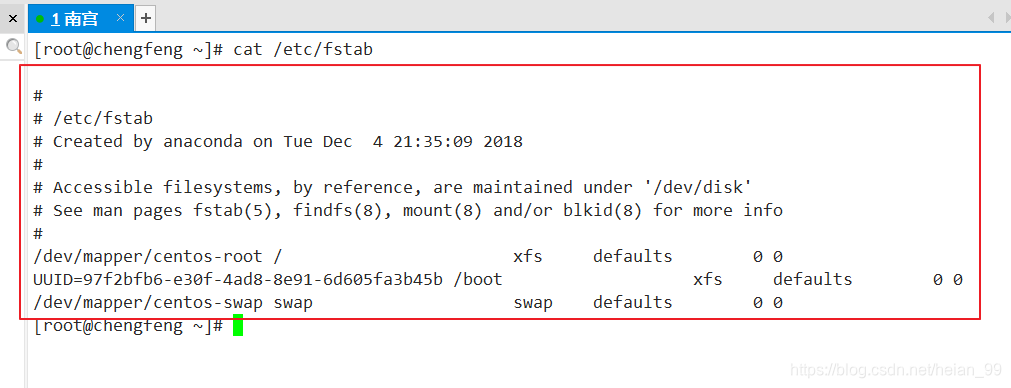
cat -n /etc/fstab

(2)查看未知类容
看未知的类容文件,我们不知道有多大,就用more和less查看比较方便使用
两者相同点:可以 翻页 或者 一行一行查看
不同点:more只能往下翻页,有的翻过了,就不能翻回去了
less可以往上往下随意查看翻动
more/less 分页显示类容
more 只能往下翻(空格:翻页 回车:一行一行 q:退出)
less 可以上下翻
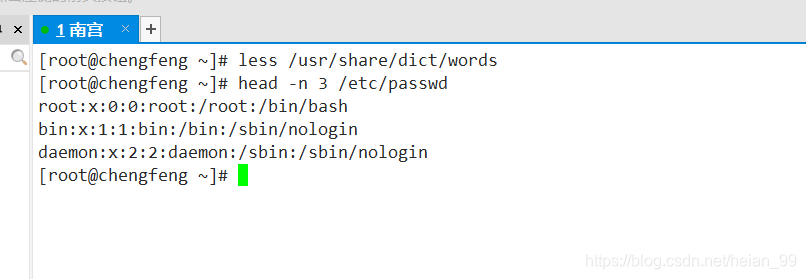
less /usr/share/dict/words

(3)head/tail(头部/尾巴)
head
不写-n显示前10行类容

[root@chengfeng ~]# head -n 3 /etc/passwd(显示前三行)
Tail
不写-n显示后10行类容
[root@chengfeng ~]# tail-n 3 /etc/passwd(显示前三行)

(4)查看文件类型
[root@chengfeng ~]# file /etc/passwd (查看文件类型)
(5)查看命令所在的路径
[root@chengfeng ~]# which ls

alias ls='ls --color=auto'

	/usr/bin/ls

[root@chengfeng ~]# which cd

/usr/bin/cd
(6)| :管道符 连接命令 前面的命令给后面命令当参数
[root@chengfeng ~]# head -n 5 /etc/passwd

root:x:0:0:root:/root:/bin/bash

bin:x:1:1:bin:/bin:/sbin/nologin

daemon:x:2:2:daemon:/sbin:/sbin/nologin

adm:x:3:4:adm:/var/adm:/sbin/nologin

lp:x:4:7:lp:/var/spool/lpd:/sbin/nologin

[root@chengfeng ~]# head -n 5 /etc/passwd | tail -n 1(显示passwd第5行的类容)

lp:x:4:7:lp:/var/spool/lpd:/sbin/nologin
显示前4个最大文件
root@chengfeng ~]# ls -lhS /etc/ | head -n 5

总用量 1.4M

-rw-r--r--.  1 root root   655K 6月   7 2013 services

-rw-r--r--   1 root root    92K 1月   7 14:35 ld.so.cache

-rw-r--r--   1 root root    51K 5月  15 2013 mime.types

-rw-r--r--   1 root root    15K 10月 31 08:17 autofs.conf
显示最近修改的文件
[root@chengfeng ~]# ls -lt /etc/ |head -n 11

总用量 1396

drwxr-xr-x   5 root lp        304 1月   7 19:01 cups

-rw-r--r--   1 root root       57 1月   7 19:01 resolv.conf

-rw-r--r--   1 root root     1992 1月   7 14:51 passwd

----------   1 root root     1138 1月   7 14:50 shadow

----------   1 root root      690 1月   7 14:50 gshadow

-rw-r--r--   1 root root      862 1月   7 14:50 group

-rw-r--r--.  1 root root      850 1月   7 14:49 group-

----------.  1 root root      682 1月   7 14:49 gshadow-
(7)查找文件或目录
# find 路径 查找方式
按文件名称查找
[root@chengfeng ~]# find /etc/ -name "*.conf"

/etc/resolv.conf

/etc/pki/ca-trust/ca-legacy.conf

/etc/yum/pluginconf.d/fastestmirror.conf
统计查找的文件个数
[root@chengfeng ~]# find /etc/ -name "*.conf" |wc -l

352
按文件大小查找
查找大于1M的文件
[root@chengfeng ~]# find /etc/ -size +1M

/etc/udev/hwdb.bin

/etc/selinux/targeted/contexts/files/file_contexts.bin

/etc/selinux/targeted/policy/policy.31

/etc/selinux/targeted/active/policy.kern

/etc/selinux/targeted/active/policy.linked
按文件的修改时间查找
查找7前修改的文件
[root@chengfeng ~]# find / -mtime +7查找7内修改的文件
[root@chengfeng ~]# find / -mtime -7按文件的类型查找
[root@chengfeng ~]# find /dev/ -type b

/dev/dm-1

/dev/dm-0

/dev/sda2

/dev/sda1

/dev/sda

/dev/sr0

[root@chengfeng ~]# find /dev/ -type l
复合条件查文件
[root@chengfeng ~]# find / -mtime +7 -a -size +100k(a:and并列)
Find /bj/ -name “*.txt” -exec rm -rf {}\; 删除
# Find /bj/ -name “*.txt” -exec cp {} /root \;复制
Linux命令查找文件目录的更多相关文章
- linux命令---查找文件中的内容
linux命令---查找文件中的内容 [yang@localhost ~]$ cat 1.txt |egrep '123456789|second'-------匹配123456789或者seco ...
- linux命令_文件目录操作命令
# linux命令--文件和目录操作命令 pwd "print working directory" 打印工作目录的绝对路径 范例: 在bash命令行显示当前用户的完整路径 系统B ...
- Linux系统查找文件目录的命令
查找目录名autobackup,并且列出路径:find -name 'autobackup'-type d find -name 'directoryname'-type d
- linux命令--查找与帮助
一.搜寻命令 1.whereis命令 whereis是搜索系统命令的命令,也就是说,whereis 命令不能搜索普通文件, 而只能搜索系统命令. 命令名称:whereis 英文原意:locate th ...
- 【Linux命令】文件目录管理命令7个(touch、mkdir、cp、mv、rm、dd、file)
目录 touch创建空白文档或设置文件时间 mkdir创建空白目录 cp复制文件或目录 mv剪切文件或重命名文件 rm删除文件或目录 dd按照指定大小和个数的数据库来复制文件或转换文件 file查看文 ...
- Linux - 命令 - 查找命令总结
关于查找文件的几个命令 一.find命令 find是最常用也是最强大的查找命令,可以查找任何类型的文件 find命令的一般格式: find <指定目录><指定条件><指定 ...
- linux命令-查找所有文件中包含某个字符串
查找目录下的所有文件中是否含有某个字符串 find .|xargs grep -ri "IBM" 查找目录下的所有文件中是否含有某个字符串,并且只打印出文件名 find .|xar ...
- Linux 命令:文件目录操作与实例
来源: http://blog.51cto.com/yuanzhitang/2056994 本文介绍基础的文件操作:创建,移动,编辑,删除 文件和文件夹 命令与案例: mkdir 创建目录 - ...
- 常用Linux命令笔记
任何脱离业务的架构都是耍流氓 只记录实际常用的Linux命令 常用Linux命令 查找安装路径: whereis nginx 查询nginx进程: ps aux|grep nginx 查看 CentO ...
随机推荐
- VIJOS-P1450 包裹快递
洛谷 P1542 包裹快递 https://www.luogu.org/problem/P1542 JDOJ 1527: VIJOS-P1450 包裹快递 https://neooj.com/oldo ...
- es6之后,真的不需要知道原型链了吗?
3月份几乎每天都能看到面试的人从我身边经过,前段时间同事聊面试话题提到了原型链,顿时激起了我在开始学习前端时很多心酸的回忆.第一次接触js的面向对象思想是在读<js高程设计>(红宝书)的时 ...
- python之路—从入门到放弃
python基础部分 函数 初识函数 函数进阶 装饰器函数 迭代器和生成器 内置函数和匿名函数 递归函数 常用模块 常用模块 模块和包 面向对象 初识面向对象 面向对象进阶 网络编程 网络编程 并发编 ...
- [LeetCode] 75. Sort Colors 颜色排序
Given an array with n objects colored red, white or blue, sort them in-place so that objects of the ...
- kubeadm部署K8S集群v1.16.3
本次先更新kubeadm快速安装K8S,二进制安装上次没写文档,后续更新,此次最新的版本是V1.16.3 1.关闭防火墙.关闭selinux.关闭swapoff -a systemctl stop f ...
- (十四)golang--函数和包
1.怎么定义函数? func (形参列表) 返回值列表{ 执行操作 return } 2.什么是包? 包的本质就是一个文件夹,存放程序文件 三大作用: 区分相同的名字的函数.变量等标识符: 当程序文件 ...
- Loj #3042. 「ZJOI2019」麻将
Loj #3042. 「ZJOI2019」麻将 题目描述 九条可怜是一个热爱打麻将的女孩子.因此她出了一道和麻将相关的题目,希望这题不会让你对麻将的热爱消失殆尽. 今天,可怜想要打麻将,但是她的朋友们 ...
- useEffect传入第二个参数陷入死循环
最近新项目刚上手,就用了react的hooks,之前也看过hooks的不少文章,只是还没实战实战. 业务场景1:需要在页面一开始时得到一个接口的返回值,取调用另一个接口. 我的思路是,先设置这个接口的 ...
- Ext.Net GridPanel (属性|方法|配置|详细介绍)
1.Ext.NET ---- GridPanel 主要配置项: store:表格的数据集 columns:表格列模式的配置数组,可自动创建ColumnModel列模式 autoExpandColumn ...
- dp - 最大子矩阵和 - HDU 1081 To The Max
To The Max Problem's Link: http://acm.hdu.edu.cn/showproblem.php?pid=1081 Mean: 求N*N数字矩阵的最大子矩阵和. ana ...