
~request库的使用
官方文档:
安装:pip install request
特点:requests最大的特点就是其风格简单直接优雅。
1.请求方法
import requests        # 导入requests

resp_1 = requests.get('http://httpbin.org/get')    # 发送get请求

resp_2 = requests.post('http://httpbin.org/post', data = {'key':'value'})    # 发送post请求,data:传递参数

resp_3 =requests.put('http://httpbin.org/put',data={'key': 'value'})   #发送put请求,data:传递参数

resp_4 = resp_5 = requests.head('http://httpbin.org/get')   # 发送head请求

resp_5 = requests.options('http://httpbin.org/get')    # 发送options请求

resp_6 = requests.delete('http://httpbin.org/delete')  # 发送delete请求
2.传递URL参数
# requests中使用关键字params传递URL参数

import requests

params = {'key1': 'value1', 'key2': ['value2','value3']}

resp = requests.get('http://httpbin.org/get', params=params)

print(resp.url)
3.自定义header
import requests

url = 'https://www.douban.com/'

headers = {

     'User-Agent': 'Mozilla/5.0 (Windows NT 10.0; WOW64) AppleWebKit/537.36 (KHTML, like Gecko) Chrome/63.0.3239.26 Safari/537.36 Core/1.63.6821.400 QQBrowser/10.3.3040.400'

}

resp = requests.get(url=url,headers=headers)

resp.encoding = 'utf-8'

print(resp.text)
4.自定义Cookie
import requests

cookies = {

    'cookies_are': 'working'

}

resp = requests.get('http://www.baidu.com',cookies=cookies)

for items in resp.cookies.items():

      cookies[items[0]] = items[1]

      print(cookies)
5.设置代理
proxies = {

    'http': 'http://127.0.0.10:3126',

    'https': 'http://10.10.1.10:1080'

}

requests.get('http://example.org',proxies=proxies)
6.重定向
# 在网络请求中,我们常常会遇到状态码是3开头的重定向问题,

# 在Requests中是默认开启允许重定向的,即遇到重定向时,会自动继续访问。

# 使用allow_redirects来控制是否开启重定向

resp = requests.get('http://github.com', allow_redirects=False)

print(resp.status_code)
7.禁止证书验证
"有时候我们使用了抓包工具,这个时候由于抓包工具提供的证书并不是由受信任的数字证书颁发机构颁发的,"

"所以证书的验证会失败,所以我们就需要关闭证书验证。在请求的时候把verify参数设置为False就可以关闭证书验证了。"

resp = requests.get('http://httpbin.org/post', verify=False)
8.设置超时
"设置访问超时,设置timeout参数就可"

requests.get('http://github.com', timeout=0.001)
9.接收响应
"通过Requests发起请求获取到的,是一个requests.models.Response对象。通过这个对象我们可以很方便的获取响应的内容。"

"之前通过urllib获取的响应,读取的内容都是bytes的二进制格式,需要我们自己去将结果decode()一次转换成字符串数据。"

"而Requests通过text属性,就可以获得字符串格式的响应内容。"

resp = requests.get('http://www.baidu.com')

resp.encoding = 'utf-8'   # --------------指定解码的编码格式

print(resp.text)          # --------------获取字符串格式的响应内容

print(resp.content)       # --------------获得原始的二进制数据

print(resp.json())        # --------------将json格式数据转换为字典格式的数据

print(resp.status_code)   # --------------获取响应的状态码

print(resp.headers)       # --------------获取响应的报头

print(resp.cookies)       # --------------获取服务器返回的cookies

print(resp.url)           # --------------查看访问的URL
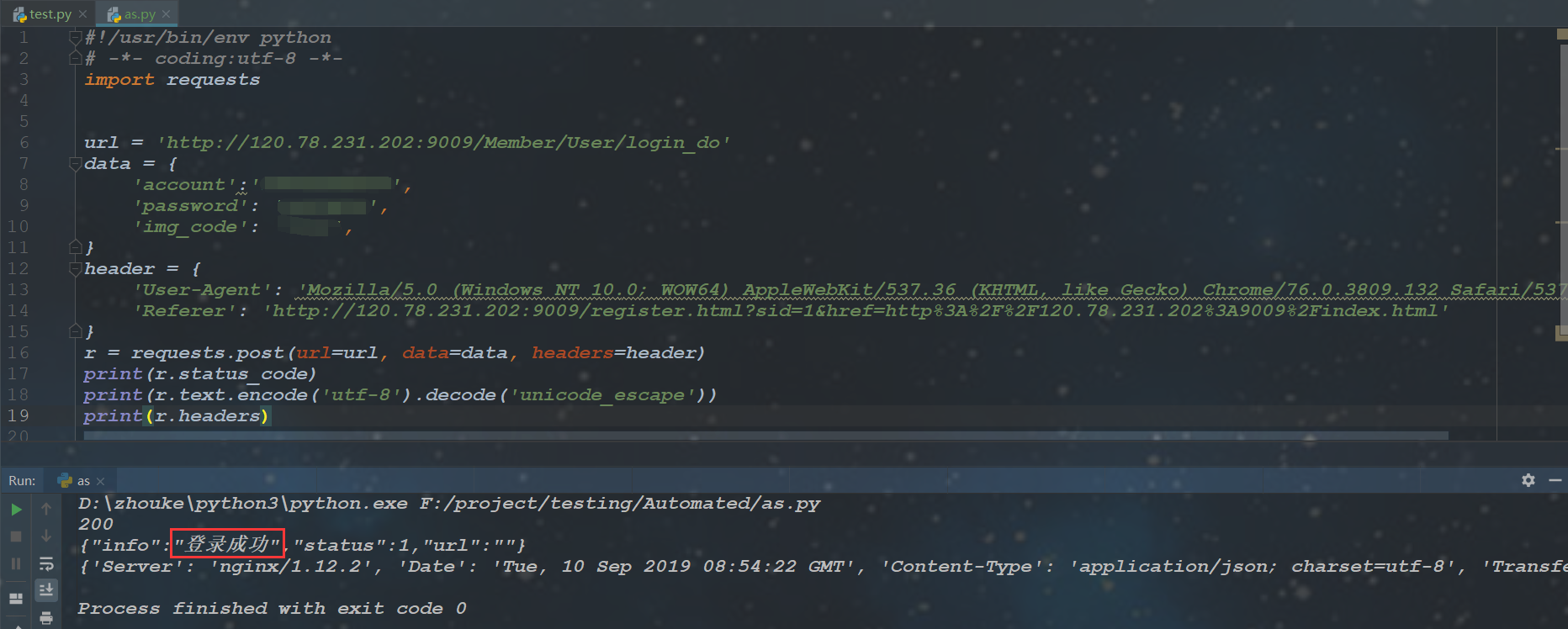
10.案例:使用request完成登录
~request库的使用的更多相关文章
- Python3 urllib.request库的基本使用
Python3 urllib.request库的基本使用 所谓网页抓取,就是把URL地址中指定的网络资源从网络流中读取出来,保存到本地. 在Python中有很多库可以用来抓取网页,我们先学习urlli ...
- Python request库与爬虫框架
Requests库的7个主要方法 requests.request():构造一个请求,支持以下各方法的基础方法 requests.get():获取HTML网页的主要方法,对应于HTTP的GET ...
- Request库使用response.text返回乱码问题
我们日常使用Request库获取response.text,这种调用方式返回的text通常会有乱码显示: import requests res = requests.get("https: ...
- 爬虫——urllib.request库的基本使用
所谓网页抓取,就是把URL地址中指定的网络资源从网络流中读取出来,保存到本地.在Python中有很多库可以用来抓取网页,我们先学习urllib.request.(在python2.x中为urllib2 ...
- 爬虫request库规则与实例
Request库的7个主要方法: requests.request(method,url,**kwargs) method:请求方式,对应get/put/post等7种: r = reques ...
- Python网络爬虫与信息提取[request库的应用](单元一)
---恢复内容开始--- 注:学习中国大学mooc 嵩天课程 的学习笔记 request的七个主要方法 request.request() 构造一个请求用以支撑其他基本方法 request.get(u ...
- Request库的安装与使用
Request库的安装与使用 安装 pip install reqeusts Requests库的7个主要使用方法 requests.request() 构造一个请求,支撑以下各方法的基础方法 req ...
- python网络爬虫学习笔记(一)Request库
一.Requests库的基本说明 引入Rquests库的代码如下 import requests 库中支持REQUEST, GET, HEAD, POST, PUT, PATCH, DELETE共7个 ...
- Request库学习
0x00前言 这库让我爱上了python 碉堡! 开心去学了一些python,然后就来学这个时候神库~~ 资料来源:http://cn.python-requests.org/en/latest/u ...
- 爬虫入门【1】urllib.request库用法简介
urlopen方法 打开指定的URL urllib.request.urlopen(url, data=None, [timeout, ]*, cafile=None, capath=None, ca ...
随机推荐
- 03、CPU主频,和性能
性能?时间的倒数 有两个指标:一个是响应时间或者叫执行时间:一个是吞吐率或者带宽,这两个就可以理解为办事的时间和办事的多少. 而 性能= 1/响应时间 CPU时钟:计算机的计时单位 程序的CPU执行时 ...
- etcd安装
etcd有三种集群化启动的配置方案,分别为静态配置启动.etcd自身服务发现.通过DNS进行服务发现,重点讲一下静态配置启动.根据启动环境,可以选择不同的配置方式.这也是新版etcd区别于旧版的一大特 ...
- 大数据技术之kettle(2)——练习三个基本操作
一.同一数据库两表数据关联更新 实现效果:把stu1的数据按id同步到stu2,stu2有相同id则更新数据 步骤: 1.在mysql中创建两张表: mysql>create database ...
- Go 随机打乱 字符串 数组
func Random(strings []string) string { for i := len(strings) - 1; i > 0; i-- { num := rand.Intn(i ...
- 第2课第1节_Java面向对象编程_类的引入_P【学习笔记】
摘要:韦东山android视频学习笔记 1. 面向对象编程的引入,我们先写一个简单的程序输出张三,李四的名字.代码如下,假如,现在我们要在名字前面添加籍贯广东,那样岂不是每个printf语句都得修改添 ...
- 分库分表 or NewSQL数据库?终于看懂应该怎么选!【转】
最近与同行科技交流,经常被问到分库分表与分布式数据库如何选择,网上也有很多关于中间件+传统关系数据库(分库分表)与NewSQL分布式数据库的文章,但有些观点与判断是我觉得是偏激的,脱离环境去评价方案好 ...
- numpy中的mean()函数
本文链接:https://blog.csdn.net/lilong117194/article/details/78397329mean() 函数定义:numpy.mean(a, axis, dtyp ...
- C#读取Word指定页的内容
/// <summary> /// Word按页读取内容 /// </summary> /// <param name="page">页数< ...
- composer Changed current directory to没反应
根据官方手册执行composer global require "laravel/installer" 显示Changed current directory to C:/User ...
- nginx高级玩法之根据来源ip分流
author :headsen chen date : 2019-08-15 16:37:05 notice :个人原创 需求:根据不同的请求的来源ip实现分流到不同的后端上去 方法一:1,在s ...