
SpringBoot系列之profles配置多环境(篇一)
SpringBoot profles配置多环境
23/100
发布文章
u014427391
软件环境简介
这里介绍一下SpringBoot提供的profiles属性加上maven配置一下多环境,在实践生产中,正规一点的可能有开发环境、测试环境、预发布环境、生产环境等等,而这些环境的参数肯定都不一样,换环境的时候,经常需要修改参数,参数一多,维护起来很麻烦,所以SpringBoot提供了通过profiles配置来达到多环境配置,不需要项目一上生产环境还是预发布就改一堆配置文件。
软件环境:
- application-dev(开发环境)
- application-test(测试环境)
- application-uat(预发布)
- application-prod(生产环境)
配置文件格式可以为preperties或者yml,因为yml写起来比较简介,所以本博客介绍一yml的配置文件,介绍一下配置方式:
yml配置profiles
先介绍一下通过SpringBoot配置文件的这种方式,这里需要新建如图yml配置文件:
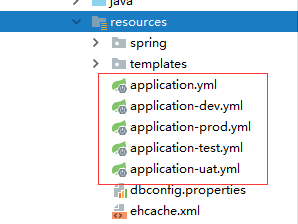
- application-dev.yml(开发环境)
- application-test.yml(测试环境)
- application-uat.yml(预发布)
- application-prod.yml(生产环境)
配置比较容易,需要在application.yml配置:
spring:

  profiles:

    active: dev
给出我的application.yml配置,可以参考:
server:

  context-path: /jeeplatform

  error:

    whitelabel:

      enabled: true

spring:

  profiles:

    active: dev
开发环境apprlication-dev.yml配置,根据自己需要配置:
server:

  port: 8080

spring:

  datasource:

    # 主数据源

    shop:

      url: jdbc:mysql://127.0.0.1:3306/jeeplatform?autoReconnect=true&useUnicode=true&characterEncoding=utf8&characterSetResults=utf8&useSSL=false

      username: root

      password: root

    driver-class-name: com.mysql.jdbc.Driver

    type: com.alibaba.druid.pool.DruidDataSource

    # 连接池设置

    druid:

      initial-size: 5

      min-idle: 5

      max-active: 20

      # 配置获取连接等待超时的时间

      max-wait: 60000

      # 配置间隔多久才进行一次检测,检测需要关闭的空闲连接,单位是毫秒

      time-between-eviction-runs-millis: 60000

      # 配置一个连接在池中最小生存的时间,单位是毫秒

      min-evictable-idle-time-millis: 300000

      # Oracle请使用select 1 from dual

      validation-query: SELECT 'x'

      test-while-idle: true

      test-on-borrow: false

      test-on-return: false

      # 打开PSCache,并且指定每个连接上PSCache的大小

      pool-prepared-statements: true

      max-pool-prepared-statement-per-connection-size: 20

      # 配置监控统计拦截的filters,去掉后监控界面sql无法统计,'wall'用于防火墙

      filters: stat,wall,slf4j

      # 通过connectProperties属性来打开mergeSql功能;慢SQL记录

      connection-properties: druid.stat.mergeSql=true;druid.stat.slowSqlMillis=5000

      # 合并多个DruidDataSource的监控数据

      use-global-data-source-stat: true

  # JPA配置

  jpa:

    database: mysql

    hibernate:

      show_sql: true

      format_sql: true

      ddl-auto: none

      naming:

        physical-strategy: org.hibernate.boot.model.naming.PhysicalNamingStrategyStandardImpl

  # MVC配置

  mvc:

    view:

      prefix: /WEB-INF/jsp/

      suffix: .jsp

  #Jedis配置

  jedis :

    pool :

      host : 127.0.0.1

      port : 6379

      password : redispassword

      timeout : 0

      config :

        maxTotal : 100

        maxIdle : 10

        maxWaitMillis : 100000
测试环境、预发布环境、生产环境的配置类似,根据需要配置
如果是jar,可以直接运行命令:
java -jar [jar名称].jar --spring.profiles.active=[环境参数(dev|test|uat|prod)]
eg:
java -jar myproject.jar --spring.profiles.active = dev
拓展,配置maven
这是另外的拓展,其实也是基于前面的配置,配置多环境信息在maven的pom文件里,主要目的是maven打包的时候,可以通过传环境参数对应package
配置,需要在maven的pom文件添加配置信息,这里设置默认开发环境,设置<activeByDefault>为true
<profiles>

        <profile>

            <id>dev</id>

            <properties>

                <activatedProperties>dev</activatedProperties>

                <project.packaging>jar</project.packaging>

            </properties>

            <activation>

                <activeByDefault>true</activeByDefault>

            </activation>

        </profile>

        <profile>

            <id>test</id>

            <properties>

                <activatedProperties>test</activatedProperties>

                <project.packaging>jar</project.packaging>

            </properties>

        </profile>

        <profile>

            <id>uat</id>

            <properties>

                <activatedProperties>uat</activatedProperties>

                <project.packaging>jar</project.packaging>

            </properties>

        </profile>

        <profile>

            <id>prod</id>

            <properties>

                <activatedProperties>prod</activatedProperties>

                <project.packaging>jar</project.packaging>

            </properties>

        </profile>

    </profiles>
可以修改一下application.yml:直接读maven配置文件:
server:

  context-path: /jeeplatform

  error:

    whitelabel:

      enabled: true

spring:

  profiles:

    active: @activatedProperties@

  application:

    name: @project.name@_${spring.profiles.active}
maven根据环境package
maven clean package -Pdev | -Ptest | -Puat | -Pprod
eg:直接package开发环境的
maven clean package -Pdev
SpringBoot系列之profles配置多环境(篇一)的更多相关文章
- SpringBoot系列之profles配置多环境(篇二)
SpringBoot系列之profles配置多环境(篇二) 继续上篇博客SpringBoot系列之profles配置多环境(篇一)之后,继续写一篇博客进行补充 写Spring项目时,在测试环境是一套数 ...
- SpringBoot系列之外部配置用法简介
SpringBoot系列之外部配置用法简介 引用Springboot官方文档的说法,官方文档总共列举了如下用法: 1.Devtools global settings properties on yo ...
- SpringBoot 系列教程自动配置选择生效
191214-SpringBoot 系列教程自动配置选择生效 写了这么久的 Spring 系列博文,发现了一个问题,之前所有的文章都是围绕的让一个东西生效:那么有没有反其道而行之的呢? 我们知道可以通 ...
- SpringBoot日记——SpringMvc自动配置与扩展篇
为了让SpringBoot保持对SpringMVC的全面支持和扩展,而且还要维持SpringBoot不写xml配置的优势,我们需要添加一些简单的配置类即可实现: 通常我们使用的最多的注解是: @Bea ...
- SpringBoot系列教程JPA之基础环境搭建
JPA(Java Persistence API)Java持久化API,是 Java 持久化的标准规范,Hibernate是持久化规范的技术实现,而Spring Data JPA是在 Hibernat ...
- SpringBoot系列之YAML配置用法
1.全局配置 SpringBoot的全局配置文件有两种: application.properties application.yml 配置文件的作用:修改SpringBoot自动配置的默认值,主要是 ...
- springboot系列四、配置模板引擎、配置热部署
一.配置模板引擎 在之前所见到的信息显示发现都是以 Rest 风格进行显示,但是很明显在实际的开发之中,所有数据的显示最终都应该交由页面完成,但是这个页面并不是*.jsp 页面,而是普通的*.html ...
- nopCommerce 3.9 大波浪系列 之 NUnit 配置调试环境
官网:http://nunit.org/ GitHub:https://github.com/nunit 本文只介绍NUnit在VS中的配置使用,进一步学习 NUnit 请参考官方文档. nopCom ...
- SpringBoot系列之学习教程汇总
对应SpringBoot系列博客专栏,例子代码,本博客不定时更新 一.配置篇 SpringBoot系列之@PropertySource读取yaml文件 >> source down ...
随机推荐
- mssql 导出作业,导出表,导出存储过程等
1.mssql 导出作业 1.选中sql server 代理-作业 2.点击F7 显示对象资源管理器详细信息,3.按住ctrol 选中 右键编写作业脚本到就可以了 2.mssql 导出表和存储过程等 ...
- apicloud开发app
1.apicloud官网 2.注册登录 3.开发控制台 4.创建应用 5.代码=>svn拉取代码,账号:注册账号的邮箱,密码:获取分支密码中的密码 6.编辑器下载对应的插件或者直接使用apicl ...
- 前端技术扫盲-rem和px以及em关系
首先rem,em和px都是长度单位,下面单独介绍各个单位的概念: px像素(Pixel).相对长度单位.像素px是相对于显示器屏幕分辨率而言的.PC端用比较多的. em是相对长度单位.相对于当前对象内 ...
- CTF必备技能丨Linux Pwn入门教程——ROP技术(下)
Linux Pwn入门教程系列分享如约而至,本套课程是作者依据i春秋Pwn入门课程中的技术分类,并结合近几年赛事中出现的题目和文章整理出一份相对完整的Linux Pwn教程. 教程仅针对i386/am ...
- jQuery的window.onload和$(function(){})
<script src="js/jquery-1.11.3.js"></script> <script> //在onload事件中,所有页面内容 ...
- Jenkins的CI持续集成
Jenkins的CI持续集成 全局配置 系统管理->全局工具配置,配置Git,JDK和Maven 1)解压maven到当前目录 tar zxf apache-maven-3.5.4-bin.ta ...
- Python环境安装与基础语法(1)——计算机基础知识
Python安装 pip #包管理工具 pip install #安装包 pip list #查看包 IPython #增强的python shell,自动补全,自动缩进,支持shell,增加了很多函 ...
- Jquery ajax 同步阻塞引起的UI线程阻塞的坑(loading图片显示不出来,layer.load延迟)
今天想做一个点击地市用ajax重新获取数据刷新页面功能,因为ajax属于耗时操作,想在获取数据且加载页面时显示加载遮罩层,结果发现了ajax的好多坑. 例如如上栗子,我想点击按钮让遮罩层显示,ajax ...
- 2.2 Scala基础知识
一.基本数据类型和变量 1.基本数据类型 java中每一个数据类型都是一个类: scala没有自己定义String类型,String类型是从java.lang.String照搬的. 字面量(liter ...
- python安装thrift-sasl提示缺少sasl.h文件
这其实是在pip安装Cyrus-SASL bindings for Python时报的错误. 由于没有whl文件,都是源码要经过编译之后才能安装. 所以,报这个错误,一般都是缺少安装软件造成的. 不管 ...