
文件分片 浏览器文件大小限制 自定义请求头 在一个资源的加载进度停止之后被触发 arrayBuffer 异步 二进制数据缓存区
 js 整数限制 浏览器文件大小限制

https://w3c.github.io/FileAPI/#dom-blob-arraybuffer

https://developer.mozilla.org/en-US/docs/Web/API/Blob
<!DOCTYPE html>

<html lang="en">

<head>

    <meta charset="UTF-8">

    <title>upload</title>

</head>

<body>

    <input type="file" name="file" id="file">

    <button id="upload" onClick="upload()">upload</button>

    <script>

        let bytesPerPiece = 1024 * 1024 * 2; // 每块Part最小100KB(最后一块可以比100KB小),最大5GB。

        const UploadId = "D91419EF432C4F208DC09EDF869EE224";

        const apiUrl = 'http://test:8082/api/cloud-resource-oss/upload-part/';

        // https://developer.mozilla.org/en-US/docs/Web/API/Fetch_API/Using_Fetch

        // https://developer.mozilla.org/zh-CN/docs/Web/API/File/Using_files_from_web_applications

        // https://stackoverflow.com/questions/42506376/custom-headers-are-not-added-to-request-object

        async function postData(url = '', data = {}) {

            // Default options are marked with *

            const response = await fetch(url, {

                method: 'POST', // *GET, POST, PUT, DELETE, etc.

                //  mode: 'cors', // no-cors, *cors, same-origin

                mode: 'same-origin', // no-cors, *cors, same-origin

                cache: 'no-cache', // *default, no-cache, reload, force-cache, only-if-cached

                // credentials: 'omit', // include, *same-origin, omit

                credentials: 'include', // include, *same-origin, omit

                headers: {

                    'Content-Type': 'application/json',

                    // 'Content-Type': 'application/x-www-form-urlencoded',

                    'X-ACCESS-TOKEN': '1',

                },

                redirect: 'follow', // manual, *follow, error

                referrer: 'no-referrer', // no-referrer, *client

                body: JSON.stringify(data) // body data type must match "Content-Type" header

            });

            // return await response.json(); // parses JSON response into native JavaScript objects

            return await response;

        }

        function transformArrayBufferToBase64(buffer) {

            var binary = '';

            var bytes = new Uint8Array(buffer);

            var len = bytes.byteLength;

            for (var i = 0; i < len; i++) {

                binary += String.fromCharCode(bytes[i]);

            }

            return window.btoa(binary);

        }

        //发送请求

        async function upload() {

            let ele = document.getElementById("file")

            const blob = ele.files[0];

            let start = 0;

            let end;

            let index = 0;

            const filesize = blob.size;

            const filename = blob.name;

            //计算文件切片总数

            const totalPieces = Math.ceil(filesize / bytesPerPiece);

            console.log("filesize, bytesPerPiece, filesize / bytesPerPiece", filesize, bytesPerPiece, filesize / bytesPerPiece)

            while (index < totalPieces) {

                end = start + bytesPerPiece;

                if (end > filesize) {

                    end = filesize;

                }

                console.log("index", index)

                // The default value is 0.

                // The default value is size.

                let chunk = blob.slice(start, end);//切割文件

                let sliceIndex = blob.name + index;

                console.log('chunk', chunk)

                let data = {};

                data["region_id"] = "cn-beijing";

                data["BucketName"] = "aa34";

                data["ObjectName"] = "32.6M.zip";

                data["PartNumber"] = index + 1;

                data["PartSize"] = bytesPerPiece;

                data["TotalSize"] = filesize;

                data["UploadId"] = UploadId;

                let reader = new FileReader();

                // 处理loadend事件。该事件在读取操作结束时(要么成功,要么失败)触发。

                reader.onloadend = function (evt) {

                    data["PartBytes"] = transformArrayBufferToBase64(evt.target.result)

                    try {

                        const ret = postData(apiUrl, data);

                    } catch (error) {

                        console.error(error);

                    }

                }

                reader.readAsArrayBuffer(chunk);

                start = end;

                index++;

            }

        }

    </script>

</body>

</html>
文件校验
<!DOCTYPE html>

<html lang="en">

<head>

    <meta charset="UTF-8">

    <title>upload</title>

</head>

<body>

    <input type="file" name="file" id="file">

    <button id="upload" onClick="upload()">upload</button>

    <script>

        let bytesPerPiece = 1024 * 1024 * 1; // 每块Part最小100KB(最后一块可以比100KB小),最大5GB。

        const UploadId = "8509183A4A5C4DFF8EEC19DF78B5E8EC";

        const apiUrl = 'http://test:8082/api/cloud-resource-oss/upload-part/';

        // https://developer.mozilla.org/en-US/docs/Web/API/Fetch_API/Using_Fetch

        // https://developer.mozilla.org/zh-CN/docs/Web/API/File/Using_files_from_web_applications

        // https://stackoverflow.com/questions/42506376/custom-headers-are-not-added-to-request-object

        async function postData(url = '', data = {}) {

            // Default options are marked with *

            const response = await fetch(url, {

                method: 'POST', // *GET, POST, PUT, DELETE, etc.

                //  mode: 'cors', // no-cors, *cors, same-origin

                mode: 'same-origin', // no-cors, *cors, same-origin

                cache: 'no-cache', // *default, no-cache, reload, force-cache, only-if-cached

                // credentials: 'omit', // include, *same-origin, omit

                credentials: 'include', // include, *same-origin, omit

                headers: {

                    'Content-Type': 'application/json',

                    // 'Content-Type': 'application/x-www-form-urlencoded',

                    'X-ACCESS-TOKEN': 'token9999999',

                    'X-Appid': 'aliid1',

                    'X-Proxy-Url': 'http://120.79.10.103:8004',

                },

                redirect: 'follow', // manual, *follow, error

                referrer: 'no-referrer', // no-referrer, *client

                body: JSON.stringify(data) // body data type must match "Content-Type" header

            });

            // return await response.json(); // parses JSON response into native JavaScript objects

            return await response;

        }

        function transformArrayBufferToBase64(buffer) {

            let binary = '';

            const bytes = new Uint8Array(buffer);

            const len = bytes.byteLength;

            for (let i = 0; i < len; i++) {

                binary += String.fromCharCode(bytes[i]);

            }

            return window.btoa(binary);

        }

        let data = {};

        data["region_id"] = "cn-beijing";

        data["BucketName"] = "aaaaaaaaaaa434343434";

        data["ObjectName"] = "32.6M.zip";

        var ele;

        var blob;

        async function handlerOrder(jobList) {

            // https://developers.google.com/web/fundamentals/primers/async-functions

            /*

async function logInOrder(urls) {

  for (const url of urls) {

    const response = await fetch(url);

    console.log(await response.text());

  }

}

代码简洁得多,但我的第二次获取要等到第一次获取读取完毕才能开始,以此类推

            */

            for (let i in jobList) {

                console.log("i", i)

                const job = jobList[i]

                // blob, start, end, index,

                const start = job["start"]

                const end = job["end"]

                const index = job["index"]

                const partSize = job["PartSize"]

                const response = await worker(start, end, index, partSize);

                console.log("job,response", job, await response)

            }

        }

        async function worker(start, end, index, partSize) {

            // The default value is 0.

            // The default value is size.

            let chunk = blob.slice(start, end);//切割文件

            data["PartNumber"] = index + 1;

            data["PartSize"] = partSize;

            let reader = new FileReader();

            reader.onloadstart = function (evt) {

            }

            // 处理loadend事件。该事件在读取操作结束时(要么成功,要么失败)触发。

            reader.onloadend = function (evt) {

                data["PartBytes"] = transformArrayBufferToBase64(evt.target.result)

                try {

                    return postData(apiUrl, data);

                } catch (error) {

                    console.error(error);

                }

            }

            reader.readAsArrayBuffer(chunk);

        }

        async function upload() {

            ele = document.getElementById("file")

            blob = ele.files[0];

            filesize = blob.size;

            filename = blob.name;

            let start = 0;

            let end;

            let index = 0;

            //计算文件切片总数

            const totalPieces = Math.ceil(filesize / bytesPerPiece);

            console.log("filesize, bytesPerPiece, filesize / bytesPerPiece", filesize, bytesPerPiece, filesize / bytesPerPiece)

            data["TotalSize"] = filesize;

            data["UploadId"] = UploadId;

            let partSize = bytesPerPiece;

            let passIndex = []

            let jobList = []

            // blob, start, end, index, bytesPerPiece

            // 建立任务池

            while (index < totalPieces) {

                end = start + bytesPerPiece;

                if (end > filesize) {

                    end = filesize;

                    partSize = filesize - start;

                }

                console.log("index", index)

                data["PartNumber"] = index + 1;

                data["PartSize"] = partSize;

                let d = {}

                d["start"] = start

                d["end"] = end

                d["index"] = index

                d["PartSize"] = partSize

                jobList.push(d)

                index++;

                start = end;

            }

            // 处理任务

            // 文件校验

            await handlerOrder(jobList)

        }

    </script>

</body>

</html>
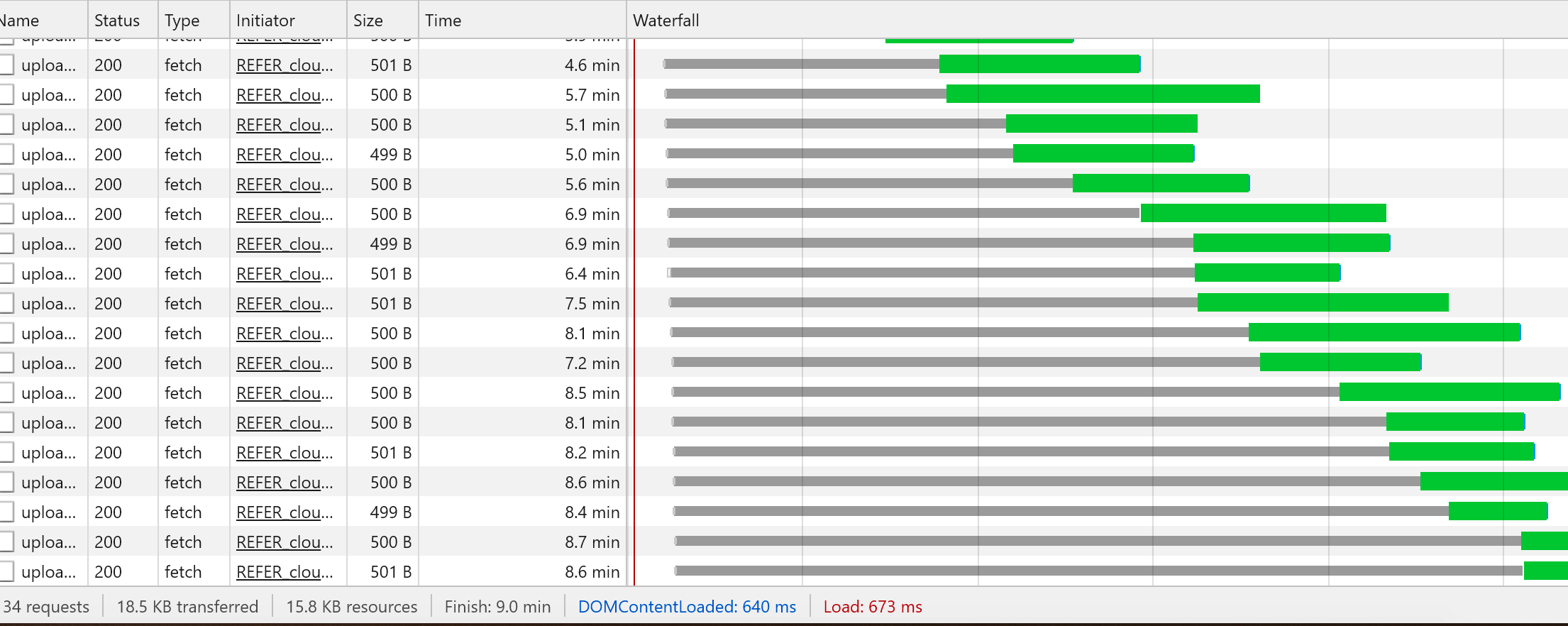
TODO 零拷贝
https://developer.mozilla.org/zh-CN/docs/Web/JavaScript/Reference/Global_Objects/TypedArray
一个TypedArray 对象描述一个底层的二进制数据缓存区的一个类似数组(array-like)视图。事实上,没有名为 TypedArray的全局对象,也没有一个名为的 TypedArray构造函数。

当传入length参数时,一个内部数组缓冲区会被创建在内存中。该缓存区的大小是传入的length乘以数组中每个元素的字节数(BYTES_PER_ELEMENT),每个元素的值都为0。(译者注:每个元素的字节数是由具体的构造函数决定的,比如Int16Array的每个元素的字节数为2,Int32Array的每个元素的字节数为4)
FileReader 对象允许Web应用程序异步读取存储在用户计算机上的文件(或原始数据缓冲区)的内容,使用 File 或 Blob 对象指定要读取的文件或数据。
其中File对象可以是来自用户在一个<input>元素上选择文件后返回的FileList对象,也可以来自拖放操作生成的 DataTransfer对象,还可以是来自在一个HTMLCanvasElement上执行mozGetAsFile()方法后返回结果。
文件分片 浏览器文件大小限制 自定义请求头 在一个资源的加载进度停止之后被触发 arrayBuffer 异步 二进制数据缓存区的更多相关文章
- Python3 自定义请求头消息headers
Python3 自定义请求头消息headers 使用python爬虫爬取数据的时候,经常会遇到一些网站的反爬虫措施,一般就是针对于headers中的User-Agent,如果没有对headers进行设 ...
- 使用 Spring RestTemplate 调用 rest 服务时自定义请求头(custom HTTP headers)
在 Spring 3.0 中可以通过 HttpEntity 对象自定义请求头信息,如: private static final String APPLICATION_PDF = "app ...
- Ajax设置自定义请求头的两种方法
用自定义请求头token为例 方法一 $.ajax({ type: "post", url:"http://127.0.0.1:4564/bsky-app/templat ...
- ASP.NET Core - 实现Http自定义请求头策略
前言 在正常的情况下,当我们系统用到JWT认证方式时,需要在Http请求头添加Authorization: XXX,这样在后台服务的控制器中打上[Authorize]授权标签,就限定所有的请求必须通过 ...
- 灵活、可高度自定义的——Progress进度圈、弹窗、加载进度、小菊花
DDProgressHUD的介绍 提供了四种类型的展示: 显示无限旋转的加载图(比如小菊花,可以自定义),显示文字信息.网络刷新时经常用到. 显示加载进度的动画,也可以显示文字.网络下载时用的比较多, ...
- 为不同分辨率单独做样式文件,在页面头部用js判断分辨率后动态加载定义好的样式文件
为不同分辨率单独做样式文件,在页面头部用js判断分辨率后动态加载定义好的样式文件.样式文件命名格式如:forms[_屏幕宽度].css,样式文件中只需重新定义文本框和下拉框的宽度即可. 在包含的头文件 ...
- WPF 客户端浏览器 添加Loading加载进度
在windows开发界面时,使用浏览器来请求和显示网页内容,是比较常见的. 但是在请求网页内容时,因网速或者前端功能复杂加载较慢,亦或者加载时遇到各种问题,如空白/黑屏/加载不完整/证书问题等. 因此 ...
- react封装简单的浏览器顶部加载进度条全局组件
在项目中经常会有在请求前后加loading或者加加载进度条,一般这些组件都会抽离出来作为全局组件 进度条的插件貌似都不是很符合自己项目中的需求,于是.. 参考nprogress样式,自己在项目中封装组 ...
- VC++ 使用WebBrowser控件中html文件以资源形式加载
. . . . //加载资源文件中的HTML,IDR_HTML1就是HTML文件在资源文件中的ID wchar_t self_path[MAX_PATH] = { }; GetModuleFileNa ...
随机推荐
- linux 中常遇到的问题
1.上传文件是速度为零 xshell连接对应的Ubuntu服务器上在Ubuntu服务器上安装lrzszsudo apt install lrzsz xshell连接对应的centos服务器上 yum ...
- scrapy xpath去除空格
content = response.xpath("normalize-space('//img/@src')")
- springboot+druid+mybatis
pom.xml <dependency> <groupId>com.microsoft.sqlserver</groupId> <artifactId> ...
- Flask介绍及简单使用
Flask Django是一个大而全的框架,Flask是一个轻量级的框架. 区别: Django内部集成了大量的组件:请求处理是逐一封装和传递: Flask本身并没有太多的功能,但是第三方组件非常丰富 ...
- Flask入门到放弃(五)—— 蓝图
转载请在文章开头附上原文链接地址:https://www.cnblogs.com/Sunzz/p/10980094.html 蓝图 Blueprint 模块化 随着flask程序越来越复杂,我们需要对 ...
- 浅谈HTTP中Get与Post的区别【转】
转自http://www.cnblogs.com/hyddd/archive/2009/03/31/1426026.html#commentform 感谢LZ分享 Http定义了与服务器交互的不同方法 ...
- 静态Pod
静态Pod kubernetes 除了我们常用的普通Pod外,还有一种特殊的Pod,叫静态Pod. 概念 静态Pod是直接由节点kubelet进程来管理的,不能通过apiserver的master节点 ...
- 《基于B_S模式的教务管理系统设计与实现》论文笔记(十九)
标题:广州医科大学考务管理系统的研究与分析 一.基本信息 时间:2012 来源:南通大学杏林学院 关键词:: 考务管理:网络考试:数据库系统 二.研究内容 1.重修补考报名考务管理系统采用的技术: 重 ...
- 如何使用project制定项目计划?(附详细步骤截图)
使用project制定项目计划可以分为六个步骤,如下图(1): 图(1)-project制定项目计划步骤 下面我们就以project2010为例,按上图所示步骤对如何制定项目计划进行详细说明: 一.创 ...
- Xms Xmx PermSize MaxPermSize的含义
参数的含义 -vmargs -Xms128M -Xmx512M -XX:PermSize=64M -XX:MaxPermSize=128M -vmargs 说明后面是VM的参数,所以后面的其实都是JV ...