
python写一个随机点名软件
最近有个随机点名软件的需求,故写了一个,上代码:github地址
# -*- coding: utf-8 -*-

# @Time    : 18-12-31 下午4:21

# @Author  : Felix Wang

from tkinter import *

import tkinter.font as tkFont

import random

import gc

import os, sys

import chardet

import copy

from threading import Thread

import time

def resource_path(relative):

    """

    图片路径

    :param relative:

    :return:

    """

    if hasattr(sys, "_MEIPASS"):

        return os.path.join(sys._MEIPASS, relative)

    return os.path.join(relative)

def center_window(root, width, height):

    """

    中心大小

    :param root: tk对象

    :param width:

    :param height:

    :return:

    """

    screenwidth = root.winfo_screenwidth()

    screenheight = root.winfo_screenheight()

    size = '%dx%d+%d+%d' % (width, height, (screenwidth - width) / 2, (screenheight - height) / 2)

    root.geometry(size)

def clear():

    lb.delete(0, END)

def get_names():

    names = []

    name_path = os.path.join(BASE_DIR, 'name.txt')

    with open(name_path, 'rb') as f:

        data = f.read()

        cod = chardet.detect(data)['encoding']

        if 'gb' in str(cod):

            cod = 'gbk'

        for name in data.decode(cod).strip().split('\n'):

            if name.strip():

                names.append(name.strip())

        return names

class MyThread(Thread):

    def __init__(self):

        self.ifdo = False

        self.auto_choise = False

        self.is_auto = -1

        super().__init__()

    def run(self):

        while True:

            if self.is_auto is True:

                while self.ifdo:

                    index = random.randint(0, len(names) - 1)

                    echo["text"] = names[index]

                    root.update_idletasks()

                    time.sleep(1 / 23 - 0.003)

                self.is_auto = -1

            elif self.is_auto is False:

                if self.auto_choise:

                    self.auto()

                    self.is_auto = -1

            time.sleep(0.1)

    def stop(self):

        """

        手动抽奖时点击停止按钮时的操作

        :return:

        """

        if self.is_auto:

            self.ifdo = False

            button2["text"] = '手动抽奖'

            pict['image'] = huaji_gif

            _name = random.choice(names)

            echo["text"] = _name

            lb.insert(END, _name)

            root.update_idletasks()

            root.update()

            for x in locals().keys():

                del locals()[x]

            gc.collect()

            pict['image'] = huaji_gif

            scrolly.update()

    def go(self):

        """

        手动开始时的停止标记

        :return:

        """

        if self.is_auto == -1:

            self.is_auto = True

            self.ifdo = True

            pict["image"] = huang_gif

            button2["text"] = '点击停止'

    def auto_start(self):

        """

        自动开始设置更改标记

        :return:

        """

        if self.is_auto == -1:

            self.is_auto = False

            self.auto_choise = True

            pict["image"] = huang_gif

            button["text"] = '先别点我'

            global ft1

            ft1 = tkFont.Font(family='Fixdsys', size=80, weight=tkFont.BOLD)

    def auto(self):

        """

        自动开始时执行的操作

        :return:

        """

        copy_names = copy.deepcopy(names)

        ren = int(v.get())

        for i in range(ren):

            for a in range(23):

                index = random.randint(0, len(names) - 1)

                echo["text"] = random.choice(names)

                root.update_idletasks()

                time.sleep(1 / 23 - 0.003)

            choise_name = copy_names.pop(random.choice(range(len(copy_names))))

            echo["text"] = choise_name

            lb.insert(END, choise_name)

            if i == ren - 1:

                pict['image'] = huaji_gif

                button["text"] = '开始抽奖'

            for a in range(5):

                root.update()

                time.sleep(0.06)

        root.update_idletasks()

        for x in locals().keys():

            del locals()[x]

        gc.collect()

        scrolly.update()

        self.auto_choise = False

flag = False

def name2():

    global flag

    flag = not flag

    if flag:

        tr.go()

    else:

        tr.stop()

def name():

    tr.auto_start()

try:

    BASE_DIR = os.path.dirname(os.path.abspath(__file__))

    names = get_names()

    root = Tk()

    root.title("随机抽奖器(by 王以涛)")

    center_window(root, 570, 160)

    ft = tkFont.Font(family='Fixdsys', size=40, weight=tkFont.BOLD)

    ft1 = tkFont.Font(family='Fixdsys', size=80, weight=tkFont.BOLD)

    echo = Label(root, text='随机抽奖', font=ft, width=8)  # 默认显示

    echo.grid(row=1, column=1, columnspan=2)

    scrolly = Scrollbar(root)

    scrolly.grid(row=1, column=5, rowspan=2, ipady=30)

    lb = Listbox(root, yscrollcommand=scrolly.set, exportselection=False, height=6)

    lb.grid(row=1, column=3, rowspan=2, columnspan=2, pady=0)

    scrolly['command'] = lb.yview

    # button = Button(root, text='删除所选名字', command=lambda x=lb: x.delete(ACTIVE))

    # button.grid(row=3, column=3)

    button = Button(root, text='删除所有名字', command=clear)

    button.grid(row=3, column=4)

    v = StringVar()

    Scale(root, from_=1, to=len(names), resolution=1, orient=HORIZONTAL, variable=v).grid(row=2, column=1, columnspan=2)

    # 抽奖时的图片

    data_dir = os.path.join(BASE_DIR, "img")

    huaji_gif = PhotoImage(file=resource_path(os.path.join(data_dir, 'huaji.gif')))

    huang_gif = PhotoImage(file=resource_path(os.path.join(data_dir, 'huang.gif')))

    pict = Label(root, image=huaji_gif)

    pict.grid(row=1, column=0, rowspan=3)

    button = Button(root, text='自动抽奖', command=name)

    button.grid(row=3, column=1, columnspan=1)

    flag = False

    button2 = Button(root, text='手动抽奖', command=name2)

    button2.grid(row=3, column=2, columnspan=1)

    tr = MyThread()

    tr.setDaemon(True)

    tr.start()

    root.mainloop()

except Exception as e:

    print('错误信息', e)

    time.sleep(60)
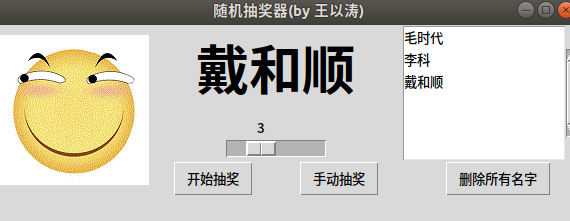
效果如下:

python写一个随机点名软件的更多相关文章
- 用Python写一个随机数字生成代码,5行代码超简单
本文的文字及图片来源于网络,仅供学习.交流使用,不具有任何商业用途,版权归原作者所有,如有问题请及时联系我们以作处理. 第一步,安装 random 库 random库是使用随机数的Python标准库 ...
- 用Python写一个简单的Web框架
一.概述 二.从demo_app开始 三.WSGI中的application 四.区分URL 五.重构 1.正则匹配URL 2.DRY 3.抽象出框架 六.参考 一.概述 在Python中,WSGI( ...
- 十行代码--用python写一个USB病毒 (知乎 DeepWeaver)
昨天在上厕所的时候突发奇想,当你把usb插进去的时候,能不能自动执行usb上的程序.查了一下,发现只有windows上可以,具体的大家也可以搜索(搜索关键词usb autorun)到.但是,如果我想, ...
- 【Python】如何基于Python写一个TCP反向连接后门
首发安全客 如何基于Python写一个TCP反向连接后门 https://www.anquanke.com/post/id/92401 0x0 介绍 在Linux系统做未授权测试,我们须准备一个安全的 ...
- Python写一个自动点餐程序
Python写一个自动点餐程序 为什么要写这个 公司现在用meican作为点餐渠道,每天规定的时间是早7:00-9:40点餐,有时候我经常容易忘记,或者是在地铁/公交上没办法点餐,所以总是没饭吃,只有 ...
- python写一个能变身电光耗子的贪吃蛇
python写一个不同的贪吃蛇 写这篇文章是因为最近课太多,没有精力去挖洞,记录一下学习中的收获,python那么好玩就写一个大一没有完成的贪吃蛇(主要还是跟课程有关o(╥﹏╥)o,课太多好烦) 第一 ...
- [py]python写一个通讯录step by step V3.0
python写一个通讯录step by step V3.0 参考: http://blog.51cto.com/lovelace/1631831 更新功能: 数据库进行数据存入和读取操作 字典配合函数 ...
- #写一个随机产生138开头手机号的程序 1.输入一个数量,产生xx条手机号 2.产生的这些手机号不能重复
import randomcount=int(input('请输入你所想要手机号数量:'))prefix='138'for i in range(count): num=random.sample(r ...
- 用python写一个自动化盲注脚本
前言 当我们进行SQL注入攻击时,当发现无法进行union注入或者报错等注入,那么,就需要考虑盲注了,当我们进行盲注时,需要通过页面的反馈(布尔盲注)或者相应时间(时间盲注),来一个字符一个字符的进行 ...
随机推荐
- LOJ3120 CTS2019 珍珠 生成函数、二项式反演、NTT
传送门 题目大意:给出一个长度为\(n\)的序列\(a_i\),序列中每一个数可以取\(1\)到\(D\)中的所有数.问共有多少个序列满足:设\(p_i\)表示第\(i\)个数在序列中出现的次数,\( ...
- 支付宝支付回调方法RSA2验签失败处理方法
支付宝支付签名方式RSA2生成支付时使用的是支付宝公钥和应用私钥, 而不是应用公钥,支付宝公钥的生成是根据上传应用公钥而变动的, 所以在做回调的时候参数ALIPAY_PUBLIC_KEY也需要传支付宝 ...
- pip install scrapy 报错
最近在研究Python,安装scrapy过程中报错如下图: 尝试找了一下解决方式:下载已经编译好的.whl安装包 步骤如下: 1.下载与Python版本和系统版本相匹配的Twisted包,网址:htt ...
- 关于Eclipse导入maven项目报空指针异常
今天新建了一个maven项目,因为是通过公司的工具新建的,代码拉下来就有src.pom.xml文件. 导入Eclipse却报空指针异常.具体如下: An error has occurred. See ...
- 启动Nginx服务失败:Job for nginx.service failed because the control process exited with error code. See "systemctl status nginx.service" and "journalctl -xe" for details.
首次接触nginx,安装完使用命令 service nignx restart 后,出现这个错误,并按照提示给出的命令查看错误详情 systemctl status nginx.service ...
- Python多版本环境搭建(Linux系统)
python Linux 环境 (版本隔离工具) 首先新建用户,养成良好习惯 useradd python 1.安装pyenv GitHub官网: https://github.c ...
- c# 搜索字符串
- Photozoom图像放大的技术一二事
平行空间下,未知的可能不仅仅是这个世界,还可能是前所未有的未知的探索.那么对于微小型世界来说,我们就需要借助技术的支撑来发现.photozoom就好比是“电子的放大镜”,对我们清晰图像的放大起到了重要 ...
- mysql_safe和mysql_multi
1 mysql_safe 原理 mysqld_safe其实为一个shell脚本(封装mysqld),启动时需要调用server和database(即/bin和/data目录),因此需要满足下述条件之一 ...
- K3 Cloud的数据中心加载异常处理
以前一直是财务维护的K3 Cloud突然说不能登录,用的SQL 2008的数据库,运维也搞不定,找帮忙,因为是部署在阿里云上,上去看看数据库,这个K3数据库占了600多G,想看看这个表结构,就是打不 ...