
Linux操作系统内核编译之NTFS文件系统模块支持案例
Linux操作系统内核编译之NTFS文件系统模块支持案例
作者:尹正杰
版权声明:原创作品,谢绝转载!否则将追究法律责任。
一.内核编译概述
  单内核体系设计、但充分借鉴了微内核设计体系的优点,为内核引入模块化机制

  内核组成部分:

    kernel:([*]:Y)
      内核核心,一般为bzImage,通常在/boot目录下

      名称为 vmlinuz-VERSION-RELEASE

    kernel object:([M]:M)
      内核对象,一般放置于/lib/modules/VERSION-RELEASE/

    辅助文件:ramdisk

      initrd

      initramfs
二.内核版本
运行中的内核:

  uname命令:

    uname - print system information

    uname [OPTION]...

      -n: 显示节点名称

      -r: 显示VERSION-RELEASE

      -a:显示所有信息
三.内核模块管理相关命令
1>.lsmod命令
  显示由核心已经装载的内核模块

  显示的内容来自于: /proc/modules文件
[root@yinzhengjie ~]# lsmod

Module                  Size  Used by

tcp_diag

inet_diag                  tcp_diag

nls_utf8

fuse

rfcomm

sco

bridge

bnep

l2cap                     rfcomm,bnep

autofs4

8021q

garp                       8021q

stp                        bridge,garp

llc                        bridge,garp,stp

ipt_REJECT

nf_conntrack_ipv4

nf_defrag_ipv4             nf_conntrack_ipv4

iptable_filter

ip_tables                 iptable_filter

ip6t_REJECT

nf_conntrack_ipv6

nf_defrag_ipv6            nf_conntrack_ipv6

xt_state

nf_conntrack              nf_conntrack_ipv4,nf_conntrack_ipv6,xt_state

ip6table_filter

ip6_tables                ip6table_filter

ib_ipoib

rdma_ucm

ib_ucm

ib_uverbs                 rdma_ucm,ib_ucm

ib_umad

rdma_cm                   rdma_ucm

ib_cm                     ib_ipoib,ib_ucm,rdma_cm

iw_cm                     rdma_cm

ib_sa                     ib_ipoib,rdma_ucm,rdma_cm,ib_cm

ib_mad                    ib_umad,ib_cm,ib_sa

ib_core                   ib_ipoib,rdma_ucm,ib_ucm,ib_uverbs,ib_umad,rdma_cm,ib_cm,iw_cm,ib_sa,ib_mad

ib_addr                    rdma_ucm,rdma_cm,ib_core

ipv6                     bridge,ip6t_REJECT,nf_conntrack_ipv6,nf_defrag_ipv6,ib_ipoib,ib_addr

uinput

microcode

vmware_balloon

btusb

bluetooth                 rfcomm,sco,bnep,l2cap,btusb

snd_seq_midi

rfkill                    bluetooth

snd_seq_midi_event         snd_seq_midi

snd_ens1371

snd_rawmidi               snd_seq_midi,snd_ens1371

snd_ac97_codec           snd_ens1371

ac97_bus                   snd_ac97_codec

snd_seq                   snd_seq_midi,snd_seq_midi_event

snd_seq_device             snd_seq_midi,snd_rawmidi,snd_seq

snd_pcm                   snd_ens1371,snd_ac97_codec

snd_timer                 snd_seq,snd_pcm

snd                       snd_ens1371,snd_rawmidi,snd_ac97_codec,snd_seq,snd_seq_device,snd_pcm,snd_timer

soundcore                  snd

snd_page_alloc             snd_pcm

e1000

sg

shpchp

i2c_piix4

ext4

jbd2                      ext4

mbcache                    ext4

sr_mod

cdrom                     sr_mod

sd_mod

crc_t10dif                 sd_mod

pata_acpi

ata_generic

ata_piix

mptspi

mptscsih                  mptspi

mptbase                   mptspi,mptscsih

scsi_transport_spi        mptspi

ttm

drm_kms_helper

drm                      ttm,drm_kms_helper

i2c_core                  i2c_piix4,drm_kms_helper,drm

dm_mirror

dm_region_hash            dm_mirror

dm_log                     dm_mirror,dm_region_hash

dm_mod                   dm_mirror,dm_log

[root@yinzhengjie ~]#
[root@yinzhengjie ~]# lsmod
[root@yinzhengjie ~]# uname -r

2.6.-.el6.x86_64

[root@yinzhengjie ~]#

[root@yinzhengjie ~]# uname -m

x86_64

[root@yinzhengjie ~]#

[root@yinzhengjie ~]# cat /etc/redhat-release

CentOS release 6.10 (Final)

[root@yinzhengjie ~]#

[root@yinzhengjie ~]# lsmod | grep xfs   #我们发现当前已经加载的模块并没有xfs文件系统内核模块哟~

[root@yinzhengjie ~]#

[root@yinzhengjie ~]# locate xfs      #我们发现CentOS .10是支持xfs文件系统的,但默认清空下并没有加载,因为CentOS .x系列使用的默认文件系统是ext4。

/boot/grub/xfs_stage1_5

/etc/selinux/targeted/modules/active/modules/xfs.pp

/lib/modules/2.6.-.el6.x86_64/kernel/fs/xfs

/lib/modules/2.6.-.el6.x86_64/kernel/fs/xfs/xfs.ko

/usr/include/linux/dqblk_xfs.h

/usr/lib/python2./site-packages/sos/plugins/xfs.py

/usr/lib/python2./site-packages/sos/plugins/xfs.pyc

/usr/lib/python2./site-packages/sos/plugins/xfs.pyo

/usr/share/grub/x86_64-redhat/xfs_stage1_5

/usr/share/selinux/devel/include/services/xfs.if

/usr/share/selinux/targeted/xfs.pp.bz2

[root@yinzhengjie ~]#

[root@yinzhengjie ~]#
[root@yinzhengjie ~]# lsmod | grep xfs #我们发现当前已经加载的模块并没有xfs文件系统内核模块哟~
2>.modinfo命令
  显示模块的详细描述信息

  modinfo [ -k kernel ] [ modulename|filename... ]

    -n:只显示模块文件路径

    -p:显示模块参数

    -a:作者

    -d:描述


  示例:
    lsmod |grep xfs

    modinfo xfs
[root@yinzhengjie ~]# modinfo xfs

filename:       /lib/modules/2.6.-.el6.x86_64/kernel/fs/xfs/xfs.ko

license:        GPL

description:    SGI XFS with ACLs, security attributes, large block/inode numbers, no debug enabled

author:         Silicon Graphics, Inc.

retpoline:      Y

srcversion:     032C69ECC93FCBD7B47F691

depends:        exportfs

vermagic:       2.6.-.el6.x86_64 SMP mod_unload modversions

[root@yinzhengjie ~]#

[root@yinzhengjie ~]# modinfo -n xfs

/lib/modules/2.6.-.el6.x86_64/kernel/fs/xfs/xfs.ko

[root@yinzhengjie ~]#

[root@yinzhengjie ~]# modinfo -p xfs

[root@yinzhengjie ~]# modinfo -a xfs

Silicon Graphics, Inc.

[root@yinzhengjie ~]# modinfo -d xfs

SGI XFS with ACLs, security attributes, large block/inode numbers, no debug enabled

[root@yinzhengjie ~]#
[root@yinzhengjie ~]# modinfo xfs
3>.modprobe命令(可以解决依赖性,和Linux的yum工具很像)
  装载或卸载内核模块

    modprobe [ -C config-file ] [ modulename ] [ module parame-ters... ]

    modprobe [ -r ] modulename…

  配置文件:/etc/modprobe.conf, /etc/modprobe.d/*.conf
4>.depmod命令
内核模块依赖关系文件及系统信息映射文件的生成工具
5>.装载或卸载内核模块(不能解决依赖性,和Linux的rpm工具很像)
insmod命令:指定模块文件,不自动解决依赖模块

  insmod [ filename ] [ module options... ]

  insmod `modinfo –n exportfs`

  lnsmod `modinfo –n xfs`

rmmod命令:卸载模块

  rmmod [ modulename ]

  rmmod xfs

  rmmod exportfs
四.内核编译
1>.获取内核
前提:

  ()准备好开发环境

  ()获取目标主机上硬件设备的相关信息

  ()获取目标主机系统功能的相关信息

      例如:需要启用相应的文件系统

  ()获取内核源代码包

      www.kernel.org
2>.开发环境准备
包组

  Development Tools

目标主机硬件设备相关信息

  CPU:

    cat /proc/cpuinfo

    x86info -a

    lscp
3>.硬件设备
PCI设备:

  lspci

    -v

    -vv

  lsusb

    -v

    -vv

  lsblk 块设备

了解全部硬件设备信息

  hal-device:CentOS
4>.内核编译安装系统步骤概述
  安装开发包组

  下载源码文件

  .config:准备文本配置文件

  make menuconfig:配置内核选项

  make [-j #]

  make modules_install:安装模块

  make install :安装内核相关文件

    安装bzImage为/boot/vmlinuz-VERSION-RELEASE

    生成initramfs文件

    编辑grub的配置文件
5>.编译内核
配置内核选项

  支持“更新”模式进行配置:make help

    ()make config:基于命令行以遍历的方式配置内核中可配置的每个选项

    ()make menuconfig:基于curses的文本窗口界面(字符界面)

    ()make gconfig:基于GTK (GNOME)环境窗口界面(图形界面)

    ()make xconfig:基于QT(KDE)环境的窗口界面(图形界面)

  支持“全新配置”模式进行配置

    ()make defconfig:基于内核为目标平台提供的“默认”配置进行配置

    ()make allyesconfig: 所有选项均回答为“yes“(所有功能都启用)

    ()make allnoconfig: 所有选项均回答为“no“(所有功能都不启用)

编译

  全编译:make [-j #]

  编译内核的一部分功能:

    ()只编译某子目录中的相关代码

        cd /usr/src/linux

        make dir/

    ()只编译一个特定的模块

        cd /usr/src/linux

        make dir/file.ko

        示例:只为e1000编译驱动:

            make drivers/net/ethernet/intel/e1000/e1000.ko

如何交叉编译内核:

  编译的目标平台与当前平台不相同

  make ARCH=arch_name

要获取特定目标平台的使用帮助

  make ARCH=arch_name help

  示例:

    make ARCH=arm help

在已经执行过编译操作的内核源码树做重新编译

  需要事先清理操作:

    make clean:清理大多数编译生成的文件,但会保留config文件等

    make mrproper: 清理所有编译生成的文件、config及某些备份文件

    make distclean:mrproper、清理patches以及编辑器备份文件
[root@yinzhengjie ~]# dmesg | grep -C  sda              #查看sda硬盘信息的前后10行

ata2: PATA max UDMA/ cmd 0x170 ctl 0x376 bmdma 0x1068 irq

usb -: New USB device found, idVendor=0e0f, idProduct=

usb -: New USB device strings: Mfr=, Product=, SerialNumber=

usb -: Product: VMware Virtual USB Hub

usb -: configuration # chosen from  choice

hub -:1.0: USB hub found

hub -:1.0:  ports detected

ata2.: ATAPI: VMware Virtual IDE CDROM Drive, , max UDMA/

ata2.: configured for UDMA/

scsi :::: CD-ROM            NECVMWar VMware IDE CDR10 1.00 PQ:  ANSI:

sd :::: [sda]  -byte logical blocks: ( GB/ GiB)

sd :::: [sda] Write Protect is off

sd :::: [sda] Mode Sense:

sd :::: [sda] Cache data unavailable

sd :::: [sda] Assuming drive cache: write through

sd :::: [sda] Cache data unavailable

sd :::: [sda] Assuming drive cache: write through

 sda: sda1 sda2

sd :::: [sda] Cache data unavailable

sd :::: [sda] Assuming drive cache: write through

sd :::: [sda] Attached SCSI disk

sr0: scsi3-mmc drive: 1x/1x writer dvd-ram cd/rw xa/form2 cdda tray

Uniform CD-ROM driver Revision: 3.20

sr :::: Attached scsi CD-ROM sr0

usb -2.1: new full speed USB device number  using uhci_hcd

dracut: Scanning devices sda2  for LVM logical volumes vg_node200/lv_swap vg_node200/lv_root

dracut: inactive '/dev/vg_node200/lv_root' [50.00 GiB] inherit

dracut: inactive '/dev/vg_node200/lv_home' [445.65 GiB] inherit

dracut: inactive '/dev/vg_node200/lv_swap' [3.86 GiB] inherit

usb -2.1: New USB device found, idVendor=0e0f, idProduct=

usb -2.1: New USB device strings: Mfr=, Product=, SerialNumber=

usb -2.1: Product: Virtual Bluetooth Adapter

usb -2.1: Manufacturer: VMware

usb -2.1: SerialNumber:

usb -2.1: configuration # chosen from  choice

EXT4-fs (dm-): mounted filesystem with ordered data mode. Opts:

--

NET: Registered protocol family

Bluetooth: HCI device and connection manager initialized

Bluetooth: HCI socket layer initialized

Bluetooth: Generic Bluetooth USB driver ver 0.6

usbcore: registered new interface driver btusb

microcode: CPU0 sig=0x906ea, pf=0x1, revision=0xb4

platform microcode: firmware: requesting intel-ucode/-9e-0a

microcode: CPU1 sig=0x906ea, pf=0x1, revision=0xb4

platform microcode: firmware: requesting intel-ucode/-9e-0a

Microcode Update Driver: v2. <tigran@aivazian.fsnet.co.uk>, Peter Oruba

EXT4-fs (sda1): mounted filesystem with ordered data mode. Opts:

SELinux: initialized (dev sda1, type ext4), uses xattr

EXT4-fs (dm-): mounted filesystem with ordered data mode. Opts:

SELinux: initialized (dev dm-, type ext4), uses xattr

Adding 4046844k swap on /dev/mapper/vg_node200-lv_swap.  Priority:- extents: across:4046844k

SELinux: initialized (dev binfmt_misc, type binfmt_misc), uses genfs_contexts

NET: Registered protocol family

lo: Disabled Privacy Extensions

ip6_tables: (C) - Netfilter Core Team

nf_conntrack version 0.5. ( buckets,  max)

ip_tables: (C) - Netfilter Core Team

e1000: eth0 NIC Link is Up  Mbps Full Duplex, Flow Control: None

[root@yinzhengjie ~]#

[root@yinzhengjie ~]#
[root@yinzhengjie ~]# dmesg | grep -C 10 sda #查看sda硬盘信息的前后10行
[root@yinzhengjie linux-4.18.]# du -sh ./

.3G    ./

[root@yinzhengjie linux-4.18.]#

[root@yinzhengjie linux-4.18.]# make clean

  CLEAN   .

  CLEAN   arch/x86/entry/vdso

  CLEAN   arch/x86/kernel/cpu

  CLEAN   arch/x86/kernel

  CLEAN   arch/x86/realmode/rm

  CLEAN   arch/x86/lib

  CLEAN   certs

  CLEAN   drivers/gpu/drm/radeon

  CLEAN   drivers/scsi/aic7xxx

  CLEAN   drivers/scsi

  CLEAN   drivers/tty/vt

  CLEAN   drivers/video/logo

  CLEAN   lib/raid6

  CLEAN   lib

  CLEAN   net/wireless

  CLEAN   security/selinux

  CLEAN   usr

  CLEAN   arch/x86/boot/compressed

  CLEAN   arch/x86/boot

  CLEAN   arch/x86/tools

  CLEAN   .tmp_versions

[root@yinzhengjie linux-4.18.]#

[root@yinzhengjie linux-4.18.]# du -sh ./

915M    ./

[root@yinzhengjie linux-4.18.]#
[root@yinzhengjie linux-4.18.13]# make clean
[root@yinzhengjie linux-4.18.]# du -sh ./

915M    ./

[root@yinzhengjie linux-4.18.]#

[root@yinzhengjie linux-4.18.]# make mrproper

  CLEAN   scripts/basic

  CLEAN   scripts/genksyms

  CLEAN   scripts/kconfig

  CLEAN   scripts/mod

  CLEAN   scripts/selinux/genheaders

  CLEAN   scripts/selinux/mdp

  CLEAN   scripts

  CLEAN   include/config usr/include include/generated arch/x86/include/generated

  CLEAN   .config .version Module.symvers

[root@yinzhengjie linux-4.18.]#

[root@yinzhengjie linux-4.18.]#

[root@yinzhengjie linux-4.18.]# du -sh ./

900M    ./

[root@yinzhengjie linux-4.18.]#

[root@yinzhengjie linux-4.18.]#
[root@yinzhengjie linux-4.18.13]# make mrproper
五.内核编译实战案例之ntfs编译安装
1>.下载源码文件并解压
[root@yinzhengjie ~]# ll -h

total 98M

-rw-r--r--.  root root 98M Oct  : linux-4.18..tar.xz

[root@yinzhengjie ~]#

[root@yinzhengjie ~]# tar xf linux-4.18..tar.xz

[root@yinzhengjie ~]#

[root@yinzhengjie ~]# ll -h

total 98M

drwxrwxr-x.  root root .0K Oct    linux-4.18.

-rw-r--r--.   root root  98M Oct  : linux-4.18..tar.xz

[root@yinzhengjie ~]#

[root@yinzhengjie ~]# du -sh linux-4.18.

898M    linux-4.18.

[root@yinzhengjie ~]#
2>.准备文本配置文件
[root@yinzhengjie ~]# grep -i ntfs /boot/config-2.6.-.el6.x86_64       #查看操作系统是否编译了ntfs模块到内核,很显然是没有的。

# CONFIG_NTFS_FS is not set

[root@yinzhengjie ~]#

[root@yinzhengjie ~]# wc -l /boot/config-2.6.-.el6.x86_64

 /boot/config-2.6.-.el6.x86_64

[root@yinzhengjie ~]#

[root@yinzhengjie ~]# ll -h

total 98M

drwxrwxr-x.  root root .0K Dec  : linux-4.18.

-rw-r--r--.  root root 98M Oct  : linux-4.18..tar.xz

[root@yinzhengjie ~]#

[root@yinzhengjie ~]# cp /boot/config-2.6.-.el6.x86_64 linux-4.18./.config      #直接拿系统的编译文件作为模板来修改即可,咱们不是做内核开发人员,没必要一个一个参数去修改。

[root@yinzhengjie ~]#

[root@yinzhengjie ~]# ll linux-4.18./.config

-rw-r--r--.  root root  Dec  : linux-4.18./.config

[root@yinzhengjie ~]#
3>.安装依赖包
[root@yinzhengjie ~]# yum -y groupinstall "Development Tools"
Loaded plugins: fastestmirror, refresh-packagekit, security
Setting up Group Process
Loading mirror speeds from cached hostfile
* base: mirrors.huaweicloud.com
* extras: mirrors.huaweicloud.com
* updates: mirrors.huaweicloud.com
Package :make-3.81-.el6.x86_64 already installed and latest version
Package patch-2.6-.el6_9.x86_64 already installed and latest version
Package :pkgconfig-0.23-9.1.el6.x86_64 already installed and latest version
Package gettext-0.17-.el6.x86_64 already installed and latest version
Package elfutils-0.164-.el6.x86_64 already installed and latest version
Package cvs-1.11.-.el6.x86_64 already installed and latest version
Resolving Dependencies
--> Running transaction check
---> Package autoconf.noarch :2.63-5.1.el6 will be installed
---> Package automake.noarch :1.11.-.el6 will be installed
---> Package binutils.x86_64 :2.20.51.0.-5.48.el6 will be updated
---> Package binutils.x86_64 :2.20.51.0.-5.48.el6_10. will be an update
---> Package bison.x86_64 :2.4.-.el6 will be installed
---> Package byacc.x86_64 :1.9.-.el6 will be installed
---> Package cscope.x86_64 :15.6-.el6 will be installed
---> Package ctags.x86_64 :5.8-.el6 will be installed
---> Package diffstat.x86_64 :1.51-.el6 will be installed
---> Package doxygen.x86_64 :1.6.-.el6 will be installed
---> Package flex.x86_64 :2.5.-.el6 will be installed
---> Package gcc.x86_64 :4.4.-.el6 will be installed
--> Processing Dependency: cpp = 4.4.-.el6 for package: gcc-4.4.-.el6.x86_64
--> Processing Dependency: cloog-ppl >= 0.15 for package: gcc-4.4.-.el6.x86_64
---> Package gcc-c++.x86_64 :4.4.-.el6 will be installed
--> Processing Dependency: libstdc++-devel = 4.4.-.el6 for package: gcc-c++-4.4.-.el6.x86_64
--> Processing Dependency: libmpfr.so.()(64bit) for package: gcc-c++-4.4.-.el6.x86_64
---> Package gcc-gfortran.x86_64 :4.4.-.el6 will be installed
--> Processing Dependency: libgfortran = 4.4.-.el6 for package: gcc-gfortran-4.4.-.el6.x86_64
--> Processing Dependency: libgfortran.so.()(64bit) for package: gcc-gfortran-4.4.-.el6.x86_64
---> Package git.x86_64 :1.7.-.el6_9 will be installed
--> Processing Dependency: perl-Git = 1.7.-.el6_9 for package: git-1.7.-.el6_9.x86_64
--> Processing Dependency: perl(Git) for package: git-1.7.-.el6_9.x86_64
--> Processing Dependency: perl(Error) for package: git-1.7.-.el6_9.x86_64
---> Package indent.x86_64 :2.2.-.el6 will be installed
---> Package intltool.noarch :0.41.-1.1.el6 will be installed
--> Processing Dependency: perl(XML::Parser) for package: intltool-0.41.-1.1.el6.noarch
--> Processing Dependency: gettext-devel for package: intltool-0.41.-1.1.el6.noarch
---> Package libtool.x86_64 :2.2.-15.5.el6 will be installed
---> Package patchutils.x86_64 :0.3.-3.1.el6 will be installed
---> Package rcs.x86_64 :5.7-.el6 will be installed
---> Package redhat-rpm-config.noarch :9.0.-.el6.centos will be installed
---> Package rpm-build.x86_64 :4.8.-.el6 will be installed
---> Package subversion.x86_64 :1.6.-.el6_7 will be installed
--> Processing Dependency: perl(URI) >= 1.17 for package: subversion-1.6.-.el6_7.x86_64
---> Package swig.x86_64 :1.3.-.el6 will be installed
---> Package systemtap.x86_64 :2.9-.el6 will be installed
--> Processing Dependency: systemtap-devel = 2.9-.el6 for package: systemtap-2.9-.el6.x86_64
--> Processing Dependency: systemtap-client = 2.9-.el6 for package: systemtap-2.9-.el6.x86_64
--> Running transaction check
---> Package cloog-ppl.x86_64 :0.15.-1.2.el6 will be installed
--> Processing Dependency: libppl_c.so.()(64bit) for package: cloog-ppl-0.15.-1.2.el6.x86_64
--> Processing Dependency: libppl.so.()(64bit) for package: cloog-ppl-0.15.-1.2.el6.x86_64
---> Package cpp.x86_64 :4.4.-.el6 will be installed
---> Package gettext-devel.x86_64 :0.17-.el6 will be installed
--> Processing Dependency: gettext-libs = 0.17-.el6 for package: gettext-devel-0.17-.el6.x86_64
--> Processing Dependency: libgettextpo.so.()(64bit) for package: gettext-devel-0.17-.el6.x86_64
--> Processing Dependency: libgcj_bc.so.()(64bit) for package: gettext-devel-0.17-.el6.x86_64
--> Processing Dependency: libasprintf.so.()(64bit) for package: gettext-devel-0.17-.el6.x86_64
---> Package libgfortran.x86_64 :4.4.-.el6 will be installed
---> Package libstdc++-devel.x86_64 :4.4.-.el6 will be installed
---> Package mpfr.x86_64 :2.4.-.el6 will be installed
---> Package perl-Error.noarch :0.17015-.el6 will be installed
---> Package perl-Git.noarch :1.7.-.el6_9 will be installed
---> Package perl-URI.noarch :1.40-.el6 will be installed
---> Package perl-XML-Parser.x86_64 :2.36-.el6 will be installed
--> Processing Dependency: perl(LWP) for package: perl-XML-Parser-2.36-.el6.x86_64
---> Package systemtap-client.x86_64 :2.9-.el6 will be installed
---> Package systemtap-devel.x86_64 :2.9-.el6 will be installed
--> Processing Dependency: kernel-devel for package: systemtap-devel-2.9-.el6.x86_64
--> Running transaction check
---> Package gettext-libs.x86_64 :0.17-.el6 will be installed
---> Package kernel-devel.x86_64 :2.6.-754.24..el6 will be installed
---> Package libgcj.x86_64 :4.4.-.el6 will be installed
---> Package perl-libwww-perl.noarch :5.833-.el6 will be installed
--> Processing Dependency: perl-HTML-Parser >= 3.33 for package: perl-libwww-perl-5.833-.el6.noarch
--> Processing Dependency: perl(HTML::Entities) for package: perl-libwww-perl-5.833-.el6.noarch
--> Processing Dependency: perl(Compress::Zlib) for package: perl-libwww-perl-5.833-.el6.noarch
---> Package ppl.x86_64 :0.10.-.el6 will be installed
--> Running transaction check
---> Package perl-Compress-Zlib.x86_64 :2.021-.el6 will be installed
--> Processing Dependency: perl(IO::Uncompress::Gunzip) >= 2.021 for package: perl-Compress-Zlib-2.021-.el6.x86_64
--> Processing Dependency: perl(IO::Compress::Gzip::Constants) >= 2.021 for package: perl-Compress-Zlib-2.021-.el6.x86_64
--> Processing Dependency: perl(IO::Compress::Gzip) >= 2.021 for package: perl-Compress-Zlib-2.021-.el6.x86_64
--> Processing Dependency: perl(IO::Compress::Base::Common) >= 2.021 for package: perl-Compress-Zlib-2.021-.el6.x86_64
--> Processing Dependency: perl(Compress::Raw::Zlib) >= 2.021 for package: perl-Compress-Zlib-2.021-.el6.x86_64
---> Package perl-HTML-Parser.x86_64 :3.64-.el6 will be installed
--> Processing Dependency: perl(HTML::Tagset) >= 3.03 for package: perl-HTML-Parser-3.64-.el6.x86_64
--> Processing Dependency: perl(HTML::Tagset) for package: perl-HTML-Parser-3.64-.el6.x86_64
--> Running transaction check
---> Package perl-Compress-Raw-Zlib.x86_64 :2.021-.el6 will be installed
---> Package perl-HTML-Tagset.noarch :3.20-.el6 will be installed
---> Package perl-IO-Compress-Base.x86_64 :2.021-.el6 will be installed
---> Package perl-IO-Compress-Zlib.x86_64 :2.021-.el6 will be installed
--> Finished Dependency Resolution Dependencies Resolved ================================================================================================================================================
Package Arch Version Repository Size
================================================================================================================================================
Installing:
autoconf noarch 2.63-5.1.el6 base k
automake noarch 1.11.-.el6 base k
bison x86_64 2.4.-.el6 base k
byacc x86_64 1.9.-.el6 base k
cscope x86_64 15.6-.el6 base k
ctags x86_64 5.8-.el6 base k
diffstat x86_64 1.51-.el6 base k
doxygen x86_64 :1.6.-.el6 base 2.4 M
flex x86_64 2.5.-.el6 base k
gcc x86_64 4.4.-.el6 base M
gcc-c++ x86_64 4.4.-.el6 base 4.7 M
gcc-gfortran x86_64 4.4.-.el6 base 4.7 M
git x86_64 1.7.-.el6_9 base 4.6 M
indent x86_64 2.2.-.el6 base k
intltool noarch 0.41.-1.1.el6 base k
libtool x86_64 2.2.-15.5.el6 base k
patchutils x86_64 0.3.-3.1.el6 base k
rcs x86_64 5.7-.el6 base k
redhat-rpm-config noarch 9.0.-.el6.centos base k
rpm-build x86_64 4.8.-.el6 base k
subversion x86_64 1.6.-.el6_7 base 2.3 M
swig x86_64 1.3.-.el6 base 1.1 M
systemtap x86_64 2.9-.el6 base k
Updating:
binutils x86_64 2.20.51.0.-5.48.el6_10. updates 2.8 M
Installing for dependencies:
cloog-ppl x86_64 0.15.-1.2.el6 base k
cpp x86_64 4.4.-.el6 base 3.7 M
gettext-devel x86_64 0.17-.el6 base k
gettext-libs x86_64 0.17-.el6 base k
kernel-devel x86_64 2.6.-754.24..el6 updates M
libgcj x86_64 4.4.-.el6 base M
libgfortran x86_64 4.4.-.el6 base k
libstdc++-devel x86_64 4.4.-.el6 base 1.6 M
mpfr x86_64 2.4.-.el6 base k
perl-Compress-Raw-Zlib x86_64 :2.021-.el6 base k
perl-Compress-Zlib x86_64 2.021-.el6 base k
perl-Error noarch :0.17015-.el6 base k
perl-Git noarch 1.7.-.el6_9 base k
perl-HTML-Parser x86_64 3.64-.el6 base k
perl-HTML-Tagset noarch 3.20-.el6 base k
perl-IO-Compress-Base x86_64 2.021-.el6 base k
perl-IO-Compress-Zlib x86_64 2.021-.el6 base k
perl-URI noarch 1.40-.el6 base k
perl-XML-Parser x86_64 2.36-.el6 base k
perl-libwww-perl noarch 5.833-.el6 base k
ppl x86_64 0.10.-.el6 base 1.3 M
systemtap-client x86_64 2.9-.el6 base 3.7 M
systemtap-devel x86_64 2.9-.el6 base 1.7 M Transaction Summary
================================================================================================================================================
Install Package(s)
Upgrade Package(s) Total download size: M
Downloading Packages:
(/): autoconf-2.63-5.1.el6.noarch.rpm | kB :
(/): automake-1.11.-.el6.noarch.rpm | kB :
(/): binutils-2.20.51.0.-5.48.el6_10..x86_64.rpm | 2.8 MB :
(/): bison-2.4.-.el6.x86_64.rpm | kB :
(/): byacc-1.9.-.el6.x86_64.rpm | kB :
(/): cloog-ppl-0.15.-1.2.el6.x86_64.rpm | kB :
(/): cpp-4.4.-.el6.x86_64.rpm | 3.7 MB :
(/): cscope-15.6-.el6.x86_64.rpm | kB :
(/): ctags-5.8-.el6.x86_64.rpm | kB :
(/): diffstat-1.51-.el6.x86_64.rpm | kB :
(/): doxygen-1.6.-.el6.x86_64.rpm | 2.4 MB :
(/): flex-2.5.-.el6.x86_64.rpm | kB :
(/): gcc-4.4.-.el6.x86_64.rpm | MB :
(/): gcc-c++-4.4.-.el6.x86_64.rpm | 4.7 MB :
(/): gcc-gfortran-4.4.-.el6.x86_64.rpm | 4.7 MB :
(/): gettext-devel-0.17-.el6.x86_64.rpm | kB :
(/): gettext-libs-0.17-.el6.x86_64.rpm | kB :
(/): git-1.7.-.el6_9.x86_64.rpm | 4.6 MB :
(/): indent-2.2.-.el6.x86_64.rpm | kB :
(/): intltool-0.41.-1.1.el6.noarch.rpm | kB :
(/): kernel-devel-2.6.-754.24..el6.x86_64.rpm | MB :
(/): libgcj-4.4.-.el6.x86_64.rpm | MB :
(/): libgfortran-4.4.-.el6.x86_64.rpm | kB :
(/): libstdc++-devel-4.4.-.el6.x86_64.rpm | 1.6 MB :
(/): libtool-2.2.-15.5.el6.x86_64.rpm | kB :
(/): mpfr-2.4.-.el6.x86_64.rpm | kB :
(/): patchutils-0.3.-3.1.el6.x86_64.rpm | kB :
(/): perl-Compress-Raw-Zlib-2.021-.el6.x86_64.rpm | kB :
(/): perl-Compress-Zlib-2.021-.el6.x86_64.rpm | kB :
(/): perl-Error-0.17015-.el6.noarch.rpm | kB :
(/): perl-Git-1.7.-.el6_9.noarch.rpm | kB :
(/): perl-HTML-Parser-3.64-.el6.x86_64.rpm | kB :
(/): perl-HTML-Tagset-3.20-.el6.noarch.rpm | kB :
(/): perl-IO-Compress-Base-2.021-.el6.x86_64.rpm | kB :
(/): perl-IO-Compress-Zlib-2.021-.el6.x86_64.rpm | kB :
(/): perl-URI-1.40-.el6.noarch.rpm | kB :
(/): perl-XML-Parser-2.36-.el6.x86_64.rpm | kB :
(/): perl-libwww-perl-5.833-.el6.noarch.rpm | kB :
(/): ppl-0.10.-.el6.x86_64.rpm | 1.3 MB :
(/): rcs-5.7-.el6.x86_64.rpm | kB :
(/): redhat-rpm-config-9.0.-.el6.centos.noarch.rpm | kB :
(/): rpm-build-4.8.-.el6.x86_64.rpm | kB :
(/): subversion-1.6.-.el6_7.x86_64.rpm | 2.3 MB :
(/): swig-1.3.-.el6.x86_64.rpm | 1.1 MB :
(/): systemtap-2.9-.el6.x86_64.rpm | kB :
(/): systemtap-client-2.9-.el6.x86_64.rpm | 3.7 MB :
(/): systemtap-devel-2.9-.el6.x86_64.rpm | 1.7 MB :
----------------------------------------------------------------------------------------------------------------------------------------------------------------------------
Total 9.4 MB/s | MB :
Running rpm_check_debug
Running Transaction Test
Transaction Test Succeeded
Running Transaction
Installing : perl-URI-1.40-.el6.noarch /
Installing : mpfr-2.4.-.el6.x86_64 /
Updating : binutils-2.20.51.0.-5.48.el6_10..x86_64 /
Installing : perl-IO-Compress-Base-2.021-.el6.x86_64 /
Installing : :perl-Compress-Raw-Zlib-2.021-.el6.x86_64 /
Installing : :perl-Error-0.17015-.el6.noarch /
Installing : autoconf-2.63-5.1.el6.noarch /
Installing : automake-1.11.-.el6.noarch /
Installing : git-1.7.-.el6_9.x86_64 /
Installing : perl-Git-1.7.-.el6_9.noarch /
Installing : perl-IO-Compress-Zlib-2.021-.el6.x86_64 /
Installing : perl-Compress-Zlib-2.021-.el6.x86_64 /
Installing : cpp-4.4.-.el6.x86_64 /
Installing : libgcj-4.4.-.el6.x86_64 /
Installing : kernel-devel-2.6.-754.24..el6.x86_64 /
Installing : perl-HTML-Tagset-3.20-.el6.noarch /
Installing : perl-HTML-Parser-3.64-.el6.x86_64 /
Installing : perl-libwww-perl-5.833-.el6.noarch /
Installing : perl-XML-Parser-2.36-.el6.x86_64 /
Installing : libgfortran-4.4.-.el6.x86_64 /
Installing : ppl-0.10.-.el6.x86_64 /
Installing : cloog-ppl-0.15.-1.2.el6.x86_64 /
Installing : gcc-4.4.-.el6.x86_64 /
Installing : systemtap-devel-2.9-.el6.x86_64 /
Installing : systemtap-client-2.9-.el6.x86_64 /
Installing : redhat-rpm-config-9.0.-.el6.centos.noarch /
Installing : libstdc++-devel-4.4.-.el6.x86_64 /
Installing : gettext-libs-0.17-.el6.x86_64 /
Installing : gettext-devel-0.17-.el6.x86_64 /
Installing : intltool-0.41.-1.1.el6.noarch /
Installing : gcc-c++-4.4.-.el6.x86_64 /
Installing : rpm-build-4.8.-.el6.x86_64 /
Installing : systemtap-2.9-.el6.x86_64 /
Installing : gcc-gfortran-4.4.-.el6.x86_64 /
Installing : libtool-2.2.-15.5.el6.x86_64 /
Installing : subversion-1.6.-.el6_7.x86_64 /
Installing : swig-1.3.-.el6.x86_64 /
Installing : rcs-5.7-.el6.x86_64 /
Installing : diffstat-1.51-.el6.x86_64 /
Installing : flex-2.5.-.el6.x86_64 /
Installing : patchutils-0.3.-3.1.el6.x86_64 /
Installing : :doxygen-1.6.-.el6.x86_64 /
Installing : byacc-1.9.-.el6.x86_64 /
Installing : cscope-15.6-.el6.x86_64 /
Installing : ctags-5.8-.el6.x86_64 /
Installing : indent-2.2.-.el6.x86_64 /
Installing : bison-2.4.-.el6.x86_64 /
Cleanup : binutils-2.20.51.0.-5.48.el6.x86_64 /
Verifying : perl-Compress-Zlib-2.021-.el6.x86_64 /
Verifying : bison-2.4.-.el6.x86_64 /
Verifying : gcc-4.4.-.el6.x86_64 /
Verifying : perl-HTML-Parser-3.64-.el6.x86_64 /
Verifying : gettext-libs-0.17-.el6.x86_64 /
Verifying : indent-2.2.-.el6.x86_64 /
Verifying : rpm-build-4.8.-.el6.x86_64 /
Verifying : subversion-1.6.-.el6_7.x86_64 /
Verifying : libstdc++-devel-4.4.-.el6.x86_64 /
Verifying : automake-1.11.-.el6.noarch /
Verifying : redhat-rpm-config-9.0.-.el6.centos.noarch /
Verifying : ctags-5.8-.el6.x86_64 /
Verifying : cscope-15.6-.el6.x86_64 /
Verifying : perl-Git-1.7.-.el6_9.noarch /
Verifying : byacc-1.9.-.el6.x86_64 /
Verifying : gettext-devel-0.17-.el6.x86_64 /
Verifying : mpfr-2.4.-.el6.x86_64 /
Verifying : systemtap-devel-2.9-.el6.x86_64 /
Verifying : systemtap-client-2.9-.el6.x86_64 /
Verifying : autoconf-2.63-5.1.el6.noarch /
Verifying : ppl-0.10.-.el6.x86_64 /
Verifying : :doxygen-1.6.-.el6.x86_64 /
Verifying : cloog-ppl-0.15.-1.2.el6.x86_64 /
Verifying : patchutils-0.3.-3.1.el6.x86_64 /
Verifying : libgfortran-4.4.-.el6.x86_64 /
Verifying : gcc-c++-4.4.-.el6.x86_64 /
Verifying : :perl-Error-0.17015-.el6.noarch /
Verifying : :perl-Compress-Raw-Zlib-2.021-.el6.x86_64 /
Verifying : flex-2.5.-.el6.x86_64 /
Verifying : perl-XML-Parser-2.36-.el6.x86_64 /
Verifying : perl-IO-Compress-Base-2.021-.el6.x86_64 /
Verifying : gcc-gfortran-4.4.-.el6.x86_64 /
Verifying : perl-HTML-Tagset-3.20-.el6.noarch /
Verifying : diffstat-1.51-.el6.x86_64 /
Verifying : rcs-5.7-.el6.x86_64 /
Verifying : perl-libwww-perl-5.833-.el6.noarch /
Verifying : systemtap-2.9-.el6.x86_64 /
Verifying : kernel-devel-2.6.-754.24..el6.x86_64 /
Verifying : perl-IO-Compress-Zlib-2.021-.el6.x86_64 /
Verifying : perl-URI-1.40-.el6.noarch /
Verifying : intltool-0.41.-1.1.el6.noarch /
Verifying : swig-1.3.-.el6.x86_64 /
Verifying : binutils-2.20.51.0.-5.48.el6_10..x86_64 /
Verifying : cpp-4.4.-.el6.x86_64 /
Verifying : libtool-2.2.-15.5.el6.x86_64 /
Verifying : git-1.7.-.el6_9.x86_64 /
Verifying : libgcj-4.4.-.el6.x86_64 /
Verifying : binutils-2.20.51.0.-5.48.el6.x86_64 / Installed:
autoconf.noarch :2.63-5.1.el6 automake.noarch :1.11.-.el6 bison.x86_64 :2.4.-.el6 byacc.x86_64 :1.9.-.el6
cscope.x86_64 :15.6-.el6 ctags.x86_64 :5.8-.el6 diffstat.x86_64 :1.51-.el6 doxygen.x86_64 :1.6.-.el6
flex.x86_64 :2.5.-.el6 gcc.x86_64 :4.4.-.el6 gcc-c++.x86_64 :4.4.-.el6 gcc-gfortran.x86_64 :4.4.-.el6
git.x86_64 :1.7.-.el6_9 indent.x86_64 :2.2.-.el6 intltool.noarch :0.41.-1.1.el6 libtool.x86_64 :2.2.-15.5.el6
patchutils.x86_64 :0.3.-3.1.el6 rcs.x86_64 :5.7-.el6 redhat-rpm-config.noarch :9.0.-.el6.centos rpm-build.x86_64 :4.8.-.el6
subversion.x86_64 :1.6.-.el6_7 swig.x86_64 :1.3.-.el6 systemtap.x86_64 :2.9-.el6 Dependency Installed:
cloog-ppl.x86_64 :0.15.-1.2.el6 cpp.x86_64 :4.4.-.el6 gettext-devel.x86_64 :0.17-.el6
gettext-libs.x86_64 :0.17-.el6 kernel-devel.x86_64 :2.6.-754.24..el6 libgcj.x86_64 :4.4.-.el6
libgfortran.x86_64 :4.4.-.el6 libstdc++-devel.x86_64 :4.4.-.el6 mpfr.x86_64 :2.4.-.el6
perl-Compress-Raw-Zlib.x86_64 :2.021-.el6 perl-Compress-Zlib.x86_64 :2.021-.el6 perl-Error.noarch :0.17015-.el6
perl-Git.noarch :1.7.-.el6_9 perl-HTML-Parser.x86_64 :3.64-.el6 perl-HTML-Tagset.noarch :3.20-.el6
perl-IO-Compress-Base.x86_64 :2.021-.el6 perl-IO-Compress-Zlib.x86_64 :2.021-.el6 perl-URI.noarch :1.40-.el6
perl-XML-Parser.x86_64 :2.36-.el6 perl-libwww-perl.noarch :5.833-.el6 ppl.x86_64 :0.10.-.el6
systemtap-client.x86_64 :2.9-.el6 systemtap-devel.x86_64 :2.9-.el6 Updated:
binutils.x86_64 :2.20.51.0.-5.48.el6_10. Complete!
[root@yinzhengjie ~]#
[root@yinzhengjie ~]# yum -y groupinstall "Development Tools" #安装开发包组
[root@yinzhengjie ~]# yum -y install ncurses-devel

Loaded plugins: fastestmirror, refresh-packagekit, security

Setting up Install Process

Loading mirror speeds from cached hostfile

 * base: mirrors.huaweicloud.com

 * extras: mirrors.huaweicloud.com

 * updates: mirrors.huaweicloud.com

Resolving Dependencies

--> Running transaction check

---> Package ncurses-devel.x86_64 :5.7-4.20090207.el6 will be installed

--> Finished Dependency Resolution

Dependencies Resolved

============================================================================================================================================================================

 Package                                     Arch                                 Version                                          Repository                          Size

============================================================================================================================================================================

Installing:

 ncurses-devel                               x86_64                               5.7-4.20090207.el6                               base                                k

Transaction Summary

============================================================================================================================================================================

Install        Package(s)

Total download size:  k

Installed size: 1.7 M

Downloading Packages:

ncurses-devel-5.7-4.20090207.el6.x86_64.rpm                                                                                                          |  kB     :

Running rpm_check_debug

Running Transaction Test

Transaction Test Succeeded

Running Transaction

  Installing : ncurses-devel-5.7-4.20090207.el6.x86_64                                                                                                                  /

  Verifying  : ncurses-devel-5.7-4.20090207.el6.x86_64                                                                                                                  /

Installed:

  ncurses-devel.x86_64 :5.7-4.20090207.el6

Complete!

[root@yinzhengjie ~]#
[root@yinzhengjie ~]# yum -y install ncurses-devel
[root@yinzhengjie ~]# yum -y install elfutils-libelf-devel

Loaded plugins: fastestmirror, refresh-packagekit, security

Setting up Install Process

Loading mirror speeds from cached hostfile

 * base: mirrors.huaweicloud.com

 * extras: mirrors.huaweicloud.com

 * updates: mirrors.huaweicloud.com

Resolving Dependencies

--> Running transaction check

---> Package elfutils-libelf-devel.x86_64 :0.164-.el6 will be installed

--> Finished Dependency Resolution

Dependencies Resolved

================================================================================================================================================

 Package                                     Arch                         Version                              Repository                  Size

================================================================================================================================================

Installing:

 elfutils-libelf-devel                       x86_64                       0.164-.el6                          base                         k

Transaction Summary

================================================================================================================================================

Install        Package(s)

Total download size:  k

Installed size:  k

Downloading Packages:

elfutils-libelf-devel-0.164-.el6.x86_64.rpm                                                                             |   kB     :

Running rpm_check_debug

Running Transaction Test

Transaction Test Succeeded

Running Transaction

  Installing : elfutils-libelf-devel-0.164-.el6.x86_64                                                                                     /

  Verifying  : elfutils-libelf-devel-0.164-.el6.x86_64                                                                                     /

Installed:

  elfutils-libelf-devel.x86_64 :0.164-.el6

Complete!

[root@yinzhengjie ~]#
[root@yinzhengjie ~]# yum -y install elfutils-libelf-devel
[root@yinzhengjie ~]# yum -y install openssl-devel

Loaded plugins: fastestmirror, refresh-packagekit, security

Setting up Install Process

Loading mirror speeds from cached hostfile

 * base: mirrors.huaweicloud.com

 * extras: mirrors.huaweicloud.com

 * updates: mirrors.huaweicloud.com

Resolving Dependencies

--> Running transaction check

---> Package openssl-devel.x86_64 :1.0.1e-.el6_10 will be installed

--> Processing Dependency: openssl = 1.0.1e-.el6_10 for package: openssl-devel-1.0.1e-.el6_10.x86_64

--> Processing Dependency: zlib-devel for package: openssl-devel-1.0.1e-.el6_10.x86_64

--> Processing Dependency: krb5-devel for package: openssl-devel-1.0.1e-.el6_10.x86_64

--> Running transaction check

---> Package krb5-devel.x86_64 :1.10.-.el6 will be installed

--> Processing Dependency: libselinux-devel for package: krb5-devel-1.10.-.el6.x86_64

--> Processing Dependency: libcom_err-devel for package: krb5-devel-1.10.-.el6.x86_64

--> Processing Dependency: keyutils-libs-devel for package: krb5-devel-1.10.-.el6.x86_64

---> Package openssl.x86_64 :1.0.1e-.el6 will be updated

---> Package openssl.x86_64 :1.0.1e-.el6_10 will be an update

---> Package zlib-devel.x86_64 :1.2.-.el6 will be installed

--> Running transaction check

---> Package keyutils-libs-devel.x86_64 :1.4-.el6 will be installed

---> Package libcom_err-devel.x86_64 :1.41.-.el6 will be installed

---> Package libselinux-devel.x86_64 :2.0.-.el6 will be installed

--> Processing Dependency: libsepol-devel >= 2.0.- for package: libselinux-devel-2.0.-.el6.x86_64

--> Processing Dependency: pkgconfig(libsepol) for package: libselinux-devel-2.0.-.el6.x86_64

--> Running transaction check

---> Package libsepol-devel.x86_64 :2.0.-.el6 will be installed

--> Finished Dependency Resolution

Dependencies Resolved

================================================================================================================================================

 Package                                  Arch                        Version                                Repository                    Size

================================================================================================================================================

Installing:

 openssl-devel                            x86_64                      1.0.1e-.el6_10                       updates                      1.2 M

Installing for dependencies:

 keyutils-libs-devel                      x86_64                      1.4-.el6                              base                           k

 krb5-devel                               x86_64                      1.10.-.el6                          base                          k

 libcom_err-devel                         x86_64                      1.41.-.el6                         base                           k

 libselinux-devel                         x86_64                      2.0.-.el6                           base                          k

 libsepol-devel                           x86_64                      2.0.-.el6                           base                           k

 zlib-devel                               x86_64                      1.2.-.el6                           base                           k

Updating for dependencies:

 openssl                                  x86_64                      1.0.1e-.el6_10                       updates                      1.5 M

Transaction Summary

================================================================================================================================================

Install        Package(s)

Upgrade        Package(s)

Total download size: 3.5 M

Downloading Packages:

(/): keyutils-libs-devel-1.4-.el6.x86_64.rpm                                                                          |   kB     :

(/): krb5-devel-1.10.-.el6.x86_64.rpm                                                                               |  kB     :

(/): libcom_err-devel-1.41.-.el6.x86_64.rpm                                                                        |   kB     :

(/): libselinux-devel-2.0.-.el6.x86_64.rpm                                                                          |  kB     :

(/): libsepol-devel-2.0.-.el6.x86_64.rpm                                                                            |   kB     :

(/): openssl-1.0.1e-.el6_10.x86_64.rpm                                                                               | 1.5 MB     :

(/): openssl-devel-1.0.1e-.el6_10.x86_64.rpm                                                                         | 1.2 MB     :

(/): zlib-devel-1.2.-.el6.x86_64.rpm                                                                                |   kB     :

------------------------------------------------------------------------------------------------------------------------------------------------

Total                                                                                                           7.6 MB/s | 3.5 MB     :

Running rpm_check_debug

Running Transaction Test

Transaction Test Succeeded

Running Transaction

  Installing : libcom_err-devel-1.41.-.el6.x86_64                                                                                       /

  Installing : zlib-devel-1.2.-.el6.x86_64                                                                                               /

  Installing : libsepol-devel-2.0.-.el6.x86_64                                                                                           /

  Installing : libselinux-devel-2.0.-.el6.x86_64                                                                                         /

  Installing : keyutils-libs-devel-1.4-.el6.x86_64                                                                                         /

  Installing : krb5-devel-1.10.-.el6.x86_64                                                                                              /

  Updating   : openssl-1.0.1e-.el6_10.x86_64                                                                                              /

  Installing : openssl-devel-1.0.1e-.el6_10.x86_64                                                                                        /

  Cleanup    : openssl-1.0.1e-.el6.x86_64                                                                                                 /

  Verifying  : openssl-1.0.1e-.el6_10.x86_64                                                                                              /

  Verifying  : keyutils-libs-devel-1.4-.el6.x86_64                                                                                         /

  Verifying  : libsepol-devel-2.0.-.el6.x86_64                                                                                           /

  Verifying  : openssl-devel-1.0.1e-.el6_10.x86_64                                                                                        /

  Verifying  : krb5-devel-1.10.-.el6.x86_64                                                                                              /

  Verifying  : libselinux-devel-2.0.-.el6.x86_64                                                                                         /

  Verifying  : zlib-devel-1.2.-.el6.x86_64                                                                                               /

  Verifying  : libcom_err-devel-1.41.-.el6.x86_64                                                                                       /

  Verifying  : openssl-1.0.1e-.el6.x86_64                                                                                                 /

Installed:

  openssl-devel.x86_64 :1.0.1e-.el6_10

Dependency Installed:

  keyutils-libs-devel.x86_64 :1.4-.el6         krb5-devel.x86_64 :1.10.-.el6            libcom_err-devel.x86_64 :1.41.-.el6

  libselinux-devel.x86_64 :2.0.-.el6         libsepol-devel.x86_64 :2.0.-.el6         zlib-devel.x86_64 :1.2.-.el6

Dependency Updated:

  openssl.x86_64 :1.0.1e-.el6_10

Complete!

[root@yinzhengjie ~]#
[root@yinzhengjie ~]# yum -y install openssl-devel
4>.进入解压目录配置内核选项
[root@yinzhengjie ~]# cd linux-4.18.

[root@yinzhengjie linux-4.18.]#

[root@yinzhengjie linux-4.18.]# make menuconfig

  HOSTCC  scripts/basic/fixdep

  UPD     scripts/kconfig/.mconf-cfg

  HOSTCC  scripts/kconfig/mconf.o

  YACC    scripts/kconfig/zconf.tab.c

  LEX     scripts/kconfig/zconf.lex.c

  HOSTCC  scripts/kconfig/zconf.tab.o

  HOSTCC  scripts/kconfig/lxdialog/checklist.o

  HOSTCC  scripts/kconfig/lxdialog/inputbox.o

  HOSTCC  scripts/kconfig/lxdialog/menubox.o

  HOSTCC  scripts/kconfig/lxdialog/textbox.o

  HOSTCC  scripts/kconfig/lxdialog/util.o

  HOSTCC  scripts/kconfig/lxdialog/yesno.o

  HOSTLD  scripts/kconfig/mconf

scripts/kconfig/mconf  Kconfig

.config::warning: symbol value 'm' invalid for MICROCODE

.config::warning: symbol value 'm' invalid for CPU_FREQ_STAT

.config::warning: symbol value 'm' invalid for X86_INTEL_PSTATE

.config::warning: symbol value 'm' invalid for PCCARD_NONSTATIC

.config::warning: symbol value 'm' invalid for HOTPLUG_PCI_SHPC

.config::warning: symbol value 'm' invalid for NF_CT_PROTO_DCCP

.config::warning: symbol value 'm' invalid for NF_CT_PROTO_SCTP

.config::warning: symbol value 'm' invalid for NF_CT_PROTO_UDPLITE

.config::warning: symbol value 'm' invalid for NF_NAT_PROTO_DCCP

.config::warning: symbol value 'm' invalid for NF_NAT_PROTO_UDPLITE

.config::warning: symbol value 'm' invalid for NF_NAT_PROTO_SCTP

.config::warning: symbol value 'm' invalid for MFD_WM8400

.config::warning: symbol value 'm' invalid for MFD_WM831X

.config::warning: symbol value 'm' invalid for MFD_WM8350

.config::warning: symbol value 'm' invalid for MFD_WM8350_I2C

.config::warning: symbol value 'm' invalid for AB3100_CORE

.config::warning: symbol value 'm' invalid for LIRC
[root@yinzhengjie linux-4.18.13]# make menuconfig #执行该命令后会弹出如下图所示的图形界面
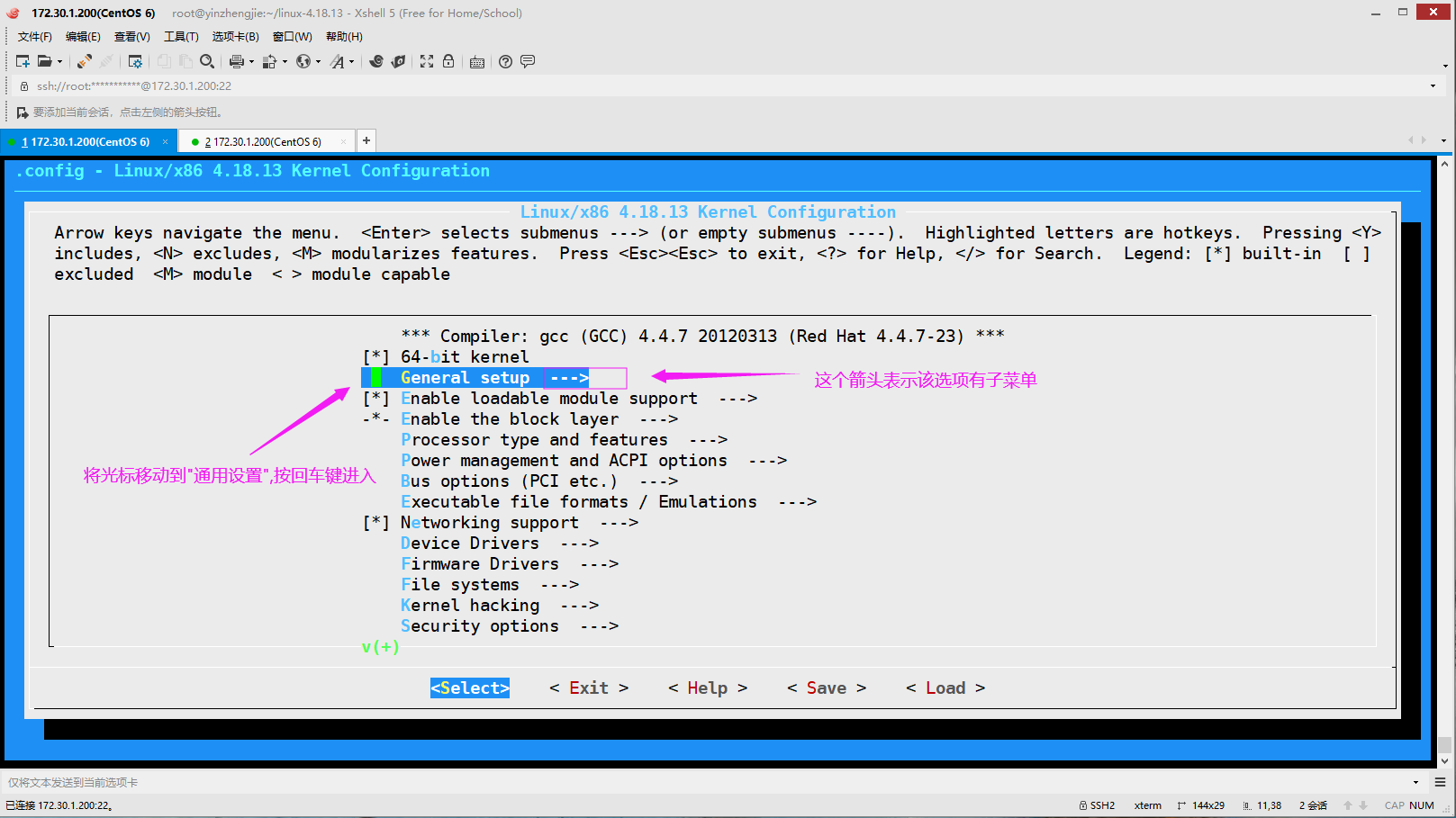
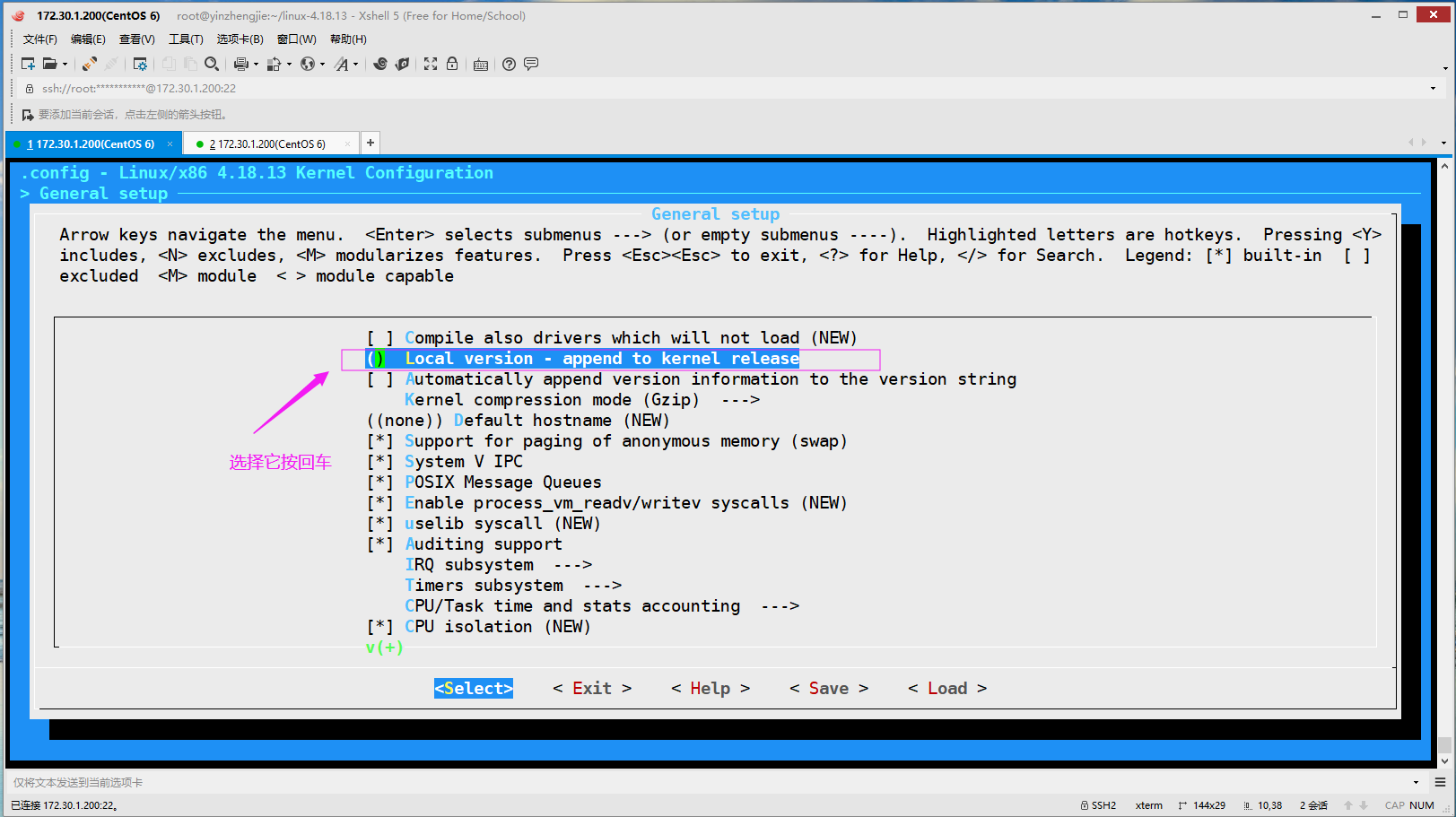
如下图所示,选择"() Local version - append to kernel release ",添加咱们自定义的内核版本。
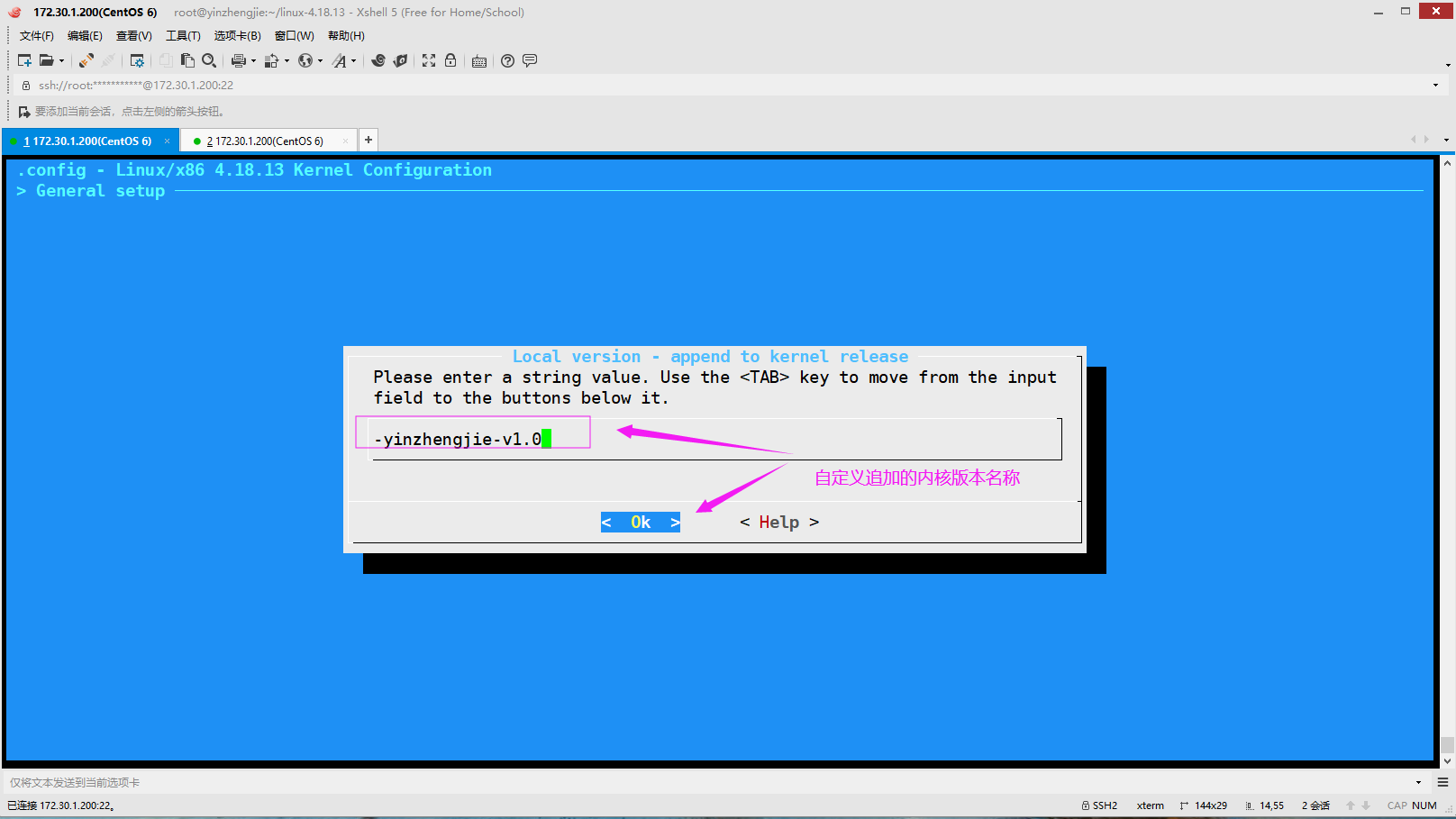
如下图所示,自定义追加自定义的内核版本
如下图所示,追加内核参数配置完成后,使用tab键退出当前菜单。

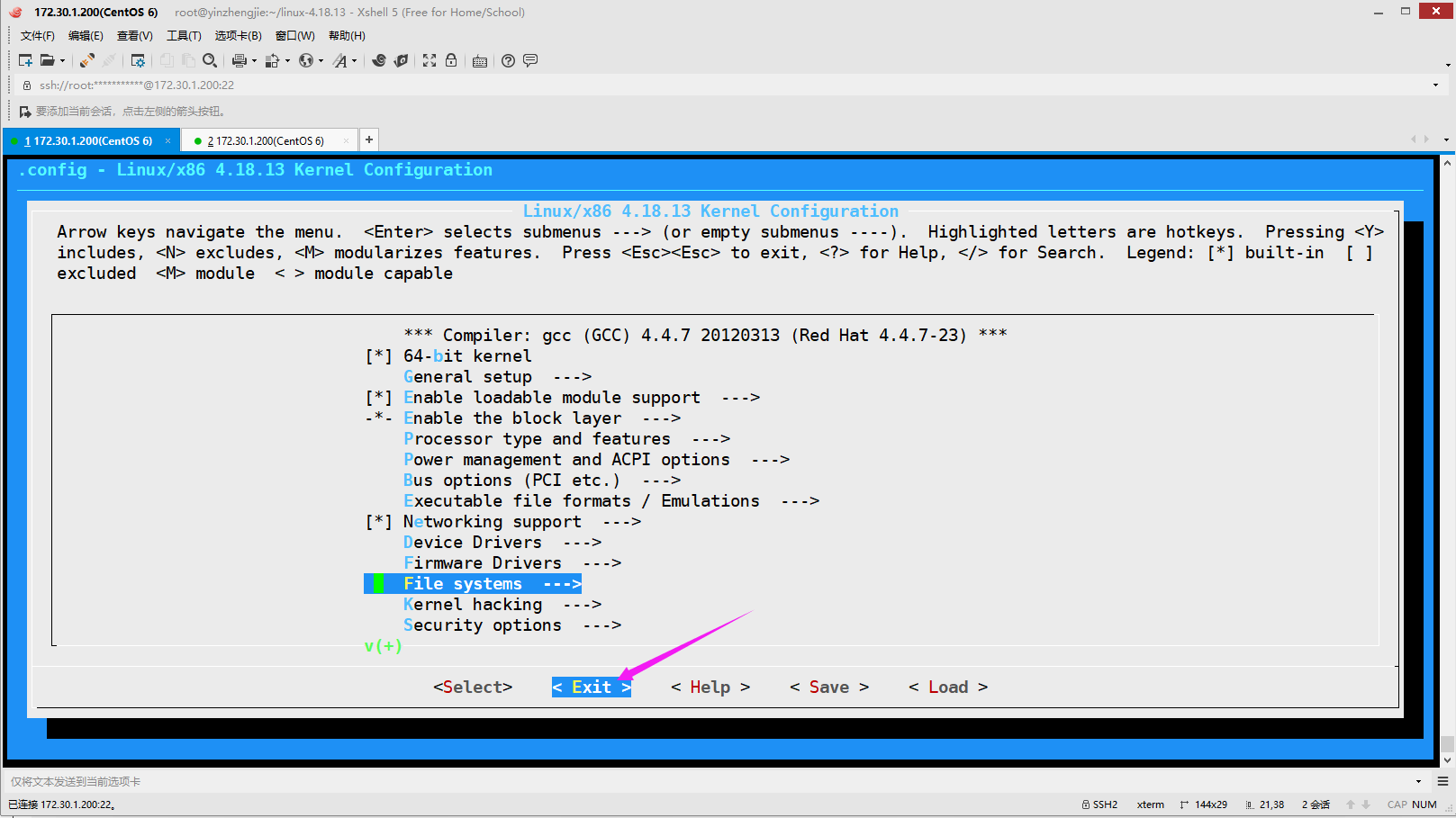
如下图所示,选择" File systems ---> ",可以进入到配置文件系统界面。

如下图所示,选择" DOS/FAT/NT Filesystems --->",进入DOS/FAT/NTFS文件系统配置界面。
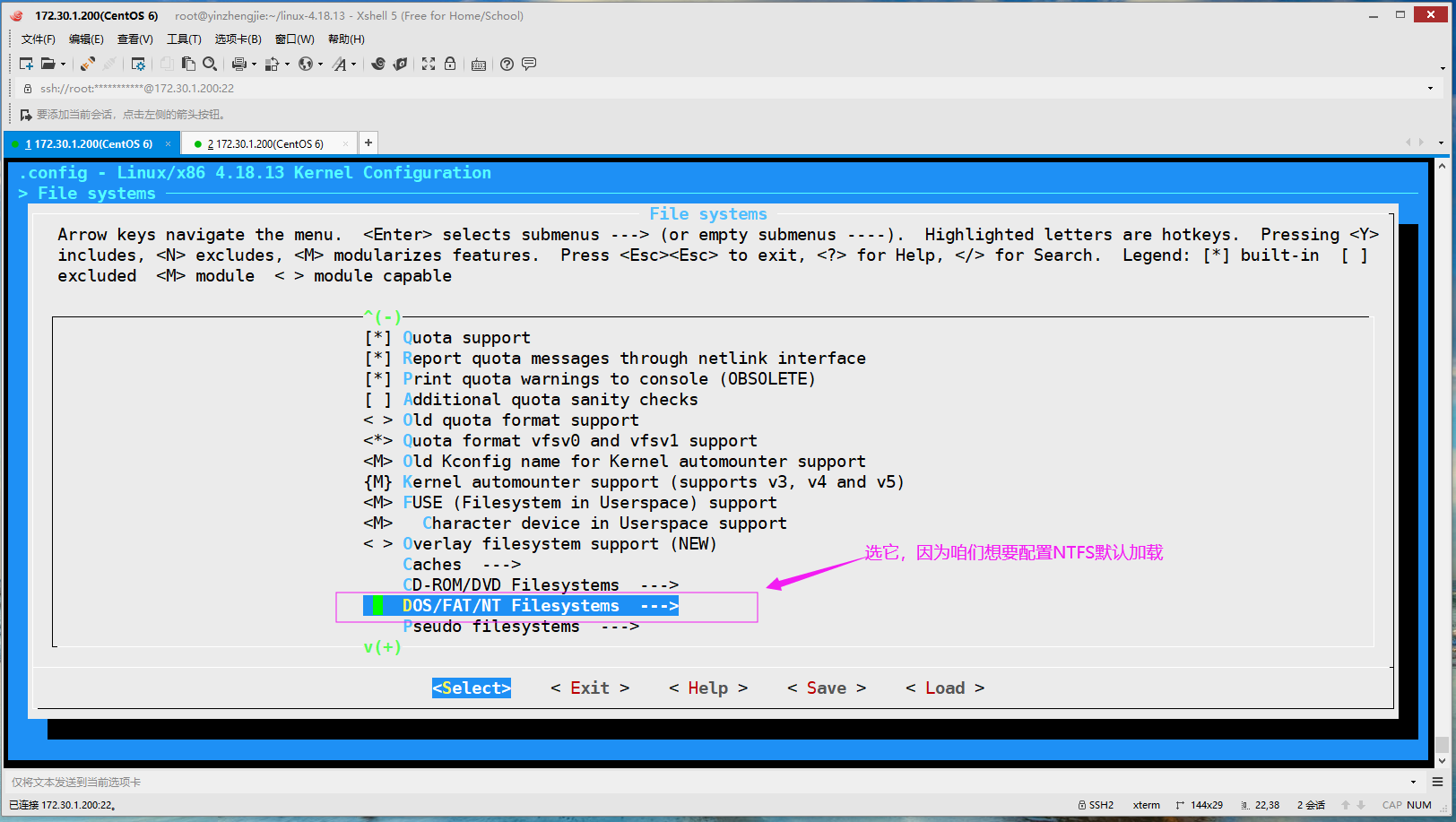
如下图所示,选择"",以模块化方式支持ntfs文件系统。

如下图所示,继续向上级菜单退出。

如下图所示,退出一级菜单。
如下图所示,选择"< Yes >",从而保存配置。
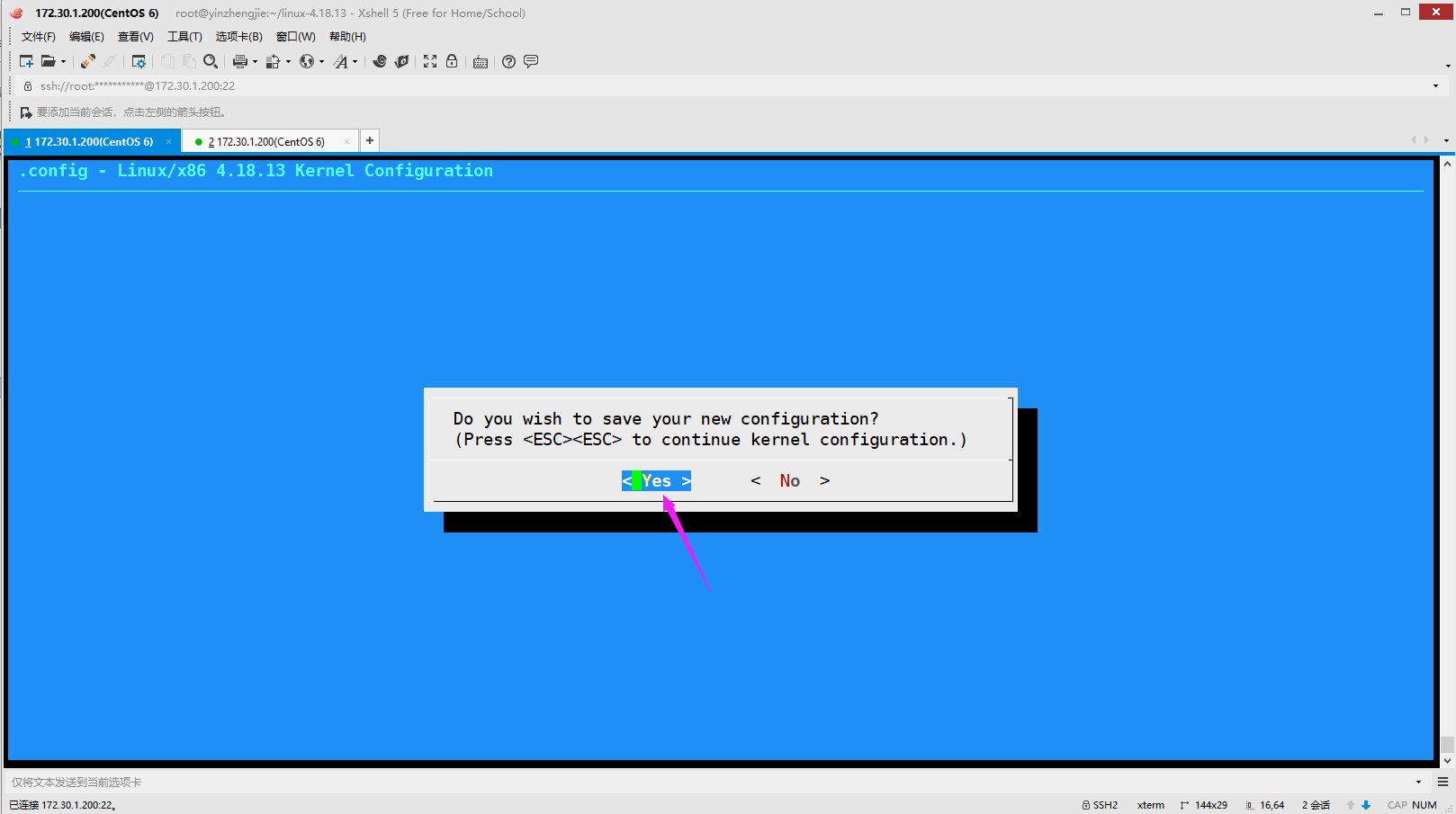
[root@yinzhengjie linux-4.18.]# grep -i ntfs .config        #发现咱们从系统拷贝过来的".config"文件已经被修改啦~

CONFIG_NTFS_FS=m

# CONFIG_NTFS_DEBUG is not set

CONFIG_NTFS_RW=y

[root@yinzhengjie linux-4.18.]#
5>.编译(编译过程属于CPU密集型操作,使用top命令可以看到cpu占用较高,编译过程中CPU性能越好,编译的速度越快)
[root@yinzhengjie linux-4.18.]# lscpu

Architecture:          x86_64

CPU op-mode(s):        -bit, -bit

Byte Order:            Little Endian

CPU(s):

On-line CPU(s) list:   -

Thread(s) per core:

Core(s) per socket:

Socket(s):

NUMA node(s):

Vendor ID:             GenuineIntel

CPU family:

Model:

Model name:            Intel(R) Core(TM) i7-8750H CPU @ .20GHz

Stepping:

CPU MHz:               2208.002

BogoMIPS:              4416.00

Hypervisor vendor:     VMware

Virtualization type:   full

L1d cache:             32K

L1i cache:             32K

L2 cache:              256K

L3 cache:              9216K

NUMA node0 CPU(s):     -

[root@yinzhengjie linux-4.18.]#
[root@yinzhengjie linux-4.18.13]# lscpu #查看CPU的核心数
[root@yinzhengjie linux-4.18.]# make -j 8

 ......

  LD [M]  sound/pci/vx222/snd-vx222.ko

  LD [M]  sound/soundcore.ko

  LD [M]  sound/synth/emux/snd-emux-synth.ko

  LD [M]  sound/usb/6fire/snd-usb-6fire.ko

  LD [M]  sound/usb/bcd2000/snd-bcd2000.ko

  LD [M]  sound/synth/snd-util-mem.ko

  LD [M]  sound/usb/caiaq/snd-usb-caiaq.ko

  LD [M]  sound/usb/hiface/snd-usb-hiface.ko

  LD [M]  sound/usb/misc/snd-ua101.ko

  LD [M]  sound/usb/snd-usb-audio.ko

  LD [M]  sound/usb/snd-usbmidi-lib.ko

  LD [M]  sound/usb/usx2y/snd-usb-us122l.ko

  LD [M]  sound/usb/usx2y/snd-usb-usx2y.ko

  LD [M]  virt/lib/irqbypass.ko

[root@yinzhengjie linux-4.18.]#

[root@yinzhengjie linux-4.18.]# du -sh ./          #编译后当前目录会很大。

.3G    ./

[root@yinzhengjie linux-4.18.]#
[root@yinzhengjie linux-4.18.13]# ll /boot/ | grep yinzhengjie
-rw-------. 1 root root 7664276 Dec 3 00:33 initramfs-4.18.13-yinzhengjie-v1.0.img
lrwxrwxrwx. 1 root root 41 Dec 3 00:33 System.map -> /boot/System.map-4.18.13-yinzhengjie-v1.0
-rw-r--r--. 1 root root 3258256 Dec 3 00:33 System.map-4.18.13-yinzhengjie-v1.0
lrwxrwxrwx. 1 root root 38 Dec 3 00:33 vmlinuz -> /boot/vmlinuz-4.18.13-yinzhengjie-v1.0
-rw-r--r--. 1 root root 6338368 Dec 3 00:33 vmlinuz-4.18.13-yinzhengjie-v1.0
[root@yinzhengjie linux-4.18.13]#
[root@yinzhengjie linux-4.18.]# cat /boot/grub/grub.conf

# grub.conf generated by anaconda

#

# Note that you do not have to rerun grub after making changes to this file

# NOTICE:  You have a /boot partition.  This means that

#          all kernel and initrd paths are relative to /boot/, eg.

#          root (hd0,)

#          kernel /vmlinuz-version ro root=/dev/mapper/vg_node200-lv_root

#          initrd /initrd-[generic-]version.img

#boot=/dev/sda

default=

timeout=

splashimage=(hd0,)/grub/splash.xpm.gz

hiddenmenu

title CentOS (4.18.-yinzhengjie-v1.)

    root (hd0,)

    kernel /vmlinuz-4.18.-yinzhengjie-v1. ro root=/dev/mapper/vg_node200-lv_root nomodeset rd_NO_LUKS LANG=en_US.UTF- rd_LVM_LV=vg_node200/lv_swap rd_NO_MD SYSFONT=

latarcyrheb-sun16 crashkernel=128M rd_LVM_LV=vg_node200/lv_root  KEYBOARDTYPE=pc KEYTABLE=us rd_NO_DM rhgb quiet    initrd /initramfs-4.18.-yinzhengjie-v1..img

title CentOS  (2.6.-.el6.x86_64)

    root (hd0,)

    kernel /vmlinuz-2.6.-.el6.x86_64 ro root=/dev/mapper/vg_node200-lv_root nomodeset rd_NO_LUKS LANG=en_US.UTF- rd_LVM_LV=vg_node200/lv_swap rd_NO_MD SYSFONT=lat

arcyrheb-sun16 crashkernel=128M rd_LVM_LV=vg_node200/lv_root  KEYBOARDTYPE=pc KEYTABLE=us rd_NO_DM rhgb quiet    initrd /initramfs-2.6.-.el6.x86_64.img

[root@yinzhengjie linux-4.18.]#

[root@yinzhengjie linux-4.18.]#
[root@yinzhengjie linux-4.18.13]# cat /boot/grub/grub.conf #我们发现多出来内核菜单的配置
6>.安装模块
[root@yinzhengjie linux-4.18.]# ll /lib/modules/

total

drwxr-xr-x.  root root  Dec   : 2.6.-.el6.x86_64

[root@yinzhengjie linux-4.18.]#

[root@yinzhengjie linux-4.18.]# make modules_install

  ......

  INSTALL sound/pci/vx222/snd-vx222.ko

  INSTALL sound/soundcore.ko

  INSTALL sound/synth/emux/snd-emux-synth.ko

  INSTALL sound/synth/snd-util-mem.ko

  INSTALL sound/usb/6fire/snd-usb-6fire.ko

  INSTALL sound/usb/bcd2000/snd-bcd2000.ko

  INSTALL sound/usb/caiaq/snd-usb-caiaq.ko

  INSTALL sound/usb/hiface/snd-usb-hiface.ko

  INSTALL sound/usb/misc/snd-ua101.ko

  INSTALL sound/usb/snd-usb-audio.ko

  INSTALL sound/usb/snd-usbmidi-lib.ko

  INSTALL sound/usb/usx2y/snd-usb-us122l.ko

  INSTALL sound/usb/usx2y/snd-usb-usx2y.ko

  INSTALL virt/lib/irqbypass.ko

  DEPMOD  4.18.-yinzhengjie-v1.

[root@yinzhengjie linux-4.18.]#

[root@yinzhengjie linux-4.18.]# ll /lib/modules/      #模块安装成功后观察一下该目录会多出来一个模块目录哟~

total

drwxr-xr-x.  root root  Dec   : 2.6.-.el6.x86_64

drwxr-xr-x.  root root  Dec   : 4.18.-yinzhengjie-v1.

[root@yinzhengjie linux-4.18.]#
7>.安装内核相关文件
[root@yinzhengjie linux-4.18.]# make install        #如果在CentOS 7上操作到这一步出错了请忽略它,继续下面的操作。

sh ./arch/x86/boot/install.sh 4.18.-yinzhengjie-v1. arch/x86/boot/bzImage \

        System.map "/boot"

ERROR: modinfo: could not find module sco

ERROR: modinfo: could not find module l2cap

ERROR: modinfo: could not find module ib_ucm

ERROR: modinfo: could not find module ib_sa

ERROR: modinfo: could not find module ib_mad

ERROR: modinfo: could not find module ib_addr

ERROR: modinfo: could not find module microcode

ERROR: modinfo: could not find module vmware_balloon

ERROR: modinfo: could not find module snd_page_alloc

ERROR: modinfo: could not find module shpchp

ERROR: modinfo: could not find module crc_t10dif

[root@yinzhengjie linux-4.18.]#
8>.重启操作系统并观察是否可以正常启动
[root@yinzhengjie linux-4.18.]# reboot

Broadcast message from root@yinzhengjie

    (/dev/pts/) at : ...

The system is going down for reboot NOW!

[root@yinzhengjie linux-4.18.]#
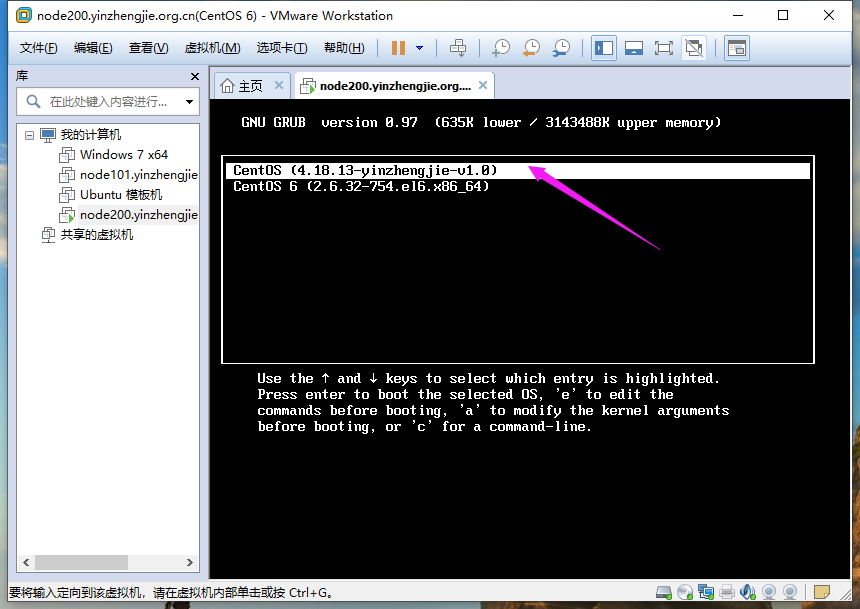
9>.操作系统启动成功
[root@yinzhengjie ~]# uname -r

4.18.-yinzhengjie-v1.

[root@yinzhengjie ~]#

[root@yinzhengjie ~]# uname -m

x86_64

[root@yinzhengjie ~]#

[root@yinzhengjie ~]# locate ntfs.ko        #我们发现找不到ntfs驱动,因为没有更新locate数据库

[root@yinzhengjie ~]#

[root@yinzhengjie ~]# updatedb            #更新数据库

[root@yinzhengjie ~]#

[root@yinzhengjie ~]# locate ntfs.ko          #发现这次是找到ntfs驱动啦

/lib/modules/4.18.-yinzhengjie-v1./kernel/fs/ntfs/ntfs.ko

/root/linux-4.18./fs/ntfs/.ntfs.ko.cmd

/root/linux-4.18./fs/ntfs/ntfs.ko

[root@yinzhengjie ~]#
10>.在Linux挂载window操作系统的磁盘
[root@yinzhengjie ~]# lsblk

NAME                          MAJ:MIN RM   SIZE RO TYPE MOUNTPOINT

sdb                             :    .5G   disk

├─sdb2                          :      293G   part

├─sdb3                          :    .6G   part

└─sdb1                          :       16M   part

sr0                            :       .7G   rom

sda                             :       500G   disk

├─sda2                          :     .5G   part

│ ├─vg_node200-lv_swap (dm-) :       .9G   lvm  [SWAP]

│ ├─vg_node200-lv_home (dm-) :     .7G   lvm  /home

│ └─vg_node200-lv_root (dm-) :        50G   lvm  /

└─sda1                          :       500M   part /boot

[root@yinzhengjie ~]#

[root@yinzhengjie ~]# lsmod | grep ntfs        #默认是没有加载window的支持的NTFS文件系统的。

[root@yinzhengjie ~]#

[root@yinzhengjie ~]# mkdir /windows

[root@yinzhengjie ~]#

[root@yinzhengjie ~]# mount /dev/sdb3 /windows/

[root@yinzhengjie ~]#

[root@yinzhengjie ~]# lsmod | grep ntfs        #很显然,当我们将windows的NTFS文件系统挂载成功后,就发现ntfs模块被加载啦~

ntfs

[root@yinzhengjie ~]#

[root@yinzhengjie ~]# df -TH

Filesystem           Type   Size  Used Avail Use% Mounted on

/dev/mapper/vg_node200-lv_root

                     ext4    53G   15G   36G  % /

tmpfs                tmpfs  .0G   74k  .0G   % /dev/shm

/dev/sda1            ext4   500M   79M  391M  % /boot

/dev/mapper/vg_node200-lv_home

                     ext4   471G   74M  447G   % /home

/dev/sdb3            ntfs   686G  331G  356G  % /windows      #看这里,我们会明显发现是NTFS文件系统格式

[root@yinzhengjie ~]#

[root@yinzhengjie ~]# ll /windows/                    #接下来咱们就可以访问NTFS文件系统的格式

total

drwx------  root root   Nov  : BaiduNetdiskDownload

drwx------  root root  Sep   : Hlddz

drwx------  root root      Jul  : KuGou

drwx------  root root      Sep  : Program Files (x86)

drwx------  root root      Jul   : $RECYCLE.BIN

drwx------  root root      Sep   : System Volume Information

drwx------  root root      Sep  : temp

drwx------  root root   Sep   : YXS

drwx------  root root      Aug  : 学习资料

drwx------  root root      Oct  : 英雄时刻

[root@yinzhengjie ~]#

[root@yinzhengjie ~]# mount | grep windows          #我们发现挂载是以读写方式挂载的,虽然是可以进行读操作,但写入操作是被拒绝了,因此Linux内核对window的NTFS支持还是不够完善。

/dev/sdb3 on /windows type ntfs (rw)

[root@yinzhengjie ~]#

[root@yinzhengjie ~]# echo "https://www.cnblogs.com/yinzhengjie/" > /windows/blog.txt

-bash: /windows/blog.txt: Permission denied

[root@yinzhengjie ~]#

六.使Linux完美支持NTFS文件系统格式
1>.安装ntfs-3q
  如果我们只是让Linux支持NTFS格式其实并不需要重新编译Linux。以上的演示只是为了阐述内核编译的过程。

  在epel源中安装一个叫"ntfs-3g"的软件包即可,它可以完美的支持ntfs文件系统的哟~
[root@yinzhengjie ~]# yum -y install epel-release

Loaded plugins: fastestmirror, refresh-packagekit, security

Setting up Install Process

Loading mirror speeds from cached hostfile

 * base: mirrors.huaweicloud.com

 * extras: mirrors.huaweicloud.com

 * updates: mirrors.huaweicloud.com

Resolving Dependencies

--> Running transaction check

---> Package epel-release.noarch :- will be installed

--> Finished Dependency Resolution

Dependencies Resolved

================================================================================================================================================

 Package                                Arch                             Version                         Repository                        Size

================================================================================================================================================

Installing:

 epel-release                           noarch                           -                             extras                             k

Transaction Summary

================================================================================================================================================

Install        Package(s)

Total download size:  k

Installed size:  k

Downloading Packages:

epel-release--.noarch.rpm                                                                                              |   kB     :

Running rpm_check_debug

Running Transaction Test

Transaction Test Succeeded

Running Transaction

  Installing : epel-release--.noarch                                                                                                      /

  Verifying  : epel-release--.noarch                                                                                                      /

Installed:

  epel-release.noarch :-

Complete!

[root@yinzhengjie ~]#
[root@yinzhengjie ~]# yum -y install epel-release
[root@yinzhengjie ~]# yum search ntfs

Loaded plugins: fastestmirror, refresh-packagekit, security

Loading mirror speeds from cached hostfile

epel/metalink                                                                                                            | 6.7 kB     :

 * base: mirrors.zju.edu.cn

 * epel: fedora.cs.nctu.edu.tw

 * extras: mirrors.zju.edu.cn

 * updates: mirrors.zju.edu.cn

epel                                                                                                                     | 5.3 kB     :

epel/primary_db                                                                                                          | 6.1 MB     :

============================================================== N/S Matched: ntfs ===============================================================

ntfs-3g.i686 : Linux NTFS userspace driver

ntfs-3g.x86_64 : Linux NTFS userspace driver

ntfs-3g-devel.i686 : Development files and libraries for ntfs-3g

ntfs-3g-devel.x86_64 : Development files and libraries for ntfs-3g

ntfsprogs.x86_64 : NTFS filesystem libraries and utilities

ntfsprogs-devel.i686 : Headers and libraries for libntfs

ntfsprogs-devel.x86_64 : Headers and libraries for libntfs

ntfsprogs-gnomevfs.i686 : NTFS GNOME virtual filesystem module

ntfsprogs-gnomevfs.x86_64 : NTFS GNOME virtual filesystem module

  Name and summary matches only, use "search all" for everything.

[root@yinzhengjie ~]#
[root@yinzhengjie ~]# yum search ntfs
[root@yinzhengjie ~]# yum -y install ntfs-3g.x86_64

Loaded plugins: fastestmirror, refresh-packagekit, security

Setting up Install Process

Loading mirror speeds from cached hostfile

 * base: mirrors.zju.edu.cn

 * epel: fedora.cs.nctu.edu.tw

 * extras: mirrors.zju.edu.cn

 * updates: mirrors.zju.edu.cn

Resolving Dependencies

--> Running transaction check

---> Package ntfs-3g.x86_64 :2017.3.-.el6 will be installed

--> Finished Dependency Resolution

Dependencies Resolved

================================================================================================================================================

 Package                         Arch                           Version                                      Repository                    Size

================================================================================================================================================

Installing:

 ntfs-3g                         x86_64                         :2017.3.-.el6                           epel                          k

Transaction Summary

================================================================================================================================================

Install        Package(s)

Total download size:  k

Installed size:  k

Downloading Packages:

ntfs-3g-2017.3.-.el6.x86_64.rpm                                                                                      |  kB     :

warning: rpmts_HdrFromFdno: Header V3 RSA/SHA256 Signature, key ID 0608b895: NOKEY

Retrieving key from file:///etc/pki/rpm-gpg/RPM-GPG-KEY-EPEL-6

Importing GPG key 0x0608B895:

 Userid : EPEL () <epel@fedoraproject.org>

 Package: epel-release--.noarch (@extras)

 From   : /etc/pki/rpm-gpg/RPM-GPG-KEY-EPEL-

Running rpm_check_debug

Running Transaction Test

Transaction Test Succeeded

Running Transaction

  Installing : :ntfs-3g-2017.3.-.el6.x86_64                                                                                            /

  Verifying  : :ntfs-3g-2017.3.-.el6.x86_64                                                                                            /

Installed:

  ntfs-3g.x86_64 :2017.3.-.el6

Complete!

[root@yinzhengjie ~]#
[root@yinzhengjie ~]# yum -y install ntfs-3g.x86_64
[root@yinzhengjie ~]# rpm -ql ntfs-3g

/bin/lowntfs-3g

/bin/ntfs-3g

/bin/ntfs-3g.probe

/bin/ntfsmount

/lib64/libntfs-3g.so.

/lib64/libntfs-3g.so.88.0.

/sbin/mount.lowntfs-3g

/sbin/mount.ntfs

/sbin/mount.ntfs-3g

/sbin/mount.ntfs-fuse

/usr/bin/ntfs-3g

/usr/bin/ntfsmount

/usr/share/doc/ntfs-3g-2017.3.

/usr/share/doc/ntfs-3g-2017.3./AUTHORS

/usr/share/doc/ntfs-3g-2017.3./COPYING

/usr/share/doc/ntfs-3g-2017.3./CREDITS

/usr/share/doc/ntfs-3g-2017.3./ChangeLog

/usr/share/doc/ntfs-3g-2017.3./NEWS

/usr/share/doc/ntfs-3g-2017.3./README

/usr/share/hal/fdi/policy/10osvendor/-ntfs-config-write-policy.fdi

/usr/share/man/man8/mount.lowntfs-3g..gz

/usr/share/man/man8/mount.ntfs-3g..gz

/usr/share/man/man8/ntfs-3g..gz

/usr/share/man/man8/ntfs-3g.probe..gz

[root@yinzhengjie ~]#
[root@yinzhengjie ~]# rpm -ql ntfs-3g
2>.使用Linux默认的内核启动
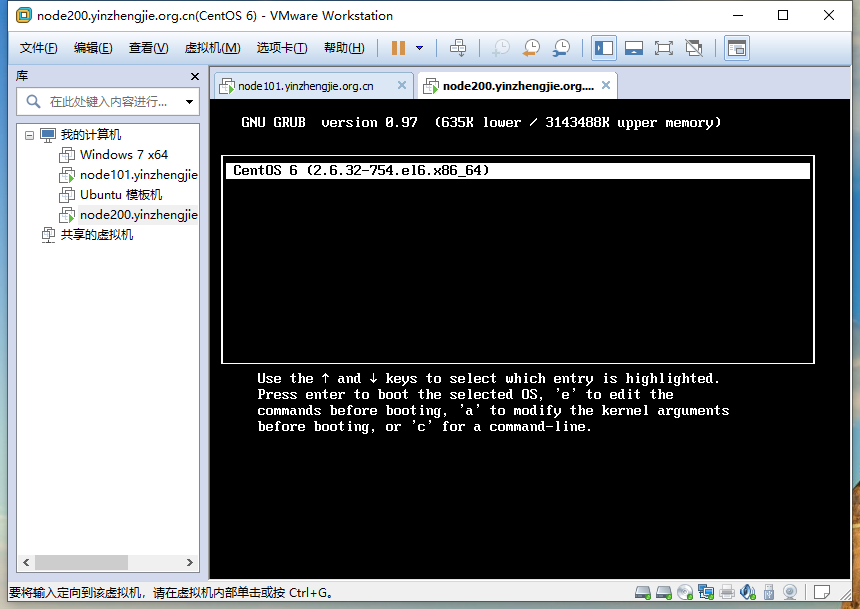
[root@yinzhengjie ~]# reboot           #如下图所示,不要选择咱们编译的支持ntfs文件系统的内核,而是选择默认的内核启动操作系统。

Broadcast message from root@yinzhengjie

    (/dev/pts/) at : ...

The system is going down for reboot NOW!

[root@yinzhengjie ~]#
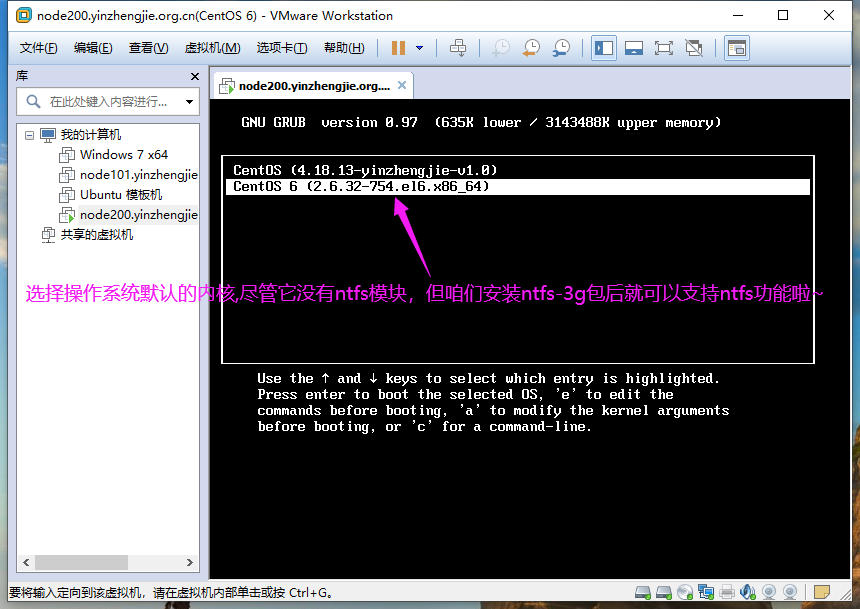
3>.安装ntfs-3g包后使用默认的内核照样可以正常读写访问ntfs格式的文件系统哟~
[root@yinzhengjie ~]# uname -r

2.6.-.el6.x86_64

[root@yinzhengjie ~]#

[root@yinzhengjie ~]# blkid

/dev/mapper/vg_node200-lv_root: UUID="fb2cc473-bcf1-4e0d-9fff-71f7aa018cc6" TYPE="ext4"

/dev/block/:: UUID="fb2cc473-bcf1-4e0d-9fff-71f7aa018cc6" TYPE="ext4"

/dev/block/:: UUID="MS8oog-4gRp-iB4D-bpwh-G9R0-BQ2R-U2wseb" TYPE="LVM2_member"

/dev/sr0: LABEL="CentOS_6.10_Final" TYPE="iso9660"

/dev/sda1: UUID="6148dc57-76a2-4214-b4d5-5af9c5b40576" TYPE="ext4"

/dev/sdb3: LABEL="M-eM--M-&M-dM-9M- M-hM-5M-^DM-fM-^VM-^Y" UUID="86BE2310BE22F7F7" TYPE="ntfs"

/dev/mapper/vg_node200-lv_swap: UUID="a0fd4399-0a45-48ac-817a-3b6c830f63b4" TYPE="swap"

/dev/mapper/vg_node200-lv_home: UUID="12c57023-efb5-4f61-8c90-c672a3a24dcc" TYPE="ext4"

[root@yinzhengjie ~]#

[root@yinzhengjie ~]# df -TH

Filesystem           Type   Size  Used Avail Use% Mounted on

/dev/mapper/vg_node200-lv_root

                     ext4    53G   15G   36G  % /

tmpfs                tmpfs  .1G   74k  .1G   % /dev/shm

/dev/sda1            ext4   500M   79M  395M  % /boot

/dev/mapper/vg_node200-lv_home

                     ext4   471G   74M  447G   % /home

[root@yinzhengjie ~]#

[root@yinzhengjie ~]# mount /dev/sdb3 /windows/

[root@yinzhengjie ~]#

[root@yinzhengjie ~]# ll /windows/

total

drwxrwxrwx  root root   Nov  : BaiduNetdiskDownload

drwxrwxrwx  root root  Sep   : Hlddz

drwxrwxrwx  root root      Jul  : KuGou

drwxrwxrwx  root root      Sep  : Program Files (x86)

drwxrwxrwx  root root      Jul   : $RECYCLE.BIN

drwxrwxrwx  root root      Sep   : System Volume Information

drwxrwxrwx  root root      Sep  : temp

drwxrwxrwx  root root   Sep   : YXS

drwxrwxrwx  root root      Aug  : 学习资料

drwxrwxrwx  root root      Oct  : 英雄时刻

[root@yinzhengjie ~]#

[root@yinzhengjie ~]# echo "https://www.cnblogs.com/yinzhengjie/" > /windows/blog.txt      #此时,我们发现咱们的数据写入成功啦,这都是归功于ntfs-3g这个软件包~

[root@yinzhengjie ~]#

[root@yinzhengjie ~]# ll /windows/

total

drwxrwxrwx  root root   Nov  : BaiduNetdiskDownload

-rwxrwxrwx  root root     Dec   : blog.txt

drwxrwxrwx  root root  Sep   : Hlddz

drwxrwxrwx  root root      Jul  : KuGou

drwxrwxrwx  root root      Sep  : Program Files (x86)

drwxrwxrwx  root root      Jul   : $RECYCLE.BIN

drwxrwxrwx  root root      Sep   : System Volume Information

drwxrwxrwx  root root      Sep  : temp

drwxrwxrwx  root root   Sep   : YXS

drwxrwxrwx  root root      Aug  : 学习资料

drwxrwxrwx  root root      Oct  : 英雄时刻

[root@yinzhengjie ~]#

[root@yinzhengjie ~]# date

Tue Dec  :: CST

[root@yinzhengjie ~]#
七.卸载正在使用的内核(内核文件已经被加载到内存中,本地内核文件暂时也不会使用到了,因此是可以卸载的,只不过卸载后,一旦重启操作系统将在也无法使用该内核了)
1>.删除驱动文件
[root@yinzhengjie ~]# ll /lib/modules/

total

drwxr-xr-x.  root root  Dec   : 2.6.-.el6.x86_64

drwxr-xr-x.  root root  Dec   : 4.18.-yinzhengjie-v1.

[root@yinzhengjie ~]#

[root@yinzhengjie ~]# uname -r

4.18.-yinzhengjie-v1.

[root@yinzhengjie ~]#

[root@yinzhengjie ~]# rm -rf /lib/modules/4.18.-yinzhengjie-v1./

[root@yinzhengjie ~]#
2>.删除内核文件
[root@yinzhengjie ~]# ll /boot/

total

-rw-r--r--.  root root    Jun    config-2.6.-.el6.x86_64

drwxr-xr-x.  root root      Dec   : efi

drwxr-xr-x.  root root      Dec   : grub

-rw-------.  root root  Dec   : initramfs-2.6.-.el6.x86_64.img

-rw-------.  root root   Dec   : initramfs-4.18.-yinzhengjie-v1..img

-rw-------.  root root   Dec   : initrd-2.6.-.el6.x86_64kdump.img

-rw-------   root root   Dec   : initrd-4.18.-yinzhengjie-v1.0kdump.img

drwx------.  root root     Dec   : lost+found

-rw-r--r--.  root root    Jun    symvers-2.6.-.el6.x86_64.gz

lrwxrwxrwx.  root root        Dec   : System.map -> /boot/System.map-4.18.-yinzhengjie-v1.

-rw-r--r--.  root root   Jun    System.map-2.6.-.el6.x86_64

-rw-r--r--.  root root   Dec   : System.map-4.18.-yinzhengjie-v1.

-rw-r--r--.  root root   Dec   : System.map-4.18.-yinzhengjie-v1..old

lrwxrwxrwx.  root root        Dec   : vmlinuz -> /boot/vmlinuz-4.18.-yinzhengjie-v1.

-rwxr-xr-x.  root root   Jun    vmlinuz-2.6.-.el6.x86_64

-rw-r--r--.  root root   Dec   : vmlinuz-4.18.-yinzhengjie-v1.

-rw-r--r--.  root root   Dec   : vmlinuz-4.18.-yinzhengjie-v1..old

[root@yinzhengjie ~]#

[root@yinzhengjie ~]# rm -f /boot/*4.18*

[root@yinzhengjie ~]#

[root@yinzhengjie ~]# ll /boot/

total 38464

-rw-r--r--. 1 root root   108282 Jun 20  2018 config-2.6.32-754.el6.x86_64

drwxr-xr-x. 3 root root     1024 Dec  1 07:32 efi

drwxr-xr-x. 2 root root     1024 Dec  3 01:43 grub

-rw-------. 1 root root 25761655 Dec  1 07:34 initramfs-2.6.32-754.el6.x86_64.img

-rw-------. 1 root root  6305745 Dec  1 07:37 initrd-2.6.32-754.el6.x86_64kdump.img

drwx------. 2 root root    12288 Dec  1 07:22 lost+found

-rw-r--r--. 1 root root   216063 Jun 20  2018 symvers-2.6.32-754.el6.x86_64.gz

lrwxrwxrwx. 1 root root       41 Dec  3 01:42 System.map -> /boot/System.map-4.18.13-yinzhengjie-v1.0

-rw-r--r--. 1 root root  2652834 Jun 20  2018 System.map-2.6.32-754.el6.x86_64

lrwxrwxrwx. 1 root root       38 Dec  3 01:42 vmlinuz -> /boot/vmlinuz-4.18.13-yinzhengjie-v1.0

-rwxr-xr-x. 1 root root  4315504 Jun 20  2018 vmlinuz-2.6.32-754.el6.x86_64

[root@yinzhengjie ~]#
3>.修改内核的配置文件
[root@yinzhengjie ~]# cat /boot/grub/grub.conf

# grub.conf generated by anaconda

#

# Note that you do not have to rerun grub after making changes to this file

# NOTICE:  You have a /boot partition.  This means that

#          all kernel and initrd paths are relative to /boot/, eg.

#          root (hd0,)

#          kernel /vmlinuz-version ro root=/dev/mapper/vg_node200-lv_root

#          initrd /initrd-[generic-]version.img

#boot=/dev/sda

default=

timeout=

splashimage=(hd0,)/grub/splash.xpm.gz

hiddenmenu

title CentOS (4.18.-yinzhengjie-v1.)

    root (hd0,)

    kernel /vmlinuz-4.18.-yinzhengjie-v1. ro root=/dev/mapper/vg_node200-lv_root nomodeset rd_NO_LUKS LANG=en_US.UTF- rd_LVM_LV=vg_node2

/lv_swap rd_NO_MD SYSFONT=latarcyrheb-sun16 crashkernel=128M rd_LVM_LV=vg_node200/lv_root  KEYBOARDTYPE=pc KEYTABLE=us rd_NO_DM rhgb quiet    initrd /initramfs-4.18.-yinzhengjie-v1..img

title CentOS  (2.6.-.el6.x86_64)

    root (hd0,)

    kernel /vmlinuz-2.6.-.el6.x86_64 ro root=/dev/mapper/vg_node200-lv_root nomodeset rd_NO_LUKS LANG=en_US.UTF- rd_LVM_LV=vg_node200/

lv_swap rd_NO_MD SYSFONT=latarcyrheb-sun16 crashkernel=128M rd_LVM_LV=vg_node200/lv_root  KEYBOARDTYPE=pc KEYTABLE=us rd_NO_DM rhgb quiet    initrd /initramfs-2.6.-.el6.x86_64.img

[root@yinzhengjie ~]#

[root@yinzhengjie ~]# vim /boot/grub/grub.conf

[root@yinzhengjie ~]#

[root@yinzhengjie ~]# cat /boot/grub/grub.conf

# grub.conf generated by anaconda

#

# Note that you do not have to rerun grub after making changes to this file

# NOTICE:  You have a /boot partition.  This means that

#          all kernel and initrd paths are relative to /boot/, eg.

#          root (hd0,)

#          kernel /vmlinuz-version ro root=/dev/mapper/vg_node200-lv_root

#          initrd /initrd-[generic-]version.img

#boot=/dev/sda

default=

timeout=

splashimage=(hd0,)/grub/splash.xpm.gz

hiddenmenu

title CentOS  (2.6.-.el6.x86_64)

    root (hd0,)

    kernel /vmlinuz-2.6.-.el6.x86_64 ro root=/dev/mapper/vg_node200-lv_root nomodeset rd_NO_LUKS LANG=en_US.UTF- rd_LVM_LV=vg_node200/

lv_swap rd_NO_MD SYSFONT=latarcyrheb-sun16 crashkernel=128M rd_LVM_LV=vg_node200/lv_root  KEYBOARDTYPE=pc KEYTABLE=us rd_NO_DM rhgb quiet    initrd /initramfs-2.6.-.el6.x86_64.img

[root@yinzhengjie ~]#

[root@yinzhengjie ~]#
4>.重启操作系统观察内核已经被成功删除啦
[root@yinzhengjie ~]# reboot

Broadcast message from root@yinzhengjie

    (/dev/pts/) at : ...

The system is going down for reboot NOW!

[root@yinzhengjie ~]#
Linux操作系统内核编译之NTFS文件系统模块支持案例的更多相关文章
- 专家解读Linux操作系统内核中的GCC特性
专家解读Linux操作系统内核中的GCC特性 Linux内核使用GNU Compiler Collection (GCC)套件的几个特殊功能.这些功能包括提供快捷方式和简化以及向编译器提供优化提示 ...
- Linux操作系统内核参数
Linux操作系统内核参数 作者:尹正杰 版权声明:原创作品,谢绝转载!否则将追究法律责任. 一./proc目录 /proc目录: 内核把自己内部状态信息及统计信息,以及可配置参数通过proc伪文件系 ...
- linux如何编译安装新内核支持NTFS文件系统?(以redhat7.2x64为例)
内核,是一个操作系统的核心.它负责管理系统的进程.内存.设备驱动程序.文件和网络系统,决定着系统的性能和稳定性.Linux作为一个自由软件,在广大爱好者的支持下,内核版本不断更新.新的内核修订了旧内核 ...
- linux下 驱动模块编译步骤
本文将直接了当的带你进入linux的模块编译.当然在介绍的过程当中,我也会添加一些必要的注释,以便初学者能够看懂.之所以要写这篇文章,主要是因为从书本上学的话,可能要花更长的时间才能学会整个过程,因为 ...
- Linux云计算-01_介绍以及Linux操作系统安装
1 学习目的 兴趣爱好 技能提升 找到满意的工作 2 什么是云计算 云计算(cloud computing)是分布式计算的一种,指的是通过网络"云"将巨大的数据计算处理程序分解成无 ...
- 【Linux基础】Unix与Linux操作系统介绍
一.Unix和Linux操作系统概述 1.Unix是什么 UNIX是一个计算机操作系统,一个用来协调.管理和控制计算机硬件和软件资源的控制程序. 2.Unix特点 (1)多用户:在同一时刻可以有多个用 ...
- node-fs文件系统模块
在node环境中所有与文件操作都是通过fs核心模块实现的.包括文件的创建.删除.查询以及读写和写入 在 fs 模块中,所有的方法都分为同步和异步两种实现,具有 sync 后缀的方法为同步方法,不具有 ...
- 1-18 编译安装内核支持ntfs文件系统
大纲: 源码编译Linux内核 使用Linux内核模块 实战:编译一个NTFS内核模块,实现Linux挂载NTFS文件系统并实现读写功能 =============================== ...
- Linux系统挂载NTFS文件系统
今天尝试并成功的将一块500G的移动硬盘挂载到了RHEL5的系统上,甚感欣慰.想到也许以后自己或其他同学们会有类似经历,于是尽量细致的记录于此. 无论是一块安装了Windows/Linu ...
随机推荐
- udev规则(转)
Writing udev rules by Daniel Drake (dsd)Version 0.74 The most recent version of this document can al ...
- Scala词法文法解析器 (一)解析SparkSQL的BNF文法
平台公式及翻译后的SparkSQL 平台公式的样子如下所示: if (XX1_m001[D003]="邢おb7肮α䵵薇" || XX1_m001[H003]<"2& ...
- 简单认识RTLO(Right-to-Left Override)
目录 两行代码实现字符逆序输出 做个假文件 参考 今天在群里看到的用法,RLO是一个微软的中东Unicode字符8238,或者0x202E,可以使后面的字符都变为RTL(阿拉伯语从右往左书写,对我们来 ...
- kali 破解wifi
1.查看网卡名称:iwconfig 有一块 名为wlan0 的无线网卡通过一下命令排除影响因素 root@jkali:~# iwconfig lo no wireless extensions. wl ...
- just the check 买单
今日焦点 Just the check 买单吧 split it 平分 leave a tip 留小费 词汇实践 hey. Can I get you anything else today? 您好. ...
- windows,office激活工具推荐
微软的操作系统windows,办公软件office,都需要付费.今天,蒟蒻菌带来一部软件,可以激活上述软件,那就是: heu_kms_activator_v19.5.1 二话不说,立即使用: 可以根据 ...
- python安装 hanlp +使用 坑坑坑。。。填填填。。。
刚开始用都不知道要怎么安装,包括什么文件.百度了下发现正常安装就可以用,不用下多余的东西,但是但是但是但是但是但是但是但是 用pycharm安装不行,pip安装不行,也是见鬼了. 解决方法: 1.手动 ...
- Linux内核device结构体分析
1.前言 Linux内核中的设备驱动模型,是建立在sysfs设备文件系统和kobject上的,由总线(bus).设备(device).驱动(driver)和类(class)所组成的关系结构,在底层,L ...
- Linux内核引用计数器kref结构
1.前言 struct kref结构体是一个引用计数器,它被嵌套进其它的结构体中,记录所嵌套结构的引用计数.引用计数用于检测内核中有多少地方使用了某个对象,每当内核的一个部分需要某个对象所包含的信息时 ...
- redux本来是同步的为什么它能执行异步代码(chunk)实现原理是什么 中间件的实现原理是什么
我们用redux执行同步的时候,都是先发起一个dispatch(actionCreator()) 1.先在actionCreator()中生成一个action对象. 2.由dispatch方法将act ...