
pyhon opencv mojave 摄像头报错

https://blog.csdn.net/renzibei/article/details/82998933
参考了上面博主的例子,才明白。
Mac macOS 10.14 Mojave Xcode opencv 调用摄像头权限错误 This app has crashed because it attempted to access privacy-sensitive data without a usage description.
更新了macOS 10.14 Mojave之后,使用opencv调用摄像头会产生权限错误,报错This app has crashed because it attempted to access privacy-sensitive data without a usage description.
原因是macOS 10.14加入了对所有程序的隐私权限管理,如果要涉及隐私权限,要在可执行程序旁边加入Info.plist且在里面注册摄像头权限。
不过,我的是python
python 的解决办法是将,Info.plist文件复制后,放到了python的 文件夹下。我的电脑是路径是
/Users/mac/anaconda3/bin
我修改后的文件是
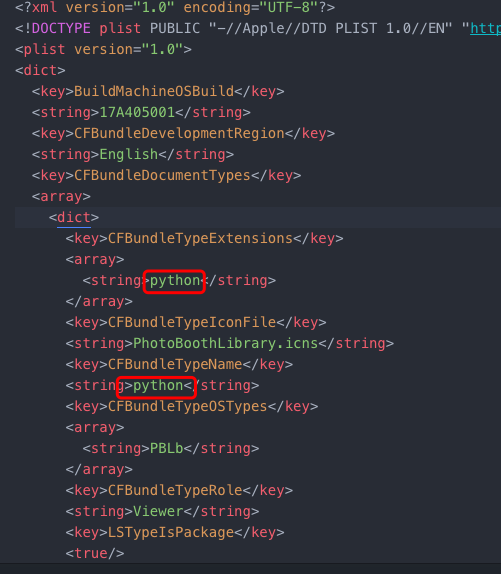
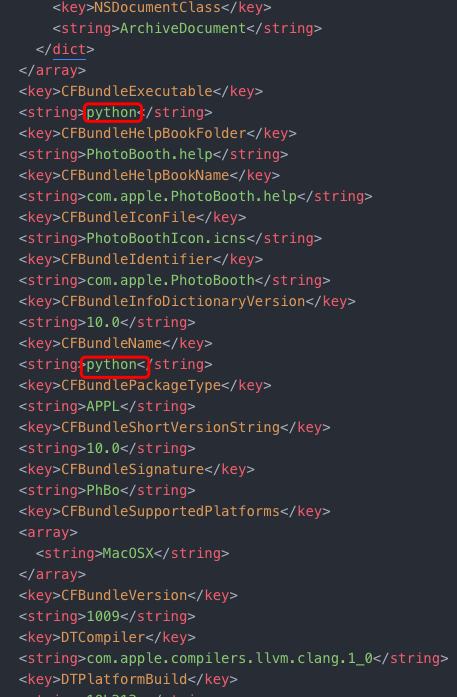
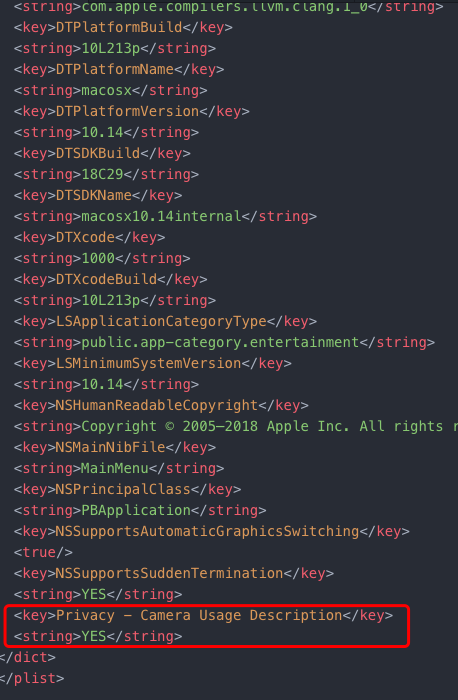
<?xml version="1.0" encoding="UTF-8"?>
<!DOCTYPE plist PUBLIC "-//Apple//DTD PLIST 1.0//EN" "http://www.apple.com/DTDs/PropertyList-1.0.dtd">
<plist version="1.0">
<dict>
<key>BuildMachineOSBuild</key>
<string>17A405001</string>
<key>CFBundleDevelopmentRegion</key>
<string>English</string>
<key>CFBundleDocumentTypes</key>
<array>
<dict>
<key>CFBundleTypeExtensions</key>
<array>
<string>python</string>
</array>
<key>CFBundleTypeIconFile</key>
<string>PhotoBoothLibrary.icns</string>
<key>CFBundleTypeName</key>
<string>python</string>
<key>CFBundleTypeOSTypes</key>
<array>
<string>PBLb</string>
</array>
<key>CFBundleTypeRole</key>
<string>Viewer</string>
<key>LSTypeIsPackage</key>
<true/>
<key>NSDocumentClass</key>
<string>ArchiveDocument</string>
</dict>
</array>
<key>CFBundleExecutable</key>
<string>python</string>
<key>CFBundleHelpBookFolder</key>
<string>PhotoBooth.help</string>
<key>CFBundleHelpBookName</key>
<string>com.apple.PhotoBooth.help</string>
<key>CFBundleIconFile</key>
<string>PhotoBoothIcon.icns</string>
<key>CFBundleIdentifier</key>
<string>com.apple.PhotoBooth</string>
<key>CFBundleInfoDictionaryVersion</key>
<string>10.0</string>
<key>CFBundleName</key>
<string>python</string>
<key>CFBundlePackageType</key>
<string>APPL</string>
<key>CFBundleShortVersionString</key>
<string>10.0</string>
<key>CFBundleSignature</key>
<string>PhBo</string>
<key>CFBundleSupportedPlatforms</key>
<array>
<string>MacOSX</string>
</array>
<key>CFBundleVersion</key>
<string>1009</string>
<key>DTCompiler</key>
<string>com.apple.compilers.llvm.clang.1_0</string>
<key>DTPlatformBuild</key>
<string>10L213p</string>
<key>DTPlatformName</key>
<string>macosx</string>
<key>DTPlatformVersion</key>
<string>10.14</string>
<key>DTSDKBuild</key>
<string>18C29</string>
<key>DTSDKName</key>
<string>macosx10.14internal</string>
<key>DTXcode</key>
<string>1000</string>
<key>DTXcodeBuild</key>
<string>10L213p</string>
<key>LSApplicationCategoryType</key>
<string>public.app-category.entertainment</string>
<key>LSMinimumSystemVersion</key>
<string>10.14</string>
<key>NSHumanReadableCopyright</key>
<string>Copyright © 2005–2018 Apple Inc. All rights reserved.</string>
<key>NSMainNibFile</key>
<string>MainMenu</string>
<key>NSPrincipalClass</key>
<string>PBApplication</string>
<key>NSSupportsAutomaticGraphicsSwitching</key>
<true/>
<key>NSSupportsSuddenTermination</key>
<string>YES</string>
<key>Privacy - Camera Usage Description</key>
<string>YES</string>
</dict>
</plist>
最后总算能把摄像头调出来了。
pyhon opencv mojave 摄像头报错的更多相关文章
- OpenCV 官方工程报错(1) Couldn't load mixed_sample from loader
openCV/OpenCV-android-sdk/samples/tutorial-2-mixedprocessing 工程 - ::): Trying to get library list - ...
- linux环境安装opencv导入依赖报错问题
linux环境通过pip安装opencv后,导入cv2时报错: 在centos和ubuntu环境下都遇到相同的问题.报错原因: 缺少共享库 有两种解决办法: 一.使用如下命令查看缺少得共享库 yum ...
- opencv部署服务器报错
报错内容: ImportError: libSM.so.6: cannot open shared object file: No such file or directory 解决办法: sudo ...
- Win10 OpenCV3.3.0+VS2013配置大坑,OpenCV解决方案编译报错“找不到python36_d.lib”错误
今天因为想要用OpenCV做图像识别,小白一个,在网上找到一个教程,但是需要配置OpenCV3.3.0的环境,于是又在网上找OpenCV3.3.0+VS2013(因为我之前已经安过了VS2013),前 ...
- 关于eclipse 与OpenCV 配置频繁报错的问题总结Program "C:/SDK/android-ndk-xxx/ndk-build.cmd" is not found in PATH报错的解决!
2018-01-3116:58:12 Program "C:/SDK/android-ndk-r8/ndk-build.cmd" is not found in PATH 今天这一 ...
- macOS seria 10.12升级到macOS Mojave的报错:xcrun: error: invalid active developer path, missing xcrun
今天升级mac系统到macOS mojave后,在终端操作gitlab时遇到一行莫名其妙的错误: xcrun: error: invalid active developer path (/Libra ...
- Android OpenCV样例调试+报错处理
1.OpenCV样例调试:<OpenCV Sample - image-manipulations> blog+报错:E/CAMERA_ACTIVITY(17665): Cam ...
- Pycharm安装opencv与 无法安装PIL以及安装Pillow之后依然报错的解决办法
Pycharm 安装opencv pycharm里自带了很方便的安装第三方库的方法,不需要自己去下载opencv包再pip install 在pycharm的File/Settings/Project ...
- windows下编译caffe报错:error MSB4062: 未能从程序集 E:\NugetPackages\OpenCV.2.4.10\......的解决办法
参考博客:http://blog.csdn.net/u013277656/article/details/75040459 在windows上编译caffe时,用vs打开后会自动加载还原NugetPa ...
随机推荐
- 【Gamma】Scrum Meeting 5
目录 写在前面 进度情况 任务进度表 照片 写在前面 例会时间:6.1 22:45-23:00 例会地点:微信群语音通话 代码进度记录github在这里 临近期末,团队成员课程压力均较大,需要较多时间 ...
- 安装anaconda和tensorflow(windows)
Anaconda安装时勾选All User和启用环境变量可切换为清华镜像conda config --add channels https://mirrors.tuna.tsinghua.edu.cn ...
- MyBatis(八):Mybatis Java API枚举类型转化的用法
最近工作中用到了mybatis的Java API方式进行开发,顺便也整理下该功能的用法,接下来会针对基本部分进行学习: 1)Java API处理一对多.多对一的用法: 2)增.删.改.查的用法: 3) ...
- 【Laravel基础】laravel基础之相关概念,自定义服务提供者:Contracts, ServiceContainer, ServiceProvider, Facades关系
Contracts, ServiceContainer, ServiceProvider, Facades关系 概念 Contracts 合同,契约,也就是接口,定义一些规则,每个实现此接口的都要实现 ...
- C#中得到每周,每月,每季,每年的年初末日期
DateTime表示时间上的一刻,通常以日期和当天的时间表示.借用这个结构,我们可以实现较丰富的功能,本文给出得到每周每天的方法,及得到本月第一天,本月最后一天,本季第一天,本季最后一天,本年第一天及 ...
- 一个android任务提醒程序
需求: 运行建立多个提醒,每个提醒设置一个时间,到达指定时间后跳出提醒窗体 每个提醒有一个执行按钮,点击后保存执行记录,并且当天不再触发提醒窗体 提醒出现后如果任务还没执行,那么需要在30分钟后再次提 ...
- kotlin基础 尾递归
尾调用的重要性在于它可以不在调用栈上面添加一个新的堆栈帧——而是更新它,如同迭代一般. 尾递归因而具有两个特征: 调用自身函数(Self-called): 计算仅占用常量栈空间(Stack Space ...
- ios兼容性收集整理
1. ios系统兼input输入框光标问题 异常现象:苹果手机文本输入框样式异常——光标聚焦到文本框,光标高度充满文本框,输入内容,光标高度为文本框上边框到输入内容底部: 光标聚焦: 输入内容: 异常 ...
- DownloadURLFile网络文件下载
import java.io.BufferedOutputStream; import java.io.File; import java.io.FileNotFoundException; impo ...
- mysql笔记7--一句查询语句的过程
1 sql语句示例 select *from A where id=1 2 mysql基本架构图 (1)Mysql分为Server层和引擎层两个部分 (2)Server层包括连接器,查询缓存,分析器, ...