
windows上传文件到 linux的hdfs
一、windows上传文件到 linux的hdfs
1、先在 centos 上开启 hdfs, 用 jps 可以看到下面信息, 说明完成开启

2、在win上配置 hadoop (https://www.cnblogs.com/Jomini/p/11432484.html) 后,
要在 hadoop 的 bin 文件上放以下两个文件(网上找下载),

3、创建 maven 工程, 运行读写程序
pom 文件
<dependency>

	<groupId>org.apache.logging.log4j</groupId>

	<artifactId>log4j-core</artifactId>

	<version>2.8.2</version>

</dependency>

<dependency>

	<groupId>org.apache.hadoop</groupId>

	<artifactId>hadoop-common</artifactId>

	<version>2.7.2</version>

</dependency>

<dependency>

	<groupId>org.apache.hadoop</groupId>

	<artifactId>hadoop-client</artifactId>

	<version>2.7.2</version>

</dependency>

<dependency>

	<groupId>org.apache.hadoop</groupId>

	<artifactId>hadoop-hdfs</artifactId>

	<version>2.7.2</version>

</dependency>
运行上传文件
import java.io.IOException;

import java.net.Socket;

import org.apache.hadoop.conf.Configuration;

import org.apache.hadoop.fs.FileStatus;

import org.apache.hadoop.fs.FileSystem;

import org.apache.hadoop.fs.Path;

public class Apptest {

	public static void main(String[] args) throws Exception, IOException {

		upload();

	}

	public static void upload() throws IOException {

		Configuration conf = new Configuration();

		conf.set("fs.defaultFS", "hdfs://192.168.121.133:9000");

		FileSystem fs = FileSystem.get(conf);

		Path src = new Path("d://test.txt");

		Path dest = new Path("/");

		fs.copyFromLocalFile(src, dest);

		FileStatus[] fileStatus = fs.listStatus(dest);

		for (FileStatus file : fileStatus) {

			System.out.println(file.getPath());

		}

		System.out.println("上传成功");

	}

}
运行使用 Run configuration, 要 配置 linux 上的用户,不然抛出用户权限问题
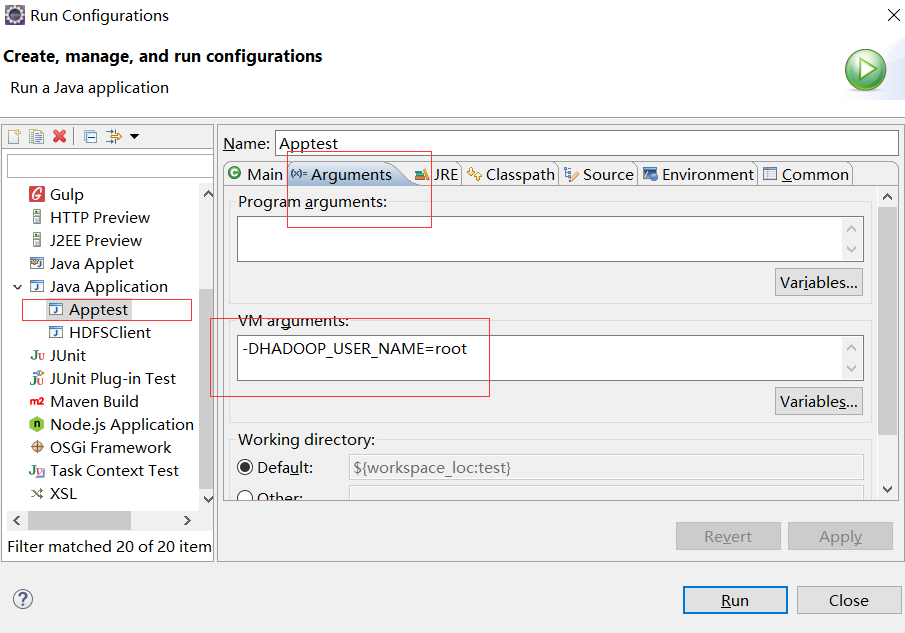
console

hdfs

二、在 hdfs 创建路径创建路径
2.1 在 hdfs 创建路径
程序
import java.io.IOException;

import org.apache.hadoop.conf.Configuration;

import org.apache.hadoop.fs.FileSystem;

import org.apache.hadoop.fs.Path;

public class Apptest {

	public static void main(String[] args) throws Exception, IOException {

        Configuration conf = new Configuration();

        conf.set("fs.defaultFS", "hdfs://192.168.121.133:9000");

        //获取hdfs 客户端对象

	FileSystem fs = FileSystem.get(conf);

        //在hdfs 上创建路径

	fs.mkdirs(new Path("/testPath"));

        //关闭资源

	fs.close();

	System.out.println("end");

	}

}
运行结果

2.2 在上面创建的路径 "/testPath" 下面 再创建路径 file
程序
import java.io.IOException;

import java.net.URI;

import org.apache.hadoop.conf.Configuration;

import org.apache.hadoop.fs.FileSystem;

import org.apache.hadoop.fs.Path;

public class Apptest {

	public static void main(String[] args) throws Exception, IOException {

	Configuration conf = new Configuration();

        //获取hdfs 客户端对象

	FileSystem fs = FileSystem.get(new URI("hdfs://192.168.121.133:9000"),conf,"root");

	//在 /testPath 下创建路径

	fs.mkdirs(new Path("/testPath/file"));

        //关闭资源

	fs.close();

	System.out.println("end");

	}

}
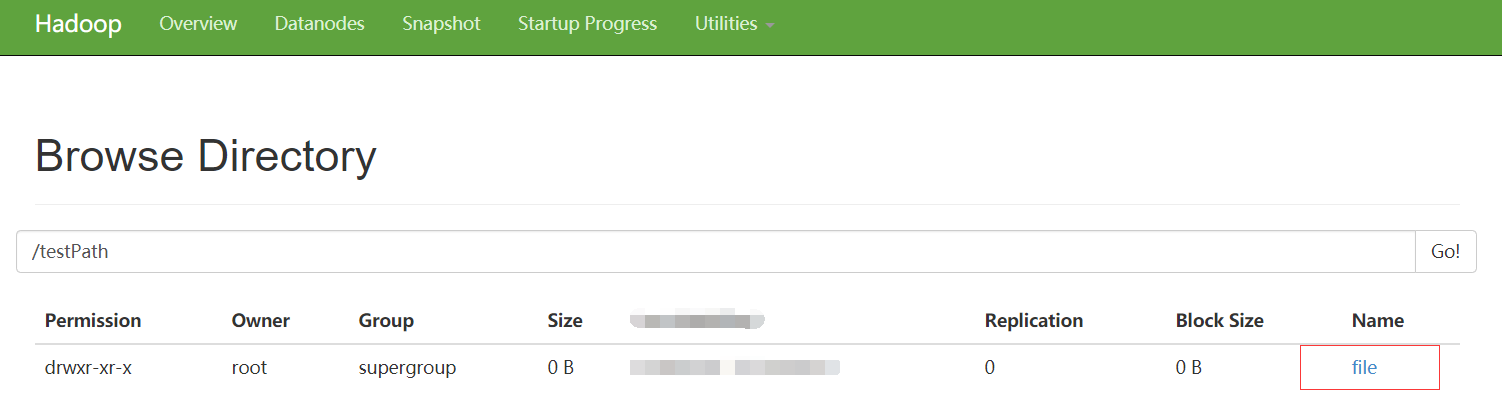
点击在hdfs上面的路径 /testPath 会出现 /file
windows上传文件到 linux的hdfs的更多相关文章
- Windows上传文件到linux 使用winscp
Windows上传文件到linux 使用winscp, winscp下载目录 https://sourceforge.net/projects/winscp/postdownload?source=d ...
- Xshell实现Windows上传文件到Linux主机
我是怎么操作的: 1.打开一台本地Linux虚拟机,使用mount 挂载Windows的共享文件夹到Linux上,然后拷贝数据到Linux虚拟机里面:(经常第一步都不顺利,无法挂载Windows的文件 ...
- linux安装lrzsz支持rz从windows上传文件到linux
1.下载lrzsz wget https://wangxuejin-data-1252194948.cos.ap-shanghai.myqcloud.com/lrzsz-0.12.20.tar.gz ...
- windows 上传文件到 Linux 服务器
方法一: pscp E:\javaWP\new11111.txt username@130.75.7.156:/home/
- windows上传文件到linux
1.在putty的网站上下载putty跟pscp 2.安装ssh跟putty sudo apt-get install openssh-server sudo apt-get install putt ...
- 使用FileZilla解决从Windows上传文件到Linux vsftpd的乱码问题!
日前将golang的开发环境从windows转移到了CentOS6上,为了把以前写得项目代码上传到centos,架设了vsftpd服务,设置为本地用户登录,然后用惯用的ftp软件flashfxp上传了 ...
- 利用Xshell从windows上传文件到linux
1.首先,打开你的xshell客户端. 2.我用的是ubuntu 所以用 apt-get install lrzsz 命令来安装这个上传软件. 安装成功以后,可以使用rz上传,sz下载. 然后等待上传 ...
- windows上传文件到linux云服务器上
安装putty,将pscp.exe移到 C:\Windows\System32 目录下. 在cmd 中执行,pscp -l rot -pw [password] -ls [ip]:/opt 查看目录 ...
- python 从windows上传文件到linux脚本
import paramiko import datetime import os hostname = '192.168.112.132' username = 'root' password = ...
随机推荐
- 【oracle】INSERT INTO SELECT
- ASP.NET开发实战——(六)ASP.NET MVC & 分层 代码篇
上一篇文章对如何规范使用ASP.NET进行了介绍,本章内容将根据上一篇得出的结论来修改博客应用的代码. 代码分层 综合考虑将博客应用代码分为以下几个层次: ○ 模型:代表应用程序中的数据模型,与数据库 ...
- 关于webpack的面试题
随着现代前端开发的复杂度和规模越来越庞大,已经不能抛开工程化来独立开发了,如react的jsx代码必须编译后才能在浏览器中使用:又如sass和less的代码浏览器也是不支持的. 而如果摒弃了这些开发框 ...
- C语言第2
今个那老哥替我刷题,然后遇到一个打印中文编码得问题,我多嘴一问,为啥 用 unsiged 然后他让我换成char试试:然后出现了以下结果 #include <stdio.h> #inclu ...
- 最小费用最大流 学习笔记&&Luogu P3381 【模板】最小费用最大流
题目描述 给出一个网络图,以及其源点和汇点,每条边已知其最大流量和单位流量费用,求出其网络最大流和在最大流情况下的最小费用. 题目链接 思路 最大流是没有问题的,关键是同时保证最小费用,因此,就可以把 ...
- CompletableFuture1
public class CompletableFutureTest { public static void main(String[] args) throws Exception { test5 ...
- Java自学-集合框架 HashMap
Java集合框架 HashMap 示例 1 : HashMap的键值对 HashMap储存数据的方式是-- 键值对 package collection; import java.util.HashM ...
- Maven快速入门--Idea版
目录 1.web项目的基本知识 1.1 项目构建 1.1.1传统的构建过程如下: 1.1.2 mavn构建项目 1.2 maven构建项目的优点: 2. 依赖管理 2.1 传统依赖管理 2.1.1 手 ...
- 英语_金丝楠是紫楠(phoebeSheareri)的别名
姚黄魏紫俱凋零--红木家具今古谈(连载七) [上海木业网]楠木品种包括闽楠.细叶楠.红毛山楠.滇楠.白楠.紫楠.乌心楠.桢楠.水楠.香楠等二百余种之多,1997年的木材国家标准中就列入了八种.某些售卖 ...
- JS 判断设备来源
1.js代码判断当前设备: function deviceType(){ var ua = navigator.userAgent; var agent = ["Android", ...