
How do I fix "selector not recognized" runtime exceptions when trying to use category methods from a static library?
https://developer.apple.com/library/content/qa/qa1490/_index.html
A: If you're seeing a "selector not recognized" runtime exception when calling a category method that is implemented in a static library, you are hitting the link-time build issue described here, and need to add the -ObjC linker flag to your project, by following these steps:
In Xcode, choose View > Navigators > Show Project Navigator, or press
⌘1.Select your project under the PROJECT heading in the Project Navigator, then select the Build Settings tab.
Scroll down to the Other Linker Flags build setting under the Linking collection, or type "Other Linker Flags" into the search bar.
Set the value of the Other Linker Flags build setting to
$(OTHER_LDFLAGS) -ObjC.
Figure 1 Modifying the Other Linker Flags build setting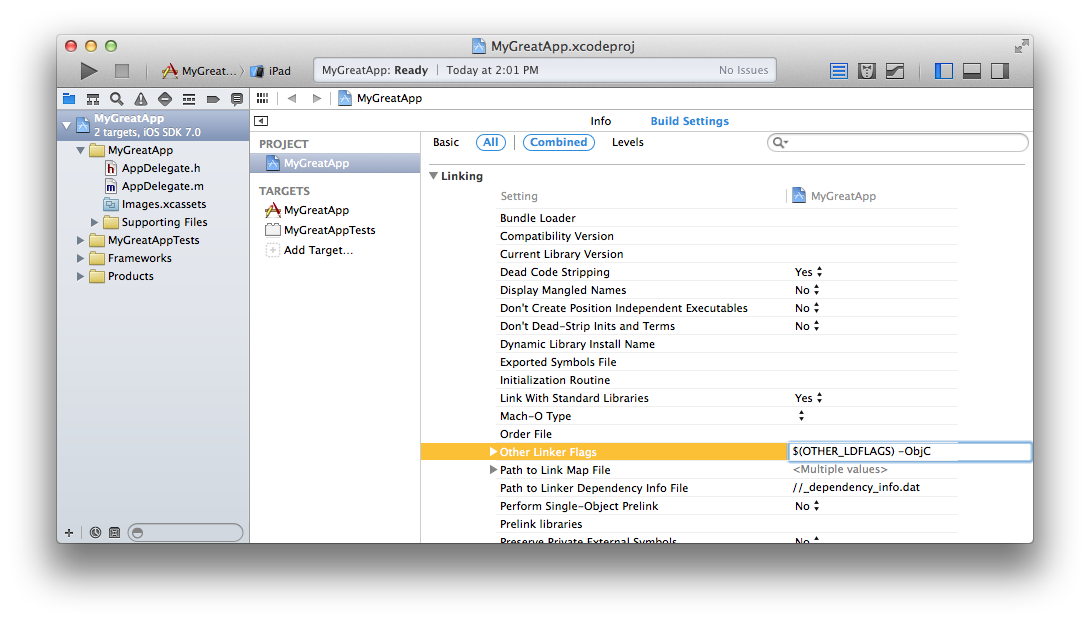
Troubleshooting
If adding the -ObjC flag isn't fixing the problem, double check that a conflicting Target build setting is not overriding it, by following the above steps, but selecting the current target under "TARGETS" in step 2, instead of the project.
Other Causes of selector not recognized Exceptions
The most common causes of a "selector not recognized" exception are:
No Such Method
The method really does not exist. Check your spelling. Check documentation to verify that the method exists on the version of the operating system your app is using.
Memory Management
Your app is trying to use an object after it has been deallocated, use the Zombies instrument to debug this kind of problem. You are seeing "selector not recognized" because the memory has been re-allocated as a different kind of object.
What causes those exceptions?
An impedance mismatch between UNIX static libraries and the dynamic nature of Objective-C can cause category methods in static libraries to not be linked into an app, resulting in "selector not recognized" exceptions when the methods aren't found at runtime.
The Linker
When a C program is compiled, each "source file" is turned into an "object file" that contains executable functions and static data. The linker glues these object files together into a final executable. That executable is eventually bundled into an app by Xcode.
When a source file uses something (like a function) defined in another file, then an undefined symbol is written into the object file, to "stand in" for the missing thing. The linker resolves these symbols by pulling in the object files that include definitions of undefined symbols when building the final executable.
For example, if main.c uses the function foo(), where foo is defined in another file, B.c, then the object file main.o will have an unresolved symbol for foo(), and B.o will include an implementation of foo(). At link time, B.o will be brought into the final executable, so that the code in main.o now references the implementation of foo() defined in B.o.
A UNIX static library is just a collection of object files. Normally the linker only pulls in an object file from a static library if doing so would resolve some undefined symbol. Not pulling in all object files reduces the size of the final executable.
Objective-C
The dynamic nature of Objective-C complicates things slightly. Because the code that implements a method is not determined until the method is actually called, Objective-C does not define linker symbols for methods. Linker symbols are only defined for classes.
For example, if main.m includes the code [[FooClass alloc] initWithBar:nil]; then main.o will contain an undefined symbol for FooClass, but no linker symbols for the -initWithBar:method will be in main.o.
Since categories are a collection of methods, using a category's method does not generate an undefined symbol. This means the linker does not know to load an object file defining the category, if the class itself is already defined. This causes the same "selector not recognized" runtime exception you would see for any unimplemented method.
The -ObjC Linker Flag
Passing the -ObjC option to the linker causes it to load all members of static libraries that implement any Objective-C class or category. This will pickup any category method implementations. But it can make the resulting executable larger, and may pickup unnecessary objects. For this reason it is not on by default.
How do I fix "selector not recognized" runtime exceptions when trying to use category methods from a static library?的更多相关文章
- Effective Java 58 Use checked exceptions for recoverable conditions and runtime exceptions for programming errors
Three kinds of throwables Throwables Checked Recoverable checked exceptions Y Y runtime exceptions N ...
- iOS的Runtime机制下给类别(category)添加属性、替换原有类的方法执行
一.Runtime的理解 OC是面向对象的语言这是常识,其实就是通过Runtime机制动态创建类和对象,这里只是简单的运用runtime的使用! 二.类别(category)添加属性_使用前记得导入头 ...
- Building Objective-C static libraries with categories
Q: How do I fix "selector not recognized" runtime exceptions when trying to use category m ...
- Other Linker Flags到底是什么
一.问题描述 在项目开发中用到百度地图,有时候在工程中会报“方法找不到”的错误(unrecognized selector sent to instance). 二.问题分析 首先,要说明一下Othe ...
- 【转】关于Xcode的Other Linker Flags
链接器 首先,要说明一下Other Linker Flags到底是用来干嘛的.说白了,就是ld命令除了默认参数外的其他参数.ld命令实现的是链接器的工作,详细说明可以在终端man ld查看. 如果有人 ...
- 关于Xcode的Other Linker Flags
背景 在ios开发过程中,有时候会用到第三方的静态库(.a文件),然后导入后发现编译正常但运行时会出现selector not recognized的错误,从而导致app闪退.接着仔细阅读库文件的说明 ...
- Xcode 编辑器之关于Other Linker Flags相关问题
一,概述 问题场景一 当从网上去下载一些之前的完整的项目的时候,用终端也 pod update了,但一运行,熟悉的linker错误就出来了. 解决办法 在Other Linker Flags(也即 O ...
- Selector
原文: https://developer.apple.com/library/ios/documentation/General/Conceptual/DevPedia-CocoaCore/Sele ...
- Objective C运行时(runtime)
#import <objc/runtime.h> void setBeingRemoved(id __self, SEL _cmd) { NSLog(@"------------ ...
随机推荐
- 利用setenv进行tomcat 内存设置
part.1 系统环境及版本 系统环境: centos 7 版本: tomcat 7.0.78 part.2 步骤流程 2.1 新建setenv.sh # cd /usr/local/tomcat/b ...
- Effective.Java第1-11条
1. 考虑使用静态工厂方法替代构造方法 一个类可以提供一个公共静态工厂方法,它只是返回类实例的静态方法.例如JDK的Boolean的valueOf方法: public final class Bool ...
- zk脑裂
一.为什么zookeeper要部署基数台服务器?二.zookeeper脑裂(Split-Brain)问题2.1.什么是脑裂?2.2.什么原因导致的?2.2.zookeeper是如何解决的?一.为什么z ...
- Istio 1.4 更新了 | 感觉学不完
Istio 1.4 更新了 官网 https://istio.io/news/2019/announcing-1.4/ Istio 评选 为GitHub上增长最快的五个 开源项目之一 变更说明获取更改 ...
- vs2019发布Web到云服务器(IIS)
捣鼓了也有几天,到处收集资料终于折腾出来,做点小笔记 原文地址:https://www.cnblogs.com/potential/p/3751426.html 一.我的环境: Windows Ser ...
- 小结 python 实战中遇到的几种需要化名的情境
笑来在<自学是门手艺>的<2.4.3 化名与匿名>中,讲到了函数的化名.经过几个月的实战,我发现,实际上化名无处不在.我有时也会称之为"别称",意思一样.函 ...
- winform datagridview控件使用
最近做项目时,显示查询结果总需要绑定到datagridview控件上显示,总结了给datagridview绑定数据的方式,以及导出datagridview数据到excel表格,如有错误请多指教 1.直 ...
- ansible超详细使用指南
在工作中有用到ansible用于自动部署和环境配置,这里整理了一份很详尽的使用指南,如果有用到的可以看看.关于使用ansible自动部署一个网站和docker化,将在下一篇文章中介绍,敬请期待.文章内 ...
- 一.B/S架构和C/S架构
1.B/S架构 Browser-Server, 浏览器和服务器架构.包含客户端浏览器.web应用服务器.数据库服务器的软件系统.用户只需要一个浏览器就可以访问服务.系统更新的时候,只需要更新服务端, ...
- python爬虫爬取天气数据并图形化显示
前言 使用python进行网页数据的爬取现在已经很常见了,而对天气数据的爬取更是入门级的新手操作,很多人学习爬虫都从天气开始,本文便是介绍了从中国天气网爬取天气数据,能够实现输入想要查询的城市,返回该 ...