
C# 连接SQLServer数据库自动生成model类代码
Program.cs
using System;

using System.Collections.Generic;

using System.Linq;

using System.Threading.Tasks;

using System.Windows.Forms;

namespace ModelFactory

{

    static class Program

    {

        /// <summary>

        /// 应用程序的主入口点。

        /// </summary>

        [STAThread]

        static void Main()

        {

            Application.EnableVisualStyles();

            Application.SetCompatibleTextRenderingDefault(false);

            DBSelect dbs = new DBSelect();

            dbs.ShowDialog();

            TableSelect ts = new TableSelect();

            ts.ShowDialog();

            Application.Run(new ModelFactory());

        }

    }

}
DataBase.cs
using System;

using System.Collections.Generic;

using System.Data;

using System.Data.SqlClient;

using System.Linq;

using System.Text;

using System.Threading.Tasks;

namespace ModelFactory

{

    public static class DataBase

    {

        public static string DataSouse { get; set; }

        public static string USER_ID { get; set; }

        public static string PASSWORD { get; set; }

        public static string database { get; set; }

        private static string connectString{ get; set; }

        public static List<string> tablenames = new List<string>();

        public static void Init()

        {

            if (string.IsNullOrEmpty(DataBase.database)) DataBase.database = "master";

            connectString = string.Format("DATA SOURCE={0};INITIAL CATALOG={1};USER ID={2};PASSWORD={3};", DataSouse, database, USER_ID, PASSWORD);

        }

        public static SqlConnection SqlOpen()

        {

            SqlConnection connection = null;

            try

            {

                connection = new SqlConnection(connectString);

                //connection.Open();

                return connection;

            }

            catch

            {

                return connection;

            }

        }

        public static bool SqlClose(SqlConnection connection)

        {

            if (connection != null)

            {

                connection.Close();

                return true;

            }

            else

                return false;

        }

        public static DataSet ProcSet(string commandstr)

        {

            //	data.Clear();

            DataSet data = new DataSet();

            SqlConnection connection = SqlOpen();

            SqlDataAdapter aCommand = new SqlDataAdapter(commandstr, connection);

            try

            {

                aCommand.SelectCommand.CommandTimeout = 120;

                connection.Open();

                aCommand.Fill(data);

                SqlClose(connection);

                return data;

            }

            catch (Exception e)

            {

                return null;

            }

            finally

            {

                SqlClose(connection);

            }

        }

        public static int DoProc(string commandstr)

        {

            SqlConnection connection = SqlOpen();

            SqlCommand sqlCom = new SqlCommand(commandstr, connection);

            sqlCom.CommandTimeout = 1200;

            try

            {

                connection.Open();

                int x = Convert.ToInt32(sqlCom.ExecuteNonQuery());

                SqlClose(connection);

                return x;

            }

            catch (Exception e)

            {

                return 0;

            }

            finally

            {

                SqlClose(connection);

            }

        }

        public static string ProcString(string commandstr)

        {

            SqlConnection connection = SqlOpen();

            SqlCommand sqlCom = new SqlCommand(commandstr, connection);

            sqlCom.CommandTimeout = 600;

            string str = "";

            try

            {

                connection.Open();

                var obj = sqlCom.ExecuteScalar();

                if (obj != null)

                    str = obj.ToString();

                return str;

            }

            catch (Exception e)

            {

                return "";

            }

            finally

            {

                SqlClose(connection);

            }

        }

        public static void Add(string tablename)

        {

            tablenames.Add(tablename);

        }

    }

}
DBSelect
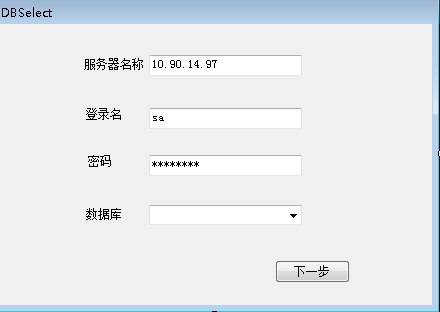
using System;

using System.Collections.Generic;

using System.ComponentModel;

using System.Data;

using System.Drawing;

using System.Linq;

using System.Text;

using System.Threading.Tasks;

using System.Windows.Forms;

namespace ModelFactory

{

    public partial class DBSelect : Form

    {

        public DBSelect()

        {

            InitializeComponent();

        }

        private void textBox3_Leave(object sender, EventArgs e)

        {

            DataBase.DataSouse = textBox1.Text.Trim();

            DataBase.USER_ID = textBox2.Text.Trim();

            DataBase.PASSWORD = textBox3.Text.Trim();

            DataBase.Init();

            DataSet ds = DataBase.ProcSet("SELECT d.name,d.database_id FROM sys.databases AS d WHERE d.log_reuse_wait>0");

            comboBox1.DisplayMember = "name";

            comboBox1.ValueMember = "database_id";

            comboBox1.DataSource = ds.Tables[0];

        }

        private void button1_Click(object sender, EventArgs e)

        {

            DataBase.database = comboBox1.Text;

            DataBase.Init();

            this.Close();

        }

        private void comboBox1_Enter(object sender, EventArgs e)

        {

            textBox3_Leave(sender, e);

        }

    }

}
TableSelect
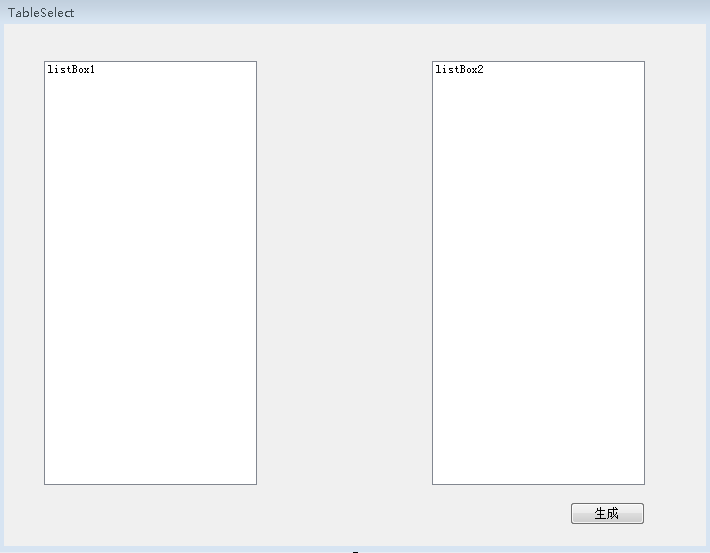
using System;

using System.Collections.Generic;

using System.ComponentModel;

using System.Data;

using System.Drawing;

using System.Linq;

using System.Text;

using System.Threading.Tasks;

using System.Windows.Forms;

namespace ModelFactory

{

    public partial class TableSelect : Form

    {

        public TableSelect()

        {

            InitializeComponent();

            listBox2.DisplayMember = "name";

            listBox2.ValueMember = "name";

            listBox1.DataSource = DataBase.ProcSet("SELECT t.name FROM sys.tables AS t").Tables[0];

            listBox1.DisplayMember = "name";

            listBox1.ValueMember = "name";

        }

        private void listBox1_DoubleClick(object sender, EventArgs e)

        {

            //listBox1.Items.Remove(listBox1.SelectedItem);

            listBox2.Items.Add(listBox1.SelectedItem);

        }

        private void listBox2_DoubleClick(object sender, EventArgs e)

        {

            listBox2.Items.Remove(listBox2.SelectedItem);

        }

        private void button3_Click(object sender, EventArgs e)

        {

           foreach(System.Data.DataRowView row in listBox2.Items)

           {

               DataBase.Add(row.Row.ItemArray[0].ToString());

           }

           this.Close();

        }

    }

}
ModelFactory.cs
using System;

using System.Collections.Generic;

using System.ComponentModel;

using System.Data;

using System.Drawing;

using System.Linq;

using System.Text;

using System.Threading.Tasks;

using System.Windows.Forms;

namespace ModelFactory

{

    public partial class ModelFactory : Form

    {

        private StringBuilder sb = new StringBuilder();

        public ModelFactory()

        {

            InitializeComponent();

            foreach (string tablename in DataBase.tablenames)

            {

                sb.AppendLine("    public class " + tablename);

                sb.AppendLine("    {");

                DataTable dt = DataBase.ProcSet("select top 1 * from " + tablename).Tables[0];

                //DbType dbtype;

                string dbtype,columnname;

                for (int i = 0; i < dt.Columns.Count;i++ )

                {

                    dbtype = CastType(dt.Columns[i].DataType);

                    columnname = dt.Columns[i].ColumnName;

                    sb.AppendLine("         public " + dbtype + " " + columnname+" {get;set;}");

                }

                sb.AppendLine("    }");

            }

            textBox1.Text = sb.ToString();

        }

        public string CastType(Type type)

        {

            if (type == typeof(string))

            {

                return "string";

            }

            else if (type == typeof(DateTime))

            {

                return "DateTime";

            }

            else if (type == typeof(bool))

            {

                return "bool";

            }

            else if (type == typeof(int))

            {

                return "int";

            }

            else

            {

                return type.ToString().Split('.')[type.ToString().Split('.').Length - 1];

            }

        }

    }

}
C# 连接SQLServer数据库自动生成model类代码的更多相关文章
- django根据已有数据库表生成model类
django根据已有数据库表生成model类 创建一个Django项目 django-admin startproject 'xxxx' 修改setting文件,在setting里面设置你要连接的数据 ...
- 使用T4为数据库自动生成实体类
T4 (Text Template Transformation Toolkit) 是一个基于模板的代码生成器.使用T4你可以通过写一些ASP.NET-like模板,来生成C#, T-SQL, XML ...
- Asp.Net Core如何根据数据库自动生成实体类
通过引用Nuget包添加实体类 运行 Install-Package Microsoft.EntityFrameworkCore.SqlServer 运行 Install-Package Micros ...
- SpringBoot整合Mybatis 使用generator自动生成实体类代码、Mapper代码、dao层代码
1.新建一个SpringBoot项目,并引入Mybatis和mybatis-generator相关的依赖. <dependency> <groupId>org.springfr ...
- 使用mybatis-generator在自动生成Model类和Mapper文件
使用mybatis-generator插件可以很轻松的实现mybatis的逆向工程,即,能通过表结构自动生成对应的java类及mapper文件,可以大大提高工作效率,并且它提供了很多自定义的设置可以应 ...
- c# 利用t4模板,自动生成Model类
我们在用ORM(比如dapper)的时候,很多时候都需要自己写Model层(当然也有很多orm框架自带了这种功能,比如ef),特别是表里字段比较多的时候,一个Model要写半天,而且Model如果用于 ...
- Entity Framework连接Mysql数据库并生成Model和DAL层
Entity Framework (EF,ADO.NET Entity Framework)是微软官方提供的.NET平台的ORM框架.相比于LINQ TO SQL,EF框架具有很明显的优势: EF框架 ...
- mybatis自定义代码生成器(Generator)——自动生成model&dao代码
花了两天的时间研究了下mybatis的generator大体了解了其生成原理以及实现过程.感觉generator做的非常不错,给开发者也留足了空间.看完之后在generator的基础上实现了自定义的生 ...
- MVC Html辅助方法DropDownList的简单使用、连接MYSQL数据库用自定义model类接收
附上启发链接:https://www.cnblogs.com/CreateMyself/p/5424894.html [HttpGet] public ActionResult Edit(int id ...
随机推荐
- 笔记 - 数据结构 - 区间第k大
Codeforces Round #602 (Div. 2, based on Technocup 2020 Elimination Round 3) D2 - Optimal Subsequence ...
- docker 进程管理
详文:理解Docker容器的进程管理:https://yq.aliyun.com/articles/5545 在Docker中,每个Container都是Docker Daemon的子进程. dock ...
- TICK/TIGK运维栈安装运行【上】
TICK/TIGK运运维metrics栈包括 InfuluxDB:为时间序列数据专门定制的高性能数据存储.TSM引擎允许高速接收和数据压缩.完全go语言编写.编译成一个单一的二进制,没有外部依赖.简单 ...
- 性能测试分析过程(二)cpu 使用率过高的分析方法
Linux 系统下 cpu 使用率过高的分析方法 1.通过 top 命令可以很明显查看出哪个进程耗cpu比较高 2. ps -mp 25147-o THREAD,tid,time\top -Hp pi ...
- java开源工具包-Jodd框架
java开源工具包-Jodd框架 / 2019-07-24 Jodd是一个Java工具包和微型框架,Jodd 工具包含一些实用的工具类和小型框架,增强了 JDK 提供很多强大的功能,可以帮助实现 ...
- Python3基础 二、八、十、十六进制数的定义
Python : 3.7.3 OS : Ubuntu 18.04.2 LTS IDE : pycharm-community-2019.1.3 ...
- C# Newtonsoft.Json解析json字符串处理(最清晰易懂的方法)
需求: 假设有如下json字符串: { ", "employees": [ { "firstName": "Bill", &quo ...
- python初级(302) 3 easygui简单使用二
一.复习 1.easygui 信息提示对话框 2.easygui 是否对话框 二.easygui其它组件 1.选择对话框:choicebox(msg, title, choices) import e ...
- [LeetCode] 260. Single Number III 单独数 III
Given an array of numbers nums, in which exactly two elements appear only once and all the other ele ...
- [LeetCode] 291. Word Pattern II 词语模式 II
Given a pattern and a string str, find if str follows the same pattern. Here follow means a full mat ...