
spring-cloud: eureka之:ribbon负载均衡自定义配置(二)
spring-cloud: eureka之:ribbon负载均衡自定义配置(二)
有默认配置的话基本上就是轮询接口,现在我们改用自定义配置,同时支持:轮询,随机接口读取
准备工作:
1.eureka服务
2.两个user服务: 项目名:spring-cloud-user接口:7900/7901
3.两个user服务:项目名:spring-cloud-user2接口:8800/8801
4.movie服务,读取/调用user信息接口
eureka启动文件加入@EnableEurekaServer注解
@EnableEurekaServer

@SpringBootApplication

public class EurekaApplication {

	public static void main(String[] args) {

		SpringApplication.run(EurekaApplication.class, args);

	}

}
user服务:
spring-cloud-user配置文件:
#port

server.port=7901/7900

#data

spring.jpa.generate-ddl=false

spring.jpa.show-sql=true

spring.jpa.hibernate.ddl-auto=none

spring.datasource.platform=h2

spring.datasource.schema=classpath:schema.sql

spring.datasource.data=classpath:data.sql

spring.application.name=spring-cloud-user

#log

logging.level.root=INFO

logging.level.org.org.hibernate=INFO

logging.level.org.hibernate.type.descriptor.sql.BasicBinder=TRACE

logging.level.org.hibernate.type.descriptor.sql.BasicExtractor=TRACE

logging.level.com.muyang=debug

#eureka

eureka.client.serviceurl.defaultzone=http://localhost:8761/eureka

eureka.instance.preferIpAddress=true
spring-cloud-user启动文件加入@EnableEurekaClient注解
@EnableEurekaClient

@SpringBootApplication

public class BootUserApplication {

	public static void main(String[] args) {

		SpringApplication.run(BootUserApplication.class, args);

	}

}
spring-cloud-user的接口文件代码
@RestController

public class UserController {

	@Autowired

	private UserRepository userRepository;

	@GetMapping("/simple/{id}")

	public User findById(@PathVariable Long id)

	{

		return userRepository.findOne(id);

	}

}
spring-cloud-user2的配置同上,请注意相应的端口号的修改.
movie服务:
新建一个testConfiguration.java配置文件,跟启动文件目录同级
然后再新建一个@interface的ExcludeFromComponentScan注解文件,作为testConfiguration.java的componetscan注解
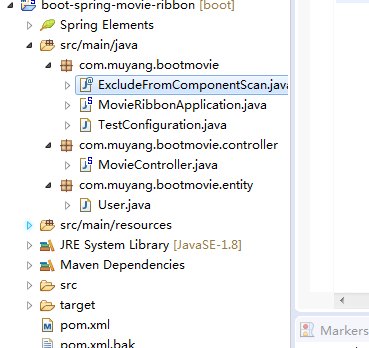
ExcludeFromComponentScan.java
public @interface ExcludeFromComponentScan {

}
TestConfiguration.java配置文件
引入componetScan,和随机接口读取
@Configuration

@ExcludeFromComponentScan

public class TestConfiguration {

	//@Autowired

	//IClientConfig config;

	//随机

	@Bean

	public IRule ribbonIRule()

	{

		return new RandomRule();

	}

}
Application.java启动文件
再启动文件加入,@EnableEurekaClient注解,
同时设置spring-cloud-user接口为随机读取:@RibbonClient(name = "spring-cloud-user", configuration = TestConfiguration.class)
排除不合适的组件类型:excludeFilters:指定不适合组件扫描的类型
@ComponentScan(excludeFilters = { @ComponentScan.Filter(type = FilterType.ANNOTATION, value = ExcludeFromComponentScan.class) })@EnableEurekaClient
@EnableEurekaClient

@SpringBootApplication

//随机spring-boot-user

@RibbonClient(name = "spring-boot-user", configuration = TestConfiguration.class)

@ComponentScan(excludeFilters = { @ComponentScan.Filter(type = FilterType.ANNOTATION, value = ExcludeFromComponentScan.class) })

//spring-boot-user2负载均衡

public class Application {

    @Bean

    @LoadBalanced

    public RestTemplate restTemplate() {

        return new RestTemplate();

    }

    public static void main(String[] args) {

        SpringApplication.run(Application.class, args);

    }

}
movieController.java文档
以/test为例,spring-cloud-user为随机读取接口,spring-cloud-user2位轮询读取接口
@RestController

public class MovieController {

	@Autowired

	private RestTemplate restTemplate;

	@Autowired

	LoadBalancerClient loadBalancerClient;

	@GetMapping("/movie/{id}")

	public User findById(@PathVariable Long id)

	{

		//http://localhost:7900/simple/

		return restTemplate.getForObject("http://spring-boot-user/simple/" + id, User.class);

	}

	@GetMapping("/test")

	public String testUser()

	{       //随机

		ServiceInstance serviceInstance = this.loadBalancerClient.choose("spring-boot-user");

		System.out.println("111:"+serviceInstance.getServiceId() + ":" + serviceInstance.getHost() + ":" + serviceInstance.getPort());

		//负载均衡

		ServiceInstance serviceInstance2 = this.loadBalancerClient.choose("spring-boot-user2");

		System.out.println("222:" + serviceInstance2.getServiceId() + ":" + serviceInstance2.getHost() + ":" + serviceInstance2.getPort());

		return "1";

	}

}
spring-cloud: eureka之:ribbon负载均衡自定义配置(二)的更多相关文章
- Spring Cloud微服务Ribbon负载均衡/Zuul网关使用
客户端负载均衡,当服务节点出现问题时进行调节或是在正常情况下进行 服务调度.所谓的负载均衡,就是当服务提供的数量和调用方对服务进行 取舍的调节问题,在spring cloud中是通过Ribbon来解决 ...
- spring cloud: zuul(三): ribbon负载均衡配置
zuul的routes配置下path/url组合不支持负载均衡 下面介绍zuul的routes配置下的path/serviceId负载均衡配置 spring-boot-user微服务开启了:7901, ...
- 关于spring cloud eureka整合ribbon实现客户端的负载均衡
1. 实现eureka整合ribbon非常简单, 1.1.首先引入所需maven依赖 <dependency> <groupId>org.springframework.boo ...
- Spring Cloud 客服端负载均衡 Ribbon
一.简介 Spring Cloud Ribbon 是一个基于Http和TCP的客服端负载均衡工具,它是基于Netflix Ribbon实现的.它不像服务注册中心.配置中心.API网关那样独立部署, ...
- 2.【Spring Cloud Alibaba】实现负载均衡-Ribbon
负载均衡的两种方式 如何实现负载均衡 目前已经实现让A总能找到B,如何实现负载均衡 负载均衡的两种方式 服务器端负载均衡 客户端负载均衡 使用Ribbo实现负载均衡 Ribbon是什么 ==Netfl ...
- Spring Cloud ---- 服务消费与负载均衡(Rest + Ribbon )
上一篇主要写了基于Eurake的服务的注册,主要就是创建注册中心,创建服务者,将服务者注册到注册中心,完成服务的暴露.这一篇主要写服务的消费与服务消费的负载均衡. 服务的调用方式有两种,Rest + ...
- 4.Spring Cloud初相识--------Feign负载均衡
前言: 在上一节里,我们学习了ribbon的使用. 我们了解到ribbon是一个客户端负载均衡机制. 而我们今天要讲的Feign呢,也是一款客户端负载均衡机制. 或者这样说,Feign封装了ribbo ...
- Spring Cloud ---- 服务消费与负载均衡(feign)
feign是一个声明式的伪客户端,只需要创建一个接口并且注解,它具有可插拔的特性.feign集合了Ribbon,再与Eurake结合实现服务的注册发现与负载均衡.结合Hystrix,具有熔断功能. 1 ...
- 【Spring Cloud学习之三】负载均衡
环境 eclipse 4.7 jdk 1.8 Spring Boot 1.5.2 Spring Cloud 1.2 主流的负载均衡技术有nginx.LVS.HAproxy.F5,Spring Clou ...
随机推荐
- Bootstrap3-文字样式
Bootstrap将全局font-size设置为14px,line-height为1.428.这些属性直接赋给<body>和所有段落元素.另外,<p>(段落)还被设置了等于1/ ...
- hdu6000 Wash ccpc-20162017-finals B Wash
地址:http://acm.split.hdu.edu.cn/showproblem.php?pid=6000 题目: Wash Time Limit: 20000/10000 MS (Java/Ot ...
- CQRS/ES框架调研
1.Enode一个C#写的CQRS/ES框架,由汤雪华设计及实现,github上有相关源码,其个人博客上有详细的孵化.设计思路.版本迭代及最新的完善: 2.axon framwork,java编写,网 ...
- Python实现Json结构对比的小工具兼谈编程求解问题
摘要: 通过使用Python编写一个解析Json结构对比的小工具,来提炼编程求解的通用步骤和技巧. 难度: 初级 先上代码. jsondiff.py #!/usr/bin/python #_*_enc ...
- PageRank算法与TextRank算法详解
PageRank算法: 该算法本质上属于有向带权图. 对于某个互联网网页A来说,该网页PageRank的计算基于以下两个基本假设: 数量假设:在Web图模型中,如果一个页面节点接收到的其他网页指向的入 ...
- linux基础命令---touch
touch 将文件的访问时间和修改时间修改为当前时间.如果指定的文件不存在,那么将会创造空文件,除非指定-c或-h选项.文件参数字符串‘-‘被专门处理,并导致touch更改与标准输出相关联的文件的时间 ...
- [转载]ASP.NET中IsPostBack详解
1.IsPostBack介绍Page.IsPostBack是一个标志:当前请求是否第一次打开. 调用方法为:Page.IsPostBack或者IsPostBack或者this.IsPostBack或者 ...
- SQLServer 进阶记录式学习
1.强制类型转换 nvarchar->decimal ) , , ) SET @i = '1083.589' SET @num = @i SELECT @num , )) SELECT @nu ...
- 基于Spring Cloud的微服务落地
微服务架构模式的核心在于如何识别服务的边界,设计出合理的微服务.但如果要将微服务架构运用到生产项目上,并且能够发挥该架构模式的重要作用,则需要微服务框架的支持. 在Java生态圈,目前使用较多的微服务 ...
- 阿里云实现简单的运行 Django 项目
首先申请一个阿里云账号,买一个阿里云服务器是必须的,对于一个学生来讲,按道理说,在不打折不搞活动的时候,价格还是蛮贵的,所以说,同志们,革命尚未成功,一定要挺住!!! 申请了阿里云,消费完毕,登录阿里 ...