
如何在windows中部署Gitblit
1.安装Java环境
2.下载Gitblit压缩包
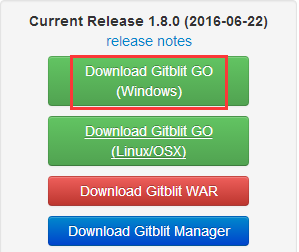
3.解压后进行配置
编辑gitblit-1.8.0\data\gitblit.properties文件
git.repositoriesFolder = F:/GitServer 注意目录必须要用“/”而不是“\”。
server.httpPort = 8080
server.httpsPort = 8443
4.运行解压目录下的gitblit.cmd
5.在浏览器里进行管理
在浏览器中访问版本库的时候,复制的按钮需要Adobe Flash Player
6.导入证书
gitblit-1.8.0\data\certs\ca.cer
可以参考http://blog.csdn.net/xtayfjpk/article/details/45669335 此文章有关于如何生成用户证书以及服务器证书的细节
7.扩展:将GitBlit配置为Windows服务
Gitblit uses Apache Commons Daemon to install and configure its Windows service.
- Review the contents of the
installService.cmdwhere you may have to change the default keystore password. - Set the ARCH value as appropriate for your installed Java Virtual Machine.
- Add any necessary --StartParams as enumerated below in Command-Line Parameters.
- Execute the script.
After service installation you can use the gitblitw.exe utility to control and modify the runtime settings of the service.
Additional service definition options and runtime capabilities of gitblitw.exe (prunmgr.exe) are documented here.
涉及到的一个启动参数--StartParams="--storePassword;gitblit;--baseFolder;%CD%\data" ^ 只要修改一下密码就可以了
NOTE:
If you change the name of the service from gitblit you must also change the name of gitblitw.exe to match the new service name otherwise the connection between the service and the utility is lost, at least to double-click execution.
cmd文件中提到了Procrun
//IS Install service
Command-Line parameters override the values in gitblit.properties at runtime.
--baseFolder           The default base folder for all relative file reference settings

--repositoriesFolder   Git Repositories Folder

--userService          Authentication and Authorization Service (filename or fully qualified classname)

--httpPort             HTTP port for to serve. (port <= 0 will disable this connector)

--httpsPort            HTTPS port to serve.  (port <= 0 will disable this connector)

--sshPort              SSH Daemon port to serve.  (port <= 0 will disable this daemon)

--gitPort              Git Daemon port to serve.  (port <= 0 will disable this daemon)

--alias                Alias in keystore of SSL cert to use for https serving

--storePassword        Password for SSL (https) keystore.

--shutdownPort         Port for Shutdown Monitor to listen on. (port <= 0 will disable this monitor)

--dailyLogFile         Redirect logging to a rolling, daily log file instead of stdout

--tempFolder           Folder for server to extract built-in webapp
Example
java -jar gitblit.jar --userService c:/myrealm.config --storePassword something --baseFolder c:/data
服务安装之后还需要另外设置
VM Considerations
By default, the service installation script configures your Windows service to use your default JVM. This setup usually defaults to a client VM.
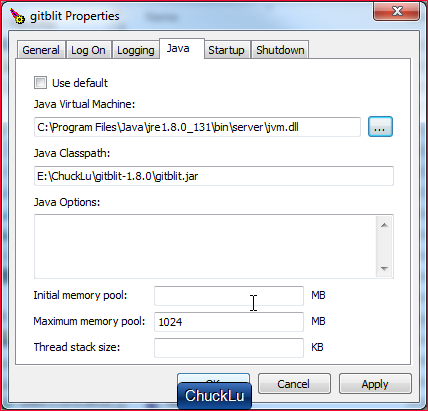
If you have installed a JDK, you might consider using the gitblitw.exe utility to manually specify the server VM.
- Execute
gitblitw.exe - On the Java tab uncheck Use default.
- Manually navigate your filesystem and specify the server VM with the
...buttonJava Virtual Machine:
C:\Program Files\Java\jre6\bin\server\jvm.dll
服务运行成功之后,假如通过https进行push的话,需要配置证书。
否则会提示fatal: unable to access url: SSL certificate problem: self signed certificate in certificate chain
有可能无法启动服务,可以查看日志gitblit-1.8.0\logs
[2017-05-19 17:29:14] [info] Commons Daemon procrun (1.0.10.0 64-bit) started
[2017-05-19 17:29:14] [error] Unable to open the Service Manager
[2017-05-19 17:29:14] [error] Access is denied.
[2017-05-19 17:29:14] [error] Commons Daemon procrun failed with exit value: 8 (Failed to install service)
[2017-05-19 17:29:14] [error] Access is denied.
Try running your command from a prompt with admin rights.
Right-click on the CMD.exe icon and select "Run as administrator" to start it that way.
用管理员权限打开cmd,然后进入installservice.cmd所在的目录。用命令行打开。【需要注意的是,必须使用这种方法来处理,右键管理员权限运行是不行的】
8.配置成可以使用Windows 域账号进行登录
realm.authenticationProviders = windows
9.配置邮件
http://gitblit.com/setup_hooks.html
10.push failed for branch (n/a (unpacker error))
git.checkReferencedObjectsAreReachable = false
配置汇总
git.repositoriesFolder = D:/GitServerRepository
server.httpPort = 8080
realm.authenticationProviders = windows
federation.allowProposals = true
git.checkReferencedObjectsAreReachable = false
=====================================================================
Gitblit介绍
What is Gitblit?
Gitblit is an open-source, pure Java stack for managing, viewing, and serving Git repositories.
It's designed primarily as a tool for small workgroups who want to host centralized repositories.
GO: Single-Stack Solution
Gitblit GO is an integrated, single-stack solution based on Jetty.
You do not need Apache httpd, Perl, Git, or Gitweb. Should you want to use some or all of those, you still can; Gitblit plays nice with the other kids on the block.
This is what you should download if you want to go from zero to Git in less than 5 mins.
WAR: For Your Servlet Container
Gitblit WAR is what you should download if you already have a servlet container available that you wish to use. Jetty 6/7/8 and Tomcat 6/7 are known to work. Generally, any Servlet 2.5 or Servlet 3.0 container should work.
You decide how to use Gitblit
Gitblit can be used as a dumb repository viewer with no administrative controls or user accounts.
Gitblit can be used as a complete Git stack for cloning, pushing, and repository access control.
Gitblit can be used without any other Git tooling (including actual Git) or it can cooperate with your established tools.
All Transports
The SSH, HTTP, & GIT protocols are supported and ready-to-go out of the box.
Issue tracking with branch-based pull requests
Gitblit blends elements of GitHub, BitBucket, and Gerrit to provide a streamlined collaboration workflow based on branches within the primary repository.
=============================
Tickets
http://gitblit.com/tickets_setup.html
=================================
Gitblit进行迁移的时候,需要同步用户设置,
git.repositoriesFolder = F:/GitServer
server.httpPort = 8080
server.httpsPort = 8443
Any important changes to the setting keys or default values will always be mentioned in the release log.
Gitblit v0.8.0 introduced a new default user service implementation which serializes and deserializes user objects into users.conf.
A users.conf file will be automatically created from an existing users.properties file on the first launch after an upgrade.
To use the users.conf service,realm.userService=users.conf must be set.
This revised user service allows for more sophisticated Gitblit user objects and will facilitate the development of more advanced features without adding the complexity of an embedded SQL database.
users.properties and its user service implementation are deprecated as of v0.8.0.
users.properties会在服务器启动的时候,自动转换成users.conf
===============================
如何在windows中部署Gitblit的更多相关文章
- 如何在windows中编写R程序包(转载)
网上有不少R包的编译过程介绍,挑选了一篇比较详细的,做了稍许修改后转载至此,与大家分享 如何在windows中编写R程序包 created by helixcn modified by binaryf ...
- 如何在Windows中打开多个Windows Media Player
博客搬到了fresky.github.io - Dawei XU,请各位看官挪步.最新的一篇是:如何在Windows中打开多个Windows Media Player.
- 如何在Windows中手动生成SSH密钥?(转)
在Windows上,您可以通过多种方式创建SSH密钥.Windows需要SSH客户端,但在其操作系统上没有默认的SSH客户端.请注意,Windows目前正在测试本机OpenSSH应用程序,一般,不提倡 ...
- Kubernetes入门(四)——如何在Kubernetes中部署一个可对外服务的Tensorflow机器学习模型
机器学习模型常用Docker部署,而如何对Docker部署的模型进行管理呢?工业界的解决方案是使用Kubernetes来管理.编排容器.Kubernetes的理论知识不是本文讨论的重点,这里不再赘述, ...
- 如何在Windows中编译Linux Unix的代码(采用cygwin)?
来源:http://www.cnblogs.com/rocky_yi/archive/2009/12/08/cygwin.html 作者:rocky_y 很多经典算法往往是用C++在linux下实 ...
- 如何在Windows中使用netsh命令进行端口转发
自Windows XP开始,Windows中就内置网络端口转发的功能.任何传入到本地端口的TCP连接(IPv4或IPv6)都可以被重定向到另一个本地端口,或远程计算机上的端口,并且系统不需要有一个专门 ...
- 如何在Windows中安装GitHub
1.使用Git 在Git官网下载Git安装包,双击开始安装即可.安装完毕之后,在Windows中会具有一个Git Bash命令行工具以及一个Git GUI客户端工具. 点击Download即可下载. ...
- 如何在linux中部署mongodb并设置连接认证
在windows上给mongodb设置连接认证权限:mongodb默认是不认证的,默认没有账号,现在就讲讲怎么设置账户和密码 1.首先进入C:\mongodb\bin下面双击运行mongo.exe启动 ...
- Nexus安装及部署(含如何在Tomcat中部署)
1. Nexus价值 1)方便-节约带宽-快 2)便于统一管理 3)持续集成需要 2.Nexus下载 http://www.sonatype.org/nexus/go 3.Nexus启动 解压后进入\ ...
随机推荐
- 01_Python 基础课程安排
Python 基础课程安排 目标 明确基础班课程内容 课程清单 序号 内容 目标 01 Linux 基础 让大家对 Ubuntu 的使用从很 陌生 达到 灵活操作 02 Python 基础 涵盖 Py ...
- 【剑指offer】替换空格
一.题目: 请实现一个函数,将一个字符串中的空格替换成“%20”.例如,当字符串为We Are Happy.则经过替换之后的字符串为We%20Are%20Happy. 二.思路: Python代码,先 ...
- byte处理的几种方法
/** * 字符串转16进制byte * @param * @return * @throws Exception * @author hw * @date 2018/10/19 9:47 */ pr ...
- [py]处理文件的3个方法
file处理的3个方法: f和f.readlines效果一样 # f.read() 所有行 -> 字符串 # f.readline 读取一行 -> 字符串 # f.readlines 所有 ...
- Django 连接redis方法
1. 按照redis模块 # 在cmd中 pip3 install redis 2. 测试代码 插入单挑数据 import redis conn = redis.Redis(host='10.0.0. ...
- [LeetCode] 252. Meeting Rooms_Easy tag: Sort
Given an array of meeting time intervals consisting of start and end times [[s1,e1],[s2,e2],...] (si ...
- [LeetCode] 438. Find All Anagrams in a String_Easy
438. Find All Anagrams in a String DescriptionHintsSubmissionsDiscussSolution Pick One Given a str ...
- notification 是同步的
所有notification的观察者执行之后,post notification的函数才会往下执行.
- 怎么申请 bing api key
1:打开网址 https://login.live.com/ 注册帐号并登录(点击上图中的登录按钮即可),在新窗口点击下方的“立即注册”(有帐号的可以直接登录) 2:填写相关信息(推荐使用hotmai ...
- print(array)时array中间是省略号没有输出全部的解决方法
import numpy as np np.set_printoptions(threshold=np.inf) 大量元素情况 可以采用set_printoptions(threshold='nan' ...