
struts2:图解action之HelloWorld示范(从action转到JSP)
虽然Struts 2.x的Action在技术上不需要实现任何接口或继承任何类型,但是,大多情况下我们都会出于方便的原因,使Action类继承com.opensymphony.xwork2.ActionSupport类,并重载(Override)此类里的String execute()方法以实现相关功能。
本文是一个HelloWorld级别的action示范程序。
1. 修改web.xml
    <filter>

        <filter-name>struts2</filter-name>

        <filter-class>org.apache.struts2.dispatcher.ng.filter.StrutsPrepareAndExecuteFilter</filter-class>

    </filter>

    <filter-mapping>

        <filter-name>struts2</filter-name>

        <url-pattern>/*</url-pattern>

    </filter-mapping>
加入上述代码的作用是添加过滤器,拦截所有请求,将由struts来处理;具体由下面的struts.xml配置决定。
2. 创建struts.xml
<?xml version="1.0" encoding="UTF-8" ?>

<!DOCTYPE struts PUBLIC

    "-//Apache Software Foundation//DTD Struts Configuration 2.3//EN"

    "http://struts.apache.org/dtds/struts-2.3.dtd">

<struts>

    <constant name="struts.action.extension" value="action"></constant>

</struts>
注意:
- 此文件存放于WEB-INF/classes目录下面。
- 最后一行为我本机环境加入的,含义是只拦截后缀为action的请求。
3. 在struts.xml配置文件中注册Action和result
    <package name="myStruts" extends="struts-default">

            <action name="hello" class="com.clzhang.ssh.demo.action.HelloAction">

                <result>/ssh/demo1/hello.jsp</result>

            </action>

    </package>
action的name决定调用时的名称;class为实现类名;result的值为action执行完成后转向何页面。如果没有为result指定name名称,默认值为success。
4. 创建action处理类
package com.clzhang.ssh.demo.action;

import java.util.Date;

import java.text.SimpleDateFormat;

import com.opensymphony.xwork2.ActionSupport;

public class HelloAction extends ActionSupport {

    private String message;

    public String getMessage() {

        return message;

    }

    @Override

    public String execute() {

        message = "Hello there, now is: "

                + new SimpleDateFormat("yyyy-MM-dd hh:mm").format(new Date());

        return SUCCESS;

    }

}
关于ActionSupport类的更多内容,请参考:http://struts.apache.org/release/2.0.x/struts2-core/apidocs/index.html?overview-summary.html
5. 创建显示JSP文件
<%@page contentType="text/html; charset=UTF-8"%>

<%@taglib prefix="s" uri="/struts-tags"%>

<html>

<head>

    <title>Hello there!</title>

</head>

<body>

    <h2><s:property  value="message"/></h2>

</body>

</html>
JSP文件中用到了struts标签,以后的章节中会详细描述。
6. 打开IE,测试
输入地址:http://127.0.0.1:8080/st/hello.action,回车结果为:
Hello there, now is: 2013-11-18 11:13
图解:
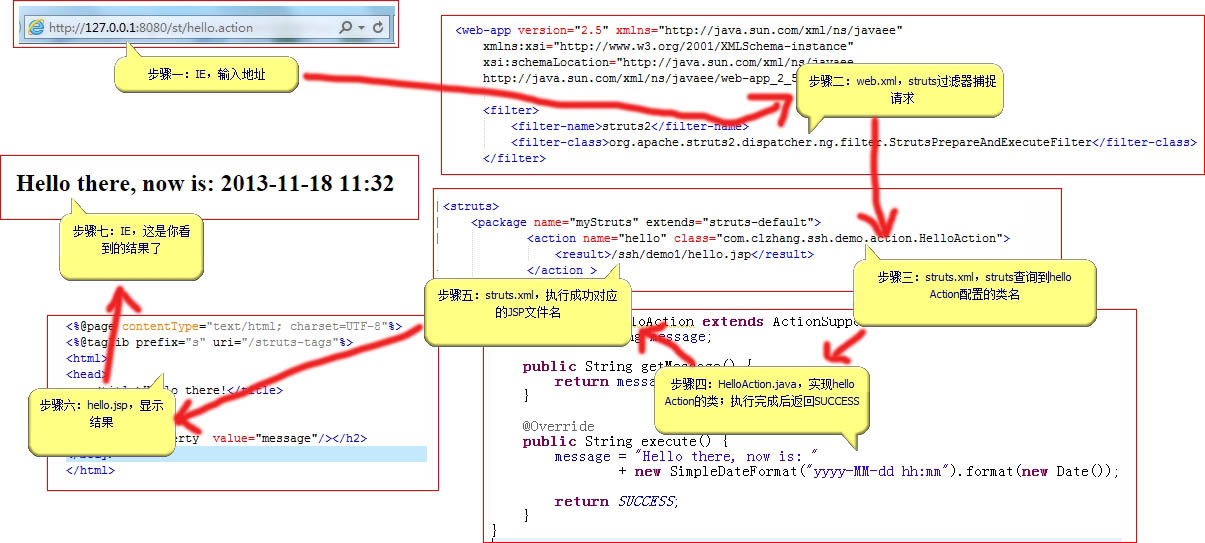
struts2:图解action之HelloWorld示范(从action转到JSP)的更多相关文章
- struts2视频学习笔记 07-08(为Action的属性注入值,指定需要Struts 2处理的请求后缀,常用常量)
课时7 为Action的属性注入值(增加灵活性,适用于经常更改的参数) Struts2为Action中的属性提供了依赖注入功能,在struts2的配置文件中,我们可以很方便地为Action中的属性注入 ...
- 【Struts2学习笔记(2)】Action默认值和配置Action于result各种转发类型
一.Action缺省配置值 <span style="font-size:18px;"><package name="itcast" name ...
- struts2中错误There is no Action mapped for namespace [/] and action name [] associated with context path
1 There is no Action mapped for namespace [/] and action name [] associated with context path [/Stru ...
- Struts2从一个action转到另一个action的两种方法
在Struts2中,Action处理完用户请求后,将会返回一个字符串对象,这个字符串对象就是一个逻辑视图名.Struts 2通过配置逻辑视图名和物理视图之间的映射关系,一旦系统收到Action返回的某 ...
- Struts2中关于"There is no Action mapped for namespace / and action name"的总结
今天在调试一个基础的Struts2框架小程序.总是提示"There is no Action mapped for namespace / and action name"的错误. ...
- Struts2 从一个Action跳至另一个Action
Struts2 从一个Action跳至另一个Action 一.注解的 @Result(name=SUCCESS,type="chain", params={"actio ...
- struts2的action的知识点和利用action向页面注入值的操作
1. Action的顺序,会先搜索指定名字下的包的action,如果找不到会去搜索默认路径下的包下的action. 2. 如果没有给action设置值,那么action会有一些默认 ...
- struts2.1.6教程三、在Action获取Scope对象
引言:在前面的Action操作中,关键就是Action中的exectue方法,但是此方法并没有request.session.application等对象作为参数,自然就不能利用这些对象来操作.下面我 ...
- Struts2基于XML配置方式实现对Action方法进行校验
JavaWeb框架(2) 使用XML对Action方法进行校验方式有两种,一种是对Action的所有方法进行校验,另一种是对Action指定方法进行校验. 对Action的所有方法进行校验: 步骤: ...
随机推荐
- Maven 拾遗
01. maven 概要 首先我把 maven 的概念快速的梳理一下,让我们快速地建立起一个比较精确的 maven 应用场景. maven 不是 ant,也不是 make,以前接触的构建工具,需要写一 ...
- 关于gitblit在Windows中无法Start的问题
前期配置/data/defaults.properties文件,请自行百度 首先:找到该目录下的该文件 右键打开,找到SET ARCH=xx,将xx替换成x86 将该处的默认修改成配置环境变量的jvm ...
- PHP 反射API说明
2.API概览:class Reflection { }interface Reflector { }class ReflectionException extends Exception { }cl ...
- CPP复习笔记 3
--------------- CPP函数编译原理和成员函数的实现 从上节的分析中能够看出.对象的内存中仅仅保留了成员变量,除此之外没有不论什么其它信息,程序运行时不知道 stu 的类型为 Stude ...
- PHP调用mysql函数整理
mysql函数整理 名称:mysql_connect() 用途:打开非持久的 MySQL 连接.如果成功,则返回一个 MySQL 连接标识,失败则返回 FALSE. 语法:mysql_connect( ...
- javascript基础 思维导图2
来源于:http://www.cnblogs.com/xianyulaodi/p/5886128.html 1.javascript数据类型 2.javascript数组 3.javascript运算 ...
- ios中图层的用法(1)
uiview画圆角 - (void)layerMyView { // 圆角 self.myview.layer.cornerRadius = ; // 边框 self.myview.layer.bor ...
- iOS – 单例模式写一次就够了
一. 单例模式简介 单例模式的作用 可以保证在程序运行过程,一个类只有一个实例,而且该实例易于供外界访问 从而方便地控制了实例个数,并节约系统资源 单例模式的使用场合 在整个应用程序中,共享一份资源( ...
- linux 版本中 i386/i686/x86-64/pcc 等的区别
在查看dpdk官方文档的时候,发现有 这样(kernel - devel.x86_64; kernel - devel.ppc64:glibc.i686)这样的安装包信息,收集了点资料来分析这三者的关 ...
- angularJS实现无刷新文件下载
$scope.getExcel = function () { $http.post("/production/statistics/export", { storeId: $sc ...