
selenium Remote Server 实现原理
selenium作为一个出色的web automation框架,被越来越多的企业采用究其原因,框架设计的比较remarkable,
作为一个开源的框架,能够开辟出一套协议,以至于针对app测试的appium采取相同的strategy。使用的是webdriver protocol的扩展版。
为什么说这个框架设计的比较好?究竟好在哪里?
先从表面上看:
- selenium automation framework 支持多语言,java、python、c#、JavaScript、Perl、ruby ...... 测试工具中,能支持这么多语言还不牛逼么 ?QTP/UFT才只支持vbs
- 跨平台支持windows/linux/Mac OS
- 支持grid
- 拥有page object model和page factory
以上,均是不可多得的设计,那么问题又来了,为什么selenium支持那么多语言,怎么实现的?
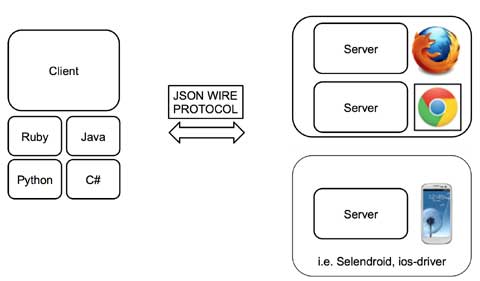
我想,我给出的答案是协议,selenium remote server/webdriver/appium等完全遵循webdriver json protocol
通过json协议实现跨语言跨平台。如果想了解更多webdriver的Json协议,请参考http://www.w3.org/TR/webdriver/
如果你也要使用restful 自己测试一下下载使用restclient-ui-3.5-jar-with-dependencies.jar
让我们来验证这一点,首先你需要一个restful client 和一个chromew ebdriver,selenium-server-standalone-2.48.0.jar
在cmd起remote server
java -Dwebdriver.chrome.driver="chromedriver.exe" -jar selenium-server-standalone-2.48.0.jar

启动成功,接下来打开浏览器:打开http://localhost:4444/wd/hub/static/resource/hub.html
1.创建session
2.打开百度
3.创建截图
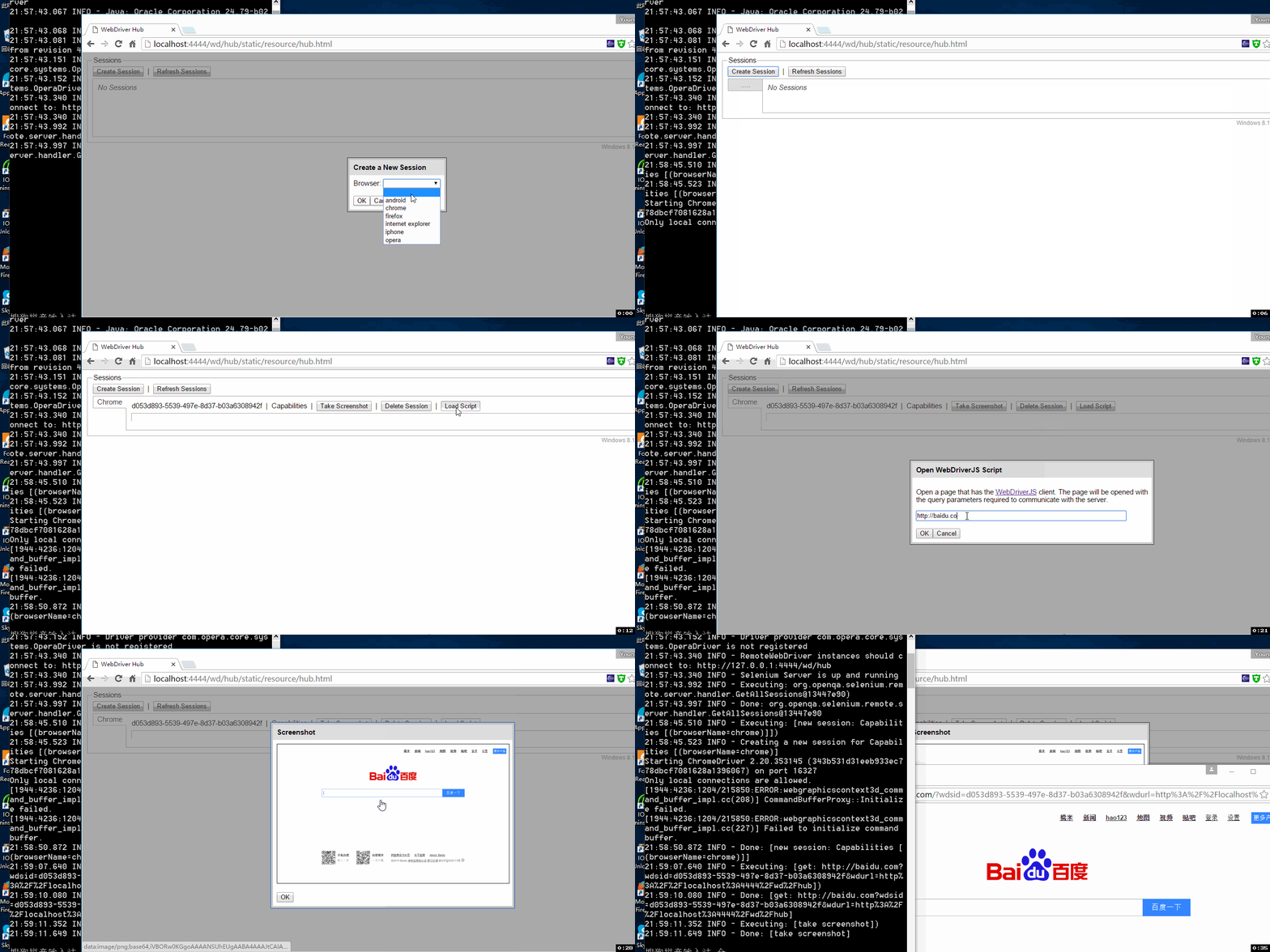
那么这个过程是在怎么实现呢?
看webdriver 的protocol
第一步创建session:Post http://127.0.0.1:4444/wd/hub/session
如果不想使用默认的,可以通过post desiredCapabilities
这样设置body
{ "desiredCapabilities": {

      "browserName": "chrome",

      "javascriptEnabled": true,

      "platform": "ANY",

      "version": "55"

   }

}
可使用上面的办法,拿到session ID
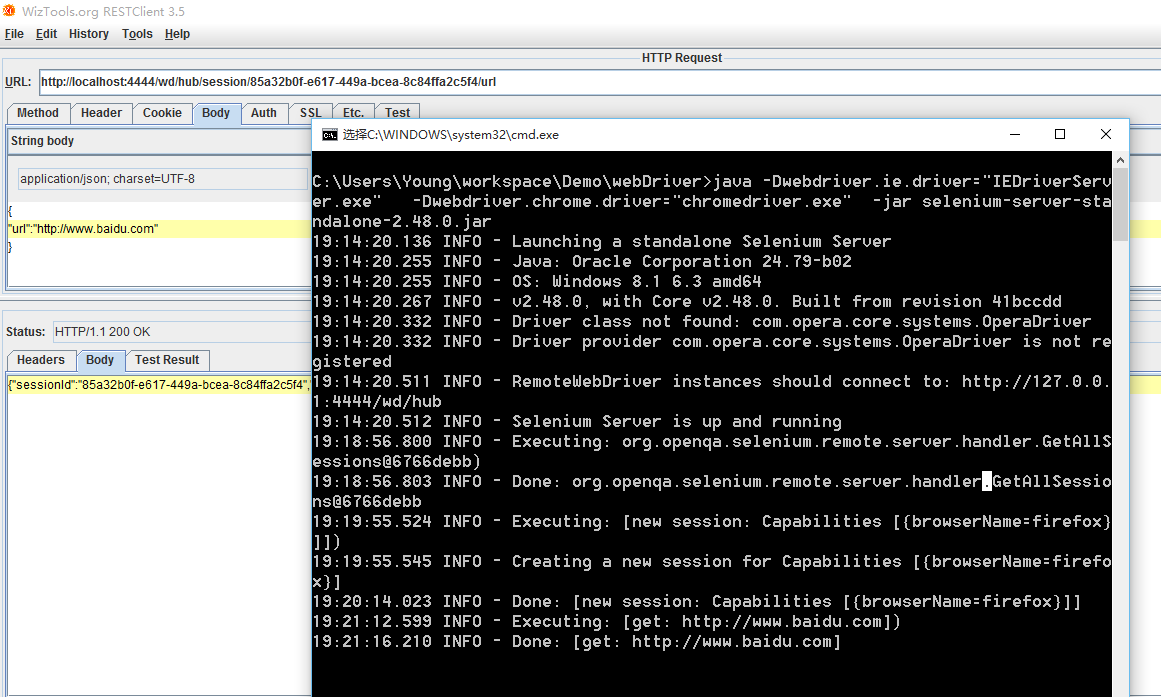
第二步:打开百度
发送Post http://localhost:4444/wd/hub/session/85a32b0f-e617-449a-bcea-8c84ffa2c5f4/url
Body:
{

"url":"http://www.baidu.com"

}
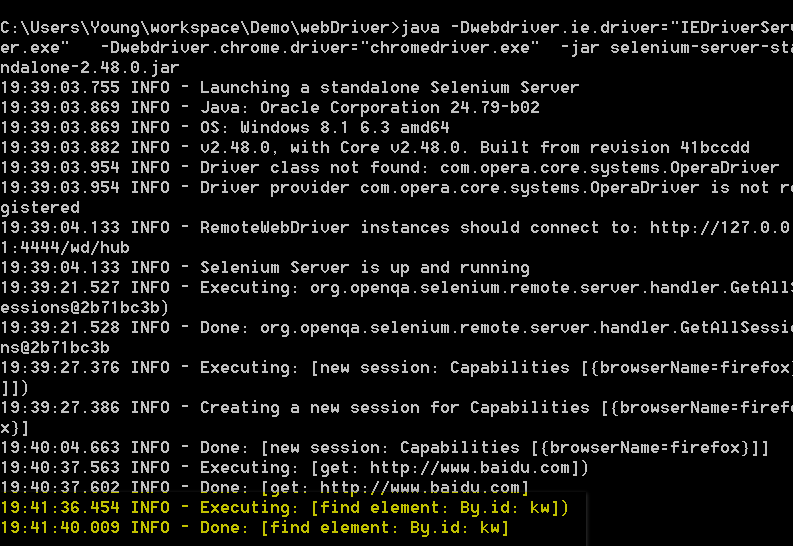
第三步:findElement By id
发送Post http://localhost:4444/wd/hub/session/85a32b0f-e617-449a-bcea-8c84ffa2c5f4/element
{

    "using": "id",

    "value": "kw"

}
也可以使用xpath
{

    "using": "xpath",

    "value": "//input[@id='kw']"

}
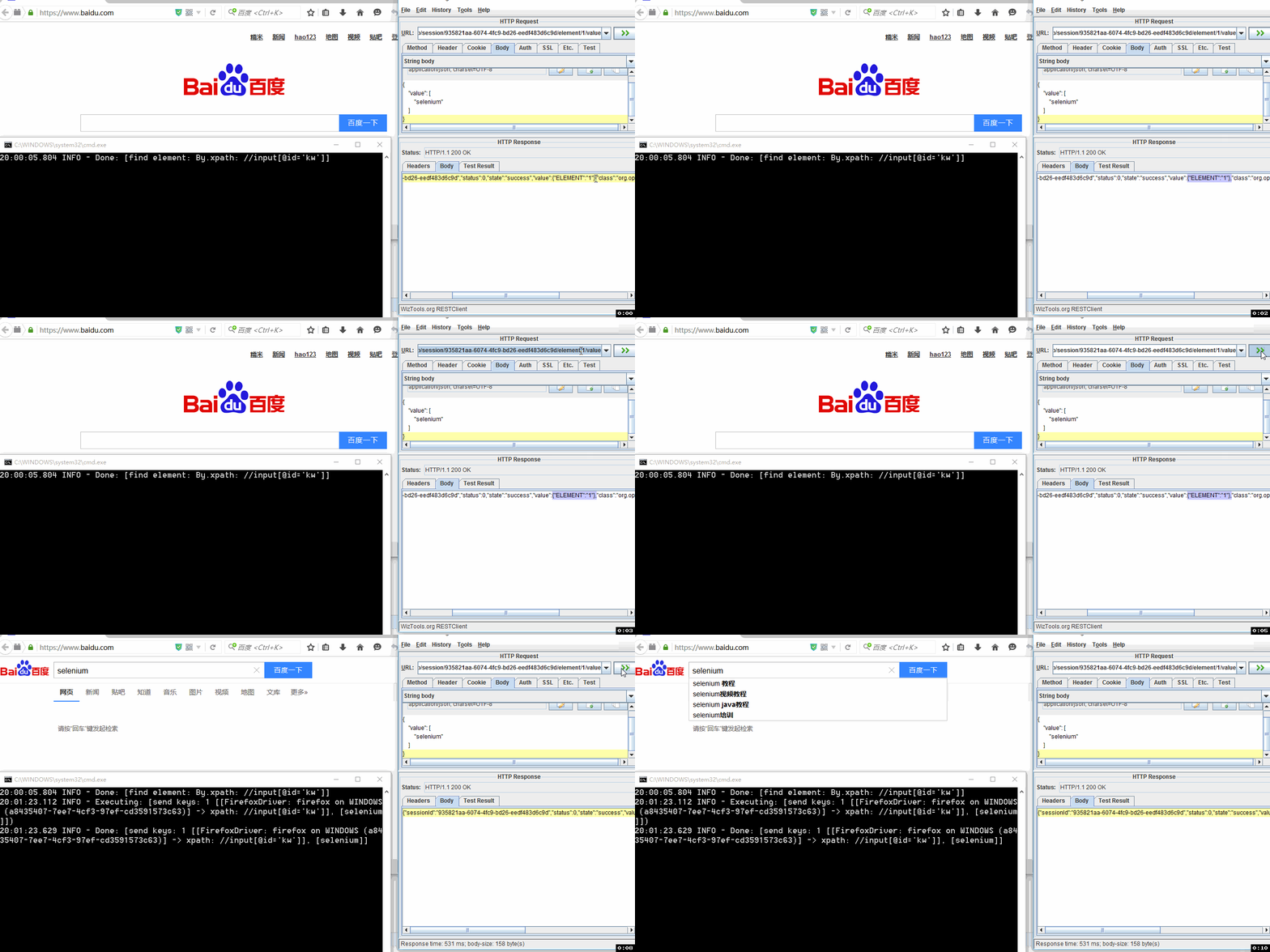
第三步:输入selenium 从上一步获取element ID为1
发送 Post http://localhost:4444/wd/hub/session/935821aa-6074-4fc9-bd26-eedf483d6c9d/element/1/value
Body
{

    "value": [

        "selenium"

    ]

}
总结:
selenium remote sever 其实就是通过webdriver Json与浏览器交互,这也就介绍了为什么selenium能够实现支持各种语言,
不管是java python 等,都是通过selenium API翻译成Json 与浏览器进行交互。掌握了webdriver protocol 可以通过自己直接写request来
实现与浏览器交互
selenium Remote Server 实现原理的更多相关文章
- org.openqa.selenium.remote.UnreachableBrowserException: Could not start a new session. Possible causes are invalid address of the remote server or br
WARN <init>, HHH000409: Using org.hibernate.id.UUIDHexGenerator which does not generate IETF R ...
- selenium及webdriver的原理
主要内容转自:http://blog.csdn.net/ant_ren/article/details/7968582和http://blog.csdn.net/ant_ren/article/det ...
- org.openqa.selenium.remote.SessionNotFoundException: Unexpected error launch IE
1.在启动ie浏览器前先加入属性设置一项: DesiredCapabilities ie = DesiredCapabilities.internetExplorer(); ie.setCapabil ...
- Selenium2学习-037-WebUI自动化实战实例-IE浏览器显示比例问题:org.openqa.selenium.remote.SessionNotFoundException: Unexpected error launching Internet Explorer. Browser zoom level was set to 94%. It should be set to 100%
好久没有写博文了,今天在给部门新人演示 Selenium WebDriver 启动其支持的各种浏览器时,启动 IE 时总是无法打开对应的百度网址,页面如下所示:
- WebService:The remote server returned an error: (400) Bad Request
开发工具:VS2010.开发组件:WebService.运行环境:Windows 今天一个同事在进行计费接口联调试时,发现了一个非常奇怪的问题:接口在家里环境测试,一切正常,但是部署到现网环境之后,连 ...
- [解决问题]selenium.remote.UnreachableBrowserException 异常分析并解决问题
I have a set of automations that work fantastically in Firefox and Chrome, and I'd like to launch an ...
- CHECK_NRPE: Received 0 bytes from daemon. Check the remote server logs for error messages.
今天,在用icinga服务器端测试客户端脚本时,报如下错误: [root@mysql-server1 etc]# /usr/local/icinga/libexec/check_nrpe -H 192 ...
- appium运行报错.<init>(Lorg/openqa/selenium/remote/ErrorCodes;Z)V
最近这几天就在学习appium,搭建环境就耗费了很多时间,不得不承认自己够笨的了,然后我把环境搭建好,写完脚本的时候,就报这个错了,当时是从某个群里直接下载的demo,不得不吐槽说,够坑的,是能跑通, ...
- System.Net.WebException : The remote server returned an error: (415) UNSUPPORTED MEDIA TYPE
I am having problems with a bit of code that accesses a restful web service. Running this code, it e ...
随机推荐
- jQuery 自定义插件 (分页控件)
1.引入jqpage.js 2.html代码 <div id="page"> </div> 3.js 调用 $(function () { $.fn.jqp ...
- sql server多重行列转置的优化
将表1转化成表2: 表1 表2 得到表2的结果,需要经过多次pivot转换,再经union连接到一起,代码如下: ] from ( select 'a' as type, * from Table_1 ...
- form 表单跨域提交
<!DOCTYPE html><html> <head> <title>form 表单上传文件</title> <script src ...
- 【翻译】XV6-DRAFT as of September 3,2014 第0章 操作系统接口
操作系统接口 操作系统的任务是让多个程序共享计算机(资源),并且提供一系列基于计算机硬件的但更有用的服务.操作系统管理并且把底层的硬件抽象出来,举例来说,一个文字处理软件(例如word)不需要关心计算 ...
- UltralEdit 替换tips
UltralEdit的字符串替换,简直是编辑器的神来之笔! 可以通过 搜索--〉替换 菜单调出,也可以使用 Ctrl+R 快捷键 下面来看字符的表示吧: tab可以直接Tab键(可能不成功,因为被用作 ...
- fedora22,fedora24最简单的安装virtaulbox的方法
fedora为什么不好用呢? 1.因为很多软件没有预先安装,新手安装时,就无从下手了. 2.版本更新太快,有老手提供了解决方案,但是版本更新了,新手按照步骤来,就不能配置成功! 不抱怨了. 安装vir ...
- Parallel.Foreach
随着多核时代的到来,并行开发越来越展示出它的强大威力! 使用并行程序,充分的利用系统资源,提高程序的性能.在.net 4.0中,微软给我们提供了一个新的命名空间:System.Threading.Ta ...
- python学习笔记(一)
• Python能干嘛?[1]科学计算[2]图形化开发[3]系统脚本[4]Web服务器[5]网络爬虫[6]服务器集群自动化运维 • 常用工具:easy_install.pip.ipython.Subl ...
- QT下调试基于ros的catkin项目
1.首先告诉qt ros的搜索路径,通过修改qt creator 桌面启动程序来实现 sudo gedit ~/.local/share/applications/DigiaQtOpenSour ...
- XSS的防御
基于代码修改的防御 和SQL注入防御一样,XSS攻击也是利用了Web页面的编写疏忽,所以还有一种方法就是从Web应用开发的角度来避免: 步骤1.对所有用户提交内容进行可靠的输入验证,包括对URL.查询 ...